# FawryPay React Native SDK (Nitro Modules)
This is the only official FawryPay SDK package for React Native, powered by [Nitro Modules](https://nitro.margelo.com/) for superior performance and seamless native integration.
## Table of Contents
- [Introduction](#introduction)
- [Installation](#installation)
- [Getting Started](#getting-started)
- [Step 1: Create a FawryPay Account](#step-1-create-a-fawrypay-account)
- [Step 2: Initialize the SDK](#step-2-initialize-the-sdk)
- [Step 3: Present Payment Options](#step-3-present-payment-options)
- [Step 4: Present Card Manager (Optional)](#step-4-present-card-manager-optional)
- [Step 5: Event Listeners (Recommended)](#step-5-event-listeners-recommended)
- [Platform-specific Notes](#platform-specific-notes)
- [Android](#android)
- [iOS](#ios)
- [Customizing UI Colors](#customizing-ui-colors)
- [Parameters Explained](#parameters-explained)
- [API Reference](#api-reference)
- [Sample Project](#sample-project)
## Introduction
The FawryPay React Native SDK provides seamless integration for processing payments and managing cards within your React Native application. Built on Nitro Modules, this SDK offers:
- ⚡ **Superior Performance**: Native module architecture with minimal overhead
- 🔒 **Secure Payments**: Industry-standard security with 3D Secure support
- 💳 **Card Management**: Save and manage customer payment methods
- 🌐 **Multi-language Support**: Arabic and English interfaces
- 📱 **Cross-platform**: Full iOS and Android support
## Expo Compatibility
**❌ Expo Managed Workflow**: Not supported due to native module requirements
**✅ Expo Bare Workflow**: Fully supported (equivalent to vanilla React Native)
**✅ Vanilla React Native**: Fully supported
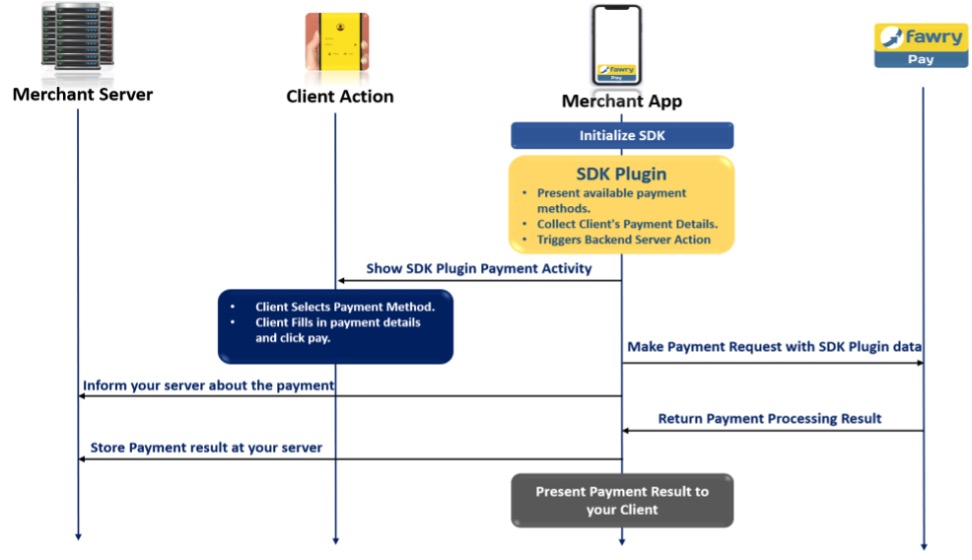
#### How it works
## Installation
### Prerequisites
- React Native 0.60+
- iOS 12.0+ / Android API 21+
- Node.js 16+
### Step 1: Install the FawryPay SDK
```bash
npm install @fawry_pay/rn-fawry-pay-sdk react-native-nitro-modules
```
> **Important**: `react-native-nitro-modules` is required as this library relies on [Nitro Modules](https://nitro.margelo.com/).
### Step 2: Platform Setup
Follow the platform-specific setup instructions below.
## Getting Started
### Step 1: Create a FawryPay Account
Before utilizing the FawryPay SDK, you must have a FawryPay merchant account. Visit the [FawryPay website](https://atfawry.com) to create an account if you don't already have one.
### Step 2: Initialize the SDK
In your React Native project, import the necessary components and configure the FawryPay SDK:
```typescript
import React, { useEffect, useRef } from 'react';
import { TouchableOpacity, Text, StyleSheet, View, Platform } from 'react-native';
import {
startPayment,
openCardsManager,
addFawryListener,
FawryEvents,
} from '@fawry_pay/rn-fawry-pay-sdk';
import type {
BillItems,
MerchantInfo,
CustomerInfo,
FawryLaunchModel,
FawryLanguages
} from '@fawry_pay/rn-fawry-pay-sdk';
import uuid from 'react-native-uuid';
const cartItems: BillItems[] = [
{ itemId: 'item1', description: 'Item 1 Description', quantity: '1', price: '300' },
{ itemId: 'item2', description: 'Item 2 Description', quantity: '1', price: '200' },
{ itemId: 'item3', description: 'Item 3 Description', quantity: '1', price: '500' },
];
const merchant : Fawry.MerchantInfo = {
merchantCode: 'YOUR MERCHANT CODE',
merchantSecretCode: 'YOUR SECRET CODE',
merchantRefNum: uuid.v4().toString(),
};
const customer : Fawry.CustomerInfo = {
customerName: 'Ahmed Kamal',
customerMobile: '+1234567890',
customerEmail: 'ahmed.kamal@example.com',
customerProfileId: '12345',
};
const fawryConfig : Fawry.FawryLaunchModel = {
baseUrl: 'https://atfawry.fawrystaging.com/',
lang: Fawry.FawryLanguages.ENGLISH,
signature: '',
allow3DPayment: false,
skipReceipt: false,
skipLogin: true,
payWithCardToken: true,
authCaptureMode: false,
allowVoucher: true,
items: cartItems,
merchantInfo: merchant,
customerInfo: customer,
};
```
### Step 3: Present Payment Options
To initiate the payment process, use the `startPayment` function:
```typescript
const handlePayment = () => {
// Generate new reference number for each transaction
const updatedMerchant = {
...merchant,
merchantRefNum: uuid.v4().toString()
};
startPayment({
...fawryConfig,
merchantInfo: updatedMerchant
});
};
```
### Step 4: Present Card Manager (Optional)
Allow users to manage their saved cards:
```typescript
const handleCardsManager = () => {
openCardsManager(
fawryConfig.baseUrl,
fawryConfig.lang,
fawryConfig.merchantInfo,
fawryConfig.customerInfo
);
};
```
### Step 5: Event Listeners (Recommended)
Set up event listeners to handle payment responses and card manager events:
```typescript
const App = () => {
const removeListenerRef = useRef<(() => void) | null>(null);
useEffect(() => {
// Setup event listener
removeListenerRef.current = addFawryListener((eventName, payload) => {
try {
const parsed = isValidJson(payload) ? JSON.parse(payload) : payload;
switch(eventName) {
case FawryEvents.EVENT_PAYMENT_COMPLETED:
console.log('Payment completed:', parsed);
// Handle successful payment
// Navigate to success screen or update UI
break;
case FawryEvents.EVENT_ON_SUCCESS:
console.log('Payment success:', parsed);
// Handle general success
break;
case FawryEvents.EVENT_ON_FAIL:
console.log('Payment failed:', parsed);
// Handle payment failure
// Show error message to user
break;
case FawryEvents.EVENT_CardManager_FAIL:
console.log('Card manager error:', parsed);
// Handle card manager errors
break;
case FawryEvents.EVENT_READY:
console.log('SDK Ready');
// SDK is initialized and ready
break;
default:
console.log(`Unhandled event: ${eventName}`, parsed);
}
} catch (e) {
console.error(`Event parsing error for ${eventName}:`, e);
console.warn(`Raw payload: ${payload}`);
}
});
// Cleanup on unmount
return () => {
removeListenerRef.current?.();
};
}, []);
const isValidJson = (payload: string): boolean => {
try {
JSON.parse(payload);
return true;
} catch (e) {
return false;
}
};
// Your component JSX...
};
```
## Platform-specific Notes
### Android
For Android integration, follow these additional steps:
1. Open `android/build.gradle` and add the FawryPay repository:
```gradle
allprojects {
repositories {
google()
mavenCentral()
maven { url "https://nexusmobile.fawrystaging.com:2597/repository/maven-public/" }
maven { url "https://maven.google.com" }
jcenter()
}
}
```
2. Ensure your `android/app/build.gradle` has minimum SDK version 21:
```gradle
android {
compileSdkVersion 34
defaultConfig {
minSdkVersion 21
targetSdkVersion 34
}
}
```
### iOS
For iOS integration, follow these steps:
#### 1. Update your `Podfile`:
```ruby
platform :ios, '16.6'
ENV['RCT_NEW_ARCH_ENABLED'] = '1'
# Load the custom RCTAppDelegate fix
require_relative 'fix-rct-delegate.rb'
# Resolve react_native_pods.rb with node
require Pod::Executable.execute_command('node', ['-p',
'require.resolve(
"react-native/scripts/react_native_pods.rb",
{paths: [process.argv[1]]},
)', __dir__]).strip
prepare_react_native_project!
target 'YourAppName' do
use_modular_headers!
use_frameworks!
# Add Folly explicitly
pod 'RCT-Folly', :podspec => '../node_modules/react-native/third-party-podspecs/RCT-Folly.podspec'
config = use_native_modules!
use_react_native!(
:path => config[:reactNativePath],
:hermes_enabled => true,
:fabric_enabled => true,
:new_arch_enabled => true,
:app_path => "#{Pod::Config.instance.installation_root}/.."
)
# Add FawryPay SDK
pod 'FawryPaySDK'
pre_install do |installer|
Pod::Installer::Xcode::TargetValidator.send(:define_method, :verify_no_static_framework_transitive_dependencies) {}
installer.pod_targets.each do |pod|
if ['React-RCTAppDelegate'].include?(pod.name)
def pod.build_type;
Pod::BuildType.dynamic_framework
end
end
end
end
post_install do |installer|
react_native_post_install(
installer,
config[:reactNativePath],
:mac_catalyst_enabled => false
)
installer.pods_project.targets.each do |target|
target.build_configurations.each do |config|
config.build_settings['CLANG_ALLOW_NON_MODULAR_INCLUDES_IN_FRAMEWORK_MODULES'] = 'YES'
config.build_settings['BUILD_LIBRARY_FOR_DISTRIBUTION'] = 'YES'
config.build_settings['IPHONEOS_DEPLOYMENT_TARGET'] = '16.6'
if target.name.start_with?('React-')
config.build_settings['SWIFT_VERSION'] = '5.0'
config.build_settings['ALWAYS_SEARCH_USER_PATHS'] = 'NO'
config.build_settings['CLANG_CXX_LANGUAGE_STANDARD'] = 'c++20'
config.build_settings['OTHER_CPLUSPLUSFLAGS'] = '$(inherited) -DFOLLY_NO_CONFIG -DFOLLY_MOBILE=1 -DFOLLY_USE_LIBCPP=1 -DFOLLY_CFG_NO_COROUTINES=1'
end
if ['React-RCTAppDelegate', 'React-RCTRuntime', 'React-Core'].include?(target.name)
config.build_settings['GCC_TREAT_WARNINGS_AS_ERRORS'] = 'NO'
config.build_settings['OTHER_CFLAGS'] = '$(inherited) -Wno-error=implicit-function-declaration -Wno-error -Wno-nullability-completeness'
config.build_settings['CLANG_WARN_DOCUMENTATION_COMMENTS'] = 'NO'
end
if ['FawryPaySDK'].include?(target.name)
config.build_settings['SKIP_INSTALL'] = 'NO'
config.build_settings['CODE_SIGNING_ALLOWED'] = 'NO'
config.build_settings['SWIFT_COMPILATION_MODE'] = 'wholemodule'
config.build_settings['GENERATE_INFOPLIST_FILE'] = 'YES'
end
end
end
end
end
```
#### 2. Add the `fix-rct-delegate.rb` file:
Create a file named `fix-rct-delegate.rb` in the root of your `ios/` directory with:
```ruby
# fix-rct-delegate.rb
module ReactNativePods
class PodspecModifier
def modify_react_rct_app_delegate(spec)
spec.pod_target_xcconfig ||= {}
spec.pod_target_xcconfig['GCC_PREPROCESSOR_DEFINITIONS'] = ['$(inherited)',
'RCT_EXTERN_MODULE=RCT_EXTERN',
'_LIBCPP_ENABLE_CXX17_REMOVED_FEATURES=1']
spec.pod_target_xcconfig['OTHER_CFLAGS'] = '$(inherited) -Wno-error -Wno-nullability-completeness -Wno-error=implicit-function-declaration'
spec.pod_target_xcconfig['APPLICATION_EXTENSION_API_ONLY'] = 'NO'
spec.compiler_flags = '-fno-objc-msgsend-selector-stubs'
if ENV['RCT_NEW_ARCH_ENABLED'] == '1'
spec.dependency 'React-RCTRuntime'
spec.dependency 'React-NativeModulesApple'
spec.dependency 'ReactCommon'
end
end
end
end
```
#### 3. Install iOS dependencies
```bash
cd ios && pod install
```
#### ✅ Notes
- This setup assumes React Native New Architecture (Fabric + TurboModules)
- iOS minimum deployment target is `16.6`
- Includes manual fixes for `RCTAppDelegate`, Xcode 15, and Swift interop
- Ensures `FawryPaySDK` links properly with required runtime settings
## Customizing UI Colors
### Android
1. Navigate to `android/app/src/main/res/values/`
2. Create or edit `colors.xml`:
```xml
#6F61C0
#A084E8
```
### iOS
1. In your iOS project, create `Style.plist`:
```xml
primaryColorHex
#6F61C0
secondaryColorHex
#A084E8
tertiaryColorHex
#8BE8E5
headerColorHex
#6F61C0
```
2. Add `Style.plist` to your Xcode project.
#### ✅ Notes
- This setup assumes React Native New Architecture (Fabric + TurboModules)
- iOS minimum deployment target is `16.6`
- Includes manual fixes for `RCTAppDelegate`, Xcode 15, and Swift interop
- Ensures `FawryPaySDK` links properly with required runtime settings
## Parameters Explained
CustomerInfo
| **PARAMETER** | **TYPE** | **REQUIRED** | **DESCRIPTION** | **EXAMPLE** |
|---------------|---------------|---------------|---------------|---------------|
| customerName | string | optional | \- | Name Name |
| customerEmail | string | optional | \- | [email\@email.com](mailto:email@email.com){.email} |
| customerMobile | string | optional | \- | +0100000000 |
| customerProfileId | string | optional | mandatory in case of payments using saved cards | 1234 |
MerchantInfo
| **PARAMETER** | **TYPE** | **REQUIRED** | **DESCRIPTION** | **EXAMPLE** |
|---------------|---------------|---------------|---------------|---------------|
| merchantCode | string | required | Merchant ID provided during FawryPay account setup. | +/IPO2sghiethhN6tMC== |
| merchantRefNum | string | required | Merchant's transaction reference number is random 10 alphanumeric digits. | A1YU7MKI09 |
| merchantSecretCode | string | required | provided by support | 4b8jw3j2-8gjhfrc-4wc4-scde-453dek3d |
LaunchApplePayModel
- Used only on IOS
| **PARAMETER** | **TYPE** | **REQUIRED** | **DESCRIPTION** | **EXAMPLE** |
|---------------|---------------|---------------|---------------|---------------|
| merchantID | String | required | Merchant ID provided during FawryPay account setup. | +/IPO2sghiethhN6tMC== |
LaunchCheckoutModel
| **PARAMETER** | **TYPE** | **REQUIRED** | **DESCRIPTION** | **EXAMPLE** |
|---------------|---------------|---------------|---------------|---------------|
| scheme | String | required | if you need use myfawry as payment method.
BillItems
| **PARAMETER** | **TYPE** | **REQUIRED** | **DESCRIPTION** | **EXAMPLE** |
|---------------|---------------|---------------|---------------|---------------|
| itemId | string | required | \- | 3w8io |
| description | string | optional | \- | This is description |
| price | string | required | \- | 200.00 |
| quantity | string | required | \- | 1 |
FawryLaunchModel
| **PARAMETER** | **TYPE** | **REQUIRED** | **DESCRIPTION** | **EXAMPLE** |
|---------------|---------------|---------------|---------------|---------------|
| **CustomerInfo** | LaunchCustomerModel | optional | Customer information. | \- |
| **MerchantInfo** | LaunchMerchantModel | required | Merchant information. | \- |
| **launchCheckoutModel** | LaunchCheckoutModel | optional | if you need use myfawry as payment method.
| **launchApplePayModel** | LaunchApplePayModel | optional | Used only on IOS. | \- |
| **BillItems** | BillItems[] | required | Array of items which the user will buy, this array must be of type BillItems | \- |
| paymentSignature | String | optional | You can create your own signature by concatenate the following elements on the same order and hash the result using **SHA-256** as explained:"merchantCode + merchantRefNum + customerProfileId (if exists, otherwise insert"") + itemId + quantity + Price (in tow decimal format like '10.00') + Secure hash keyIn case of the order contains multiple items the list will be **sorted** by itemId and concatenated one by one for example itemId1+ Item1quantity + Item1price + itemId2 + Item2quantity + Item2price | \- |
| tokenizationSignature| String | optional | You can create your own signature by concatenate the following elements on the same order and hash the result using **SHA-256** as explained:"merchantCode + customerProfileId (if exists, otherwise insert"") + Secure hash key | \- |
| allowVoucher | Boolean | optional - default value = false | True if your account supports voucher code | \- |
| payWithCardToken | Boolean | required | If true, the user will pay with a card token ( one of the saved cards or add new card to be saved )If false, the user will pay with card details without saving | \- |
| allow3DPayment | Boolean | optional - default value = false | to allow 3D secure payment make it "true" | \- |
| skipReceipt | Boolean | optional - default value = false | to skip receipt after payment trial | \- |
| skipLogin | Boolean | optional - default value = true | to skip login screen in which we take email and mobile | \- |
| authCaptureMode | Boolean | optional - default value = false | depends on refund configuration: will be true when refund is enabled and false when refund is disabled | false |
| baseUrl | String | required | Provided by the support team.Use staging URL for testing and switch for production to go live. | https://atfawry.fawrystaging.com (staging)
https://atfawry.com (production) |
| lang | String | required | SDK language which will affect SDK's interface languages. | Fawry.FawryLanguages.ENGLISH |
## API Reference
### Functions
#### `startPayment(model: FawryLaunchModel): void`
Initiates the payment flow with the provided configuration.
#### `openCardsManager(baseUrl: string, lang: FawryLanguages, merchantInfo: MerchantInfo, customerInfo: CustomerInfo): void`
Opens the card management interface for users to manage saved payment methods.
#### `addFawryListener(listener: FawryPayListener): () => void`
Registers an event listener for payment and card management events. Returns a cleanup function.
### Events
| Event | Description | Payload Type |
|-------|-------------|--------------|
| `EVENT_READY` | SDK initialization complete | string |
| `EVENT_PAYMENT_COMPLETED` | Payment transaction completed | Object |
| `EVENT_ON_SUCCESS` | Payment succeeded | Object |
| `EVENT_ON_FAIL` | Payment failed | Object |
| `EVENT_CardManager_FAIL` | Card manager error | Object |
| `EVENT_COMPLETION_BLOCK` | Payment initialization | string |
| `EVENT_PRE_COMPLETION` | Pre-payment setup | string |
### Types
```typescript
type FawryLanguages = 'ENGLISH' | 'ARABIC';
type FawryPayListener = (eventName: string, payload: string) => void;
```
## Sample Project
For a complete implementation example, check out our sample project in the `example/` directory of this repository.
## Contributing
See the [contributing guide](CONTRIBUTING.md) to learn how to contribute to the repository and the development workflow.
## License
MIT
---
Made with [Nitro Modules](https://nitro.margelo.com/) and [create-react-native-library](https://github.com/callstack/react-native-builder-bob)