# dsh-token-dashboard 📊
[中文](README.md) · [Changelog](https://github.com/Etheslay/dsh-token-dashboard/blob/main/CHANGELOG.md) · [MIT](https://github.com/Etheslay/dsh-token-dashboard/blob/main/LICENSE)



> A **Codex-style usage profile** inside [DeepSeek Harness](https://github.com/deepseek-ai/deepseek-harness) Settings: lifetime tokens, a year of activity, cache hit rate and top models — all of it read from local session logs, read-only and offline.
---
## 🚀 Quick start (install)
```sh
# --profile: desktop for the desktop app (Electron), web for `dsh web`
dsh plugin --profile desktop add @etheslay/dsh-token-dashboard --registry=https://registry.npmjs.org/
```
Restart DSH, then open **Settings → Usage**. Requires DSH 0.2.x and Node ≥ 22.18.
> 💡 To update, run the same command again — `@latest` picks up the new version.
> 💡 Rather not type it? Send this to any agent that can run terminal commands: **"Install the DSH plugin @etheslay/dsh-token-dashboard into my desktop profile, then confirm it with `dsh --profile desktop --dump-config`."**
> 💡 Keep `--registry`: the default registry in mainland China is npmmirror, which syncs newly published scoped packages with a delay — leaving it out can 404.
## ✨ Features
- **Five all-time figures** — lifetime tokens, peak tokens, longest chat, longest streak, current streak. All cumulative, so there is no date-range picker
- **A year of activity** — two stacked six-month blocks, in Daily / Weekly / Cumulative modes, with a `less ▢▢▢▢▢ more` ramp and a hover readout per day
- **Insights** — most used reasoning · most used model (ranked by tokens, not by reply count) · skills explored · total skills used · total chats · total turns · cache hit rate
- **Most used** — the skills invoked most often, with counts
- **Bilingual** — follows the DSH UI language, and so do the numbers and durations: `3.7亿`, `46分59秒` rather than `370M`, `46m 59s`
- **Read-only, zero cost** — reads the session logs under `$DSH_HOME/sessions` and nothing else: no writes, no model calls, no prompt or message content sent anywhere
- **No runtime dependencies** — the Host half imports only `node:*`; the browser half resolves React and the UI primitives from the DSH shell's module table
- **Codex layout, DSH data** — reproduces the Codex analytics Overview layout and its formatting rules, and **invents nothing** DSH cannot measure: no quota, no plan name, no rate windows
## 📸 Screenshots
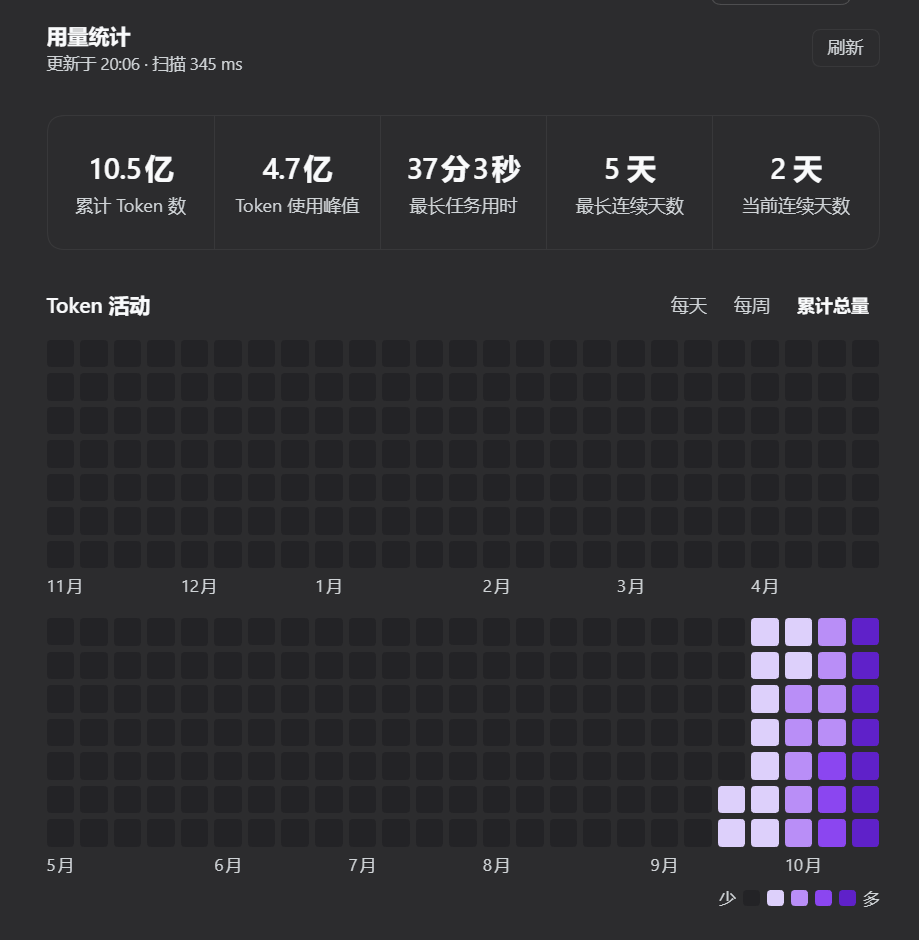
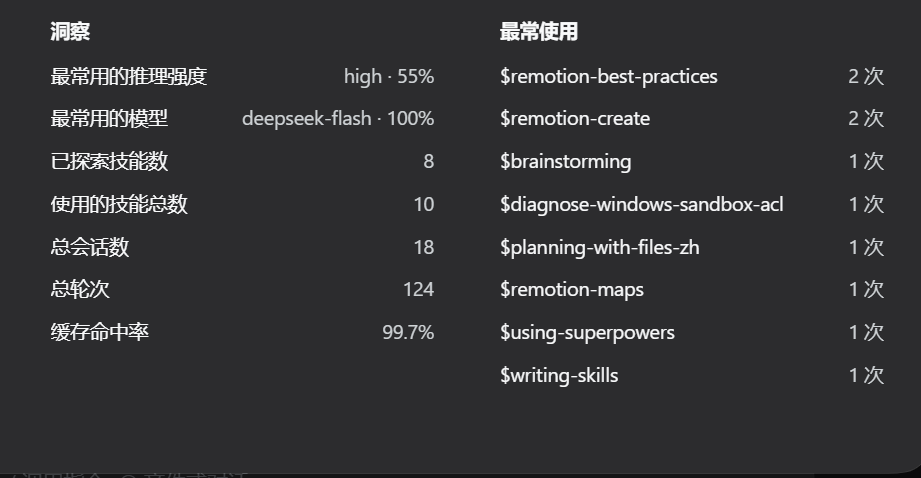
> Taken from a real DSH session on this machine: 18 chats, 1.05 billion tokens, dark theme. Numbers and durations follow the UI language.
## 📦 Other ways to install
- **npm page** — [`@etheslay/dsh-token-dashboard`](https://www.npmjs.com/package/@etheslay/dsh-token-dashboard): version, publish date and file list live there
- **Plugin Market** — Settings → Plugin Market → search and install; the market maintains `dsh.profile.bundles` for you
- **By hand** — `npm install @etheslay/dsh-token-dashboard`, then list the package under `dsh.profile.bundles` in the profile's `package.json`. **Both steps are needed**: a name declared in `bundles` but not installed makes DSH fail to start next time
- **From source** — clone the repo, then `npm install && npm run build && npm run refresh:profile` (see Development)
## 🗑️ Uninstall
```sh
dsh plugin --profile desktop remove @etheslay/dsh-token-dashboard
```
Remove the package name from `dsh.profile.bundles` in that profile's `package.json` as well. The plugin leaves no user data behind — it only ever reads session logs.
## 🩺 Troubleshooting
- **Installed, but Settings shows nothing** — check the profile first (the desktop app uses `desktop`), then run `dsh --profile desktop --dump-config` and look for `dsh-token-dashboard` in the config tree
- **Is the Host half mounted?** — open `http://127.0.0.1:/dsh-token-dashboard/api/health`; `{"ok":true,…}` means it is
- **"Plugin updated, restart DSH"** — expected. The browser half hot-reloads, but the Host half is an ES module cached in the Node process and needs a DSH restart
## 🧑💻 Development
```sh
npm install
npm run build # lib/index.js + lib/client.js + lib/types
npm run typecheck
npm test # fold, formatting and render, bilingual README, browser bundle, real-log cross-check
npm run preview # render docs/panel.html from your own session store
npm run check:layout # measure the panel in headless Chrome
npm run refresh:profile # repack and install into the profile the app actually loads
```
**Editing `src/` does not change what the app runs.** The app loads the packed copy inside the profile; `npm run refresh:profile` is what replaces it, and Host-half changes additionally need a DSH restart. Tools are documented in [`tools/README.md`](tools/README.md).
Design notes — panel geometry, the fold rules, how the colour ramp was derived, and the test strategy — live in [docs/design.md](https://github.com/Etheslay/dsh-token-dashboard/blob/main/docs/design.md).
## 📄 License
MIT — see [LICENSE](https://github.com/Etheslay/dsh-token-dashboard/blob/main/LICENSE) for the full text, and [NOTICE](https://github.com/Etheslay/dsh-token-dashboard/blob/main/NOTICE) for which Codex formatting rules were reproduced and from where.