# asui
AS React UI Library (another one!)

[](https://www.npmjs.com/package/@eleventheye/asui)
- [asui](#asui)
- [Contributing](#contributing)
- [Theming](#theming)
- [Available components](#available-components)
- [ASButton · Reference](#asbutton--reference)
- [ASIconButton · Reference](#asiconbutton--reference)
- [ASTextField · Reference](#astextfield--reference)
- [ASDropdown · Reference](#asdropdown--reference)
- [ASSwitch · Reference](#asswitch--reference)
- [ASChoiceBar · Reference](#aschoicebar--reference)
- [ASChoiceBarItem · Reference](#aschoicebaritem--reference)
- [ASModal · Reference](#asmodal--reference)
- [ASSnackbar · Reference](#assnackbar--reference)
- [ASLoader · Reference](#asloader--reference)
- [ASChartHBar · Reference](#ascharthbar--reference)
- [ASChartVBar · Reference](#aschartvbar--reference)
- [ASChartDonut · Reference](#aschartdonut--reference)
- [ASIcon and SVG icons · Reference](#asicon-and-svg-icons--reference)
- [ASTappable · Reference](#astappable--reference)
- [Available Utilities](#available-utilities)
- [Icon factory](#icon-factory)
- [createGlyphIcon · Reference](#createglyphicon--reference)
## Contributing
See [Component development workflow](./docs/component-workflow.md) for adding or modifying components, documenting theme properties, validation, and ticket handoff. Follow [Commit syntax and release workflow](./docs/commit-syntax.md) for branches and commits.
## Theming
Apply a complete project theme once with `ASThemeProvider`. See [Applying an ASUI theme](./docs/theme-provider.md) for inheritance, local replacements, compatibility details, and examples.
See the [Theme property reference](./docs/theme-reference.md) for available tokens and component properties, descriptions, and classic/neutral default values for every size.
## Available components
Import components from `@eleventheye/asui`. Examples below use application-owned values and named handlers; follow each reference for the full API, defaults, and accessibility requirements.
### ASButton · [Reference](./docs/native-buttons.md)
---
A themed action button with ASTappable pointer handling by default, native HTML button behavior through `as="button"`, and [link behavior](./docs/button-links.md) through `as="a"`.
**Example**
```tsx
import { ASButton } from '@eleventheye/asui';
Save changes
```
### ASIconButton · [Reference](./docs/native-icon-buttons.md)
---
An icon-only action with selection, loading, and disabled states. Supports ASTappable, native button, and [link behavior](./docs/button-links.md). All modes support SVG and factory-created glyph icons.
**Example**
```tsx
import { ASIconButton, SearchIcon } from '@eleventheye/asui';
```
### ASTextField · [Reference](./docs/text-fields.md)
---
A single-line input with optional icons, clearing, and validation feedback. The same component supports [multiline text and character counts](./docs/multiline-text-fields.md) through `multiline`; there is no separate ASTextArea export.
**Example**
```tsx
import { ASTextField } from '@eleventheye/asui';
```
### ASDropdown · [Reference](./docs/dropdown.md)
---
A themed native select for string options, with optional leading icon and placeholder. Its popup uses the browser's native presentation; [theme properties](./docs/theme-reference.md#dropdowns--asdropdownstyles) control the field's appearance.
**Example**
```tsx
import { ASDropdown } from '@eleventheye/asui';
```
### ASSwitch · [Reference](./docs/switch.md)
---
A controlled on/off switch with an accessible label, keyboard activation, and themed track and thumb. The parent owns its checked state.
**Example**
```tsx
import { ASSwitch } from '@eleventheye/asui';
```
### ASChoiceBar · [Reference](./docs/choicebar.md)
---
A responsive item selector. Desktop shows a horizontal option list; mobile shows the selected option and opens a picker. Both support previous/next selection. The component reports item IDs and does not manage routes.
**Example**
```tsx
import { ASChoiceBar } from '@eleventheye/asui';
```
### ASChoiceBarItem · [Reference](./src/aschoicebar/ASChoiceBar.types.ts)
---
The lower-level option used by ASChoiceBar. It exposes selection appearance, activation, and measurement callbacks. Use ASChoiceBar for the complete selection and responsive-layout behavior.
**Example**
```tsx
import { ASChoiceBarItem } from '@eleventheye/asui';
```
### ASModal · [Reference](./docs/modal.md)
---
A controlled, portaled overlay with themed backdrop and content surface. The application supplies its content, close controls, and dismissal handling.
**Example**
```tsx
import { ASButton, ASModal } from '@eleventheye/asui';
Details
Close
```
### ASSnackbar · [Reference](./docs/snackbar.md)
---
A temporary notification with optional dismissal and a finite lifetime. The application owns visibility and any notification queue.
**Example**
```tsx
import { ASSnackbar } from '@eleventheye/asui';
```
### ASLoader · [Reference](./docs/loader.md)
---
An indeterminate loading indicator with grow, spin, and dots variants. Supports sizes and optional modal presentation; see its [theme properties](./docs/theme-reference.md#loaders--asloaderstyles).
**Example**
```tsx
import { ASLoader, LoaderType } from '@eleventheye/asui';
```
### ASChartHBar · [Reference](./docs/chart-hbar.md)
---
A horizontal percentage bar with solid or striped fill, endpoint labels, and configurable direction. Explicit data colors override theme defaults.
**Example**
```tsx
import { ASChartHBar } from '@eleventheye/asui';
```
### ASChartVBar · [Reference](./docs/chart-vbar.md)
---
A vertical percentage bar supporting upward or downward fill. Shares fill styles and theme properties with ASChartHBar.
**Example**
```tsx
import { ASChartVBar } from '@eleventheye/asui';
```
### ASChartDonut · [Reference](./docs/chart-donut.md)
---
One to four concentric percentage arcs with independently configurable data colors, tracks, and central labels. Ring values are independent and do not need to add up to 100.
**Example**
```tsx
import { ASChartDonut } from '@eleventheye/asui';
```
### ASIcon and SVG icons · [Reference](./docs/svg-icons.md)
---
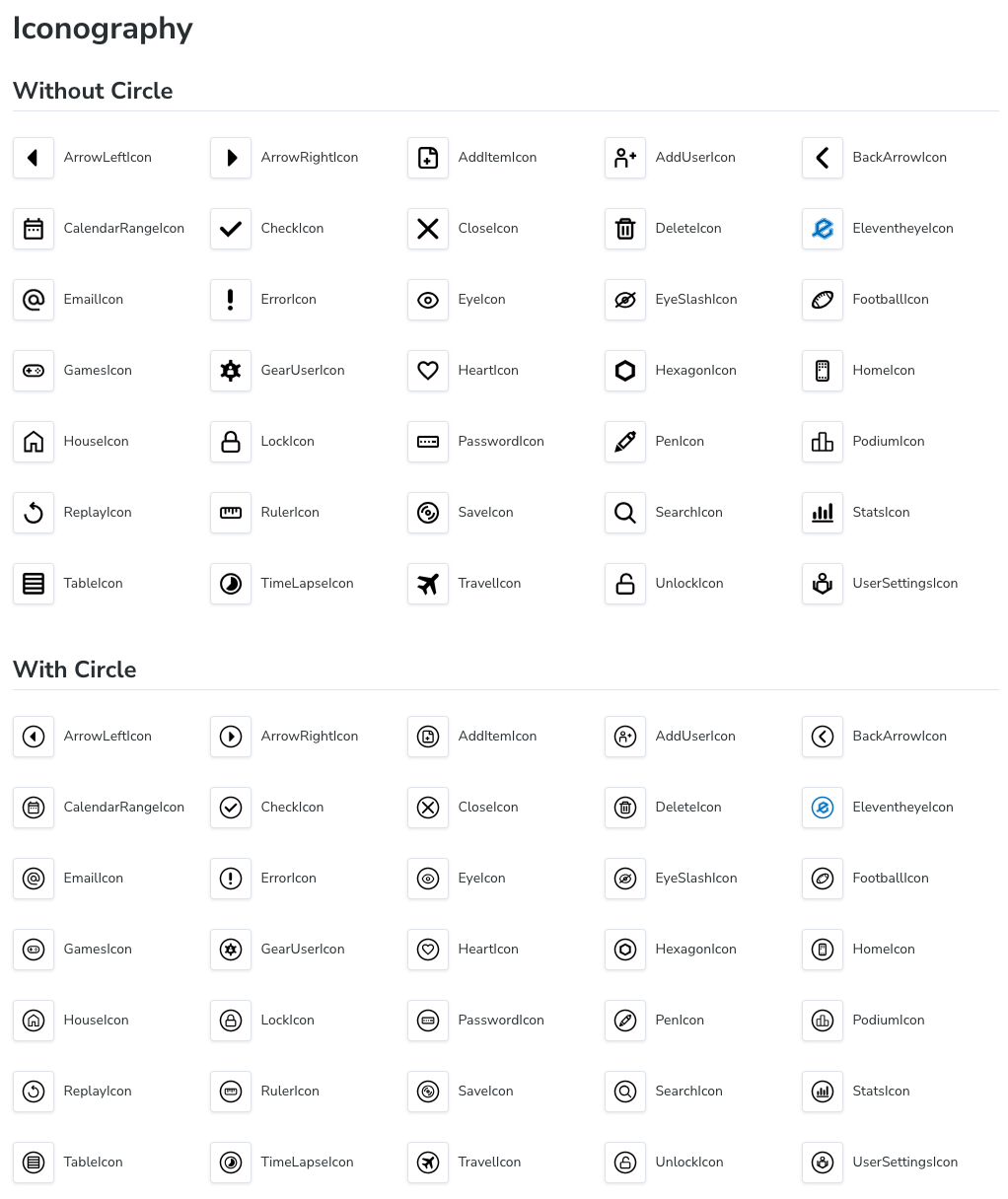
Named SVG icons share ASIcon's stroke, fill, sizing, and optional circle decoration. Fills are transparent by default; pass `fillColor` to fill the SVG path.
**Example**
```tsx
import { SearchIcon, HeartIcon } from '@eleventheye/asui';
```
### ASTappable · [Reference](./src/astappable/ASTappable.tsx)
---
A lower-level pointer/tap wrapper used by ASUI controls. It exposes `onTapped`; it does not supply button semantics or keyboard activation. Use ASButton or ASIconButton for ordinary actions.
**Example**
```tsx
import { ASTappable } from '@eleventheye/asui';
Pointer interaction surface
```
## Available Utilities
### Icon factory
#### createGlyphIcon · [Reference](./docs/glyph-icons.md)
---
Create reusable font-icon components once in an application icon module. The application loads the font; components import the icons they need.
**Example**
```tsx
import { createGlyphIcon } from '@eleventheye/asui';
export const RefreshIcon = createGlyphIcon({
glyph: 'refresh',
fontFamily: 'Material Symbols Rounded',
weight: 300,
});
// In a component:
```