@editora/ui-sortable
Drag-and-drop lists and boards as one web component, <ui-sortable>: reorder within a list, move
between lists, nest, clone and select several items, with full keyboard support. A small React wrapper is included.




Docs and examples ·
Storybook ·
GitHub
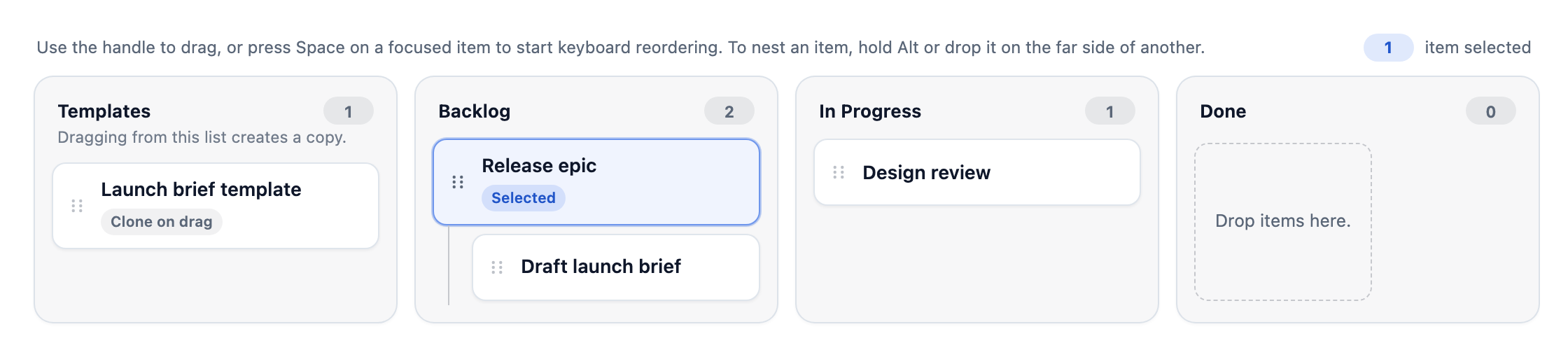
## Features
- **One component, many layouts.** A single list, several lists side by side (a board), horizontal lists, nested
hierarchies.
- **Reorder, transfer, nest and clone.** Drop an item between others, into another list, inside another item, or drag
a copy out of a template list.
- **Multi-selection**: select several items and move them together.
- **A drag that is always a reorder**: nesting takes a deliberate gesture (hold Alt, or drop on the far side of a card),
so a plain drag never nests by accident. On touch a card is lifted by holding it, so the page still scrolls.
- **Guard rails**: `maxItems` per list, a `canDrop` function, and a cancelable `before-change` event, so your app has
the last word on a move.
- **Keyboard and screen readers.** Space lifts the focused item, the arrow keys choose the place, Space drops it, and
the move is announced.
- **Persistence built in**: a `persist-request` event with the new positions, and a `persistKey` that keeps the positions across reloads.
- **Small.** The component is 17 KB gzipped (19 KB with the React wrapper), against about 490 KB for the whole
[`@editora/ui-core`](https://www.npmjs.com/package/@editora/ui-core) catalog it comes from.
- **More than one board**: sortables with the same `group` take each other's cards, and a list can have a height of its
own and scroll by itself.
- **Your own markup, with or without React**: custom cards, list headers and empty states, and a free `data` field on
every item and list.
- **Translatable and quiet**: every text it shows or announces can be replaced (`labels`), and the hint line can be hidden.
## Install
```bash
npm install @editora/ui-sortable
```
For the React wrapper, React is a peer dependency: `npm install @editora/ui-sortable react react-dom`.
## Quick start
Import the package once to register the element, then give it `lists` and `items`:
```html
```
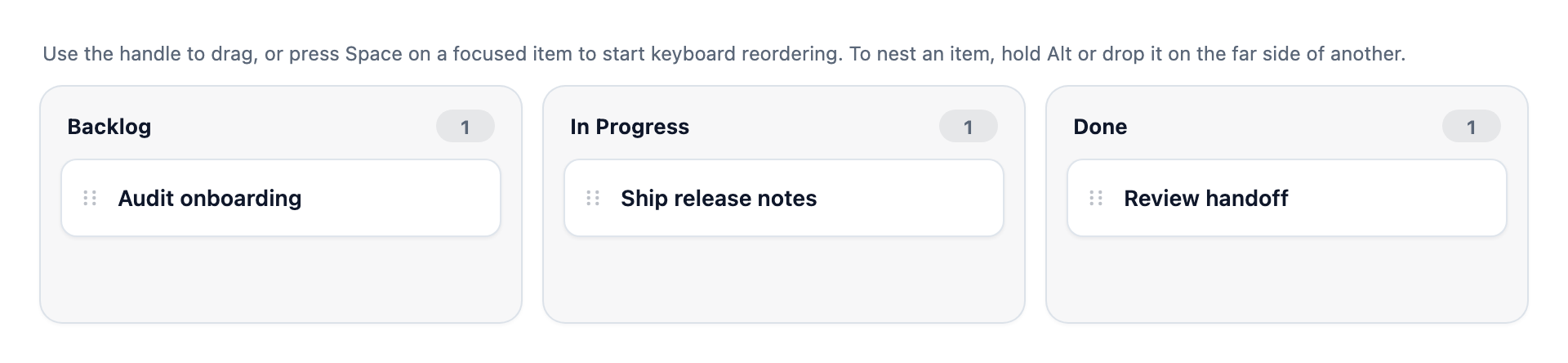
The element does not move your data: it fires `change` with the new `items`, and you store them. With a bundler, drop the
import map and `import '@editora/ui-sortable'`; without one, the import map above is all it needs.
## React
```tsx
import { Sortable, type SortableItem, type SortableList } from '@editora/ui-sortable/react';
const lists: SortableList[] = [
{ id: 'backlog', label: 'Backlog' },
{ id: 'done', label: 'Done' }
];
const items: SortableItem[] = [
{ id: 'story-1', label: 'Audit onboarding', listId: 'backlog' },
{ id: 'story-2', label: 'Ship release notes', listId: 'done' }
];
export default function Example() {
return (
{
console.log(detail.items);
}}
/>
);
}
```
`@editora/ui-sortable/react` is the wrapper on its own, without the rest of `@editora/ui-react`.
### A controlled board
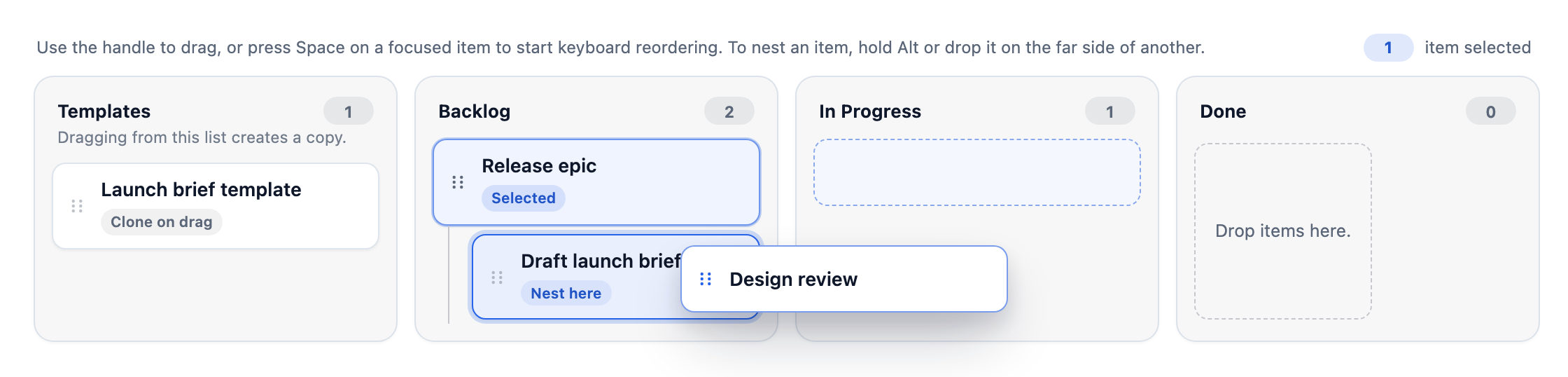
Keep the items, and the selection, in state. This board has a template list that clones what you drag out of it, a
horizontal list, a nested item and a `persistKey` that remembers the positions:
```tsx
import * as React from 'react';
import { Sortable, type SortableItem, type SortableList } from '@editora/ui-sortable/react';
const lists: SortableList[] = [
{ id: 'templates', label: 'Templates', cloneOnDrag: true },
{ id: 'backlog', label: 'Backlog' },
{ id: 'active', label: 'In Progress' },
{ id: 'done', label: 'Done', orientation: 'horizontal' }
];
const initialItems: SortableItem[] = [
{ id: 'template-brief', label: 'Launch brief template', listId: 'templates', cloneOnDrag: true },
{ id: 'epic', label: 'Release epic', listId: 'backlog' },
{ id: 'brief', label: 'Draft launch brief', listId: 'backlog', parentId: 'epic' },
{ id: 'review', label: 'Design review', listId: 'active' }
];
export default function ReleaseBoard() {
const [items, setItems] = React.useState(initialItems);
const [selection, setSelection] = React.useState(['epic']);
return (
setSelection(detail.selection)}
onPersistRequest={(detail) => {
console.log(detail.persistence.records);
}}
/>
);
}
```
### A flat list
For a single list that only reorders, turn nesting off:
```tsx
import * as React from 'react';
import { Sortable, type SortableItem, type SortableList } from '@editora/ui-sortable/react';
const lists: SortableList[] = [
{ id: 'queue', label: 'Editorial Queue' }
];
const initialItems: SortableItem[] = [
{ id: 'headline', label: 'Headline polish', listId: 'queue' },
{ id: 'legal', label: 'Legal review', listId: 'queue' },
{ id: 'seo', label: 'SEO metadata', listId: 'queue' }
];
export default function FlatSortableQueue() {
const [items, setItems] = React.useState(initialItems);
return (
);
}
```
### Your own markup
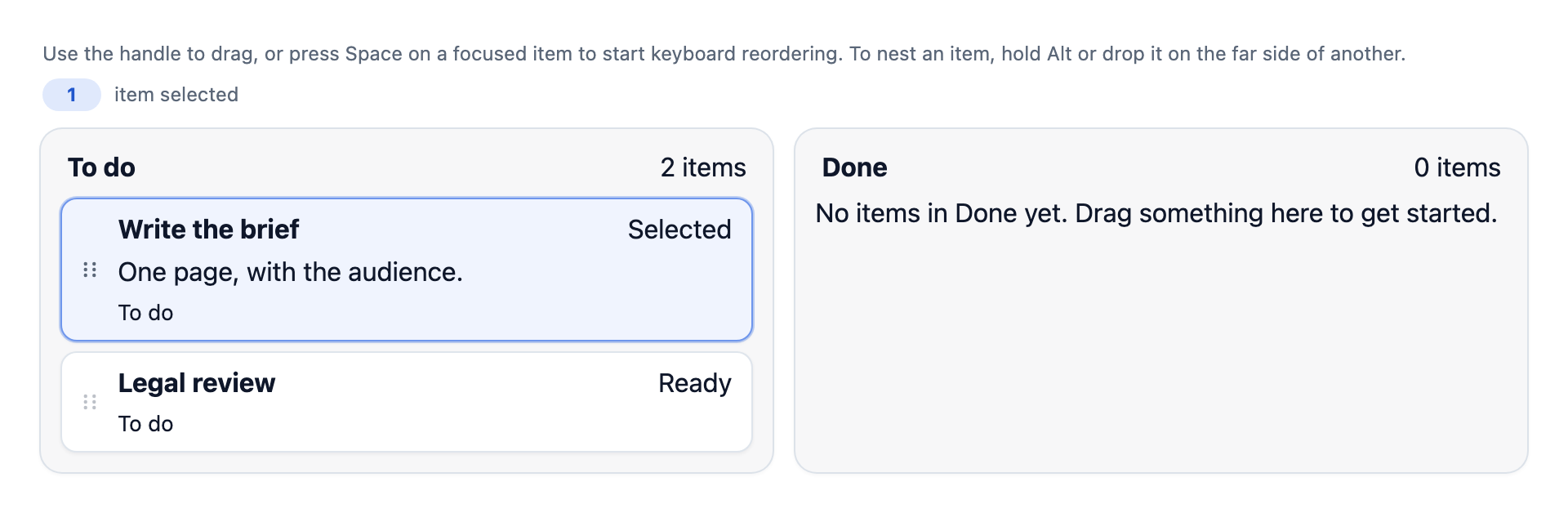
`renderItem`, `renderListHeader` and `renderEmptyState` replace the default item, list header and empty message. The
context says whether the item is selected, how many items a list holds, and so on:
```tsx
import * as React from 'react';
import { Sortable, type SortableItem, type SortableList } from '@editora/ui-sortable/react';
const lists: SortableList[] = [
{ id: 'todo', label: 'To do' },
{ id: 'done', label: 'Done' }
];
const initialItems: SortableItem[] = [
{ id: 'brief', label: 'Write the brief', description: 'One page, with the audience.', listId: 'todo' },
{ id: 'review', label: 'Legal review', listId: 'todo' }
];
export default function CustomRendering() {
const [items, setItems] = React.useState(initialItems);
const [selection, setSelection] = React.useState(['brief']);
return (
setSelection(detail.selection)}
renderItem={(item, context) => (
{item.label}
{context.selected ? 'Selected' : 'Ready'}
{item.description &&
{item.description}
}
{context.list?.label}
)}
renderListHeader={(list, context) => (
{list.label}
{context.itemCount} items
)}
renderEmptyState={(list) => (
No items in {list.label} yet. Drag something here to get started.
)}
/>
);
}
```
### Refusing moves
A list can hold a limited number of items (`maxItems`, counted at every nesting level), `canDrop` decides whether items
may go somewhere, and `onBeforeChange` is the last word before anything changes. A place that is refused is never
highlighted, the keyboard skips it, and the card you are holding turns red over it:
```tsx
import * as React from 'react';
import { Sortable, type SortableItem, type SortableList } from '@editora/ui-sortable/react';
type Task = { reviewed: boolean };
const lists: SortableList[] = [
{ id: 'todo', label: 'To do' },
{ id: 'doing', label: 'Doing', maxItems: 2 },
{ id: 'done', label: 'Done' }
];
const initialItems: SortableItem[] = [
{ id: 'brief', label: 'Write the brief', listId: 'todo', data: { reviewed: true } },
{ id: 'budget', label: 'Approve the budget', listId: 'todo', data: { reviewed: false } },
{ id: 'launch', label: 'Plan the launch', listId: 'todo', data: { reviewed: true } },
{ id: 'assets', label: 'Collect the assets', listId: 'doing', data: { reviewed: true } }
];
export default function GuardedBoard() {
const [items, setItems] = React.useState(initialItems);
return (
drop.targetListId !== 'done' || drop.items.every((item) => (item.data as Task).reviewed)
}
// The last word before anything changes: return false to cancel (here, at most two cards at a time).
onBeforeChange={(detail) => detail.movedIds.length <= 2}
onItemsChange={setItems}
/>
);
}
```
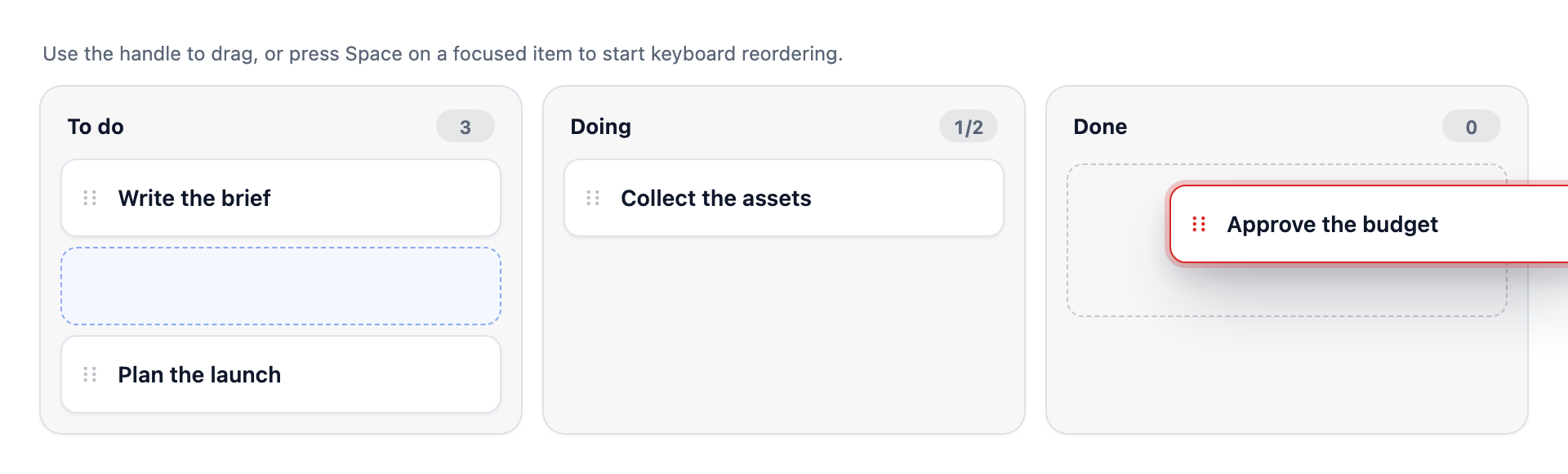
`before-change` is a cancelable event (`detail` is what `change` will report, plus `target` and `clone`):
`event.preventDefault()` cancels the move, puts a dragged card back, and fires no `change`. `moveSelection()` returns
`false` when a move did not happen.
### Without React
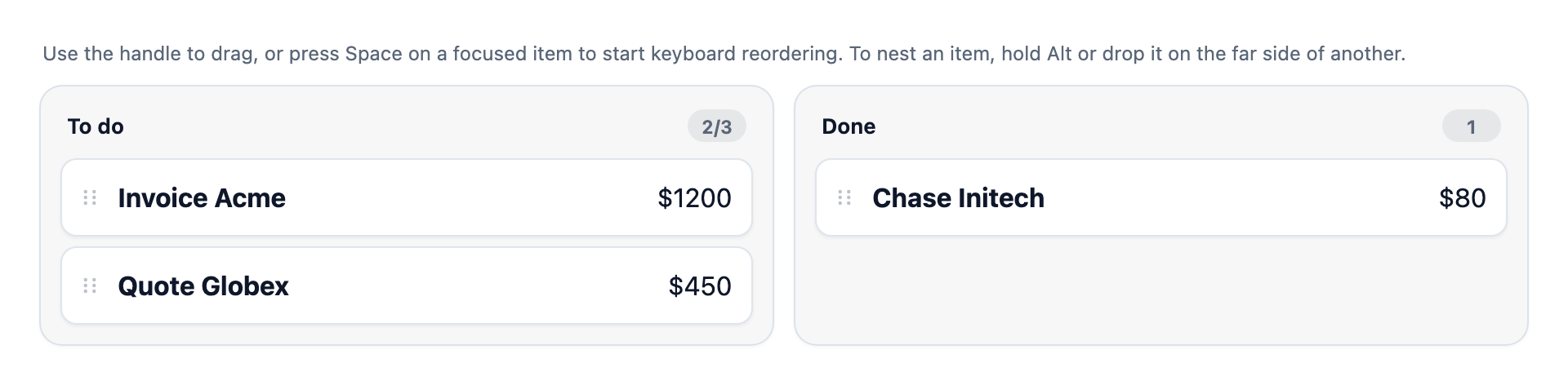
`renderItem`, `renderListHeader` and `renderEmptyState` are properties of the element too. Each returns a new DOM node, a
string of HTML (escape anything that came from a user), or nothing to keep the built-in markup. A card is drawn again when
its `data` changes and when it is selected or deselected:
```html
```
### Two boards
Give two sortables the same `group` and a card held over one of them can be dropped in the other. Each one reports its own
`change` (the one it left with `external.direction === 'out'`, the one it reached with `'in'`), so each keeps its own state;
`onBeforeChange` on either can cancel the move, and the other one's `canDrop` and `maxItems` apply:
```tsx
import * as React from 'react';
import { Sortable, type SortableItem, type SortableList } from '@editora/ui-sortable/react';
const backlogLists: SortableList[] = [{ id: 'backlog', label: 'Backlog' }];
const sprintLists: SortableList[] = [{ id: 'sprint', label: 'This sprint', maxItems: 3, maxHeight: 280 }];
export default function TwoBoards() {
const [backlog, setBacklog] = React.useState([
{ id: 'audit', label: 'Audit onboarding', listId: 'backlog' },
{ id: 'notes', label: 'Ship release notes', listId: 'backlog' },
{ id: 'handoff', label: 'Review handoff', listId: 'backlog' }
]);
const [sprint, setSprint] = React.useState([
{ id: 'login', label: 'Fix login', listId: 'sprint' },
{ id: 'docs', label: 'Write docs', listId: 'sprint' }
]);
// Sortables with the same group take each other's cards. Each one reports its own change,
// so each keeps its own state.
return (
);
}
```
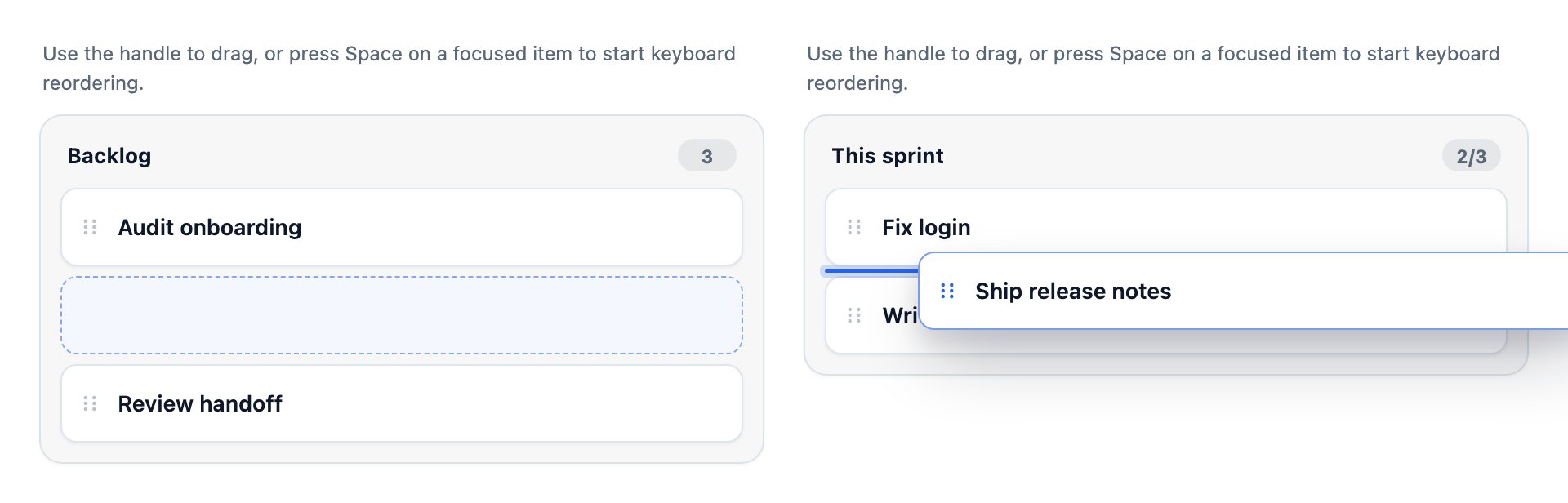
Ids must be unique across the group (a drop onto a board that already has one of the ids is refused; a copy gets a fresh
id there). Dragging between boards is for the pointer: for the keyboard and for code there is
`moveSelectionTo(otherSortable, { targetListId, beforeId?, parentId?, clone? })`.
## Items and lists
| Item field | |
| --- | --- |
| `id`, `label`, `listId` | Required: the item's id, its text and the list it is in. |
| `parentId` | The id of the item this one is nested under. |
| `description` | A second line of text. |
| `cloneOnDrag` | Dragging this item leaves it where it is and drops a copy. |
| `disabled`, `dragDisabled`, `hidden` | Disable the item, stop it being dragged, or hide it. |
| `data` | Anything of yours that can be written as JSON. It travels with the item through moves and copies and comes back in every event, so you do not need a side table. What you get back is a copy. |
| List field | |
| --- | --- |
| `id`, `label` | Required. |
| `description`, `emptyLabel` | A line under the title, and the text of the empty state. |
| `orientation` | `'vertical'` (the default) or `'horizontal'`. |
| `cloneOnDrag` | Items dragged out of this list are copied. |
| `disabled` | Turn the list off. |
| `accepts` | The ids of the lists it takes items from (the lists of another sortable count too). |
| `maxHeight` | The tallest its cards can be before the list scrolls by itself: a number of px or a CSS length such as `"20rem"`. Holding a card at its edge scrolls it, and the keyboard keeps the focused card in view. |
| `maxItems` | The most items it can hold. A move or copy that would go past it is refused; the header shows `3/5`. |
| `data` | Anything of yours that can be written as JSON, as on items. |
## Options
| React prop | Attribute | |
| --- | --- | --- |
| `lists`, `items` | `lists`, `items` | The data. In HTML, set them as properties or as JSON attributes. |
| `selection` | `selection` | The selected item ids. |
| `allowNesting` | `allow-nesting` | Allow dropping an item inside another. |
| `group` | `group` | Sortables with the same group take each other's cards (see Two boards). |
| `listMaxHeight` | `list-max-height` | `maxHeight` for every list that does not set its own. |
| `nestTrigger` | `nest-trigger` | What it takes to nest with the pointer: `gutter` (the default: hold Alt, or drop on the far side of a card), `modifier` (hold Alt) or `area` (the middle of any card, as before). Without it the top half of a card is "before it" and the bottom half "after it". |
| `touchHoldDelay` | `touch-hold-delay` | Milliseconds a finger must rest on a card before it lifts (for cards dragged by their body); `0` lifts at once. Default `350`. The built-in handle always lifts at once. |
| `labels` | `labels` | Replacements for any of its texts: `{ hintHandle, selectedMany, badgeSelected, announceMovedOne, listFull, ... }`. `{count}`, `{label}`, `{list}` and `{max}` are filled in. |
| `hideToolbar` | `hide-toolbar` | Hide the hint and the selection count from sight (screen readers still get the hint). |
| `canDrop` | `canDrop` (property) | A function that is given `{ items, movedIds, targetListId, parentId, beforeId, mode, clone, from? }` (`from` is the other sortable, for a card that comes from one) and returns whether they may go there. |
| `dropzoneStyle` | `dropzone-style` | `indicator` (an insertion rail, the default) or `container` (the whole list highlights). |
| `dropIndicatorVisibility` | `drop-indicator-visibility` | `active` or `always`. |
| `dragPreviewSize` | `drag-preview-size` | The card that follows the pointer: `match-item` (the card's own size) or `compact` (narrower, title only). |
| `dragHandleMode` | `drag-handle-mode` | `handle` (drag by the grip) or `item` (drag anywhere on the card). |
| `dragHandleSelector` | `drag-handle-selector` | A selector for your own drag handle. |
| `persistKey` | `persist-key` | Keep where each item is in `localStorage` under this key, and restore it on load. |
| `filterQuery`, `sort`, `allowFilteredDrag` | `filter-query`, `sort`, `allow-filtered-drag` | Filter the items, sort them (`manual` or `label`), and allow dragging while filtered. |
| `showSelectionBadge` | `show-selection-badge` | Show the *Selected* badge on selected items. |
| `disabled` | `disabled` | Turn the whole component off. |
The React wrapper also takes `itemRadius`, `handleRadius`, `listGap` and `itemSpacing` for the look.
## Nesting, touch and keyboard
With nesting on (the default), the top half of a card is "before it" and the bottom half "after it", so dragging onto a
card always reorders. To drop an item *inside* another, hold **Alt** (Option) or drop on the far side of the card (its
right, in a left-to-right page): the card highlights before you let go. Set `nestTrigger="area"` for the old rule, where the
middle of a card nests, or `allowNesting={false}` to turn it off. The keyboard has an explicit "Nest inside" destination, so it
needs none of this.
A card dragged by its body (`dragHandleMode="item"`, or your own handle) is lifted on touch by holding it for a third of a
second; a finger that moves first scrolls the page, and a tap still selects. The built-in handle lifts at once.
## Look and layout
Lists sit side by side and the board scrolls sideways when they do not fit (each list is at least 260px wide;
change it with `--ui-sortable-list-min-size`). Holding a card at the edge of the board scrolls it. A card you pick up is
lifted under the pointer, its place stays as an empty slot, and a thin line shows where it will land.
The colours come from `--ui-color-primary`, `--ui-color-surface`, `--ui-color-text`, `--ui-color-muted` and
`--ui-color-border`; set them on the element or a parent to theme it, dark included. The parts `root`, `toolbar`,
`lists`, `list`, `items`, `item`, `handle`, `dropzone` and `drag-ghost` can be styled from outside:
```css
/* Stack the lists instead of scrolling them sideways. */
ui-sortable::part(lists) {
grid-auto-flow: row;
overflow: visible;
}
```
A list can scroll by itself instead: `maxHeight` on a list, or `listMaxHeight` for all of them.
## Events
| Event | React prop | `detail` |
| --- | --- | --- |
| `before-change` | `onBeforeChange` | Cancelable. The same as `change`, before it is applied, plus `target` and `clone`. In React return `false` to cancel. |
| `change` | `onChange` | `{ items, lists, selection, previousSelection, movedIds, source, operation, persistence, external? }`. `external` (`{ direction, peer }`, where `direction` is `'in'` or `'out'`) is only there when the items crossed between two sortables. `source` is `pointer`, `keyboard`, `api` or `restore`; `operation` is `reorder`, `transfer`, `nest` or `clone`. |
| | `onItemsChange` | The new `items` array. |
| `selection-change` | `onSelectionChange` | `{ selection, previousSelection }` |
| `persist-request` | `onPersistRequest` | The same detail as `change`: `persistence.records` is `[{ id, listId, parentId, index }]`, ready to save. |
## Methods
On the element (or a ref to it): `select(ids)`, `clearSelection()`, `moveSelection({ targetListId, beforeId?, parentId?, mode?, clone? })`
(which returns whether anything moved), `moveSelectionTo(otherSortable, options)` (the same into another sortable), `focusItem(id)`, `cancelDrag()` and `getPersistenceSnapshot()`. The properties
`canDrop`, `labels`, `renderItem`, `renderListHeader` and `renderEmptyState` can be set on it as well.
## Keyboard
Focus an item, then press **Space** to lift it, the **arrow keys** to choose where it goes, and **Space** again to drop
it. The result is announced to screen readers ("Item reordered in Editorial Queue."), and a hint above the lists
explains the keys.
## Types
`@editora/ui-sortable` re-exports `UISortable`, `UISortableList`, `UISortableItem`, `UISortableChangeDetail`,
`UISortableBeforeChangeDetail`, `UISortableDropInfo`, `UISortableLabels`, `UISortableNestTrigger` and
`UISortableDropzoneStyle`, among others. `@editora/ui-sortable/react` exports `Sortable`, `SortableList`, `SortableItem`,
`SortableChangeDetail`, `SortableBeforeChangeDetail`, `SortableDropInfo`, `SortableLabels`, `SortableNestTrigger` and
`SortableDropzoneStyle`.
## Server rendering
Both entries can be imported on the server: loading them does not touch the DOM, and the custom element is defined only
in the browser. On the server `Sortable` from `@editora/ui-sortable/react` renders an empty `` tag; the lists
and items are applied in the browser, once the element is defined and the component has mounted. A `'use client'` file
that renders it is still rendered on the server first (Next.js does this); that render produces the empty tag and does
not fail.
## Part of Editora
This is the sortable of [`@editora/ui-core`](https://www.npmjs.com/package/@editora/ui-core) as its own install. The same
component is also in [`@editora/ui-react`](https://www.npmjs.com/package/@editora/ui-react) and in the web components
catalog.
## License
MIT © [Ajay Kumar](https://github.com/ajaykr089)