# Using Pi
This page collects day-to-day usage details that do not fit on the quickstart page.
## Interactive Mode
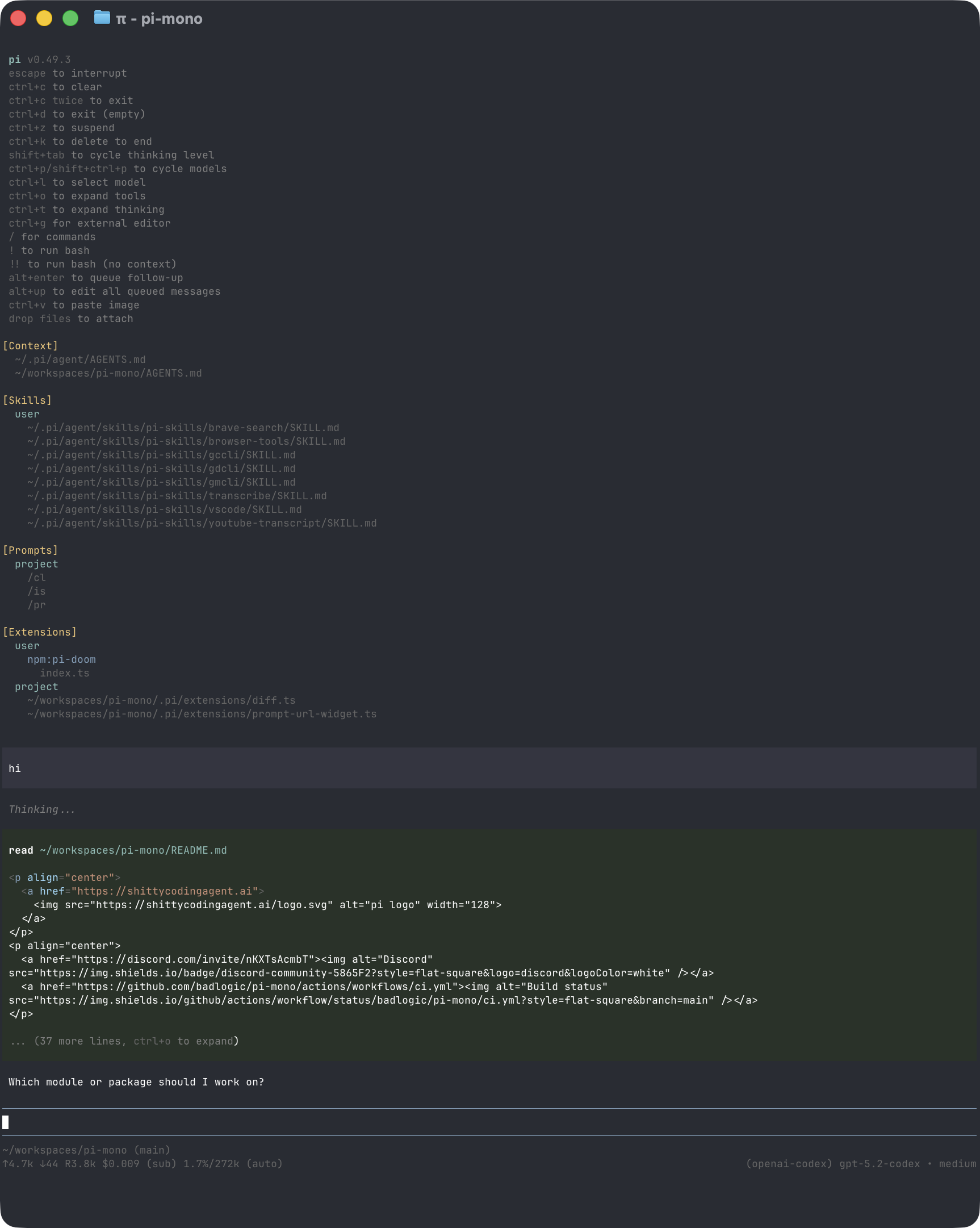
The interface has four main areas:
- **Startup header** - shortcuts, loaded context files, prompt templates, skills, and extensions
- **Messages** - user messages, assistant responses, tool calls, tool results, notifications, errors, and extension UI
- **Editor** - where you type; border color indicates the current thinking level
- **Footer** - working directory, session name, token/cache usage, cost, context usage, and current model
The editor can be replaced temporarily by built-in UI such as `/settings` or by custom extension UI.
### Editor Features
| Feature | How |
|---------|-----|
| File reference | Type `@` to fuzzy-search project files |
| Path completion | Press Tab to complete paths |
| Multi-line input | Shift+Enter, or Ctrl+Enter on Windows Terminal |
| Images | Paste with Ctrl+V, Alt+V on Windows, or drag into the terminal |
| Shell command | `!command` runs and sends output to the model |
| Hidden shell command | `!!command` runs without sending output to the model |
| External editor | Ctrl+G opens `$VISUAL` or `$EDITOR` |
See [Keybindings](keybindings.md) for all shortcuts and customization.
## Slash Commands
Type `/` in the editor to open command completion. Extensions can register custom commands, skills are available as `/skill:name`, and prompt templates expand via `/templatename`.
| Command | Description |
|---------|-------------|
| `/login`, `/logout` | Manage OAuth or API-key credentials |
| `/model` | Switch models |
| `/scoped-models` | Enable/disable models for Ctrl+P cycling |
| `/settings` | Thinking level, theme, message delivery, transport |
| `/resume` | Pick from previous sessions |
| `/new` | Start a new session |
| `/name ` | Set session display name |
| `/session` | Show session file, ID, messages, tokens, and cost |
| `/tree` | Jump to any point in the session and continue from there |
| `/fork` | Create a new session from a previous user message |
| `/clone` | Duplicate the current active branch into a new session |
| `/compact [prompt]` | Manually compact context, optionally with custom instructions |
| `/copy` | Copy last assistant message to clipboard |
| `/export [file]` | Export session to HTML |
| `/share` | Upload as private GitHub gist with shareable HTML link |
| `/reload` | Reload keybindings, extensions, skills, prompts, and context files |
| `/hotkeys` | Show all keyboard shortcuts |
| `/changelog` | Display version history |
| `/quit` | Quit pi |
## Message Queue
You can submit messages while the agent is still working:
- **Enter** queues a steering message, delivered after the current assistant turn finishes executing its tool calls.
- **Alt+Enter** queues a follow-up message, delivered after the agent finishes all work.
- **Escape** aborts and restores queued messages to the editor.
- **Alt+Up** retrieves queued messages back to the editor.
On Windows Terminal, Alt+Enter is fullscreen by default. Remap it as described in [Terminal setup](terminal-setup.md) if you want pi to receive the shortcut.
Configure delivery in [Settings](settings.md) with `steeringMode` and `followUpMode`.
## Sessions
Sessions are saved automatically to `~/.pi/agent/sessions/`, organized by working directory.
```bash
pi -c # Continue most recent session
pi -r # Browse and select a session
pi --no-session # Ephemeral mode; do not save
pi --session # Use a specific session file or session ID
pi --fork # Fork a session into a new session file
```
Useful session commands:
- `/session` shows the current session file and ID.
- `/tree` navigates the in-file session tree and can summarize abandoned branches.
- `/fork` creates a new session from an earlier user message.
- `/clone` duplicates the current active branch into a new session file.
- `/compact` summarizes older messages to free context.
See [Sessions](sessions.md) and [Compaction](compaction.md) for details.
## Context Files
Pi loads `AGENTS.md` or `CLAUDE.md` at startup from:
- `~/.pi/agent/AGENTS.md` for global instructions
- parent directories, walking up from the current working directory
- the current directory
Use context files for project conventions, commands, safety rules, and preferences. Disable loading with `--no-context-files` or `-nc`.
### System Prompt Files
Replace the default system prompt with:
- `.pi/SYSTEM.md` for a project
- `~/.pi/agent/SYSTEM.md` globally
Append to the default prompt without replacing it with `APPEND_SYSTEM.md` in either location.
## Exporting and Sharing Sessions
Use `/export [file]` to write a session to HTML.
Use `/share` to upload a private GitHub gist with a shareable HTML link.
If you use pi for open source work and want to publish sessions for model, prompt, tool, and evaluation research, see [`badlogic/pi-share-hf`](https://github.com/badlogic/pi-share-hf). It publishes sessions to Hugging Face datasets.
## CLI Reference
```bash
pi [options] [@files...] [messages...]
```
### Package Commands
```bash
pi install [-l] # Install package, -l for project-local
pi remove [-l] # Remove package
pi uninstall [-l] # Alias for remove
pi update [source|self|pi] # Update pi and packages; skips pinned packages
pi update --extensions # Update packages only
pi update --self # Update pi only
pi update --extension # Update one package
pi list # List installed packages
pi config # Enable/disable package resources
```
See [Pi Packages](packages.md) for package sources and security notes.
### Modes
| Flag | Description |
|------|-------------|
| default | Interactive mode |
| `-p`, `--print` | Print response and exit |
| `--mode json` | Output all events as JSON lines; see [JSON mode](json.md) |
| `--mode rpc` | RPC mode over stdin/stdout; see [RPC mode](rpc.md) |
| `--export [out]` | Export a session to HTML |
In print mode, pi also reads piped stdin and merges it into the initial prompt:
```bash
cat README.md | pi -p "Summarize this text"
```
### Model Options
| Option | Description |
|--------|-------------|
| `--provider ` | Provider, such as `anthropic`, `openai`, or `google` |
| `--model ` | Model pattern or ID; supports `provider/id` and optional `:` |
| `--api-key ` | API key, overriding environment variables |
| `--thinking ` | `off`, `minimal`, `low`, `medium`, `high`, `xhigh` |
| `--models ` | Comma-separated patterns for Ctrl+P cycling |
| `--list-models [search]` | List available models |
### Session Options
| Option | Description |
|--------|-------------|
| `-c`, `--continue` | Continue the most recent session |
| `-r`, `--resume` | Browse and select a session |
| `--session ` | Use a specific session file or partial UUID |
| `--fork ` | Fork a session file or partial UUID into a new session |
| `--session-dir ` | Custom session storage directory |
| `--no-session` | Ephemeral mode; do not save |
### Tool Options
| Option | Description |
|--------|-------------|
| `--tools `, `-t ` | Allowlist specific built-in, extension, and custom tools |
| `--no-builtin-tools`, `-nbt` | Disable built-in tools but keep extension/custom tools enabled |
| `--no-tools`, `-nt` | Disable all tools |
Built-in tools: `read`, `bash`, `edit`, `write`, `grep`, `find`, `ls`.
### Resource Options
| Option | Description |
|--------|-------------|
| `-e`, `--extension ` | Load an extension from path, npm, or git; repeatable |
| `--no-extensions` | Disable extension discovery |
| `--skill ` | Load a skill; repeatable |
| `--no-skills` | Disable skill discovery |
| `--prompt-template ` | Load a prompt template; repeatable |
| `--no-prompt-templates` | Disable prompt template discovery |
| `--theme ` | Load a theme; repeatable |
| `--no-themes` | Disable theme discovery |
| `--no-context-files`, `-nc` | Disable `AGENTS.md` and `CLAUDE.md` discovery |
Combine `--no-*` with explicit flags to load exactly what you need, ignoring settings. Example:
```bash
pi --no-extensions -e ./my-extension.ts
```
### Other Options
| Option | Description |
|--------|-------------|
| `--system-prompt ` | Replace default prompt; context files and skills are still appended |
| `--append-system-prompt ` | Append to system prompt |
| `--verbose` | Force verbose startup |
| `-h`, `--help` | Show help |
| `-v`, `--version` | Show version |
### File Arguments
Prefix files with `@` to include them in the message:
```bash
pi @prompt.md "Answer this"
pi -p @screenshot.png "What's in this image?"
pi @code.ts @test.ts "Review these files"
```
### Examples
```bash
# Interactive with initial prompt
pi "List all .ts files in src/"
# Non-interactive
pi -p "Summarize this codebase"
# Non-interactive with piped stdin
cat README.md | pi -p "Summarize this text"
# Different model
pi --provider openai --model gpt-4o "Help me refactor"
# Model with provider prefix
pi --model openai/gpt-4o "Help me refactor"
# Model with thinking level shorthand
pi --model sonnet:high "Solve this complex problem"
# Limit model cycling
pi --models "claude-*,gpt-4o"
# Read-only mode
pi --tools read,grep,find,ls -p "Review the code"
```
### Environment Variables
| Variable | Description |
|----------|-------------|
| `PI_CODING_AGENT_DIR` | Override config directory; default is `~/.pi/agent` |
| `PI_CODING_AGENT_SESSION_DIR` | Override session storage directory; overridden by `--session-dir` |
| `PI_PACKAGE_DIR` | Override package directory, useful for Nix/Guix store paths |
| `PI_OFFLINE` | Disable startup network operations, including update checks, package update checks, and install/update telemetry |
| `PI_SKIP_VERSION_CHECK` | Skip the Pi version update check at startup. This prevents the `pi.dev` latest-version request |
| `PI_TELEMETRY` | Override install/update telemetry: `1`/`true`/`yes` or `0`/`false`/`no`. This does not disable update checks |
| `PI_CACHE_RETENTION` | Set to `long` for extended prompt cache where supported |
| `VISUAL`, `EDITOR` | External editor for Ctrl+G |
## Design Principles
Pi keeps the core small and pushes workflow-specific behavior into extensions, skills, prompt templates, and packages.
It intentionally does not include built-in MCP, sub-agents, permission popups, plan mode, to-dos, or background bash. You can build or install those workflows as extensions or packages, or use external tools such as containers and tmux.
For the full rationale, read the [blog post](https://mariozechner.at/posts/2025-11-30-pi-coding-agent/).