English · 简体中文
# @dsh-xhl/workspace-groups


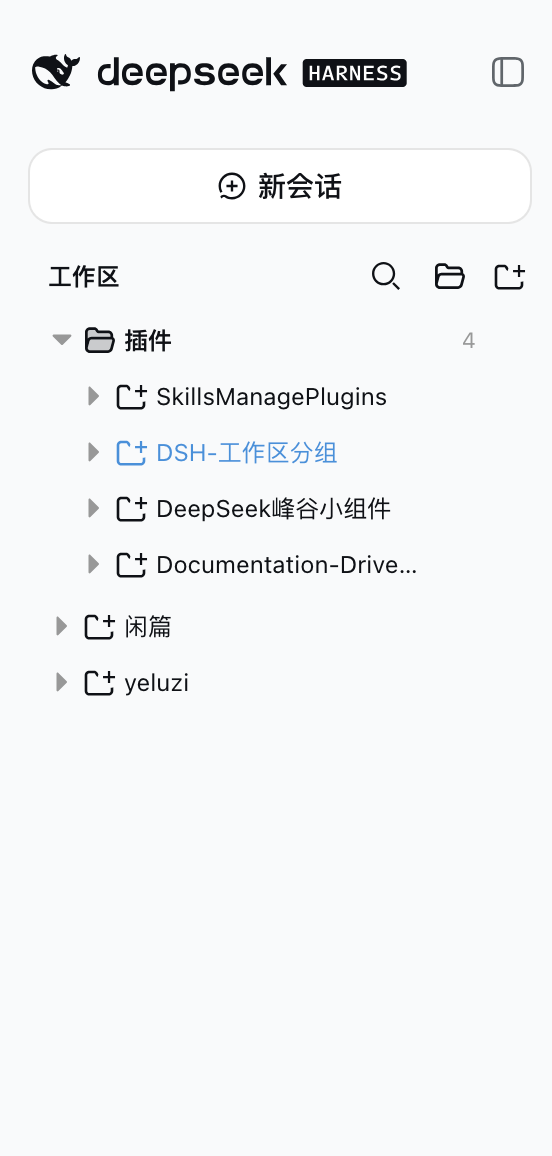
 > **A DeepSeek Harness (DSH) web client plugin: a complete workspace grouping manager.**
> Turns the GUI sidebar's two-level workspace list (Projects → Sessions) into a
> three-level **Category folder → Project folder → Session** tree, backed by full
> group-management capabilities: manual group creation, rename/delete of any group,
> drag-and-drop grouping, free ordering of projects and groups, rule-based
> auto-classification, and tree-shaped search. Every action takes effect
> **immediately and persists**, with **zero intrusion** on official data.
## Screenshot
> **A DeepSeek Harness (DSH) web client plugin: a complete workspace grouping manager.**
> Turns the GUI sidebar's two-level workspace list (Projects → Sessions) into a
> three-level **Category folder → Project folder → Session** tree, backed by full
> group-management capabilities: manual group creation, rename/delete of any group,
> drag-and-drop grouping, free ordering of projects and groups, rule-based
> auto-classification, and tree-shaped search. Every action takes effect
> **immediately and persists**, with **zero intrusion** on official data.
## Screenshot
 ## Features
### Grouped tree browsing
- **Group folder → project folder → session row**, both levels collapsible; expansion state
persists independently (`dsh.workspace.groups.view.v1`, survives refresh/restart)
- **Top-level project rows**: ungrouped projects (matching no rule, dragged out of a group,
or returned by a group delete) render as plain rows right after the group folders, at the
same level — **there is no "未分类" bucket**
- **A "flower branch" runs down the tree and grows to the row you are on.** Ported from the
[RewampUI Flower Sidebar](https://www.rewampui.com/components/flower-sidebar): one continuous
SVG stem behind the rows, with **every dot anchored to its own row's marker** — a folder's dot
sits on its expand triangle, a session's on its status dot — so the three levels form three
clean columns instead of one stem floating beside them. A faint dashed *ghost* draws the whole
route while a solid stroke is drawn only as far as the active row, so the stem visibly reaches
where you are; that row's dot blooms (r 3.2 vs 2). Both coordinates are **measured per row**
(the tree mixes row heights and indents per row via padding, so neither a single pitch nor a
single stem x lands correctly). The overlay is `pointer-events: none` and paints behind the
rows, so every click, hover and drag still belongs to the row. The host theme has no accent hue
to borrow (`--dsw-alias-brand-primary` is the same near-black as the label colour, and the only
saturated tokens are the state colours, which would falsely read as "running" / "needs
attention"), so the bloom is expressed by **size plus full-strength ink** instead.
- **You can tell at a glance which workspace a session belongs to.** Beyond the branch, three
more independent cues — not indent alone, since a 20px indent with identical type at both
levels was previously the *only* difference between a child session and a sibling project row:
1. **Weight**: folder labels 600 (700 for the folder holding the open session); session titles
400 (500 when that session is open).
2. **Typeface**: folder names are directory names and render **monospace**; session titles are
prose in the UI font. This cue is not colour-based, so it survives every theme.
3. **Colour**: folder labels primary, session titles secondary — the open session lifts back.
### Group management (full lifecycle)
- **Create groups manually**: the "新建分组" button in the section header shows the group
immediately (empty groups render too)
- **Rename / delete any group**: every group row (**rule categories included**) has a hover
`⋯` menu; deleting a group sends all of its projects back to the **top level**;
rule-category rename/delete rides the overlay (`renamed` / `hidden`),
**the rule YAML stays untouched**
- **Rule-based auto-classification**: the sidecar YAML declares category rules (`pathPrefix` /
`pathExact` / `nameContains` / `basenameContains`); edit the config to adjust grouping
without touching code
### Drag-and-drop grouping + ordering
- **Drag projects into groups**: drop on any group row or on a project row inside a group
(cross-group move = overrides the rule classification)
- **Drag projects OUT of a group**: the **entire top-level area** is the move-out drop
target while dragging, shown with an **insertion line** (not a highlight box) — drop on
any top-level row (reorder before/after it), on the blank space below the last row
(append), or, when the top level is empty, a standalone line under the last group
folder; grouped projects also have a "移出分组" menu item (rule-classified ones included)
- **Reorder projects inside a group**: top half of a project row = insert before it,
bottom half = insert after it
- **Reorder top-level projects**: top-level rows are draggable too — top half = insert
before, bottom half = insert after; the top-level order persists under
`workspaceOrder["__topLevel__"]`
- **Reorder groups**: group rows are draggable — top half of another group row = move before it,
bottom half = move after it
- **Insertion position indicator**: a 2px line (above/below the row) shows the exact drop
point while dragging — what you see is where it lands
- **Level-aware folding, auto-restored**: dragging a project folds every project row
(grouped AND top-level; group rows stay expanded); dragging a group folds every group
(project rows keep their expansion) — dragend restores the pre-drag expansion snapshot
- **Distinct row icons**: group rows use a folder glyph, project rows a project glyph
(same as the official workspace browser) — groups and projects are easy to tell apart
### Search & operations
- **Tree-shaped search**: results keep the three-level structure (category → project → matched
session), matched rows highlighted with a content snippet, 250ms debounce
- **No regression on workspace/session actions**: Add Workspace, project rename/delete,
session new/open/rename/fork/archive
- **Open in folder**: the project row menu gains an "Open in folder" entry whenever the
host resolved a system file manager (reusing the official open-in-app routes — this
plugin adds no host route of its own)
### Session tabs
- **A tab means "in play", not "once opened".** A session earns a tab only once a conversation
has actually started in it *and* it is still engaged: **running**, **waiting on you**
(approval / plan review / question), or **finished while you were away** (the unread marker —
the tab is what tells you to come back). A blank draft holds no tab until its first message is
sent, and **browsing settled history leaves the strip alone** — clicking through finished
conversations no longer litters it with tabs. Tabs already opened stay open; this rule only
decides whether a *new* one appears. (Browsing history is the sidebar's job; the strip is a
working set. The earlier `!blank` rule failed because a conversation finished last week is
also non-blank.)
- **Each tab is shaped like a folder tab**: the workspace on a **short top line** over the session
title on a **longer bottom line**, so the stacked pair reads as a labelled folder rather than two
unrelated strings. The workspace line is monospace, smaller (10px) and secondary; the title is
12px and primary, making the conversation the chip's subject. Each line sizes to its own content
(`align-items: flex-start`), which is what produces the short-over-long shape. Chips carry a
faint inset outline that strengthens on the active one, so a row of them reads as separate
objects instead of one continuous bar. A session in no workspace shows its title alone,
vertically centred. The tooltip carries the full `workspace · title` plus the directory path.
- **The strip is kept on the HOST, and survives a reload, a restart and a port change.** It is
stored in a JSON sidecar under `$DSH_HOME` (`workspace-groups.tabs.json`), served over
`GET|PUT /workspace-groups/tabs`. Browser storage **cannot** do this job: the origin includes
the **port**, every launch picks a new one, and `localStorage` / `sessionStorage` are both
scoped to the origin — so a tab list kept there starts empty next time. The read is deliberately
**not gated by any browser-session marker**: a marker has to live in browser storage too, so the
port change would erase it and every restart would look like a fresh session (that bug shipped
once and silently discarded the user's tabs). The sidecar simply is the strip's memory, and a
file written by the older marker-based build still loads — the extra field is ignored.
- **A tab appears the moment a session starts working**: a sidebar session row, a workspace's
`+` (New Session), the Ctrl+R quick switch, or a conversation-header crumb — open a session
from any entry point and, once it starts running, is waiting on you, or finished while you
were away, a tab appears in the strip at the **top of the conversation column**; opening
another adds another (one tab per session)
- **Positions never move once placed**: a tab's slot in the strip is decided when it is first
opened and never changes afterwards. Switching to a tab — or re-opening a session that
already has one — only moves the *highlight*; the chips stay exactly where they are, so a
click never slides the chip out from under your pointer. Only two things change the order:
a session opening for the first time (appended at the end) and a tab closing
- **Scrolls sideways when the strip fills up, with no scrollbar**: chips hold their natural
width instead of squeezing, so past the available width the row scrolls horizontally. The
bar itself is hidden (`scrollbar-width: none` + `::-webkit-scrollbar`), keeping the strip
one line tall. A plain mouse wheel scrolls it sideways, and the active chip is scrolled into
view when you switch sessions — so a tab far to the right is never stranded off-screen
- **Only YOU close a tab.** The `×` on the right of a tab is the single way it disappears — the
plugin never trims the strip on its own. Not on archive, not on Host deletion, not when a
session drops out of the catalog: a tab you opened stays until you say otherwise, and it
survives reloads and restarts (see the persistence note below). This is deliberate. An
automatic sweep eventually eats tabs the user wanted, and it also misfires for a mechanical
reason — the session catalog is briefly empty on every load, so a "close tabs whose session is
gone" rule deletes every restored tab before the sessions have even arrived.
- **Session status per tab**: the dot reuses the sidebar's vocabulary — amber = a question,
approval, or plan review is waiting, green = running (subagent work included), grey = idle
(the unread-completion reminder uses the same completion dot)
- **Active chip**: the tab whose session is open is highlighted with an inset accent bar; a
click on a background chip switches through the official `ctx.uiWorkspace.openSession` — the
exact path a sidebar row takes
- **Double-click renames**: double-clicking a tab opens the session rename dialog (the same one
the sidebar's `⋯` menu opens)
- **Blank drafts never take a tab**: a scratch New Session stays out of the strip and earns a
tab the moment its first turn gives the session a title
- Tab order and the open selection **persist** (`dsh.workspace.groups.tabs.v1`), so a reload
keeps the strip in the same order
### Persistence & zero intrusion
- Every manual action (groups, grouping, ordering, rename, hide) is written to the plugin's own
overlay (`~/.dsh/workspace-groups.manual.json`), validated by the host and **written
atomically** (a malformed write returns 400 and keeps the previous file)
- **Zero intrusion**: never touches `~/.dsh/storages/workspace.json`, session on-disk
structures, or the official `@deepseek-ai/dsh-client-ui-workspace` package; the rule YAML
is never rewritten
- **Self-contained artifact**: `lib/` is prebuilt and shipped with the repo — installing from
Git runs no dependency scripts
## How it works
- The plugin is a **client plugin** with ONE slot registration plus one DOM-seated view:
1. the sidebar browser, registered into the official sidebar shell's `sidebar.workspaces`
slot (`kind: 'single'`, `scope: 'root'`) at `priority: -1`, replacing the official
WorkspaceBrowser (registered at priority 0; lowest priority wins in a single slot);
2. the session tab strip, which is **not a slot occupant**. It renders through a React
portal into a container injected as the **first child of the conversation column**
(`centerCol` in ui-layout's AppFrame) — the row directly above the conversation panel.
- **Why a DOM seat instead of a slot**: the conversation column declares **no child slot**.
Its only child is the `main` slot's occupant (the Conversation or a global panel), so there
is nowhere to register a strip. The nearest shipped slot,
`conversation.composer.dock`, is the band *under* the composer card — a different place
entirely. The strip therefore claims a real DOM node: `tab-seat.ts` finds the column by the
`_centerCol` class suffix the CSS-Modules transform always preserves (never the build-hashed
prefix), prepends its own `
## Features
### Grouped tree browsing
- **Group folder → project folder → session row**, both levels collapsible; expansion state
persists independently (`dsh.workspace.groups.view.v1`, survives refresh/restart)
- **Top-level project rows**: ungrouped projects (matching no rule, dragged out of a group,
or returned by a group delete) render as plain rows right after the group folders, at the
same level — **there is no "未分类" bucket**
- **A "flower branch" runs down the tree and grows to the row you are on.** Ported from the
[RewampUI Flower Sidebar](https://www.rewampui.com/components/flower-sidebar): one continuous
SVG stem behind the rows, with **every dot anchored to its own row's marker** — a folder's dot
sits on its expand triangle, a session's on its status dot — so the three levels form three
clean columns instead of one stem floating beside them. A faint dashed *ghost* draws the whole
route while a solid stroke is drawn only as far as the active row, so the stem visibly reaches
where you are; that row's dot blooms (r 3.2 vs 2). Both coordinates are **measured per row**
(the tree mixes row heights and indents per row via padding, so neither a single pitch nor a
single stem x lands correctly). The overlay is `pointer-events: none` and paints behind the
rows, so every click, hover and drag still belongs to the row. The host theme has no accent hue
to borrow (`--dsw-alias-brand-primary` is the same near-black as the label colour, and the only
saturated tokens are the state colours, which would falsely read as "running" / "needs
attention"), so the bloom is expressed by **size plus full-strength ink** instead.
- **You can tell at a glance which workspace a session belongs to.** Beyond the branch, three
more independent cues — not indent alone, since a 20px indent with identical type at both
levels was previously the *only* difference between a child session and a sibling project row:
1. **Weight**: folder labels 600 (700 for the folder holding the open session); session titles
400 (500 when that session is open).
2. **Typeface**: folder names are directory names and render **monospace**; session titles are
prose in the UI font. This cue is not colour-based, so it survives every theme.
3. **Colour**: folder labels primary, session titles secondary — the open session lifts back.
### Group management (full lifecycle)
- **Create groups manually**: the "新建分组" button in the section header shows the group
immediately (empty groups render too)
- **Rename / delete any group**: every group row (**rule categories included**) has a hover
`⋯` menu; deleting a group sends all of its projects back to the **top level**;
rule-category rename/delete rides the overlay (`renamed` / `hidden`),
**the rule YAML stays untouched**
- **Rule-based auto-classification**: the sidecar YAML declares category rules (`pathPrefix` /
`pathExact` / `nameContains` / `basenameContains`); edit the config to adjust grouping
without touching code
### Drag-and-drop grouping + ordering
- **Drag projects into groups**: drop on any group row or on a project row inside a group
(cross-group move = overrides the rule classification)
- **Drag projects OUT of a group**: the **entire top-level area** is the move-out drop
target while dragging, shown with an **insertion line** (not a highlight box) — drop on
any top-level row (reorder before/after it), on the blank space below the last row
(append), or, when the top level is empty, a standalone line under the last group
folder; grouped projects also have a "移出分组" menu item (rule-classified ones included)
- **Reorder projects inside a group**: top half of a project row = insert before it,
bottom half = insert after it
- **Reorder top-level projects**: top-level rows are draggable too — top half = insert
before, bottom half = insert after; the top-level order persists under
`workspaceOrder["__topLevel__"]`
- **Reorder groups**: group rows are draggable — top half of another group row = move before it,
bottom half = move after it
- **Insertion position indicator**: a 2px line (above/below the row) shows the exact drop
point while dragging — what you see is where it lands
- **Level-aware folding, auto-restored**: dragging a project folds every project row
(grouped AND top-level; group rows stay expanded); dragging a group folds every group
(project rows keep their expansion) — dragend restores the pre-drag expansion snapshot
- **Distinct row icons**: group rows use a folder glyph, project rows a project glyph
(same as the official workspace browser) — groups and projects are easy to tell apart
### Search & operations
- **Tree-shaped search**: results keep the three-level structure (category → project → matched
session), matched rows highlighted with a content snippet, 250ms debounce
- **No regression on workspace/session actions**: Add Workspace, project rename/delete,
session new/open/rename/fork/archive
- **Open in folder**: the project row menu gains an "Open in folder" entry whenever the
host resolved a system file manager (reusing the official open-in-app routes — this
plugin adds no host route of its own)
### Session tabs
- **A tab means "in play", not "once opened".** A session earns a tab only once a conversation
has actually started in it *and* it is still engaged: **running**, **waiting on you**
(approval / plan review / question), or **finished while you were away** (the unread marker —
the tab is what tells you to come back). A blank draft holds no tab until its first message is
sent, and **browsing settled history leaves the strip alone** — clicking through finished
conversations no longer litters it with tabs. Tabs already opened stay open; this rule only
decides whether a *new* one appears. (Browsing history is the sidebar's job; the strip is a
working set. The earlier `!blank` rule failed because a conversation finished last week is
also non-blank.)
- **Each tab is shaped like a folder tab**: the workspace on a **short top line** over the session
title on a **longer bottom line**, so the stacked pair reads as a labelled folder rather than two
unrelated strings. The workspace line is monospace, smaller (10px) and secondary; the title is
12px and primary, making the conversation the chip's subject. Each line sizes to its own content
(`align-items: flex-start`), which is what produces the short-over-long shape. Chips carry a
faint inset outline that strengthens on the active one, so a row of them reads as separate
objects instead of one continuous bar. A session in no workspace shows its title alone,
vertically centred. The tooltip carries the full `workspace · title` plus the directory path.
- **The strip is kept on the HOST, and survives a reload, a restart and a port change.** It is
stored in a JSON sidecar under `$DSH_HOME` (`workspace-groups.tabs.json`), served over
`GET|PUT /workspace-groups/tabs`. Browser storage **cannot** do this job: the origin includes
the **port**, every launch picks a new one, and `localStorage` / `sessionStorage` are both
scoped to the origin — so a tab list kept there starts empty next time. The read is deliberately
**not gated by any browser-session marker**: a marker has to live in browser storage too, so the
port change would erase it and every restart would look like a fresh session (that bug shipped
once and silently discarded the user's tabs). The sidecar simply is the strip's memory, and a
file written by the older marker-based build still loads — the extra field is ignored.
- **A tab appears the moment a session starts working**: a sidebar session row, a workspace's
`+` (New Session), the Ctrl+R quick switch, or a conversation-header crumb — open a session
from any entry point and, once it starts running, is waiting on you, or finished while you
were away, a tab appears in the strip at the **top of the conversation column**; opening
another adds another (one tab per session)
- **Positions never move once placed**: a tab's slot in the strip is decided when it is first
opened and never changes afterwards. Switching to a tab — or re-opening a session that
already has one — only moves the *highlight*; the chips stay exactly where they are, so a
click never slides the chip out from under your pointer. Only two things change the order:
a session opening for the first time (appended at the end) and a tab closing
- **Scrolls sideways when the strip fills up, with no scrollbar**: chips hold their natural
width instead of squeezing, so past the available width the row scrolls horizontally. The
bar itself is hidden (`scrollbar-width: none` + `::-webkit-scrollbar`), keeping the strip
one line tall. A plain mouse wheel scrolls it sideways, and the active chip is scrolled into
view when you switch sessions — so a tab far to the right is never stranded off-screen
- **Only YOU close a tab.** The `×` on the right of a tab is the single way it disappears — the
plugin never trims the strip on its own. Not on archive, not on Host deletion, not when a
session drops out of the catalog: a tab you opened stays until you say otherwise, and it
survives reloads and restarts (see the persistence note below). This is deliberate. An
automatic sweep eventually eats tabs the user wanted, and it also misfires for a mechanical
reason — the session catalog is briefly empty on every load, so a "close tabs whose session is
gone" rule deletes every restored tab before the sessions have even arrived.
- **Session status per tab**: the dot reuses the sidebar's vocabulary — amber = a question,
approval, or plan review is waiting, green = running (subagent work included), grey = idle
(the unread-completion reminder uses the same completion dot)
- **Active chip**: the tab whose session is open is highlighted with an inset accent bar; a
click on a background chip switches through the official `ctx.uiWorkspace.openSession` — the
exact path a sidebar row takes
- **Double-click renames**: double-clicking a tab opens the session rename dialog (the same one
the sidebar's `⋯` menu opens)
- **Blank drafts never take a tab**: a scratch New Session stays out of the strip and earns a
tab the moment its first turn gives the session a title
- Tab order and the open selection **persist** (`dsh.workspace.groups.tabs.v1`), so a reload
keeps the strip in the same order
### Persistence & zero intrusion
- Every manual action (groups, grouping, ordering, rename, hide) is written to the plugin's own
overlay (`~/.dsh/workspace-groups.manual.json`), validated by the host and **written
atomically** (a malformed write returns 400 and keeps the previous file)
- **Zero intrusion**: never touches `~/.dsh/storages/workspace.json`, session on-disk
structures, or the official `@deepseek-ai/dsh-client-ui-workspace` package; the rule YAML
is never rewritten
- **Self-contained artifact**: `lib/` is prebuilt and shipped with the repo — installing from
Git runs no dependency scripts
## How it works
- The plugin is a **client plugin** with ONE slot registration plus one DOM-seated view:
1. the sidebar browser, registered into the official sidebar shell's `sidebar.workspaces`
slot (`kind: 'single'`, `scope: 'root'`) at `priority: -1`, replacing the official
WorkspaceBrowser (registered at priority 0; lowest priority wins in a single slot);
2. the session tab strip, which is **not a slot occupant**. It renders through a React
portal into a container injected as the **first child of the conversation column**
(`centerCol` in ui-layout's AppFrame) — the row directly above the conversation panel.
- **Why a DOM seat instead of a slot**: the conversation column declares **no child slot**.
Its only child is the `main` slot's occupant (the Conversation or a global panel), so there
is nowhere to register a strip. The nearest shipped slot,
`conversation.composer.dock`, is the band *under* the composer card — a different place
entirely. The strip therefore claims a real DOM node: `tab-seat.ts` finds the column by the
`_centerCol` class suffix the CSS-Modules transform always preserves (never the build-hashed
prefix), prepends its own ``, and re-inserts that same element if React reconciles the
column's child list. A `MutationObserver` plus a bounded `requestAnimationFrame` retry covers
the column mounting after the plugin's `apply()` runs; both are torn down with the effect.
- **One handle, one scope**: the DOM seat is also what keeps the tab store legal. DSH's slot
registry enforces *one handle, one scope* — mounting one store handle under both
`sidebar.workspaces` (`root`) and a session-scoped slot (`session`) throws and aborts the
whole client `apply()`. Because the strip is a child of the browser entry rather than a
second registration, the store is seated exactly once.
- **Who owns the strip**: tabs are a **view**, not a second navigation model. The tab
lifecycle (which sessions hold a tab, in what order) belongs to the sidebar browser — it
already derives the open session for its own tree, so "does this session need a tab?" is
decided in exactly one place (and the effect is idempotent per session). The strip only
renders and supplies the navigation verbs, receiving the tab store, the session hooks and
the navigation callbacks as ordinary props from that one component.
- All data comes from the runtime API: the `useWorkspaces` / `useSessions` /
`useSessionStatus` global hooks and `ctx.workspaces.*` / `ctx.sessions.*` /
`ctx.uiWorkspace.*` — grouping is purely a **presentation-layer transform**.
- The host half does two things: parses the sidecar YAML and merges it with the runtime
overlay, served to the client via `GET /workspace-groups/config` (`Cache-Control: no-cache`);
and `PUT /workspace-groups/manual` accepts the full overlay (manual groups, per-workspace
grouping overrides, group/project ordering, rule-category renames and hides), validates it
and writes it atomically to `$DSH_HOME/workspace-groups.manual.json`.
- **Classification priority**: manual override (written by drag/menu; `null` = forced
top-level, rules ignored) → YAML rule classification (hidden rule categories are inert)
→ **top level** (ungrouped projects render as top-level rows). The YAML is never
rewritten.
## Install (npm)
> Prerequisite: [DeepSeek Harness](https://github.com/deepseek-ai/deepseek-harness)
> installed (`dsh` available) with a target profile initialized (e.g. the built-in `web`).
>
> Version pairing: `0.3.x` of this plugin targets the `dsh 0.1.7-rc.2` client
> contract (`useSessionStatus` / `ctx.uiWorkspace` / the `mainView` selection
> model); on a `0.1.2-rc.1`-era `dsh`, use `0.1.2`.
>
> `0.3.0` note: `dsh 0.1.7` renamed the whole `dsh-client-ui-primitives` icon set
> from size suffixes to weight suffixes (`IconCloseFill14` → `IconCloseFillMedium` /
> `…Regular`, no legacy aliases); every call site now uses the new names directly.
```sh
dsh plugin --profile web add @dsh-xhl/workspace-groups
```
This automatically:
1. Adds `"@dsh-xhl/workspace-groups": "^0.3.0"` to `dependencies` in
`~/.dsh/profiles/web/package.json`
2. Appends `"@dsh-xhl/workspace-groups"` to `dsh.profile.bundles`
3. Runs pnpm install and validates the bundle layer
**Restart the web profile after installing** (both the bundle and the host half only load
on restart):
```sh
# Stop the running dsh web process and start it again, e.g.:
dsh web
```
Verify the install:
```sh
dsh --profile web --dump-config | grep -A3 workspace-groups
# expect: - id: workspace-groups / name: @dsh-xhl/workspace-groups / config: {}
curl http://127.0.0.1:3080/workspace-groups/config
# expect: the sidecar YAML parsed as JSON
```
### Alternative: install from GitHub
```sh
dsh plugin --profile web add github:z-col/dsh-workspace-groups
```
This adds `"dsh-workspace-groups": "github:z-col/dsh-workspace-groups"` (pinned to
version/commit) to `dependencies` instead. The GitHub distribution works from the
committed `lib/` artifacts and requires no publish step.
## Uninstall
```sh
dsh plugin --profile web remove @dsh-xhl/workspace-groups
```
This removes the dependency from `dependencies` and the matching line from
`dsh.profile.bundles`. A **web profile restart** is required for it to take effect.
> Manual equivalent (pick one, don't repeat): edit `~/.dsh/profiles/web/package.json`,
> remove the `@dsh-xhl/workspace-groups` line from `dependencies` and
> `"@dsh-xhl/workspace-groups"` from `dsh.profile.bundles`, then run `pnpm install` in
> that directory.
## Classification config (sidecar)
Default location `~/.dsh/workspace-groups.yaml` (override the home dir with the
`$DSH_HOME` env var). Template: `workspace-groups.example.yaml` at the repo root.
```yaml
categories:
- name: DSH 插件
rules:
- pathPrefix: /Users/zcol/Project/SkillsManagePlugins
- nameContains: 插件
- basenameContains: plugin
- name: 个人项目
rules:
- pathPrefix: /Users/zcol/Project/yeluzi
```
Rule fields (each rule is an OR — any match classifies; categories are matched in order,
first match wins):
| Field | Meaning |
|---|---|
| `pathPrefix` | Project absolute path prefix |
| `pathExact` | Project absolute path exact match |
| `nameContains` | Project display title contains (case-insensitive) |
| `basenameContains` | Project directory name contains (case-insensitive) |
Projects matching no category — or moved out of a group — render as **top-level project
rows** (same level as the group folders), never hidden.
## Manual groups & drag-and-drop grouping (runtime overlay)
Besides the rule YAML there is a plugin-owned runtime overlay, **recording only manual
UI operations**, at `$DSH_HOME/workspace-groups.manual.json` (e.g. `~/.dsh/workspace-groups.manual.json`):
```json
{
"categories": ["临时", "归档"],
"assignments": {
"a1b2c3d4-e5f6-7890-abcd-ef1234567890": "临时",
"a1b2c3d4-e5f6-7890-abcd-ef1234567891": null
},
"categoryOrder": ["临时", "DSH 插件"],
"workspaceOrder": { "临时": ["a1b2c3d4-e5f6-7890-abcd-ef1234567890"] },
"renamed": { "DSH 插件": "插件集" },
"hidden": ["文档"]
}
```
- `categories` — manually created group names (no rules; empty groups render too).
- `assignments` — workspace → group classification overrides keyed by the stable workspace id
(renames don't affect it). **Takes precedence over YAML rules**; a value of `null` means
**forced top-level** (even when a rule would match).
- `categoryOrder` — group display order (top-level rows are not listed here; they always
render after the group folders).
- `workspaceOrder` — per-group manual ordering of projects (written by drag ordering).
- `renamed` / `hidden` — UI rename/delete of rule categories (a hidden category's rules become
inert and its matches go top-level); the rule YAML stays untouched.
- The file is written in full by the browser UI (`PUT /workspace-groups/manual`, atomic
replace); manual edits also take effect on next load. A malformed write returns 400 and
keeps the previous file — the rule YAML is never at risk.
| Action | How |
|---|---|
| Create group | "新建分组" button in the section header (folder icon), enter a name in the dialog |
| Rename/delete group | hover `⋯` menu on **any** group (rule categories included); deleting sends its projects back to the top level |
| Drag project into group | drag a project row onto a target group row / any project row inside a group, release to move |
| Reorder projects | drag a project row onto another project row in the same group: **top half = insert before, bottom half = insert after** (indicator shows the spot); all project rows fold while dragging and restore on dragend |
| Reorder top-level projects | drag a top-level row onto another top-level row: **top half = insert before, bottom half = insert after**; order persists under `workspaceOrder["__topLevel__"]` |
| Move out of a group | drop anywhere on the **top-level area** (an insertion line shows the spot — reorder before/after a top-level row, or append below the last row; when the top level is empty a line shows under the last group), or the project row's "移出分组" menu (forced top-level) |
| Reorder groups | drag a group row onto another group row: **top half = move before, bottom half = move after** (indicator shows the spot; all groups fold while dragging, restored on dragend) |
| Open in folder | the project row's "在文件夹中打开" / "Open in folder" menu entry — opens the project directory in the host's file manager (see below) |
### Open in folder (reuses the official open-in-app)
The project row's "Open in folder" entry carries **no launching logic of its own**: it
reuses what the official `@deepseek-ai/dsh-host-open-in-app` already resolved —
`GET /open-in-app/apps` reads back the applications that host verified as launchable,
the plugin picks this platform's file manager from them
(Windows `explorer` / macOS `finder` / Linux `filemanager`), and POSTs the project
directory to `POST /open-in-app/open` for its **verified launcher** to handle.
- When that host half resolved no file manager (e.g. a remote SSH deployment),
**the entry is simply absent** rather than failing on click; a project whose
directory no longer exists is refused by the host with 404 and surfaces as a
transient "could not open the folder" banner.
- This plugin's own host half is therefore **unchanged**: no new route, no process
spawn — permissions and the Host/Origin fence stay with those three official routes.
## Topics
This repo targets automatic discovery by the DSH plugin ecosystem (community marketplaces
scan GitHub topics). Already set:
- `dsh-plugin` (core tag; [1024Store](https://github.com/imsai-sh/awesome-deepseek-harness-plugins)
and similar marketplaces discover by this topic periodically, validating
`package.json` + the plugin bundle manifest (`cordis.patch.yml`))
- `deepseek-harness` / `deepseek-harness-plugin` / `dsh`
- `sidebar` / `workspace` / `workspace-groups`
`package.json` also provides `keywords` for npm/search indexing.
## Development
```sh
pnpm install
pnpm typecheck # host + client dual-program type checking
pnpm test # core rules, overlay, tree derivation unit tests
pnpm build # build lib/ (node half + client bundle)
pnpm watch # tsdown watch (client HMR)
node scripts/verify-groups.mjs # real-browser CDP verification (host restarted; self-spawns a headless Chrome, auto-restores the scene)
```
Artifact contract (mirrors the official client packages):
- `lib/index.js` — host half (ESM; reads the sidecar + `/workspace-groups/config` route;
js-yaml inlined, no runtime dependencies)
- `lib/client.js` — browser half (`window.__ModuleLoader__.load({id, factory})`; only
requires platform seeds: react / react/jsx-runtime / react-dom /
@deepseek-ai/dsh-client-store / @deepseek-ai/dsh-client-ui-slots /
@deepseek-ai/dsh-client-ui-primitives; cross-plugin value imports are rejected at build
time by the purity gate)
- `lib/types/**` — declaration files
> Release strategy: `lib/` build artifacts are committed (no `prepare` script), so
> `dsh plugin add github:...` never runs third-party build scripts — install and use.
## Repository layout
```
src/
index.ts # host half: config snapshot route + manual write route + tabs route
host-config.ts # sidecar YAML reading/validation
host-manual.ts # runtime overlay read/write/validation (atomic publish)
host-tabs.ts # session-tab sidecar: atomic write + browser-session lifetime
context-types.ts # host-side cordis service structure types
core/
types.ts # config types (shared by both halves)
matcher.ts # classification + manual override priority + ordering pure functions (shared)
client/
index.ts # apply: registers sidebar.workspaces (priority -1); seats the tab store once
contract.ts # injected surface types (browser) + the strip's plain props
stores.ts # expansion-state store (persist: dsh.workspace.groups.view.v1)
tab-store.ts # session-tab store (hydrated from the host)
tab-persist.ts # client side of /workspace-groups/tabs (host-backed strip)
tabs.ts # pure tab state: append/close/restore/indicator derivation
store-hook.ts # selector hook over a store instance (the framework binds this for slot seats only)
tab-seat.ts # DOM seat: injects the strip container as the conversation column's first child
tree.ts # three-level tree derivation + tree search derivation
branch.ts # flower-branch geometry: the curly stem, its kinks, and the dots
GroupsBrowser.tsx # browser region component (group dialogs + drag grouping/ordering + insertion indicator)
SessionTabs.tsx # session tab strip component (portalled into the column-head seat)
FlowerBranch.tsx # SVG overlay that grows the stem to the active row
rows.tsx # category/project/session/search-result rows (drag sources/targets)
open-folder.ts # "open in folder" transport (client of the official open-in-app routes)
locales.ts # zh/en copy
styles.css # inline styles (browser + tab strip)
tests/
core.test.ts # classification rules + override priority + moveBefore/moveAfter + config parsing
manual.test.ts # overlay validation + atomic file round-trip
tree.test.ts # tree derivation rendering contract (manual group empty render / override priority)
store.test.ts # expansion semantics (collapse writes false, never deletes the key)
quick.test.ts # quick-panel data shaping (running first / workspace search ranking)
tabs.test.ts # tab state (append, close, restore, blank drafts, indicators, no sweep)
tab-seat.test.ts # DOM seat (first-child placement, late column mount, re-seat after React removes it, dispose)
branch.test.ts # flower-branch geometry (kink per group, dot per row on its own y, grown stops at active)
host-tabs.test.ts # host tab store (atomic write, no session gating, legacy-file compat, corrupt fallback)
styles.test.ts # tab-strip layout contract (chips do not shrink, row scrolls, scrollbar hidden)
open-folder.test.ts # open-in-app transport (file-manager pick + read/POST contract)
scripts/
verify-groups.mjs # real-browser CDP verification (self-spawns headless Chrome, auto-restores the scene)
```
> Development docs (`docs/` five-level framework and `AGENTS.md`) are engineering files for
> development, **not shipped with the repo** (excluded via `.gitignore`).
## Verification record
- v0.1/v0.2 real-combination verification (headless Chrome + CDP): three-level tree takeover,
correct classification, expansion persistence, search keeps workspace membership;
`workspace.json` / session on-disk / official store: zero intrusion.
- v0.3 real-browser verification 24/24 (`scripts/verify-groups.mjs`: create group / drag /
order / collapse / rule-category menu / rename / delete-back-to-top-level /
scene restore; zero-intrusion assertions).
- v0.4 real-browser verification 30/30 (added: insertion indicator, project/group
**downward drag** (bottom half → insert after the target), group upward drag (top half →
move before the target); scene restored).
- v0.4.1 real-browser verification 34/34 (added: dragging projects OUT of a group —
top-level drop zone / top-level rows = forced top-level; grouped projects get the
"移出分组" menu item).
- v0.5 real-browser verification 35/35 (model change: **no "未分类" bucket** — top-level
project rows, group delete returns members to the top level, drag/menu move-out to the
top level, no uncategorized bucket anywhere in the tree; scene restored).
- v0.6 real-browser verification 40/40 (added: **level-aware folding** — dragging a project
folds project rows only (group rows stay open), dragging a group folds group rows only;
dragend restores the pre-drag expansion snapshot).
- v0.6.1 real-browser verification 42/42 (added: the whole top-level area as the move-out
drop target with a visible landing highlight; distinct folder-vs-project row icons;
scene restored).
- v0.7 real-browser verification 46/46 (added: top-level landing shown with an **insertion
line** instead of a highlight box — reorder before/after a top-level row, append below
the last row, or a standalone line when the top level is empty; **top-level projects are
reorderable** with their order persisted under `workspaceOrder["__topLevel__"]`; also
fixed a host validation bug that rejected `__topLevel__` and a drop-positioning bug where
dropping between two top-level rows landed above the first; scene restored).
- v0.8: **open in folder** on the project row, reusing the official open-in-app host routes
(per-platform file-manager pick, entry absent when the host resolved none, launch
failures surfaced as a transient banner).
- v0.9: **session tabs** — one strip at the **top of the conversation column**, injected as the
column's first child (the column declares no child slot, and the nearest shipped slot sits
under the composer card instead); clicking a session opens a tab, tabs close individually,
the status dot reuses the sidebar vocabulary, double-click renames, blank drafts stay out,
and the order persists.
- v0.9.1: rebuilt for **DSH 0.1.7-rc.2** — the client contract moved the icon set from
size-suffixed names (`IconCloseFill14`) to weight-suffixed ones (`IconCloseFillMedium` /
`…Regular`), and the tab store now mounts under a single scope (the slot version mounted one
handle under both `root` and `session`, which the registry rejects).
- v0.9.2: **tab positions are stable** — the strip no longer pulls the active tab to the front,
so clicking a tab switches the conversation without moving the chip; the store's `touch`
and `close` transforms are now no-ops when nothing changed, which stops the arrival counter
churning on every catalog update.
- v0.9.3: **the strip scrolls sideways past the available width, with no scrollbar** — chips
hold their natural width (`flex: 0 0 auto`) instead of shrinking, a plain wheel scrolls the
row horizontally, and the active chip is kept in view. The active chip also gets the host's
selected-row fill instead of a hardcoded blue accent bar (`--dsw-accent` / `--dsw-bg-selected`
are not product theme tokens, so those always fell through to blue literals).
- v0.9.4: **tabs name their project** (`project · title`, mono prefix, tooltip with the path),
and the **sidebar tree is legible at a glance** — heavier monospace folder labels against
lighter prose session titles.
- v0.10: **flower branch** — one continuous SVG stem down the sidebar tree, kinking at each
project, with a dot per row on the curve; a dashed ghost draws the whole route and a solid
stroke grows to the active row, whose dot blooms. Replaces the per-folder guide rail.
- v0.10.1: **tabs mean "in play", not "once opened"** — a session earns a tab only while it is
running, waiting on you, or finished-unread, so browsing settled history no longer fills the
strip. A draft holds no tab until its first message is sent.
- v0.10.2: **tabs are folder-shaped** — the workspace sits on a short top line over the session
title on a longer bottom line, each line sizing to its own content.
- v0.11: **roomier tabs** (56px strip, 8/10px padding, 6px between chips, 3px between the two
lines, an inset outline per chip) and **tabs persist to the host** (`$DSH_HOME/…tabs.json` over
`GET|PUT /workspace-groups/tabs`) — browser storage is per-origin and the port changes every
launch, so it could never restore a strip. One bug found while verifying: the persistence
subscriber wrote the store's initial EMPTY state over the stored tabs before the host read
resolved (fixed with a hydration latch — writes now happen only on a real state change).
- v0.11.1: **a tab is removed only by the user.** All automatic trimming is gone: no catalog-driven
sweep, no close on archive or Host deletion. The rule is the user's ("unless I close it, the
program must not delete it"), and the sweep was also mechanically broken — the session catalog
is briefly empty on every load, so it deleted restored tabs before the sessions arrived. The
persistence subscriber now only writes on a real state change, so a failed or empty read can no
longer erase the stored strip either.
- v0.11.2: **the restart fix.** The `X-WG-Session` marker is gone. It lived in `sessionStorage`,
which the port change erased, so every restart presented a new marker and the host withheld the
stored tabs — the exact "restart doesn't show my tabs" bug. The sidecar is now returned
verbatim, and a legacy file's extra `sessionKey` field is ignored. `restore` also MERGES
instead of bailing on a non-empty strip: the tab opened during startup and the stored tabs now
both survive.
- v0.12 (release `0.3.0`): merged the remote `0.2.1` icon-rename fix — every call site now uses
the `dsh 0.1.7` weight-suffixed names directly (`IconCloseFillMedium` / `…Regular`), so the
remote `icons.ts` alias table is no longer needed and has been deleted. The remote inject-face
fixes are kept: the reserved `hooks.directoryFlow` compartment (the official entry stays
registered behind this one and gates its own "Add workspace…" affordance on that hole) and the
dual map/record read of `SessionStatusSnapshot`.
- Typecheck + build pass (including the client-bundle purity gate).
- 179 unit tests green (vitest: `core` / `manual` / `tree` / `store` / `quick` / `tabs` /
`tab-seat` / `host-tabs` / `branch` / `styles` / `open-folder`).
- Reproducible automated verification: `node scripts/verify-groups.mjs` (host restarted).
## License
MIT