<div align="center">

<img src="assets/logo.svg" width="72" height="72" alt="Kineto">

# Kineto

**A web motion library with live controls and copy-ready code.**

English · [한국어](i18n/README.ko.md) · [日本語](i18n/README.jp.md) · [简体中文](i18n/README.zh-CN.md) · [繁體中文](i18n/README.zh-TW.md) · [Русский](i18n/README.ru.md) · [Italiano](i18n/README.it.md)

<p><a href="https://github.com/catgarret/kineto/actions/workflows/ci.yml"><img src="https://github.com/catgarret/kineto/actions/workflows/ci.yml/badge.svg" alt="CI" height="20"></a>&nbsp;&nbsp;<a href="https://www.npmjs.com/package/@dong-gri/kineto"><img src="https://img.shields.io/npm/v/@dong-gri/kineto.svg" alt="npm" height="20"></a>&nbsp;&nbsp;<a href="LICENSE"><img src="https://img.shields.io/npm/l/@dong-gri/kineto.svg" alt="license" height="20"></a>&nbsp;&nbsp;<a href="https://www.jsdelivr.com/package/npm/@dong-gri/kineto"><img src="https://img.shields.io/jsdelivr/npm/hm/@dong-gri/kineto.svg" alt="jsDelivr" height="20"></a></p>

[Live demo](https://kineto.dongri.me) · [Module reference](docs/module-reference.md) · [Usage and quality matrix](docs/module-usage-matrix.md) · [Troubleshooting](docs/troubleshooting.md) · [AI prompt guide](AI-PROMPT-GUIDE.md) · [Feature contract](FEATURE_CONTRACT.md)

</div>

---

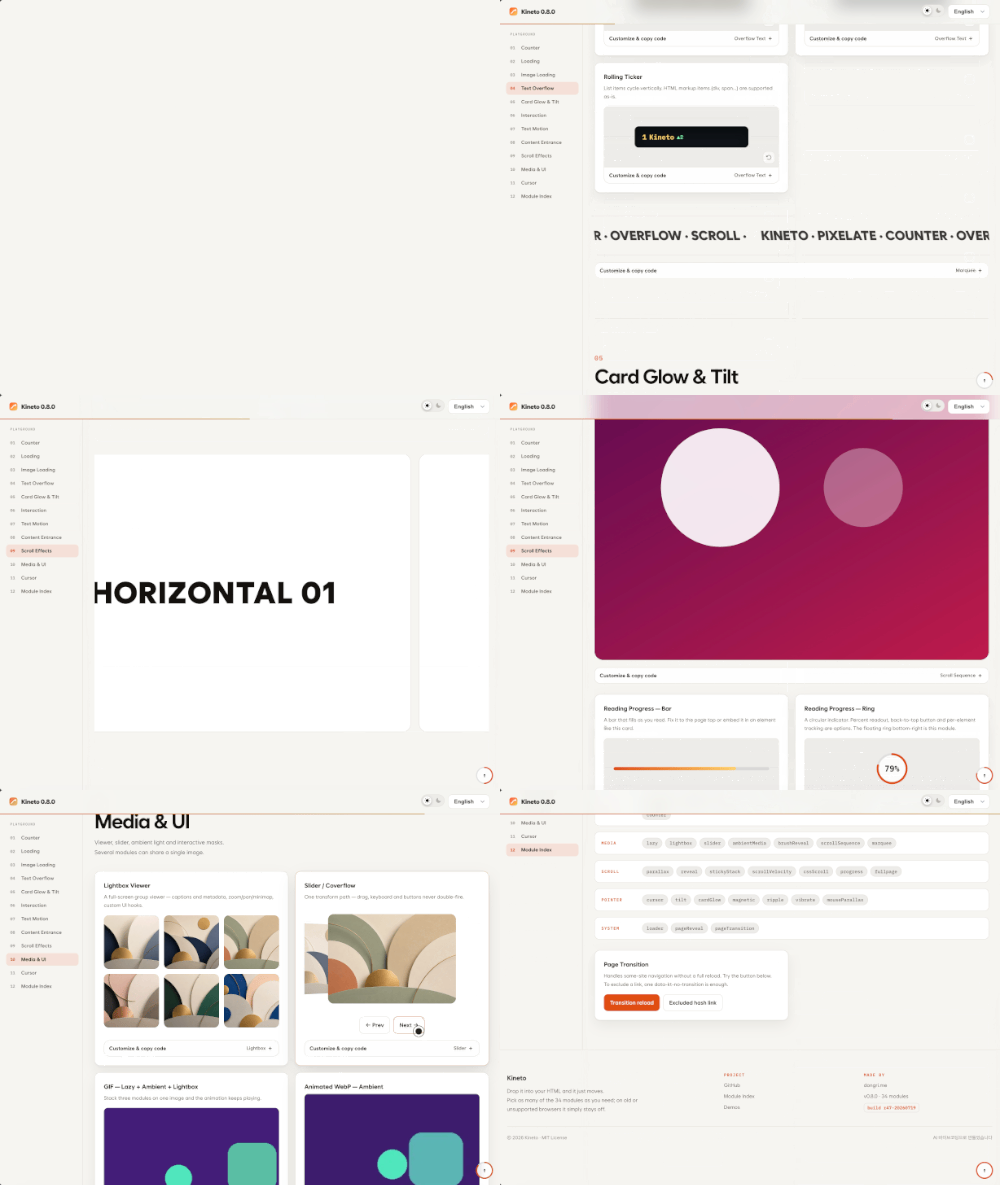
Kineto provides 52 modules for motion, media, scroll, text, and UI.
Use a single `data-kt-*` attribute or control the same feature through the
JavaScript API.
Unsupported environments disable the effect while keeping the content intact.

> Using an AI coding tool? The [AI prompt guide](AI-PROMPT-GUIDE.md) includes
> canonical English project instructions and a Korean usage guide. Agents
> modifying this repository must also follow [the AI handoff](docs/AI-HANDOFF.md).

<img src="https://cdn.jsdelivr.net/gh/catgarret/kineto@main/assets/preview/kineto.gif" width="620" alt="Kineto Preview">

## Highlights

Tune every effect in the [live demo](https://kineto.dongri.me),
then copy the resulting HTML, Vanilla JavaScript, React, Vue, or CSS-variable snippet.

**Progressive Print** — Blur and fine noise clear as the image sharpens.

<img src="https://cdn.jsdelivr.net/gh/catgarret/kineto@main/assets/preview/print.gif" width="620" alt="Progressive Print">

**Card Glow** — A spotlight, surface reflection, and border glow follow the
pointer.

<img src="https://cdn.jsdelivr.net/gh/catgarret/kineto@main/assets/preview/cardglow.gif" width="620" alt="Card Spotlight and Reflection">

**Text Transition** — Swap phrases with slide, blur, dissolve, or shimmer.

<img src="https://cdn.jsdelivr.net/gh/catgarret/kineto@main/assets/preview/texttransition.gif" width="620" alt="Text Transition">

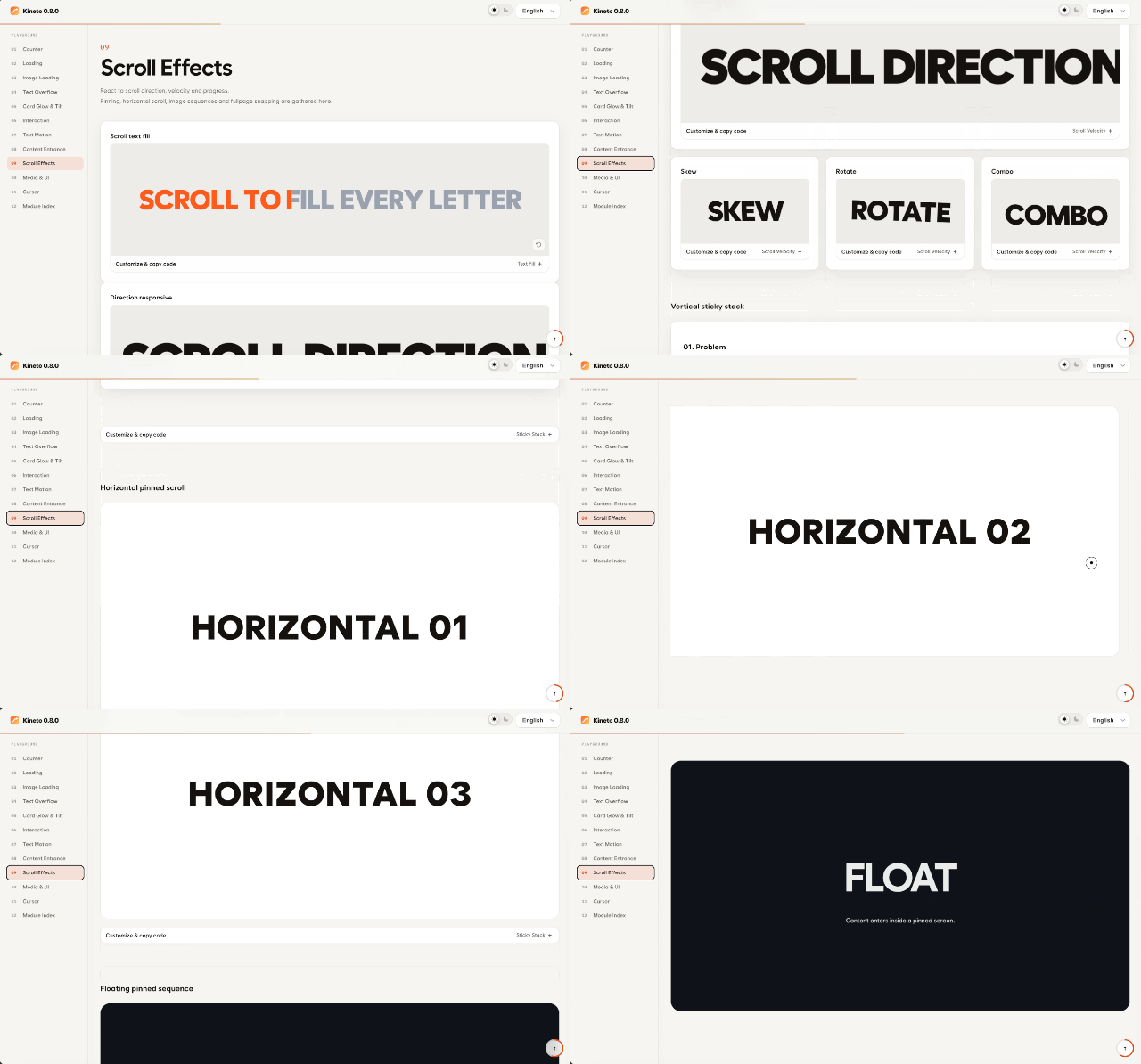
**Scroll Velocity** — Move, rotate, or transform elements with scroll speed and
direction.
<img src="https://cdn.jsdelivr.net/gh/catgarret/kineto@main/assets/preview/scrollvelocity.gif" width="620" alt="ScrollVelocity">

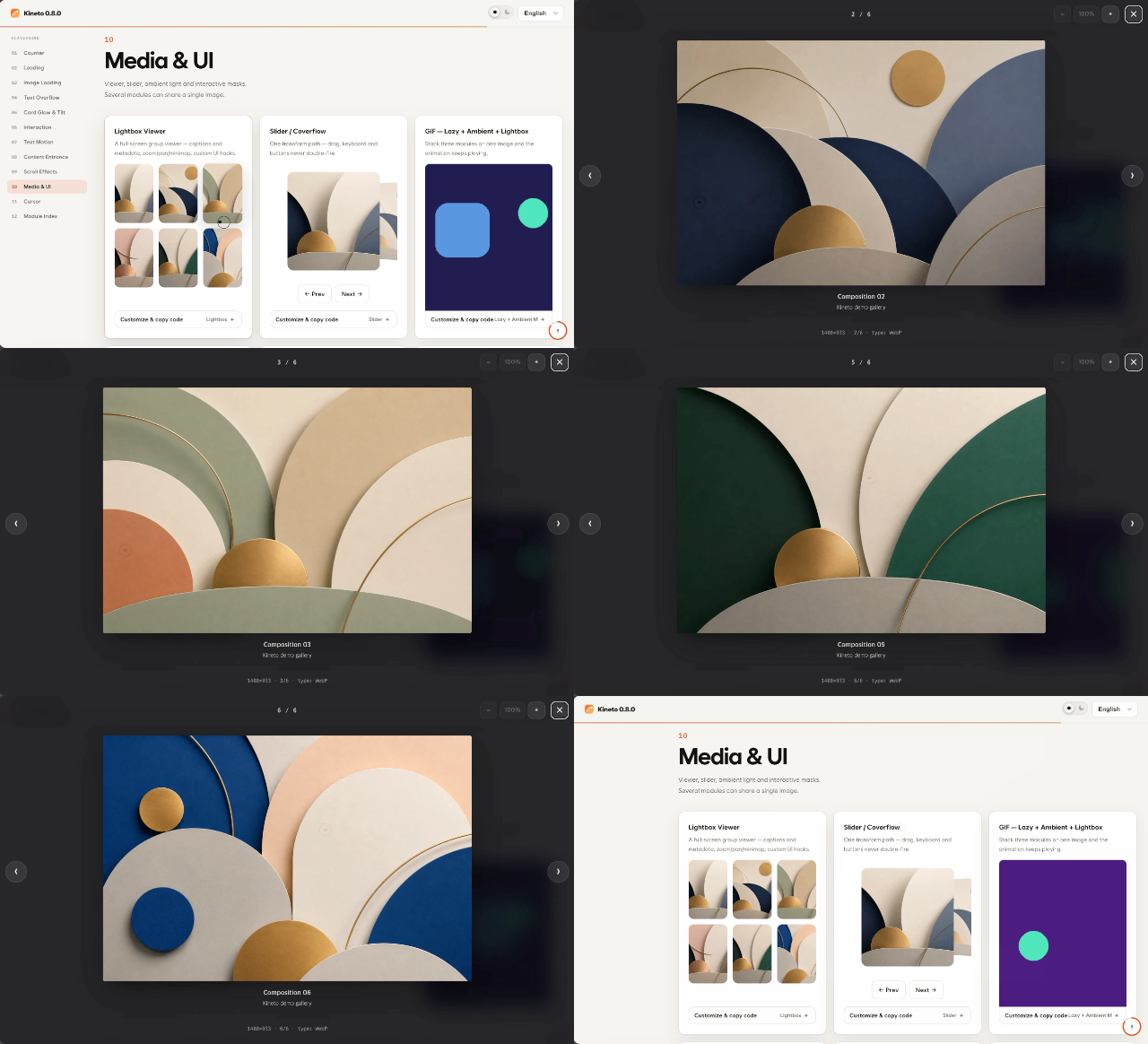
**Lightbox** — A full-screen viewer with groups, zoom, pan, and a minimap.
<img src="https://cdn.jsdelivr.net/gh/catgarret/kineto@main/assets/preview/lightbox.gif" width="620" alt="Lightbox">

See the [full module list](#modules) below for all 52 modules.

## Installation

### npm

```bash
npm install @dong-gri/kineto
```

```js
import Kineto from '@dong-gri/kineto';
import '@dong-gri/kineto/style.css';

Kineto.autoInit();
```

기본 엔트리는 52개 모듈을 한 번에 등록하는 가장 간단한 경로입니다. 초기 번들 비용이
중요한 제품에서는 아래의 `core` + 모듈 엔트리를 기본 선택으로 두고, 실제 사용하는
모듈만 등록하십시오. 소비자별 측정값과 gzip 예산은
[`docs/consumer-bundle-size.md`](docs/consumer-bundle-size.md)에 공개합니다.

### CDN (script tag, no build step)

```html
<link rel="stylesheet" href="https://cdn.jsdelivr.net/npm/@dong-gri/kineto/dist/kineto.min.css">
<script src="https://cdn.jsdelivr.net/npm/@dong-gri/kineto/dist/kineto.umd.min.js"></script>
<script>
  Kineto.autoInit();
</script>
```

### CDN (ESM)

```js
import Kineto from 'https://cdn.jsdelivr.net/npm/@dong-gri/kineto/+esm';
```

## Quick start

Everything works from HTML attributes alone.

```html
<h2 data-kt-text-reveal="stream">Text that streams in</h2>
<strong data-kt-counter="pop" data-kt-to="98760" data-kt-format=",">98,760</strong>
<img data-kt-lazy="skeleton" data-src="./cover.webp" alt="Cover">
<section data-kt-reveal="fade-up">Appears on scroll</section>
```

The same features are available through the JavaScript API.

```js
Kineto.counter('#total', { preset: 'pop', to: 98760, format: ',' });
Kineto.reveal('.card', { preset: 'fade-up', stagger: 0.06 });
const lightbox = Kineto.lightbox('.gallery img', { group: 'work', minimap: true });
```

### Named Motion States

For repeated visual states, use the small state controller instead of creating a
new effect module. It owns opacity, transform, and the limited blur/brightness
filter set; DOM removal and accessibility state remain with your component.

```js
const cards = Kineto.states({
  hidden: { opacity: 0, y: 16 },
  visible: { opacity: 1, y: 0 }
});

await cards.apply('.card', 'visible', { initial: 'hidden', stagger: 40 });
// `data-kt-state="visible"` elements can be applied with cards.scan().
```

`apply()` returns a Promise with `finished`/`cancelled` status and a `cancel()`
method. Call `cards.destroy()` to cancel active runs and restore the original
inline styles. See the [Motion States RFC](docs/motion-states-rfc.md) for the
scope and boundaries.

### iOS edge-to-edge (notch & home bar)

Add `viewport-fit=cover` so loaders and page transitions extend beneath the
iPhone notch and home bar.

```html
<meta name="viewport" content="width=device-width, initial-scale=1, viewport-fit=cover">
```

## Motion engines

Kineto does not bundle GSAP or Lenis.
It loads an engine from the CDN only when an effect needs one.
If the page already exposes `window.gsap` or `window.Lenis`, Kineto reuses that
instance.

When the CDN is unavailable, the content remains visible and supported effects
fall back to native behavior.
You can also pin a version, self-host, or use an internal mirror.

```js
Kineto.setEngineSource({
  gsap: 'https://cdn.jsdelivr.net/npm/gsap@3.13.0/dist/gsap.min.js',
  scrollTrigger: 'https://cdn.jsdelivr.net/npm/gsap@3.13.0/dist/ScrollTrigger.min.js',
  lenis: 'https://cdn.jsdelivr.net/npm/lenis@1.1.0/dist/lenis.min.js',
  gsapIntegrity: 'sha384-...',
  scrollTriggerIntegrity: 'sha384-...',
  lenisIntegrity: 'sha384-...'
});
```

The pinned default CDN files use SHA-384 subresource integrity. When overriding
an engine URL, provide the matching integrity value or self-host the file under
your own origin.

To manage the engines yourself, load them before Kineto initializes.

```html
<script src="https://cdn.jsdelivr.net/npm/gsap@3/dist/gsap.min.js"></script>
<script src="https://cdn.jsdelivr.net/npm/gsap@3/dist/ScrollTrigger.min.js"></script>
<script src="https://cdn.jsdelivr.net/npm/lenis@1/dist/lenis.min.js"></script>
```

Smooth scroll is off by default and opt-in at runtime.

```js
Kineto.enableSmooth({ lerp: 0.08 });
Kineto.disableSmooth();
```

## Modules

| Module | Activation attribute | Purpose |
|---|---|---|
| `accordion` | `data-kt-accordion` | Accessible `<details>` accordion, CSS-customizable arrow |
| `ambientMedia` | `data-kt-ambient-media` | Ambient glow sampled from media |
| `blurText` | `data-kt-blur-text` | Per-character blur reveal |
| `bottomSheet` | `data-kt-bottom-sheet` | Draggable bottom sheet with focus trap |
| `brushReveal` | `data-kt-brush-reveal` | Pointer brush-mask reveal / scratch card |
| `cardGlow` | `data-kt-card-glow` | Pointer spotlight, surface sheen, luminous border |
| `confetti` | `data-kt-confetti` | Click / view confetti burst |
| `counter` | `data-kt-counter` | Number count, flip, clock, countdown |
| `dateTime` | `data-kt-date-time` | Relative and absolute server timestamps |
| `coverReveal` | `data-kt-cover-reveal` | Color cover wipe reveal |
| `cssScroll` | `data-kt-css-scroll` | Scroll bound to CSS vars / scroll & view timeline |
| `cursor` | `data-kt-cursor` | Eleven custom cursor presets |
| `drag` | `data-kt-drag` | Drag with inertia, bounds, snap-back, keyboard |
| `flip` | `data-kt-flip` | FLIP layout animation on reorder / add / remove |
| `fullpage` | `data-kt-fullpage` | Fullpage section paging (x / y / mixed axis) |
| `gesture` | `data-kt-gesture` | whileHover / whileTap spring feedback |
| `glitch` | `data-kt-glitch` | RGB slice and glitch reveal |
| `hold` | `data-kt-hold` | Hold / mash-to-confirm gauge |
| `horizontalScroll` | `data-kt-horizontal-scroll` | Pinned horizontal scroll section |
| `lazy` | `data-kt-lazy` | Image load effects (skeleton, pixelate, print, dissolve) |
| `lightbox` | `data-kt-lightbox` | Full-screen viewer, groups, zoom, minimap, filmstrip |
| `loader` | `data-kt-loader` | Loader bound to real progress sources |
| `loadingIndicator` | `data-kt-loading-indicator` | Inline spinner, bar, shimmer, and symbol indicators |
| `magnetic` | `data-kt-magnetic` | Magnetic pointer response |
| `marquee` | `data-kt-marquee` | Continuous marquee |
| `megaMenu` | `data-kt-mega-menu` | GNB dropdown / mega menu (keyboard + aria) |
| `mouseParallax` | `data-kt-mouse-parallax` | Pointer / gyroscope parallax |
| `overflowText` | `data-kt-overflow-text` | Ways to handle overflowing text + item scenes |
| `pageReveal` | `data-kt-page-reveal` | Page-entry overlay |
| `pageTransition` | `data-kt-page-transition` | Same-origin page transitions |
| `parallax` | `data-kt-parallax` | Scroll parallax |
| `progress` | `data-kt-progress` | Reading progress bar / ring |
| `reveal` | `data-kt-reveal` | Scroll-entry reveal |
| `ripple` | `data-kt-ripple` | Click ripple |
| `scrollSequence` | `data-kt-scroll-sequence` | Image-sequence scrubbing |
| `scrollShadows` | `data-kt-scroll-shadows` | CSS edge shadows on scroll containers |
| `scrollVelocity` | `data-kt-scroll-velocity` | Scroll speed / direction response |
| `slider` | `data-kt-slider` | Slide, coverflow, stacked, and radial carousel effects |
| `radial` | `data-kt-radial` | Backward-compatible radial carousel entry point |
| `stickyHeader` | `data-kt-sticky-header` | Shrinking / cover-to-fixed sticky header |
| `stickyStack` | `data-kt-sticky-stack` | Sticky stack (vertical / horizontal / floating) |
| `switch` | `data-kt-switch` | Accessible toggle switch (form-usable) |
| `tabs` | `data-kt-tabs` | WAI-ARIA tabs, segmented control |
| `textFill` | `data-kt-text-fill` | Scroll-driven text fill |
| `textReveal` | `data-kt-text-reveal` | Text reveal (incl. Hangul composition) |
| `textSplit` | `data-kt-text-split` | Character / word split motion |
| `textTransition` | `data-kt-text-transition` | Text swap transitions (direction options) |
| `tilt` | `data-kt-tilt` | 3D tilt and glare |
| `toast` | `data-kt-toast` | Status toast (role=status/alert) |
| `tooltip` | `data-kt-tooltip` | Accessible tooltip (auto-placement) |
| `typewriter` | `data-kt-typewriter` | Typing effect |
| `vibrate` | `data-kt-vibrate` | Haptic vibration feedback |

For each module's variants and full option list, see the [module reference](docs/module-reference.md) and `kineto.features.json`.

## Framework adapters

Kineto ships first-party TypeScript declarations for the full package, modular
core/module imports, and the React, Vue, and jQuery adapters. Module options
remain open-ended so custom modules and newly introduced options can be used
without casts.

```jsx
import { Motion } from '@dong-gri/kineto/react';
<Motion as="h2" type="textReveal" options={{ mode: 'hangul' }}>Hello</Motion>
```

```js
import KinetoVue from '@dong-gri/kineto/vue';
app.use(KinetoVue);
```

Vue's `<Transition>` can use a Kineto module for one-shot enter/leave motion.
Vue still owns the DOM boundary; the hook calls Vue's `done` callback from the
module completion event and cleans up the temporary instance after each phase.

```js
import { Transition, h, ref } from 'vue';
import { useKinetoTransition } from '@dong-gri/kineto/vue';

const visible = ref(true);
const transition = useKinetoTransition('reveal', {
  enterOptions: { preset: 'fade-up', duration: 0.35 },
  leaveOptions: { preset: 'fade', duration: 0.2 }
});

// In a render function:
h(Transition, transition, {
  default: () => visible.value ? h('article', 'Panel') : null
});
```

Use one-shot modules for this bridge. If a custom module does not emit
`onComplete`, the adapter uses its configured `duration` + `delay` as a bounded
fallback so Vue's transition lifecycle cannot remain blocked indefinitely.

```js
import installKineto from '@dong-gri/kineto/jquery';
installKineto(window.jQuery);
$('.card').kineto('reveal', { preset: 'fade-up' });
```

## Modular imports

The default entry includes and registers all modules for zero-configuration use.
For a smaller application bundle, import the core and only the modules you use:

```js
import Kineto from '@dong-gri/kineto/core';
import sliderModule from '@dong-gri/kineto/modules/slider';
import revealModule from '@dong-gri/kineto/modules/reveal';
import '@dong-gri/kineto/style.css';

Kineto.register('slider', sliderModule);
Kineto.register('reveal', revealModule);
Kineto.scan();
```

Module entries share code-split runtime chunks. Importing a module does not
register the other modules or download their implementations.

권장 판단은 다음과 같습니다.

- 랜딩 페이지나 짧은 프로토타입: 기본 엔트리로 빠르게 시작합니다.
- 제품 번들: `@dong-gri/kineto/core`와 `@dong-gri/kineto/modules/<name>`만 가져옵니다.
- 기능을 늦게 열어야 하는 경우: 해당 모듈 엔트리를 동적 import하고, 로드가 끝난 뒤
  `Kineto.register()`와 `Kineto.scan()`을 호출합니다.

모듈형 엔트리는 자동으로 다른 모듈을 등록하지 않습니다. 따라서 `data-kt-*` 속성이
있어도 해당 모듈을 등록하지 않으면 동작하지 않는 것이 정상이며, 이 경우에는
[`troubleshooting`](docs/troubleshooting.md#모듈형-엔트리가-동작하지-않음)을 먼저 확인하십시오.

Motion States is also available as an opt-in modular entry when the application
does not need the full registry:

```js
import Kineto from '@dong-gri/kineto/core';
import states from '@dong-gri/kineto/states';

const cards = states({
  hidden: { opacity: 0, y: 12 },
  visible: { opacity: 1, y: 0 }
});

await cards.apply('.card', 'visible');
```

The standalone entry shares the same named-state contract and SSR-safe behavior
as `Kineto.states()`, but does not register the full module set.

Presence is an opt-in modular prototype because it coordinates DOM lifetime and
accessibility rather than a visual effect alone:

```js
import presence from '@dong-gri/kineto/presence';

const lifecycle = presence(panel, { mode: 'wait', accessibility: 'managed' });
await lifecycle.enter();
const result = await lifecycle.leave({ duration: 180 });
if (result.status === 'finished') panel.remove();
```

See the [Presence Core RFC](docs/presence-core-rfc.md) for the current contract;
the host still owns DOM insertion and removal. React/Vue consumers should keep
the referenced element mounted until `leave()` settles; the framework lifecycle
fixture and future adapter release gates are documented in the [Presence
framework adapter contract](docs/presence-adapter-contract.md).

## Browser support

Latest Chrome, Edge, Firefox, and Safari (desktop and mobile). With `prefers-reduced-motion` enabled, every module renders its final state without animation; on unsupported environments the effects degrade to static content.

## Build

```bash
npm install
npm run build   # emits dist/
npm run ci      # lint, build, Node/Chromium tests, contract and package checks
npm run verify  # full CI suite plus dependency security audit
```

## License

MIT © [dongri.me](https://dongri.me)