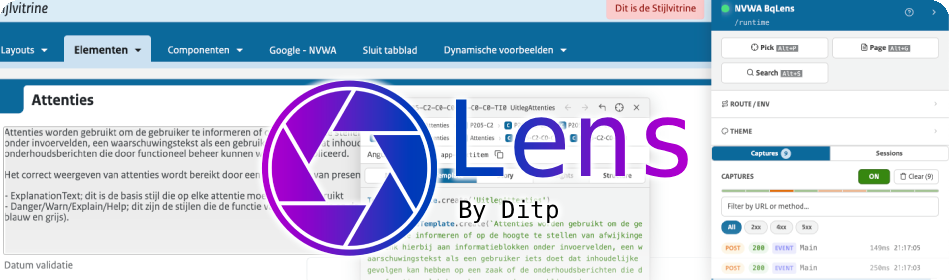
# BqLens
A developer overlay for Angular applications driven by [Blueriq](https://my.blueriq.com/) — the kind where the UI is not authored in Angular templates, but composed at runtime from JSON the runtime sends down.
Made by **Roel Berends** — [r.berends@ditpsoftware.nl](mailto:r.berends@ditpsoftware.nl)
Repository — [bitbucket.org/ditpsoftware/bq-lens](https://bitbucket.org/ditpsoftware/bq-lens)
**Contents**
- [The problem](#the-problem)
- [How BqLens solves it](#how-bqlens-solves-it)
- [Installation](#installation)
- [Configuration](#configuration)
- [Why a single panel](#why-a-single-panel)
- [Contributing](#contributing)
## The problem
Blueriq-driven apps invert the usual Angular relationship between code and UI:
- **The rendered DOM doesn't match anything you can `Cmd+Click` to.** Components are picked from a registry against incoming `Element` types. What's on screen is the result of a JSON tree the server emitted, not a template you can grep for.
- **Angular DevTools shows the host components, not the Blueriq elements.** You can see *which Angular component rendered a node*, but not *which Blueriq element it was rendering*, what its `key` is, what `contentStyle` drove the styling decision, or what the server actually sent.
- **The HTTP traffic is the source of truth, but it's opaque.** Every `/load`, `/refresh`, `/start_flow` carries a Blueriq response shaping the next render. To understand a bug you usually need to read those responses — and the browser's network tab gives you raw JSON with no context.
- **Reproducing a state in Storybook is a chore.** You see a buggy element on the page, you want it isolated in a story, and there's no shortcut between "this element on screen" and "a CSF3 story I can paste into the Storybook tree."
- **Nothing connects an element to its surroundings.** Walking ancestors, finding all fields inside a section, listing every button on the page — these are common questions with no good answer in the standard tooling.
In short: the gap between the *DOM you see*, the *Blueriq element that produced it*, and the *server payload that produced that* is wide, and bridging it manually slows everything down.
## How BqLens solves it
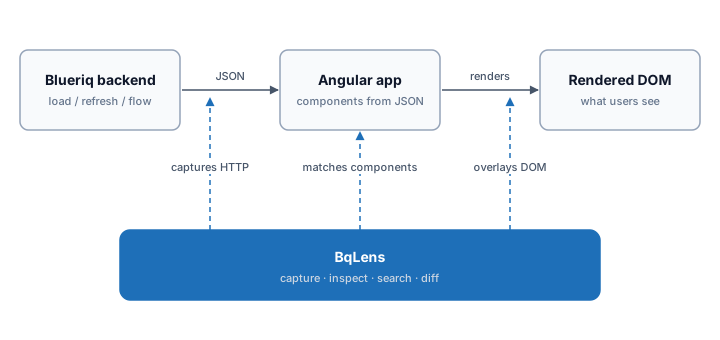
BqLens is a single floating panel injected into the app at runtime (dev only). It threads three views together — **DOM**, **Blueriq element model**, and **HTTP traffic** — so a developer can move between them in one or two clicks.
### Element inspector (the picker)
Press `Alt+P` and click anywhere. BqLens walks up the DOM, finds the nearest Angular host that renders a Blueriq element, and shows you:
- The element's `key`, `type`, `functionalKey`, the **Angular component selector** that rendered it (so `Cmd+Click` *does* work — on the right thing), the **Angular class name**, and the **`@BlueriqComponent` selector** that picked that class for this element. Selector and class capture both depend on dev-mode prerequisites — see [Build-config requirements](#build-config-requirements-for-selector--class-name-capture).
- Five views on that element, switchable via tabs:
- **Template** — the Angular component template generated from this element via `JsonToTemplatesComponent` (paste-ready into a real component).
- **JSON** — the cache-enriched server payload for this element and its descendants, fully resolved.
- **Story** — a Storybook CSF3 story for this element, with a configurable providers import path. Drop straight into the Storybook tree.
- **Insights** — typed analysis: fields with their data types and values, buttons with their actions, validation messages, table summaries. Picking a disabled or read-only element surfaces a **Why blocked?** section with a plain-English row per blocker (read-only flag set, required-empty, blocking validation, precondition gate, validate-on-click). A **Looks-wrong** section flags high-confidence authoring smells (empty captions, required-but-readonly, refresh on a read-only field, duplicate labels, validations without messages).
- **Structure** — the Blueriq element tree rooted at the inspected element, with type icons, descendant counts, and click-to-navigate. A **History** subsection lists each cached element's last value transitions (timestamp, before → after, originating capture id) plus its source URLs and the captures that touched it — surfacing the bounded provenance rings the cache already collects.
- A **breadcrumb trail** of ancestor Blueriq elements (not Angular components — Blueriq elements), each clickable.
- **Back / forward navigation history** (20-deep ring buffer), so jumping into a child and back is a key away.
- A **scroll-following overlay** so the highlight stays anchored as the user scrolls the page underneath.
When the live DOM doesn't have the element anymore (e.g. it scrolled out, was unmounted, or you got there via search), BqLens falls back to the cached server payload and synthesizes enough of an element to keep the inspector working.
### HTTP capture & diff
A `DevInterceptor` sits in front of every Blueriq request. The capture list shows method, URL, status, request body, response body, and a status-class filter (2xx / 4xx / 5xx). For every `POST /load` (and similar), the response is **warmed into an in-memory element cache** — a flat map from `key` to enriched element JSON, with children resolved into nested objects.
That cache is what makes everything else fast: the inspector reads from it, the search reads from it, the structure tree reads from it. If it's not in the cache, BqLens falls back to live DOM serialization and merges the result back in.
A **diff mode** lets the developer pick two captures and answer "what changed between this refresh and the last one?" in three views, available as a tab strip at the top of the diff modal:
- **Structure** (default) — field-level diff built on the typed analysis: `field · editable: true → false`, `table · rowCount: 5 → 0`, sections appearing or disappearing, page-context attribute changes. Match keys are functional: `functionalKey` for fields, `caption` for buttons and links, `displayName` for sections, `name` for tables.
- **Semantic** — cache-key-level: which elements appeared, disappeared, or had attribute changes, regardless of how their identity reads to a human. Useful when the structural view shows nothing but you can see something moved.
- **Text** — raw JSON line-by-line diff with hunks. Last-resort view for whitespace, ordering, or metadata changes the structural views deliberately skip.
### Element search
`Alt+S` opens a fuzzy search across every cached element. Each element contributes a weighted set of search fields — display name, name, caption, question text, functional key, type, content style, plain text, styles, values — so typing `"voornaam"` finds every field whose label, name, or value contains that word, ranked by field weight. Selecting a result jumps the inspector to that element, regardless of whether it's still on screen.
### Page view
`Alt+G` builds a full page snapshot: the entire current page's template (via `JsonToTemplatesComponent`), its JSON, its element tree, and its captured analysis — opened in a large modal view. Useful when "show me what the runtime thinks is on screen right now" is the question.
### Internals (self-diagnostics)
A separate **Internals** view, opened from the action bar next to Pick / Page / Search, is bq-lens looking at itself. It surfaces live counters (cached elements, tombstones, parent links, slow merges, integrity violations, template memo size and hit rate, evictions), a filterable cache-event log, a storage-layer event log, and on-demand **Run audit** / **Force rehydrate** actions. Every counter, button, and filter carries a plain-language tooltip so the panel explains itself without external docs.
The same view exposes **Export bug bundle** — one click downloads a single JSON file with the captures, the (internals-stripped) cache snapshot, the structure graph, the counters, the cache-event ring, and the current page tree. Hand it to a teammate and they can reproduce what you're seeing without sharing your screen. The bundle inherits the captures' sensitivity (response bodies are included verbatim), so treat it the same way you'd treat the captures themselves.
### Activation
- `Alt+D` — toggle the panel
- `Alt+P` — element picker
- `Alt+G` — page view
- `Alt+S` — element search
- `Alt+E` — jump to last error capture
- `Esc` — cancel the picker, or close the active overlay (inspector / search / diff / large view)
- `ddddd` (five `d` presses outside an input, in production) — toggle the dev-mode session flag
The floating tab is draggable; the side it docks on is persisted to `localStorage`, as is the picker's story-providers import path.
## Installation
```bash
npm install @ditpsoftware/bq-lens
```
Then register the module in your app's root module — see [Configuration](#configuration) for the full options:
```ts
import { BqLensModule } from '@ditpsoftware/bq-lens';
@NgModule({
imports: [
BqLensModule.forRoot(), // production flag and Blueriq base URL auto-detected
],
})
export class AppModule {}
```
Both `production` and `blueriqBaseUrl` are auto-detected:
- `production` defaults to `!isDevMode()` from `@angular/core`.
- `blueriqBaseUrl` is read from the public `Backend.toUrl('')` API of `@blueriq/angular/backend/common` — i.e. whatever URL the host configured on `V2BackendModule.forRoot({ baseUrl })`. If `Backend` isn't in DI, BqLens falls back to sniffing outgoing HTTP traffic for the first request matching a known Blueriq URL shape (`/api/v\d+/session/`, `/keepalive`, etc.) and replays any pre-learning requests once the prefix is locked in.
Pass them explicitly only for unusual setups — multi-runtime hosts, non-standard build configs, or test harnesses that don't register a `Backend`.
Once Angular reaches its first stable tick BqLens auto-bootstraps and appends a floating tab to `document.body`. Press `Alt+D` (or click the tab) to open the panel.
### Prerequisites
- **Angular 20+** runtime (peer-declared in `package.json`).
- **`@blueriq/angular`** and **`@blueriq/core`** — from the Blueriq Artifactory; consumers need their `.npmrc` configured for the `@blueriq` scope.
- **`legacy-peer-deps`** — `@blueriq/angular@0.18.x` declares Angular 15-19 peers while bq-lens targets Angular 20. Add `legacy-peer-deps=true` to your project's `.npmrc` once so every `npm install` resolves cleanly without flags.
Icons are bundled inline as SVG — no Font Awesome required. The `extraSections.icon` field accepts a name from the bundled icon registry; see [`bq-icon.component.ts`](src/lib/components/bq-icon.component.ts) for the available names.
### Recommended dev-mode build config
The inspector popup surfaces the **Blueriq selector** (e.g. `field[contentStyle=hint]`) and the **Angular component class name** for each picked element. Both are captured at runtime from a `console.table` dump that `@blueriq/angular` emits inside `provideCompiledComponentResolver`. The dump is gated by `isDevMode() && config.logComponents` and only fires once Angular dev mode is fully active.
For these rows to appear, the host app's dev configuration must satisfy:
- **Blueriq config** — leave `logComponents` at its default (`true`). Setting it to `false` silences the dump and bq-lens has no way to recover the data.
- **No `enableProdMode()`** — typically gated behind `if (environment.production)`, but worth double-checking.
- **Angular CLI build flags** — `optimization`, `buildOptimizer`, and `aot` must all be `false` for the dev build configuration. The Angular build optimizer statically folds `if (isDevMode())` blocks in third-party libraries, dead-code-eliminating the dump *at build time* — even when `environment.production` is `false` and `enableProdMode()` is never called. The runtime check and the build-time strip are independent; both must be satisfied.
To verify dev mode is active in the running app, open the browser console and evaluate:
```js
typeof ngDevMode !== 'undefined' && ngDevMode
```
If that returns falsy, the build optimizer has stripped the dump and the bq-lens "Blueriq selector" / "Angular class" rows will stay empty. Fix by overriding the offending flags for the dev configuration in `angular.json`:
```json
{
"configurations": {
"development": {
"optimization": false,
"buildOptimizer": false,
"aot": false
}
}
}
```
Class names rely on the same dev-mode guarantee: minified builds mangle `cls.name`, which is what bq-lens uses as the lookup key. bq-lens is a dev-only overlay, so this is acceptable — but it is the reason a misconfigured build can show garbage characters in the "Angular class" row.
### Offline / vendored install
For air-gapped environments where the npm registry isn't reachable, every release is also packed as a `.tgz` and committed under [`releases/`](https://bitbucket.org/ditpsoftware/bq-lens/src/main/releases/) in this repo. Drop the tarball into the host app's `vendor/` folder and reference it via npm's `file:` protocol:
```bash
mkdir -p vendor
curl -L -o vendor/ditpsoftware-bq-lens-0.0.1.tgz \
https://bitbucket.org/ditpsoftware/bq-lens/raw/main/releases/ditpsoftware-bq-lens-0.0.1.tgz
```
```json
{
"dependencies": {
"@ditpsoftware/bq-lens": "file:./vendor/ditpsoftware-bq-lens-0.0.1.tgz"
}
}
```
Then `npm install`. Commit the `.tgz` so CI and other developers don't depend on the download being available at install time. To upgrade, download the new version's `.tgz`, replace the file in `vendor/`, bump the version in `package.json`, then run `npm install file:./vendor/ditpsoftware-bq-lens-.tgz` (the explicit path forces npm to refresh the lockfile integrity hash even if the version string is unchanged).
## Configuration
The minimum to mount the panel — no arguments, all fields auto-detected:
```ts
BqLensModule.forRoot(),
```
That's enough — the panel auto-bootstraps once Angular reaches its first stable tick and appends itself to `document.body`. No template change is required in the host app. `production` defaults to `!isDevMode()` and `blueriqBaseUrl` resolves from `Backend.toUrl('')` (or, failing that, from sniffed traffic).
If you'd rather control the mount point yourself (e.g. to put the panel inside a specific layout container, or to keep it next to a sibling overlay), drop the tag once into the host's root template (typically `app.component.html`):
```html
```
When the tag is present, bq-lens uses it; when it's absent, the auto-bootstrap kicks in. The panel uses `position: fixed`, so the parent doesn't matter for layout — keep it at the root level rather than inside a routed view so the panel survives navigation.
Add fields as you need them. A fully populated call looks like this:
```ts
import { NgModule } from '@angular/core';
import { environment } from '../environments/environment';
import { BqLensModule } from '@ditpsoftware/bq-lens';
import { MyThemeSectionComponent } from './app/my-theme-section.component';
@NgModule({
imports: [
// …
BqLensModule.forRoot({
// production and blueriqBaseUrl auto-detect; uncomment only if you need to override:
// production: environment.production,
// blueriqBaseUrl: environment.blueriqBaseUrl,
title: 'My BqLens',
tabLabel: 'LENS',
primaryColor: '#01689b',
secondaryColor: '#cce0f1',
flatCorners: false,
extraSections: [
{ label: 'Theme', icon: 'palette', component: MyThemeSectionComponent, initiallyOpen: false },
],
}),
],
})
export class AppModule {}
```
`BqLensConfig` accepts the following fields:
| Field | Type | Purpose |
|---|---|---|
| `production` | `boolean?` | When true, the panel is gated behind a session-storage flag and a five-`d` keystroke escape hatch. When false, always on. **Defaults to `!isDevMode()`** from `@angular/core`. |
| `blueriqBaseUrl` | `string?` | Root URL the interceptor watches — captures only fire for requests under this prefix. **Defaults to** `Backend.toUrl('')` from `@blueriq/angular/backend/common`, with URL-pattern sniffing as a last resort. Override for multi-runtime hosts. |
| `title` | `string?` | Header text. Defaults to `'BqLens'`. |
| `tabLabel` | `string?` | Floating tab label, trimmed to 4 characters. Defaults to `'DEV'`. |
| `primaryColor` | `string?` | Initial primary color (any CSS color). Mutable at runtime via `DevColorsService`. |
| `secondaryColor` | `string?` | Initial secondary color (any CSS color). Mutable at runtime via `DevColorsService`. |
| `flatCorners` | `boolean?` | When true, every element inside the panel renders with `border-radius: 0`. Useful for hosts whose design language is square/flat. Defaults to false. |
| `extraSections` | `BqLensSectionConfig[]?` | Host-defined collapsible sections rendered above the main tab switcher. See below. |
### Extension slots
`extraSections` lets a host app inject arbitrary collapsible sections into the panel — theme switchers, feature-flag toggles, environment selectors, mock-data switchers, anything app-specific. Each entry is `{ label, icon?, component, initiallyOpen? }`; BqLens owns the section frame (header, chevron, open/close state) and renders the host's component inside via `*ngComponentOutlet`. The component is fully Angular and can inject any service from the host's DI tree — BqLens itself stays domain-agnostic.
### Colors
BqLens exposes exactly two color knobs: **primary** and **secondary**. Everything else — hover tints, focus rings, scrollbars, chip surfaces, the pulse animation on the picker — is derived from these two via CSS `color-mix()` so a single setter recolors the whole panel coherently. Default fallbacks match the inspect theme: primary `#01689b`, secondary `#cce0f1`.
#### Plumbing
| Layer | Name | Purpose |
|---|---|---|
| CSS custom property | `--bq-lens-primary` | Runtime primary color. Written to `:root`. |
| CSS custom property | `--bq-lens-secondary` | Runtime secondary color. Written to `:root`. |
| SCSS alias | `v.$primary` | `var(--bq-lens-primary, )` — use this in component SCSS. |
| SCSS alias | `v.$secondary` | `var(--bq-lens-secondary, )`. |
| SCSS derived | `v.$primary-light` | `color-mix(in srgb, $primary 12%, white)` — pale hover/highlight bg. |
| SCSS derived | `v.$primary-tint-sm/md/lg` | `color-mix(... transparent)` at 15% / 35% / 60% — focus ring, scrollbar tints. |
| SCSS derived | `v.$primary-dark` | `color-mix(... black 5%)` — chip border. |
| SCSS derived | `v.$secondary-dark` | `color-mix(... black 10%)` — chip border. |
#### Setting colors
**At module setup** — pass them to `forRoot(...)`:
```ts
BqLensModule.forRoot({
...environment,
primaryColor: '#01689b',
secondaryColor: '#cce0f1',
}),
```
`DevColorsService` reads the config at construction and writes both CSS custom properties to `document.documentElement` immediately.
**Per-environment** — declare the colors on each environment object and spread them in. Each build target ships pre-colored — no flash of inspect-blue at boot:
```ts
// src/environments/environment.ts
export const environment = {
// …
bqLensPrimary: '#01689b', // inspect blue
bqLensSecondary: '#cce0f1',
};
// src/environments/environment.bvm.ts
export const environment = {
// …
bqLensPrimary: '#e17000', // BVM orange
bqLensSecondary: '#f6d4b2',
};
```
```ts
// app.module.ts
BqLensModule.forRoot({
...environment,
primaryColor: environment.bqLensPrimary,
secondaryColor: environment.bqLensSecondary,
}),
```
**At runtime** — inject `DevColorsService` and call any setter:
```ts
constructor(private colors: DevColorsService) {}
this.colors.setPrimary('#42145f');
this.colors.setSecondary('#c6b8cf');
this.colors.setColors('#42145f', '#c6b8cf'); // either arg is optional
```
Every consumer of the CSS variables (and every `color-mix()` derived from them) repaints in the same frame.
#### Limits
This is *not* a theming engine — no named themes, no presets, no palettes, just two colors. If the host has its own `ThemeService`, the host wires up its theme switches to call `DevColorsService.setColors(...)` itself. For one-off tinted variants, derive them via `color-mix()` in SCSS rather than expanding the API.
`color-mix()` is Baseline 2023 (Chrome 111+, Firefox 113+, Safari 16.2+) — fine for a dev-only target.
### Storage keys
BqLens persists a small amount of UI state to `localStorage` and `sessionStorage` under the `bq-lens-*` namespace. To reset panel state, clear these keys in DevTools → Application → Storage:
| Key | Storage | Purpose |
|---|---|---|
| `bq-lens-panel` | session | Whether the panel is enabled in this tab (production gate; set by the `ddddd` escape hatch). |
| `bq-lens-panel-side` | local | Which edge (`left` / `right`) the floating tab docks on. |
| `bq-lens-panel-tab-top` | local | Vertical position (px) of the floating tab. |
| `bq-lens-sections` | session | Open/closed state of `extraSections` per tab. |
| `bq-lens-captures` | session | Persisted HTTP capture log (last 10 entries kept on quota errors). |
| `bq-lens-dismissed-errors` | session | IDs of captures the user dismissed from the error banner; prevents the same error from re-appearing across reloads. |
| `bq-lens-story-providers` | local | Last-used providers import path for generated CSF stories. |
## Why a single panel
Each piece of the above could exist as a separate Chrome extension, or a separate dev tool, or a separate npm package. The reason they're one panel:
- **The element cache is shared.** Capturing once feeds the inspector, the search, the structure tree, and the diff. Splitting it across tools would mean re-warming for every consumer.
- **Navigation is shared.** Picker → child → breadcrumb → search result → cached element are all the same operation against the same state, with the same back/forward history.
- **The panel is dev-only.** Tree-shaken out of production builds (gated by `environment.production` plus the session flag), so size is not a primary concern; coherence is.
The internal architecture mirrors that:
- A `DevInspectorService` (component-scoped) owns inspector state — selected element, view mode, history, breadcrumbs, scroll-follow lifecycle.
- A `DevElementCacheService` (root-scoped) owns the element cache and its enrichment.
- A `DevPickerService` owns DOM ↔ Blueriq element resolution, the visual overlay, and ancestor walks.
- A `DevCaptureService` owns the HTTP capture log and persistence.
- A `DevFormatService` owns syntax highlighting and template formatting.
- A `DevSearchService` owns weighted fuzzy search.
- A `DevColorsService` owns the two runtime CSS custom properties (`--bq-lens-primary`, `--bq-lens-secondary`).
The component is the orchestrator; the services are independent enough to test alone but kept together because they share a single user-facing surface.
## Contributing
For working on bq-lens itself — editing source, watching changes flow into a host app, and cutting a release. Consumers don't need any of this: see [Installation](#installation).
### Local setup
```bash
nvm use 24 # ng-packagr 20+ requires Node ^20.19 / ^22.12 / >=24
npm install # @blueriq/* peers come from the Artifactory; .npmrc needs @blueriq scope auth
```
There is no `ng serve` for the library itself — it's not an app, it's a package. Iteration happens by building into `dist/` and consuming `dist/` from a host app that *does* run `ng serve`.
### Live-development loop
The fastest inner loop: ng-packagr in watch mode + a host app pointed at `dist/` via a sibling-repo symlink. Edits in `src/lib/` rebuild in 1–2s and the host's dev server picks them up on the next change-detection tick.
This setup is **for development only** — never commit the symlinked dependency reference into the host's `package.json`. Distribution to consumers always goes through the npm-published package.
**1. In `bq-lens/`** — start the watcher:
```bash
npm run watch # rebuilds dist/ on every save
```
**2. In the host app** (sibling directory, e.g. `../my-app/`) — point `@ditpsoftware/bq-lens` at `dist/`:
```bash
npm install file:../bq-lens/dist
```
This rewrites the host's `package.json` to `"@ditpsoftware/bq-lens": "file:../bq-lens/dist"` and symlinks `node_modules/@ditpsoftware/bq-lens → ../bq-lens/dist`.
**3. In the host's `angular.json`** — add `preserveSymlinks: true` to the build target's options. Webpack would otherwise resolve bq-lens's peer deps from `bq-lens/node_modules/`; with this flag, it resolves them from the host's own `node_modules` like any normal package. The flag is a no-op for non-symlinked installs, so it's safe to leave on permanently:
```json
{
"projects": {
"": {
"architect": {
"build": {
"options": {
"preserveSymlinks": true
}
}
}
}
}
}
```
**4. Run the host's dev server.** Saves in `bq-lens/src/lib/` rebuild `dist/`; the host's HMR picks them up.
#### Storybook in a symlinked dev setup
`preserveSymlinks: true` keeps `ng serve` and `ng build` happy, but Storybook's webpack pipeline does not pick that flag up the same way. From bq-lens's dist files, webpack walks up the filesystem and lands inside `bq-lens/node_modules/@blueriq/angular` — bq-lens's own dev install — which can't resolve `@ngrx/store`/`@ngrx/effects` from there. The bundle fails before any bq-lens code runs.
This is **dev-only**. Consumers who install bq-lens via `npm install @ditpsoftware/bq-lens` (registry or `.tgz`) get only `dist/` content and webpack walks straight up to the host's `node_modules` — no sibling `node_modules/` to fall into, no error.
If you're symlinked and need Storybook to bundle, stub out `@ditpsoftware/bq-lens` in the host's storybook config. A no-op `BqLensModule` is enough — Storybook stories don't exercise the panel anyway:
```ts
// .storybook/bq-lens-stub.ts
import { ModuleWithProviders, NgModule } from '@angular/core';
@NgModule({})
export class BqLensModule {
static forRoot(_config?: unknown): ModuleWithProviders {
return { ngModule: BqLensModule };
}
}
```
```ts
// .storybook/main.ts
import * as path from 'path';
webpackFinal: async (config) => {
config.resolve = config.resolve || {};
config.resolve.alias = {
...(config.resolve.alias || {}),
'@ditpsoftware/bq-lens': path.resolve(__dirname, 'bq-lens-stub.ts'),
};
return config;
},
```
Add `./bq-lens-stub.ts` to the `include` array of `.storybook/tsconfig.json` so Angular's compiler picks it up.
The alternative — install via the tarball under `releases/` instead of symlinking — sidesteps this entirely.
**To return to the published package:**
```bash
npm install @ditpsoftware/bq-lens
```
> **Tip:** wrap step 2 and the return-to-published command in two npm scripts on the host side (e.g. `bqlens:link` / `bqlens:unlink`) so switching is one command.
### Cutting a release
```bash
# bq-lens/
# 1. Bump version in package.json
# (semver — public-api.ts breakage = major; new exports = minor; fixes = patch)
npm run release # build → pack into releases/ditpsoftware-bq-lens-.tgz
# 2. Publish to npm
cd dist
npm publish --access public
```
Commit the source changes, the version bump, and `releases/ditpsoftware-bq-lens-.tgz`. Tag the commit `v` and push — the Bitbucket pipeline verifies the package version matches the tag and rebuilds from source.
The committed tarball under `releases/` is the offline-install fallback (see [Offline / vendored install](#offline--vendored-install)); npm is the default distribution channel.