---
layout: default
title: Making a build
has_toc: false
nav_exclude: true
---
{% include header.html %}
# Making a build
## Preparing a toolchain
The library uses the following toolchain:
* [Node JS](https://nodejs.org) with NPM (NodeJS Package Manager).
* [yarn](https://yarnpkg.com) Package Manager.
* [npx](https://www.npmjs.com/package/npx) NPM Package Executor
* [@microsoft/api-extractor](https://api-extractor.com/pages/overview/intro/) to extract API type information and comments
* [@microsoft/api-documenter](https://api-extractor.com/pages/setup/generating_docs/) to build API documentation from API type information and comments extracted by the `api-extractor`.
First install NodeJS with NPM, then install the rest of the toolchain globally using NPM.
```
npm install -g yarn npx @microsoft/api-extractor @microsoft/api-documenter
```
## Cloning a repository
To clone a repository:
```
git clone {{site.data.lib.git}}/{{-site.data.lib.repo-}}.git
```
## Installing dependencies
To get started with the library, install dependencies first:
```
cd ./{{site.data.lib.repo}}
yarn
```
## Building the code
Build the library:
```
npm run build
```
or open the library in VS Code ad press `Ctrl+Shift+B`.
The build output (JavaScript files) will be put into the following locations, according to the target:
* ES6 (for modern browsers):
* unbundled: `./dist/es6/`
* bundled (UMD): `./dist/es6.bundles/`
* ES5 (for older browsers):
* unbundled: `./dist/es5/`
* bundled: `./dist/es5.bundles/`
* TypeScript typings: `./dist/typings/`
## Building the documentation
API documentation is built from source code comments in a TSDoc format
using `@microsoft/api-extractor` and `@microsoft/api-documenter`.
To build the API documentation run:
```
npm run api-doc
```
The build output (API report files and Markdown documents) will be put into the `./dist/api/` folder.
## Build pipeline overview
[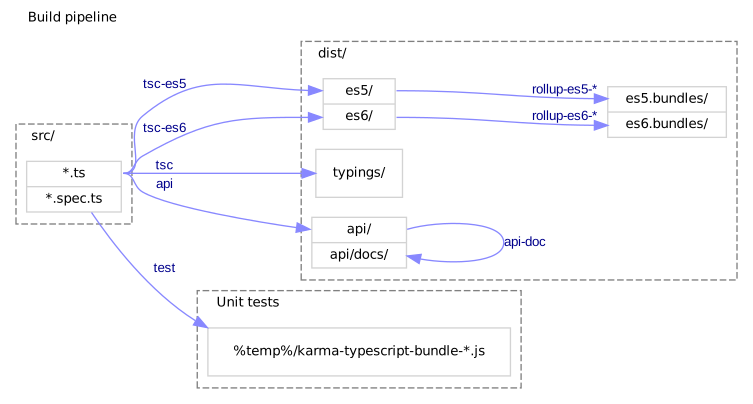](build-pipeline.dot)
NOTE: this diagram is created using Graphviz and a `build-pipeline.dot` file.
Do not edit the SVG file directly.
In VS Code, use the [Graphviz Preview](https://marketplace.visualstudio.com/items?itemName=EFanZh.graphviz-preview)
extension to preview DOT files and export them to SVG/PNG/PDF.