<div align="center">

# `@diagrammo/dgmo`

### Simple text in. Brilliant diagrams out.

Write plain-text `.dgmo` files, get clean, themeable diagrams and charts. One markup language, **45+ chart types** — flowcharts, sequence diagrams, ER, org charts, C4, gantt, maps, bar/line/pie, and a lot more.

[![npm](https://img.shields.io/npm/v/@diagrammo/dgmo?color=2e7d32&label=npm)](https://www.npmjs.com/package/@diagrammo/dgmo)
[![npm downloads](https://img.shields.io/npm/dm/@diagrammo/dgmo?color=blue)](https://www.npmjs.com/package/@diagrammo/dgmo)

[![license](https://img.shields.io/npm/l/@diagrammo/dgmo)](./LICENSE)

**[📖 Docs](https://diagrammo.app/start) · [🧩 Language Reference](https://diagrammo.app/reference) · [🖥️ Desktop App](https://diagrammo.app/app) · [🪄 Live Editor](https://online.diagrammo.app)**
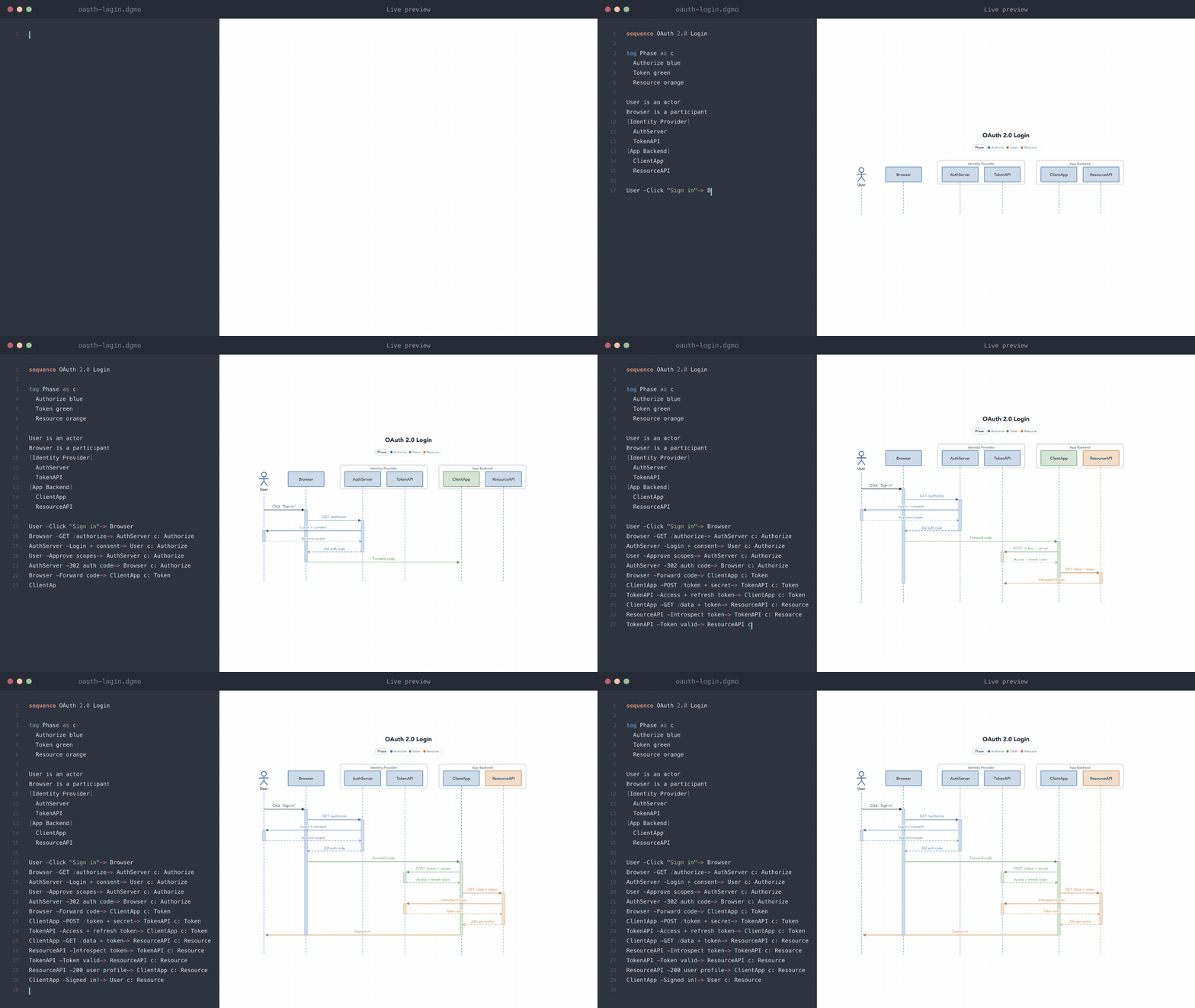
<a href="https://online.diagrammo.app"><img src="https://diagrammo.app/readme/sequence.gif" alt="Typing a DGMO sequence diagram and watching it render live" width="100%"></a>

</div>

---

```
sequence Boarding the Marauder

Quartermaster -Hoist the colors-> Crew
Crew -Aye, captain-> Bosun
Bosun -Heading 270-> Helm
Helm -On course-> Quartermaster
```

That's a complete diagram. No coordinates, no XML, no drag-and-drop — just text you can diff, review, and version like any other source file.

## Author it visually

Want a richer editing experience than a text file? The **[Diagrammo desktop app](https://diagrammo.app/app)** (native macOS, offline, auto-updating) and the **[online editor](https://online.diagrammo.app)** (any browser, nothing to install) turn DGMO into a full authoring environment:

- **Live preview** — the diagram redraws as you type
- **Smart editing** — syntax highlighting, autocomplete, and optional vim keybindings
- **7 themeable palettes**, each with light / dark / transparent variants
- **One-click export** to PNG or SVG, plus instant shareable links
- **Local-first** — your `.dgmo` files are plain text on disk, work fully offline, and never go stale the way an exported image does

Because every diagram is just text, it lives in git, diffs cleanly in PRs, and drops straight into your docs, your [AI tools](https://diagrammo.app/ai), or any web page.

→ Start at **[diagrammo.app](https://diagrammo.app)**

## Install

```bash
# Library
npm install @diagrammo/dgmo

# CLI (macOS, via Homebrew)
brew install diagrammo/dgmo/dgmo

# CLI (no install)
npx @diagrammo/dgmo-cli diagram.dgmo
```

## CLI

```bash
dgmo                                   # creates a sample.dgmo to get you started
dgmo diagram.dgmo                      # → diagram.png
dgmo diagram.dgmo -o out.svg           # → SVG (format from extension)
cat diagram.dgmo | dgmo > out.png      # pipe in, PNG to stdout
dgmo diagram.dgmo --theme dark --palette catppuccin
```

| Flag | Values | Default |
|------|--------|---------|
| `--theme` | `light`, `dark`, `transparent` | `light` |
| `--palette` | one of 7 palettes (see below) | `slate` |
| `-o` | output path (`.svg` → SVG, else PNG) | `<input>.png` |

## Library

Render any diagram to an SVG string — no browser, no visible DOM:

```typescript
import { render } from '@diagrammo/dgmo';

const { svg } = await render(`
bar Revenue by Quarter
Q1 12
Q2 19
Q3 15
Q4 22
`, { theme: 'light', palette: 'slate' });
```

`render()` auto-detects the chart type and dispatches to the right engine. Need the lower-level parsers, config builders, and per-type renderers? They live under the [`@diagrammo/dgmo/advanced`](https://diagrammo.app/dev) subpath — see the docs for the full surface and stability contract.

## Drop into any web page

Add one `<script>` tag and every `<pre class="dgmo">` block renders on load:

```html
<script src="https://cdn.jsdelivr.net/npm/@diagrammo/dgmo-standalone/dist/auto.js"></script>

<pre class="dgmo">pie Crew Rations
Grog: 58
Hardtack: 21
Limes: 21</pre>
```

Prefer an explicit element? Use `<dgmo-diagram>` from the same package:

```html
<script src="https://cdn.jsdelivr.net/npm/@diagrammo/dgmo-standalone/dist/element.js"></script>

<dgmo-diagram palette="slate">pie Crew Rations
Grog: 58
Hardtack: 21
Limes: 21</dgmo-diagram>
```

Theme detection, copy button, and "open in editor" come for free. Full config, framework recipes (Astro, Docusaurus, Hugo, MkDocs), self-hosting, and CSP guidance: **[diagrammo.app/embed](https://diagrammo.app/embed)**.

Using a docs framework? First-class plugins wrap all of this:
[`remark-dgmo`](https://www.npmjs.com/package/remark-dgmo) · [`astro-dgmo`](https://www.npmjs.com/package/astro-dgmo) · [`docusaurus-plugin-dgmo`](https://www.npmjs.com/package/docusaurus-plugin-dgmo) · [`fumadocs-dgmo`](https://www.npmjs.com/package/fumadocs-dgmo) · [`nextra-dgmo`](https://www.npmjs.com/package/nextra-dgmo) · [`vitepress-dgmo`](https://www.npmjs.com/package/vitepress-dgmo)

## Use it from your AI tool

Claude, Cursor, Codex, and other agents can author and render DGMO directly. One command sets up every assistant you have — no second package, no prompts:

```bash
dgmo install
```

It auto-detects Claude Code, Codex, Claude Desktop, Cursor, Windsurf, and Copilot and wires each one to the bundled MCP server. More: **[diagrammo.app/ai](https://diagrammo.app/ai)**.

## Chart types

**Data charts** — bar · line · area · pie · doughnut · radar · polar-area · bar-stacked · multi-line · scatter · heatmap · funnel · sankey · chord

**Visualizations** — slope · wordcloud · arc · timeline · venn · quadrant · tech-radar · cycle · pyramid · ring · function · map

**Diagrams** — sequence · flowchart · class · er · org · c4 · state · infra · kanban · sitemap · mindmap · gantt · pert · journey-map · boxes-and-lines · wireframe · raci · rasci · daci

_Beta — expect rough edges and syntax changes: **c4**, **sketch**, **venn**. `dgmo types` marks them too._

All **45 chart types** are categorized with live examples at **[diagrammo.app/reference](https://diagrammo.app/reference)**.

Each type's full syntax, directives, and options live in the **[Language Reference](https://diagrammo.app/reference)** — the authoritative spec.

## Palettes & themes

Built-in palettes, each with light, dark, and transparent variants:

`slate` (default) · `atlas` · `blueprint` · `tidewater` · `nord` · `catppuccin` · `tokyo-night`

Register your own with `registerPalette()`. Color helpers (`getPalette`, `tint`, `mute`, `contrastText`, …) and Mermaid theme-variable generation ship from the package too — see the [docs](https://diagrammo.app/dev).

## Editor support

Syntax highlighting and autocomplete for `.dgmo` files ship as ready-to-use exports:

- `@diagrammo/dgmo/highlight` — standalone highlighter
- `@diagrammo/dgmo/editor` — CodeMirror 6 language support

Both back the [desktop app](https://diagrammo.app/app) and the [live editor](https://online.diagrammo.app).

## Develop

```bash
pnpm install
pnpm build        # tsup → dist/ (ESM + CJS + CLI)
pnpm test         # vitest
pnpm typecheck
```

## License

MIT © Demian Neidetcher
