Modulator
=========
[](https://www.npmjs.com/package/@danielhaim/modulator)
[](https://www.npmjs.com/package/@danielhaim/modulator)

[](https://github.com/danielhaim1/modulator/actions/workflows/build-dist.yml)
[](https://github.com/danielhaim1/modulator/actions/workflows/build-docs.yml)
[](https://www.npmjs.com/package/@danielhaim/modulator)
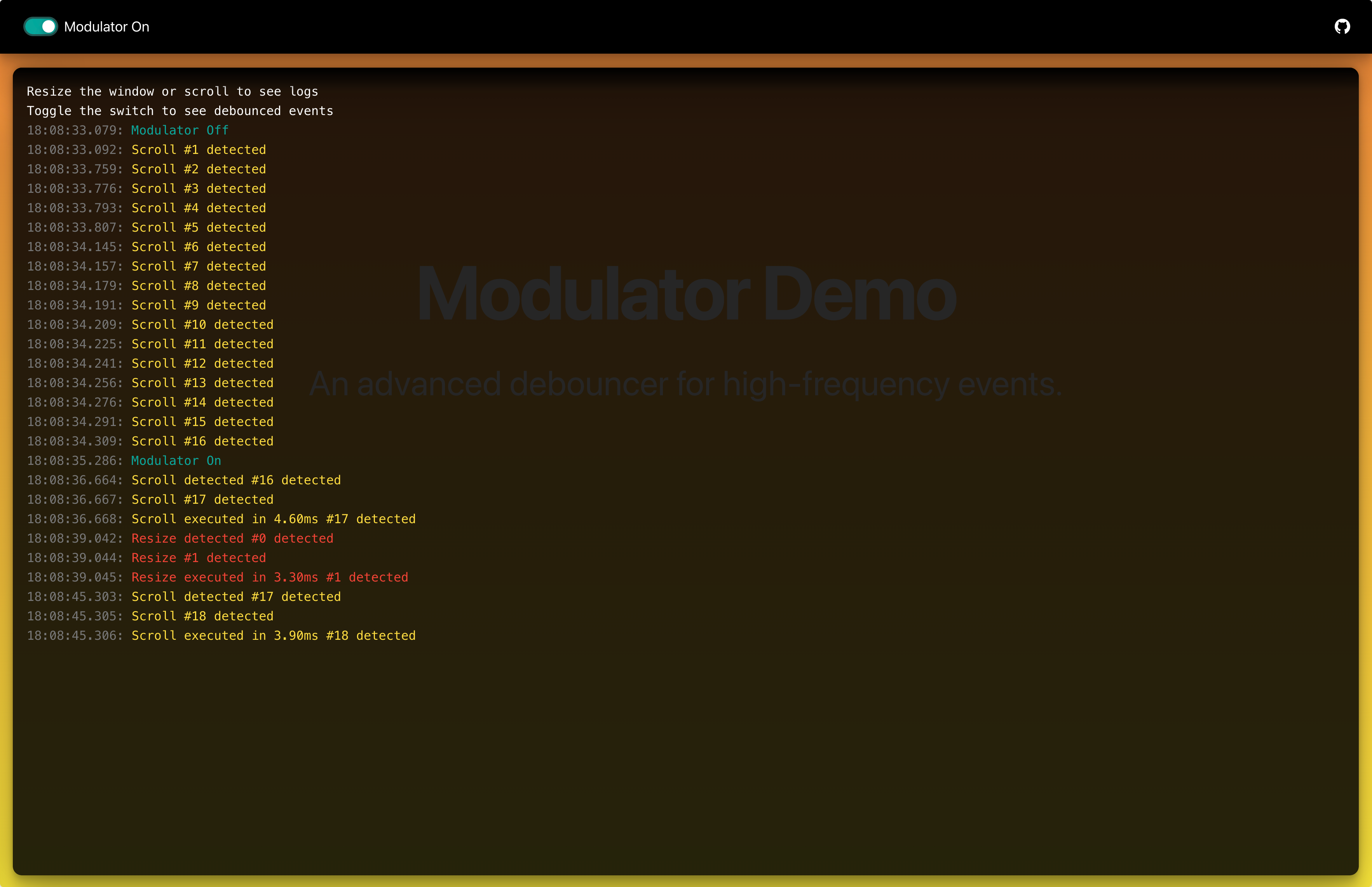
Modulator is an advanced debouncing utility, now written in **TypeScript**, designed to optimize high-frequency events in web applications (e.g., scroll, resize, input). This standalone solution offers enhanced performance and flexibility compared to basic debouncing functions.
Key features include:
* **Promise-based Return:** Always returns a Promise that resolves with the result of your function or rejects on error/cancellation.
* **Configurable Caching:** Optional result caching based on arguments with controllable `maxCacheSize`.
* **Immediate Execution:** Option (`immediate: true`) to trigger the function on the leading edge.
* **Maximum Wait Time:** Optional `maxWait` parameter to guarantee execution after a certain period, even with continuous calls.
* **Cancellation:** A `.cancel()` method to abort pending debounced calls and reject their associated Promise.
* **TypeScript Support:** Ships with built-in type definitions for a better developer experience.
## Demo ##
 API Documentation
-----------------
### Installation ###
```bash
npm install @danielhaim/modulator
# or
yarn add @danielhaim/modulator
```
### Usage ###
#### ES Modules (Recommended) ####
```javascript
import { modulate } from '@danielhaim/modulator';
// or import default Modulator from '@danielhaim/modulator'; // If using the object wrapper (less common now)
async function myAsyncFunction(query) {
console.log('Executing with:', query);
// Simulate work
await new Promise(res => setTimeout(res, 50));
if (query === 'fail') throw new Error('Failed!');
return `Result for ${query}`;
}
const debouncedFunc = modulate(myAsyncFunction, 300);
debouncedFunc('query1')
.then(result => console.log('Success:', result)) // Logs 'Success: Result for query1' after 300ms
.catch(error => console.error('Caught:', error));
debouncedFunc('fail')
.then(result => console.log('Success:', result))
.catch(error => console.error('Caught:', error)); // Logs 'Caught: Error: Failed!' after 300ms
// Using async/await
async function run() {
try {
const result = await debouncedFunc('query2');
console.log('Async Success:', result);
} catch (error) {
console.error('Async Error:', error);
}
}
run();
```
#### CommonJS ####
```javascript
const { modulate } = require('@danielhaim/modulator');
const debouncedFunc = modulate(/* ... */);
// ... usage is the same
```
#### Browser (UMD / Direct Script) ####
Include the UMD build:
```html
```
#### AMD ####
```javascript
requirejs(['path/to/modulator.amd'], function(Modulator) {
const debouncedFunc = Modulator.modulate(myFunction, 200);
// ...
});
```
### `modulate(func, wait, immediate?, context?, maxCacheSize?, maxWait?)`
Creates a debounced function that delays invoking `func` until after `wait` milliseconds have elapsed since the last time the debounced function was invoked.
**Returns:** `DebouncedFunction` - A new function that returns a `Promise`. This promise resolves with the return value of the original `func` or rejects if `func` throws an error, returns a rejected promise, or if the debounced call is cancelled via `.cancel()`.
### Parameters ###
| Name | Type | Attributes | Default | Description |
| -------------- | ---------------------------------------- | ---------- | --------- | ----------------------------------------------------------------------------------------------------------------------------------------- |
| `func` | `Function` | | | The function to debounce. Can be synchronous or asynchronous (return a Promise). |
| `wait` | `number` | | | The debouncing wait time in milliseconds. Must be non-negative. |
| `immediate?` | `boolean` | `` | `false` | If `true`, triggers `func` on the leading edge instead of the trailing edge. Subsequent calls within the `wait` period are ignored until the cooldown finishes. |
| `context?` | `object` | `` | `null` | The context (`this`) to apply when invoking `func`. Defaults to the context the debounced function is called with. |
| `maxCacheSize?`| `number` | `` | `100` | The maximum number of results to cache based on arguments. Uses `JSON.stringify` for keys. Set to `0` to disable caching. Must be non-negative. |
| `maxWait?` | `number` | `null` | `` | `null` | The maximum time (in ms) `func` is allowed to be delayed before it's invoked, even if calls keep occurring. Must be `>= wait` if set. |
### Enhanced Functionality ###
The returned debounced function has an additional method:
* **`debouncedFunc.cancel()`**: Cancels any pending invocation of the debounced function. If a call was pending, the `Promise` returned by that call will be rejected with an error indicating cancellation. This does *not* clear the result cache.
### Caching ###
* When `maxCacheSize > 0`, Modulator caches the results (resolved values) of successful `func` invocations.
* The cache key is generated using `JSON.stringify(arguments)`. This works well for primitive arguments but may have limitations with complex objects, functions, or circular references.
* If a subsequent call is made with the same arguments (generating the same cache key) while the result is in the cache, the cached result is returned immediately via a resolved Promise, and `func` is not invoked.
* The cache uses a simple Least Recently Used (LRU) eviction strategy: when the cache exceeds `maxCacheSize`, the oldest entry is removed. Accessing a cached item marks it as recently used.
Examples
--------
#### Basic Debounce (Trailing Edge) ####
```javascript
function handleInput(value) {
console.log('Processing input:', value);
// e.g., make API call
}
// Debounce to run only 500ms after the user stops typing
const debouncedHandleInput = modulate(handleInput, 500);
searchInput.addEventListener('input', (event) => {
debouncedHandleInput(event.target.value)
.catch(err => console.error("Input Error:", err)); // Optional: Catch potential errors
});
```
#### Immediate Execution (Leading Edge) ####
```javascript
function handleClick() {
console.log('Button clicked!');
// Perform action immediately, but prevent rapid re-clicks
}
// Trigger immediately, then ignore calls for 1000ms
const debouncedClick = modulate(handleClick, 1000, true);
myButton.addEventListener('click', () => {
debouncedClick().catch(err => {
// Only log if it's not a cancellation error, as we don't cancel here
if (err.message !== 'Debounced function call was cancelled.') {
console.error("Click Error:", err);
}
});
});
```
#### Handling Promise Results & Errors ####
```javascript
async function searchAPI(query) {
if (!query) return []; // Handle empty query
console.log(`Searching API for: ${query}`);
const response = await fetch(`/api/search?q=${query}`);
if (!response.ok) throw new Error(`API Error: ${response.statusText}`);
return response.json();
}
const debouncedSearch = modulate(searchAPI, 400);
const statusElement = document.getElementById('search-status'); // Assume element exists
const searchInput = document.getElementById('search-input'); // Assume element exists
searchInput.addEventListener('input', async (event) => {
const query = event.target.value;
statusElement.textContent = 'Searching...';
try {
// debouncedSearch returns a promise here
const results = await debouncedSearch(query);
// Check if query is still relevant before updating UI
if (query === searchInput.value) {
statusElement.textContent = `Found ${results.length} results.`;
// Update UI with results
} else {
console.log("Query changed, ignoring results for:", query);
}
} catch (error) {
// Handle errors from searchAPI OR cancellation errors
if (error.message === 'Debounced function call was cancelled.') {
console.log('Search cancelled.');
// Status might already be 'Searching...' which is fine
} else {
console.error('Search failed:', error);
statusElement.textContent = `Error: ${error.message}`;
}
}
});
// Example of cancellation (Alternative approach combining input/cancel)
let currentQuery = '';
searchInput.addEventListener('input', async (event) => {
const query = event.target.value;
currentQuery = query;
statusElement.textContent = 'Typing...';
// Cancel any previous pending search before starting a new one
debouncedSearch.cancel(); // Cancel previous timer/promise
if (!query) { // Handle empty input immediately
statusElement.textContent = 'Enter search term.';
// Clear results UI
return;
}
// Only proceed if query is not empty after debounce period
try {
statusElement.textContent = 'Waiting...'; // Indicate waiting for debounce
// Start new search (will wait 400ms unless cancelled again)
const results = await debouncedSearch(query); // New promise for this call
// Re-check if the query changed *after* the await completed
if (query === currentQuery) {
statusElement.textContent = `Found ${results.length} results.`;
// Update UI
} else {
console.log('Results ignored, query changed.');
// Status might remain 'Typing...' from next input event
}
} catch (error) {
// Handle errors from the awaited promise
if (error.message !== 'Debounced function call was cancelled.') {
console.error('Search failed:', error);
statusElement.textContent = `Error: ${error.message}`;
} else {
// Ignore cancellation errors here as we trigger cancel often
console.log('Search promise cancelled.');
}
}
});
```
#### Using `maxWait` ####
```javascript
function saveData() {
console.log('Saving data to server...');
// API call to save
return Promise.resolve({ status: 'Saved' }); // Example return
}
// Debounce saving by 1 second, but ensure it saves
// at least once every 5 seconds even if user keeps typing.
const debouncedSave = modulate(saveData, 1000, false, null, 0, 5000); // No cache, maxWait 5s
const saveStatus = document.getElementById('save-status'); // Assume element exists
const textArea = document.getElementById('my-textarea'); // Assume element exists
textArea.addEventListener('input', () => {
saveStatus.textContent = 'Changes detected, waiting to save...';
debouncedSave()
.then(result => {
// Check if still relevant (optional)
saveStatus.textContent = `Saved successfully at ${new Date().toLocaleTimeString()}`;
console.log('Save result:', result);
})
.catch(err => {
if (err.message !== 'Debounced function call was cancelled.') {
console.error("Save Error:", err);
saveStatus.textContent = `Save failed: ${err.message}`;
} else {
console.log("Save cancelled.");
// Status remains 'waiting...' or might be updated by next input
}
});
});
```
Resources
---------
- [The Debouncing and Throttling Explained article on the CSS-Tricks website](https://css-tricks.com/debouncing-throttling-explained-examples/)
- [The Underscore.js documentation on the debounce function](https://underscorejs.org/#debounce)
- [The Lodash documentation on the debounce function](https://lodash.com/docs/4.17.15#debounce)
Report Bugs
-----------
If you encounter any bugs while using Modulator, please report them to the [GitHub issue tracker](https://github.com/danielhaim1/modulator/issues).
When submitting a bug report, please include as much information as possible, such as:
* Version of Modulator used.
* Browser/Node.js environment and version.
* Steps to reproduce the bug.
* Expected behavior vs. actual behavior.
* Any relevant code snippets.