# VASTClient
The `VASTClient` class provides a client to manage the fetching and parsing of VAST documents. It provides methods for fetching VAST resources by resolving the wrapper chain (recursive fetching and parsing) by using the `VASTParser` parsing methods.
- [Constructor](#constructor)
- [Properties](#properties)
- [Methods](#methods)
## Constructor
The constructor signature is:
```Javascript
constructor(cappingFreeLunch, cappingMinimumTimeInterval, customStorage)
```
All the parameters are optional.
### Parameters
- **`cappingFreeLunch: Number`** - Used to set the `cappingFreeLunch` property of the class, if not provided a default value of `0` is used for the property
- **`cappingMinimumTimeInterval: Number`** - Used to set the `cappingMinimumTimeInterval` property of the class, if not provided a default value of `0` is used for the property
- **`customStorage: Storage`** - Optional custom storage to be used instead of the default one [`utils/storage.js`](../../src/util/storage.js)
### Example
To get an instance of `VASTClient`, simply import it and create one using the constructor:
```Javascript
import { VASTClient } from 'vast-client'
// With default values
const vastClient = new VASTClient();
// With cappingFreeLunch
const vastClient = new VASTClient(2);
// With cappingMinimumTimeInterval
const vastClient = new VASTClient(0, 2000);
// With customStorage
const vastClient = new VASTClient(0, 0, customStorage);
```
## Properties
### cappingFreeLunch: Number
The number of calls to skip.
Example: if set to `3`, the first 3 VAST requests will not be executed.
```Javascript
// Ignore the first 2 calls
vastClient.cappingFreeLunch = 2;
// Those following vastClient.get calls won't be done
vastClient.get(VASTUrl);
vastClient.get(VASTUrl);
// VASTUrl will be called
vastClient.get(VASTUrl);
```
### cappingMinimumTimeInterval: Number
The minimum time interval (in milliseconds) which has to pass between the display of an ad and the request for the vast-client.
Example: if set to `2000`, any call which will be requested less than 2 seconds after the last ad displayed will be ignored.
In order for the VASTClient to detect that the ad has been displayed, you must first initialize a [VASTTracker](docs/api/vast-tracker.md)
with the ad and the chosen creative. Then, notify the VASTTracker that the player started to play the ad with `vastTracker.track('start')`
```Javascript
// Ignores any call made 5 minutes or less after the last successful ad
vastClient.cappingMinimumTimeInterval = 5 * 60 * 1000;
const initVastTracker = (ad) => {
// Choose the creative that fit the best to player
vastTracker = new VASTTracker(vastClient, ad, ad.creatives[0]);
}
// The call is made
vastClient.get(VASTUrl).then(initVastTracker);
// Elsewhere in the code, Player start to play the ad and notify the vast-tracker
vastTracker.track('start')
// 2 minutes later: The call is ignored
vastClient.get(VASTUrl);
// 6 minutes later: The call is made
vastClient.get(VASTUrl);
```
### storage: Storage
Instance of a class which implements the `Storage` interface. Should be set up only once through the constructor.
## Public Methods 💚
### get(url, options): Promise
Gets a parsed VAST document for the given url, applying the skipping rules defined (`cappingFreeLunch` and `cappingMinimumTimeInterval`).
Returns a `Promise` which either resolves with the fully parsed [`VASTResponse`](https://github.com/dailymotion/vast-client-js/blob/master/docs/api/class-reference.md#vastresponse) or rejects with an `Error`.
By default the fully parsed `VASTResponse` contains all the Ads contained in the `VAST` resource. It's possible to get only the first Ad or AdPod and then get the remaining ones on demand by passing `resolveAll: false` in the `options` parameter.
#### Parameters
- **`url: String`** - The url to use to fetch the VAST document
- **`options: Object`** - An optional Object to configure the request:
- `timeout: Number` - A custom timeout for the requests (default `120000 ms`)
- `withCredentials: Boolean` - A boolean to enable the withCredentials options for the XHR URLHandler (default `false`)
- `fetchOptions: Object` - Additional options to pass to the fetch request, like headers, cache, etc.
- `wrapperLimit: Number` - A number of Wrapper responses that can be received with no InLine response (default `10`)
- `urlHandler: URLHandler` - Custom urlhandler to be used instead of the default ones [`urlhandlers`](../../src/urlhandlers)
- `urlhandler: URLHandler` - Fulfills the same purpose as `urlHandler`, which is the preferred parameter to use
- `resolveAll: Boolean` - Allows you to parse all the ads contained in the VAST or to parse: only the AdPod, or stand alone ad per stand alone ad (default `true`)
- `allowMultipleAds: Boolean` - A Boolean value that identifies whether multiple ads are allowed in the requested VAST response. This will override any value of allowMultipleAds attribute set in the VAST
- `followAdditionalWrappers: Boolean` - a Boolean value that identifies whether subsequent Wrappers after a requested VAST response is allowed. This will override any value of followAdditionalWrappers attribute set in the VAST
#### Example
```Javascript
const vastClient = new VASTClient();
vastClient.get('http://example.dailymotion.com/vast.xml')
.then(res => {
// Do something with the parsed VAST response
})
.catch(err => {
// Deal with the error
});
// With the options optional parameter
const options = {
withCredentials: true,
wrapperLimit: 7,
fetchOptions: {
headers: {
'User-Agent': 'My Custom User Agent',
'Cache-Control': 'no-cache'
}
}
};
vastClient.get('http://example.dailymotion.com/vast.xml', options)
.then(res => {
// Do something with the parsed VAST response
})
.catch(err => {
// Deal with the error
});
```
### parseVAST(vastXml, options)
Parses the given xml Object into a [VASTResponse](https://github.com/dailymotion/vast-client-js/blob/master/docs/api/class-reference.md#vastresponse).
Returns a `Promise` which either resolves with the fully parsed `VASTResponse` or rejects with an `Error`.
By using this method, you will be able to perform fetching in case you want to parse a VAST document and follow a wrappers chain.
If you just need to parse an inline VAST or you want to parse the first VAST document encountered, you should use the **parseVAST** method from the **VASTParser**.
#### Parameters
- **`vastXml: Object`** - An object representing an xml document
- **`options: Object`** - An optional Object of parameters to be used in the parsing process
- `timeout: Number` - A custom timeout for the possible wrapper resolving requests (default `120000`)
- `withCredentials: Boolean` - A boolean to enable the withCredentials options for the XHR URLHandler (default `false`)
- `fetchOptions: Object` - Additional options to pass to the fetch request, like headers, cache, etc.
- `wrapperLimit: Number` - A number of Wrapper responses that can be received with no InLine response (default `10`)
- `urlHandler: URLHandler` - Custom urlhandler to be used instead of the default ones [`urlhandlers`](../../src/urlhandlers)
- `urlhandler: URLHandler` - Fulfills the same purpose as `urlHandler`, which is the preferred parameter to use
- `allowMultipleAds: Boolean` - A boolean value that identifies whether multiple ads are allowed in the requested VAST response. This will override any value of allowMultipleAds attribute set in the VAST
- `followAdditionalWrappers: Boolean` - A boolean value that identifies whether subsequent Wrappers after a requested VAST response is allowed. This will override any value of followAdditionalWrappers attribute set in the VAST
- `requestDuration: Number` - The fetching time of the XML in ms. Provide it with byteLength to have a more accurate estimated bitrate.
- `byteLength: Number`- The size of the request in bytes. Provide it with requestDuration to have a more accurate estimated bitrate.
#### Events emitted
- **`VAST-resolved`**
- **`VAST-resolving`**
- **`VAST-warning`**
#### Example
```Javascript
const vastXml = (new window.DOMParser()).parseFromString(xmlStr, "text/xml");
vastParser.parseVAST(vastXml)
.then(res => {
// Do something with the parsed VAST response
})
.catch(err => {
// Deal with the error
});
// Or with some options
const options = {
timeout: 5000,
withCredentials: true,
wrapperLimit: 7
}
vastParser.parseVAST(vastXml, options)
.then(res => {
// Do something with the parsed VAST response
})
.catch(err => {
// Deal with the error
});
```
#### How does resolveAll work
Let's consider the VAST shown in the following image: it contains 4 ads, with the 2nd and 3rd defining an AdPod.
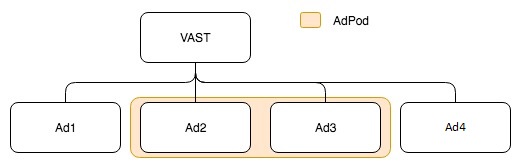
Using `get` method with default `options` will return a [`VASTResponse`](https://github.com/dailymotion/vast-client-js/blob/master/docs/api/class-reference.md#vastresponse) containing all the ads resolved, which would look like this:
```Javascript
{
ads: [
ad1,
ad2,
ad3,
ad4
],
errorURLTemplates,
version
}
```
The `resolveAll` parameter allows to request only the AdPod or first Ad. If we pass it as `false` the response would look like:
```Javascript
{
ads: [
ad2,
ad3
],
errorURLTemplates,
version
}
```
We can then request the remaining ads using `getNextAds` method:
```Javascript
// get the next ad or adPod
vastClient.getNextAds()
.then(ads => {
console.log(ads);
/*
Will print something like
{
ads: [
ad2,
ad3
],
errorURLTemplate
}
*/
});
// get last ad
vastClient.getNextAds()
.then(ads => {
console.log(ads);
/*
Will print something like
{
ads: [
ad4
],
errorURLTemplate
}
*/
});
```
**Why should you use `resolveAll=false`?**
Most times you will only need the first Ad or AdPod (following ones are usually either optional ads or fallback ones). Using `resolveAll=false` allows you to avoid useless calls to resolve every wrapper chain of the initial VAST.
### hasRemainingAds(): Boolean
Returns `true` if there are remaining ads not returned by the `get` method (in case `resolveAll` was passed as `false`). Returns `false` otherwise.
#### Example
```Javascript
const vastClient = new VASTClient();
// With the options optional parameter
const options = {
resolveAll: false
};
// Getting a VAST which contains more than one Ad
vastClient.get('http://example.dailymotion.com/vast.xml', options)
.then(res => {
// Do something with the parsed VAST response
})
.catch(err => {
// Deal with the error
});
vastClient.hasRemainingAds(); // Returns true
```
### getNextAds(all): Promise
Returns a `Promise` which either resolves with a [`VASTResponse`](https://github.com/dailymotion/vast-client-js/blob/master/docs/api/class-reference.md#vastresponse) or rejects with an Error.
The resolved `VASTResponse` can contain either a single Ad or AdPod or all the remaining Ads if `all` parameter is passed as `true`.
#### Example
```Javascript
const vastClient = new VASTClient();
// With the options optional parameter
const options = {
resolveAll: false
};
// Getting a VAST which contains more than one Ad
vastClient.get('http://example.dailymotion.com/vast.xml', options)
.then(res => {
// Do something with the parsed VAST response
})
.catch(err => {
// Deal with the error
});
vastClient.hasRemainingAds(); // Returns true
vastClient.getNextAds()
.then(res => {
// Do something with the next Ad
})
.catch(err => {
// Deal with the error
});
vastClient.getNextAds(true)
.then(res => {
// Do something with all the remaining Ads
})
.catch(err => {
// Deal with the error
});
```
### getParser()
Returns the instance of `VASTParser` used by the client to parse the VAST. Use it to directly call a method provided by the `VASTParser` class.
#### Example
```Javascript
const vastClient = new VASTClient();
const vastParser = vastClient.getParser();
// Clear the url template filters used
vastParser.clearUrlTemplateFilters();
```
### addURLTemplateFilter(filter)
Adds a filter function to the array of filters which are called before fetching a VAST document.
#### Parameters
- **`filter: function`** - The filter function to be added at the end of the array
#### Example
```Javascript
vastClient.addURLTemplateFilter( vastUrl => {
return url.replace('[DOMAIN]', 'mywebsite.com')
});
/*
For a VASTAdTagURI defined as :
http://example.dailymotion.com/vast.php?domain=[DOMAIN]
HTTP request will be:
http://example.dailymotion.com/vast.php?domain=mywebsite.com
*/
```
### removeLastURLTemplateFilter()
Removes the last element of the url templates filters array.
#### Example
```Javascript
const replaceDomain = () => {
return url.replace('[DOMAIN]', 'mywebsite.com')
};
vastClient.addURLTemplateFilter(replaceDomain);
// ...
vastClient.removeURLTemplateFilter(replaceDomain);
// [DOMAIN] placeholder is no longer replaced
```
### countURLTemplateFilters()
Returns the number of filters of the url templates filters array.
#### Example
```Javascript
vastClient.addURLTemplateFilter( vastUrl => {
return url.replace('[DOMAIN]', 'mywebsite.com')
});
vastClient.countUrlTemplateFilters();
// returns 1
```
### clearURLTemplateFilters()
Removes all the filter functions from the url templates filters array.
#### Example
```Javascript
vastClient.addURLTemplateFilter( vastUrl => {
return url.replace('[DOMAIN]', 'mywebsite.com')
});
vastClient.clearUrlTemplateFilters();
// [DOMAIN] placeholder is no longer replaced
```