react-native-mmfile
Fastest storage with encryption for React Native.
## Features
- 🚀 **High Performance:** Leverages mmap for memory-mapped file I/O, significantly outperforming [react-native-fs](https://github.com/itinance/react-native-fs).
Built on the new React Native architecture with [NitroModules](https://nitro.margelo.com), it enables zero-copy operations and direct ArrayBuffer access.
- 🛠️ **Simple API:** Easily `read`, `write` or `append` files using the `Mmfile` or `EncryptedMmfile` objects.
- 🔒 **Encryption:** Supports AES-128, AES-192, and AES-256 in CTR mode for real-time encryption/decryption and random access. The cipher is implemented in C++ and optimized for performance using NEON (ARM) and AES-NI (Intel) instructions.
- 📦 **Zero Dependencies:** No external libraries required—pure, efficient native code.
- 📱 **Cross-Platform:** Seamlessly works on both iOS and Android
## Performance
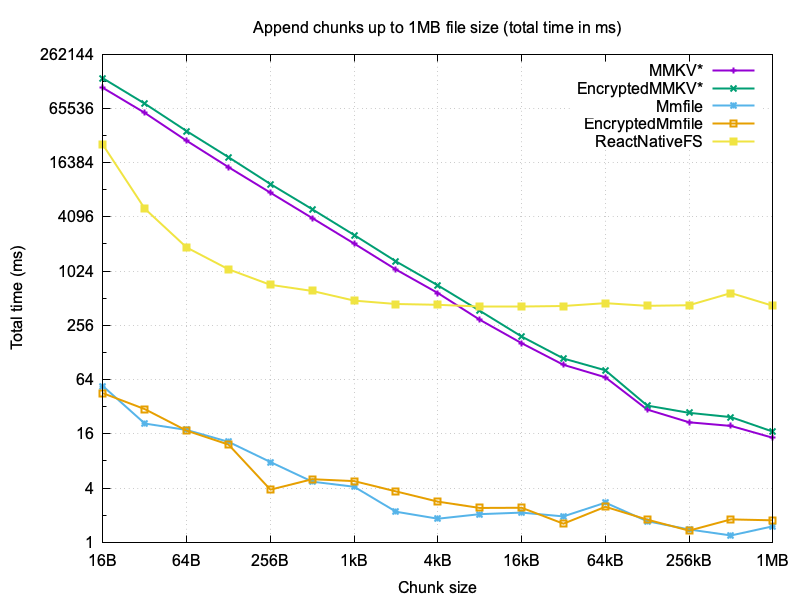
To compare the performance of **react-native-mmfile** to the most popular React Native storage modules [react-native-mmkv](https://github.com/mrousavy/react-native-mmkv) and [react-native-fs](https://github.com/itinance/react-native-fs), the following benchmark measures the total time it takes to write a file of 1MB by appending chunks of varying sizes (16 bytes to 1MB).
*) It's important to note that MMKV is not a file-based storage solution, but rather a key-value store and doesn't offer an append operation, so it had to overwrite the file each time, but even in a single write operation, it was still slower than **react-native-mmfile**.
## Installation
React Native 
```sh
bun add react-native-mmfile react-native-nitro-modules
cd ios && pod install
```
> [!NOTE]
> **Supported Android ABIs.** The native code is built for `arm64-v8a`, `armeabi-v7a` and `x86_64`. The 32-bit `armeabi-v7a` library exists for 64-bit ARMv8 CPUs that run a 32-bit Android (e.g. the Samsung Galaxy A13): it executes in AArch32 but still uses the hardware AES instructions, so it requires the ARMv8 Cryptography Extensions. If your app pins `reactNativeArchitectures` in `android/gradle.properties`, make sure `armeabi-v7a` is included.
>
> **Minimum SDK is 28 (Android 9).** Every pre-ARMv8 32-bit CPU (which lacks the AES instructions) tops out at Android 8.1, so this floor guarantees the `armeabi-v7a` library only ever runs on a CPU that supports it — and keeps the app off the long-EOL Android 8. Consuming apps must therefore use `minSdkVersion >= 28`.
## Usage
```ts
import { Mmfile } from '@d4l/react-native-mmfile';
// encode 'Hello World' to ArrayBuffer using UTF-8 encoding
const data = new TextEncoder().encode('Hello World').buffer;
let file = Mmfile.openMmfile('hello.txt');
file.append(data);
file.close();
```
## Documentation
- [Full API reference](docs/API.md)
- *Nitro Modules — The easiest and fastest way to write React Native modules*, [Medium article](https://medium.com/@dave.weese/nitro-modules-1e0fbffcdda4)
## Example App
The example app demonstrates the usage of `react-native-mmfile` and can be found in the [example](example) directory. To run the example app, follow these steps:
```bash
cd example
npm run preinstall
npm install
# For Android
npm run android
# For iOS
cd ios
pod install
npm run ios
```
## Run Tests
To run the tests, you need to install GoogleTests first, e.g. with Homebrew:
```bash
brew install googletest
```
And then use the following commands:
```bash
cd cpp/tests
mkdir build
cd build
cmake ..
cmake --build .
ctest
```
## License
MIT
