# dsh-free-search

[![npm](https://img.shields.io/npm/v/@copylee/dsh-free-search)](https://www.npmjs.com/package/@copylee/dsh-free-search)

[中文](README.md) · English

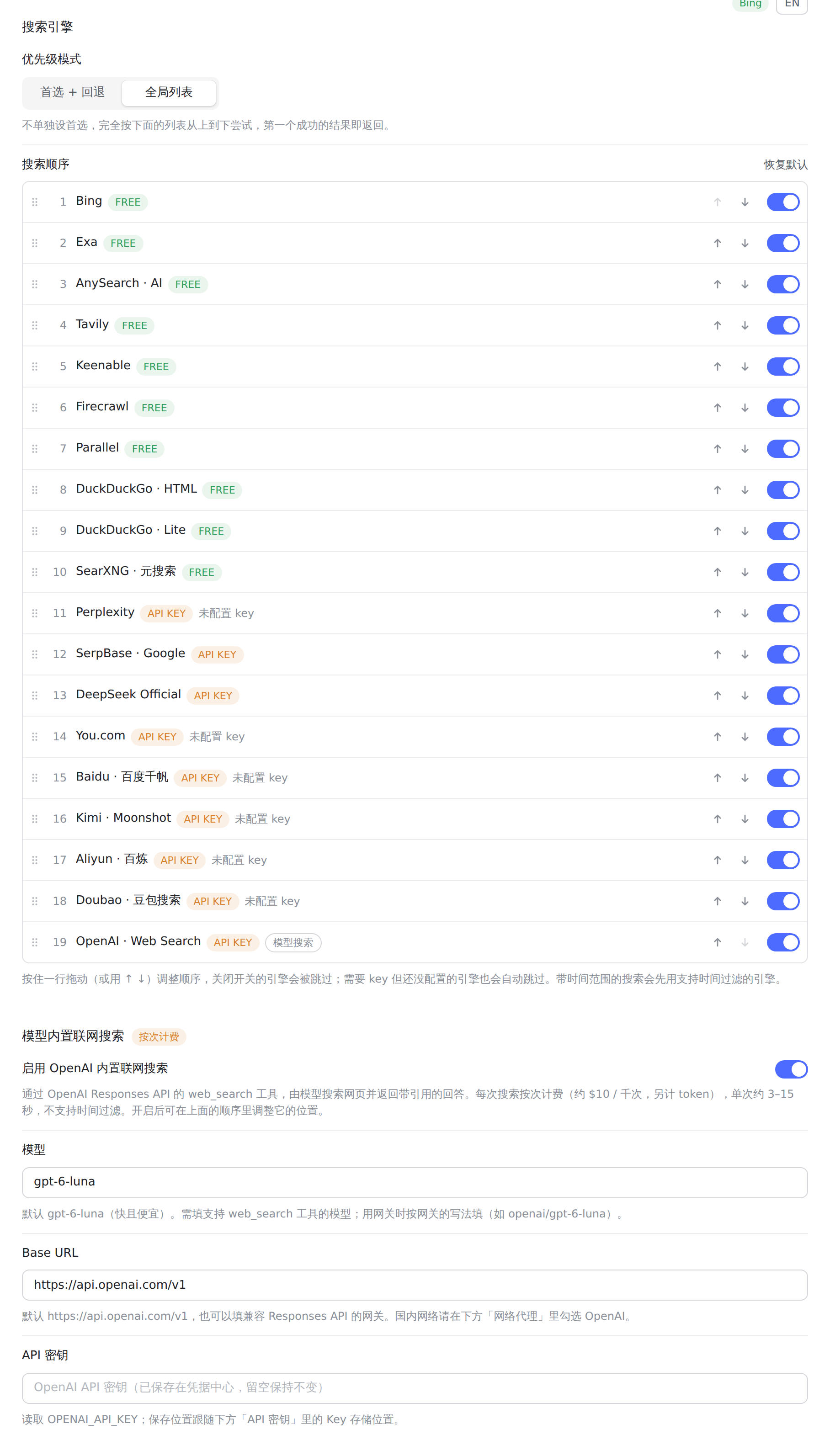
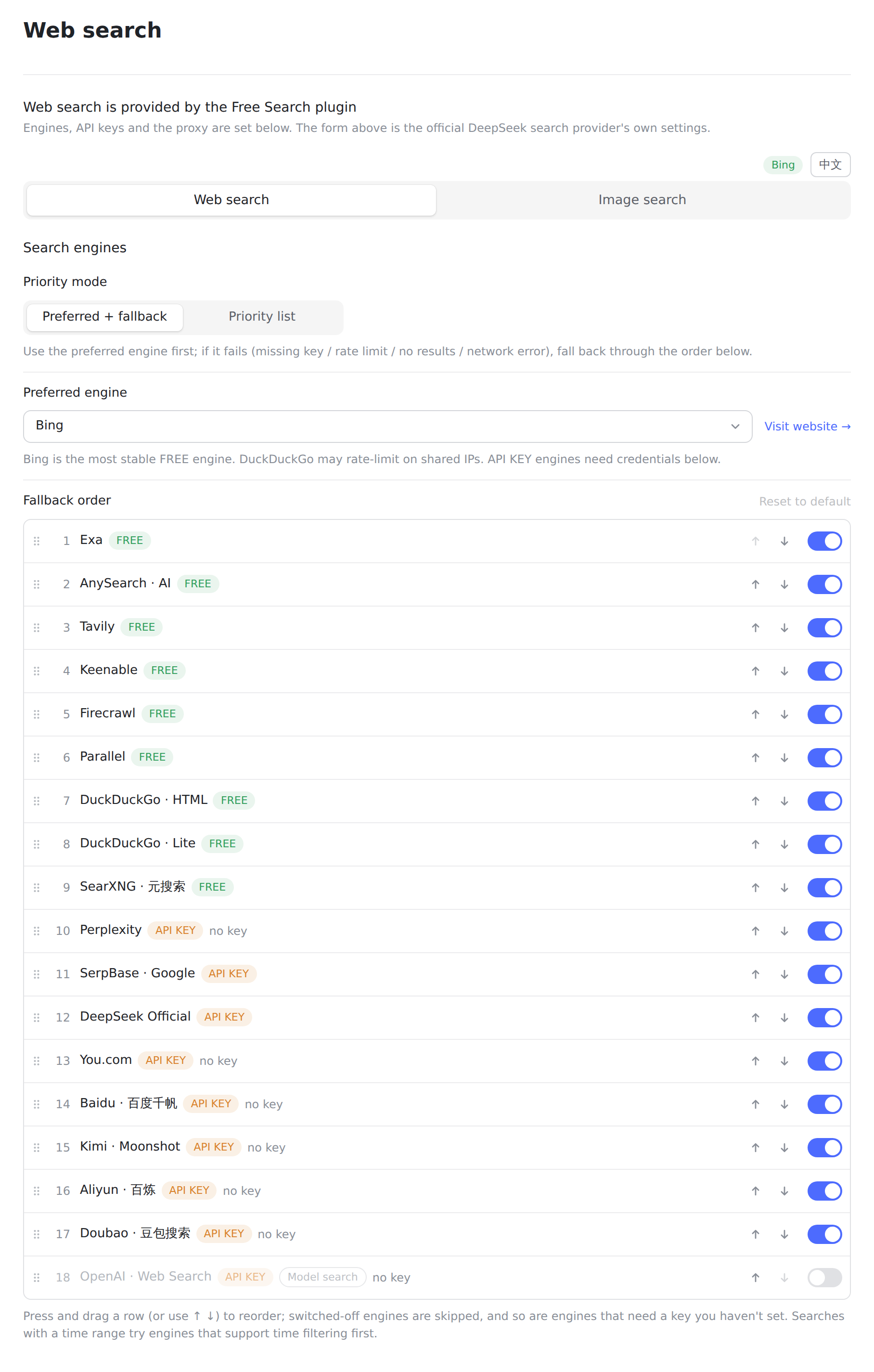
**Free web search for DeepSeek Harness — no API key, zero cost, switchable engines.** A plugin that adds a multi-engine search provider to DeepSeek Harness (dsh) through the `ctx.web` seam. The built-in `web_search` tool picks it up automatically; switch engines, set API keys, test engines and pick a per-engine proxy from its settings card, or switch engines with a popup command.


<div align="center">
  <a href="https://raw.githubusercontent.com/copylee711/dsh-free-search/master/assets/settings-overview-en.png">
    <img src="https://raw.githubusercontent.com/copylee711/dsh-free-search/master/assets/settings-overview-en.png" alt="Settings page: search engines and priority" width="820" />
  </a>
  <br>
  <sub>Settings page (same styling as DSH's own settings, follows the light/dark theme)</sub>
</div>

## Why You Need It

dsh's default search provider relies on the official DeepSeek API key (`DEEPSEEK_API_KEY`). If you:
- Do not have (or prefer not to use) an official DeepSeek key,
- Use a gateway like opencode-go (whose OpenAI-compatible endpoint does not support the `web_search` tool),

...then the built-in search will inevitably fail, and the agent will tell you "I cannot access the internet."

This plugin provides multiple free search engines with automatic fallback, completely freeing you from relying on DeepSeek's official key.

## Features

- **Zero Cost** — Multiple free engines with no API key or registration required
- **Multi-Engine Support** — DuckDuckGo (HTML / Lite), Bing, AnySearch AI, SearXNG (meta-search with custom instances), Exa, Tavily, Keenable, Firecrawl, Parallel, Perplexity, SerpBase, DeepSeek Official, You.com, Baidu Qianfan, Kimi, Aliyun Bailian and Doubao search — plus the **OpenAI model's built-in web search**
- **Adjustable search priority** — pick a mode: "Preferred + fallback" (one preferred engine, then the list) or "Priority list" (strictly top to bottom); drag to reorder the list and switch engines on/off one by one; the preferred engine can also be "Auto" (smart routing by query language)
- **Model built-in web search (OpenAI)** — optional: the model (default `gpt-6-luna`) searches the web through the Responses API `web_search` tool and returns an answer with cited sources; model and Base URL (any compatible gateway) are configurable; billed per search, off by default
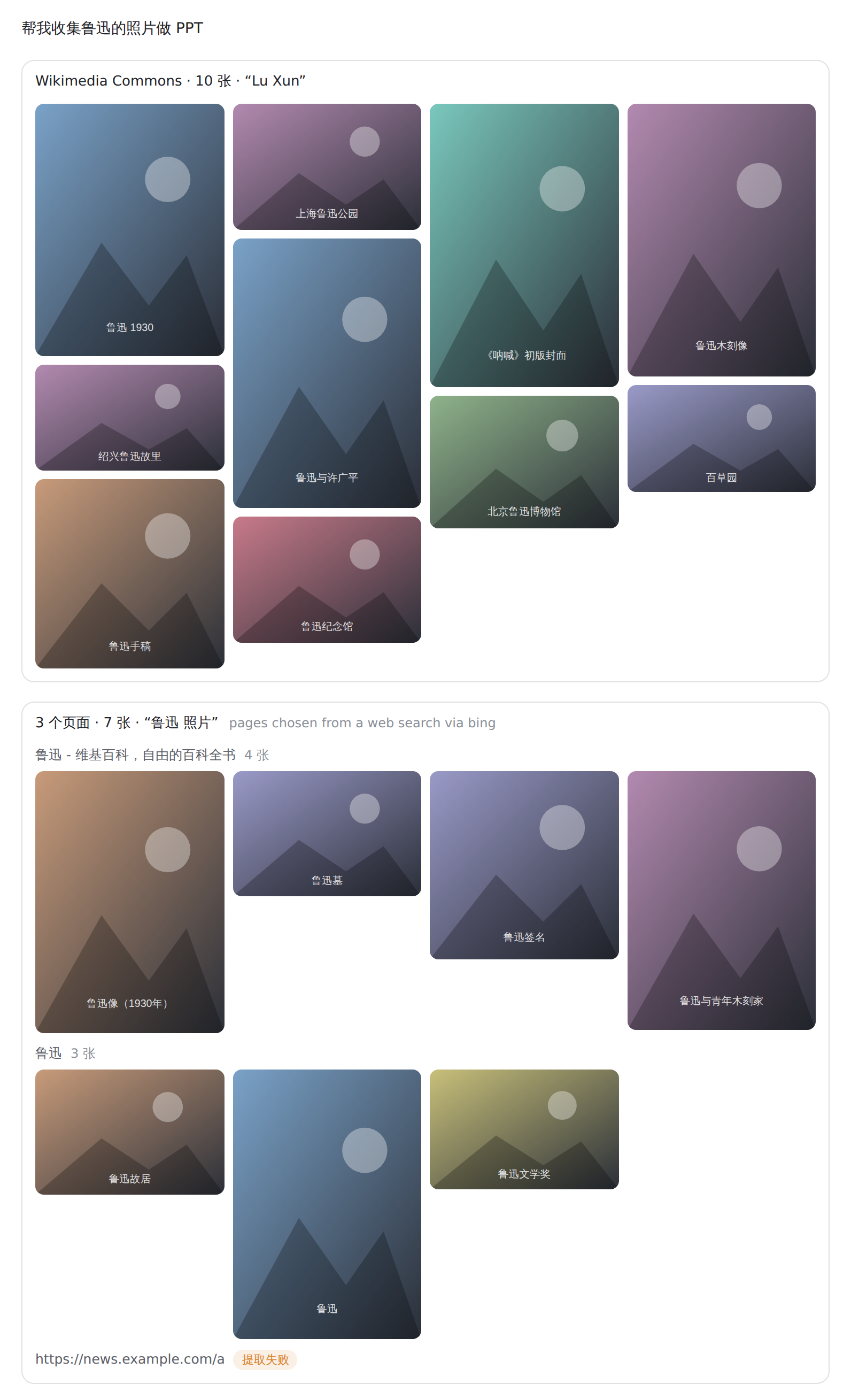
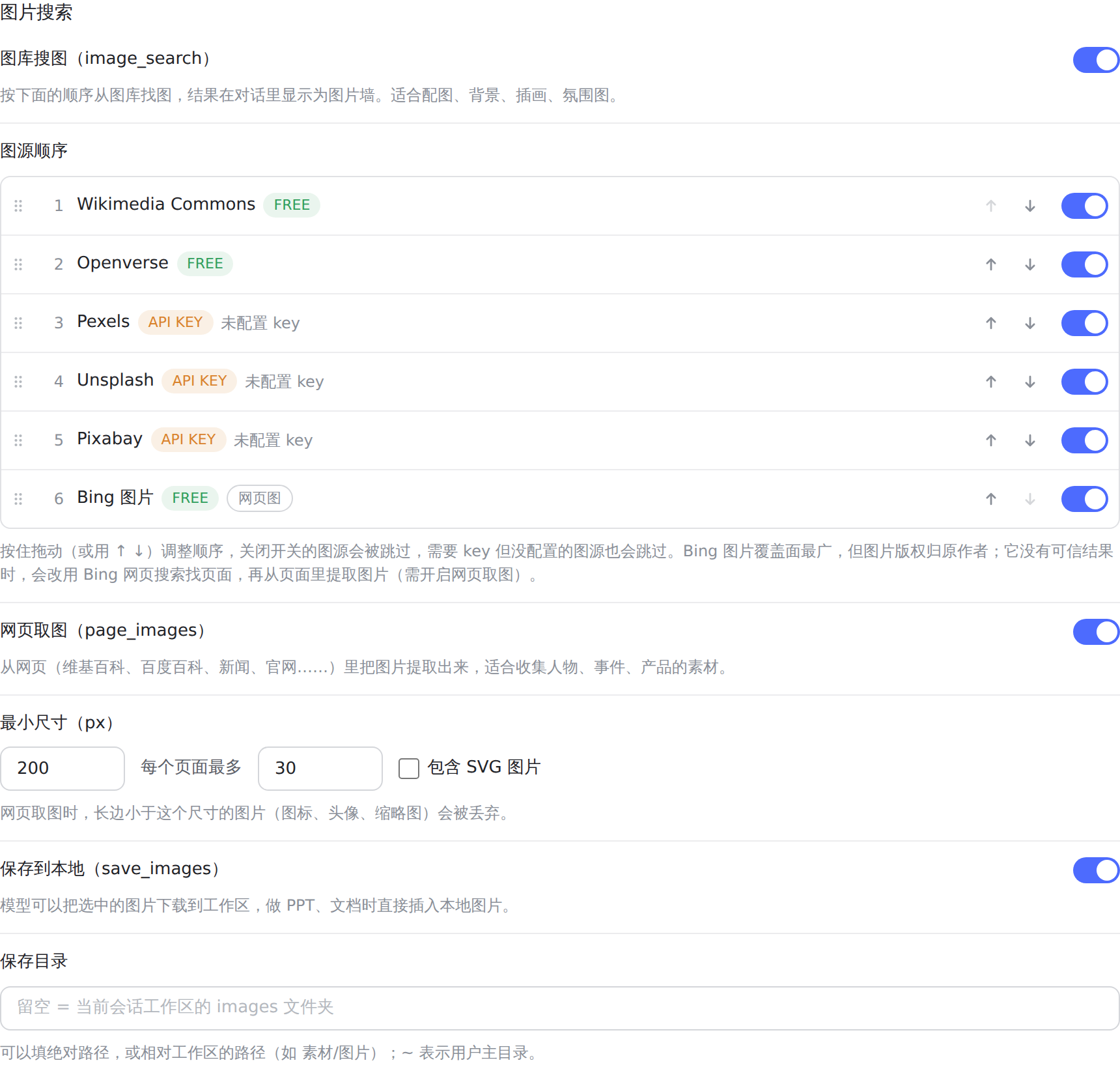
- **Image search and page images** — `image_search` finds pictures in image libraries (Wikimedia Commons / Openverse keyless, Pexels / Unsplash / Pixabay with keys, optional Bing Images), `page_images` pulls the pictures out of Wikipedia, Baidu Baike, news and official pages, and `save_images` downloads chosen ones into the workspace; results show up as an image wall in the chat with a lightbox and downloads. Each of the three tools can be switched on or off on the settings page
- **Cross-source search (multi_search)** — queries several engines concurrently, merges results by URL and marks which engines each result was seen in
- **Web Settings UI** — styled like DSH's own settings pages (follows the light/dark theme): priority, model search, API keys (masked as "configured", with where each key comes from), proxy, Chinese/English toggle; open it from Plugins → Official → **Web search** (DSH 0.1.7-rc.1+)
- **Popup Switch Command** — Type `/free-search-engine` in the chat: a picker opens with all engines; click one to switch (equivalent to the settings page + save)
- **Engine Testing** — `free_search_test` for the agent to check all engines in one call; the settings UI also has a "Test engine" button that tests the selected engine directly (no fallback chain; paid engines without a key report an explicit error)
- **Unified Engine Fallback** — Any engine failure (paid or free, missing key, 401, rate limit, network error, no results) automatically tries the next engine in the order set on the settings page (paid engines without a key are skipped; exa/tavily/keenable/firecrawl/parallel work keyless) — with a note attached to the results naming the engine that actually served them (e.g. `Note: perplexity unavailable or failed, using exa.`). Search never fails outright.
- **Time Filtering** — The `advanced_search` tool supports `timeRange`: fixed tiers, custom relative values, or an absolute date (details below)
- **System Prompt Injection** — The agent is aware of the currently active engine and which engines require API keys; it is also told that all search output is **untrusted external data** and must never be executed as instructions
- **Prompt-Injection Guard (untrusted-data boundary)** — Web-derived text from the plugin's own tools (`advanced_search` / `platform_search` / `free_search_test`) is wrapped in an explicit `<untrusted-web-content>` boundary (look-alike tags inside the text are stripped to prevent early closure); the core `web_search` / `web_fetch` tools carry DSH core's own notice (`External web content follows...`); every snippet is cleaned and capped at 300 characters
- **Version + Update Check** — The settings card shows the current version, and a "Check update" button queries the npm registry to compare against the latest release, prompting a one-click jump when a newer version exists
- **Result Caching** — Identical queries (same engine / time-filter args) hit an LRU cache (50 entries) for up to 5 minutes, protecting free engines from rate-limiting and saving paid quota; the TTL is configurable from 0-5 minutes in the settings UI (0 disables caching)
- **Per-engine proxy** — Pick "System proxy (auto-detect)" or enter a proxy address in the config card, and choose which engines use it; no environment variables needed (see "Proxy" below)
- **Visual Badges** — Free engines feature a green `FREE` badge, while paid engines show an orange `API KEY` badge in the settings UI
- **Webpage Fetching (`web_fetch`)** — Allows the agent to read full webpage contents (official `dsh-web-fetch-http` provider, pure JS, zero extra dependencies)
- **Platform Search (`platform_search`)** — Search GitHub / V2EX / Bilibili / Reddit / Hacker News / Stack Overflow / Wikipedia / npm (public APIs, zero extra dependencies)
- **Clean Integration** — Implements the official `WebSearchProvider` seam interface, coexisting seamlessly with official plugins

## Supported Engines

| id | Engine | Cost | Description |
|---|---|---|---|
| `ddg` | DuckDuckGo HTML | Free | Occasional rate limits (anti-bot challenges); recovers automatically |
| `ddg-lite` | DuckDuckGo Lite | Free | Lightweight version; same rate-limit behavior as above |
| `bing` | Bing | Free | **Default engine**, most stable, optimized for Chinese (`zh-CN`) |
| `anysearch` | AnySearch AI | Free | AI search, no key needed (anonymous quota) |
| `searxng` | SearXNG Meta Search | Free | Multi-instance automatic failover; supports custom instances |
| `exa` | Exa | Free | **Usable without a key** (anonymous MCP); configure a key for higher quota |
| `tavily` | Tavily | Free | **Usable without a key** (keyless anonymous); configure a key for higher quota |
| `keenable` | Keenable | Free | **Usable without a key** (anonymous MCP); configure a key for higher quota |
| `firecrawl` | Firecrawl | Free | **Usable without a key** (official keyless anonymous quota); configure a key for higher limits |
| `parallel` | Parallel | Free | **Works without a key** (official MCP anonymous quota); a key raises limits and enables precise time filtering |
| `perplexity` | Perplexity | Paid | Requires `PERPLEXITY_API_KEY` |
| `serpbase` | SerpBase | Paid | Requires `SERPBASE_API_KEY` (serpbase.dev, 100 free queries on signup) |
| `deepseek-official` | DeepSeek Official | Paid | Requires `DEEPSEEK_API_KEY` |
| `you` | You.com | Paid | Requires `YOUCOM_API_KEY` |
| `baidu` | Baidu Qianfan AI search | Paid | Requires `BAIDU_API_KEY`; supports time filtering |
| `kimi` | Kimi (Moonshot) web search | Paid | Requires `MOONSHOT_API_KEY` |
| `aliyun` | Aliyun Bailian EnhancedSearch | Paid | Requires `DASHSCOPE_API_KEY` |
| `doubao` | Doubao search (Volcano Engine Web Search) | Paid | Requires `DOUBAO_SEARCH_API_KEY` (500 free searches/month); supports time filtering; long summaries |
| `openai` | OpenAI model built-in web search | Paid | Requires `OPENAI_API_KEY`; **off by default**, turn it on under "Model built-in web search"; about $10 per 1K searches plus tokens; returns an answer with citations; no time filtering |

The preferred engine can also be `auto` (smart routing): Chinese/Japanese/Korean queries try Bing / Baidu / Aliyun / AnySearch first, other languages Bing / Exa / Tavily, then the fallback order.

- **Default engine is `bing`** (free and most stable), ready to use out of the box after installation.
- **Auto-failover**: any engine failure (rate-limited free engine, or missing/invalid paid key, network error) automatically tries the next engine in the order set on the settings page (default: free engines first — Bing → Exa → AnySearch → Tavily → Keenable → Firecrawl → Parallel → DuckDuckGo → SearXNG — then the engines that need a key, skipped while their key is not set) — with a note attached to the results naming the engine that actually served them (e.g. `Note: perplexity unavailable or failed, using exa.`). Search never fails outright because of engine issues.
- **Official Links in Settings**: Free engines display "Visit Website →", while paid engines display "Get API Key →" (opens in a new tab):
  - Exa: <https://dashboard.exa.ai/api-keys>
  - Tavily: <https://app.tavily.com/home>
  - Keenable: <https://keenable.ai/login>
  - Parallel: <https://platform.parallel.ai>
  - Perplexity: <https://www.perplexity.ai/settings/api>
  - SerpBase: <https://serpbase.dev>
  - DeepSeek: <https://platform.deepseek.com/api_keys>
  - You.com: <https://you.com/platform/api-keys>
  - Baidu Qianfan: <https://console.bce.baidu.com/qianfan>
  - Kimi: <https://platform.moonshot.cn>
  - Aliyun Bailian: <https://bailian.console.aliyun.com>
  - Doubao search: <https://console.volcengine.com/search-infinity/web-search>
  - OpenAI: <https://platform.openai.com/api-keys>

### Why are some engines free?

- **AnySearch**: its `v1/search` REST endpoint provides anonymous public search quota without registration or an API key. Quota is rate-limited (fine for daily queries), but as one of the free engines with mutual fallback it stays reliable.
- **Exa**: its public MCP endpoint (`mcp.exa.ai/mcp`) supports anonymous requests, so it works without a key; configuring `EXA_API_KEY` grants a higher usage quota.
- **Tavily**: offers keyless anonymous quota via the `x-tavily-access-mode: keyless` header — it works without a key; configuring `TAVILY_API_KEY` switches to the account tier for higher quota and more stable results.
- **Keenable**: without a key it is called via its public MCP endpoint (`api.keenable.ai/mcp`); configuring `KEENABLE_API_KEY` switches to the REST API (`api.keenable.ai/v1/search`) for higher quota and organization-scoped rate limits.
- **Firecrawl**: its `/v2/search` endpoint works **without a key** out of the box (the official docs state "No API key needed to get started", with anonymous rate limits); configuring `FIRECRAWL_API_KEY` raises the limits. Supports `tbs` time filtering (`qdr:h/d/w/m/y` and custom date ranges).

## Installation

```sh
dsh plugin --profile web add @copylee/dsh-free-search
```

Or install from source:

```sh
git clone https://github.com/copylee711/dsh-free-search.git
dsh plugin --profile web add /path/to/dsh-free-search
```

> This package is a fork of [DDDMUC/dsh-free-search](https://github.com/DDDMUC/dsh-free-search) (npm `dsh-free-search`). Both declare the same entry id `web-search-free`, so **do not install both**; when migrating, uninstall `dsh-free-search` first, then install this package. Upstream v0.6.0's new engines (You.com / Baidu / Kimi / Aliyun / Doubao), smart routing, `multi_search`, default-search takeover and legacy config migration are merged into this package; upstream settings such as `provider: auto` keep working.

Then restart:

```sh
dsh web
```

> **After upgrading the plugin, fully quit and reopen DSH as well** (including the tray icon). Reloading the page only updates the UI while the background keeps the old code, so new settings cannot be saved and new features are missing; the config card shows a restart banner when that happens.

### Dependency Note

This plugin intentionally specifies `@deepseek-ai/dsh-settings` and `@deepseek-ai/dsh-tools` as `peerDependencies`: the DSH runtime must use a single instance from the installation tree. Always install the plugin using `dsh plugin --profile <profile> add ...`. Do **not** copy DSH core packages into a profile-local `node_modules`, as duplicate copies can break the tool scheduler.

## Usage

### Web Settings (Recommended)

After installation, open the config page (DSH 0.1.7-rc.1+):

- Sidebar **Plugins** page → **Official** group → **Web search**: the official DeepSeek search provider's own settings stay on top, and this plugin's config card is right below them
- If the official DeepSeek search provider is switched off (which removes the Web search page), the card shows on **Installed** → `@copylee/dsh-free-search` instead

The config page provides:

- **Search engines**:
  - **Priority mode**: "Preferred + fallback" — pick a preferred engine (or "Auto" smart routing) and fall back through the list below; "Priority list" — no preferred engine, the list is tried strictly top to bottom
  - **Accent colour**: the bottom of the card offers terracotta, blue or black for switches, checkboxes, the Save button and links; the choice is shared with the other copylee plugins
  - **Fallback order / Search order**: press and drag a row (or use ↑ ↓) to reorder, switch engines on/off on the right; engines missing their key are marked; "Reset to default" restores the defaults
- **Model built-in web search**: turn OpenAI's built-in search on (off by default) and set the model (default `gpt-6-luna`), Base URL (any gateway compatible with the Responses API) and `OPENAI_API_KEY`; once on it appears in the order above and can go anywhere
- **Search results**: safe search, Bing market, result cache TTL
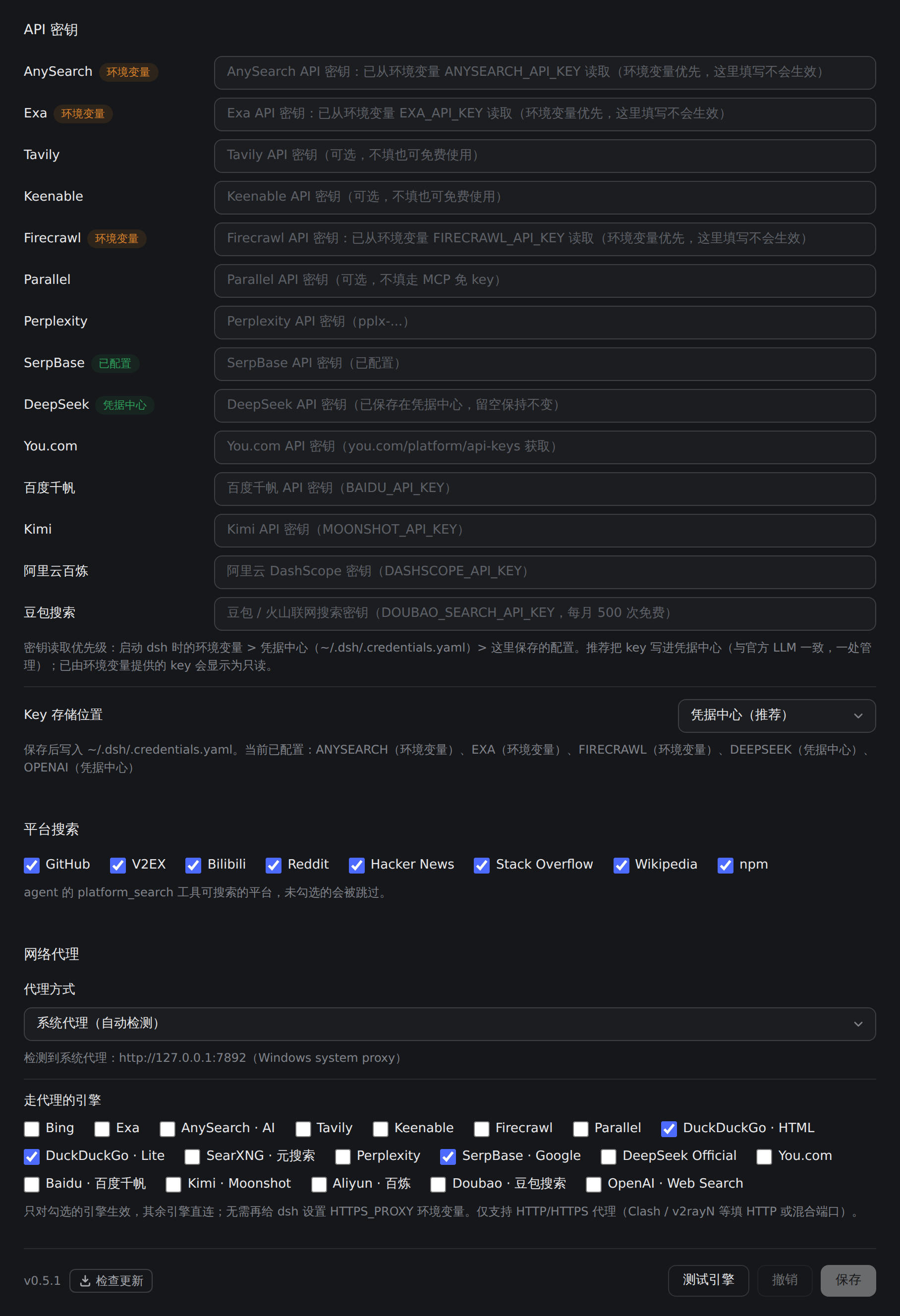
- **API keys**: Enter keys for Exa / Tavily / Keenable / Firecrawl / Parallel / Perplexity / DeepSeek (password fields; displayed as "configured" once saved; Exa / Tavily / Keenable / Firecrawl / Parallel work without a key too).
  - **Recommended**: store paid-engine keys in the harness credential center `~/.dsh/.credentials.yaml` (e.g. `DEEPSEEK_API_KEY: sk-...`, same as the official LLM providers — one place for all keys). Resolution order: environment variables dsh was started with > credentials center > settings page; the settings-page fields remain for backward compatibility. A key supplied by an environment variable shows as read-only in the config card (e.g. "read from environment variable EXA_API_KEY"); change it in the environment instead.
- **Test engine**: Tests the engine tried first directly (no fallback chain; paid engines without a key report an explicit error); `Discard` only cancels unsaved edits
- **Network proxy**: see "Proxy" below
- **Platform search**: check platforms (GitHub / V2EX / Bilibili / Reddit / HN / Stack Overflow / Wikipedia / npm) to enable them for the `platform_search` tool (disabled platforms are skipped).
- **EN / 中文**: toggle the interface language (default Chinese).

<table align="center" style="border: none; border-collapse: collapse;">
  <tr style="border: none;">
    <td align="center" width="50%" style="border: none; padding: 6px;">
      <a href="https://raw.githubusercontent.com/copylee711/dsh-free-search/master/assets/settings-model-search.png">
        <img src="https://raw.githubusercontent.com/copylee711/dsh-free-search/master/assets/settings-model-search.png" alt="Priority list + model built-in web search" width="100%" />
      </a>
      <br>
      <sub><b>Priority list mode</b> with OpenAI built-in web search on</sub>
    </td>
    <td align="center" width="50%" style="border: none; padding: 6px;">
      <a href="https://raw.githubusercontent.com/copylee711/dsh-free-search/master/assets/settings-dark.png">
        <img src="https://raw.githubusercontent.com/copylee711/dsh-free-search/master/assets/settings-dark.png" alt="API keys and proxy in the dark theme" width="100%" />
      </a>
      <br>
      <sub><b>Dark theme</b>: API keys (with their source) and network proxy</sub>
    </td>
  </tr>
</table>

### Switching Engines from the Chat (/free-search-engine)

You can also switch the engine right from the chat — no need to open the settings page. Type `/free-search-engine`: a **picker opens with all engines** (the same interaction as `/model` for selecting a model). Click one to switch; the current engine is marked. In "Preferred + fallback" mode it becomes the preferred engine ("Auto" smart routing is offered too); in "Priority list" mode it moves to the top of the list. Either way the engine is switched on.

The command only changes the priority settings; search still goes through `web_search` + the unified fallback chain — even if the preferred engine fails, it automatically switches to others, never failing outright. The system prompt refreshes accordingly.

### Configuration File

Since DSH 0.1.7-rc.1 the configuration is stored with the profile's plugin entry: the settings page and `/free-search-engine` both write the `config` of the `web-search-free` (`@copylee/dsh-free-search`) entry in the active profile's `cordis.patch.yml`.

The old `free-search:` section of `~/.dsh/settings.yaml` is **not** imported by the DSH core (it only maps `ui-developer-tools` / `ui-onboarding` / `shell`); the file is renamed to `settings.yaml.imported` and the section's values stay there. At startup the plugin looks for that section in `settings.yaml.imported` (or a still-present `settings.yaml`) and seeds the recognized fields into this entry's `config` **once** (watch for `free-search: migrated N field(s)…` in the startup log).

```yaml
# config of that entry in profiles/<profile>/cordis.patch.yml:
provider: bing              # preferred engine: any engine id, or auto (smart routing)
priorityMode: preferred     # preferred (preferred + fallback) / list (priority list)
engineOrder:                # fallback order / priority list (missing engines are appended)
  - exa
  - tavily
  - bing
disabledEngines:            # skipped engines (default [openai])
  - openai
openaiModel: gpt-6-luna     # model for OpenAI built-in web search
openaiBaseUrl: https://api.openai.com/v1   # or a gateway compatible with the Responses API
lang: zh                    # settings UI language (zh / en)
bingMarket: zh-CN           # Bing market
region: cn-zh               # DuckDuckGo region (optional)
searxngInstances:           # Custom SearXNG instances (optional)
  - https://your-instance.example
exaApiKey: ...              # Or configure via the web settings UI
tavilyApiKey: ...           # Or configure via the web settings UI
keenableApiKey: ...         # Or configure via the web settings UI
firecrawlApiKey: ...        # Or configure via the web settings UI
parallelApiKey: ...         # Or configure via the web settings UI
perplexityApiKey: ...
serpbaseApiKey: ...         # Or configure via the web settings UI
deepseekApiKey: ...
# youcomApiKey / baiduApiKey / kimiApiKey / aliyunApiKey / doubaoApiKey / openaiApiKey work the same (prefer the credential center)
proxyMode: system          # off (direct) / system (auto-detect OS proxy) / custom (use proxyUrl)
proxyUrl: http://127.0.0.1:7897   # used when proxyMode is custom
proxyEngines:               # engines that use the proxy
  - ddg
  - ddg-lite
  - openai
  - perplexity
  - you
  - wikimedia
  - openverse
```

### Asking the Agent to Test All Engines

Tell the agent *"Test all search engines"*, and it will call the `free_search_test` tool to check each engine sequentially and report back:

```
Search engine test:
- ddg: FAIL - DuckDuckGo is rate-limited right now (anti-bot challenge, usually temporary) - Bing works
- bing: OK (2 results, e.g. "DeepSeek Harness developer preview...")
- exa: FAIL - EXA_API_KEY not configured
```

### Time Filtering (`advanced_search`)

Ask the agent for *"news from the last week"*, *"releases this month"*, *"updates from the last 3 days"*, or *"posts since July"*, and it will call the `advanced_search` tool with a `timeRange` parameter. It uses the same unified fallback chain, can force a specific `engine`, and returns the same shape as `web_search`.

**The `timeRange` parameter accepts three forms:**

| Form | Example | Meaning |
|---|---|---|
| Fixed tier | `day` / `week` / `month` / `year` | = 1 / 7 / 30 / 365 days |
| Custom relative | `12h`, `3d`, `2mo`, `1y` | last 12 hours / 3 days / 2 months / 1 year |
| Absolute date | `2026-07-01` | results published on or after that date |

**How each engine handles `timeRange`:**

| Engine | Parameter | Precise? | Notes |
|---|---|---|---|
| Exa | `startPublishedDate` | precise | custom days become an ISO date (N days ago); absolute dates pass through |
| Keenable | `published_after` | precise | relative values (`12h/3d/2mo/1y`) and absolute dates pass through |
| Tavily | `time_range` | approximate | only fixed tiers; custom days map to the nearest tier |
| Firecrawl | `tbs` | approximate | fixed tiers map to `qdr:d/w/m/y`; absolute dates use `cdr:1,cd_min:M/D/YYYY` (precise) |
| Parallel | `source_policy.after_date` with a key (precise); without a key the MCP path has no date parameter, so the window is written into the objective as a freshness hint (soft filter) | precise / soft | custom days become an ISO date (N days ago); absolute dates pass through |
| SearXNG | `time_range` | approximate | same as above |
| DuckDuckGo / Lite | `df` | approximate | same as above |
| Baidu Qianfan | `search_filter.range.page_time` | precise | converted to a start/end date |
| Doubao search | `TimeRange` | approximate / precise | relative values map to OneDay/OneWeek/OneMonth/OneYear; absolute dates use a `start..today` range |
| Bing / AnySearch / OpenAI etc. | — | ignored | no corresponding parameter |

**Nearest-tier mapping rule**: `≤2 days → day`, `≤14 days → week`, `≤90 days → month`, otherwise `year`. For example, `3d` becomes `day` on Tavily, and `2mo` becomes `month`.

**Engine-chain priority**: when a `timeRange` is present, engines that support time filtering (tavily / exa / keenable / firecrawl / parallel / searxng / ddg / ddg-lite / baidu / doubao) are moved to the front of the fallback chain, so the filter actually takes effect — even if the preferred engine is bing (which does not support filtering), a filtering-capable engine is tried first.

Example: *"Find DSH news from the last 3 days"* → agent calls `advanced_search` with `timeRange: "3d"`.

### Fetch Webpage Content (`web_fetch`)

After searching, the agent can **read full webpage content** (e.g., *"Open the first link and summarize it"*). The `web_fetch` tool is enabled by default (official `dsh-web-fetch-http` provider):

- Automatically follows redirects and decodes HTML to plain text.
- Supports timeout and response size limits.
- Note: `web_fetch` does not have SSRF protection; the agent could theoretically access internal network addresses. Use as needed.

### Platform Search (`platform_search`)

Ask the agent to search specific platforms (e.g., *"Search GitHub for deepseek harness"*, *"Find related videos on Bilibili"*, or *"Discussions about dsh on V2EX"*). The `platform_search` tool supports:

| Platform | Purpose |
|---|---|
| `github` | GitHub repository search (public API, free, no key required) |
| `v2ex` | V2EX full-text topic search (via SOV2EX; falls back to matching hot topics) |
| `bilibili` | Bilibili video search (sends a device cookie and WBI signature, avoiding the -352 anti-bot error); queries like 热门 / trending / popular return Bilibili's popular list |
| `reddit` | Reddit posts / discussions (tries the public JSON endpoints, then RSS; Reddit often blocks data-center / proxy IPs, and reports it clearly when every endpoint is blocked) |
| `hn` | Hacker News tech community discussions (official Algolia API) |
| `stackoverflow` | Stack Overflow Q&A (official public Stack Exchange API) |
| `wikipedia` | Wikipedia articles (zh.wikipedia.org for Chinese; switches to en.wikipedia.org when `lang: en`) |
| `npm` | npm package search (registry official API) |

All platform searches rely on public endpoints with zero external dependencies and no API keys — they work out of the box.

### Cross-source search (multi_search)

When the agent needs cross-checking or several perspectives ("find a few more sources"), it can call `multi_search`: it queries several engines concurrently (by default the first 3 enabled engines of the smart route, or the `engines` you pass), merges results by normalized URL and marks each with `seen in: bing, baidu`; results found by more engines rank higher. It uses more engine quota, so it is for when source diversity matters.

### Taking over the default search

DSH's base bundle ships `web.searchProvider: deepseek-official` (which needs DeepSeek balance). At startup the plugin takes over when searchProvider is unset or still that shipped default; if another provider was chosen explicitly, it does not override it and only logs a warning with the YAML to switch.

## Image search and page images

For slides and research material you can ask the agent for pictures directly: "collect photos of Lu Xun for my slides", "find a few minimalist living-room references", "get all the pictures from this article".

| Tool | What it does |
|---|---|
| `image_search` | Searches for pictures. By default the agent picks the source(s) that fit the request, possibly several at once with the results merged (e.g. Pexels for scenery, Wikimedia + Bing Images for a person); if they lack a key, fail or find nothing, it falls back to the order set on the settings page, which can also be made the only rule ("Always my order"). Sources: Wikimedia Commons and Openverse (keyless, with license info) → Pexels, Unsplash, Pixabay (high-quality stock, free API keys) → Bing Images (keyless, widest coverage, copyright of the original owners; when Bing Images has no trustworthy results — e.g. pictures unrelated to the query — it runs a web search — same engine order as your web search settings — and extracts the pictures from the pages found) |
| `page_images` | Extracts the pictures from web pages. Pass page URLs, or just a query to search first and extract from the best pages (Wikipedia, encyclopedias and official sites first). Wikipedia is read through its API (original files plus licenses); Baidu Baike resize parameters are stripped to get originals; other pages are parsed for `og:image`, article images, lazy-loaded images and `srcset`, with icons, logos, avatars and tracking pixels dropped and small images filtered out |
| `save_images` | Downloads chosen results (by their `img_xxxxxxxx` ids or URLs) into the `images/` folder of the session workspace, named "title - source site", and returns the local paths for inserting into slides or documents |

<div align="center">
  <a href="https://raw.githubusercontent.com/copylee711/dsh-free-search/master/assets/image-wall.png">
    <img src="https://raw.githubusercontent.com/copylee711/dsh-free-search/master/assets/image-wall.png" alt="Image wall in the chat" width="620" />
  </a>
  <br>
  <sub>Image wall in the chat (mock-up with placeholder images): library results and page images grouped by page; click for the lightbox with download / source / copy link / copy id</sub>
</div>

- **Image wall**: thumbnails and full images are fetched through the plugin's own endpoint with the source page as Referer, so hotlink-protected pictures (e.g. Baidu Baike) still show; the per-engine proxy applies too (tick the image sources or "page images / downloads" under Network proxy).
- **"Image search" settings**: a switch at the top of the config card flips between "Web search" and "Image search" (the choice is remembered), so the two sets of settings are shown separately; switch each tool on or off (a switched-off tool is removed from the agent's tool list); choose whether the agent picks sources by purpose (default) or they always follow your order; drag to reorder sources and switch them individually; set the minimum size for page images (default 200px), the maximum per page and whether to include SVG; leave the save folder empty to use the workspace's `images/`, or give an absolute or relative path.
- **API keys**: Pexels (<https://www.pexels.com/api/>), Unsplash (<https://unsplash.com/developers>) and Pixabay (<https://pixabay.com/api/docs/>) are free; fill them under API keys or in the credential center as `PEXELS_API_KEY`, `UNSPLASH_ACCESS_KEY`, `PIXABAY_API_KEY`.
- **Safety**: the plugin only fetches public addresses (loopback, private and link-local addresses are refused, and every redirect hop is checked), accepts image content types only, and caps each file at 30 MiB.
- **Copyright**: Wikimedia / Openverse / stock results carry author and license info; pictures from web pages and Bing Images belong to their owners — fine as reference material, check the license before publishing.

<div align="center">
  <img src="https://raw.githubusercontent.com/copylee711/dsh-free-search/master/assets/settings-images.png" alt="Image search section of the settings page" width="620" />
  <br>
  <sub>The "Image search" section of the settings page</sub>
</div>

## With dsh-better-display: illustrated answers + citation chips

Search results and the image wall appear only inside the tool-call panel, and DSH usually collapses that panel once the call finishes, leaving the final answer as plain text. The companion plugin [**dsh-better-display**](https://github.com/copylee711/dsh-better-display) fixes that:

- **Citation chips**: `multi_search` / `advanced_search` / `platform_search` results come numbered `[1] [2] …` with direct links, so the model can cite them as `[1](url)`. dsh-better-display renders these as ChatGPT-style superscript chips: hovering shows the site and title, and clicking opens the page. A "Sources · N" panel is added at the end of the reply.
- **Inline pictures**: `image_search` / `page_images` results tell the model to embed fitting pictures as `![caption](image URL "source · license")`. dsh-better-display renders them as captioned figures (several on one line become a gallery) with a click-to-zoom lightbox.
- Division of labour: this plugin **finds** (search, image search, page images) and dsh-better-display **shows** (chips, sources panel, pictures). Each plugin works on its own.

```sh
dsh plugin --profile web add @copylee/dsh-free-search
dsh plugin --profile web add @copylee/dsh-better-display
dsh --profile web
```

Then try: "Tell me about the Eiffel Tower with a few pictures, and cite your sources".

> dsh-better-display is a superset of [dsh-better-markdown](https://github.com/zerob13/dsh-better-markdown) (same markstream-react pipeline with code highlighting, Mermaid and KaTeX), so you can remove dsh-better-markdown after installing it.

## Proxy (for Users in Mainland China)

Engines such as DuckDuckGo and OpenAI usually need a proxy in mainland China, and Node.js `fetch` ignores the system proxy by default. There is no need to set environment variables for dsh anymore: set it under **Network proxy** in the plugin's config card:

- **System proxy (auto-detect)**: reads the `HTTPS_PROXY` / `HTTP_PROXY` / `ALL_PROXY` environment variables, then the Windows "Internet Options" system proxy, then the macOS HTTP(S) proxy. The detected address is shown under the dropdown.
- **Custom proxy address**: enter it yourself, e.g. `http://127.0.0.1:7897` (`http://` may be omitted).
- **Engines that use the proxy**: only the checked engines go through the proxy; the rest connect directly (checked by default: sources that are usually unreachable directly from mainland China — DuckDuckGo HTML / Lite, OpenAI, Perplexity, You.com, Wikimedia Commons and Openverse; this only takes effect once a proxy is turned on).

Notes:

- HTTP/HTTPS proxies only. For Clash, v2rayN and similar clients use the HTTP port or the mixed port; a `socks5://` address is rejected with a clear error.
- If a proxy is selected but no address is available (e.g. the system proxy is off), that engine fails for this request and the fallback chain moves on to the next engine.
- The "Test engine" button sends its request with the same proxy settings, so you can use it to check the proxy.
- If you previously set `NODE_USE_ENV_PROXY=1` + `HTTPS_PROXY` for dsh as the old docs suggested, that routes all of dsh's traffic through the proxy; with this setting you can drop those variables.
- Works side by side with [dsh-proxy](https://github.com/copylee711/dsh-proxy) (the DSH global / model-provider proxy plugin): engines checked here use the proxy set here; unchecked engines behave like any other request, going through dsh-proxy's global proxy when it is on and directly otherwise. If dsh-proxy's global proxy is already on, you can leave this set to "No proxy".

## safeSearch filtering

- Config key `safeSearch`: `off` (engine default, no parameter) / `moderate` / `strict`
- Applies to Bing (adlt), DuckDuckGo HTML (adlt) and DuckDuckGo Lite (adlt)
- Default `off`: no extra filtering, the engine's own default applies; change it under "Safe search" in the plugin's config card

## How It Works

- `lib/index.js`: Host side. Implements `WebSearchProvider` (`id` / `available()` / `search()`), unified engine routing + auto-fallback (order and on/off state from the settings page, with smart routing); parses `timeRange` (fixed tiers / relative values / absolute dates) and forwards it to each engine; declares its editable config as volatile fields on the `web-search-free` composition entry and ships its own settings page; provides the `/api/dsh-free-search-settings` read/write bridge + `raw-search` debug endpoint; registers the `free_search_test`, `platform_search`, `advanced_search` and `multi_search` tools plus the switchable `image_search`, `page_images` and `save_images`; dynamically injects the engine list into system prompts (auto-refreshes on settings change).
- `lib/client.js`: Browser side. React configuration card (priority list, model search, key inputs, connectivity test and Chinese/English toggle, styled with DSH's design tokens), mounted below the official Web search page (`plugins.detail.section`), falling back to the plugin's detail page (`plugins.bundle.config`) when that page is absent; registers the `/free-search-engine` popup switch command (`commandUi` popupSelect, the same mechanism as `/model`).
- `lib/images.js`: the image search / page image core (source adapters, page extraction, image-header size probing, public-address checks, saving to disk); network access is injected by `lib/index.js` so the per-engine proxy applies.
- `cordis.patch.yml`: Plugin loader configuration.
- `tests/`: offline tests (`pnpm test`); `scripts/image-smoke.mjs` plus the `image-smoke` workflow check image search and page images against the real network.

## License

MIT