# react-native-in-app-purchase
[](https://www.npmjs.com/package/@class101/react-native-in-app-purchase)
[](https://www.npmjs.com/package/@class101/react-native-in-app-purchase)
[](https://www.npmjs.com/package/@class101/react-native-in-app-purchase)
👻 A dead simple In-App Purchase library for React Native
## Getting started
```bash
$ yarn add @class101/react-native-in-app-purchase
# RN >= 0.60
cd ios && pod install
# RN < 0.60
react-native link @class101/react-native-in-app-purchase
```
### Android
Add `BILLING` permission to the `AndroidManifest.xml`.
```xml
...
```
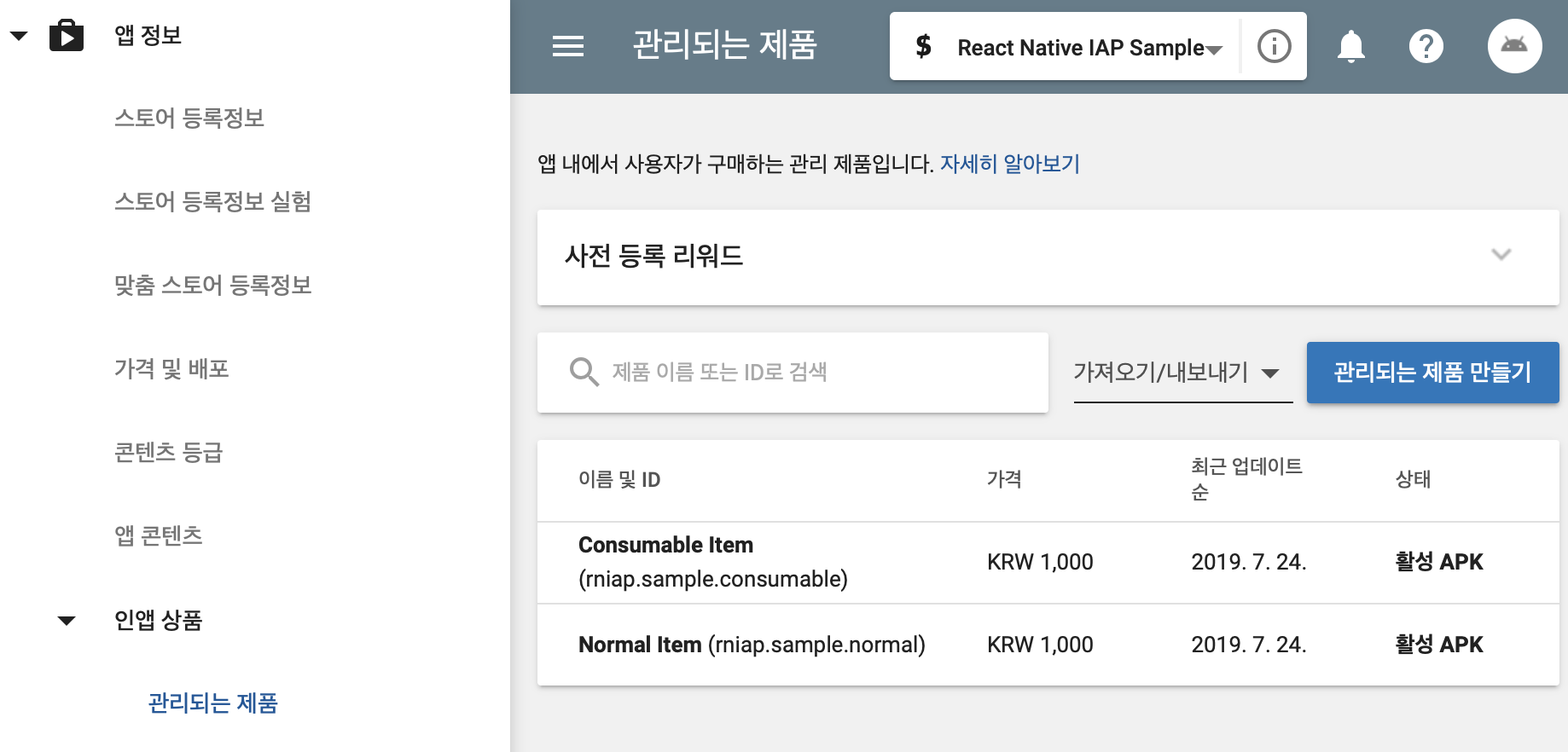
Create your app on the Google Play Console, and add product in the In-App Products section. Make sure set the product status to **active** so that you can view or purchase it.
[](docs/android_1.png?raw=true)
Note that testing Android In-App Billing is only possible after uploading your APK to Alpha release or above.
### iOS
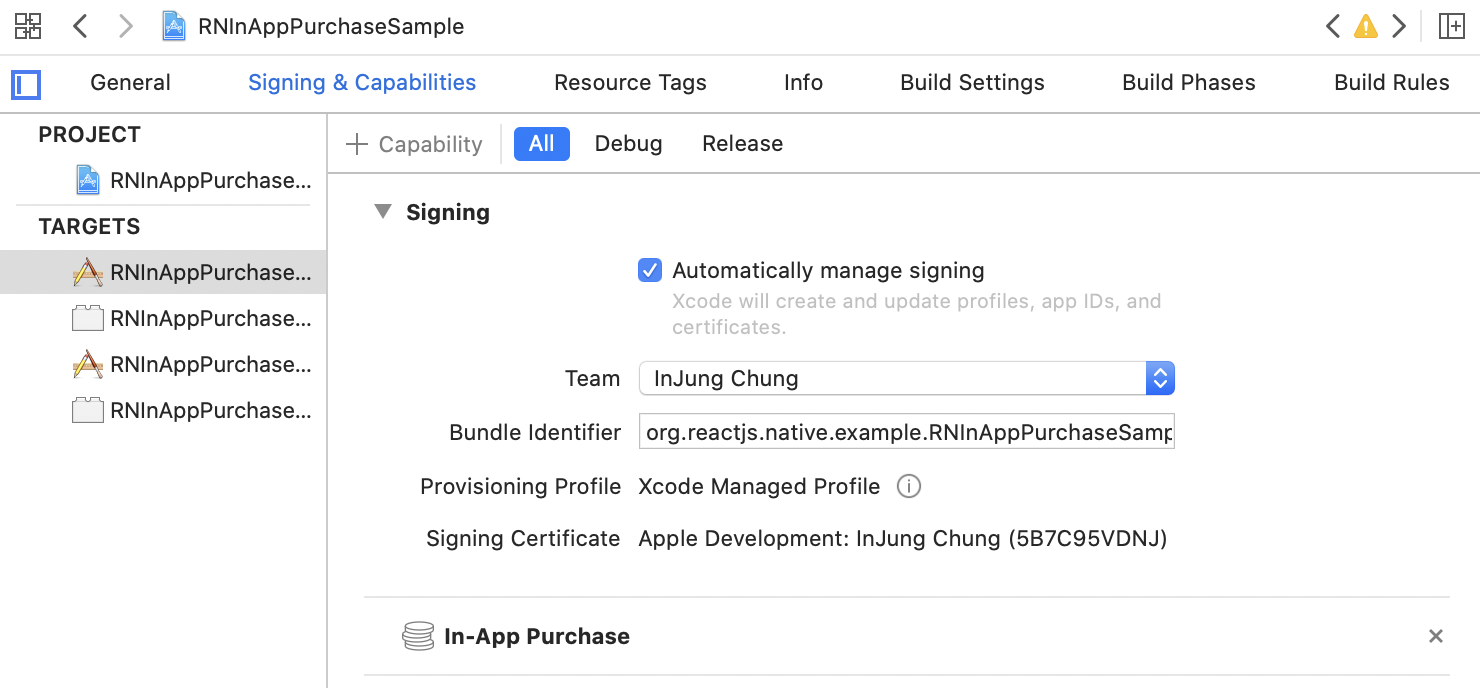
Add In-App Purchase capability on the Signing & Capabilities section of the project.
[](docs/ios_1.png?raw=true)
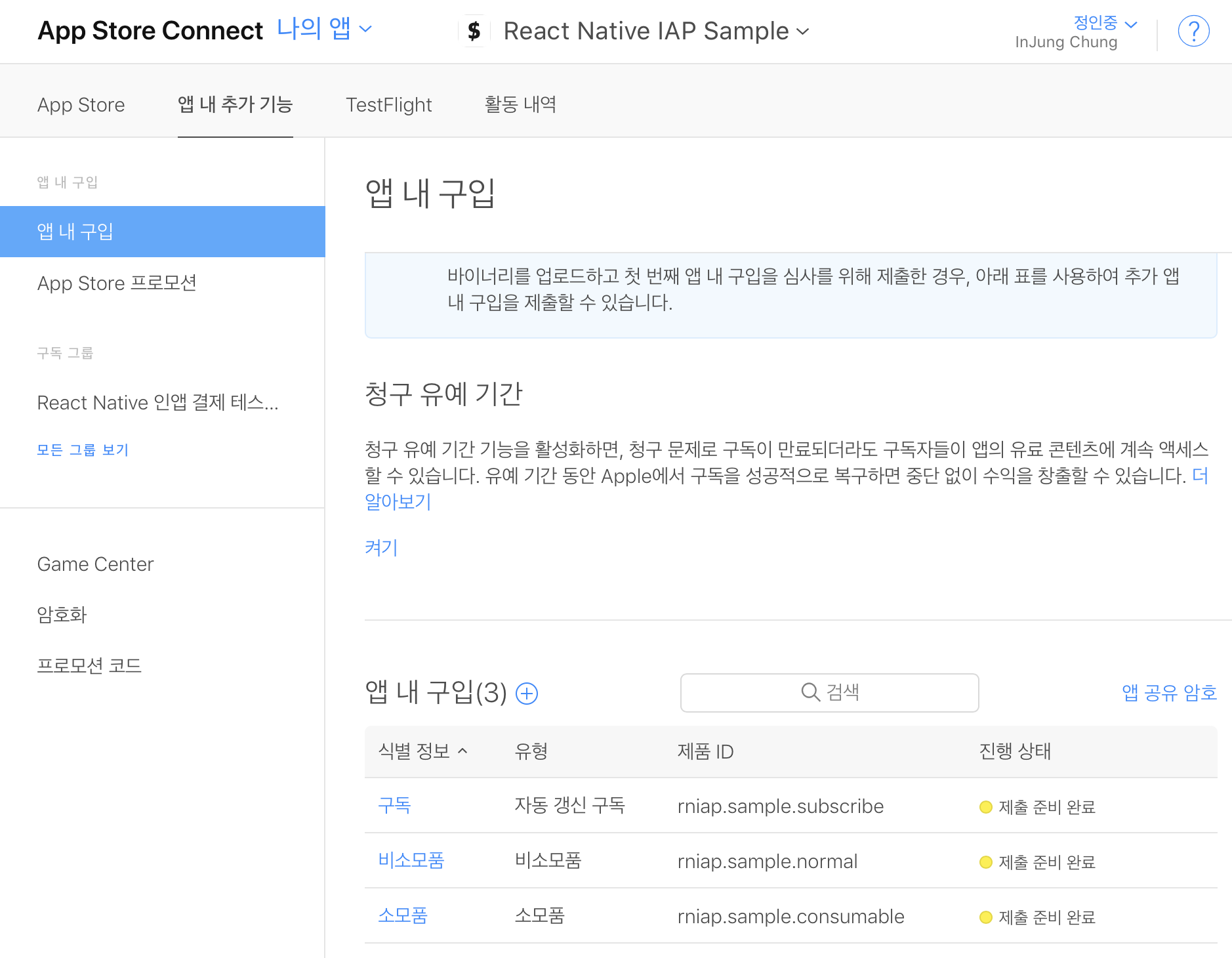
Create your app on the App Store Connect, and add product in the In-App Purchases section. You may need to fill the audit information field.
[](docs/ios_2.png?raw=true)
Testing iOS In-App Purchase is possible on TestFlight.
## Usage
See full example [here](sample/App.js). This sample can also be downloaded from the [Play Store](https://play.google.com/store/apps/details?id=com.rninapppurchasesample).
#### 1. Prepare product ids
Choose the product id that you want to sell. It would be nice to have the same product id for Android and iOS.
```javascript
import InAppPurchase from "@class101/react-native-in-app-purchase";
const PRODUCT_IDS = [
"rniap.sample.normal",
"rniap.sample.consumable",
"rniap.sample.subscribe",
];
```
#### 2. Add Listeners
For some reasons, the `purchase` and `fetchProducts` functions are not `Promise`. So you need to register `onPurchase` and `onFetchProducts` listeners.
```javascript
const onFetchProducts = (products) => {
this.setState({ products });
};
const onPurchase = (purchase) => {
// Validate payment on your backend server with purchase object.
setTimeout(() => {
// Complete the purchase flow by calling finalize function.
InAppPurchase.finalize(
purchase,
purchase.productId === "rniap.sample.consumable"
).then(() => {
Alert.alert("In App Purchase", "Purchase Succeed!");
});
});
};
const onError = (e) => {
console.log(e);
};
InAppPurchase.onFetchProducts(onFetchProducts);
InAppPurchase.onPurchase(onPurchase);
InAppPurchase.onError(onError);
```
After each purchase, you need to verify receipt on your server. If purchase is valid, call `finalize` function in the app. Set whether it is consumable or not as the second argument to the `finalize` function.
#### 3. Configure and Fetch Products
Once you have registered your listeners, call `configure` and `fetchProducts`. Since the library will initialize billingClient only once, you can call `configure`, `fetchProducts` multiple times.
```javascript
InAppPurchase.configure().then(() => {
InAppPurchase.fetchProducts(PRODUCT_IDS);
});
```
#### 4. Purchase Product
Call `InAppPurchase.purchase` with product id.
```javascript
InAppPurchase.purchase(item.productId); // 'rniap.sample.consumable'
```
#### 5. Retry
In some cases, your app may not be able to call the `finalize` function even the purchase was successful. (such as poor internet connection) Purchases that are not finalized can be retrieved with the `flush` function. Send these purchases to the server to verify, and then call the `finalize` function.
```javascript
InAppPurchase.flush().then((purchases) => {
purchases.forEach(onPurchase);
});
```
## Type Definitions
Type definitions of Product, Purchase and InAppPurchaseError.
#### Product
| Property | Type | Comment |
| ----------- | ------ | --------------------------- |
| productId | string | - |
| price | string | - |
| currency | string | Currency code (USD, KRW...) |
| title | string | - |
| description | string | - |
#### Purchase
| Property | Type | Comment |
| --------------- | -------- | ---------------------------------------------- |
| productIds | string[] | - |
| transactionId | string | - |
| transactionDate | string | - |
| receipt | string | Use this property to validate iOS purchase |
| purchaseToken | string | Use this property to validate Android purchase |
#### InAppPurchaseError
| Property | Type | Comment |
| -------- | ------------------------------------ | --------------------------------------------- |
| type | FETCH_PRODUCTS, PURCHASE, CONNECTION | `CONNECTION` error is only occurs on Android. |
| code | number | - |
| message | string | - |
## Receipt Verification
Actually this isn't something that should be mentioned in this document. However, since it's critical part of implementing In-App Purchase flow, I'll show you how I implemented it.
#### Client Side
```typescript
const onPurchase = useCallback(
(result: Purchase) => {
return verifyReceipt({
variables: {
input: {
platform: Platform.select({
ios: "apple",
android: "google",
}),
productId: result.productIds[0],
receipt: Platform.select({
ios: result.receipt,
android: result.purchaseToken,
}),
},
},
})
.then(() => InAppPurchase.finalize(result, true))
.then(() =>
Alert.alert(
LocalizedStrings.COIN_PURCHASE_SUCCESS_TITLE,
LocalizedStrings.COIN_PURCHASE_SUCCESS_MESSAGE
)
)
.catch((e) => Alert.alert(LocalizedStrings.COMMON_ERROR, e.message))
.finally(() => setIsLoading(false));
},
[setIsLoading, verifyReceipt]
);
```
#### Server Side
Here I used [node-iap](https://github.com/Wizcorp/node-iap) library.
```typescript
class VerifyReceipt extends Interactor {
public async perform() {
const { user, platform, productId, receipt, language } = this.context;
if (!["apple", "google"].includes(platform)) {
throw new functions.https.HttpsError(
"invalid-argument",
LocalizedStrings(language).ERROR_RECEIPT_VALIDATE_FAILURE
);
}
return new Promise((resolve, reject) => {
iap.verifyPayment(
platform,
{
receipt,
productId,
packageName: PACKAGE_NAME,
keyObject: require("../../../iapServiceAccountKey.json"),
},
async (error, response) => {
if (error) {
return reject(
new functions.https.HttpsError("aborted", error.message)
);
}
// If it's already consumed
if (platform === "google" && response.receipt.purchase_state === 1) {
return reject(
new functions.https.HttpsError(
"unavailable",
LocalizedStrings(language).ERROR_RECEIPT_NOT_FOUND
)
);
}
const coin = COIN_LIST[language].find((c) => c.id === productId);
// Unavailable product
if (!coin) {
return reject(
new functions.https.HttpsError(
"unavailable",
LocalizedStrings(language).ERROR_RECEIPT_VALIDATE_FAILURE
)
);
}
const orderId = response.transactionId;
// If it's already verified
const userRef = firestore().collection("users").doc(user.id);
const transactionSnapshot = await userRef
.collection("transactions")
.where("orderId", "==", orderId)
.get();
if (transactionSnapshot.docs.length > 0) {
return resolve({
transaction: transactionSnapshot.docs[0].data() as Transaction,
profile: user,
});
}
const now = Date.now();
const batch = firestore().batch();
const receiptRef = userRef.collection("receipts").doc();
const transactionRef = userRef.collection("transactions").doc();
const transaction = {
id: transactionRef.id,
description: LocalizedStrings(language).DESCRIPTION_PURCHASE_COIN,
orderId,
amount: coin.amount,
createdAt: now,
};
batch.set(receiptRef, {
id: receiptRef.id,
productId,
orderId,
createdAt: now,
});
batch.set(
userRef,
{
coin: firestore.FieldValue.increment(coin.amount),
},
{
merge: true,
}
);
batch.set(transactionRef, transaction);
await batch.commit();
resolve({
transaction,
profile: {
...user,
coin: user.coin + coin.amount,
},
});
}
);
});
}
}
```
Note the part _If it's already verified_. Purchases that have already been verified should also return **success**. Otherwise, the item will be provided multiple times when flushing.
## Contributing
Bug reports and pull requests are welcome on [GitHub](https://github.com/pedaling/react-native-in-app-purchase/issues).
## License
The package is available as open source under the terms of the [MIT License](LICENSE).