
# @cclabsnz/sf-audit
[](https://github.com/cclabsnz/sf-audit-plugin/actions/workflows/ci.yml)
[](https://www.npmjs.com/package/@cclabsnz/sf-audit)
[](https://securityscorecards.dev/viewer/?uri=github.com/cclabsnz/sf-audit-plugin)
[](LICENSE)
A read-only security audit for any Salesforce org, run from the Salesforce CLI (`sf`): 109 checks, an
A–F grade, and a report your security team (or your client's) can act on.
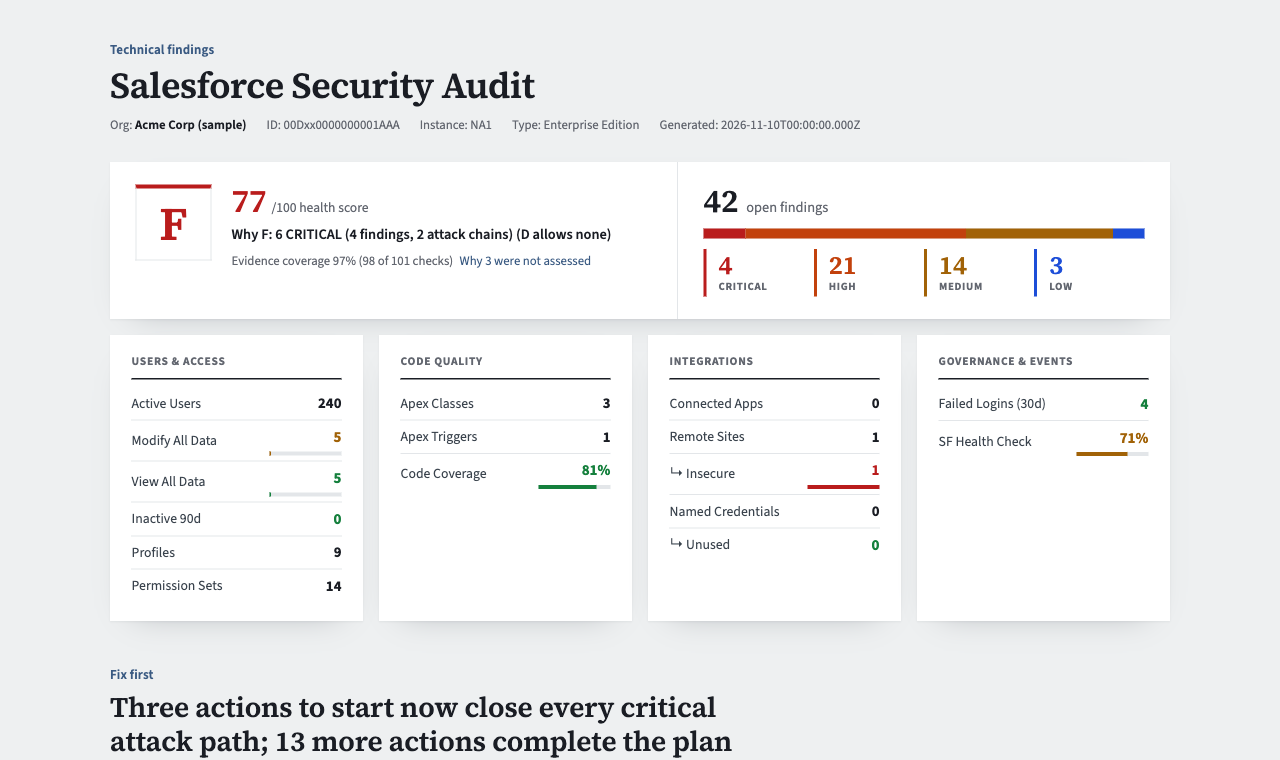 *A sample report from a fictional org, produced by the real checks against synthetic data. Open the
full [technical report](https://www.softwareinsights.dev/samples/sf-audit/sample-report.html) or the
[executive report](https://www.softwareinsights.dev/samples/sf-audit/sample-executive-report.html).*
```bash
sf plugins install @cclabsnz/sf-audit # warns that it is unsigned: answer y (see Installation)
sf audit security --target-org
```
That writes an HTML report to the current directory. **Safe to run against production:** it only
uses SOQL, Tooling/REST GETs and Metadata API reads, and a test fails the build if a write call
appears in the source ([PERMISSIONS.md](PERMISSIONS.md), [Trust & verification](#trust--verification)).
- **Checks:** identity, access, data, guest exposure, integrations, code, monitoring and Agentforce. See [What It Checks](#what-it-checks)
- **Attack chains:** findings linked into multi-step attack scenarios: nineteen named chains, plus a pass for combinations nobody has named yet
- **Compliance:** every finding mapped to 10 frameworks, including SOC 2, ISO/IEC 27001, OWASP, NZISM, HIPAA and GDPR
- **CI:** `--format sarif` for GitHub code scanning, `--fail-on` to gate a pipeline, and expiring [risk waivers](#accepting-a-risk)
The plugin also has commands to capture the free daily event logs, check connected apps for least
privilege, and investigate guest-user anomalies. See [Other commands](#other-commands).
## Installation
```bash
sf plugins install @cclabsnz/sf-audit
```
You will be warned that the plugin is not digitally signed. That is expected and says nothing about
this plugin: Salesforce only accepts signing keys served from `developer.salesforce.com`, so no
third-party plugin can satisfy it. Answer `y`.
### Unattended installs (CI/CD)
To install in CI/CD without the interactive prompt, allowlist the plugin first (sf CLI 2.135.0 or later):
```bash
sf plugins trust allowlist add --name @cclabsnz/sf-audit
sf plugins install @cclabsnz/sf-audit
```
Older CLIs have no `allowlist` command; [docs/INSTALL.md](docs/INSTALL.md) shows the file to write instead.
### Verifying provenance
Every release is published from GitHub Actions with a signed npm provenance attestation that
links the tarball to the commit and workflow run that built it. To check a version before
installing it:
```bash
npm view @cclabsnz/sf-audit@ dist.attestations.provenance.predicateType
# https://slsa.dev/provenance/v1
```
The package page on npmjs.com shows the same attestation, with a link to the build.
Detailed allowlisting and local development setup are in **[docs/INSTALL.md](docs/INSTALL.md)**.
Since "trust us" is a poor answer from a tool that authenticates against your production org, the
guarantees here are checkable rather than asserted — see [Trust & verification](#trust--verification).
## Usage
```bash
sf audit security --target-org
```
Runs all 109 checks and writes an HTML report to the current directory. `sf audit list` prints every
check id.
| Flag | Default | |
|------|---------|---|
| `--format` / `-f` | `html` | `html`, `md`, `json`, `executive`, `sarif` — comma-separated |
| `--fail-on` | (none) | Exit 1 if any finding is at or above `CRITICAL`/`HIGH`/`MEDIUM`/`LOW`. For CI |
| `--fail-on-inconclusive` | `false` | Exit 3 if any check could not gather evidence. For CI |
| `--waivers` | `.sfaudit-waivers.json` if present | Accepted-risk waivers. See [Accepting a risk](#accepting-a-risk) |
| `--digest` | `false` | With `--json`: compact result for programmatic callers — no passing checks, no prose, capped lists |
| `--summary` | `false` | With `--json`: page one as data — grade and why, coverage, the fix-first plan with the finding ids each action closes, attack paths. Smaller than `--digest` |
| `--checks` | *(all)* | Run only these check ids |
| `--frameworks` | `universal` | Compliance matrix scope for the executive report |
| `--no-history` / `--keep-history` | `false` | Skip, or force, the archive to `~/.sf/audit-history`. Skipped in CI (`CI` set, `GITHUB_ACTIONS`, `TF_BUILD`, `JENKINS_URL`) unless `--keep-history` |
```bash
# Fail a pipeline on HIGH or worse
sf audit security --target-org myOrg --fail-on HIGH
# Also fail if the audit user could not see enough to judge
sf audit security --target-org myOrg --fail-on HIGH --fail-on-inconclusive
# Branded, client-ready PDF-able report
sf audit security --target-org myOrg --format executive --prepared-for "Acme Health"
# What can this audit user actually establish? Ask before spending a run
sf audit preflight --target-org myOrg
# Machine-readable: result on stdout, progress logging suppressed
sf audit security --target-org myOrg --json
# Compact result for an agent or script
sf audit security --target-org myOrg --json --digest
# SARIF 2.1.0 for GitHub code scanning or any SARIF viewer
sf audit security --target-org myOrg --format sarif --output ./reports
```
In GitHub Actions, [cclabsnz/sf-audit-action](https://github.com/cclabsnz/sf-audit-action) wraps this:
it installs the plugin, logs in from a secret, writes a digest to the job summary, uploads the reports
and applies `--fail-on`. It audits the org, not the repository, so run it on a schedule against
production or after deploying to a validation sandbox, and from a private repository: anyone can read
a public repository's job summaries.
### Exit codes
| Code | Meaning |
|-----:|---------|
| `0` | Audit completed; nothing the caller asked to fail on |
| `1` | Findings at or above `--fail-on` |
| `2` | The audit could not run — authentication, connection, or bad flags |
| `3` | Audit ran, but checks could not gather evidence (`--fail-on-inconclusive` only) |
A definite finding outranks unknown coverage: when both apply you get `1`, and the
inconclusive count is still in the report body. `3` exists so a pipeline can tell
"this org is fine" apart from "the audit user could not see enough to judge".
Every flag, more examples, and what the executive report contains:
**[docs/COMMANDS.md](docs/COMMANDS.md)**.
## Using it from Claude Code
A Claude Code plugin in this repo runs the audit and triages it for you: the grade and why, what to fix first, the attack paths, and any finding explained. It drives this CLI, so install the CLI first (1.27.0 or later), then in Claude Code:
```text
/plugin install sf-audit --marketplace cclabsnz/sf-audit-plugin
```
Then `/sf-audit:audit myOrg`, `/sf-audit:fix-first`, `/sf-audit:explain ` and `/sf-audit:diff`. Any agent can do the same without the plugin: `sf audit security --json --summary` returns page one as compact JSON, and `sf audit explain` explains a check or finding.
## What It Checks
**109 read-only checks** across ten domains. Every finding is risk-rated CRITICAL → INFO, mapped to
compliance controls, and correlated into [attack chains](#attack-chains). Coverage includes Data
Cloud and Shield, inbound email handlers and package install handlers, and Apex findings say which
control a class bypasses: record sharing, or CRUD/FLS.
| Domain | Checks |
|--------|-------:|
| Identity & Authentication | 16 |
| Users, Permissions & Privilege | 14 |
| Data Access & Sharing | 14 |
| Guest & External-Facing Access | 13 |
| Integrations, Connected Apps & Deployments | 14 |
| Monitoring & Threat Detection | 10 |
| Apex & Code Security | 12 |
| AI & Agents (Agentforce / GenAI) | 9 |
| Org Health & Configuration | 5 |
| Secrets & Credential Storage | 2 |
Full inventory, with what each check looks for: **[docs/CHECKS.md](docs/CHECKS.md)**.
A handful of checks emit an advisory rather than a verdict, because the underlying setting is not
exposed to the read APIs this tool uses. Those are listed and explained in the same document —
advisories are INFO and never inflate the health score.
## Compliance frameworks
Findings map to controls across 10 frameworks organized into 8 source-verified general baselines and 2 specialized jurisdictional packs:
- **8 General Baselines:** OWASP Top 10 (2021), OWASP LLM Top 10 (2025), SOC 2 (2017 TSC), ISO/IEC 27001:2022, Security Benchmark for Salesforce (SBS), New Zealand Privacy Act 2020, HISO 10029:2022, and NZISM (v3.8).
- **2 Jurisdictional Packs:** HIPAA Security Rule (45 CFR Part 164 Subpart C) and GDPR (Regulation (EU) 2016/679).
The mapping is built on a **sourced catalog** — each control carries its framework, pinned version,
official title and a citation — so a finding ties to an exact, defensible requirement rather than a
bare tag. A **provenance gate** means a control renders only once its reference has been confirmed
against the authoritative source.
Scope the executive report's matrix with `--frameworks universal|nz|all`, or name them:
`--frameworks owasp,iso,hipaa`. HIPAA and GDPR are in no named pack, because jurisdiction is your
call, not a default.
> **Not an attestation.** A control showing "No findings detected" means this audit surfaced no
> issues mapped to it. It is not a statement of compliance. See [Scope & Liability](#scope--liability).
Framework versions, the packs, and the verification status of every control:
**[docs/COMPLIANCE.md](docs/COMPLIANCE.md)**.
## Attack chains
A list of findings is not a risk assessment. Three MEDIUM findings that combine into an
unauthenticated path to bulk data matter more than a lone HIGH that leads nowhere, and reading a
report severity-by-severity hides exactly that.
So every audit correlates its findings into attack chains. **Nineteen named chains** are hand-modelled
scenarios — each with its own narrative and remediation, several naming the concrete request path an
attacker would use. Where no named chain explains a combination, an emergent pass reports the
remaining entry-point → outcome pairs as lower-confidence "potential attack paths", so a novel
combination is still surfaced.
Every chain lists the findings forming its steps, and remediating **any one step breaks the chain**.
A chain is reported only when every ingredient is present: a clean org produces none.
All nineteen with severities and trigger conditions: **[docs/ATTACK-CHAINS.md](docs/ATTACK-CHAINS.md)**.
## Scope & Liability
**What this tool is.** A read-only, point-in-time configuration review. Every check uses standard Salesforce SOQL, Tooling, and REST **GET** queries and Metadata API reads only: the tool performs no DML, no metadata deployments, and never modifies the target org or its data. It runs under the permissions of the authenticated `sf` user; checks that the user cannot access are reported as *inconclusive* rather than passing silently.
**What this tool is not.** It is **not** a penetration test, a dynamic/runtime security test, or a source-code audit of managed-package internals. It does not exploit vulnerabilities, attempt privilege escalation, or guarantee detection of every misconfiguration. The Health Score and A–F grade are **prioritisation aids**, not certifications, and do not represent compliance with, or accreditation under, any standard (OWASP, SOC 2, ISO 27001, HIPAA, GDPR, or otherwise). Compliance-framework tags indicate *relevance* to a control area only.
**Point-in-time.** Results reflect org configuration **at the moment the audit ran**. Configuration drift, new customisations, and platform changes can invalidate findings at any time. Re-run regularly (see [History & Diff](docs/COMMANDS.md)).
**Authorisation.** Run this tool only against orgs you own or are **explicitly authorised in writing** to assess. You are responsible for obtaining the necessary permissions and for handling generated reports (which may contain sensitive security configuration) in accordance with your organisation's data-handling and confidentiality obligations.
**No warranty.** This software is provided "as is", without warranty of any kind, express or implied. To the maximum extent permitted by law, the authors and CloudCounsel Limited accept no liability for any loss, damage, or claim arising from use of this tool or reliance on its output. Findings are informational and should be validated by a qualified Salesforce security practitioner before any remediation action is taken.
## Trust & verification
Because this tool authenticates against production orgs, "is it safe to run?" deserves a verifiable
answer rather than a claim. Every guarantee below is something you can check yourself:
[](https://github.com/cclabsnz/sf-audit-plugin/actions/workflows/codeql.yml)
[](https://github.com/cclabsnz/sf-audit-plugin/actions/workflows/semgrep.yml)
[](https://www.bestpractices.dev/projects/14149)
[](https://www.npmjs.com/package/@cclabsnz/sf-audit#provenance)
- **Read-only, enforced in CI** — a test statically fails the build if any write path appears in the source
- **No network egress** — enforced the same way; reports are fully self-contained (fonts and Chart.js inlined)
- **Signed provenance** — released from CI via npm trusted publishing (OIDC); `npm audit signatures` verifies the tarball against the public commit
- **Independent scans** — CodeQL (`security-extended`, source *and* workflows), Semgrep, OpenSSF Scorecard, a dependency-review licence gate, `pnpm audit`, Dependabot, secret scanning with push protection, SHA-pinned Actions, and a CycloneDX SBOM per release
Run the guards yourself:
```bash
npm test test/unit/invariants
npm audit signatures
```
Full detail, including why Socket raises two behavioural alerts against this package and how to
confirm each: **[docs/TRUST.md](docs/TRUST.md)**. Least-privilege access is in
[PERMISSIONS.md](PERMISSIONS.md); vulnerability reporting in [SECURITY.md](SECURITY.md).
## Scoring
Each finding carries a risk weight (CRITICAL 10, HIGH 7, MEDIUM 4, LOW 1, INFO 0). The health score is
`100 - (total weight / max possible weight) * 100`, capped at 0, and maps to an A–F grade — A needs
≥ 85 with no HIGH findings; any open CRITICAL finding or named CRITICAL attack chain is an F. Every report says
which condition set the grade. Inconclusive checks count towards neither the penalty nor the maximum,
so they never improve the score. See [docs/SCORING.md](docs/SCORING.md).
Every report also states its **evidence coverage**: how many checks gathered evidence, out of how
many ran. A check the audit user could not run (missing permission, or an error) is listed by id
as not assessed. Its area is unknown, not clean. A run below 90% coverage cannot be graded A: it is
capped at B, and the report says so. Grades below A are never changed by coverage.
All weights and grade thresholds are configurable without recompiling, via
`--scoring-config ./my-scoring.json`. Start from [`config/scoring.sample.json`](config/scoring.sample.json),
which lists every valid `checkWeights` key; your config is deep-merged with the defaults, so include
only what you want to change.
Grade bands, the full config shape and worked examples: **[docs/SCORING.md](docs/SCORING.md)**.
### Accepting a risk
A finding you have reviewed and accepted can be waived, which takes it out of the score and out of
`--fail-on` until the waiver expires. Waivers live in a JSON file passed with `--waivers`, or in
`.sfaudit-waivers.json` in the working directory; the command always prints which file it loaded.
```json
{
"$schema": "https://raw.githubusercontent.com/cclabsnz/sf-audit-plugin/main/schemas/waivers.schema.json",
"waivers": [
{
"checkId": "flows-without-sharing",
"entity": "Order_Processor",
"reason": "Integration runs without user context; refactor booked for Q3",
"approvedBy": "security-lead",
"expiresAt": "2027-03-31"
}
]
}
```
- `entity` must equal an affected item's label exactly (case-insensitive), or the finding id for a
finding with no affected items. There are no wildcards. A finding is waived only when every one
of its affected items is covered; otherwise the covered items are annotated and it stays active.
- `expiresAt` is an ISO 8601 date at most 365 days out. An expired waiver stops applying and the
finding counts again.
- A CRITICAL finding is waived only when the waiver also sets `"acknowledgeCritical": true`.
- Waived findings are listed under Accepted Risks in the executive report, and still take part in
attack-chain correlation: accepting one weakness does not accept the path it forms with others.
## Other commands
Beyond the audit itself, the plugin ships these commands. Each is documented in
**[docs/COMMANDS.md](docs/COMMANDS.md)**.
| Command | What it does |
|---------|--------------|
| `sf audit history` / `sf audit diff` | Every run auto-archives to `~/.sf/audit-history/{orgId}`. Show posture drift across runs as a table plus an HTML timeline, or diff any two report JSONs |
| `sf audit events pull` | Capture the org's **free** daily `EventLogFile` logs to local disk before the ~1-day retention window drops them — no Event Monitoring / Shield add-on needed. Idempotent, safe to cron |
| `sf audit timeline` | Reconstruct one actor's activity across every captured event type, entirely offline. Refuses to expand a shared identity or join on a blank field, and always reports capture coverage first |
| `sf audit explain` | Explain a check, or one finding from a run: what it affects, the attack chains it is part of, and the fix-first action that closes it. Offline |
| `sf audit preflight` | Read the running user's effective permissions in one query and report which checks will produce a verdict and which will return inconclusive — **before** an audit is run |
| `sf audit apps` | Read the `RestApi`, `BulkApi2`, `GraphQlQueryExecution` and `AuraRequest` event logs to compare what each connected app actually *uses* against what its run-as user is *granted*, per object and read/write, and suggest a least-privilege permission set. `--emit-permset ` writes it as local `.permissionset-meta.xml` files for review; nothing is deployed |
To triage captured logs for abuse patterns, pair `events pull` with the companion CLI
**[sfelf-triage](https://github.com/cclabsnz/sfelf-triage)**, which reads this plugin's
`~/.sf/event-baseline/` layout directly.
### Investigating a guest anomaly
`sf audit incident collect --target-org ` finds Guest User Anomaly waves and saves a
guest-filtered evidence bundle to `~/.sf/incidents/`. `sf audit incident report --bundle `
analyses it offline into a cited verdict (who it was, whether content came back, and whether anyone
logged in) as an HTML/Markdown/JSON report with evidence CSVs. Pass
`--ip-ranges` with provider range files you have downloaded to classify hosting; the plugin
never fetches them. Use `--redact` before sharing beyond the client's security team. Bundles in
`~/.sf/incidents` hold guest-traffic rows and linked-user details unencrypted, so handle them as
sensitive data. A worked example: [investigating a Guest User Anomaly with sf-audit](https://www.softwareinsights.dev/posts/salesforce-guest-user-anomaly-investigation-sf-audit-incident/).
## Requirements
- Node.js 22+
- Salesforce CLI (`sf`) v2+
- A least-privilege, **read-only** org user. The audit performs no writes and does **not** require `View All Data` — without it one probe (integration write evidence) reports *inconclusive* rather than drawing a conclusion. See **[PERMISSIONS.md](PERMISSIONS.md)** for the exact minimum permission set, what each is for, what the tool does *not* need, and a ready-to-deploy `SF Audit (Read-Only)` permission set ([`docs/permissionset/`](docs/permissionset/SF_Audit_ReadOnly.permissionset-meta.xml)).
## Development
```bash
npm run build # compile TypeScript
npm run typecheck # type-check src + test (tsc --noEmit)
npm test # typecheck, then run all tests
npm run test:unit # typecheck, then unit tests only
npm run test:jest # tests without the typecheck — fast inner loop
npm run clean # remove compiled output
```
Jest transforms with [swc](https://swc.rs), which strips types without checking them, so
`npm run typecheck` is what catches type errors in tests — it runs ahead of Jest in
`npm test`. Use `npm run test:jest` while iterating, but don't treat it as a green run.
Release history is in **[CHANGELOG.md](CHANGELOG.md)**; each entry mirrors its
[GitHub Release](https://github.com/cclabsnz/sf-audit-plugin/releases), which carries the signed
provenance attestation and the CycloneDX SBOM for that build.
Project documents: **[GOVERNANCE.md](docs/GOVERNANCE.md)** (roles, decisions, continuity), **[ARCHITECTURE.md](docs/ARCHITECTURE.md)**, **[ROADMAP.md](docs/ROADMAP.md)**, and the **[assurance case](docs/ASSURANCE-CASE.md)** — the argument, with evidence, that this tool is safe to point at a production org.
Maintainers: see **[docs/RELEASE.md](docs/RELEASE.md)** for the release checklist and the one-time repository-hardening steps (npm provenance token, branch protection, and the CodeQL / Scorecard setup behind the badges above).
## Further reading
Deep dives on this tool and the topics it checks, from our engineering blog
**[softwareinsights.dev](https://www.softwareinsights.dev)** — including how sf-audit works, the free
Event Monitoring baseline, guest-user exposure grading, the delivery-team access model, Agentforce
hardening after ForcedLeak, and the NZ compliance context.
Full annotated list: **[docs/FURTHER-READING.md](docs/FURTHER-READING.md)**.
## Commercial support
`sf-audit` is free and open source. If you'd like hands-on help — interpreting findings, prioritising remediation, or a full Salesforce security and architecture review — **[CloudCounsel](https://cloudcounsel.co.nz)**, the team behind this plugin, offers Salesforce security consulting. Reach us at [hello@cloudcounsel.co.nz](mailto:hello@cloudcounsel.co.nz).