# Using Pi
This page collects day-to-day usage details that do not fit on the quickstart page.
## Interactive Mode
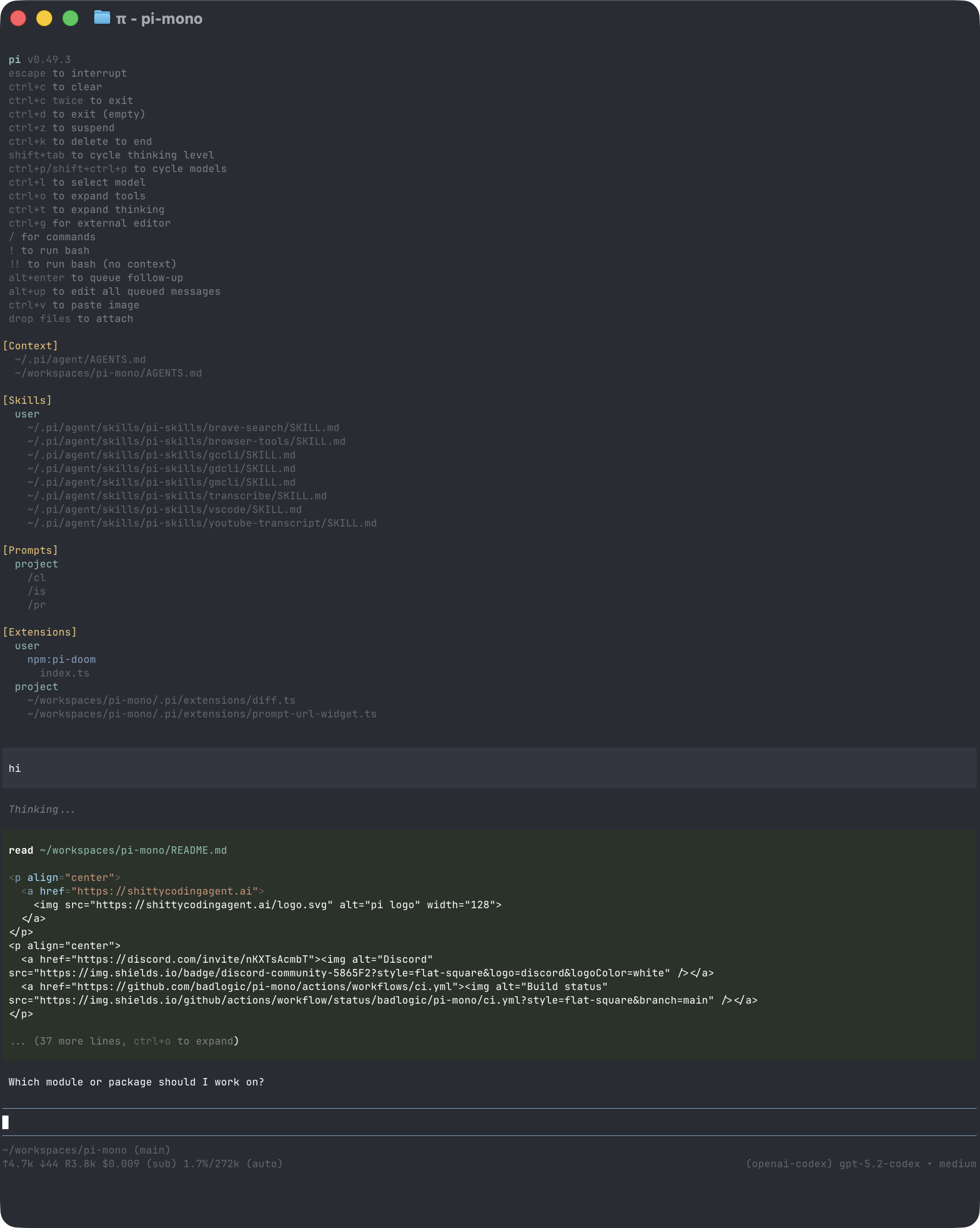
The interface has four main areas:
- **Startup header** - shortcuts, loaded context files, prompt templates, skills, and extensions
- **Messages** - user messages, assistant responses, tool calls, tool results, notifications, errors, and extension UI
- **Editor** - where you type; border color indicates the current thinking level
- **Footer** - working directory, session name, token/cache usage, cost, context usage, and current model
Footer cost labels match the `/usage`, `/session`, and autonomy status cost line:
- **CURRENT** is the current session file's total recorded cost, including assistant usage and any **SUBAGENTS** cost.
- **TODAY** is this host's active session-storage total for the local calendar day; it rolls over at local midnight.
- **SUBAGENTS** appears only when delegated/spawned workers reported cost in the current session, and that amount is already included in **CURRENT**.
For ChatGPT Plus/Pro via OpenAI Codex OAuth, token usage is still recorded for context/cost estimates, but subscription quota windows come from OpenAI Codex response headers. Those windows reset at the server-provided `x-codex-*-reset-at` epoch seconds and may include multiple metered families; they are not the same as Pi's local-midnight **TODAY** window and are not treated as paid API spend.
The editor can be replaced temporarily by built-in UI such as `/settings` or by custom extension UI.
### Editor Features
| Feature | How |
|---------|-----|
| File reference | Type `@` to fuzzy-search project files |
| Path completion | Press Tab to complete paths |
| Multi-line input | Shift+Enter, or Ctrl+Enter on Windows Terminal |
| Images | Paste with Ctrl+V on Unix/macOS, Alt+V on Windows, or either on WSL; the same action pastes text when no image is present |
| Platform shell command | `!command` runs in PowerShell on Windows or Bash elsewhere and sends output to the model |
| Hidden platform shell command | `!!command` runs without sending output to the model |
| External editor | Ctrl+G opens `$VISUAL` or `$EDITOR` |
See [Keybindings](keybindings.md) for all shortcuts and customization.
Pasted images are stored under `~/.pi/agent/state/attachments` by default and attached to the current prompt as numbered markers. Later prompts can say `look at image #2` or `look at the image` for the latest current-session attachment. Set `images.clipboardDirectory` to use another folder; a relative folder is an explicit workspace-relative choice. Storage is bounded and Pi never writes an attachment folder into the workspace by default.
### Questions, Steps, and Workers
When an owner choice materially changes the result, the built-in `ask_question` interaction presents up to four questions together. It supports single choice, multi-select, an unrestricted multi-line custom **Other** answer, clipboard text or image paste, explicit **Skip**, configurable keyboard navigation, cancellation, and a final review before a multi-question answer is submitted. The request is checkpointed before display; `/resume` restores the original tool call, and large answers remain exact in a retrievable artifact while only a bounded projection enters prompt context. TUI and RPC hosts use the same fail-closed typed request. Image paste is refused with a visible explanation when the routed model cannot accept images instead of silently replacing it with a placeholder. Non-interactive sessions fail closed instead of inventing an answer, and worker sessions do not construct the question tool.
Every model-invoked skill, goal, task, worker, file, shell, and extension call contributes once to the same collapsed `Performing N actions` / `Performed N actions` transcript row. Ctrl+T opens the detailed transcript. Live task and worker state uses the single activity lane; durable labels and admitted preset or adaptive grant IDs remain visible after `/resume`. Completed worker output remains untrusted until the parent verifies it through the existing result and review contracts.
### Secret Store
The only Pi-side Bitwarden setup input is a `BW_SESSION` key. When a TUI credential action needs it, Pi opens one masked prompt; paste the key there and the agent continues the activation or migration itself. `/secrets` uses the same prompt for manual profile management. Pi provisions its pinned [Bitwarden Password Manager CLI](https://bitwarden.com/help/cli/) (`bw`) automatically when no system installation is available. Generate the key with `bw unlock --raw` after signing in to Bitwarden. Pi keeps it in memory for the current session; it is never placed in model context or passed to model-controlled processes.
The private menu accepts username/password pairs, a pasted token or private key, a dropped absolute key-file path, or multiple variables in dotenv syntax. Pi stores the profile as an encrypted Bitwarden item and writes no local vault or project dotenv. A normalized Git-origin identity binds the profile to the project, so another clone on a synced machine detects the same binding. Repositories without a portable origin use a machine-local opaque project identity. An existing profile can be explicitly bound to additional projects on the same machine.
The model-facing `secret_store` tool can inspect non-secret profile metadata, activate a profile already authorized for the current project, and migrate model-blind credential sources. Activation works without a live TUI in interactive, print, and RPC modes when that Pi process has a valid `BW_SESSION`. Values are injected in memory into Bash, Python, and allowlisted `run_process` variables; exact values are redacted from tool results and owner-shell transcripts. Locking or exiting clears the active environment and session key. This is a model-facing boundary, not an OS sandbox: code intentionally given process or network authority can use an activated credential through its consuming application.
In a user-plane session with credential capability, the agent can also migrate credentials it can already access by naming an environment variable, dotenv file, or credential/key file through `secret_store migrate`. The host reads those sources and writes the encrypted profile directly; values never enter tool arguments, model context, or tool results. Migration activates the profile for the current project and retains source files so existing consumers are not silently broken. Replacing an existing profile requires an explicit `overwrite` flag. If the Bitwarden session is missing or stale, the only owner input Pi requests is a fresh `BW_SESSION` key through the masked prompt; filesystem/process authority cannot manufacture vault authority.
## Slash Commands
Type `/` in the editor to open command completion. Extensions can register custom commands, skills are available as `/skill:name`, and prompt templates expand via `/templatename`.
| Command | Description |
|---------|-------------|
| `/login`, `/logout` | Manage OAuth or API-key credentials |
| `/model` | Switch models |
| `/scoped-models` | Enable/disable models for Ctrl+P cycling |
| `/settings` | Thinking level, theme, Project AGENTS.md, message delivery, transport |
| `/secrets` | Connect Bitwarden; add, bind, activate, or remove project credential profiles |
| `/resume` | Pick from previous sessions |
| `/new` | Start a new session |
| `/name ` | Set session display name |
| `/session` | Show session file, ID, messages, tokens, and cost |
| `/tree` | Jump to any point in the session and continue from there |
| `/fork` | Create a new session from a previous user message |
| `/clone` | Duplicate the current active branch into a new session |
| `/compact [prompt]` | Manually compact context, optionally with custom instructions |
| `/copy` | Copy last assistant message to clipboard |
| `/export [file]` | Export session to HTML |
| `/share` | Upload as private GitHub gist with shareable HTML link |
| `/reload` | Reload keybindings, extensions, skills, prompts, and context files |
| `/hotkeys` | Show all keyboard shortcuts |
| `/changelog` | Display version history |
| `/toolhealth` | Show tool repair diagnostics and learned standing rules |
| `/toolprobe [provider/model]` | Probe native/text tool-call support and persist a host-local verdict |
| `/toolrule-remove ` | Remove one learned tool repair standing rule |
| `/goal [status\|resume\|complete\|close\|reopen \|override ]` | Inspect or control the durable session goal |
| `/goal-continue [maxTurns] [maxStallTurns] [maxMinutes]` | Continue the active goal within explicit bounds |
| `/task`, `/steps` | Manage the native session checklist; see [Task steps](task-steps.md) |
| `/quit` | Quit pi |
## Message Queue
You can submit messages while the agent is still working:
- **Enter** queues a steering message; if the assistant is currently streaming text, Pi interrupts that stream and delivers the steering next. Otherwise, it delivers after the current assistant turn finishes executing its tool calls.
- **Alt+Enter** queues a follow-up message, delivered after the agent finishes all work.
- **Escape** aborts and restores queued messages to the editor.
- **Alt+Up** retrieves queued messages back to the editor.
On Windows Terminal, Alt+Enter is fullscreen by default. Remap it as described in [Terminal setup](terminal-setup.md) if you want pi to receive the shortcut.
Configure delivery in [Settings](settings.md) with `steeringMode` and `followUpMode`.
## Sessions
Sessions are saved automatically to `~/.pi/agent/sessions/`, organized by working directory.
```bash
pi -c # Continue most recent session
pi -r # Browse and select a session
pi --no-session # Ephemeral mode; do not save
pi --name "my task" # Set session display name at startup
pi --session # Use a specific session file or session ID
pi --fork # Fork a session into a new session file
```
Useful session commands:
- `/session` shows the current session file and ID.
- `/resume` also resumes a blocked durable goal before that session's worker/process supervision starts;
`/goal resume` applies the same persisted transition in place.
- `/tree` navigates the in-file session tree and can summarize abandoned branches.
- `/fork` creates a new session from an earlier user message.
- `/clone` duplicates the current active branch into a new session file.
- `/compact` summarizes older messages to free context.
See [Sessions](sessions.md) and [Compaction](compaction.md) for details.
## Context Files
Pi discovers `AGENTS.md`, `CLAUDE.md`, or `GEMINI.md` context files from:
- `AGENTS.md`, `CLAUDE.md`, or `GEMINI.md` in `~/.pi/agent/` for global instructions (always injected)
- parent directories and the current directory, only after that directory/project opts in
Global files are scanned for prompt-injection/exfiltration phrases and injected into the system prompt. Repository files are off until you opt in (`/settings` → Project AGENTS.md). Opt-in lists their paths so the agent can read them; they are not injected at startup. Set Load to **global-only**, or pass `--no-context-files` (`-nc`), to keep only the global file.
### System Prompt Files
Replace the default system prompt with:
- `.pi/SYSTEM.md` for a project
- `~/.pi/agent/SYSTEM.md` globally
Append to the default prompt without replacing it with `APPEND_SYSTEM.md` in either location.
## Exporting and Sharing Sessions
Use `/export [file]` to write a session to HTML.
Use `/share` to upload a private GitHub gist with a shareable HTML link.
If you use pi for open source work and want to publish sessions for model, prompt, tool, and evaluation research, see [`badlogic/pi-share-hf`](https://github.com/badlogic/pi-share-hf). It publishes sessions to Hugging Face datasets.
## CLI Reference
```bash
pi [options] [@files...] [messages...]
```
### Package Commands
```bash
pi install [-l] # Install package, -l for project-local
pi remove [-l] # Remove package
pi uninstall [-l] # Alias for remove
pi update [source|self|pi] # Update pi and packages; reconcile pinned git refs
pi update --extensions # Update packages only; reconcile pinned git refs
pi update --self # Update pi only
pi update --extension # Update one package
pi list # List installed packages
pi config # Enable/disable package resources
```
These commands manage pi packages, not the pi CLI installation. To uninstall pi itself, see [Quickstart](quickstart.md#uninstall).
See [Pi Packages](packages.md) for package sources and security notes.
### Modes
| Flag | Description |
|------|-------------|
| default | Interactive mode |
| `-p`, `--print` | Print response and exit |
| `--mode json` | Output all events as JSON lines; see [JSON mode](json.md) |
| `--mode rpc` | RPC mode over stdin/stdout; see [RPC mode](rpc.md) |
| `--export [out]` | Export a session to HTML |
In print mode, pi also reads piped stdin and merges it into the initial prompt:
```bash
cat README.md | pi -p "Summarize this text"
```
### Model Options
| Option | Description |
|--------|-------------|
| `--provider ` | Provider, such as `anthropic`, `openai`, or `google` |
| `--model ` | Model pattern or ID; supports `provider/id` and optional `:` |
| `--api-key ` | API key, overriding environment variables |
| `--thinking ` | `off`, `minimal`, `low`, `medium`, `high`, `xhigh` |
| `--models ` | Comma-separated patterns for Ctrl+P cycling |
| `--list-models [search]` | List available models |
### Session Options
| Option | Description |
|--------|-------------|
| `-c`, `--continue` | Continue the most recent session |
| `-r`, `--resume` | Browse and select a session |
| `--session ` | Use a specific session file or partial UUID |
| `--fork ` | Fork a session file or partial UUID into a new session |
| `--session-dir ` | Custom session storage directory |
| `--no-session` | Ephemeral mode; do not save |
| `--name `, `-n ` | Set session display name at startup |
### Tool Options
| Option | Description |
|--------|-------------|
| `--tools `, `-t ` | Allowlist specific built-in, extension, and custom tools |
| `--exclude-tools `, `-xt ` | Disable specific built-in, extension, and custom tools |
| `--no-builtin-tools`, `-nbt` | Disable built-in tools but keep extension/custom tools enabled |
| `--no-tools`, `-nt` | Disable all tools |
Built-in tools include `read`, `edit`, `write`, `grep`, `find`, `ls`, `ask_question`, `secret_store`, and the uv-managed `python` tool. The agent always sees one stable `bash` tool contract. On Windows, Pi parses its supported simple-command grammar and converts it deterministically to PowerShell; unsupported shell constructs fail closed. Agent, interactive, and RPC shell calls have a 120-second wall-clock default, and Python calls default to 30 seconds. Native goal, task-step, human-question, secret-store, delegation, context, and toolkit tools are activated when their capability/profile gates allow them.
### Resource Options
| Option | Description |
|--------|-------------|
| `-e`, `--extension ` | Load an extension from path, npm, or git; repeatable |
| `--no-extensions` | Disable extension discovery |
| `--skill ` | Load a skill; repeatable |
| `--no-skills` | Disable skill discovery |
| `--prompt-template ` | Load a prompt template; repeatable |
| `--no-prompt-templates` | Disable prompt template discovery |
| `--theme ` | Load a theme; repeatable |
| `--no-themes` | Disable theme discovery |
| `--no-context-files`, `-nc` | Skip project `AGENTS.md`/`CLAUDE.md`/`GEMINI.md`; global `~/.pi/agent` files still load |
Combine `--no-*` with explicit flags to load exactly what you need, ignoring settings. Example:
```bash
pi --no-extensions -e ./my-extension.ts
```
### Other Options
| Option | Description |
|--------|-------------|
| `--system-prompt ` | Replace default prompt; context file contents and lazy-loadable skill locations are still appended |
| `--append-system-prompt ` | Append to system prompt |
| `--verbose` | Force verbose startup |
| `-h`, `--help` | Show help |
| `-v`, `--version` | Show version |
### File Arguments
Prefix files with `@` to include them in the message:
```bash
pi @prompt.md "Answer this"
pi -p @screenshot.png "What's in this image?"
pi @code.ts @test.ts "Review these files"
```
### Examples
```bash
# Interactive with initial prompt
pi "List all .ts files in src/"
# Non-interactive
pi -p "Summarize this codebase"
# Non-interactive with piped stdin
cat README.md | pi -p "Summarize this text"
# Named one-shot session
pi --name "release audit" -p "Audit this repository"
# Different model
pi --provider openai --model gpt-4o "Help me refactor"
# Model with provider prefix
pi --model openai/gpt-4o "Help me refactor"
# Model with thinking level shorthand
pi --model sonnet:high "Solve this complex problem"
# Limit model cycling
pi --models "claude-*,gpt-4o"
# Read-only mode
pi --tools read,grep,find,ls -p "Review the code"
# Disable one extension or built-in tool while keeping the rest available
pi --exclude-tools ask_question
```
### Environment Variables
| Variable | Description |
|----------|-------------|
| `PI_CODING_AGENT_DIR` | Override config directory; default is `~/.pi/agent` |
| `PI_CODING_AGENT_SESSION_DIR` | Override session storage directory; overridden by `--session-dir` |
| `PI_PACKAGE_DIR` | Override package directory, useful for Nix/Guix store paths |
| `PI_OFFLINE` | Disable startup network operations, including update checks, package update checks, and install/update telemetry |
| `PI_SKIP_VERSION_CHECK` | Skip the Pi version update check at startup. This prevents the `pi.dev` latest-version request |
| `PI_TELEMETRY` | Override install/update telemetry: `1`/`true`/`yes` or `0`/`false`/`no`. This does not disable update checks |
| `PI_CACHE_RETENTION` | Set to `long` for extended prompt cache where supported |
| `BW_SESSION` | Optional Bitwarden CLI session key for autonomous activation in a new Pi process |
| `VISUAL`, `EDITOR` | External editor for Ctrl+G |
## Design Principles
Pi keeps the core focused and pushes project-specific workflows into extensions, skills, prompt templates, and packages. Core includes the cross-project lifecycle primitives it depends on itself: native goals, task steps, durable root-managed leaf-worker orchestration, and a platform-selected shell. Broader integrations such as MCP and external-provider teams remain extension/package territory.
For the full rationale, read the [blog post](https://mariozechner.at/posts/2025-11-30-pi-coding-agent/).