 # Content Loader aka Content Placeholder for React Native
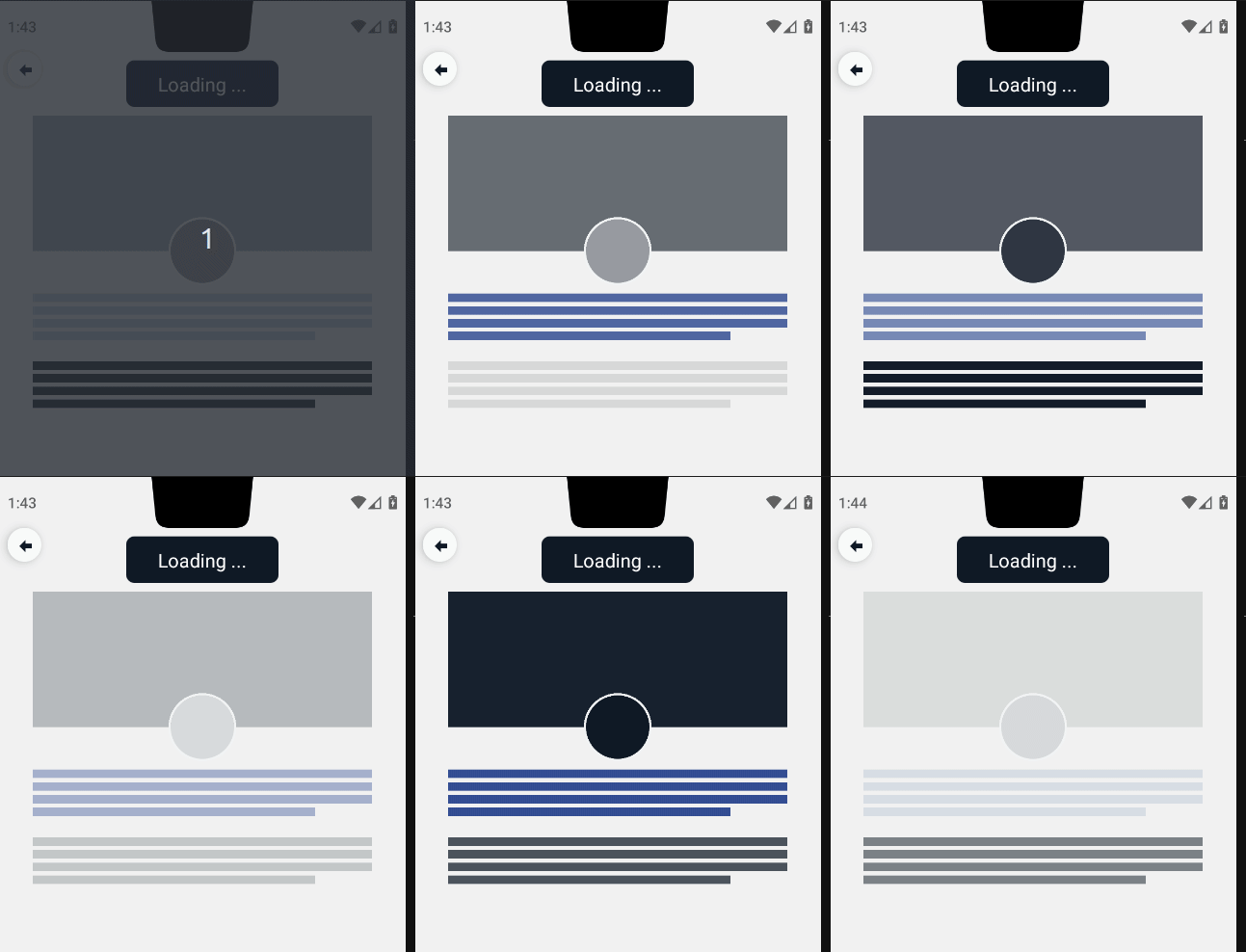
**Customizable react native content loader for React-Native apps**.
No need for external dependencies, it only use `View` component from `react-native`. For styling, you can use "barebone" stylesheet from react-native or you can use third party libraries like `Nativewind` (TailwindCSS for react-native)
## Preview
## Support
Buy me a coffe at:
[BuyMeACoffee](https://www.buymeacoffee.com/cipto)
[Saweria](https://saweria.co/ciptohadi)
## Installation
**Step 1.**
```
npm install @casteasoft/react-native-content-loader --save
```
or
```
yarn add @casteasoft/react-native-content-loader
```
**Step 2.**
And now you are ready to use it in your code. See example below.
## Basic example
```js
const ProfileImage = withViewLoader(View)
// or using explicit conditional statement
{
isLoading ? :
}
```
## Live advanced example
[Fiddle it around on codesanbox](https://codesandbox.io/s/react-native-content-loader-tclrs2)
. You prefer expo snack? I've got you, here is yummy [expo snack](https://snack.expo.dev/@ciptohadi/e8a49d)
## Advanced example using Nativewind
```js
import { View, Text, TouchableOpacity, Image } from "react-native";
import { withViewLoader } from "@casteasoft/react-native-content-loader";
import { styled } from "nativewind";
/* =============================
* Content Loader Examples @casteasoft/react-native-content-loader
# , styling using Nativewind
* ============================ */
export const ContentLoader = () => {
return
{/* Button for toggling isLoading state */}
{
setIsLoading(!isLoading);
}}
>
{isLoading ? "Loading ..." : "Completed"}
{/* Profile Details */}
Lorem ipsum dolor sit amet consectetur adipisicing elit. Illum totam
corrupti necessitatibus quasi dolores eos laboriosam cum!
Consequatur, laudantium sit facere vitae et nisi dolorum
accusantium, iure laborum, asperiores veniam.
{/* Styling content loader with style prop only */}
{isLoading ? (
) : (
Lorem ipsum dolor sit amet consectetur adipisicing elit. Illum
totam corrupti necessitatibus quasi dolores eos laboriosam cum!
Consequatur, laudantium sit facere vitae et nisi dolorum
accusantium, iure laborum, asperiores veniam.
)}
{/* End of Profile Details */}
/** =============================
* Styled Components using Nativewind
* =============================
*/
const ViewWithLoader = withViewLoader(View);
const ToggleLoadingBtn = styled(
TouchableOpacity,
`items-center self-center justify-center px-4 py-2 mx-4 my-2 bg-gray-900 rounded-lg w-36`
);
const ToggleLoadingText = styled(Text, `text-lg text-white text-font-semibold`);
const ProfileContainer = styled(View, `flex flex-col w-full`);
const ProfileHeaderContainer = styled(
View,
`relative flex flex-col items-center mx-auto w-80`
);
const ProfileHeaderImageContainer = styled(ViewWithLoader, `w-full h-32`);
const ProfileHeaderImage = styled(Image, `w-full h-full`);
const ProfileImageContainer = styled(
ViewWithLoader,
`absolute z-20 w-16 h-16 border-2 border-gray-100 rounded-full top-24`
);
const ProfileImage = styled(Image, `w-full h-full rounded-full`);
const ProfileImageBackground = styled(
View,
`absolute w-16 h-16 border-2 border-gray-100 rounded-full bg-gray-50 top-24`
);
const BioParagraph = ViewWithLoader;
```
## Available Properties
If you use a third party library like Nativewind, the tailwind class will be transformed into an array of style object, therefore there is no className property, for example:
`mx-auto mt-4 w-80` will be transformed into `[{marginLeft: "auto", marginRight: "auto"}, {marginTop: 16}, {width: 320}]`
| Property name | Description |
| ---------------- | ---------------------------------------------- |
| duration | : number (default: 3000) |
| bottomtValue | : minimum value for opacity (default: 0.1) |
| topValue | : maxmum value for opacity (default: 1) |
| children | : children element to be displayed |
| isLoading | : boolean |
| numberOfLines | : number (the number of paragraph lines) |
| style | : `StyleProp` |
| loaderColorStyle | : `StyleProp`, only backgroundColor |
| | (default: `{ backgroundColor: "#111827" }`) |
## Changelog
Please see the [releases](https://github.com/casteasoft/react-native-content-loader/releases) tab for the changelog information.
## License
[MIT](LICENSE)
### Authors
- [Cipto Hadi](https://www.twitter.com/cipto_hd)
# Content Loader aka Content Placeholder for React Native
**Customizable react native content loader for React-Native apps**.
No need for external dependencies, it only use `View` component from `react-native`. For styling, you can use "barebone" stylesheet from react-native or you can use third party libraries like `Nativewind` (TailwindCSS for react-native)
## Preview

## Support
Buy me a coffe at:
[BuyMeACoffee](https://www.buymeacoffee.com/cipto)
[Saweria](https://saweria.co/ciptohadi)
## Installation
**Step 1.**
```
npm install @casteasoft/react-native-content-loader --save
```
or
```
yarn add @casteasoft/react-native-content-loader
```
**Step 2.**
And now you are ready to use it in your code. See example below.
## Basic example
```js
const ProfileImage = withViewLoader(View)
// or using explicit conditional statement
{
isLoading ? :
}
```
## Live advanced example
[Fiddle it around on codesanbox](https://codesandbox.io/s/react-native-content-loader-tclrs2)
. You prefer expo snack? I've got you, here is yummy [expo snack](https://snack.expo.dev/@ciptohadi/e8a49d)
## Advanced example using Nativewind
```js
import { View, Text, TouchableOpacity, Image } from "react-native";
import { withViewLoader } from "@casteasoft/react-native-content-loader";
import { styled } from "nativewind";
/* =============================
* Content Loader Examples @casteasoft/react-native-content-loader
# , styling using Nativewind
* ============================ */
export const ContentLoader = () => {
return
{/* Button for toggling isLoading state */}
{
setIsLoading(!isLoading);
}}
>
{isLoading ? "Loading ..." : "Completed"}
{/* Profile Details */}
Lorem ipsum dolor sit amet consectetur adipisicing elit. Illum totam
corrupti necessitatibus quasi dolores eos laboriosam cum!
Consequatur, laudantium sit facere vitae et nisi dolorum
accusantium, iure laborum, asperiores veniam.
{/* Styling content loader with style prop only */}
{isLoading ? (
) : (
Lorem ipsum dolor sit amet consectetur adipisicing elit. Illum
totam corrupti necessitatibus quasi dolores eos laboriosam cum!
Consequatur, laudantium sit facere vitae et nisi dolorum
accusantium, iure laborum, asperiores veniam.
)}
{/* End of Profile Details */}
/** =============================
* Styled Components using Nativewind
* =============================
*/
const ViewWithLoader = withViewLoader(View);
const ToggleLoadingBtn = styled(
TouchableOpacity,
`items-center self-center justify-center px-4 py-2 mx-4 my-2 bg-gray-900 rounded-lg w-36`
);
const ToggleLoadingText = styled(Text, `text-lg text-white text-font-semibold`);
const ProfileContainer = styled(View, `flex flex-col w-full`);
const ProfileHeaderContainer = styled(
View,
`relative flex flex-col items-center mx-auto w-80`
);
const ProfileHeaderImageContainer = styled(ViewWithLoader, `w-full h-32`);
const ProfileHeaderImage = styled(Image, `w-full h-full`);
const ProfileImageContainer = styled(
ViewWithLoader,
`absolute z-20 w-16 h-16 border-2 border-gray-100 rounded-full top-24`
);
const ProfileImage = styled(Image, `w-full h-full rounded-full`);
const ProfileImageBackground = styled(
View,
`absolute w-16 h-16 border-2 border-gray-100 rounded-full bg-gray-50 top-24`
);
const BioParagraph = ViewWithLoader;
```
## Available Properties
If you use a third party library like Nativewind, the tailwind class will be transformed into an array of style object, therefore there is no className property, for example:
`mx-auto mt-4 w-80` will be transformed into `[{marginLeft: "auto", marginRight: "auto"}, {marginTop: 16}, {width: 320}]`
| Property name | Description |
| ---------------- | ---------------------------------------------- |
| duration | : number (default: 3000) |
| bottomtValue | : minimum value for opacity (default: 0.1) |
| topValue | : maxmum value for opacity (default: 1) |
| children | : children element to be displayed |
| isLoading | : boolean |
| numberOfLines | : number (the number of paragraph lines) |
| style | : `StyleProp` |
| loaderColorStyle | : `StyleProp`, only backgroundColor |
| | (default: `{ backgroundColor: "#111827" }`) |
## Changelog
Please see the [releases](https://github.com/casteasoft/react-native-content-loader/releases) tab for the changelog information.
## License
[MIT](LICENSE)
### Authors
- [Cipto Hadi](https://www.twitter.com/cipto_hd)