# @carlosgtrz/pi-codex-aliases
Pi extension that registers two aliases for Pi's built-in OpenAI Codex provider:
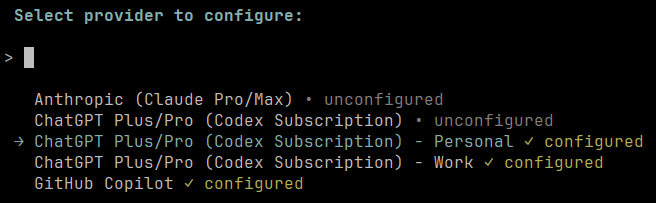
- `openai-codex-personal` — shown in `/login` as `ChatGPT Plus/Pro (Codex Subscription) - Personal`
- `openai-codex-work` — shown in `/login` as `ChatGPT Plus/Pro (Codex Subscription) - Work`
This is useful when you have both a personal ChatGPT account and a work ChatGPT account. You can keep both logged in at the same time, then switch between them using Pi's provider/model selection instead of logging in and out.
Requires Pi 0.81.0 or newer. Version 0.3.0+ registers each alias as a complete native `pi-ai` provider, directly reusing Pi's canonical Codex authentication, model metadata, and streaming implementation.
 ## Install
```bash
pi install npm:@carlosgtrz/pi-codex-aliases
```
Try without installing permanently:
```bash
pi -e npm:@carlosgtrz/pi-codex-aliases
```
For one-off testing from this repo:
```bash
pi -e ./packages/codex-aliases
```
## Usage
After installation, start Pi:
```bash
pi
```
Use `/login` to authenticate each alias separately. Each alias delegates to Pi's built-in OpenAI Codex OAuth flow, so both browser login and device-code login for headless environments are available.
In the provider list, choose:
1. `ChatGPT Plus/Pro (Codex Subscription) - Personal` for your personal ChatGPT account.
2. `ChatGPT Plus/Pro (Codex Subscription) - Work` for your work ChatGPT account.
For example, `/login` shows entries like:
```text
Select provider to configure:
→ ChatGPT Plus/Pro (Codex Subscription) • unconfigured
ChatGPT Plus/Pro (Codex Subscription) - Personal ✓ configured
ChatGPT Plus/Pro (Codex Subscription) - Work ✓ configured
```
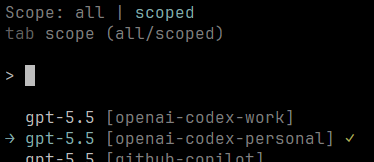
Then use Pi's provider/model selection UI or command to choose a Codex model under either alias:
- `openai-codex-personal`
- `openai-codex-work`
Each alias uses the same built-in OpenAI Codex model list, but stores separate OAuth credentials.
The extension also syncs the selected alias token into Codex-related environment variables for compatible extensions/tools during the active session.
## Sub-bar compatibility
This extension is compatible with [sub-bar](https://github.com/marckrenn/pi-sub), the Pi usage/status bar extension.
When you select either `openai-codex-personal` or `openai-codex-work`, this extension exposes the selected alias credentials through Codex-compatible environment variables and asks sub-bar's shared `sub-core` to refresh. This lets sub-bar show usage for the currently selected Codex alias instead of only Pi's default Codex provider.
## Note
You can log out of Pi's default OpenAI Codex provider if you only want to use the aliases, or keep the default provider logged in and use it for a third ChatGPT account.
## License
MIT
## Install
```bash
pi install npm:@carlosgtrz/pi-codex-aliases
```
Try without installing permanently:
```bash
pi -e npm:@carlosgtrz/pi-codex-aliases
```
For one-off testing from this repo:
```bash
pi -e ./packages/codex-aliases
```
## Usage
After installation, start Pi:
```bash
pi
```
Use `/login` to authenticate each alias separately. Each alias delegates to Pi's built-in OpenAI Codex OAuth flow, so both browser login and device-code login for headless environments are available.
In the provider list, choose:
1. `ChatGPT Plus/Pro (Codex Subscription) - Personal` for your personal ChatGPT account.
2. `ChatGPT Plus/Pro (Codex Subscription) - Work` for your work ChatGPT account.
For example, `/login` shows entries like:
```text
Select provider to configure:
→ ChatGPT Plus/Pro (Codex Subscription) • unconfigured
ChatGPT Plus/Pro (Codex Subscription) - Personal ✓ configured
ChatGPT Plus/Pro (Codex Subscription) - Work ✓ configured
```
Then use Pi's provider/model selection UI or command to choose a Codex model under either alias:
- `openai-codex-personal`
- `openai-codex-work`
Each alias uses the same built-in OpenAI Codex model list, but stores separate OAuth credentials.
The extension also syncs the selected alias token into Codex-related environment variables for compatible extensions/tools during the active session.
## Sub-bar compatibility
This extension is compatible with [sub-bar](https://github.com/marckrenn/pi-sub), the Pi usage/status bar extension.
When you select either `openai-codex-personal` or `openai-codex-work`, this extension exposes the selected alias credentials through Codex-compatible environment variables and asks sub-bar's shared `sub-core` to refresh. This lets sub-bar show usage for the currently selected Codex alias instead of only Pi's default Codex provider.
## Note
You can log out of Pi's default OpenAI Codex provider if you only want to use the aliases, or keep the default provider logged in and use it for a third ChatGPT account.
## License
MIT