

 #### `fontSize:
  ### Line height
Capsize supports two mental models for specifying line height, `lineGap` and `leading`. If you pass neither the text will follow the default spacing of the specified font, e.g. `line-height: normal`.
**NOTE: You should only ever pass one or the other, not both.**
#### `lineGap:
### Line height
Capsize supports two mental models for specifying line height, `lineGap` and `leading`. If you pass neither the text will follow the default spacing of the specified font, e.g. `line-height: normal`.
**NOTE: You should only ever pass one or the other, not both.**
#### `lineGap: 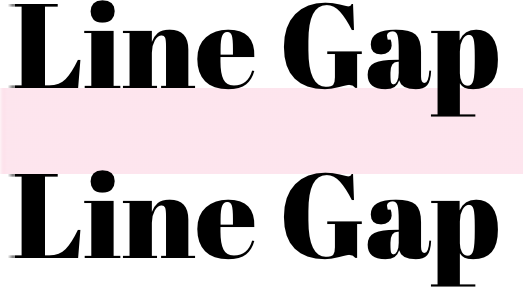 #### `leading:
  ### Font Metrics
This metadata is extracted from the metrics tables inside the font itself. There are a number of ways to find this information:
- If using a Google Font or system font, install the [@capsizecss/metrics](../../packages/metrics/README.md) package and import the metrics by name. For example:
```ts
import arialMetrics from '@capsizecss/metrics/arial';
```
- If using a font from a file, install the [@capsizecss/unpack](../../packages/unpack/README.md) package and extract the metrics from the font file directly. For example:
```ts
import { fromFile } from '@capsizecss/unpack';
const metrics = await fromFile(filePath);
```
- Or, use [the Capsize website](https://seek-oss.github.io/capsize/) to find these by selecting a font and referencing `Metrics` tab in step 3.
## Core
The core package also provides a few other metrics-based features for improving typography on the web:
### createFontStack
Creates metrics-based `@font-face` declarations to improve the alignment of font family fallbacks, which can dramatically improve the [Cumulative Layout Shift](https://web.dev/cls/) metric for sites that depend on a web font.
#### Usage
Consider the following example, where the desired web font is [Lobster](https://fonts.google.com/specimen/Lobster), falling back to `Helvetica Neue` and then `Arial`, e.g. `font-family: Lobster, 'Helvetica Neue', Arial`.
1. Import `createFontStack` from the core package:
```ts
import { createFontStack } from '@capsizecss/core';
```
2. Import the font metrics for each of the desired fonts (see [Font Metrics](#font-metrics) above):
```ts
import lobster from '@capsizecss/metrics/lobster';
import helveticaNeue from '@capsizecss/metrics/helveticaNeue';
import arial from '@capsizecss/metrics/arial';
```
3. Create your font stack passing the metrics as an array, using the same order as you would via the `font-family` CSS property.
```ts
const { fontFamily, fontFaces } = createFontStack([
lobster,
helveticaNeue,
arial,
]);
```
The returned value contains the generated font face declarations as well as the computed `fontFamily` with the appropriately ordered font aliases.
#### Usage in CSS stylesheet or a style tag
The returned values can be templated into a stylesheet or a `style` block. Here is an example [handlebars](https://handlebarsjs.com/) template:
```html
```
This will produce the following CSS:
```css
.heading {
font-family:
Lobster, 'Lobster Fallback: Helvetica Neue', 'Lobster Fallback: Arial',
'Helvetica Neue', Arial;
}
@font-face {
font-family: 'Lobster Fallback: Helvetica Neue';
src: local('Helvetica Neue');
ascent-override: 115.1741%;
descent-override: 28.7935%;
size-adjust: 86.8251%;
}
@font-face {
font-family: 'Lobster Fallback: Arial';
src: local('Arial');
ascent-override: 113.5679%;
descent-override: 28.392%;
size-adjust: 88.053%;
}
```
#### Usage with CSS-in-JS frameworks
If working with a CSS-in-JS library, the returned `fontFaces` can be provided as a JavaScript style object by providing `styleObject` as a `fontFaceFormat` option.
Here is an example using [Emotion](https://emotion.sh/):
```tsx
import { Global } from '@emotion/core';
const { fontFaces, fontFamily } = createFontStack(
[lobster, helveticaNeue, arial],
{
fontFaceFormat: 'styleObject',
},
);
export const App = () => (
<>
### Font Metrics
This metadata is extracted from the metrics tables inside the font itself. There are a number of ways to find this information:
- If using a Google Font or system font, install the [@capsizecss/metrics](../../packages/metrics/README.md) package and import the metrics by name. For example:
```ts
import arialMetrics from '@capsizecss/metrics/arial';
```
- If using a font from a file, install the [@capsizecss/unpack](../../packages/unpack/README.md) package and extract the metrics from the font file directly. For example:
```ts
import { fromFile } from '@capsizecss/unpack';
const metrics = await fromFile(filePath);
```
- Or, use [the Capsize website](https://seek-oss.github.io/capsize/) to find these by selecting a font and referencing `Metrics` tab in step 3.
## Core
The core package also provides a few other metrics-based features for improving typography on the web:
### createFontStack
Creates metrics-based `@font-face` declarations to improve the alignment of font family fallbacks, which can dramatically improve the [Cumulative Layout Shift](https://web.dev/cls/) metric for sites that depend on a web font.
#### Usage
Consider the following example, where the desired web font is [Lobster](https://fonts.google.com/specimen/Lobster), falling back to `Helvetica Neue` and then `Arial`, e.g. `font-family: Lobster, 'Helvetica Neue', Arial`.
1. Import `createFontStack` from the core package:
```ts
import { createFontStack } from '@capsizecss/core';
```
2. Import the font metrics for each of the desired fonts (see [Font Metrics](#font-metrics) above):
```ts
import lobster from '@capsizecss/metrics/lobster';
import helveticaNeue from '@capsizecss/metrics/helveticaNeue';
import arial from '@capsizecss/metrics/arial';
```
3. Create your font stack passing the metrics as an array, using the same order as you would via the `font-family` CSS property.
```ts
const { fontFamily, fontFaces } = createFontStack([
lobster,
helveticaNeue,
arial,
]);
```
The returned value contains the generated font face declarations as well as the computed `fontFamily` with the appropriately ordered font aliases.
#### Usage in CSS stylesheet or a style tag
The returned values can be templated into a stylesheet or a `style` block. Here is an example [handlebars](https://handlebarsjs.com/) template:
```html
```
This will produce the following CSS:
```css
.heading {
font-family:
Lobster, 'Lobster Fallback: Helvetica Neue', 'Lobster Fallback: Arial',
'Helvetica Neue', Arial;
}
@font-face {
font-family: 'Lobster Fallback: Helvetica Neue';
src: local('Helvetica Neue');
ascent-override: 115.1741%;
descent-override: 28.7935%;
size-adjust: 86.8251%;
}
@font-face {
font-family: 'Lobster Fallback: Arial';
src: local('Arial');
ascent-override: 113.5679%;
descent-override: 28.392%;
size-adjust: 88.053%;
}
```
#### Usage with CSS-in-JS frameworks
If working with a CSS-in-JS library, the returned `fontFaces` can be provided as a JavaScript style object by providing `styleObject` as a `fontFaceFormat` option.
Here is an example using [Emotion](https://emotion.sh/):
```tsx
import { Global } from '@emotion/core';
const { fontFaces, fontFamily } = createFontStack(
[lobster, helveticaNeue, arial],
{
fontFaceFormat: 'styleObject',
},
);
export const App = () => (
<>
...
); ``` > Also useful as a source for further manipulation given it is a data structure that can be iterated over or extended. #### Providing additional `font-face` properties Additional properties can be added to the generated `@font-face` declarations via the `fontFaceProperties` option: ```ts const { fontFamily, fontFaces } = createFontStack( [lobster, helveticaNeue, arial], { fontFaceProperties: { fontDisplay: 'swap', }, }, ); ``` This will result in the following additions to the declarations: ```diff @font-face { font-family: 'Lobster Fallback: Helvetica Neue'; src: local('Helvetica Neue'); ascent-override: 115.1741%; descent-override: 28.7935%; size-adjust: 86.8251%; + font-display: swap; } @font-face { font-family: 'Lobster Fallback: Arial'; src: local('Arial'); ascent-override: 113.5679%; descent-override: 28.392%; size-adjust: 88.053%; + font-display: swap; } ``` > [!NOTE] > Passing any of the metric override CSS properties will be ignored as they are calculated by Capsize. > However, the `size-adjust` property is accepted to support fine-tuning the override for particular use cases. > This can be used to finesse the adjustment for specific text, or to disable the adjustment by setting it to `100%`. #### Scaling for different character subsets For languages that use different unicode subsets, e.g. Thai, the fallbacks need to be scaled accordingly, as the scaling is [based on character frequency in written language]. A fallback font stack can be generated for a supported subset by specifying `subset` as an option: ```ts const { fontFamily, fontFaces } = createFontStack([lobster, arial], { subset: 'thai', }); ``` > [!TIP] > Need support for a different unicode subset? > Either create an issue or follow the steps outlined in the [`generate-weightings` script] and open a PR. [based on character frequency in written language]: ../../packages/metrics/README.md#how-xwidthavg-is-calculated [`generate-weightings` script]: ../../packages/unpack/scripts/generate-weightings.ts ### precomputeValues Returns all the information required to create leading trim styles for a specific font size given the provided font metrics. This is useful for integrations with different styling solutions. Accepts the same [options](#options) as [createStyleObject](#createstyleobject) and [createStyleString](#createstylestring). ```ts import { precomputeValues } from '@capsizecss/core'; import arialMetrics from '@capsizecss/metrics/arial'; const capsizeValues = precomputeValues({ fontSize: 16, leading: 24, fontMetrics: arialMetrics, }); // => { // fontSize: string, // lineHeight: string, // capHeightTrim: string, // baselineTrim: string, //} ``` ### getCapHeight Return the rendered cap height for a specific font size given the provided font metrics. ```ts import { getCapHeight } from '@capsizecss/core'; import arialMetrics from '@capsizecss/metrics/arial'; const actualCapHeight = getCapHeight({ fontSize: 24, fontMetrics: arialMetrics, }); // => number ``` ## Metrics To make the retrieval of font metrics easy, Capsize provides the `@capsizecss/metrics` package containing all the required data for both system and Google fonts. ```bash npm install @capsizecss/metrics ``` See the [package](../../packages/metrics/README.md) for documentation. ## Unpack If you are using a custom font or one not included in the `@capsizecss/metrics` package, Capsize provides the `@capsizecss/unpack` package to extract the required data either via a URL or from a local file. ```bash npm install @capsizecss/unpack ``` See the [package](../../packages/unpack/README.md) for documentation. ## Integrations - [vanilla-extract](https://vanilla-extract.style) integration via [@capsizecss/vanilla-extract](../../packages/vanilla-extract/README.md) ## Thanks - [Vincent De Oliveira](https://twitter.com/iamvdo) for writing [Deep dive CSS: font metrics, line-height and vertical-align](https://iamvdo.me/en/blog/css-font-metrics-line-height-and-vertical-align), which provided the research needed to build all this. - [Devon Govett](https://github.com/devongovett) for creating [Fontkit](https://github.com/foliojs/fontkit), which does all the heavy lifting of extracting the font metrics under the covers. - [SEEK](https://www.seek.com.au) for giving us the space to do interesting work. ## License MIT.