



Give your AI agent the ability to understand the physical world —
geocode, route, search, and reason about locations.
English | 繁體中文

- **18 tools** — 14 atomic + 4 composite (explore-area, plan-route, compare-places, local-rank-tracker)
- **3 modes** — stdio, StreamableHTTP, standalone exec CLI
- **Agent Skill** — built-in skill definition teaches AI how to chain geo tools ([`skills/google-maps/`](./skills/google-maps/))
### vs Google Grounding Lite
| | This project | [Grounding Lite](https://cloud.google.com/blog/products/ai-machine-learning/announcing-official-mcp-support-for-google-services) |
|---|---|---|
| Tools | **18** | 3 |
| Geocoding | Yes | No |
| Step-by-step directions | Yes | No |
| Elevation | Yes | No |
| Distance matrix | Yes | No |
| Place details | Yes | No |
| Timezone | Yes | No |
| Weather | Yes | Yes |
| Air quality | Yes | No |
| Map images | Yes | No |
| Composite tools (explore, plan, compare) | Yes | No |
| Open source | MIT | No |
| Self-hosted | Yes | Google-managed only |
| Agent Skill | Yes | No |
### Quick Start
```bash
# stdio (Claude Desktop, Cursor, etc.)
npx @cablate/mcp-google-map --stdio
# exec CLI — no server needed
npx @cablate/mcp-google-map exec geocode '{"address":"Tokyo Tower"}'
# HTTP server
npx @cablate/mcp-google-map --port 3000 --apikey "YOUR_API_KEY"
```
## Special Thanks
Special thanks to [@junyinnnn](https://github.com/junyinnnn) for helping add support for `streamablehttp`.
## Available Tools
| Tool | Description |
|------|-------------|
| `maps_search_nearby` | Find places near a location by type (restaurant, cafe, hotel, etc.). Supports filtering by radius, rating, and open status. |
| `maps_search_places` | Free-text place search (e.g., "sushi restaurants in Tokyo"). Supports location bias, rating, open-now filters. |
| `maps_place_details` | Get full details for a place by its place_id — reviews, phone, website, hours. Optional `maxPhotos` param returns photo URLs. |
| `maps_geocode` | Convert an address or landmark name into GPS coordinates. |
| `maps_reverse_geocode` | Convert GPS coordinates into a street address. |
| `maps_distance_matrix` | Calculate travel distances and times between multiple origins and destinations. Driving mode supports `avoid_tolls` and `avoid_highways`. |
| `maps_directions` | Get step-by-step navigation between two points with route details. Driving mode supports `avoid_tolls` and `avoid_highways`. |
| `maps_elevation` | Get elevation (meters above sea level) for geographic coordinates. |
| `maps_timezone` | Get timezone ID, name, UTC/DST offsets, and local time for coordinates. |
| `maps_weather` | Get current weather conditions or forecast — temperature, humidity, wind, UV, precipitation. |
| `maps_air_quality` | Get air quality index, pollutant concentrations, and health recommendations by demographic group. |
| `maps_static_map` | Generate a map image with markers, paths, or routes — returned inline for the user to see directly. |
| `maps_batch_geocode` | Geocode up to 50 addresses in one call — returns coordinates for each. |
| `maps_search_along_route` | Search for places along a route between two points — ranked by minimal detour time. |
| **Composite Tools** | |
| `maps_explore_area` | Explore what's around a location — searches multiple place types and gets details in one call. |
| `maps_plan_route` | Plan an optimized multi-stop route — uses Routes API waypoint optimization (up to 25 stops) for efficient ordering. Driving mode supports `avoid_tolls` and `avoid_highways`. |
| `maps_compare_places` | Compare places side-by-side — searches, gets details, and optionally calculates distances. |
| `maps_local_rank_tracker` | Track a business's local search ranking across a geographic grid — like LocalFalcon. Supports up to 3 keywords for batch scanning. Returns rank at each point, top-3 competitors, and metrics (ARP, ATRP, SoLV). |
All tools are annotated with `readOnlyHint: true` and `destructiveHint: false` — MCP clients can auto-approve these without user confirmation.
> **Prerequisite**: Enable **Places API (New)** and **Routes API** in [Google Cloud Console](https://console.cloud.google.com) before using place-related and routing tools.
## Installation
### Method 1: stdio (Recommended for most clients)
Works with Claude Desktop, Cursor, VS Code, and any MCP client that supports stdio:
```json
{
"mcpServers": {
"google-maps": {
"command": "npx",
"args": ["-y", "@cablate/mcp-google-map", "--stdio"],
"env": {
"GOOGLE_MAPS_API_KEY": "YOUR_API_KEY"
}
}
}
}
```
**Reduce context usage** — If you only need a subset of tools, set `GOOGLE_MAPS_ENABLED_TOOLS` to limit which tools are registered:
```json
{
"env": {
"GOOGLE_MAPS_API_KEY": "YOUR_API_KEY",
"GOOGLE_MAPS_ENABLED_TOOLS": "maps_geocode,maps_directions,maps_search_places"
}
}
```
Omit or set to `*` for all 18 tools (default).
### Method 2: HTTP Server
For multi-session deployments, per-request API key isolation, or remote access:
```bash
npx @cablate/mcp-google-map --port 3000 --apikey "YOUR_API_KEY"
# Bind to all interfaces for remote access (e.g. Docker, LAN)
npx @cablate/mcp-google-map --host 0.0.0.0 --port 3000 --apikey "YOUR_API_KEY"
```
Then configure your MCP client:
```json
{
"mcpServers": {
"google-maps": {
"type": "http",
"url": "http://localhost:3000/mcp"
}
}
}
```
### Server Information
- **Transport**: stdio (`--stdio`) or Streamable HTTP (default)
- **Tools**: 18 Google Maps tools (14 atomic + 4 composite) — filterable via `GOOGLE_MAPS_ENABLED_TOOLS`
### CLI Exec Mode (Agent Skill)
Use tools directly without running the MCP server:
```bash
npx @cablate/mcp-google-map exec geocode '{"address":"Tokyo Tower"}'
npx @cablate/mcp-google-map exec search-places '{"query":"ramen in Tokyo"}'
```
All 18 tools available: `geocode`, `reverse-geocode`, `search-nearby`, `search-places`, `place-details`, `directions`, `distance-matrix`, `elevation`, `timezone`, `weather`, `air-quality`, `static-map`, `batch-geocode-tool`, `search-along-route`, `explore-area`, `plan-route`, `compare-places`, `local-rank-tracker`. See [`skills/google-maps/`](./skills/google-maps/) for the agent skill definition and full parameter docs.
### Batch Geocode
Geocode hundreds of addresses from a file:
```bash
npx @cablate/mcp-google-map batch-geocode -i addresses.txt -o results.json
cat addresses.txt | npx @cablate/mcp-google-map batch-geocode -i -
```
Input: one address per line. Output: JSON with `{ total, succeeded, failed, results[] }`. Default concurrency: 20 parallel requests.
### API Key Configuration
API keys can be provided in three ways (priority order):
1. **HTTP Headers** (Highest priority)
```json
{
"mcp-google-map": {
"transport": "streamableHttp",
"url": "http://localhost:3000/mcp",
"headers": {
"X-Google-Maps-API-Key": "YOUR_API_KEY"
}
}
}
```
2. **Command Line**
```bash
mcp-google-map --apikey YOUR_API_KEY
```
3. **Environment Variable** (.env file or command line)
```env
GOOGLE_MAPS_API_KEY=your_api_key_here
MCP_SERVER_PORT=3000
MCP_SERVER_HOST=0.0.0.0
```
## Development
### Local Development
```bash
# Clone the repository
git clone https://github.com/cablate/mcp-google-map.git
cd mcp-google-map
# Install dependencies
npm install
# Set up environment variables
cp .env.example .env
# Edit .env with your API key
# Build the project
npm run build
# Start the server
npm start
# Or run in development mode
npm run dev
```
### Testing
```bash
# Run smoke tests (no API key required for basic tests)
npm test
# Run full E2E tests (requires GOOGLE_MAPS_API_KEY)
npm run test:e2e
```
### Project Structure
```
src/
├── cli.ts # CLI entry point
├── config.ts # Tool registration and server config
├── index.ts # Package exports
├── core/
│ └── BaseMcpServer.ts # MCP server with streamable HTTP transport
├── services/
│ ├── NewPlacesService.ts # Google Places API (New) client
│ ├── PlacesSearcher.ts # Service facade layer
│ ├── RoutesService.ts # Google Routes API client (directions, distance matrix, waypoint optimization)
│ └── toolclass.ts # Google Maps API client (geocoding, timezone, elevation, static map)
├── tools/
│ └── maps/
│ ├── searchNearby.ts # maps_search_nearby tool
│ ├── searchPlaces.ts # maps_search_places tool
│ ├── placeDetails.ts # maps_place_details tool
│ ├── geocode.ts # maps_geocode tool
│ ├── reverseGeocode.ts # maps_reverse_geocode tool
│ ├── distanceMatrix.ts # maps_distance_matrix tool
│ ├── directions.ts # maps_directions tool
│ ├── elevation.ts # maps_elevation tool
│ ├── timezone.ts # maps_timezone tool
│ ├── weather.ts # maps_weather tool
│ ├── airQuality.ts # maps_air_quality tool
│ ├── staticMap.ts # maps_static_map tool
│ ├── batchGeocode.ts # maps_batch_geocode tool
│ ├── searchAlongRoute.ts # maps_search_along_route tool
│ ├── exploreArea.ts # maps_explore_area (composite)
│ ├── planRoute.ts # maps_plan_route (composite)
│ ├── comparePlaces.ts # maps_compare_places (composite)
│ └── localRankTracker.ts # maps_local_rank_tracker (composite)
└── utils/
├── apiKeyManager.ts # API key management
└── requestContext.ts # Per-request context (API key isolation)
tests/
└── smoke.test.ts # Smoke + E2E test suite
skills/
├── google-maps/ # Agent Skill — how to USE the tools
│ ├── SKILL.md # Tool map, recipes, invocation
│ └── references/
│ ├── tools-api.md # Tool parameters + scenario recipes
│ ├── travel-planning.md # Travel planning methodology
│ └── local-seo.md # Local SEO / Google Business Profile ranking analysis
└── project-docs/ # Project Skill — how to DEVELOP/MAINTAIN
├── SKILL.md # Architecture overview + onboarding
└── references/
├── architecture.md # System design, code map, 9-file checklist
├── google-maps-api-guide.md # API endpoints, pricing, gotchas
├── geo-domain-knowledge.md # GIS fundamentals, Japan context
└── decisions.md # 10 ADRs (design decisions + rationale)
```
## Tech Stack
- **TypeScript** - Type-safe development
- **Node.js** - Runtime environment
- **@googlemaps/places** - Google Places API (New) for place search and details
- **Google Routes API** - Directions, distance matrix, and waypoint optimization via REST
- **@googlemaps/google-maps-services-js** - Geocoding, timezone, elevation
- **@modelcontextprotocol/sdk** - MCP protocol implementation (v1.27+)
- **Express.js** - HTTP server framework
- **Zod** - Schema validation
## Security
- API keys are handled server-side
- Per-session API key isolation for multi-tenant deployments
- DNS rebinding protection available for production
- Input validation using Zod schemas
For enterprise security reviews, see [Security Assessment Clarifications](./SECURITY_ASSESSMENT.md) — a 23-item checklist covering licensing, data protection, credential management, tool contamination, and AI agent execution environment verification.
To report a vulnerability, see [SECURITY.md](SECURITY.md).
## Roadmap
### Recent Additions
| Tool / Feature | What it unlocks | Status |
|------|----------------|--------|
| `maps_static_map` | Map images with pins/routes — multimodal AI can "see" the map | **Done** |
| `maps_air_quality` | AQI, pollutants — health-aware travel, outdoor planning | **Done** |
| `maps_batch_geocode` | Geocode up to 50 addresses in one call — data enrichment | **Done** |
| `maps_search_along_route` | Find places along a route ranked by detour time — trip planning | **Done** |
| `maps_explore_area` | One-call neighborhood overview (composite) | **Done** |
| `maps_plan_route` | Optimized multi-stop itinerary (composite) | **Done** |
| `maps_compare_places` | Side-by-side place comparison (composite) | **Done** |
| `maps_local_rank_tracker` | Geographic grid rank tracking — local SEO analysis (composite) | **Done** |
| `GOOGLE_MAPS_ENABLED_TOOLS` | Filter tools to reduce context usage | **Done** |
### Planned
| Feature | What it unlocks | Status |
|---------|----------------|--------|
| `maps_place_photo` | Place photos for multimodal AI — "see" the restaurant ambiance | Planned |
| Language parameter | Multi-language responses (ISO 639-1) across all tools | Planned |
| MCP Prompt Templates | `/travel-planner`, `/neighborhood-scout` slash commands in Claude Desktop | Planned |
| Geo-Reasoning Benchmark | 10-scenario test suite measuring LLM geospatial reasoning accuracy | Research |
### Use Cases We're Building Toward
These are the real-world scenarios driving our tool decisions:
- **Travel planning** — "Plan a day trip in Tokyo" (geocode → search → directions → weather)
- **Real estate analysis** — "Analyze this neighborhood: schools, commute, flood risk" (search-nearby × N + elevation + distance-matrix)
- **Logistics optimization** — "Route these 12 deliveries efficiently from the warehouse" (plan-route)
- **Field sales** — "Visit 6 clients in Chicago, minimize drive time, find lunch spots" (plan-route + search-nearby)
- **Disaster response** — "Nearest open hospitals? Am I in a flood zone?" (search-nearby + elevation)
- **Content creation** — "Top 5 neighborhoods in Austin with restaurant density and airport distance" (explore-area + distance-matrix)
- **Accessibility** — "Wheelchair-accessible restaurants, avoid steep routes" (search-nearby + place-details + elevation)
- **Local SEO** — "Audit my restaurant's ranking vs competitors within 1km" (search-places + compare-places + explore-area)
## Changelog
See [CHANGELOG.md](./CHANGELOG.md) for version history.
## License
MIT
## Contributing
Community participation and contributions are welcome! Please read [CONTRIBUTING.md](CONTRIBUTING.md) for development setup, coding guidelines, and the pull request process.
- Submit Issues: Report bugs or provide suggestions
- Create Pull Requests: Submit code improvements
- Documentation: Help improve documentation
## Contact
- Email: [reahtuoo310109@gmail.com](mailto:reahtuoo310109@gmail.com)
- GitHub: [CabLate](https://github.com/cablate/)
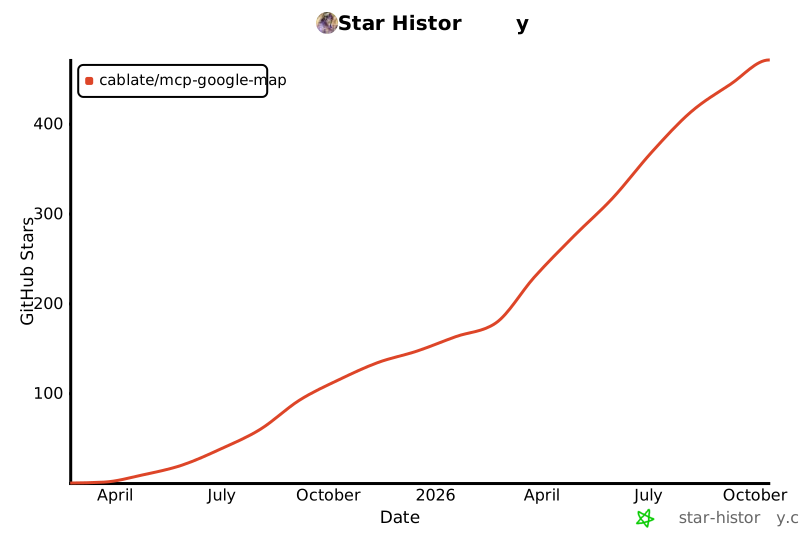
## Star History
 [](https://www.star-history.com/#cablate/mcp-google-map&Date)
[](https://www.star-history.com/#cablate/mcp-google-map&Date)