# Clappr Audio Track Selector Plugin
Allows you to select the audio language in a multi-language stream.
Designed to work with both HLS and MPEG-DASH video streams.
MPEG-Dash language selection requires the specially patched *@c3voc/dash-shaka-playback*.
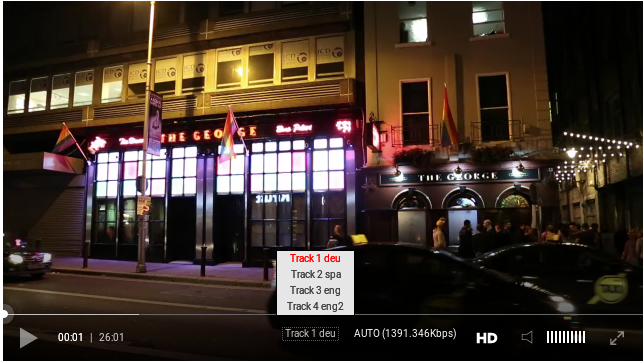 ## Usage
Add both Clappr and Audio Track Selector plugin scripts to your HTML:
```html
```
Then just add `AudioTrackSelector` into the list of plugins of your player instance:
```javascript
var player = new Clappr.Player({
source: "http://your.video/here.m3u8",
plugins: {
'core': [AudioTrackSelector]
}
});
```
## Compatibility
Only been tested on :
## Usage
Add both Clappr and Audio Track Selector plugin scripts to your HTML:
```html
```
Then just add `AudioTrackSelector` into the list of plugins of your player instance:
```javascript
var player = new Clappr.Player({
source: "http://your.video/here.m3u8",
plugins: {
'core': [AudioTrackSelector]
}
});
```
## Compatibility
Only been tested on :
PC:
Firefox v52.0
Opera v30.0
Chrome/Chromium v56.0.2924
Mobile:
Android v5.0.1 (Default Browser,Chrome)
iOS v10.2.1 (Default Browser,Chrome,Opera Mini)
## Sample m3u8 File:
#EXTM3U
#EXT-X-VERSION:3
#EXT-X-ALLOW-CACHE:NO
#EXT-X-MEDIA:TYPE=AUDIO,GROUP-ID="main_audio",CODECS="mp4a.40.5",LANGUAGE="spa",NAME="Track 2 spa",DEFAULT=NO,URI="audio_2-hls.m3u8"
#EXT-X-MEDIA:TYPE=AUDIO,GROUP-ID="main_audio",CODECS="mp4a.40.5",LANGUAGE="eng",NAME="Track 3 eng",DEFAULT=NO,URI="audio_3-hls.m3u8"
#EXT-X-MEDIA:TYPE=AUDIO,GROUP-ID="main_audio",CODECS="mp4a.40.5",LANGUAGE="eng",NAME="Track 4 eng2",DEFAULT=NO,URI="audio_4-hls.m3u8"
#EXT-X-MEDIA:TYPE=AUDIO,GROUP-ID="main_audio",CODECS="mp4a.40.5",LANGUAGE="deu",NAME="Track 1 deu",DEFAULT=YES,AUTOSELECT=YES,URI="audio_1-hls.m3u8"
#EXT-X-STREAM-INF:BANDWIDTH=1391346,RESOLUTION=1280x720,CODECS="avc1.4d001f,mp4a.40.5",AUDIO="main_audio"
B7913837368DE745F53D31B4CA27BEE5-hls.m3u8
#EXT-X-STREAM-INF:BANDWIDTH=891346,RESOLUTION=854x480,CODECS="avc1.4d001f,mp4a.40.5",AUDIO="main_audio"
1B76D37AE0FD9054953FEDD89D7BA736-hls.m3u8
All the playbacks that follow these rules:
* must trigger `PLAYBACK_LEVELS_AVAILABLE` with an ordered array of levels
* to have a property `levels`, initialized with `[]` and then after filled with the proper levels
* to have a property `currentLevel` (set/get), the level switch will happen when id (currentLevel) is changed (`playback.currentLevel = id`)
* optionally, trigger events: `PLAYBACK_LEVEL_SWITCH_START` and `PLAYBACK_LEVEL_SWITCH_END`
* `id=-1` will be always the `Auto` level