> [한국어](https://github.com/c-d-cc/reap/blob/main/README.ko.md) | [日本語](https://github.com/c-d-cc/reap/blob/main/README.ja.md) | [简体中文](https://github.com/c-d-cc/reap/blob/main/README.zh-CN.md) | [Deutsch](https://github.com/c-d-cc/reap/blob/main/README.de.md)

REAP
Recursive Evolutionary Autonomous Pipeline
A self-evolving development pipeline where AI and humans co-evolve software across generations.
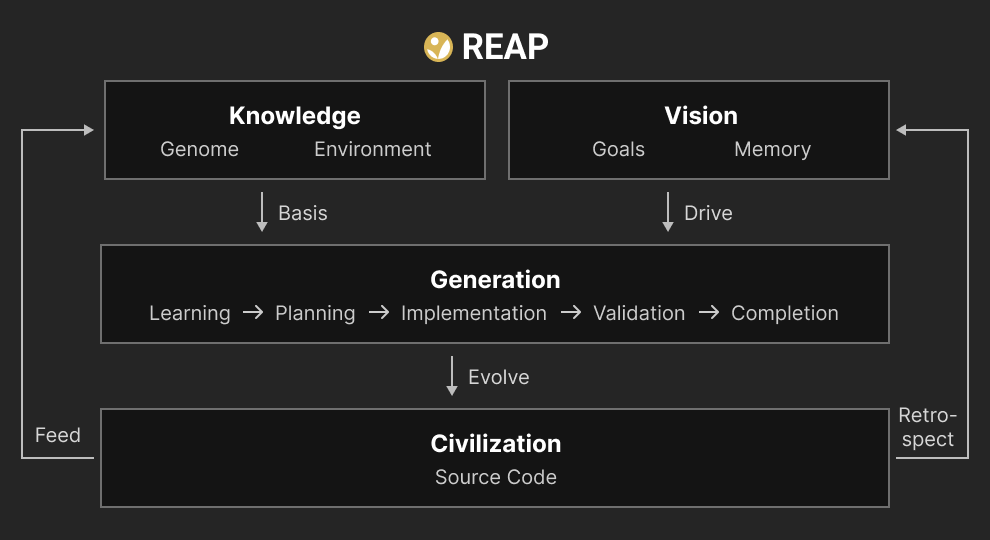
REAP is a generation-based development pipeline where AI and humans collaborate to build and evolve software. The human provides vision and makes key decisions. The AI learns the project's knowledge — Genome (architecture, conventions, constraints) and Environment (codebase, dependencies, domain) — then works through structured generations to implement, verify, and adapt. Each completed generation feeds lessons back into the knowledge base. Over time, both the knowledge and the source code (Civilization) self-evolve.
## Table of Contents
- [What is REAP?](#what-is-reap)
- [Installation](#installation)
- [Quick Start](#quick-start-)
- [Life Cycle](#life-cycle-)
- [Core Concepts](#core-concepts-)
- [Merge Lifecycle](#merge-lifecycle-)
- [Self-Evolving Features](#self-evolving-features-)
- [Slash Commands](#slash-commands-)
- [Agent Integration](#agent-integration-)
- [Project Structure](#project-structure)
- [Configuration](#configuration-)
- [Upgrading from v0.15](#upgrading-from-v015-)
## What is REAP? [↗](https://reap.cc/docs/introduction)
Have you ever run into these problems when developing with AI agents?
- **Context loss** — The agent forgets everything when you start a new session
- **Scattered development** — Code gets modified with no clear direction or goal
- **Design-code drift** — Documentation diverges from actual implementation
- **Forgotten lessons** — Hard-won insights never carry forward
- **Collaboration chaos** — Multiple agents or developers produce conflicting changes
REAP solves these with a **self-evolving generation model**:
- Each generation follows a structured lifecycle: learn the current state, plan a goal, implement, validate, and reflect
- The AI agent automatically restores full project context at every session start
- Prescriptive knowledge (Genome) evolves through human-approved adaptations at each generation's completion
- The AI automatically selects goals by analyzing the gap between vision and current state
- Clarity-driven interaction ensures the AI communicates with structure, examples, and honest opinions
- Parallel work across branches is reconciled through a genome-first merge workflow
## Installation
> **Global installation required.**
```bash
npm install -g @c-d-cc/reap
```
> **Requirements**: [Node.js](https://nodejs.org) v18+ and one supported AI agent:
> - [Claude Code](https://claude.ai/claude-code) CLI (default)
> - [OpenCode](https://opencode.ai) — set `agentClient: opencode` in `.reap/config.yml` after `/reap.init`
## Quick Start [↗](https://reap.cc/docs/quick-start)
Open your AI agent (Claude Code or OpenCode) and use slash commands:
```bash
# Initialize REAP in your project (auto-detects greenfield vs existing codebase)
/reap.init
# Run a full generation
/reap.evolve
```
`/reap.evolve` drives the entire generation lifecycle — from learning through completion. The AI explores the project, plans the work, implements it, validates, and reflects. This is the primary command for day-to-day development.
> **OpenCode users**: After `/reap.init`, edit `.reap/config.yml` to set `agentClient: opencode`, then run `reap update` to regenerate client-specific assets (`opencode.json`, `.opencode/plugins/reap-plugin.ts`, `AGENTS.md`, and slash commands at `~/.config/opencode/commands/`).
> **Note:** Users interact with REAP through `/reap.*` slash commands in their AI agent. The CLI is the internal engine that powers those commands.
## Life Cycle [↗](https://reap.cc/docs/lifecycle)
Each generation follows a five-stage lifecycle.
```
learning → planning → implementation ⟷ validation → completion
```
| Stage | What happens | Artifact |
| ------------------ | ----------------------------------------------------------------- | ---------------------- |
| **Learning** | Explore the project, build context, review genome and environment | `01-learning.md` |
| **Planning** | Define goal, decompose tasks, map dependencies | `02-planning.md` |
| **Implementation** | Build with AI-human collaboration | `03-implementation.md` |
| **Validation** | Run tests, verify completion criteria | `04-validation.md` |
| **Completion** | Reflect, collect fitness feedback, adapt genome, archive | `05-completion.md` |
## Core Concepts [↗](https://reap.cc/docs/core-concepts)
### Genome — How to Build [↗](https://reap.cc/docs/genome)
The project's prescriptive knowledge. Three files, always fully loaded:
```
.reap/genome/
application.md # Project identity, architecture, conventions, constraints
evolution.md # AI behavior guide, evolution direction, soft lifecycle rules
invariants.md # Absolute constraints (human-only edits)
```
### Environment — What Exists Now [↗](https://reap.cc/docs/environment)
The project's descriptive knowledge. Two-tier loading strategy:
```
.reap/environment/
summary.md # Always loaded at session start (~100 lines)
domain/ # Domain knowledge (on-demand)
resources/ # External reference documents — API docs, SDK specs (on-demand)
docs/ # Project reference documents — design docs, specs (on-demand)
source-map.md # Current code structure + dependencies (on-demand)
```
### Vision — Where We're Going [↗](https://reap.cc/docs/vision)
Long-term goals and direction. The AI references vision during the adapt phase to decide what's most valuable next.
```
.reap/vision/
goals.md # North star objectives
docs/ # Planning documents
memory/ # AI memory (3-tier: longterm, midterm, shortterm)
```
### Backlog [↗](https://reap.cc/docs/backlog)
Issues discovered during a generation are never fixed on the spot. They are logged as backlog items in `.reap/life/backlog/`:
- `type: genome-change` — genome modifications to apply at adapt phase
- `type: environment-change` — environment updates
- `type: task` — work items for future generations
Backlog items carry over between generations automatically. Consumed items are archived with the generation's lineage.
### Lineage — What We've Learned [↗](https://reap.cc/docs/lineage)
Archive of completed generations with two-level automatic compression:
- **Level 1**: Generation folder (5 artifacts) → single summary file
- **Level 2**: 100+ Level 1 files → single `epoch.md`
DAG metadata is preserved for branch-aware lineage traversal.
### Hooks [↗](https://reap.cc/docs/hooks)
File-based lifecycle event hooks in `.reap/hooks/`:
- `.md` files: AI prompts executed by the agent
- `.sh` files: Shell scripts executed directly
### Principles
- **Genome Immutability**: The genome is never modified during a generation. Issues are logged in the backlog and applied at completion's adapt phase.
- **Environment Immutability**: The environment is never modified directly during a generation. Changes are recorded in the backlog and applied at completion's reflect phase.
- **Human Judges Fitness**: No quantitative metrics. The human's natural language feedback is the only fitness signal.
- **Self-fitness Prohibited**: The AI never scores its own success. Only self-assessment (metacognition) is allowed.
## Merge Lifecycle [↗](https://reap.cc/docs/merge-generation)
When multiple developers or agents work in parallel, REAP provides a genome-first merge workflow.
```
detect → mate → merge → reconcile → validation → completion
```
| Stage | Purpose |
| -------------- | ---------------------------------------------- |
| **Detect** | Identify divergence between branches |
| **Mate** | Resolve genome conflicts first (human decides) |
| **Merge** | Merge source code guided by finalized genome |
| **Reconcile** | Verify genome-source consistency |
| **Validation** | Run tests |
| **Completion** | Commit merged result and archive |
## Self-Evolving Features [↗](https://reap.cc/docs/self-evolving)
### Gap-Driven Goal Selection
The AI automatically selects the next generation's goal by analyzing the gap between vision and current state. It cross-references unchecked goals in `vision/goals.md` with pending backlog items, prioritizes by impact, and proposes the most valuable next step. The human approves or adjusts.
### Human Judges Fitness
No quantitative metrics. The human's natural language feedback during the fitness phase is the only fitness signal. The AI never scores its own success — only self-assessment (metacognition) is allowed.
### Clarity-Driven Interaction
The AI adjusts its communication style based on how well-defined the current context is:
- **High clarity** (clear goal, defined tasks) → Execute with minimal questions
- **Medium clarity** (direction exists, details unclear) → Present 2-3 options with tradeoffs
- **Low clarity** (ambiguous goal) → Active dialogue with examples to build shared understanding
### Cruise Mode
Pre-approve N generations for autonomous execution:
- The AI selects goals from vision gaps and runs the full lifecycle autonomously
- If uncertainty or risk is detected, cruise pauses and requests human feedback
- After all N generations complete, human reviews the batch
## Slash Commands [↗](https://reap.cc/docs/command-reference)
| Command | Description |
| ----------------- | -------------------------------------- |
| `/reap.evolve` | Run an entire generation (recommended) |
| `/reap.start` | Start a new generation |
| `/reap.next` | Advance to the next stage |
| `/reap.back` | Return to a previous stage |
| `/reap.early-close` | Lightweight termination — preserves partial value, auto-defers incomplete tasks |
| `/reap.abort` | Abort current generation |
| `/reap.knowledge` | Review and manage genome/environment |
| `/reap.merge` | Merge lifecycle operations |
| `/reap.pull` | Fetch + merge lifecycle |
| `/reap.push` | Validate + push |
| `/reap.status` | Check current state |
| `/reap.help` | Show available commands |
| `/reap.init` | Initialize REAP in a project |
| `/reap.run` | Execute a lifecycle command directly |
| `/reap.config` | View/edit project configuration |
## Agent Integration
REAP integrates with AI agents through an adapter layer keyed by the `agentClient` config field. Currently supported clients:
- **Claude Code** (`agentClient: claude-code`, default) — static knowledge via `@` imports in `CLAUDE.md`; dynamic state via `SessionStart` hook (`reap load-context`); slash commands installed to `~/.claude/commands/reap.*.md`.
- **OpenCode** (`agentClient: opencode`) — static knowledge via `opencode.json`'s `instructions` field; dynamic state via `.reap/.session-state.md`, auto-refreshed by the bundled OpenCode plugin (`.opencode/plugins/reap-plugin.ts`) on `session.created` / `tool.execute.before`; slash commands installed to `~/.config/opencode/commands/reap.*.md`.
Switch clients by editing `.reap/config.yml`, then run `reap install-skills` followed by `reap update`. REAP regenerates the entry-point file (CLAUDE.md vs AGENTS.md), the session integration, and any client-specific assets. The `reap.` prefix in slash command directories is reserved — installs are cleanup-then-copy and will overwrite any `reap.*.md` file in those locations. Use a different prefix (`mytool.md`, `team.md`, etc.) for custom commands.
### How It Works
1. **Entry-point file** (`CLAUDE.md` for claude-code, `AGENTS.md` for opencode) instructs the AI to load genome, environment, and reap-guide at session start
2. **Slash commands** — `/reap.start`, `/reap.status`, `/reap.evolve`, etc. work in both Claude Code and OpenCode; each invokes `reap run `, which returns structured JSON instructions for the AI
3. **Signature-based locking** (nonce chain) enforces stage ordering at the code level — no skipping, no forgery, no replay
4. **Dynamic state dump** — every REAP lifecycle command synchronously writes `.reap/.session-state.md`, so OpenCode users always see the post-command state on the next session
### Subagent Mode
`/reap.evolve` can delegate the entire generation to a subagent that runs autonomously through all stages, surfacing only when genuinely blocked.
## Project Structure
```
my-project/
src/ # Your code
.reap/
config.yml # Project configuration
genome/ # Prescriptive knowledge (3 files)
application.md
evolution.md
invariants.md
environment/ # Descriptive knowledge (2-tier)
summary.md
domain/
resources/ # External reference docs (API, SDK)
docs/ # Project reference docs (design, specs)
source-map.md
vision/ # Long-term goals
goals.md
docs/
memory/ # AI memory (longterm/midterm/shortterm)
life/ # Current generation
current.yml
backlog/
lineage/ # Completed generation archive
hooks/ # Lifecycle hooks (.md/.sh)
```
## Configuration [↗](https://reap.cc/docs/configuration)
Project settings in `.reap/config.yml`:
```yaml
project: my-project # Project name
language: english # Artifact/prompt language
autoSubagent: true # Auto-delegate to subagent in evolve
strictEdit: false # Restrict code changes to REAP lifecycle
strictMerge: false # Restrict direct git pull/push/merge
agentClient: claude-code # AI agent client
# cruiseCount: 1/5 # Present = cruise mode (current/total)
```
Key settings:
- **`cruiseCount`**: When present, enables cruise mode. Format `current/total`. Removed after cruise completes.
- **`strictEdit`**: Restricts code changes to the implementation stage within the planned scope.
- **`strictMerge`**: Restricts direct git pull/push/merge — use `/reap.pull`, `/reap.push`, `/reap.merge` instead.
- **`agentClient`**: Determines which adapter is used for skill deployment.
## Upgrading from v0.15 [↗](https://reap.cc/docs/migration-guide)
REAP v0.16 is a complete rewrite built on the [Self-Evolving Pipeline](https://reap.cc/docs/self-evolving) architecture.
### Migration Steps
1. **Install v0.16:**
```bash
npm install -g @c-d-cc/reap
```
This automatically installs v0.16 skills to `~/.claude/commands/` and removes legacy v0.15 project-level skills.
2. **Open Claude Code in your project** and run:
```
/reap.update
```
3. **Follow the multi-phase migration:**
| Phase | What happens | Your role |
| ------------------ | ----------------------------------------------------------------- | ------------------------- |
| **Confirm** | Shows what will change, creates backup at `.reap/v15/` | Review and confirm |
| **Execute** | Restructures directories, migrates config/hooks/lineage/backlog | Automatic |
| **Genome Convert** | AI reconstructs genome from v0.15 files into new 3-file structure | Review AI's work |
| **Vision** | Set up vision/goals.md and memory | Provide project direction |
| **Complete** | Summary of migration results | Verify |
4. **Verify** your project works:
```
/reap.status
/reap.evolve
```
### Interrupted Migration
If the migration is interrupted (API error, session disconnect, etc.), your progress is saved in `.reap/migration-state.yml`. Simply run `/reap.update` again — it will resume from where it left off, skipping already completed steps.
To start over instead, delete `.reap/migration-state.yml` and run `/reap.update` again.
### Backup
All v0.15 files are preserved at `.reap/v15/`. After verifying the migration, you can safely delete this directory.
### What Changed
**Lifecycle redesigned:**
- The first stage is now `learning` (was `objective`). The AI explores the project before setting goals.
- Completion is now 4 phases: `reflect` → `fitness` → `adapt` → `commit` (was 5 phases).
- New concepts: embryo generations, cruise mode, vision-driven planning.
**Vision layer added:**
- `vision/goals.md` — long-term objectives, gap-driven goal selection at adapt phase
- `vision/memory/` — 3-tier memory (longterm, midterm, shortterm) for cross-generation context
- `vision/design/` — planning documents and specs
**Genome restructured (3 files):**
- `application.md` — project identity, architecture, conventions, constraints
- `evolution.md` — AI behavior guide, evolution direction, soft lifecycle rules
- `invariants.md` — absolute constraints (human-only edits)
**New features:**
- Clarity-driven interaction: AI adjusts communication depth based on context clarity
- Cruise mode: pre-approve N generations, AI runs autonomously with self-assessment
- Merge lifecycle with reconcile stage for genome-source consistency verification
- Vision system with 3-tier memory for cross-generation context
**Deprecated commands:**
- `/reap.sync` → `/reap.knowledge`
- `/reap.refreshKnowledge` → `/reap.knowledge`
## Author
**HyeonIL Choi** — [hichoi@c-d.cc](mailto:hichoi@c-d.cc) | [c-d.cc](https://c-d.cc) | [LinkedIn](https://www.linkedin.com/in/hichoi-dev) | [GitHub](https://github.com/casamia918)
## License
MIT