# bug-report-widget
Portable bug report button: page screenshot, annotations (rect / arrow / pencil / text), capture of console errors and failed network requests, submission to your endpoint. A single JS file (~63 kB gzip), Shadow DOM — host page styles don't leak in or break. No React/Tailwind required in the consuming project.
Preact + Tailwind v4 inside, compiled into the bundle.
## Screenshots
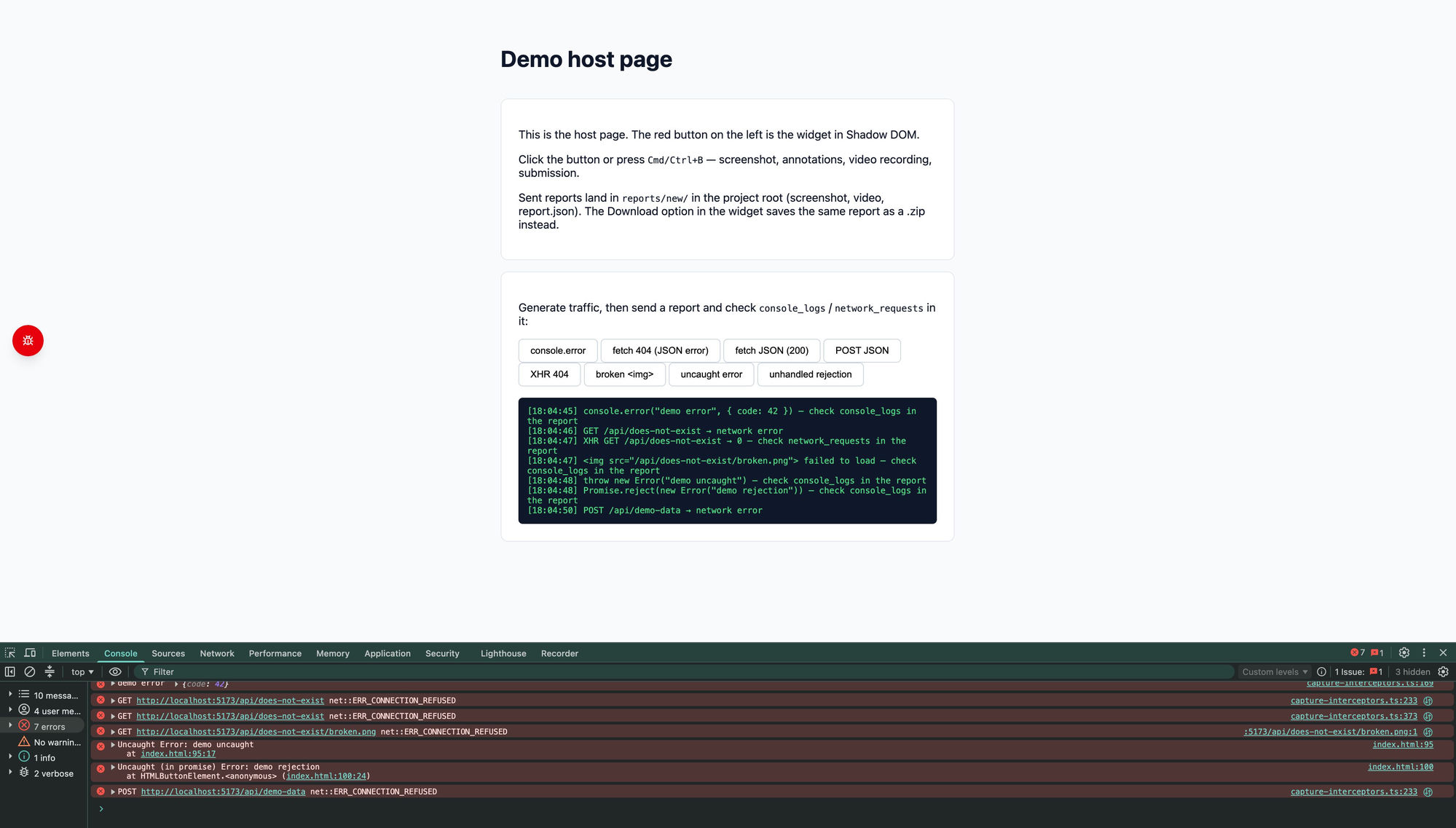
The floating button sits on the host page (draggable, position is remembered):
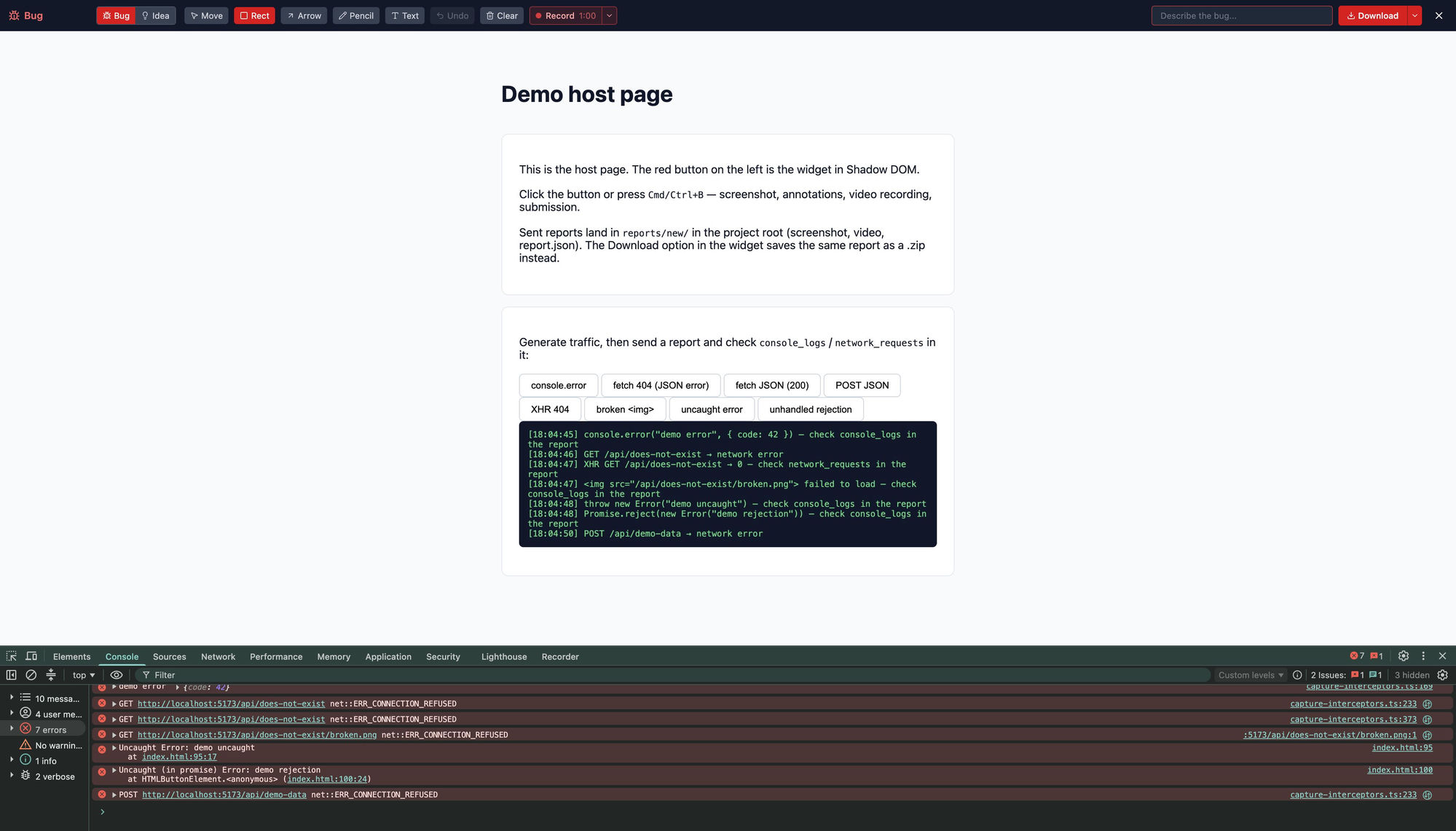
Click it — the page freezes into an annotated screenshot with tools and a destination picker:
## Build
```bash
npm install
npm run build # dist/bug-report-widget.iife.js (script tag) + dist/bug-report-widget.js (ESM)
npm run dev # demo page at http://localhost:5173 with a mock endpoint
```
## Usage
### Option 1 — script tag (any stack)
```html
```
Or straight from a CDN, no build step:
```html
```
Attributes: `data-endpoint` (required unless `data-destination="download"`), `data-destination="download"` (save the report as a .zip to the user's computer instead of POSTing), `data-download="false"` (hide the Download option — reports can only be sent to the endpoint), `data-network="all"` (capture every request, not just failed ones), `data-hotkey="false"` (disable Cmd/Ctrl+B) or `data-hotkey="k"` (remap to Cmd/Ctrl+K), `data-position="bottom-right"` (initial button position), `data-screenshot-quality="0.7"` (screenshot JPEG quality, 0–1), `data-screenshot-scale="2"` (screenshot raster scale, 0.5–3; default 1 — pass the device pixel ratio for retina-sharp shots at the cost of a slower capture), `data-credentials="include"`.
Manual initialization instead of attributes:
```html
```
### Option 2 — npm / ESM (React, Next.js, Vue, anything)
```bash
npm install @bybrave/bug-report-widget
```
```ts
import { init, destroy } from '@bybrave/bug-report-widget'
init({ endpoint: '/api/reports' })
```
In Next.js — call it in a client component inside `useEffect` (the widget is browser-only):
```tsx
'use client'
import { useEffect } from 'react'
import { init, destroy } from '@bybrave/bug-report-widget'
export function BugReportLoader() {
useEffect(() => {
init({ endpoint: '/api/reports' })
return destroy
}, [])
return null
}
```
### Updating
The package is on a `0.x` version, so `npm update` won't pick up new minor releases (`^0.4.1` doesn't allow `0.5.0` — that's how semver treats zero-major versions). To update to the latest version:
```bash
npm install @bybrave/bug-report-widget@latest
```
The unversioned CDN URL (`https://unpkg.com/@bybrave/bug-report-widget`) always resolves to the latest release — nothing to update. To avoid surprise updates, pin a version instead: `https://unpkg.com/@bybrave/bug-report-widget@0.4.1` and bump it manually.
### Config
```ts
init({
endpoint: '/api/reports', // required unless destination is 'download'
destination: 'endpoint', // default destination: 'endpoint' (POST) | 'download' (.zip)
download: true, // false hides the Download option, reports go to `endpoint` only
network: 'errors', // network capture: 'errors' (failed requests only) | 'all' (every request)
headers: { 'X-Api-Key': '...' }, // optional
credentials: 'include', // optional (RequestCredentials)
hotkey: true, // Cmd/Ctrl+B; false disables, 'k' remaps to Cmd/Ctrl+K
position: 'left', // initial button position, see below
onSubmit: (report) => {}, // after a report is sent or downloaded
onError: (error) => {}, // when capture or sending fails
screenshotQuality: 0.85, // screenshot JPEG quality, 0–1
screenshotScale: 1, // screenshot raster scale, 0.5–3 (1 = CSS pixels; devicePixelRatio for retina)
labels: { send: 'Submit' }, // partial override of any label
})
```
`position` accepts an edge/corner preset — `'left'` (default), `'right'`, `'top-left'`, `'top-right'`, `'bottom-left'`, `'bottom-right'` — or exact pixel coordinates `{ x, y }`. It only sets the starting point: the user can drag the button anywhere, and the dragged position is remembered in localStorage.
`onSubmit` receives `{ type, description, destination }`; `onError` receives the thrown error. Useful for host-side toasts or analytics.
### Report destination
The user picks where the report goes right in the widget: the arrow next to the submit button opens a Send / Download menu (the choice is remembered in localStorage). `destination` in the config only sets the default. Download saves `bug-report-.zip` with `screenshot.jpg` and `report.json` (url, description, type, console/network logs).
With `destination: 'download'` and no `endpoint`, the widget is download-only and needs no backend at all.
With `download: false` (or `data-download="false"`), the destination picker is hidden and every report goes to `endpoint` — use it when reports must not end up on users' machines.
## Backend contract
`POST {endpoint}`, `multipart/form-data`:
| Field | Type | Description |
|---|---|---|
| `screenshot` | file (JPEG) | screenshot with annotations |
| `url` | string | page URL |
| `page_title` | string | page title |
| `description` | string | report text |
| `type` | string | `bug` \| `improvement` |
| `console_logs` | string (JSON) | recent warn/error console entries, uncaught exceptions, unhandled promise rejections and failed resource loads (broken images/scripts/styles) |
| `network_requests` | string (JSON) | failed requests (status ≥ 400 or network error); every request with `network: 'all'`. Both `fetch` and `XMLHttpRequest` (axios etc.) are captured. Each entry: method, url, status, duration, request/response headers, bodies (JSON bodies as parsed objects). Sensitive headers (`Authorization`, `Cookie`, `Set-Cookie`, `X-Api-Key`) are redacted |
| `meta` | string (JSON) | environment snapshot: user_agent, language, viewport, screen, device_pixel_ratio, timezone |
Any 2xx response is treated as success.
### Example route handler for Next.js
```ts
// app/api/reports/route.ts
import { NextRequest, NextResponse } from 'next/server'
import { mkdir, writeFile } from 'fs/promises'
import path from 'path'
export async function POST(req: NextRequest) {
const form = await req.formData()
const screenshot = form.get('screenshot') as File
const id = `report_${new Date().toISOString().replace(/[:.]/g, '-')}`
const dir = path.join(process.cwd(), 'reports', 'new')
await mkdir(dir, { recursive: true })
await writeFile(path.join(dir, `${id}.jpg`), Buffer.from(await screenshot.arrayBuffer()))
await writeFile(
path.join(dir, `${id}.json`),
JSON.stringify(
{
id,
timestamp: new Date().toISOString(),
url: form.get('url'),
page_title: form.get('page_title'),
description: form.get('description'),
type: form.get('type'),
console_logs: JSON.parse((form.get('console_logs') as string) || '[]'),
network_requests: JSON.parse((form.get('network_requests') as string) || '[]'),
meta: JSON.parse((form.get('meta') as string) || '{}'),
status: 'new',
},
null,
2,
),
)
return NextResponse.json({ id }, { status: 201 })
}
```
## Features
- Floating draggable button (position persisted in localStorage), mouse and touch
- Cmd/Ctrl+B hotkey (layout-independent, ignored inside inputs and rich-text editors)
- Screenshot via [snapdom](https://github.com/zumerlab/snapdom) (no browser permissions needed)
- Tools: select/move, rectangle, arrow, pencil (adjustable line thickness), text (adjustable size); Undo (Cmd/Ctrl+Z), Clear
- Report type: Bug / Improvement
- Destination: POST to your endpoint or a .zip download (no backend required)
- Captures console warn/error, uncaught exceptions, unhandled rejections and failed resource loads (up to 100)
- Captures `fetch` and `XMLHttpRequest` (up to 50; failed only by default, all with `network: 'all'`), 512 KB total cap; streaming responses are not buffered, sensitive headers are redacted
- Environment metadata in every report: user agent, language, viewport, screen, DPR, timezone
## Feedback
Found a bug or have a feature request? [Open an issue](https://github.com/bybraveHQ/bug-report-widget/issues).
## Support
If this widget saves you time, you can support development:
- [Ko-fi](https://ko-fi.com/bybrave)
- Bitcoin (BTC): `bc1q37557q5jpeaxqydzwvf3jgj7zhnfpn2td3q40q`
## License
[MIT](LICENSE) © [Vladyslav Kaplin (bybrave)](https://github.com/bybraveHQ)