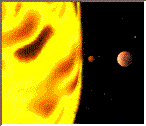
The `<Map />` component is used to define a client-side image-map. An image-map is an image with clickable areas.
This component has no props.

`<Map />` component example:

```js
import { P, Img, Area, Map } from '$PACKAGE_NAME';

<div>
  <P>Click on the sun or on one of the planets to watch it closer:</P>
  <Img src="https://www.w3schools.com/tags/planets.gif" width="145" height="126" alt="Planets" useMap="#planetmap" />
  <Map name="planetmap">
    <Area shape="rect" coords="0,0,82,126" alt="Sun" href="https://www.w3schools.com/tags/sun.htm" />
    <Area shape="circle" coords="90,58,3" alt="Mercury" href="https://www.w3schools.com/tags/mercur.htm" />
    <Area shape="circle" coords="124,58,8" alt="Venus" href="https://www.w3schools.com/tags/venus.htm" />
  </Map>
</div>
```