# pino-pretty
[](https://travis-ci.org/pinojs/pino-pretty)
[](https://coveralls.io/github/pinojs/pino-pretty?branch=master)
This module provides a basic [ndjson](http://ndjson.org/) formatter. If an
incoming line looks like it could be a log line from an ndjson logger, in
particular the [Pino](https://getpino.io/) logging library, then it will apply
extra formatting by considering things like the log level and timestamp.
A standard Pino log line like:
```
{"level":30,"time":1522431328992,"msg":"hello world","pid":42,"hostname":"foo","v":1}
```
Will format to:
```
[1522431328992] INFO (42 on foo): hello world
```
## Example
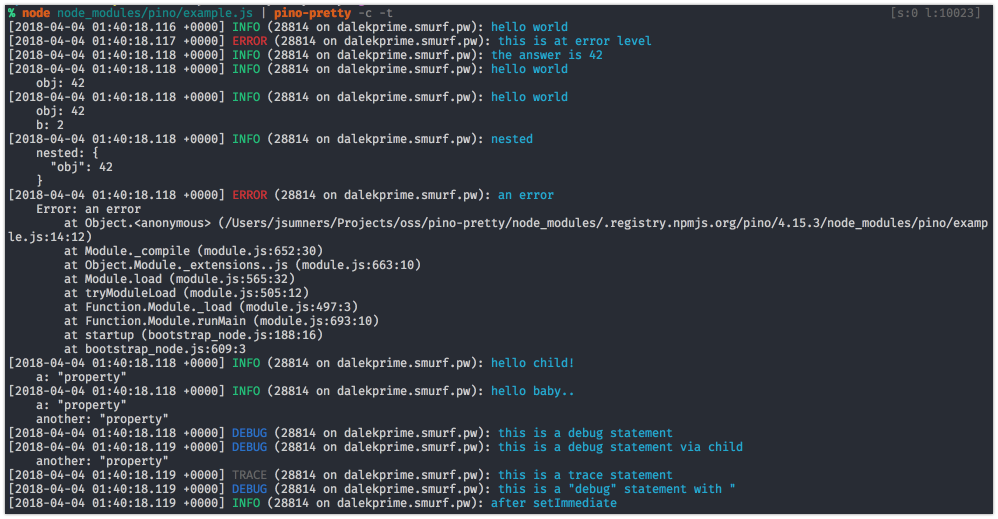
Using the [example script][exscript] from the Pino module, and specifying
that logs should be colored and the time translated, we can see what the
prettified logs will look like:
[exscript]: https://github.com/pinojs/pino/blob/fc4c83b/example.js
## Install
```sh
$ npm install -g pino-pretty
```
## Usage
It's recommended to use `pino-pretty` with `pino`
by piping output to the CLI tool:
```sh
pino app.js | pino-pretty
```
### CLI Arguments
- `--colorize` (`-c`): Adds terminal color escape sequences to the output.
- `--crlf` (`-f`): Appends carriage return and line feed, instead of just a line
feed, to the formatted log line.
- `--errorProps` (`-e`): When formatting an error object, display this list
of properties. The list should be a comma separated list of properties Default: `''`.
- `--levelFirst` (`-l`): Display the log level name before the logged date and time.
- `--errorLikeObjectKeys` (`-k`): Define the log keys that are associated with
error like objects. Default: `err,error`.
- `--messageKey` (`-m`): Define the key that contains the main log message.
Default: `msg`.
- `--timestampKey` (`-m`): Define the key that contains the log timestamp.
Default: `time`.
- `--translateTime` (`-t`): Translate the epoch time value into a human readable
date and time string. This flag also can set the format string to apply when
translating the date to human readable format. For a list of available pattern
letters see the [`dateformat` documentation](https://www.npmjs.com/package/dateformat).
- The default format is `yyyy-mm-dd HH:MM:ss.l o` in UTC.
- Require a `SYS:` prefix to translate time to the local system's timezone. A
shortcut `SYS:standard` to translate time to `yyyy-mm-dd HH:MM:ss.l o` in
system timezone.
- `--search` (`-s`): Specify a search pattern according to
[jmespath](http://jmespath.org/).
- `--ignore` (`-i`): Ignore one or several keys: (`-i time,hostname`)
## Programmatic Integration
We recommend against using `pino-pretty` in production, and highly
recommend installing `pino-pretty` as a development dependency.
When installed, `pino-pretty` will be used by `pino` as the default
prettifier.
Install `pino-pretty` alongside `pino` and set the
`prettyPrint` option to `true`:
```js
const pino = require('pino')
const logger = pino({
prettyPrint: true
})
logger.info('hi')
```
The `prettyPrint` option can also be an object containing `pretty-print`
options:
```js
const pino = require('pino')
const logger = pino({
prettyPrint: { colorize: true }
})
logger.info('hi')
```
See the [Options](#options) section for all possible options.
### Options
`pino-pretty` exports a factory function that can be used to format log strings.
This factory function is used internally by Pino, and accepts an options argument
with keys corresponding to the options described in [CLI Arguments](#cliargs):
```js
{
colorize: chalk.supportsColor, // --colorize
crlf: false, // --crlf
errorLikeObjectKeys: ['err', 'error'], // --errorLikeObjectKeys
errorProps: '', // --errorProps
levelFirst: false, // --levelFirst
messageKey: 'msg', // --messageKey
timestampKey: 'time', // --timestampKey
translateTime: false, // --translateTime
search: 'foo == `bar`', // --search
ignore: 'pid,hostname', // --ignore
processors: undefined
}
```
The `colorize` default follows
[`chalk.supportsColor`](https://www.npmjs.com/package/chalk#chalksupportscolor).
Note: the `logParsers` and `lineBuilders` options do not correspond to CLI arguments.
They are available only for API usage, as described below.
#### log processors
A log processor is an object that parses a log entry and builds the corresponding
formatted line sent to the output stream. The log processing sequence is composed of
a series of log processors, each of which handles a particular property or aspect of
the input.
A log processor can be a `parser`, a `builder`, or both. Accordingly, the log
processing sequence has two stages: a parsing stage and a building stage. All parsers
are executed in order, and then all builders are executed in the same order. The
output of the parsers is passed as input to the builders.
A parser parses an entry and can change it before it is passed to subsequent parsers.
It can also modify the `context` object, which makes it possible to pass data between
parsers, or between the parse and build stages of a log processor that supports both
stages.
`pino-pretty` uses the following built-in log processors, in this order:
* `json` (*parser*) - Parses the input `ndjson` string as an object, which is
subsequently passed to the remaining log processors.
* `primitives` (*parser*) - If the parsed result of the `json` log processor is `null`,
a boolean value, or a number, the log processing sequence for the current line is
aborted (short-circuited) and the value is returned.
* `search` (*parser*) - If the `search` property is specified, filters out entries that
do not match the `search` value, based on the `jmespath` library.
* `ignore` (*parser*) - Removes the specified properties from the `input` object.
* `time` (*parser*, *builder*) - Prettifies a timestamp if the given `input` object has
either `time`, `timestamp` or custom specified timestamp property.
* `level` (*parser*, *builder*) - Checks if the passed in `input` object has a `level`
value and returns a prettified string for that level if so.
* `metadata` (*parser*, *builder*) - Prettifies metadata that is usually present in a Pino
log line. It looks for fields `name`, `pid`, and `hostname` and returns a formatted
string using the fields it finds.
* `semicolon` (*builder*) - Appends a semicolon to the output if values have already been
added to the output.
* `message` (*parser*, *builder*) - Prettifies a message string if the given `input` object
has a `message` property.
* `eol` (*builder*) - Adds an end-of-line to the output. Uses `\r\n` if the `crlf` option
is `true` or `\n` otherwise. Defaults to `\n`.
* `error` (*builder*) - Given a log object that has a `type: 'Error'` key, prettifies the
object and returns the result.
* `object` (*builder*) - Prettifies a standard object. Special care is taken when
processing the object to handle child objects that are attached to keys known to
contain error objects.
The built-in log processing sequence can be replaced with a custom sequence comprised
of a mix of built-in and custom log processors. To customize the log processing
sequence, pass an array of log processors to the `processors` option. They will be
executed in the order in which they are specified.
To use a built-in log processor in the custom sequence, simply add a string specifying
its name to the `processors` array. Any of the log processors in the list above can be
used, except for the `json` log processor.
Do not add the built-in `json` log processor to the custom sequence. The `json` log
processor is always executed first, even when the `processors` option is specified. It
cannot be removed or replaced. This is intended to ensure that any subsequent log
processors in the sequence will always operate on an object consistently parsed from the
original `ndjson` input.
The default sequence is equivalent to specifying the `processors` option as follows:
```js
{
processors: [
// 'json', - the `json` log processor is always implicitly added at the beginning
'primitives',
'search',
'ignore',
'time',
'level',
'metadata',
'semicolon',
'message',
'eol',
'error',
'object'
]
}
```
By changing the order of the built-in log processors or excluding some of them, the
output can changed. For example, to only show the time, level and actual message,
while reversing the order of the time and level, the sequence can be specified as
follows: `{ processors: ['level', 'time', 'message'] }`.
Custom log processors can also be added to the log processing sequence. To add a
custom log processor, use one of the following structures:
* **parser** object
```js
{
parse(input, context) {}
}
```
* **builder** object
```js
{
build(lineParts, context) {}
}
```
* complete **parser** and **builder** object
```js
{
parse(input, context) {}
build(lineParts, context) {}
}
```
* **parser** function
```js
(input, context) => {}
```
Only declare the `parse` or `build` method that is needed. Declaring a method that
does nothing will negatively affect performance.
#### parsing
The `parse` function receives three parameters:`input`, `context`, and `state`.
* The `input` object represents the current log entry, possibly modified by the
previously-executed parsers.
* The `context` object represents the options, settings, and other data used by the log
processors. The `options` object used to initialize Pino, is merged into the `context`
object, making those settings available to overy log processor.
The following properties are always available as well:
- `EOL`: the actual end-of-line characters, as specified by the `crlf` option
- `IDENT`: the default indentation string
- `translateFormat`: the time formatting string, as specified by the `translateTime`
option
- `colorizer`: the selected colorizer function that accepts a level value and
returns a colorized string
- `prettified`: an object that caches prettified text, whose properties are typically
set by a parser and consumed by a builder
* The `state` object has a `stop` method, which is used to abort the log processing
process for the current entry immediately after the current parser returns.
The return value of the parse function is passed to the next parse function in the
sequence. The value returned from the last parse function is passed to the build
function.
For most parsers, the return value should be a log entry object that will be used by
the builders to construct the output line.
In some cases, whether for performance or other reasons, it makes sense to return the
result of a parser directly without performing any additional processing. The process
can be short-circuited by calling the `stop` method of the `state` argument. No other
parsers will be used, and the build stage will be skipped as well. The value returned
by the parser that calls the `stop` function will be returned as the final formatted
output.
#### building
The `build` function is a simple functions that prepares the final formatted line.
It receives two parameters: `lineParts` and `context`.
* The `lineParts` array contains the ordered list of strings that will eventually be joined
after all the build functions have been executed.
* The `context` object is the same `context` object passed to the parsers, with one
exception: the final output produced by the parsers is added to the object as the `log`
property.
Also, when the built-in prettifying log processors are used, a number of prettified
strings are added to the `context.prettified` property: `prettifiedLevel`,
`prettifiedMessage`, `prettifiedMetadata`, and `prettifiedTime`.
The builder function does not return a value. To change the output, modify the
`lineParts` array.
Note that if a parser short-circuits the parsing process, the builders will not be
executed at all.
#### examples
The following are a number of examples of parsers, builders, and combined log processors:
* **parser** - Perform a transformation on the input message:
```js
function (input) {
input.msg = input.msg.toLowerCase()
return input
}
```
* **parser** - Short-circuit the parsing process and prevent subsequent log parsers from
being executed:
```js
(input, context, state) => {
state.stop() // short-circuit the log parsing process
return input
}
```
* **parser** - Prepare a prettified string:
```js
{
parse(input, { colorizer, inlineSection ) {
if(inlineSection && 'section' in input) {
context.prettified.section = `[${colorizer(input.section)}]`
}
return input
}
}
```
* **builder** - Add a value to the array:
```js
function (lineParts) {
lineParts.push('NEW VALUE')
}
```
* **builder** - The following is an example of a more complex builder function, based
on one of the built-in builders:
```js
{
build (lineParts, { prettified }) => {
const { prettifiedTime } = prettified
if (prettifiedTime) {
if (lineParts.length > 0) {
lineParts.push(' ')
}
lineParts.push(prettifiedTime)
}
}
}
```
* **parser** and **builder** - Parse a log entry and then use the result to build the
output line:
```js
{
parse(input, { colorizer, inlineSection ) {
if(inlineSection && 'section' in input) {
context.prettified.section = ${colorizer(input.section)}
}
return input
}
build (lineParts, { prettified }) => {
const { section } = prettified
if (section) {
if (lineParts.length > 0) {
lineParts.push(' ')
}
lineParts.push(`[${section}]`)
}
}
}
```
## License
MIT License