# 组件

`@blocklet/payment-react` 库提供了一套全面的预构建 React 组件，旨在加速支付、订阅和捐赠功能的开发。这些组件进行了分类，以帮助您找到适合工作的工具，无论您需要的是完整的即用型解决方案，还是用于构建自定义体验的精细 UI 元素。

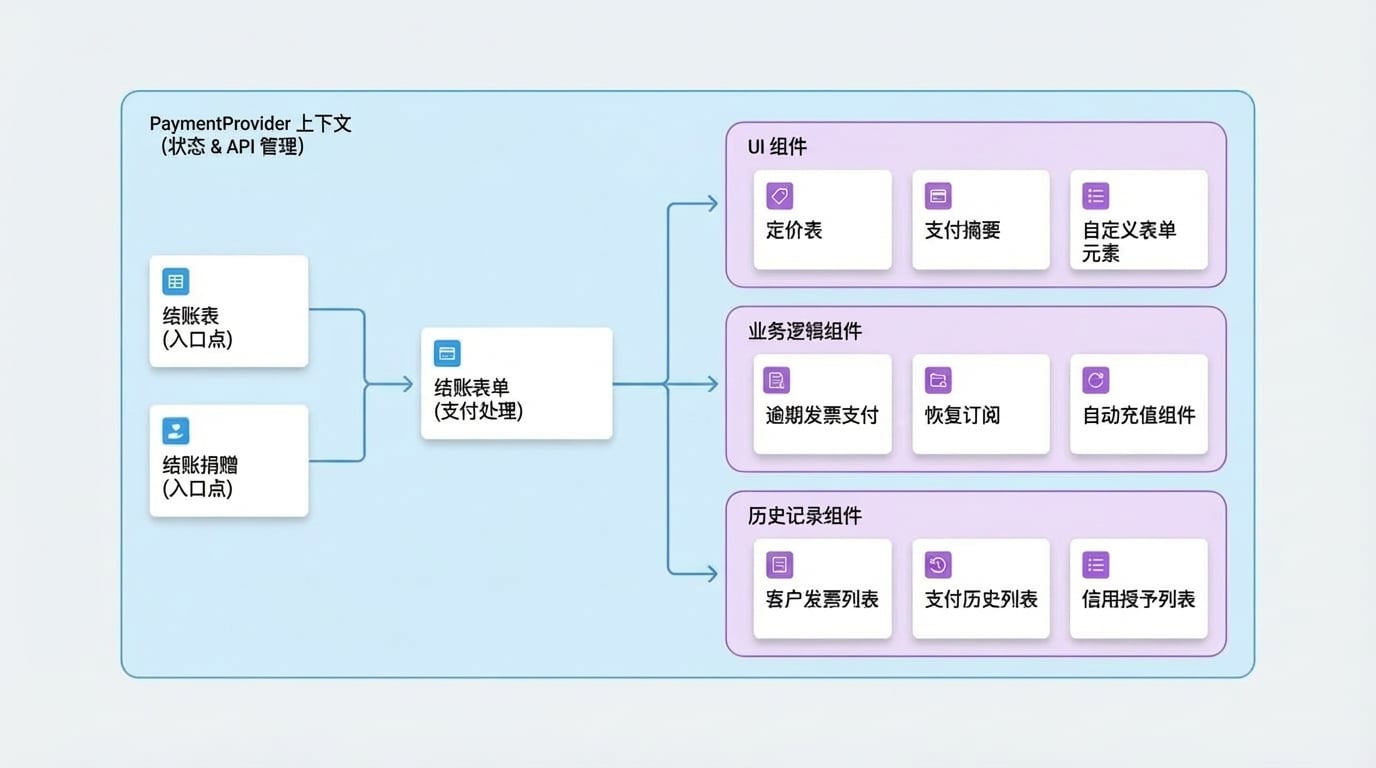
所有组件都设计为在 `PaymentProvider` 上下文中无缝工作，该上下文负责处理状态管理和 API 通信。

## 组件架构

下图说明了高级组件通常如何交互。面向用户的组件（如 `CheckoutTable` 或 `CheckoutDonate`）作为入口点，然后利用核心的 `CheckoutForm` 来处理最终的支付流程。

<!-- DIAGRAM_IMAGE_START:architecture:16:9:1764919317 -->
![Components](assets/diagram/components-diagram-0.zh.jpg)
<!-- DIAGRAM_IMAGE_END -->

## 组件分类

浏览我们的组件分类，找到您需要的构建模块。

### 结账组件

这些是高级组件，提供完整的、开箱即用的支付体验。将它们用作您支付流程的主要入口点。

<x-cards>
  <x-card data-title="CheckoutForm" data-icon="lucide:credit-card" data-href="/components/checkout/checkout-form">
    用于处理支付链接和结账会话的主要组件。
  </x-card>
  <x-card data-title="CheckoutTable" data-icon="lucide:table" data-href="/components/checkout/checkout-table">
    渲染一个完整的价格表并处理结账流程。
  </x-card>
  <x-card data-title="CheckoutDonate" data-icon="lucide:heart-handshake" data-href="/components/checkout/checkout-donate">
    使用这个灵活的组件实现捐赠功能。
  </x-card>
</x-cards>

### UI 组件

一组用于构建自定义支付表单和显示的精细组件。组合这些模块，创建一个与您的应用程序设计完美匹配的用户界面。

<x-cards>
  <x-card data-title="PricingTable" data-icon="lucide:layout-list" data-href="/components/ui/pricing-table">
    以结构化表格的形式显示订阅计划和价格选项。
  </x-card>
  <x-card data-title="PaymentSummary" data-icon="lucide:receipt" data-href="/components/ui/payment-summary">
    显示订单的详细摘要，包括订单项和总计。
  </x-card>
  <x-card data-title="Form Elements" data-icon="lucide:pencil-ruler" data-href="/components/ui/form-elements">
    用于构建自定义支付和联系表单的输入集合。
  </x-card>
</x-cards>

### 业务逻辑组件

专门用于处理复杂业务工作流的组件，例如管理逾期发票、恢复订阅和配置自动信用充值。

<x-cards>
  <x-card data-title="OverdueInvoicePayment" data-icon="lucide:file-warning" data-href="/components/business/overdue-invoice-payment">
    处理客户或订阅的逾期发票支付。
  </x-card>
  <x-card data-title="ResumeSubscription" data-icon="lucide:play-circle" data-href="/components/business/resume-subscription">
    允许用户轻松恢复已取消的订阅。
  </x-card>
  <x-card data-title="Auto-Topup Components" data-icon="lucide:battery-charging" data-href="/components/business/auto-topup">
    管理和配置自动信用充值功能。
  </x-card>
</x-cards>

### 历史组件

向您的用户显示历史支付和信用数据。这些组件可以轻松渲染发票、支付和信用交易列表。

<x-cards>
  <x-card data-title="CustomerInvoiceList" data-icon="lucide:history" data-href="/components/history/invoice-list">
    渲染客户的发票列表，包含详细信息和状态。
  </x-card>
  <x-card data-title="CustomerPaymentList" data-icon="lucide:landmark" data-href="/components/history/payment-list">
    显示客户的支付历史，包括交易详情。
  </x-card>
  <x-card data-title="CreditGrantsList" data-icon="lucide:award" data-href="/components/history/credit-grants-list">
    显示信用授予列表，包括状态和剩余金额。
  </x-card>
</x-cards>