# 元件

`@blocklet/payment-react` 函式庫提供了一套全面的預建 React 元件，旨在加速支付、訂閱和捐贈功能的開發。這些元件經過分類，以幫助您為工作找到合適的工具，無論您需要一個完整的即插即用解決方案，還是需要精細的 UI 元素來建立自訂體驗。

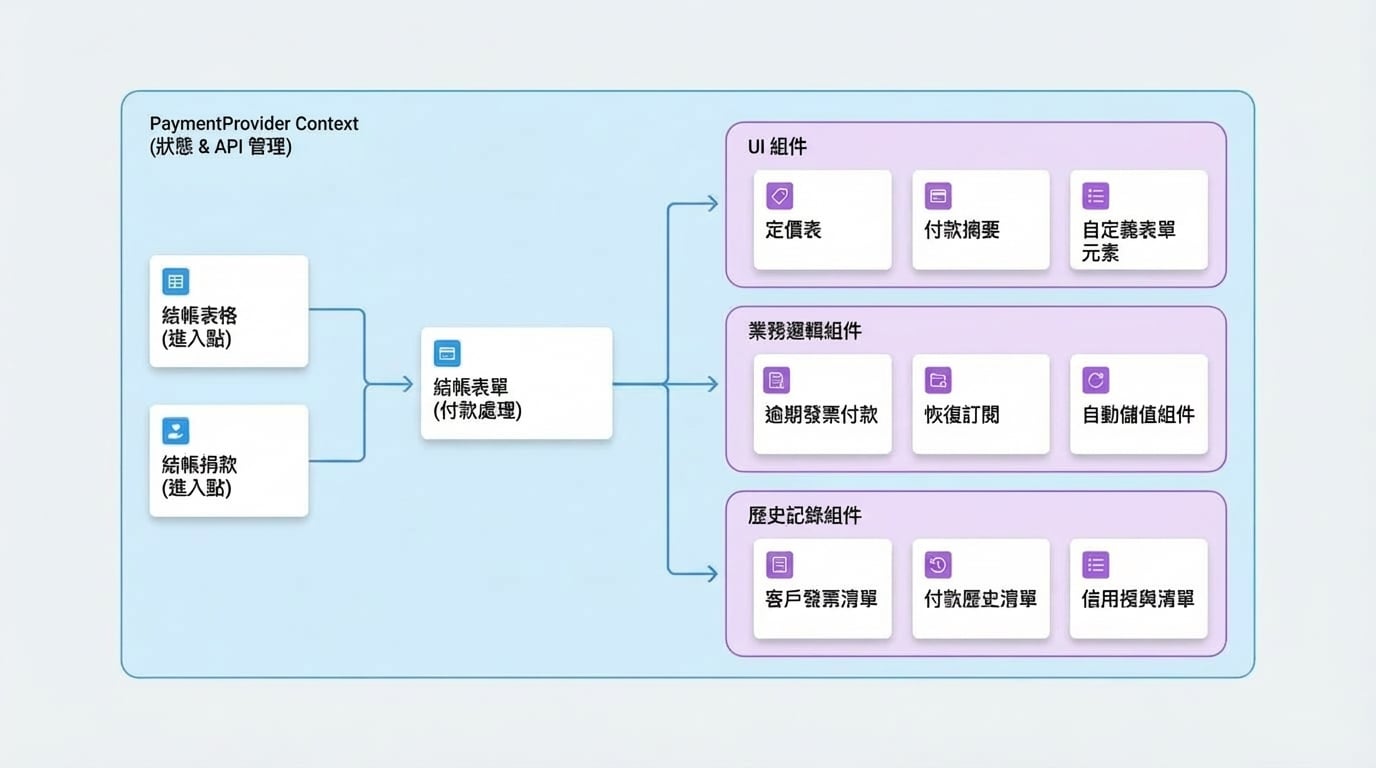
所有元件都設計為在 `PaymentProvider` 上下文中無縫工作，該上下文處理狀態管理和 API 通訊。

## 元件架構

下圖說明了高階元件通常如何互動。面向使用者的元件，如 `CheckoutTable` 或 `CheckoutDonate`，作為入口點，然後利用核心的 `CheckoutForm` 來處理最終的支付處理。

<!-- DIAGRAM_IMAGE_START:architecture:16:9:1764919317 -->
![Components](assets/diagram/components-diagram-0.zh-TW.jpg)
<!-- DIAGRAM_IMAGE_END -->

## 元件類別

探索我們的元件類別，找到您需要的建構區塊。

### 結帳元件

這些是高階元件，提供完整、開箱即用的支付體驗。將它們用作您支付流程的主要入口點。

<x-cards>
  <x-card data-title="CheckoutForm" data-icon="lucide:credit-card" data-href="/components/checkout/checkout-form">
    處理支付連結和結帳工作階段的主要元件。
  </x-card>
  <x-card data-title="CheckoutTable" data-icon="lucide:table" data-href="/components/checkout/checkout-table">
    呈現完整的價格表並處理結帳流程。
  </x-card>
  <x-card data-title="CheckoutDonate" data-icon="lucide:heart-handshake" data-href="/components/checkout/checkout-donate">
    使用這個靈活的元件實現捐贈功能。
  </x-card>
</x-cards>

### UI 元件

用於建立自訂支付表單和顯示的精細元件集合。結合這些區塊，建立一個與您應用程式設計完美匹配的使用者介面。

<x-cards>
  <x-card data-title="PricingTable" data-icon="lucide:layout-list" data-href="/components/ui/pricing-table">
    在結構化表格中顯示訂閱方案和價格選項。
  </x-card>
  <x-card data-title="PaymentSummary" data-icon="lucide:receipt" data-href="/components/ui/payment-summary">
    顯示訂單的詳細摘要，包括項目和總計。
  </x-card>
  <x-card data-title="Form Elements" data-icon="lucide:pencil-ruler" data-href="/components/ui/form-elements">
    用於建立自訂支付和聯絡表單的輸入元件集合。
  </x-card>
</x-cards>

### 業務邏輯元件

旨在處理複雜業務工作流程的專用元件，例如管理逾期發票、恢復訂閱和設定自動點數儲值。

<x-cards>
  <x-card data-title="OverdueInvoicePayment" data-icon="lucide:file-warning" data-href="/components/business/overdue-invoice-payment">
    處理客戶或訂閱的逾期發票付款。
  </x-card>
  <x-card data-title="ResumeSubscription" data-icon="lucide:play-circle" data-href="/components/business/resume-subscription">
    讓使用者輕鬆地恢復已取消的訂閱。
  </x-card>
  <x-card data-title="Auto-Topup Components" data-icon="lucide:battery-charging" data-href="/components/business/auto-topup">
    管理和設定自動點數儲值功能。
  </x-card>
</x-cards>

### 歷史記錄元件

向您的使用者顯示歷史支付和點數資料。這些元件可以輕鬆呈現發票、付款和點數交易的列表。

<x-cards>
  <x-card data-title="CustomerInvoiceList" data-icon="lucide:history" data-href="/components/history/invoice-list">
    呈現客戶的發票列表，包含詳細資訊和狀態。
  </x-card>
  <x-card data-title="CustomerPaymentList" data-icon="lucide:landmark" data-href="/components/history/payment-list">
    顯示客戶的付款歷史，包括交易詳情。
  </x-card>
  <x-card data-title="CreditGrantsList" data-icon="lucide:award" data-href="/components/history/credit-grants-list">
    顯示點數授予列表，包括狀態和剩餘金額。
  </x-card>
</x-cards>