# OverdueInvoicePayment

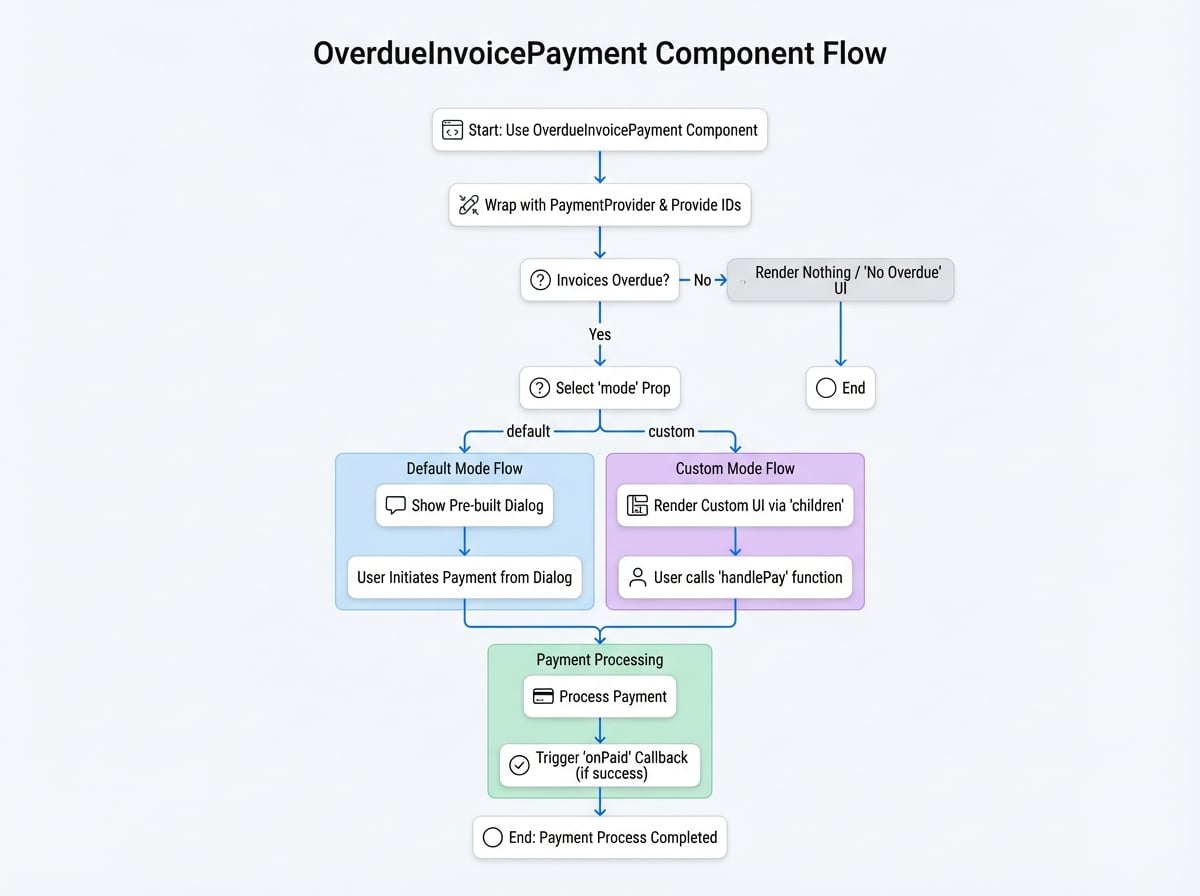
The `OverdueInvoicePayment` component is a specialized tool designed to handle the payment of overdue invoices for a specific customer or subscription. It simplifies the process by automatically fetching overdue invoices and presenting users with a clear interface to settle their outstanding payments.

This component can operate in two modes: a default mode that displays a pre-built dialog for quick integration, and a custom mode that provides the flexibility to build a unique user interface using a render prop. It must be wrapped within a `PaymentProvider` to function correctly.

## Props

The `OverdueInvoicePayment` component accepts the following props to customize its behavior:

<x-field-group>
  <x-field data-name="subscriptionId" data-type="string" data-required="false">
    <x-field-desc markdown>The ID of the subscription to check for overdue invoices. Either `subscriptionId` or `customerId` must be provided.</x-field-desc>
  </x-field>
  <x-field data-name="customerId" data-type="string" data-required="false">
    <x-field-desc markdown>The ID or DID of the customer. Use this to handle all overdue invoices for a specific customer.</x-field-desc>
  </x-field>
  <x-field data-name="mode" data-type="'default' | 'custom'" data-default="default" data-required="false">
    <x-field-desc markdown>The rendering mode. `'default'` shows a pre-built dialog. `'custom'` uses the `children` render prop for a custom UI.</x-field-desc>
  </x-field>
  <x-field data-name="onPaid" data-type="function" data-required="false">
    <x-field-desc markdown>An optional callback function that is triggered after payment for a specific currency is successfully completed. It receives `(id, currencyId, type)`, where `id` is the `subscriptionId` or `customerId`, and `type` is `'subscription'` or `'customer'`.</x-field-desc>
    <x-field data-name="parameters" data-type="object">
      <x-field data-name="id" data-type="string" data-desc="The subscriptionId or customerId."></x-field>
      <x-field data-name="currencyId" data-type="string" data-desc="The ID of the currency used for payment."></x-field>
      <x-field data-name="type" data-type="'subscription' | 'customer'" data-desc="Indicates if the payment was for a subscription or a customer."></x-field>
    </x-field>
  </x-field>
  <x-field data-name="dialogProps" data-type="object" data-required="false">
    <x-field-desc markdown>Optional props to pass to the underlying Material-UI `Dialog` component in `default` mode. For example, `{ open: true, title: 'Custom Title', onClose: handleClose }`.</x-field-desc>
  </x-field>
  <x-field data-name="detailLinkOptions" data-type="object" data-required="false">
    <x-field-desc markdown>Optional settings for the "View Details" link. Can be used to disable the link, change its text, or provide a custom `onClick` handler.</x-field-desc>
    <x-field data-name="enabled" data-type="boolean" data-required="false" data-desc="Whether the link is enabled."></x-field>
    <x-field data-name="onClick" data-type="(e: React.MouseEvent) => void" data-required="false" data-desc="Custom click handler."></x-field>
    <x-field data-name="title" data-type="string" data-required="false" data-desc="Custom link text."></x-field>
  </x-field>
  <x-field data-name="successToast" data-type="boolean" data-default="true" data-required="false">
    <x-field-desc markdown>If `true`, a success toast notification is shown upon successful payment.</x-field-desc>
  </x-field>
  <x-field data-name="alertMessage" data-type="string" data-required="false">
    <x-field-desc markdown>An optional message to append to the default title text when in customer mode.</x-field-desc>
  </x-field>
  <x-field data-name="children" data-type="function" data-required="false">
    <x-field-desc markdown>A render prop function used only when `mode` is `'custom'`. It receives a `handlePay` function and a `data` object.</x-field-desc>
    <x-field data-name="parameters" data-type="object">
      <x-field data-name="handlePay" data-type="(item: SummaryItem) => void" data-desc="Function to initiate the payment process for a specific currency group."></x-field>
      <x-field data-name="data" data-type="object" data-desc="An object containing the fetched payment information."></x-field>
    </x-field>
  </x-field>
  <x-field data-name="authToken" data-type="string" data-required="false">
    <x-field-desc markdown>An optional authentication token for API requests, useful for server-to-server or cross-origin scenarios.</x-field-desc>
  </x-field>
</x-field-group>

### `children` Render Prop Data

When using `mode="custom"`, the `data` object passed to the `children` function contains the following fields:

<x-field-group>
  <x-field data-name="subscription" data-type="Subscription" data-required="false">
    <x-field-desc markdown>The subscription details, if `subscriptionId` was provided.</x-field-desc>
  </x-field>
  <x-field data-name="summary" data-type="{ [key: string]: SummaryItem }" data-required="true">
    <x-field-desc markdown>An object where each key is a currency ID. The value contains the total amount, currency details, and payment method for that currency.</x-field-desc>
  </x-field>
  <x-field data-name="invoices" data-type="Invoice[]" data-required="true">
    <x-field-desc markdown>An array of all overdue invoice objects.</x-field-desc>
  </x-field>
  <x-field data-name="subscriptionCount" data-type="number" data-required="false">
    <x-field-desc markdown>The number of subscriptions with overdue invoices (for customer mode).</x-field-desc>
  </x-field>
  <x-field data-name="detailUrl" data-type="string" data-required="true">
    <x-field-desc markdown>The URL to view detailed invoice information.</x-field-desc>
  </x-field>
</x-field-group>

## Usage Examples

All examples assume you have `PaymentProvider` set up in your application as detailed in the [PaymentProvider documentation](./providers-payment-provider.md).

### 1. Default Mode for a Subscription

This is the simplest way to handle overdue payments for a specific subscription. The component will automatically render a dialog if any overdue invoices are found.

```javascript SubscriptionOverdue.jsx icon=logos:react
import { OverdueInvoicePayment, PaymentProvider } from '@blocklet/payment-react';
import { useSessionContext } from '../hooks/session'; // Your custom session hook

function SubscriptionPage({ subscriptionId }) {
  const { session, connect } = useSessionContext();

  const handlePaymentSuccess = (id, currencyId, type) => {
    console.log(`Payment successful for ${type} ${id} with currency ${currencyId}`);
    // You can refetch subscription data here to update its status
  };

  return (
    <PaymentProvider session={session} connect={connect}>
      {/* This component will be null if there are no overdue invoices */}
      <OverdueInvoicePayment subscriptionId={subscriptionId} onPaid={handlePaymentSuccess} />
      {/* Other subscription details can be rendered here */}
    </PaymentProvider>
  );
}
```

### 2. Default Mode for a Customer

Use this to create a centralized place for a customer to pay all their overdue invoices across multiple subscriptions.

```javascript CustomerDashboard.jsx icon=logos:react
import { OverdueInvoicePayment, PaymentProvider } from '@blocklet/payment-react';
import { useSessionContext } from '../hooks/session'; // Your custom session hook

function CustomerDashboard() {
  const { session, connect } = useSessionContext();

  return (
    <PaymentProvider session={session} connect={connect}>
      <h2>Payment Center</h2>
      <p>Please settle any outstanding payments to ensure uninterrupted service.</p>
      <OverdueInvoicePayment
        customerId={session.user.did}
        onPaid={() => {
          console.log('All customer overdue invoices paid for a currency!');
          // Refresh customer account status
        }}
      />
      {/* The rest of the customer dashboard */}
    </PaymentProvider>
  );
}
```

### 3. Custom UI Mode

For full control over the user experience, use `mode="custom"`. This allows you to integrate the payment functionality directly into your existing UI instead of using a dialog.

```javascript CustomOverdueUI.jsx icon=logos:react
import { OverdueInvoicePayment, PaymentProvider } from '@blocklet/payment-react';
import { useSessionContext } from '../hooks/session'; // Your custom session hook
import { Card, CardContent, Typography, Button, Stack } from '@mui/material';

function CustomOverdueUI({ subscriptionId }) {
  const { session, connect } = useSessionContext();

  // A simple Amount component for formatting
  const Amount = ({ amount, decimal, symbol }) => {
    const formattedAmount = (parseInt(amount, 10) / 10 ** (decimal || 0)).toFixed(2);
    return (
      <strong>
        {formattedAmount} {symbol}
      </strong>
    );
  };

  return (
    <PaymentProvider session={session} connect={connect}>
      <OverdueInvoicePayment
        subscriptionId={subscriptionId}
        mode="custom"
        onPaid={() => console.log('Custom UI payment successful!')}>
        {(handlePay, { summary, invoices }) => {
          const summaryList = Object.values(summary);
          if (invoices.length === 0) {
            return <Typography>No overdue payments. All clear!</Typography>;
          }

          return (
            <Card variant="outlined">
              <CardContent>
                <Typography variant="h6" color="error" gutterBottom>
                  You have {invoices.length} overdue invoice(s).
                </Typography>
                <Stack spacing={2} mt={2}>
                  {summaryList.map(item => (
                    <Stack key={item.currency.id} direction="row" justifyContent="space-between" alignItems="center">
                      <Typography>
                        Total Due:{' '}
                        <Amount
                          amount={item.amount}
                          decimal={item.currency.decimal}
                          symbol={item.currency.symbol}
                        />
                      </Typography>
                      <Button variant="contained" color="primary" onClick={() => handlePay(item)}>
                        Pay with {item.currency.symbol}
                      </Button>
                    </Stack>
                  ))}
                </Stack>
              </CardContent>
            </Card>
          );
        }}
      </OverdueInvoicePayment>
    </PaymentProvider>
  );
}
```

<!-- DIAGRAM_IMAGE_START:flowchart:4:3:1765377372 -->
![OverdueInvoicePayment](assets/diagram/components-business-overdue-invoice-payment-01.jpg)
<!-- DIAGRAM_IMAGE_END -->