# Auto-Topup Components
The auto-topup feature ensures uninterrupted service by automatically recharging a user's credit balance when it falls below a specified threshold. This is managed through two primary components: `AutoTopup`, which displays the current configuration, and `AutoTopupModal`, which provides the interface for setting it up.
## Auto-Topup Workflow
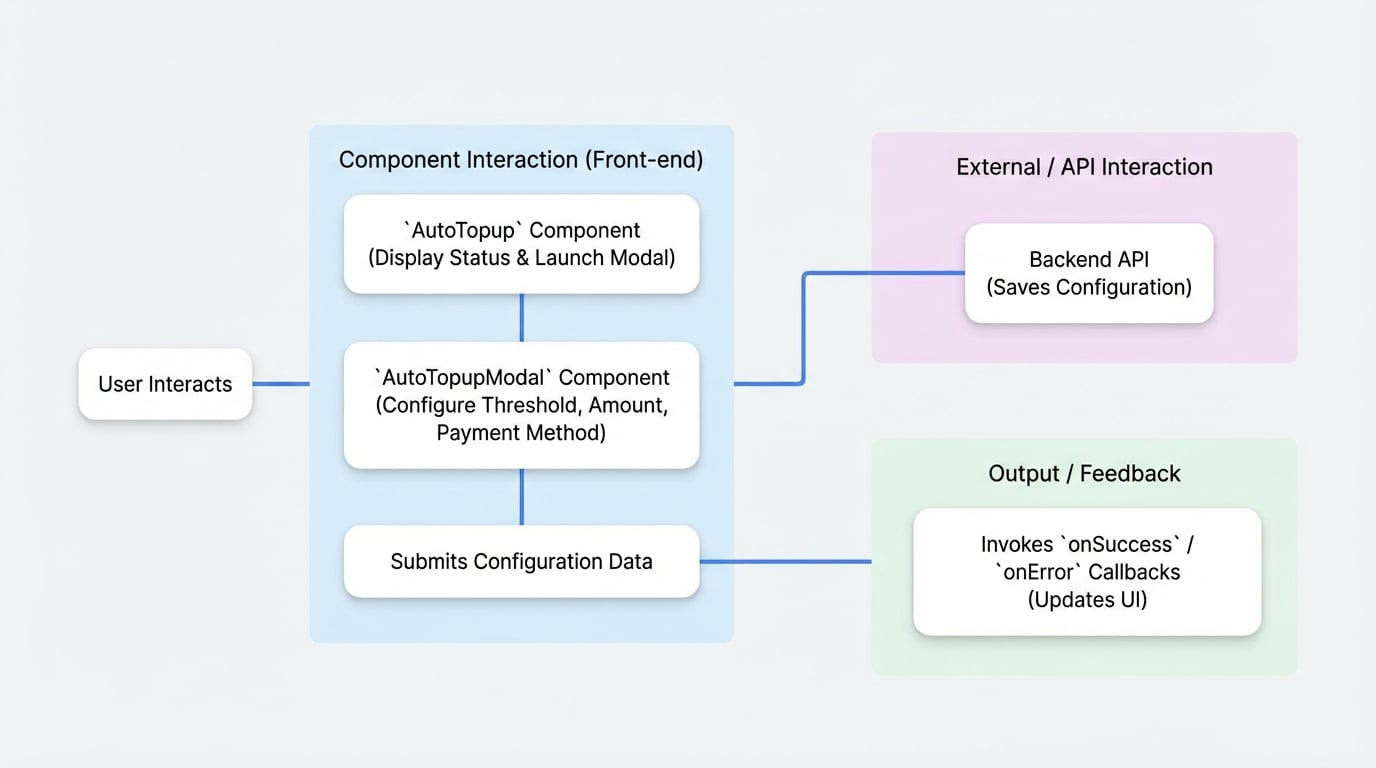
The diagram below illustrates the typical user flow for configuring the auto-topup feature. The user interacts with the `AutoTopup` display component, which launches the `AutoTopupModal` for making changes. The modal then communicates with the backend API to save the configuration.
## AutoTopup
The `AutoTopup` component is a display card that shows the current auto-recharge status for a specific currency and provides an entry point for configuration. It supports multiple rendering modes for flexibility.
### Props
| Prop | Type | Description |
| --- | --- | --- |
| `currencyId` | `string` | **Required.** The ID of the credit currency to manage. |
| `onConfigChange` | `(config: AutoRechargeConfig) => void` | Optional. Callback function triggered when the configuration is successfully updated. |
| `mode` | `'default' \| 'simple' \| 'custom'` | Optional. The rendering mode. Defaults to `'default'`. - `default`: A fully expanded card showing all details. - `simple`: A compact, collapsed view with a button to expand details. - `custom`: Renders a custom UI using the `children` render prop. |
| `sx` | `SxProps` | Optional. Custom MUI styles to apply to the component. |
| `children` | `(openModal, config, paymentData, loading) => React.ReactNode` | Optional. A render prop function used only when `mode` is `'custom'`. It receives the tools needed to build a custom interface. |
### Usage
#### Simple Mode
This is the most common use case, providing a compact display that users can expand for more details.
```tsx CreditManagement.tsx icon=logos:react
import { PaymentProvider, AutoTopup } from '@blocklet/payment-react';
function CreditManagement({ session, currencyId }) {
const handleConfigChange = (config) => {
console.log('Auto-topup config updated:', config);
// You might want to refresh the user's balance here
};
return (
);
}
```
#### Custom Mode
For full control over the UI, use `custom` mode with a render prop. This allows you to integrate the auto-topup status and configuration trigger into your existing layout seamlessly.
```tsx CustomAutoTopupDisplay.tsx icon=logos:react
import { PaymentProvider, AutoTopup } from '@blocklet/payment-react';
import { Button, Card, CardContent, Typography } from '@mui/material';
function CustomAutoTopupDisplay({ session, currencyId }) {
return (
{(openModal, config, paymentData, loading) => {
if (loading) return
Loading configuration...
;
return (
Smart Auto-Recharge
{config?.enabled ? (
Status: Active
) : (
Status: Inactive
)}
);
}}
);
}
```
## AutoTopupModal
The `AutoTopupModal` is a dialog component that allows users to enable, disable, and configure all aspects of the auto-topup feature, including the trigger threshold, purchase amount, and payment method.
### Props
| Prop | Type | Description |
| --- | --- | --- |
| `open` | `boolean` | **Required.** Controls whether the modal is visible. |
| `onClose` | `() => void` | **Required.** Callback function to close the modal. |
| `currencyId` | `string` | **Required.** The ID of the credit currency being configured. |
| `customerId` | `string` | Optional. The customer's DID. Defaults to the user from the `PaymentProvider` session. |
| `onSuccess` | `(config: AutoRechargeConfig) => void` | Optional. Callback triggered after the configuration is successfully saved. |
| `onError` | `(error: any) => void` | Optional. Callback triggered if an error occurs during submission. |
| `defaultEnabled` | `boolean` | Optional. If `true`, the 'Enable Auto-Topup' switch will be on by default when the modal opens for a new configuration. |
### Usage
Here is a complete example of how to manage the `AutoTopupModal`'s state and handle its callbacks.
```tsx AutoRechargeSettings.tsx icon=logos:react
import { PaymentProvider, AutoTopupModal } from '@blocklet/payment-react';
import { useState } from 'react';
import { Button } from '@mui/material';
function AutoRechargeSettings({ session, currencyId }) {
const [isModalOpen, setModalOpen] = useState(false);
const handleSuccess = (config) => {
console.log('Configuration saved successfully:', config);
setModalOpen(false);
// Optionally, show a success toast or refresh data
};
const handleError = (error) => {
console.error('Failed to save configuration:', error);
// Optionally, show an error message to the user
};
return (
setModalOpen(false)}
currencyId={currencyId}
onSuccess={handleSuccess}
onError={handleError}
defaultEnabled={true}
/>
);
}
```
This setup provides a robust way to manage auto-recharge functionality, giving users control while ensuring a smooth experience for maintaining their service credits.