# **Final State Functions**
Never use "if" again. Prototype, test, and code.
**[RED-GREEN-BLUE](https://blog.cleancoder.com/uncle-bob/2014/12/17/TheCyclesOfTDD.html)**
as Uncle BoB says
## Introduction
State machines are a useful concept in computer science and programming,
and are often used to model the behavior of systems. In this journey, I
explore this new way of programming to answer questions like what state
machines are, how they work, how can I implement them in my workflow.
A state machine is a mathematical model of computation that represents the
behavior of a system as a sequence of states and transitions between those
states. At any given time, a state machine is in a specific state, and when
certain conditions are met, it can transition to a new state.
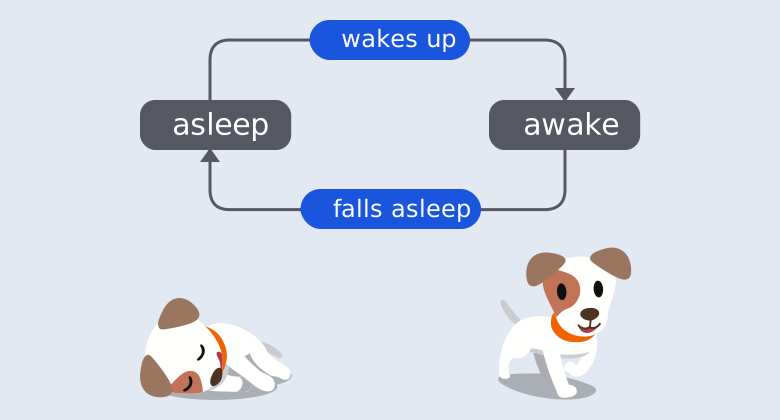
> **_Simple Cute machine_**, image from
> [XState](https://xstate.js.org/docs/guides/introduction-to-state-machines-and-statecharts/#transitions-and-events)
State machines can be implemented in a variety of ways, such as using a
switch statement or a series of if-else statements. In other hand, state
machines allow abstraction of methods/functions, guards (if-else) and
developpers can implement after defining the state machine, the logic of
the system. I used to say it's an industrial way to do programming in
opposition to the craftmanship model.
The "[XState](https://xstate.js.org/docs/)" library is the best
implementation of state machines. It goes a step further as they implement
state charts, where you can have events, children state machines, parallel
states for examples.
So I take inspiration of this library to create my own one only focus of
create of synchronous function. It's the only missing thing inside this
library.
I try my best to follow the syntax of XState, so you can use it can be used
with the
[Stately Editor](https://stately.ai/registry/discover?page=1&facetFilters=%255B%255D&numericFilters=%255B%255D)
## Features
| | **'@bemedev/fsf'** |
| ---------------------------- | :----------------: |
| Finite states | ✅ |
| Initial state | ✅ |
| Transitions (object) | ✅ |
| Transitions (string target) | ✅ |
| Delayed transitions | ❌ |
| Eventless transitions (only) | ✅ |
| Nested states | ❌ |
| Parallel states | ❌ |
| Final states | ✅ |
| Context | ✅ |
| Entry actions | ✅ |
| Exit actions | ✅ |
| Transition actions | ✅ |
| Parameterized actions | ✅ |
| Transition guards | ✅ |
| Parameterized guards | ✅ |
| Asynchronous | ✅ |
## Quick start
### Installation
```bash
npm i @bemedev/fsf //or
yarn add @bemedev/fsf //or
pnpm add @bemedev/fsf
```
### Usage (machine)
```ts
import { describe, expect, test } from 'vitest';
import { createLogic, interpret } from '@bemedev/fsf';
describe('#4: Complex, https query builder', () => {
type Context = {
apiKey?: string;
apiUrl?: string;
url?: string;
};
type Events = { products?: string[]; categories?: string[] };
const queryMachine = createLogic(
{
context: {},
initial: 'preferences',
data: 'query', // Required in v1.0.0+
states: {
preferences: {
always: {
actions: ['setUrl', 'setApiKey', 'startUrl'],
target: 'categories',
},
},
categories: {
always: [
{
cond: 'hasCategories',
target: 'products',
actions: 'setCategories',
},
'products',
],
},
products: {
always: [
{
cond: 'hasProducts',
target: 'final',
actions: 'setProducts',
},
'final',
],
},
final: {
data: 'query',
},
},
},
{
context: {} as Context,
// Add null option to make arguments optionals
events: {} as Events | null,
data: {} as string,
},
).provideOptions({
actions: {
setApiKey: ctx => {
ctx.apiKey = '123';
},
setUrl: ctx => {
ctx.apiUrl = 'https://example.com';
},
startUrl: ctx => {
const { apiUrl, apiKey } = ctx;
ctx.url = `${apiUrl}?apikey=${apiKey}`;
},
setCategories: (ctx, { categories }) => {
const _categories = categories?.join(',');
ctx.url += `&categories=${_categories}`;
},
setProducts: (ctx, { products }) => {
const _products = products?.join(',');
ctx.url += `&categories=${_products}`;
},
},
guards: {
hasCategories: (_, { categories }) =>
!!categories && categories.length > 0,
hasProducts: (_, { products }) => !!products && products.length > 0,
},
datas: {
query: ctx => ctx.url,
},
});
const func = interpret(queryMachine);
test('#1: no args', () => {
// So here, arguments are optionals !
expect(func()).toBe('https://example.com?apikey=123');
});
test('#2: categories', () => {
expect(func({ categories: ['a', 'b'] })).toBe(
'https://example.com?apikey=123&categories=a,b',
);
});
test('#3: products', () => {
expect(func({ products: ['a', 'b'] })).toBe(
'https://example.com?apikey=123&categories=a,b',
);
});
test('#4: categories and products', () => {
expect(func({ products: ['a', 'b'], categories: ['c', 'd'] })).toBe(
'https://example.com?apikey=123&categories=c,d&categories=a,b',
);
});
});
```
## Migration to v1.0.0
**Breaking Changes**: Version 1.0.0 introduces significant API changes:
1. **`data` property is now required** at the configuration level
2. **`createLogic` signature changed**: Schema is now the second argument
3. **Options are provided via `provideOptions` method** instead of third
argument
### Old API (v0.x):
```ts
const machine = createLogic(
{
schema: {
context: {} as Context,
events: {} as Events,
data: {} as string,
},
initial: 'idle',
states: {
done: { data: 'result' },
},
},
{
// Options here (third argument)
datas: {
result: () => 'success',
},
},
);
```
### New API (v1.0.0+):
```ts
type Context = { value: number };
type Events = { type: 'INCREMENT' };
type Data = string;
const machine = createLogic(
{
initial: 'idle',
data: 'defaultData', // ← Now required
states: {
idle: { always: 'done' },
done: { data: 'result' },
},
},
{
// Schema is now second argument
context: {} as Context,
events: {} as Events,
data: {} as Data,
},
).provideOptions({
// Options provided via provideOptions method
datas: {
defaultData: () => 'default', // ← Must provide corresponding function
result: () => 'success',
},
});
```
### Why These Changes?
1. **Required `data` property**: Ensures machines always have a fallback
data return value, even when transitioning through states without
explicit data definitions.
2. **Separated schema from config**: Cleaner separation of concerns -
configuration defines the structure, schema defines the types.
3. **`provideOptions` method**: Enables better composition and allows for
late binding of implementation details (actions, guards, datas,
promises).
### **Note**: Versions below 1.0.0 have breaking API changes. Please use v1.0.0 or higher.
---
## API Reference
### `createLogic(config, types)`
Creates a state machine logic instance.
**Parameters:**
- `config`: Machine configuration object
- `initial`: (required) Initial state name
- `data`: (required) Default data function key - **BREAKING CHANGE in
v1.0.0**
- `states`: (required) State definitions
- `context`: (optional) Initial context value
- `types`: Type definitions object - **BREAKING CHANGE: Now second
argument**
- `context`: TypeScript type for context (e.g., `{} as MyContext`)
- `events`: TypeScript type for events (e.g., `{} as MyEvents`)
- `data`: TypeScript type for data return value (e.g., `{} as MyData`)
- `promises`: (optional) TypeScript type for async promises
**Returns:** Machine logic instance with `provideOptions` method
**Example:**
```ts
type Context = { count: number };
type Events = { type: 'INCREMENT' } | { type: 'DECREMENT' };
type Data = number;
const machine = createLogic(
{
initial: 'idle',
data: 'defaultData', // Required in v1.0.0+
context: { count: 0 },
states: {
idle: {
on: {
INCREMENT: { target: 'active', actions: 'increment' },
},
},
active: { data: 'result' },
},
},
{
context: {} as Context,
events: {} as Events,
data: {} as Data,
},
).provideOptions({
actions: {
increment: ctx => {
ctx.count++;
},
},
datas: {
defaultData: ctx => ctx.count,
result: ctx => ctx.count,
},
});
```
### `.provideOptions(options)`
Provides implementation options to a machine logic instance. **BREAKING
CHANGE in v1.0.0** - Options are no longer passed as third argument to
`createLogic`.
**Parameters:**
- `options`: Implementation options object
- `actions`: Action function implementations
- `guards`: Guard function implementations
- `datas`: Data function implementations (must include function matching
`config.data`)
- `promises`: (optional) Promise function implementations for async
states
**Returns:** Configured machine logic instance ready to be interpreted
**Example:**
```ts
const machine = createLogic(config, types).provideOptions({
actions: {
increment: ctx => {
ctx.count++;
},
},
guards: {
isPositive: ctx => ctx.count > 0,
},
datas: {
defaultData: ctx => ctx.count,
},
});
```
### `interpret(machine)`
Interprets a machine logic instance and returns an executable function.
**Parameters:**
- `machine`: Machine logic instance created with `createLogic`
**Returns:** Function that executes the state machine with given events
**Example:**
```ts
const machine = createLogic(config, options);
const execute = interpret(machine);
const result = execute({ type: 'START' });
```
## Advanced Usage
### Guards (Conditional Logic)
Guards allow conditional transitions based on context and event data.
```ts
type Context = { status: string };
type Events = { type: 'CHECK'; value: number };
type Data = string;
const machine = createLogic(
{
initial: 'idle',
data: 'status',
states: {
idle: {
on: {
CHECK: [
{ target: 'valid', cond: 'isValid' },
{ target: 'invalid' },
],
},
},
valid: { data: 'status' },
invalid: { data: 'status' },
},
},
{
context: {} as Context,
events: {} as Events,
data: {} as Data,
},
).provideOptions({
guards: {
isValid: (ctx, event) => event.value > 0,
},
datas: {
status: ctx => ctx.status,
},
});
```
### Actions (Side Effects)
Actions perform side effects during state transitions.
```ts
type Context = { count: number };
type Events = { type: 'INCREMENT' };
type Data = number;
const machine = createLogic(
{
initial: 'idle',
data: 'counter',
context: { count: 0 },
states: {
idle: {
on: {
INCREMENT: {
target: 'active',
actions: 'incrementCounter',
},
},
},
active: { data: 'counter' },
},
},
{
context: {} as Context,
events: {} as Events,
data: {} as Data,
},
).provideOptions({
actions: {
incrementCounter: ctx => {
ctx.count = (ctx.count || 0) + 1;
},
},
datas: {
counter: ctx => ctx.count,
},
});
```
### Entry and Exit Actions
Execute actions when entering or exiting states.
```ts
type Context = {};
type Events = { type: 'START' };
type Data = string;
const machine = createLogic(
{
initial: 'idle',
data: 'result',
states: {
idle: {
entry: 'logEntry',
exit: 'logExit',
on: { START: 'running' },
},
running: { data: 'result' },
},
},
{
context: {} as Context,
events: {} as Events,
data: {} as Data,
},
).provideOptions({
actions: {
logEntry: () => console.log('Entering idle'),
logExit: () => console.log('Exiting idle'),
},
datas: {
result: () => 'done',
},
});
```
### Eventless Transitions (Always)
Automatic transitions without requiring events.
```ts
type Context = { ready: boolean; result: string };
type Events = null;
type Data = string;
const machine = createLogic(
{
initial: 'check',
data: 'output',
context: { ready: false, result: '' },
states: {
check: {
always: [
{ target: 'success', cond: 'isReady' },
{ target: 'waiting' },
],
},
success: { data: 'output' },
waiting: { data: 'output' },
},
},
{
context: {} as Context,
events: {} as Events,
data: {} as Data,
},
).provideOptions({
guards: {
isReady: ctx => ctx.ready === true,
},
datas: {
output: ctx => ctx.result,
},
});
```
## TypeScript Support
The library is written in TypeScript and provides full type safety.
```ts
type Context = {
count: number;
message: string;
};
type Events =
| { type: 'INCREMENT' }
| { type: 'DECREMENT' }
| { type: 'RESET' };
type Data = number;
const machine = createLogic(
{
context: { count: 0, message: '' },
initial: 'active',
data: 'getCount',
states: {
active: {
on: {
INCREMENT: { actions: 'increment' },
DECREMENT: { actions: 'decrement' },
RESET: { actions: 'reset' },
},
data: 'getCount',
},
},
},
{
context: {} as Context,
events: {} as Events,
data: {} as Data,
},
).provideOptions({
actions: {
increment: ctx => {
ctx.count++;
},
decrement: ctx => {
ctx.count--;
},
reset: ctx => {
ctx.count = 0;
},
},
datas: {
getCount: ctx => ctx.count,
},
});
```
## Contributing
Contributions are welcome! Please feel free to submit a Pull Request.
1. Fork the repository
2. Create your feature branch (`git checkout -b feat/amazing-feature`)
3. Commit your changes following the
[commit conventions](./.github/copilot-instructions.md)
4. Push to the branch (`git push origin feat/amazing-feature`)
5. Open a Pull Request
## License
This project is licensed under the MIT License.
## Author
**chlbri** (bri_lvi@icloud.com)
[GitHub Profile](https://github.com/chlbri?tab=repositories)
## Acknowledgments
- Inspired by [XState](https://xstate.js.org/)
- Compatible with [Stately Editor](https://stately.ai/)
- Built with TypeScript, Vitest, and Rollup
### **Note**: Versions below 1.0.0 have breaking API changes. Please use v1.0.0 or higher.
---