 - [About](#about)
- [Getting Started](#getting-started)
- [Run The Demo](#run-the-demo)
- [Examples](#examples)
- [How It Works](#how-it-works)
- [NextJS](#NextJS)
- [Hash route](#Hash-route)
- [Service Worker Support](#service-worker-support)
## About
@axa-fr/react is:
- **Secure** :
- With Demonstrating Proof of Possession (DPoP), your access_token and refresh_token are not usable outside your browser context (big protection)
- With the use of Service Worker, your tokens (refresh_token and/or access_token) are not accessible to the JavaScript client code (if you follow good practices from [`FAQ`](https://github.com/AxaFrance/oidc-client/blob/main/FAQ.md) section)
- OIDC using client side Code Credential Grant with pkce only
- **Lightweight** : Unpacked Size on npm is **274 kB**
- **Simple**
- refresh_token and access_token are auto refreshed in background
- with the use of the Service Worker, you do not need to inject the access_token in every fetch, you have only to configure OidcTrustedDomains.js file
- **Multiple Authentication** :
- You can authenticate many times to the same provider with different scope (for example you can acquire a new 'payment' scope for a payment)
- You can authenticate to multiple different providers inside the same SPA (single page application) website
- **Flexible** :
- Work with Service Worker (more secure) and without for older browser (less secure).
- You can disable Service Worker if you want (but less secure) and just use SessionStorage or LocalStorage mode.

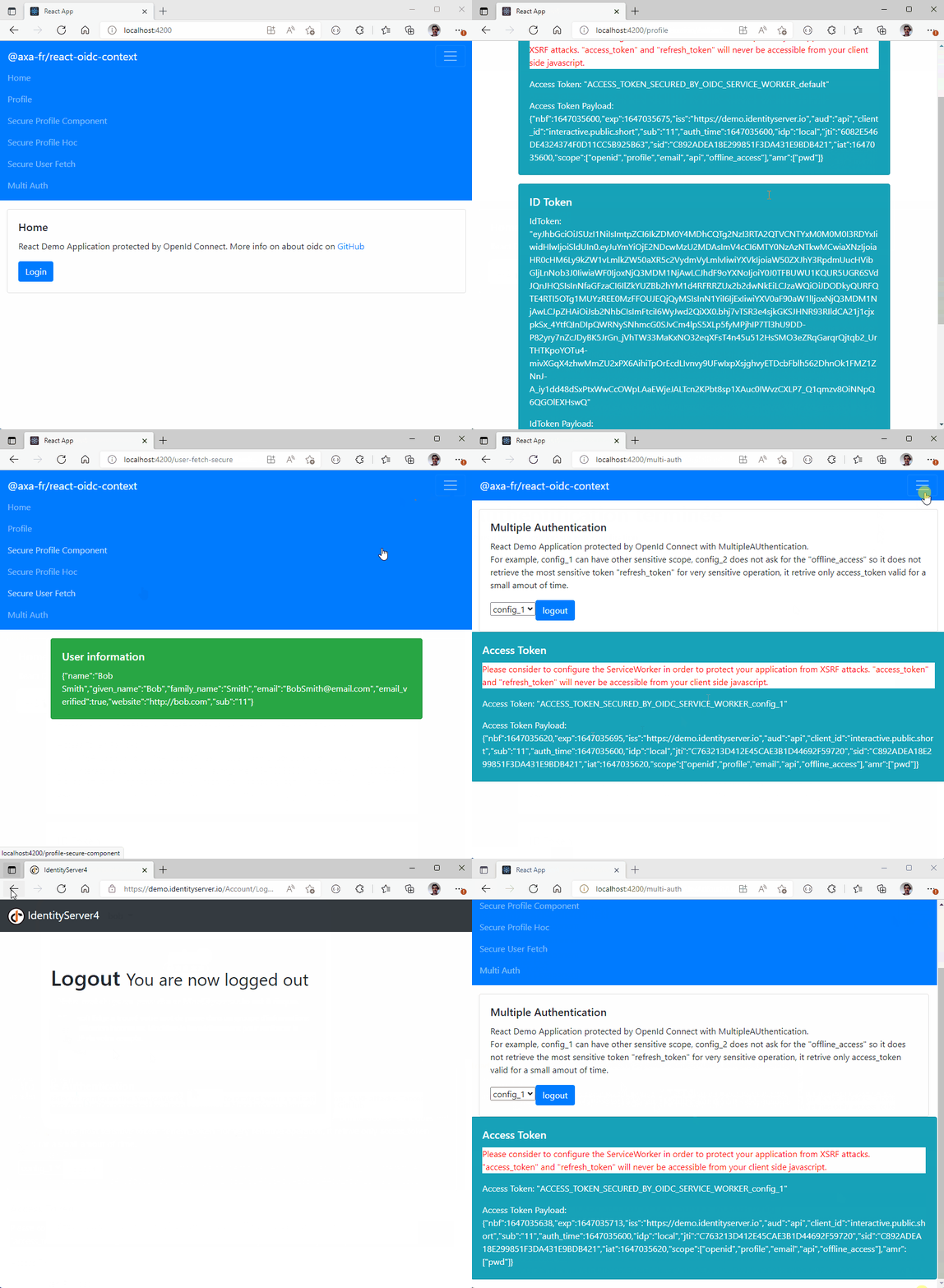
The service worker catch **access_token** and **refresh_token** that will never be accessible to the client.
## Getting Started
```sh
npm install @axa-fr/react-oidc --save
# To install or update OidcServiceWorker.js file, you can run
node ./node_modules/@axa-fr/react-oidc/bin/copy-service-worker-files.mjs public
# If you have a "public" folder, the 2 files will be created :
# ./public/OidcServiceWorker.js <-- will be updated at each "npm install"
# ./public/OidcTrustedDomains.js <-- won't be updated if already exist
```
WARNING : If you use Service Worker mode, the OidcServiceWorker.js file should always be up to date with the version of the library. You may setup a postinstall script in your package.json file to update it at each npm install. For example :
```sh
"scripts": {
...
"postinstall": "node ./node_modules/@axa-fr/react-oidc/bin/copy-service-worker-files.mjs public"
},
```
If you need a very secure mode where refresh_token and access_token will be hide behind a service worker that will proxify requests.
The only file you should edit is "OidcTrustedDomains.js".
```javascript
// OidcTrustedDomains.js
// Add bellow trusted domains, access tokens will automatically injected to be send to
// trusted domain can also be a path like https://www.myapi.com/users,
// then all subroute like https://www.myapi.com/useers/1 will be authorized to send access_token to.
// Domains used by OIDC server must be also declared here
const trustedDomains = {
default: {
oidcDomains: ['https://demo.duendesoftware.com'],
accessTokenDomains: ['https://www.myapi.com/users'],
},
};
// Service worker will continue to give access token to the JavaScript client
// Ideal to hide refresh token from client JavaScript, but to retrieve access_token for some
// scenarios which require it. For example, to send it via websocket connection.
trustedDomains.config_show_access_token = {
oidcDomains: ['https://demo.duendesoftware.com'],
accessTokenDomains: ['https://www.myapi.com/users'],
showAccessToken: true,
// convertAllRequestsToCorsExceptNavigate: false, // default value is false
// setAccessTokenToNavigateRequests: true, // default value is true
};
// DPoP (Demonstrating Proof of Possession) will be activated for the following domains
trustedDomains.config_with_dpop = {
domains: ['https://demo.duendesoftware.com'],
demonstratingProofOfPossession: true,
demonstratingProofOfPossessionOnlyWhenDpopHeaderPresent: true, // default value is false, inject DPOP token only when DPOP header is present
// Optional, more details bellow
/*demonstratingProofOfPossessionConfiguration: {
importKeyAlgorithm: {
name: 'ECDSA',
namedCurve: 'P-256',
hash: {name: 'ES256'}
},
signAlgorithm: {name: 'ECDSA', hash: {name: 'SHA-256'}},
generateKeyAlgorithm: {
name: 'ECDSA',
namedCurve: 'P-256'
},
digestAlgorithm: { name: 'SHA-256' },
jwtHeaderAlgorithm : 'ES256'
}*/
};
// Setting allowMultiTabLogin to true will enable storing login-specific parameters (state, nonce, code verifier)
// separately for each tab. This will prevent errors when logins are initiated from multiple tabs.
// IMPORTANT: When allowMultiTabLogin is true, you MUST use the OIDC fetch provided by useOidcFetch()
// or withOidcFetch() for API requests. The service worker embeds a tab-specific token placeholder
// in the Authorization header, which it then replaces with the real access token.
// Using a plain fetch or axios without the OIDC fetch wrapper will result in requests being sent
// without an Authorization header (401 errors), because the service worker cannot determine which
// tab's token to inject without the placeholder.
// Example with axios: configure it to use the OIDC fetch as its adapter or use the OIDC fetch directly.
trustedDomains.config_multi_tab_login = {
domains: ['https://demo.duendesoftware.com'],
allowMultiTabLogin: true,
};
```
## Run The Demo
```sh
git clone https://github.com/AxaFrance/oidc-client.git
cd oidc-client
pnpm install
cd /examples/react-oidc-demo
pnpm install
pnpm start
# then navigate to http://localhost:4200
```
## Examples
### Application startup
The library is router agnostic and will use native History API.
The default routes used internally :
- www.your-app.fr/authentication/callback
```javascript
import React from 'react';
import { render } from 'react-dom';
import { BrowserRouter as Router } from 'react-router-dom';
import { OidcProvider } from '@axa-fr/react-oidc';
import Header from './Layout/Header';
import Routes from './Router';
// This configuration use hybrid mode
// ServiceWorker are used if available (more secure) else tokens are given to the client
// You need to give inside your code the "access_token" when using fetch
const configuration = {
client_id: 'interactive.public.short',
redirect_uri: window.location.origin + '/authentication/callback',
silent_redirect_uri: window.location.origin + '/authentication/silent-callback',
scope: 'openid profile email api offline_access', // offline_access scope allow your client to retrieve the refresh_token
authority: 'https://demo.duendesoftware.com',
service_worker_relative_url: '/OidcServiceWorker.js', // just comment that line to disable service worker mode
service_worker_only: false,
demonstrating_proof_of_possession: false,
};
const App = () => (
- [About](#about)
- [Getting Started](#getting-started)
- [Run The Demo](#run-the-demo)
- [Examples](#examples)
- [How It Works](#how-it-works)
- [NextJS](#NextJS)
- [Hash route](#Hash-route)
- [Service Worker Support](#service-worker-support)
## About
@axa-fr/react is:
- **Secure** :
- With Demonstrating Proof of Possession (DPoP), your access_token and refresh_token are not usable outside your browser context (big protection)
- With the use of Service Worker, your tokens (refresh_token and/or access_token) are not accessible to the JavaScript client code (if you follow good practices from [`FAQ`](https://github.com/AxaFrance/oidc-client/blob/main/FAQ.md) section)
- OIDC using client side Code Credential Grant with pkce only
- **Lightweight** : Unpacked Size on npm is **274 kB**
- **Simple**
- refresh_token and access_token are auto refreshed in background
- with the use of the Service Worker, you do not need to inject the access_token in every fetch, you have only to configure OidcTrustedDomains.js file
- **Multiple Authentication** :
- You can authenticate many times to the same provider with different scope (for example you can acquire a new 'payment' scope for a payment)
- You can authenticate to multiple different providers inside the same SPA (single page application) website
- **Flexible** :
- Work with Service Worker (more secure) and without for older browser (less secure).
- You can disable Service Worker if you want (but less secure) and just use SessionStorage or LocalStorage mode.

The service worker catch **access_token** and **refresh_token** that will never be accessible to the client.
## Getting Started
```sh
npm install @axa-fr/react-oidc --save
# To install or update OidcServiceWorker.js file, you can run
node ./node_modules/@axa-fr/react-oidc/bin/copy-service-worker-files.mjs public
# If you have a "public" folder, the 2 files will be created :
# ./public/OidcServiceWorker.js <-- will be updated at each "npm install"
# ./public/OidcTrustedDomains.js <-- won't be updated if already exist
```
WARNING : If you use Service Worker mode, the OidcServiceWorker.js file should always be up to date with the version of the library. You may setup a postinstall script in your package.json file to update it at each npm install. For example :
```sh
"scripts": {
...
"postinstall": "node ./node_modules/@axa-fr/react-oidc/bin/copy-service-worker-files.mjs public"
},
```
If you need a very secure mode where refresh_token and access_token will be hide behind a service worker that will proxify requests.
The only file you should edit is "OidcTrustedDomains.js".
```javascript
// OidcTrustedDomains.js
// Add bellow trusted domains, access tokens will automatically injected to be send to
// trusted domain can also be a path like https://www.myapi.com/users,
// then all subroute like https://www.myapi.com/useers/1 will be authorized to send access_token to.
// Domains used by OIDC server must be also declared here
const trustedDomains = {
default: {
oidcDomains: ['https://demo.duendesoftware.com'],
accessTokenDomains: ['https://www.myapi.com/users'],
},
};
// Service worker will continue to give access token to the JavaScript client
// Ideal to hide refresh token from client JavaScript, but to retrieve access_token for some
// scenarios which require it. For example, to send it via websocket connection.
trustedDomains.config_show_access_token = {
oidcDomains: ['https://demo.duendesoftware.com'],
accessTokenDomains: ['https://www.myapi.com/users'],
showAccessToken: true,
// convertAllRequestsToCorsExceptNavigate: false, // default value is false
// setAccessTokenToNavigateRequests: true, // default value is true
};
// DPoP (Demonstrating Proof of Possession) will be activated for the following domains
trustedDomains.config_with_dpop = {
domains: ['https://demo.duendesoftware.com'],
demonstratingProofOfPossession: true,
demonstratingProofOfPossessionOnlyWhenDpopHeaderPresent: true, // default value is false, inject DPOP token only when DPOP header is present
// Optional, more details bellow
/*demonstratingProofOfPossessionConfiguration: {
importKeyAlgorithm: {
name: 'ECDSA',
namedCurve: 'P-256',
hash: {name: 'ES256'}
},
signAlgorithm: {name: 'ECDSA', hash: {name: 'SHA-256'}},
generateKeyAlgorithm: {
name: 'ECDSA',
namedCurve: 'P-256'
},
digestAlgorithm: { name: 'SHA-256' },
jwtHeaderAlgorithm : 'ES256'
}*/
};
// Setting allowMultiTabLogin to true will enable storing login-specific parameters (state, nonce, code verifier)
// separately for each tab. This will prevent errors when logins are initiated from multiple tabs.
// IMPORTANT: When allowMultiTabLogin is true, you MUST use the OIDC fetch provided by useOidcFetch()
// or withOidcFetch() for API requests. The service worker embeds a tab-specific token placeholder
// in the Authorization header, which it then replaces with the real access token.
// Using a plain fetch or axios without the OIDC fetch wrapper will result in requests being sent
// without an Authorization header (401 errors), because the service worker cannot determine which
// tab's token to inject without the placeholder.
// Example with axios: configure it to use the OIDC fetch as its adapter or use the OIDC fetch directly.
trustedDomains.config_multi_tab_login = {
domains: ['https://demo.duendesoftware.com'],
allowMultiTabLogin: true,
};
```
## Run The Demo
```sh
git clone https://github.com/AxaFrance/oidc-client.git
cd oidc-client
pnpm install
cd /examples/react-oidc-demo
pnpm install
pnpm start
# then navigate to http://localhost:4200
```
## Examples
### Application startup
The library is router agnostic and will use native History API.
The default routes used internally :
- www.your-app.fr/authentication/callback
```javascript
import React from 'react';
import { render } from 'react-dom';
import { BrowserRouter as Router } from 'react-router-dom';
import { OidcProvider } from '@axa-fr/react-oidc';
import Header from './Layout/Header';
import Routes from './Router';
// This configuration use hybrid mode
// ServiceWorker are used if available (more secure) else tokens are given to the client
// You need to give inside your code the "access_token" when using fetch
const configuration = {
client_id: 'interactive.public.short',
redirect_uri: window.location.origin + '/authentication/callback',
silent_redirect_uri: window.location.origin + '/authentication/silent-callback',
scope: 'openid profile email api offline_access', // offline_access scope allow your client to retrieve the refresh_token
authority: 'https://demo.duendesoftware.com',
service_worker_relative_url: '/OidcServiceWorker.js', // just comment that line to disable service worker mode
service_worker_only: false,
demonstrating_proof_of_possession: false,
};
const App = () => (
React Demo Application protected by OpenId Connect
{!isAuthenticated && ( )} {isAuthenticated && ( )} {isAuthenticated && ( )}you are not authentified
; } return (Please consider to configure the ServiceWorker in order to protect your application from XSRF attacks. ""access_token" and "refresh_token" will never be accessible from your client side javascript.
{{JSON.stringify(accessToken)}
} {accessTokenPayload != null && ({JSON.stringify(accessTokenPayload)}
)}you are not authentified
; } return ({JSON.stringify(idToken)}
} {idTokenPayload != null &&{JSON.stringify(idTokenPayload)}
}User Information are loading
; case UserStatus.Unauthenticated: returnyou are not authenticated
; case UserStatus.LoadingError: returnFail to load user information
; default: return ({JSON.stringify(oidcUser)}
{JSON.stringify(oidcUser)}
}{JSON.stringify(oidcUser)}
}Loading
; const AuthenticatingError = () =>Authenticating error
; const Authenticating = () =>Authenticating
; const SessionLost = () =>Session Lost
; const ServiceWorkerNotSupported = () =>Not supported
; const CallBackSuccess = () =>Success
; //const [isSessionLost, setIsSessionLost] = useState(false); //const onSessionLost = ()=>{ // setIsSessionLost(true); //} const App = () => (