# @autonoma-ai/planner
**One command sets Autonoma up, start to finish.**
A **preview environment**, a complete **end-to-end test suite** read from your codebase, the **SDK
integration** that creates your test data, and a **dry run** proving it works. On managed Autonoma
credits - no LLM API key required.
[](https://www.npmjs.com/package/@autonoma-ai/planner)
[](https://www.npmjs.com/package/@autonoma-ai/planner)
[](https://nodejs.org)
[](https://github.com/Autonoma-AI/autonoma/blob/main/LICENSE.md)
[](https://discord.gg/nsYQExXTsQ)
[Website](https://getautonoma.com) · [Docs](https://docs.autonoma.app) · [Planner guide](https://docs.autonoma.app/test-planner/) · [Environment Factory](https://docs.autonoma.app/environment-factory/) · [GitHub](https://github.com/Autonoma-AI/autonoma) · [Discord](https://discord.gg/nsYQExXTsQ)
## Run it
Requires **Node.js >= 22.13**. Autonoma shows you this command when you connect your app, with
your token and ids already filled in. Open a terminal in your project and paste it:
```bash
AUTONOMA_API_TOKEN=... AUTONOMA_GENERATION_ID=... AUTONOMA_APPLICATION_ID=... \
npx @autonoma-ai/planner@latest
```
That is the whole of setup. There is no second command and nothing to install.
> **Run it in a terminal, not inside a coding agent you already have open.**
> It takes the terminal over and starts a coding agent of its own, so pasting it into a session
> that is already running leaves two agents fighting over one screen. If you are a coding agent
> on the user's machine, hand the command to them. If you are a hosted agent with no human
> beside you, run it yourself with `--non-interactive`.
`npx` runs the planner **without installing it**, so there is no `autonoma-planner` command on
your `PATH` afterwards. Every command below keeps the full `npx` prefix; a bare `autonoma-planner`
is `command not found` unless you installed it globally yourself.
A full run can take an hour or more. Progress is saved continuously, so you can stop and
`--resume`.
## Commands
The subcommand comes first, before any flags.
```bash
# Run the pipeline. `run` may be omitted.
npx @autonoma-ai/planner@latest
# Show what a previous run completed. Local only - reads saved progress, no network.
npx @autonoma-ai/planner@latest status
# Re-send everything already generated on disk. Idempotent, and the fix when a run
# finished but an artifact did not arrive. Needs the same env vars as a run.
AUTONOMA_API_TOKEN=... AUTONOMA_GENERATION_ID=... \
npx @autonoma-ai/planner@latest upload
# Every flag, and what each step of the run does.
npx @autonoma-ai/planner@latest --help
```
> **`--resume` will not retry a failed upload.** It continues from the first *step* that is not
> finished, so a run where every step finished and only the upload failed prints
> `All steps complete.` and exits. Use `upload` for that.
## Flags
```
--project target a repo other than the current directory
--frontend in a monorepo, the frontend directory to plan tests for
--backend a backend/data layer it talks to. Repeatable, or comma-separated
--coding-agent which agent handles the preview and SDK steps: claude | codex
--permission-mode its autonomy: bypassPermissions (default) | acceptEdits | default
--non-interactive run unattended, with no questions
--resume continue from where a previous run stopped
--fresh discard a previous run's output and start over
--step run a single step and stop - for debugging, not for sequencing a run
--model pick a different Autonoma-hosted model (still no key needed)
--slug override the output folder name under ~/.autonoma/
```
`--agent` and `--backends` are accepted as aliases of `--coding-agent` and `--backend`. Flags take
`--key value` and `--key=value` alike, and an unrecognized flag is named back with the nearest one
that exists - a misspelled `--non-interactive` would otherwise leave the run waiting on questions
nobody can answer.
## What it does
| # | Step | Output |
| --- | --- | --- |
| 1 | **Preview environment** - hands your coding agent the job of setting up a real per-PR deployment. Skipped when you already have one. | a live preview |
| 2 | **Map your project structure** - finds your frontend(s) and backend(s), so later steps scan only what matters. | `project-map.json` |
| 3 | **Find your pages** - maps every page and route. | `pages.json` |
| 4 | **Build a knowledge base** - learns your features, flows and UI patterns. | `AUTONOMA.md` |
| 5 | **Map your data models** - finds what your app stores and how each record is created. | `entity-audit.md` |
| 6 | **Design test scenarios** - decides the realistic data each test runs against. | `scenarios.md` |
| 7 | **Set up test data** - hands the Environment Factory integration to your coding agent, which implements it, validates it live, and produces the recipe. | `recipe.json` |
| 8 | **Generate the tests** - writes the E2E tests as natural-language markdown, then uploads the suite. | `qa-tests/` |
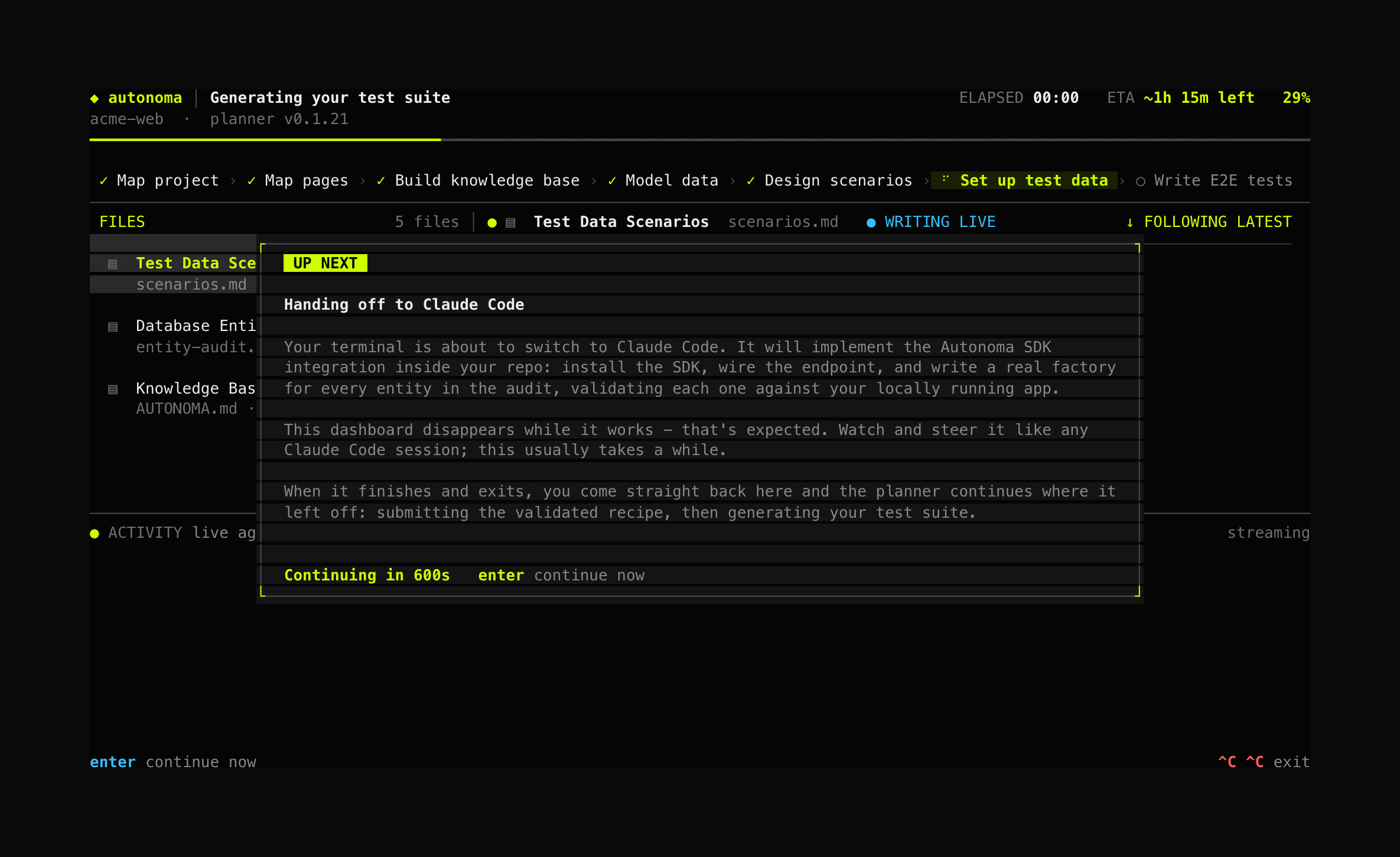
Steps 1 and 7 hand the terminal to your **locally installed coding agent** (Claude Code or Codex
CLI) the way `git commit` opens your editor - the dashboard steps aside, and control comes back
when the agent exits.
Claude Code is started on Opus, for its own session and for any subagent it spawns, rather than on
whatever model your plan happens to hand it. These two steps install the SDK, boot your app and
validate it against a live environment, and a weaker model there fails in ways that read as your
app being broken.
If neither agent is installed, the planner writes the full instructions to
`~/.autonoma//integration-prompt.md` so you can implement them with any assistant, then
continue with `--resume`.
## Watch it work
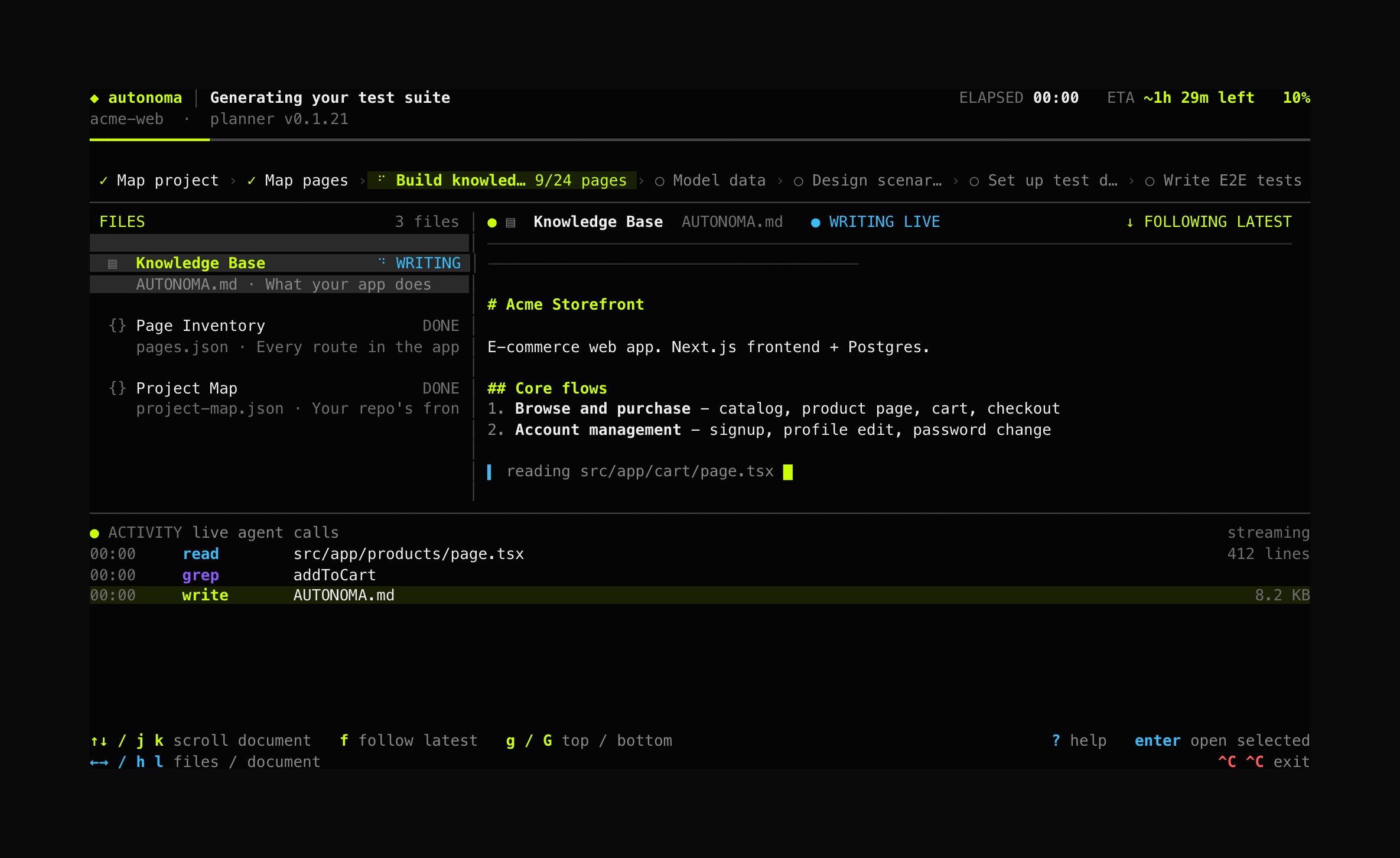
A full run takes a while, so on an interactive terminal the pipeline runs inside a live dashboard.
The steps run as a strip across the top, the files produced sit on the left, and the document being
written right now streams from disk on the right - so you can read the knowledge base, scenarios
and tests as they are produced. Navigate with arrows or `h/j/k/l`, `f` to follow the newest file,
`?` for help, Ctrl+C twice to exit with progress saved.
Piped output, CI and `--non-interactive` keep plain line-based output.
## Output
Artifacts are written to `~/.autonoma//` as they are produced:
```
~/.autonoma//
├── project-map.json # discovered frontends/backends + the scope chosen for this run
├── AUTONOMA.md # knowledge base
├── scenarios.md # test-data scenario descriptions
├── entity-audit.md # database model audit
├── recipe.json # scenario recipes; the coding agent generates and validates it
├── integration-prompt.md # rendered SDK-integration instructions
└── qa-tests/ # generated test cases (markdown)
├── INDEX.md # table of contents, written last from the files on disk
└── _invalid/ # tests that failed structural validation; never uploaded
```
When the run is attached to an Autonoma application it uploads these itself - there is no manual
upload step. Without credentials it just leaves them on disk.
## Environment variables
The command Autonoma gives you already carries these; the only one you set by hand is a token for
a standalone run.
| Variable | Required | Purpose |
| --- | --- | --- |
| `AUTONOMA_API_TOKEN` | yes | The run's credential. It runs on managed Autonoma credits through our LLM proxy, so no LLM key is needed. Create one under **Settings → API keys**. |
| `AUTONOMA_APPLICATION_ID` | no | The app this run belongs to. With it the run also sets up the preview environment and validates the result; without it the planner runs standalone against any repo. |
| `AUTONOMA_GENERATION_ID` | for upload | The setup its artifacts are uploaded against. |
| `AUTONOMA_SHARED_SECRET` | no | Signs the SDK and webhook requests the run makes on your behalf. |
| `AUTONOMA_API_URL` | no | Point at a non-production Autonoma. Defaults to production. |
| `AUTONOMA_DISTINCT_ID` | no | PostHog identity, so CLI events join the signup funnel. |
| `OPENROUTER_MODEL` | no | Override the default model (an OpenRouter-style id, forwarded by the proxy). |
| `DONT_TRACK` | no | `1`/`true` disables all telemetry - events, log shipping and session replay. |
| `AUTONOMA_DEBUG` | no | `1`/`true` prints diagnostic breadcrumbs to stderr **and** writes a full JSONL transcript to `~/.autonoma/debug/.jsonl`. |
| `AUTONOMA_DEBUG_FILE` | no | Write that transcript to this path instead, without the stderr noise. Independent of `DONT_TRACK` - it never leaves your machine. |
## Telemetry
Three lanes, all to PostHog, all off together with `DONT_TRACK=1` - one switch, no partial opt-out.
- **Events** - run and step lifecycle (`cli_run_started`, `cli_step_completed`, `$exception`).
- **Logs** - the run's narrative, shipped as OTLP records under the service name
`autonoma-planner`.
- **Session replay** - the dashboard itself, as rrweb events.
Events and logs carry **metadata only**: step names, agent and tool names, file paths, durations
and error messages. Model prose, prompts, and the contents of any file the agent read or wrote are
never sent.
**Session replay captures more, and it is worth being explicit.** A replay is a verbatim copy of
the dashboard, which renders repository paths and the contents of the files the run generates -
anything visible on screen is in the recording. Keystrokes are the exception: printable characters
are recorded as a placeholder, never the literal key, so the upload is not a transcript of your
keyboard.
## Development
```bash
pnpm install
pnpm dev # run from source (tsx)
pnpm build # bundle with tsup
pnpm typecheck
pnpm test
pnpm ui:gallery # step through every dashboard state with fixture data
```
See `docs/ui-design-brief.md` for the dashboard's design rationale.