A person is known by the company they keep.
Hint: hover over the word "person" above to show the tooltip. ## Features - :heavy_check_mark: Adaptable: use any Aristotle Metadata Registry! - :globe_with_meridians: IE11+ Support [*][ie11-support] : compatible with 99% of desktop and 98% of mobile users. - :mouse: Light: weighs just 60kb, including image assets. - :dog: Dogfooded: This library is used in our production Aristotle Registries. Updates guaranteed! ## Example 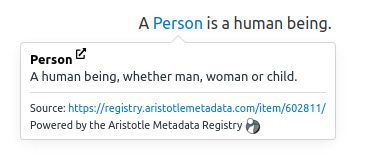 ## Quick Start ### Package Manager Install the aristotle-tooltip package: ```console frankie@aristotle:~$ npm i @aristotle-metadata-enterprises/aristotle_tooltip ``` In your application, import the `aristotle_tooltip` module, and the core css: ```javascript import aristotleTooltip from '@aristotle-metadata-enterprises/aristotle_tooltip' import 'aristotle_tooltip/dist/tooltip.css' ``` This assumes you're using a module bundler like Webpack, Rollup or Parcel. ### CDN ```html ``` Place the script at the very bottom of the ``. It must be placed before your own scripts, because of how the underlying Tippy.js library adds the tooltips. ### Usage To add a tooltip for a piece of content on your webpage: ```html A person is known by the company they keep ``` Custom styling for Aristotle links can set by applying CSS rules that target [*attribute decorators*](https://www.w3.org/TR/selectors/#attribute-selectors): ```css a[data-aristotle-concept-id] { border-bottom: 1px dotted #155799; } a[data-aristotle-concept-id]:hover { text-decoration: none; border-bottom: 1px solid #155799; } ``` ### Setup ```javascript let options = { 'url': 'https://registry.aristotlemetadata.com', 'definitionWords': 50, 'longDefinitionWords': 75, }; aristotleTooltip(options); ``` ## Options | Option | Default | Explanation | | ------------- |:-------------:| -----| | `url` | `registry.aristotlemetadata.com` | The URL of an Aristotle Metadata Registry | | `definitionWords` | 50 | The number of words to display in the initial popup | | `longDefinitionWords` | 75 | The number of words to display when 'see more..' is pressed | | `placement` | `bottom`| The positioning of the tooltip | | `trigger` | `mouseenter focus` | Events used to trigger the tooltip | | `externalLinkVisible` | `true` | Whether to display an external link icon next to the name of the metadata item | | `selector` | `document.body` | Element or css selector for creating tooltips under, tooltips not under this element will be ignored | | `interactive` | `true` | Whether interactive content such as links should be displayed | ## Setting up a Development Environment We're an open source project that welcomes any new contributions. To setup a development environment, simply fork the repo, clone it locally, and from within the `aristotle-tooltip` project, run: ```console oscar@aristotle:~$ npm install oscar@aristotle:~$ npm run build:dev ``` ## IE11 Compatibility A Promise polyfill is required for IE11 compatibility.`aristotle-tooltip` has been tested to work with [ES6 Promise](https://github.com/stefanpenner/es6-promise) ### ES6 Promise with a CDN ```html ``` [ie11-support]: #ie11-compatibility