import type Layer from "./Layer.js";
import type SceneModifications from "./support/SceneModifications.js";
import type PortalItem from "../portal/PortalItem.js";
import type ElevationInfo from "../symbols/support/ElevationInfo.js";
import type { ClonableMixin } from "../core/Clonable.js";
import type { MultiOriginJSONSupportMixin } from "../core/MultiOriginJSONSupport.js";
import type { APIKeyMixin, APIKeyMixinProperties } from "./mixins/APIKeyMixin.js";
import type { CustomParametersMixin, CustomParametersMixinProperties } from "./mixins/CustomParametersMixin.js";
import type { OperationalLayer, OperationalLayerProperties } from "./mixins/OperationalLayer.js";
import type { PortalLayer, PortalLayerProperties } from "./mixins/PortalLayer.js";
import type { ScaleRangeLayer, ScaleRangeLayerProperties } from "./mixins/ScaleRangeLayer.js";
import type { SceneService, SceneServiceProperties } from "./mixins/SceneService.js";
import type { SaveAsOptions } from "./scene/types.js";
import type { SceneModificationsItems } from "./support/SceneModifications.js";
import type { ElevationInfoProperties } from "../symbols/support/ElevationInfo.js";
import type { LayerProperties } from "./Layer.js";
export interface IntegratedMeshLayerProperties extends LayerProperties, APIKeyMixinProperties, CustomParametersMixinProperties, ScaleRangeLayerProperties, PortalLayerProperties, OperationalLayerProperties, SceneServiceProperties {
/**
* Specifies how the mesh is placed on the vertical axis (z). This property may only be used
* in a [SceneView](https://developers.arcgis.com/javascript/latest/references/core/views/SceneView/). See the [ElevationInfo sample](https://developers.arcgis.com/javascript/latest/sample-code/scene-elevationinfo/)
* for an example of how this property may be used.
* > [!WARNING]
* >
* > This property only affects [IntegratedMeshLayers](https://developers.arcgis.com/javascript/latest/references/core/layers/IntegratedMeshLayer/) when using the `absolute-height` mode.
* > [ElevationInfo.featureExpressionInfo](https://developers.arcgis.com/javascript/latest/references/core/symbols/support/ElevationInfo/#featureExpressionInfo) is not supported when the elevation info is specified for this class.
* > Integrated mesh 3D Tiles layers always render in front of the ground surface, so setting negative offset values will not render them below the ground.
* > If the elevation info is not specified, the effective elevation depends on the context and could vary per point.
*
* @since 4.5
*/
elevationInfo?: ElevationInfoProperties | null;
/**
* A [SceneModification](https://developers.arcgis.com/javascript/latest/references/core/layers/support/SceneModification/) collection used to apply client-side modifications to the layer.
* These modifications are not affected by the offset from [elevationInfo](https://developers.arcgis.com/javascript/latest/references/core/layers/IntegratedMeshLayer/#elevationInfo).
* Modifications are persisted when using [WebScene.save()](https://developers.arcgis.com/javascript/latest/references/core/WebScene/#save), which allows you to share the modified integrated
* mesh through web scenes. The following types of modifications can be applied to the integrated mesh:
*
* Illustration | Modification | Description
* ------|------------|--------
*  | clip - removes selected area | Clip-out portions of the integrated mesh to see features below. For example, utility work on gas or water lines in an area. Planners can create a scene in which the integrated mesh is clipped out at a site to expose the water or gas lines below it.
*
| clip - removes selected area | Clip-out portions of the integrated mesh to see features below. For example, utility work on gas or water lines in an area. Planners can create a scene in which the integrated mesh is clipped out at a site to expose the water or gas lines below it.
* 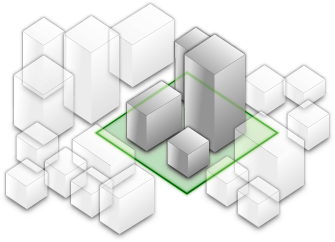 | mask - displays only selected area | Define an area of interest. Use a polygon and draw only parts of the integrated mesh inside that polygon. For example, if you want to show only a portion of an integrated mesh within the boundaries of a city.
*
| mask - displays only selected area | Define an area of interest. Use a polygon and draw only parts of the integrated mesh inside that polygon. For example, if you want to show only a portion of an integrated mesh within the boundaries of a city.
*  | replace - flattens selected area |Replace an area of an integrated mesh based on a 3D polygon. For example, to add constructed buildings, flatten the integrated mesh at the footprint of a building so the new building can be visualized. Create different scenarios of the new construction area and share the scenarios as a web scene to discuss with stakeholders. The integrated mesh flattens to the minimum z-vertex of the modification polygon.
*
* > [!WARNING]
* >
* > Scene modifications need to be in the same spatial reference as the layer they modify. Reprojection between WGS84
* > and WebMercator will be done automatically. Reprojection of the geometry to other spatial references can be done
* > with the [projectOperator](https://developers.arcgis.com/javascript/latest/references/core/geometry/operators/projectOperator/).
*
* @since 4.16
* @see [ArcGIS Pro - Modify an integrated mesh layer](https://pro.arcgis.com/en/pro-app/latest/help/mapping/layer-properties/modify-integrated-mesh-layer.htm)
* @see [Sample - Integrated mesh modification](https://developers.arcgis.com/javascript/latest/sample-code/layers-integratedmeshlayer-modification/)
* @see [SceneModifications](https://developers.arcgis.com/javascript/latest/references/core/layers/support/SceneModifications/)
* @see [SceneModification](https://developers.arcgis.com/javascript/latest/references/core/layers/support/SceneModification/)
* @example
* // create the IntegratedMeshLayer
* const layer = new IntegratedMeshLayer({ ... })
*
* // create a polygon
* const polygon = new Polygon({ ... });
*
* // create the modifications
* let modifications = new SceneModifications(
* [
* new SceneModification({geometry: polygon, type: 'replace'})
* ]);
*
* // add the modification to the IntegratedMesh
* layer.modifications = modifications;
*/
modifications?: SceneModificationsItems | null;
/**
* The title of the layer used to identify it in places such as the [LayerList](https://developers.arcgis.com/javascript/latest/references/core/widgets/LayerList/) widget.
*
* When loading a layer by service url, the title is derived from the service name.
* If the service has several layers, then the title of each layer will be the concatenation of the service name
* and the layer name.
* When the layer is loaded from a portal item, the title of the portal item will be used instead.
* Finally, if a layer is loaded as part of a webmap or a webscene, then the title of the layer as stored in the webmap/webscene will be used.
*/
title?: string | null;
}
/**
* The IntegratedMeshLayer is designed for visualizing accurate representations of built and natural environments in a
* [SceneView](https://developers.arcgis.com/javascript/latest/references/core/views/SceneView/).
*
* Integrated mesh data is typically captured by an automated process for constructing 3D objects from large sets of
* overlapping imagery. The result integrates the original input image information as a realistic textured mesh and can
* include elevation information and 3D objects, such as buildings and trees. Integrated mesh layers are generally
* created for citywide 3D mapping; they are often captured by drone and cannot be restyled.
*
* [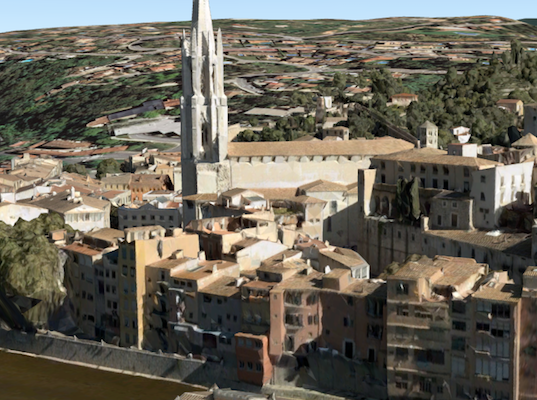](https://developers.arcgis.com/javascript/latest/sample-code/layers-integratedmeshlayer/)
*
* The Scene Service is identified by the URL of the ArcGIS Server REST resource:
*
* ```js
* const integratedMeshLayer = new IntegratedMeshLayer({
* url: "https://tiles.arcgis.com/tiles/u0sSNqDXr7puKJrF/arcgis/rest/services/Frankfurt2017_v17/SceneServer/layers/0"
* });
* ```
*
* If the service is requested from a different domain, a [CORS enabled server](https://developers.arcgis.com/javascript/latest/cors/) or a [proxy](https://developers.arcgis.com/javascript/latest/proxies/) is
* required.
*
* @since 4.1
* @see [Sample - IntegratedMeshLayer](https://developers.arcgis.com/javascript/latest/sample-code/layers-integratedmeshlayer/)
* @see [SceneLayer](https://developers.arcgis.com/javascript/latest/references/core/layers/SceneLayer/)
* @see [SceneView](https://developers.arcgis.com/javascript/latest/references/core/views/SceneView/)
* @see [Map](https://developers.arcgis.com/javascript/latest/references/core/Map/)
*/
export default class IntegratedMeshLayer extends IntegratedMeshLayerSuperclass {
constructor(properties?: IntegratedMeshLayerProperties);
/**
* Specifies how the mesh is placed on the vertical axis (z). This property may only be used
* in a [SceneView](https://developers.arcgis.com/javascript/latest/references/core/views/SceneView/). See the [ElevationInfo sample](https://developers.arcgis.com/javascript/latest/sample-code/scene-elevationinfo/)
* for an example of how this property may be used.
* > [!WARNING]
* >
* > This property only affects [IntegratedMeshLayers](https://developers.arcgis.com/javascript/latest/references/core/layers/IntegratedMeshLayer/) when using the `absolute-height` mode.
* > [ElevationInfo.featureExpressionInfo](https://developers.arcgis.com/javascript/latest/references/core/symbols/support/ElevationInfo/#featureExpressionInfo) is not supported when the elevation info is specified for this class.
* > Integrated mesh 3D Tiles layers always render in front of the ground surface, so setting negative offset values will not render them below the ground.
* > If the elevation info is not specified, the effective elevation depends on the context and could vary per point.
*
* @since 4.5
*/
get elevationInfo(): ElevationInfo | null | undefined;
set elevationInfo(value: ElevationInfoProperties | null | undefined);
/**
* A [SceneModification](https://developers.arcgis.com/javascript/latest/references/core/layers/support/SceneModification/) collection used to apply client-side modifications to the layer.
* These modifications are not affected by the offset from [elevationInfo](https://developers.arcgis.com/javascript/latest/references/core/layers/IntegratedMeshLayer/#elevationInfo).
* Modifications are persisted when using [WebScene.save()](https://developers.arcgis.com/javascript/latest/references/core/WebScene/#save), which allows you to share the modified integrated
* mesh through web scenes. The following types of modifications can be applied to the integrated mesh:
*
* Illustration | Modification | Description
* ------|------------|--------
* | clip - removes selected area | Clip-out portions of the integrated mesh to see features below. For example, utility work on gas or water lines in an area. Planners can create a scene in which the integrated mesh is clipped out at a site to expose the water or gas lines below it.
* | mask - displays only selected area | Define an area of interest. Use a polygon and draw only parts of the integrated mesh inside that polygon. For example, if you want to show only a portion of an integrated mesh within the boundaries of a city.
* | replace - flattens selected area |Replace an area of an integrated mesh based on a 3D polygon. For example, to add constructed buildings, flatten the integrated mesh at the footprint of a building so the new building can be visualized. Create different scenarios of the new construction area and share the scenarios as a web scene to discuss with stakeholders. The integrated mesh flattens to the minimum z-vertex of the modification polygon.
*
* > [!WARNING]
* >
* > Scene modifications need to be in the same spatial reference as the layer they modify. Reprojection between WGS84
* > and WebMercator will be done automatically. Reprojection of the geometry to other spatial references can be done
* > with the [projectOperator](https://developers.arcgis.com/javascript/latest/references/core/geometry/operators/projectOperator/).
*
* @since 4.16
* @see [ArcGIS Pro - Modify an integrated mesh layer](https://pro.arcgis.com/en/pro-app/latest/help/mapping/layer-properties/modify-integrated-mesh-layer.htm)
* @see [Sample - Integrated mesh modification](https://developers.arcgis.com/javascript/latest/sample-code/layers-integratedmeshlayer-modification/)
* @see [SceneModifications](https://developers.arcgis.com/javascript/latest/references/core/layers/support/SceneModifications/)
* @see [SceneModification](https://developers.arcgis.com/javascript/latest/references/core/layers/support/SceneModification/)
* @example
* // create the IntegratedMeshLayer
* const layer = new IntegratedMeshLayer({ ... })
*
* // create a polygon
* const polygon = new Polygon({ ... });
*
* // create the modifications
* let modifications = new SceneModifications(
* [
* new SceneModification({geometry: polygon, type: 'replace'})
* ]);
*
* // add the modification to the IntegratedMesh
* layer.modifications = modifications;
*/
get modifications(): SceneModifications | null | undefined;
set modifications(value: SceneModificationsItems | null | undefined);
/**
* The title of the layer used to identify it in places such as the [LayerList](https://developers.arcgis.com/javascript/latest/references/core/widgets/LayerList/) widget.
*
* When loading a layer by service url, the title is derived from the service name.
* If the service has several layers, then the title of each layer will be the concatenation of the service name
* and the layer name.
* When the layer is loaded from a portal item, the title of the portal item will be used instead.
* Finally, if a layer is loaded as part of a webmap or a webscene, then the title of the layer as stored in the webmap/webscene will be used.
*/
accessor title: string | null | undefined;
/** The layer type provides a convenient way to check the type of the layer without the need to import specific layer modules. */
get type(): "integrated-mesh";
/**
* Saves the layer to its existing portal item in the [Portal](https://developers.arcgis.com/javascript/latest/references/core/portal/Portal/)
* authenticated within the user's current session. If the layer is not saved to a
* [PortalItem](https://developers.arcgis.com/javascript/latest/references/core/portal/PortalItem/), then you should use [saveAs()](https://developers.arcgis.com/javascript/latest/references/core/layers/IntegratedMeshLayer/#saveAs).
*
* @returns When resolved, returns the portal item to which the layer is saved.
* @since 4.31
* @see [saveAs()](https://developers.arcgis.com/javascript/latest/references/core/layers/IntegratedMeshLayer/#saveAs)
* @example const portalItem = await layer.save();
*/
save(): Promise;
/**
* Saves the layer to a new portal item in the [Portal](https://developers.arcgis.com/javascript/latest/references/core/portal/Portal/) authenticated within the user's current session.
*
* @param portalItem - The portal item to which the layer will be saved.
* @param options - additional save options
* @returns When resolved, returns the portal item to which the layer is saved.
* @since 4.31
* @see [save()](https://developers.arcgis.com/javascript/latest/references/core/layers/IntegratedMeshLayer/#save)
* @example
* const portalItem = new PortalItem();
* await layer.saveAs(portalItem);
*/
saveAs(portalItem: PortalItem, options?: SaveAsOptions): Promise;
}
declare const IntegratedMeshLayerSuperclass: typeof Layer & typeof ClonableMixin & typeof APIKeyMixin & typeof CustomParametersMixin & typeof MultiOriginJSONSupportMixin & typeof ScaleRangeLayer & typeof PortalLayer & typeof OperationalLayer & typeof SceneService
| replace - flattens selected area |Replace an area of an integrated mesh based on a 3D polygon. For example, to add constructed buildings, flatten the integrated mesh at the footprint of a building so the new building can be visualized. Create different scenarios of the new construction area and share the scenarios as a web scene to discuss with stakeholders. The integrated mesh flattens to the minimum z-vertex of the modification polygon.
*
* > [!WARNING]
* >
* > Scene modifications need to be in the same spatial reference as the layer they modify. Reprojection between WGS84
* > and WebMercator will be done automatically. Reprojection of the geometry to other spatial references can be done
* > with the [projectOperator](https://developers.arcgis.com/javascript/latest/references/core/geometry/operators/projectOperator/).
*
* @since 4.16
* @see [ArcGIS Pro - Modify an integrated mesh layer](https://pro.arcgis.com/en/pro-app/latest/help/mapping/layer-properties/modify-integrated-mesh-layer.htm)
* @see [Sample - Integrated mesh modification](https://developers.arcgis.com/javascript/latest/sample-code/layers-integratedmeshlayer-modification/)
* @see [SceneModifications](https://developers.arcgis.com/javascript/latest/references/core/layers/support/SceneModifications/)
* @see [SceneModification](https://developers.arcgis.com/javascript/latest/references/core/layers/support/SceneModification/)
* @example
* // create the IntegratedMeshLayer
* const layer = new IntegratedMeshLayer({ ... })
*
* // create a polygon
* const polygon = new Polygon({ ... });
*
* // create the modifications
* let modifications = new SceneModifications(
* [
* new SceneModification({geometry: polygon, type: 'replace'})
* ]);
*
* // add the modification to the IntegratedMesh
* layer.modifications = modifications;
*/
modifications?: SceneModificationsItems | null;
/**
* The title of the layer used to identify it in places such as the [LayerList](https://developers.arcgis.com/javascript/latest/references/core/widgets/LayerList/) widget.
*
* When loading a layer by service url, the title is derived from the service name.
* If the service has several layers, then the title of each layer will be the concatenation of the service name
* and the layer name.
* When the layer is loaded from a portal item, the title of the portal item will be used instead.
* Finally, if a layer is loaded as part of a webmap or a webscene, then the title of the layer as stored in the webmap/webscene will be used.
*/
title?: string | null;
}
/**
* The IntegratedMeshLayer is designed for visualizing accurate representations of built and natural environments in a
* [SceneView](https://developers.arcgis.com/javascript/latest/references/core/views/SceneView/).
*
* Integrated mesh data is typically captured by an automated process for constructing 3D objects from large sets of
* overlapping imagery. The result integrates the original input image information as a realistic textured mesh and can
* include elevation information and 3D objects, such as buildings and trees. Integrated mesh layers are generally
* created for citywide 3D mapping; they are often captured by drone and cannot be restyled.
*
* [](https://developers.arcgis.com/javascript/latest/sample-code/layers-integratedmeshlayer/)
*
* The Scene Service is identified by the URL of the ArcGIS Server REST resource:
*
* ```js
* const integratedMeshLayer = new IntegratedMeshLayer({
* url: "https://tiles.arcgis.com/tiles/u0sSNqDXr7puKJrF/arcgis/rest/services/Frankfurt2017_v17/SceneServer/layers/0"
* });
* ```
*
* If the service is requested from a different domain, a [CORS enabled server](https://developers.arcgis.com/javascript/latest/cors/) or a [proxy](https://developers.arcgis.com/javascript/latest/proxies/) is
* required.
*
* @since 4.1
* @see [Sample - IntegratedMeshLayer](https://developers.arcgis.com/javascript/latest/sample-code/layers-integratedmeshlayer/)
* @see [SceneLayer](https://developers.arcgis.com/javascript/latest/references/core/layers/SceneLayer/)
* @see [SceneView](https://developers.arcgis.com/javascript/latest/references/core/views/SceneView/)
* @see [Map](https://developers.arcgis.com/javascript/latest/references/core/Map/)
*/
export default class IntegratedMeshLayer extends IntegratedMeshLayerSuperclass {
constructor(properties?: IntegratedMeshLayerProperties);
/**
* Specifies how the mesh is placed on the vertical axis (z). This property may only be used
* in a [SceneView](https://developers.arcgis.com/javascript/latest/references/core/views/SceneView/). See the [ElevationInfo sample](https://developers.arcgis.com/javascript/latest/sample-code/scene-elevationinfo/)
* for an example of how this property may be used.
* > [!WARNING]
* >
* > This property only affects [IntegratedMeshLayers](https://developers.arcgis.com/javascript/latest/references/core/layers/IntegratedMeshLayer/) when using the `absolute-height` mode.
* > [ElevationInfo.featureExpressionInfo](https://developers.arcgis.com/javascript/latest/references/core/symbols/support/ElevationInfo/#featureExpressionInfo) is not supported when the elevation info is specified for this class.
* > Integrated mesh 3D Tiles layers always render in front of the ground surface, so setting negative offset values will not render them below the ground.
* > If the elevation info is not specified, the effective elevation depends on the context and could vary per point.
*
* @since 4.5
*/
get elevationInfo(): ElevationInfo | null | undefined;
set elevationInfo(value: ElevationInfoProperties | null | undefined);
/**
* A [SceneModification](https://developers.arcgis.com/javascript/latest/references/core/layers/support/SceneModification/) collection used to apply client-side modifications to the layer.
* These modifications are not affected by the offset from [elevationInfo](https://developers.arcgis.com/javascript/latest/references/core/layers/IntegratedMeshLayer/#elevationInfo).
* Modifications are persisted when using [WebScene.save()](https://developers.arcgis.com/javascript/latest/references/core/WebScene/#save), which allows you to share the modified integrated
* mesh through web scenes. The following types of modifications can be applied to the integrated mesh:
*
* Illustration | Modification | Description
* ------|------------|--------
* | clip - removes selected area | Clip-out portions of the integrated mesh to see features below. For example, utility work on gas or water lines in an area. Planners can create a scene in which the integrated mesh is clipped out at a site to expose the water or gas lines below it.
* | mask - displays only selected area | Define an area of interest. Use a polygon and draw only parts of the integrated mesh inside that polygon. For example, if you want to show only a portion of an integrated mesh within the boundaries of a city.
* | replace - flattens selected area |Replace an area of an integrated mesh based on a 3D polygon. For example, to add constructed buildings, flatten the integrated mesh at the footprint of a building so the new building can be visualized. Create different scenarios of the new construction area and share the scenarios as a web scene to discuss with stakeholders. The integrated mesh flattens to the minimum z-vertex of the modification polygon.
*
* > [!WARNING]
* >
* > Scene modifications need to be in the same spatial reference as the layer they modify. Reprojection between WGS84
* > and WebMercator will be done automatically. Reprojection of the geometry to other spatial references can be done
* > with the [projectOperator](https://developers.arcgis.com/javascript/latest/references/core/geometry/operators/projectOperator/).
*
* @since 4.16
* @see [ArcGIS Pro - Modify an integrated mesh layer](https://pro.arcgis.com/en/pro-app/latest/help/mapping/layer-properties/modify-integrated-mesh-layer.htm)
* @see [Sample - Integrated mesh modification](https://developers.arcgis.com/javascript/latest/sample-code/layers-integratedmeshlayer-modification/)
* @see [SceneModifications](https://developers.arcgis.com/javascript/latest/references/core/layers/support/SceneModifications/)
* @see [SceneModification](https://developers.arcgis.com/javascript/latest/references/core/layers/support/SceneModification/)
* @example
* // create the IntegratedMeshLayer
* const layer = new IntegratedMeshLayer({ ... })
*
* // create a polygon
* const polygon = new Polygon({ ... });
*
* // create the modifications
* let modifications = new SceneModifications(
* [
* new SceneModification({geometry: polygon, type: 'replace'})
* ]);
*
* // add the modification to the IntegratedMesh
* layer.modifications = modifications;
*/
get modifications(): SceneModifications | null | undefined;
set modifications(value: SceneModificationsItems | null | undefined);
/**
* The title of the layer used to identify it in places such as the [LayerList](https://developers.arcgis.com/javascript/latest/references/core/widgets/LayerList/) widget.
*
* When loading a layer by service url, the title is derived from the service name.
* If the service has several layers, then the title of each layer will be the concatenation of the service name
* and the layer name.
* When the layer is loaded from a portal item, the title of the portal item will be used instead.
* Finally, if a layer is loaded as part of a webmap or a webscene, then the title of the layer as stored in the webmap/webscene will be used.
*/
accessor title: string | null | undefined;
/** The layer type provides a convenient way to check the type of the layer without the need to import specific layer modules. */
get type(): "integrated-mesh";
/**
* Saves the layer to its existing portal item in the [Portal](https://developers.arcgis.com/javascript/latest/references/core/portal/Portal/)
* authenticated within the user's current session. If the layer is not saved to a
* [PortalItem](https://developers.arcgis.com/javascript/latest/references/core/portal/PortalItem/), then you should use [saveAs()](https://developers.arcgis.com/javascript/latest/references/core/layers/IntegratedMeshLayer/#saveAs).
*
* @returns When resolved, returns the portal item to which the layer is saved.
* @since 4.31
* @see [saveAs()](https://developers.arcgis.com/javascript/latest/references/core/layers/IntegratedMeshLayer/#saveAs)
* @example const portalItem = await layer.save();
*/
save(): Promise;
/**
* Saves the layer to a new portal item in the [Portal](https://developers.arcgis.com/javascript/latest/references/core/portal/Portal/) authenticated within the user's current session.
*
* @param portalItem - The portal item to which the layer will be saved.
* @param options - additional save options
* @returns When resolved, returns the portal item to which the layer is saved.
* @since 4.31
* @see [save()](https://developers.arcgis.com/javascript/latest/references/core/layers/IntegratedMeshLayer/#save)
* @example
* const portalItem = new PortalItem();
* await layer.saveAs(portalItem);
*/
saveAs(portalItem: PortalItem, options?: SaveAsOptions): Promise;
}
declare const IntegratedMeshLayerSuperclass: typeof Layer & typeof ClonableMixin & typeof APIKeyMixin & typeof CustomParametersMixin & typeof MultiOriginJSONSupportMixin & typeof ScaleRangeLayer & typeof PortalLayer & typeof OperationalLayer & typeof SceneService