# @antv/g-device-api
This is a set of Device API also known as the hardware adaptation layer(HAL).
It is implemented using WebGL1/2 & WebGPU underneath and inspired by [noclip](https://github.com/magcius/noclip.website).
[](https://github.com/antvis/g-device-api/actions/workflows/build.yml)
[](https://coveralls.io/github/antvis/g-device-api?branch=master)
[](https://www.npmjs.com/package/@antv/g-device-api)
[](https://www.npmjs.com/package/@antv/g-device-api)
[](https://www.npmjs.com/package/@antv/g-device-api)
- [API](#api)
- [Shader Language](#shader-language)
- [Observable Examples](https://observablehq.com/@antv/g-device-api)
- [Compute Toys](https://observablehq.com/d/0361c83b691a32b5)
- [Limitations](#limitations)
Now we use it in the following projects:
- [g-webgl](https://github.com/antvis/G) & [g-webgpu](https://github.com/antvis/G) Used in G2 & G6 3D plots.
- [L7](https://github.com/antvis/L7) Large-scale WebGL-powered Geospatial Data Visualization analysis engine.
- [A8](https://github.com/antvis/A8) An audio visualizer.
- [renderer](https://github.com/xiaoiver/renderer) A toy renderer inspired by bevy.
## Installing
```bash
npm install @antv/g-device-api
```
## API Reference
- [Create a device](#createDevice)
- Resource Creation
- [createBuffer](#createBuffer)
- [createTexture](#createTexture)
- [createSampler](#createSampler)
- [createRenderTarget](#createRenderTarget)
- [createRenderTargetFromTexture](#createRenderTargetFromTexture)
- [createProgram](#createProgram)
- [createBindings](#createBindings)
- [createInputLayout](#createInputLayout)
- [createRenderPipeline](#createRenderPipeline)
- [createComputePipeline](#createComputePipeline)
- [createReadback](#createReadback)
- [createQueryPool](#createQueryPool)
- [createRenderPass](#createRenderPass)
- [createComputePass](#createComputePass)
- [createRenderBundle](#createRenderBundle)
- Submit
- [beignFrame](#beginFrame)
- [submitPass](#submitPass)
- [endFrame](#endFrame)
- [copySubTexture2D](#copySubTexture2D)
- Query
- [queryLimits](#queryLimits)
- [queryTextureFormatSupported](#queryTextureFormatSupported)
- [queryPlatformAvailable](#queryPlatformAvailable)
- [queryVendorInfo](#queryVendorInfo)
- Debug
- [setResourceName](#setResourceName)
- [checkForLeaks](#checkForLeaks)
- [pushDebugGroup](#pushDebugGroup)
- [popDebugGroup](#popDebugGroup)
- GPU Resources
- [Buffer](#buffer)
- [setSubData](#setSubData)
- [Texture](#texture)
- [setImageData](#setImageData)
- [Sampler](#sampler)
- [RenderTarget](#renderTarget)
- [RenderPass](#renderPass)
- [setViewport](#setViewport)
- [setScissorRect](#setScissorRect)
- [setPipeline](#setPipeline)
- [setBindings](#setBindings)
- [setVertexInput](#setVertexInput)
- [setStencilReference](#setStencilReference)
- [draw](#draw)
- [drawIndexed](#drawIndexed)
- [drawIndirect](#drawIndirect)
- [drawIndexedIndirect](#drawIndexedIndirect)
- [beginOcclusionQuery](#beginOcclusionQuery)
- [endOcclusionQuery](#endOcclusionQuery)
- [beginBundle](#beginBundle)
- [endBundle](#endBundle)
- [executeBundles](#executeBundles)
- [ComputePass](#computePass)
- [setPipeline](#setPipeline)
- [setBindings](#setBindings)
- [dispatchWorkgroups](#dispatchWorkgroups)
- [dispatchWorkgroupsIndirect](#dispatchWorkgroupsIndirect)
- Program
- [setUniformsLegacy](#setUniformsLegacy)
- QueryPool
- queryResultOcclusion
- [Readback](#readback)
- [readTexture](#readTexture)
- [readTextureSync](#readTextureSync)
- [readBuffer](#readBuffer)
### Create Device
A device is the logical instantiation of GPU.
```js
import {
Device,
BufferUsage,
WebGLDeviceContribution,
WebGPUDeviceContribution,
} from '@antv/g-device-api';
// Create a WebGL based device contribution.
const deviceContribution = new WebGLDeviceContribution({
targets: ['webgl2', 'webgl1'],
});
// Or create a WebGPU based device contribution.
const deviceContribution = new WebGPUDeviceContribution({
shaderCompilerPath: '/glsl_wgsl_compiler_bg.wasm',
// shaderCompilerPath:
// 'https://unpkg.com/@antv/g-device-api@1.4.9/rust/pkg/glsl_wgsl_compiler_bg.wasm',
});
const swapChain = await deviceContribution.createSwapChain($canvas);
swapChain.configureSwapChain(width, height);
const device = swapChain.getDevice();
```
### createBuffer
A [Buffer](#buffer) represents a block of memory that can be used in GPU operations. Data is stored in linear layout.
We references the [WebGPU design](https://www.w3.org/TR/webgpu/#dom-gpudevice-createbuffer):
```ts
createBuffer: (descriptor: BufferDescriptor) => Buffer;
```
The parameters are as follows, references the [WebGPU design](https://www.w3.org/TR/webgpu/#GPUBufferDescriptor):
- viewOrSize `required` Set buffer data directly or allocate fixed length(in bytes).
- usage `required` The allowed usage for this buffer.
- hint `optional` Known as hint when calling [bufferData](https://developer.mozilla.org/en-US/docs/Web/API/WebGLRenderingContext/bufferData#usage) in WebGL.
```ts
interface BufferDescriptor {
viewOrSize: ArrayBufferView | number;
usage: BufferUsage;
hint?: BufferFrequencyHint;
}
```
We can set buffer data directly, or allocate fixed length for later use e.g. calling [setSubData](#setSubData):
```ts
const buffer = device.createBuffer({
viewOrSize: new Float32Array([1, 2, 3, 4]),
usage: BufferUsage.VERTEX,
});
// or
const buffer = device.createBuffer({
viewOrSize: 4 * Float32Array.BYTES_PER_ELEMENT, // in bytes
usage: BufferUsage.VERTEX,
});
buffer.setSubData(0, new Uint8Array(new Float32Array([1, 2, 3, 4]).buffer));
```
The allowed [usage](https://www.w3.org/TR/webgpu/#dom-gpubuffer-usage) for buffer.
They can also be composited like `BufferUsage.VERTEX | BufferUsage.STORAGE`.
```ts
enum BufferUsage {
MAP_READ = 0x0001,
MAP_WRITE = 0x0002,
COPY_SRC = 0x0004,
COPY_DST = 0x0008,
INDEX = 0x0010,
VERTEX = 0x0020,
UNIFORM = 0x0040,
STORAGE = 0x0080,
INDIRECT = 0x0100,
QUERY_RESOLVE = 0x0200,
}
```
This param is called [usage](https://developer.mozilla.org/en-US/docs/Web/API/WebGLRenderingContext/bufferData#usage) in WebGL. We change its name to `hint` avoiding duplicate naming.
```ts
enum BufferFrequencyHint {
Static = 0x01,
Dynamic = 0x02,
}
```
### createTexture
This method references the [WebGPU design](https://developer.mozilla.org/en-US/docs/Web/API/GPUDevice/createTexture) to create a [Texture](#texture):
```ts
createTexture: (descriptor: TextureDescriptor) => Texture;
```
The parameters are as follows, references the [WebGPU design](https://www.w3.org/TR/webgpu/#GPUBufferDescriptor):
```ts
interface TextureDescriptor {
usage: TextureUsage;
format: Format;
width: number;
height: number;
depthOrArrayLayers?: number;
dimension?: TextureDimension;
mipLevelCount?: number;
pixelStore?: Partial<{
packAlignment: number;
unpackAlignment: number;
unpackFlipY: boolean;
}>;
}
```
- usage `required` The allowed usages for this GPUTexture.
- format `required` The format of this GPUTexture.
- width `required` The width of this GPUTexture.
- height `required` The height of this GPUTexture.
- depthOrArrayLayers `optional` The depth or layer count of this GPUTexture. Defaulting to `1`.
- dimension `optional` The dimension of the set of texel for each of this GPUTexture's subresources. Defaulting to `TextureDimension.TEXTURE_2D`
- mipLevelCount `optional` The number of mip levels of this GPUTexture. Defaulting to `1`.
- pixelStore `optional` Specifies the [pixel storage modes](https://developer.mozilla.org/en-US/docs/Web/API/WebGLRenderingContext/pixelStorei) in WebGL.
- packAlignment Packing of pixel data into memory. `gl.PACK_ALIGNMENT`
- unpackAlignment Unpacking of pixel data from memory. `gl.UNPACK_ALIGNMENT`
- unpackFlipY Flips the source data along its vertical axis if true. `gl.UNPACK_FLIP_Y_WEBGL`
The `TextureUsage` enum is as follows:
```ts
enum TextureUsage {
SAMPLED,
RENDER_TARGET, // When rendering to texture, choose this usage.
}
```
The `TextureDimension` enum is as follows:
```ts
enum TextureDimension {
TEXTURE_2D,
TEXTURE_2D_ARRAY,
TEXTURE_3D,
TEXTURE_CUBE_MAP,
}
```
### createSampler
[Samplers](#sampler) are created via `createSampler()`.
```ts
createSampler: (descriptor: SamplerDescriptor) => Sampler;
```
The params reference [GPUSamplerDescriptor](https://www.w3.org/TR/webgpu/#dictdef-gpusamplerdescriptor).
```ts
interface SamplerDescriptor {
addressModeU: AddressMode;
addressModeV: AddressMode;
addressModeW?: AddressMode;
minFilter: FilterMode;
magFilter: FilterMode;
mipmapFilter: MipmapFilterMode;
lodMinClamp?: number;
lodMaxClamp?: number;
maxAnisotropy?: number;
compareFunction?: CompareFunction;
}
```
`AddressMode` describes the behavior of the sampler if the sample footprint extends beyond the bounds of the sampled texture.
```ts
enum AddressMode {
CLAMP_TO_EDGE,
REPEAT,
MIRRORED_REPEAT,
}
```
`FilterMode` and `MipmapFilterMode` describe the behavior of the sampler if the sample footprint does not exactly match one texel.
```ts
enum FilterMode {
POINT,
BILINEAR,
}
enum MipmapFilterMode {
NO_MIP,
NEAREST,
LINEAR,
}
```
`CompareFunction` specifies the behavior of a comparison sampler. If a comparison sampler is used in a shader, an input value is compared to the sampled texture value, and the result of this comparison test (0.0f for pass, or 1.0f for fail) is used in the filtering operation.
```ts
enum CompareFunction {
NEVER = GL.NEVER,
LESS = GL.LESS,
EQUAL = GL.EQUAL,
LEQUAL = GL.LEQUAL,
GREATER = GL.GREATER,
NOTEQUAL = GL.NOTEQUAL,
GEQUAL = GL.GEQUAL,
ALWAYS = GL.ALWAYS,
}
```
### createRenderTarget
```ts
createRenderTarget: (descriptor: RenderTargetDescriptor) => RenderTarget;
```
```ts
interface RenderTargetDescriptor {
format: Format;
width: number;
height: number;
sampleCount: number;
texture?: Texture;
}
```
### createRenderTargetFromTexture
```ts
createRenderTargetFromTexture: (texture: Texture) => RenderTarget;
```
### createProgram
```ts
createProgram: (program: ProgramDescriptor) => Program;
```
`wgsl` will be used directly in WebGPU while `glsl` will be compiled internally.
Since WebGL doesn't support compute shader, `compute` is only available in WebGPU.
```ts
interface ProgramDescriptor {
vertex?: {
glsl?: string;
wgsl?: string;
};
fragment?: {
glsl?: string;
wgsl?: string;
};
compute?: {
wgsl: string;
};
}
```
### createBindings
```ts
createBindings: (bindingsDescriptor: BindingsDescriptor) => Bindings;
```
```ts
interface BindingsDescriptor {
bindingLayout: BindingLayoutDescriptor;
pipeline?: RenderPipeline | ComputePipeline;
uniformBufferBindings?: BufferBinding[];
samplerBindings?: SamplerBinding[];
storageBufferBindings?: BufferBinding[];
storageTextureBindings?: TextureBinding[];
}
```
`BufferBinding` has the following properties:
- binding `required` Should match the `binding` in shader.
- buffer `required`
- offset `optional` The offset, in bytes, from the beginning of buffer to the beginning of the range exposed to the shader by the buffer binding. Defaulting to `0`.
- size `optional` The size, in bytes, of the buffer binding. If not provided, specifies the range starting at offset and ending at the end of buffer.
```ts
interface BufferBinding {
binding: number;
buffer: Buffer;
offset?: number;
size?: number;
}
```
### createInputLayout
`InputLayout` defines the layout of vertex attribute data in a vertex buffer used by pipeline.
```ts
createInputLayout: (inputLayoutDescriptor: InputLayoutDescriptor) =>
InputLayout;
```
A vertex buffer is, conceptually, a view into buffer memory as an array of structures. `arrayStride` is the stride, in bytes, between elements of that array. Each element of a vertex buffer is like a structure with a memory layout defined by its attributes, which describe the members of the structure.
```ts
interface InputLayoutDescriptor {
vertexBufferDescriptors: (InputLayoutBufferDescriptor | null)[];
indexBufferFormat: Format | null;
program: Program;
}
interface InputLayoutBufferDescriptor {
arrayStride: number; // in bytes
stepMode: VertexStepMode; // per vertex or instance
attributes: VertexAttributeDescriptor[];
}
interface VertexAttributeDescriptor {
shaderLocation: number;
format: Format;
offset: number;
divisor?: number;
}
```
- shaderLocation `required` The numeric location associated with this attribute, which will correspond with a "@location" attribute declared in the vertex.module.
- format `required` The VertexFormat of the attribute.
- offset `required` The offset, in bytes, from the beginning of the element to the data for the attribute.
- divisor `optional`
### createReadback
Create a Readback to read GPU resouce's data from CPU side:
```ts
createReadback: () => Readback;
```
```ts
readBuffer: (
b: Buffer,
srcByteOffset?: number,
dst?: ArrayBufferView,
dstOffset?: number,
length?: number,
) => Promise;
```
```ts
const readback = device.createReadback();
readback.readBuffer(buffer);
```
### createQueryPool
Only WebGL 2 & WebGPU support:
```ts
createQueryPool: (type: QueryPoolType, elemCount: number) => QueryPool;
```
```ts
queryResultOcclusion(dstOffs: number): boolean | null
```
### createRenderPipeline
A `RenderPipeline` is a kind of pipeline that controls the vertex and fragment shader stages.
```ts
createRenderPipeline: (descriptor: RenderPipelineDescriptor) => RenderPipeline;
```
The descriptor is as follows:
- colorAttachmentFormats `required` The formats of color attachment.
- topology `optional` The type of primitive to be constructed from the vertex inputs. Defaulting to `TRIANGLES`:
- megaStateDescriptor `optional`
- depthStencilAttachmentFormat `optional` The format of depth & stencil attachment.
- sampleCount `optional` Used in MSAA, defaulting to `1`.
```ts
interface RenderPipelineDescriptor extends PipelineDescriptor {
topology?: PrimitiveTopology;
megaStateDescriptor?: MegaStateDescriptor;
colorAttachmentFormats: (Format | null)[];
depthStencilAttachmentFormat?: Format | null;
sampleCount?: number;
}
```
```ts
enum PrimitiveTopology {
POINTS,
TRIANGLES,
TRIANGLE_STRIP,
LINES,
LINE_STRIP,
}
```
```ts
interface MegaStateDescriptor {
attachmentsState: AttachmentState[];
blendConstant?: Color;
depthCompare?: CompareFunction;
depthWrite?: boolean;
stencilFront?: Partial;
stencilBack?: Partial;
stencilWrite?: boolean;
cullMode?: CullMode;
frontFace?: FrontFace;
polygonOffset?: boolean;
polygonOffsetFactor?: number;
polygonOffsetUnits?: number;
}
```
### createComputePipeline
```ts
createComputePipeline: (descriptor: ComputePipelineDescriptor) =>
ComputePipeline;
```
```ts
type ComputePipelineDescriptor = PipelineDescriptor;
interface PipelineDescriptor {
bindingLayouts: BindingLayoutDescriptor[];
inputLayout: InputLayout | null;
program: Program;
}
```
### createRenderPass
A RenderPass is usually created at the beginning of each frame.
```ts
createRenderPass: (renderPassDescriptor: RenderPassDescriptor) => RenderPass;
```
```ts
export interface RenderPassDescriptor {
colorAttachment: (RenderTarget | null)[];
colorAttachmentLevel?: number[];
colorClearColor?: (Color | 'load')[];
colorResolveTo: (Texture | null)[];
colorResolveToLevel?: number[];
colorStore?: boolean[];
depthStencilAttachment?: RenderTarget | null;
depthStencilResolveTo?: Texture | null;
depthStencilStore?: boolean;
depthClearValue?: number | 'load';
stencilClearValue?: number | 'load';
occlusionQueryPool?: QueryPool | null;
}
```
### createComputePass
⚠️Only WebGPU support.
```ts
createComputePass: () => ComputePass;
```
### createRenderBundle
RenderBundle can record the draw calls during one frame and replay this recording for all subsequent frames.
```ts
const renderBundle = device.createRenderBundle();
// On each frame.
if (frameCount === 0) {
renderPass.beginBundle(renderBundle);
// Omit other renderpass commands
renderPass.endBundle();
} else {
renderPass.executeBundles([renderBundle]);
}
```
### beginFrame
Should call this method at the beginning of each frame.
```ts
device.beginFrame();
const renderPass = device.createRenderPass({});
// Omit other commands.
renderPass.draw();
device.submitPass(renderPass);
device.endFrame();
```
### submitPass
Schedules the execution of the command buffers by the GPU on this queue.
```ts
submitPass(o: RenderPass | ComputePass): void;
```
### endFrame
Should call this method at the end of each frame.
### copySubTexture2D
```ts
copySubTexture2D: (
dst: Texture,
dstX: number,
dstY: number,
src: Texture,
srcX: number,
srcY: number,
depthOrArrayLayers?: number,
) => void;
```
- ⚠️WebGL 1 not supported
- WebGL 2 uses [blitFramebuffer](https://developer.mozilla.org/en-US/docs/Web/API/WebGL2RenderingContext/blitFramebuffer)
- WebGPU uses [copyTextureToTexture](https://developer.mozilla.org/en-US/docs/Web/API/GPUCommandEncoder/copyTextureToTexture)
### queryLimits
```ts
// @see https://www.w3.org/TR/webgpu/#gpusupportedlimits
queryLimits: () => DeviceLimits;
```
```ts
interface DeviceLimits {
uniformBufferWordAlignment: number;
uniformBufferMaxPageWordSize: number;
supportedSampleCounts: number[];
occlusionQueriesRecommended: boolean;
computeShadersSupported: boolean;
}
```
### queryPlatformAvailable
Query whether device's context is already lost:
```ts
queryPlatformAvailable(): boolean
```
WebGL / WebGPU will trigger Lost event:
```ts
device.queryPlatformAvailable(); // false
```
### queryTextureFormatSupported
```ts
queryTextureFormatSupported(format: Format, width: number, height: number): boolean;
```
```ts
const shadowsSupported = device.queryTextureFormatSupported(
Format.U16_RG_NORM,
0,
0,
);
```
### queryVendorInfo
WebGL 1/2 & WebGPU use different origin:
```ts
queryVendorInfo: () => VendorInfo;
```
```ts
interface VendorInfo {
readonly platformString: string;
readonly glslVersion: string;
readonly explicitBindingLocations: boolean;
readonly separateSamplerTextures: boolean;
readonly viewportOrigin: ViewportOrigin;
readonly clipSpaceNearZ: ClipSpaceNearZ;
readonly supportMRT: boolean;
}
```
### setResourceName
When using Spector.js to debug our application, we can set a name to relative GPU resource.
```ts
setResourceName: (o: Resource, s: string) => void;
```
For instance, we add a label for RT and Spector.js will show us the metadata:
```ts
device.setResourceName(renderTarget, 'Main Render Target');
```
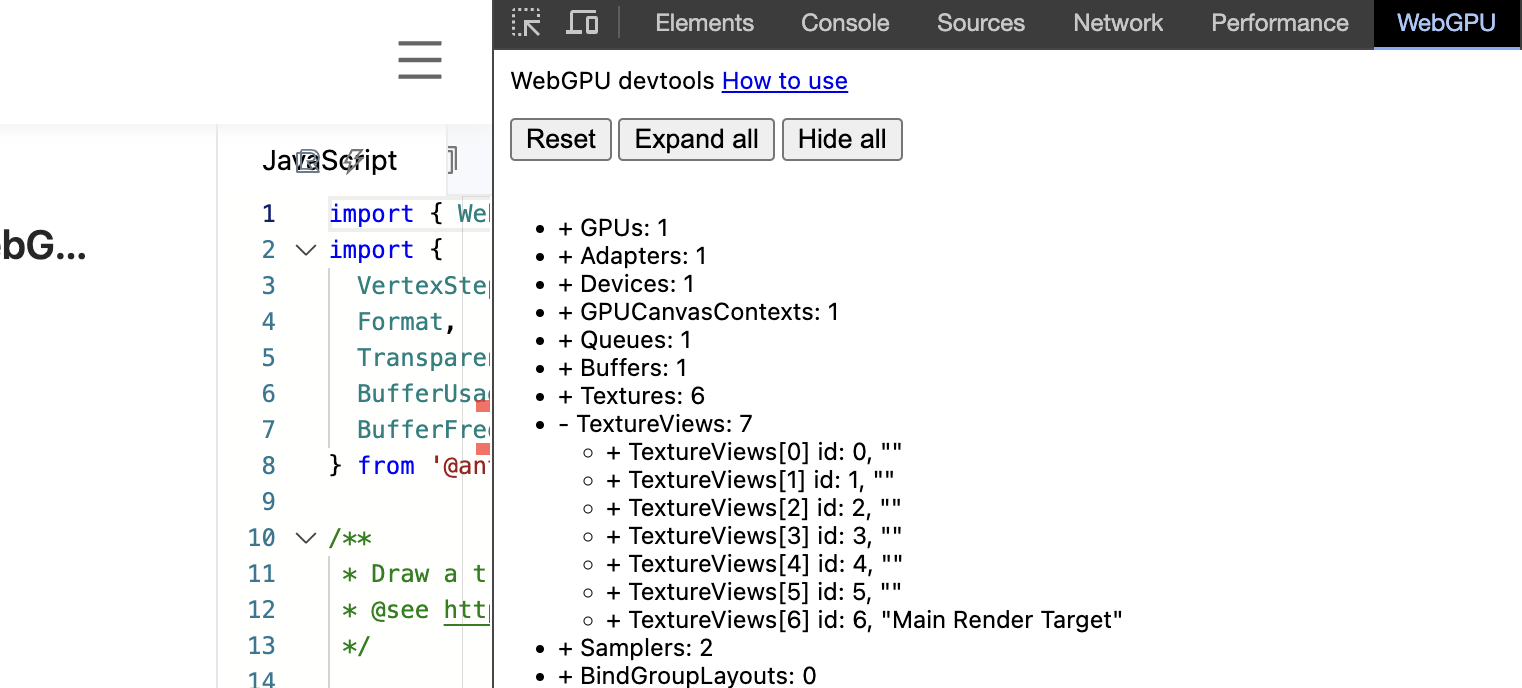
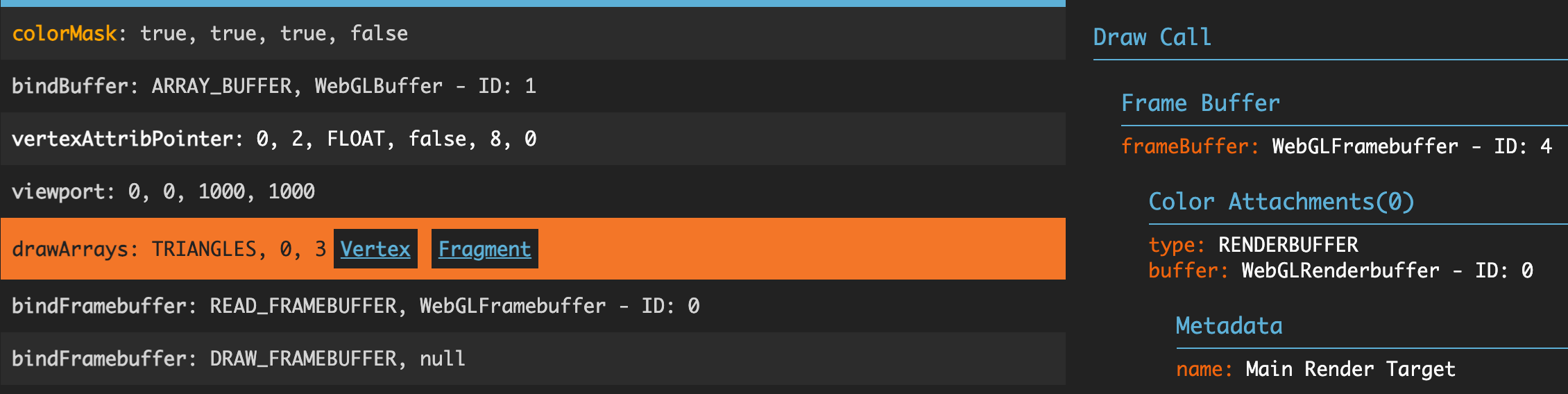 On WebGPU devtools we can also see the label:
 ### checkForLeaks
Checks if there is currently a leaking GPU resource. We keep track of every GPU resource object created, and calling this method prints the currently undestroyed object and the stack information where the resource was created on the console, making it easy to troubleshoot memory leaks.
It is recommended to call this when destroying the scene to determine if there are resources that have not been destroyed correctly. For example, in the image below, there is a WebGL Buffer that has not been destroyed:
### checkForLeaks
Checks if there is currently a leaking GPU resource. We keep track of every GPU resource object created, and calling this method prints the currently undestroyed object and the stack information where the resource was created on the console, making it easy to troubleshoot memory leaks.
It is recommended to call this when destroying the scene to determine if there are resources that have not been destroyed correctly. For example, in the image below, there is a WebGL Buffer that has not been destroyed:
 We should call `buffer.destroy()` at this time to avoid OOM.
### pushDebugGroup
```ts
pushDebugGroup(debugGroup: DebugGroup): void;
```
```ts
interface DebugGroup {
name: string;
drawCallCount: number;
textureBindCount: number;
bufferUploadCount: number;
triangleCount: number;
}
```
### popDebugGroup
## Buffer
A Buffer represents a block of memory that can be used in GPU operations. Data is stored in linear layout.
### setSubData
We can set data in buffer with this method:
- dstByteOffset `required` Offset of dest buffer in bytes.
- src `required` Source buffer data, must use Uint8Array.
- srcByteOffset `optional` Offset of src buffer in bytes. Defaulting to `0`.
- byteLength `optional` Defaulting to the whole length of the src buffer.
```ts
setSubData: (
dstByteOffset: number,
src: Uint8Array,
srcByteOffset?: number,
byteLength?: number,
) => void;
```
## Texture
One texture consists of one or more texture subresources, each uniquely identified by a mipmap level and, for 2d textures only, array layer and aspect.
### setImageData
We can set data in buffer with this method:
- data `required` Array of TexImageSource or ArrayBufferView.
- lod `optional` Lod. Defaulting to `0`.
```ts
setImageData: (
data: (TexImageSource | ArrayBufferView)[],
lod?: number,
) => void;
```
Create a cubemap texture:
```ts
// The order of the array layers is [+X, -X, +Y, -Y, +Z, -Z]
const imageBitmaps = await Promise.all(
[
'/images/posx.jpg',
'/images/negx.jpg',
'/images/posy.jpg',
'/images/negy.jpg',
'/images/posz.jpg',
'/images/negz.jpg',
].map(async (src) => loadImage(src)),
);
const texture = device.createTexture({
format: Format.U8_RGBA_NORM,
width: imageBitmaps[0].width,
height: imageBitmaps[0].height,
depthOrArrayLayers: 6,
dimension: TextureDimension.TEXTURE_CUBE_MAP,
usage: TextureUsage.SAMPLED,
});
texture.setImageData(imageBitmaps);
```
## Sampler
A GPUSampler encodes transformations and filtering information that can be used in a shader to interpret texture resource data.
## RenderPass
The RenderPass has several methods which affect how draw commands.
### setViewport
Sets the viewport used during the rasterization stage to linearly map from normalized device coordinates to viewport coordinates.
- x `required` Minimum X value of the viewport in pixels.
- y `required` Minimum Y value of the viewport in pixels.
- w `required` Width of the viewport in pixels.
- h `required` Height of the viewport in pixels.
- minDepth `optional` Minimum depth value of the viewport.
- maxDepth `optional` Minimum depth value of the viewport.
```ts
setViewport: (
x: number,
y: number,
w: number,
h: number,
minDepth?: number, // WebGPU only
maxDepth?: number, // WebGPU only
) => void;
```
### setScissorRect
Sets the scissor rectangle used during the rasterization stage. After transformation into viewport coordinates any fragments which fall outside the scissor rectangle will be discarded.
- x `required` Minimum X value of the scissor rectangle in pixels.
- y `required` Minimum Y value of the scissor rectangle in pixels.
- w `required` Width of the scissor rectangle in pixels.
- h `required` Height of the scissor rectangle in pixels.
```ts
setScissorRect: (x: number, y: number, w: number, h: number) => void;
```
### setPipeline
Sets the current RenderPipeline.
```ts
setPipeline(pipeline: RenderPipeline)
```
### setBindings
Bindings defines the interface between a set of resources bound and their accessibility in shader stages.
```ts
setBindings: (bindings: Bindings) => void;
```
### setVertexInput
```ts
setVertexInput: (
inputLayout: InputLayout | null,
buffers: (VertexBufferDescriptor | null)[] | null,
indexBuffer: IndexBufferDescriptor | null,
) => void;
```
Bind vertex & index buffer(s) like this:
```ts
interface VertexBufferDescriptor {
buffer: Buffer;
offset?: number; // in bytes
}
type IndexBufferDescriptor = VertexBufferDescriptor;
```
### setStencilReference
Sets the stencilReference value used during stencil tests with the "replace" GPUStencilOperation.
```ts
setStencilReference: (value: number) => void;
```
### draw
Draws primitives.
- vertexCount `required` The number of vertices to draw.
- instanceCount `optional` The number of instances to draw.
- firstVertex `optional` Offset into the vertex buffers, in vertices, to begin drawing from.
- firstInstance `optional` First instance to draw.
```ts
draw: (
vertexCount: number,
instanceCount?: number,
firstVertex?: number,
firstInstance?: number,
) => void;
```
### drawIndexed
Draws indexed primitives.
- indexCount `required` The number of indices to draw.
- instanceCount `optional` The number of instances to draw.
- firstIndex `optional` Offset into the index buffer, in indices, begin drawing from.
- baseVertex `optional` Added to each index value before indexing into the vertex buffers.
- firstInstance `optional` First instance to draw.
```ts
drawIndexed: (
indexCount: number,
instanceCount?: number,
firstIndex?: number,
baseVertex?: number,
firstInstance?: number,
) => void;
```
### drawIndirect
⚠️ WebGPU only.
Draws primitives using parameters read from a GPUBuffer.
```ts
drawIndirect: (indirectBuffer: Buffer, indirectOffset: number) => void;
```
```ts
// Create drawIndirect values
const uint32 = new Uint32Array(4);
uint32[0] = 3;
uint32[1] = 1;
uint32[2] = 0;
uint32[3] = 0;
// Create a GPUBuffer and write the draw values into it
const drawValues = device.createBuffer({
viewOrSize: uint32,
usage: BufferUsage.INDIRECT,
});
// Draw the vertices
renderPass.drawIndirect(drawValues, 0);
```
### drawIndexedIndirect
⚠️ WebGPU only.
Draws indexed primitives using parameters read from a GPUBuffer.
```ts
drawIndexedIndirect: (indirectBuffer: Buffer, indirectOffset: number) => void;
```
```ts
// Create drawIndirect values
const uint32 = new Uint32Array(5);
uint32[0] = 6; // The indexCount value
uint32[1] = 1; // The instanceCount value
uint32[2] = 0; // The firstIndex value
uint32[3] = 0; // The baseVertex value
uint32[4] = 0; // The firstInstance value
// Create a GPUBuffer and write the draw values into it
const drawValues = device.createBuffer({
viewOrSize: uint32,
usage: BufferUsage.INDIRECT,
});
// Draw the vertices
renderPass.drawIndirect(drawValues, 0);
```
### beginOcclusionQuery
⚠️ WebGL2 & WebGPU only.
Occlusion query is only available on render passes, to query the number of fragment samples that pass all the per-fragment tests for a set of drawing commands, including scissor, sample mask, alpha to coverage, stencil, and depth tests. Any non-zero result value for the query indicates that at least one sample passed the tests and reached the output merging stage of the render pipeline, 0 indicates that no samples passed the tests.
When beginning a render pass, `occlusionQuerySet` must be set to be able to use occlusion queries during the pass. An occlusion query is begun and ended by calling `beginOcclusionQuery()` and `endOcclusionQuery()` in pairs that cannot be nested.
```ts
beginOcclusionQuery: (queryIndex: number) => void;
```
### endOcclusionQuery
⚠️ WebGL2 & WebGPU only.
```ts
endOcclusionQuery: () => void;
```
### beginBundle
Start recording draw calls in render bundle.
```ts
beginBundle: (renderBundle: RenderBundle) => void;
```
### endBundle
Stop recording.
```ts
endBundle: () => void;
```
### executeBundles
Replay the commands recorded in render bundles.
```ts
executeBundles: (renderBundles: RenderBundle[]) => void;
```
## ComputePass
⚠️ WebGPU only.
Computing operations provide direct access to GPU’s programmable hardware. Compute shaders do not have shader stage inputs or outputs, their results are side effects from writing data into storage bindings.
### dispatchWorkgroups
Dispatch work to be performed with the current ComputePipeline.
X/Y/Z dimension of the grid of workgroups to dispatch.
```ts
dispatchWorkgroups: (
workgroupCountX: number,
workgroupCountY?: number,
workgroupCountZ?: number,
) => void;
```
### dispatchWorkgroupsIndirect
Dispatch work to be performed with the current GPUComputePipeline using parameters read from a GPUBuffer.
```ts
dispatchWorkgroupsIndirect: (
indirectBuffer: Buffer,
indirectOffset: number,
) => void;
```
## Program
### setUniformsLegacy
⚠️ Only WebGL1 need this method.
```ts
setUniformsLegacy: (uniforms: Record) => void;
```
```ts
program.setUniformsLegacy({
u_ModelViewProjectionMatrix: modelViewProjectionMatrix,
u_Texture: texture,
});
```
## Readback
Readback can read data from [Texture](#texture) or [Buffer](#buffer).
### readTexture
Read pixels from texture.
- t `required` Texture.
- x `required` X coordinate.
- y `required` Y coordinate.
- width `required` Width of dimension.
- height `required` Height of dimension.
- dst `required` Dst buffer view.
- length `optional`
```ts
readTexture: (
t: Texture,
x: number,
y: number,
width: number,
height: number,
dst: ArrayBufferView,
dstOffset?: number,
length?: number,
) => Promise;
```
For instance, if we want to read pixels from a texture:
```ts
const texture = device.createTexture({
format: Format.U8_RGBA_NORM,
width: 1,
height: 1,
usage: TextureUsage.SAMPLED,
});
texture.setImageData([new Uint8Array([1, 2, 3, 4])]);
const readback = device.createReadback();
let output = new Uint8Array(4);
// x/y 0/0
await readback.readTexture(texture, 0, 0, 1, 1, output);
expect(output[0]).toBe(1);
expect(output[1]).toBe(2);
expect(output[2]).toBe(3);
expect(output[3]).toBe(4);
```
### readTextureSync
⚠️ WebGL1 & WebGL2 only.
```ts
readTextureSync: (
t: Texture,
x: number,
y: number,
width: number,
height: number,
dst: ArrayBufferView,
dstOffset?: number,
length?: number,
) => ArrayBufferView;
```
### readBuffer
⚠️ WebGL2 & WebGPU only.
Read buffer data.
- src `required` Source buffer.
- srcOffset `required` Offset in bytes of src buffer. Defaulting to `0`.
- dst `required` Dest buffer view.
- dstOffset `optional` Offset in bytes of dst buffer. Defaulting to `0`.
- length `optional` Length in bytes of dst buffer. Defaulting to its whole size.
```ts
readBuffer: (
src: Buffer,
srcOffset: number,
dst: ArrayBufferView,
dstOffset?: number,
length?: number,
) => Promise;
```
`BufferUsage.COPY_SRC` must be used if this buffer will be read later:
```ts
const vertexBuffer = device.createBuffer({
viewOrSize: new Float32Array([0, 0.5, -0.5, -0.5, 0.5, -0.5]),
usage: BufferUsage.VERTEX | BufferUsage.COPY_SRC,
hint: BufferFrequencyHint.DYNAMIC,
});
const data = await readback.readBuffer(vertexBuffer, 0, new Float32Array(6));
```
## Shader Language
Since WebGL 1/2 & WebGPU use different shader languages, we do a lot of transpiling work at runtime.
We use a syntax very closed to GLSL 300, and for different devices:
- WebGL1. Downgrade to GLSL 100.
- WebGL2. Almost keep the same which means GLSL 300.
- WebGPU. Transpile to GLSL 440 and then use [gfx-naga]() WASM to generate WGSL.
Syntax as follows:
- [Attribute](#attribute)
- [Varying](#varying)
- [Sampler](#sampler)
- [Uniform](#uniform)
- [gl_Position](#gl_Position)
- [gl_FragColor](#gl_FragColor)
- [Define](#define)
### Attribute
```glsl
// raw
layout(location = 0) in vec4 a_Position;
// compiled GLSL 100
attribute vec4 a_Position;
// compiled GLSL 300
layout(location = 0) in vec4 a_Position;
// compiled GLSL 440
layout(location = 0) in vec4 a_Position;
// compiled WGSL
var a_Position_1: vec4;
@vertex
fn main(@location(0) a_Position: vec4) -> VertexOutput {
a_Position_1 = a_Position;
}
```
### Varying
```glsl
// raw
out vec4 a_Position;
// compiled GLSL 100
varying vec4 a_Position;
// compiled GLSL 300
out vec4 a_Position;
// compiled GLSL 440
layout(location = 0) out vec4 a_Position;
// compiled WGSL
struct VertexOutput {
@location(0) v_Position: vec4,
}
```
### Sampler
We need to use `SAMPLER_2D / SAMPLER_Cube` wrapping our texture.
```glsl
// raw
uniform sampler2D u_Texture;
outputColor = texture(SAMPLER_2D(u_Texture), v_Uv);
// compiled GLSL 100
uniform sampler2D u_Texture;
outputColor = texture2D(u_Texture, v_TexCoord);
// compiled GLSL 300
uniform sampler2D u_Texture;
outputColor = texture(u_Texture, v_Uv);
// compiled GLSL 440
layout(set = 1, binding = 0) uniform texture2D T_u_Texture;
layout(set = 1, binding = 1) uniform sampler S_u_Texture;
outputColor = texture(sampler2D(T_u_Texture, S_u_Texture), v_Uv);
// compiled WGSL
@group(1) @binding(0)
var T_u_Texture: texture_2d;
@group(1) @binding(1)
var S_u_Texture: sampler;
outputColor = textureSample(T_u_Texture, S_u_Texture, _e5);
```
### Uniform
WebGL2 uses Uniform Buffer Object.
```glsl
// raw
layout(std140) uniform Uniforms {
mat4 u_ModelViewProjectionMatrix;
};
// compiled GLSL 100
uniform mat4 u_ModelViewProjectionMatrix;
// compiled GLSL 300
layout(std140) uniform Uniforms {
mat4 u_ModelViewProjectionMatrix;
};
// compiled GLSL 440
layout(std140, set = 0, binding = 0) uniform Uniforms {
mat4 u_ModelViewProjectionMatrix;
};
// compiled WGSL
struct Uniforms {
u_ModelViewProjectionMatrix: mat4x4,
}
@group(0) @binding(0)
var global: Uniforms;
```
⚠️ We don't allow `instance_name` for now:
```glsl
// wrong
layout(std140) uniform Uniforms {
mat4 projection;
mat4 modelview;
} matrices;
```
### gl_Position
We still use `gl_Position` to represent the output of vertex shader:
```glsl
// raw
gl_Position = vec4(1.0);
// compiled GLSL 100
gl_Position = vec4(1.0);
// compiled GLSL 300
gl_Position = vec4(1.0);
// compiled GLSL 440
gl_Position = vec4(1.0);
// compiled WGSL
struct VertexOutput {
@builtin(position) member: vec4,
}
```
### gl_FragColor
```glsl
// raw
out vec4 outputColor;
outputColor = vec4(1.0);
// compiled GLSL 100
vec4 outputColor;
outputColor = vec4(1.0);
gl_FragColor = vec4(outputColor);
// compiled GLSL 300
out vec4 outputColor;
outputColor = vec4(1.0);
// compiled GLSL 440
layout(location = 0) out vec4 outputColor;
outputColor = vec4(1.0);
// compiled WGSL
struct FragmentOutput {
@location(0) outputColor: vec4,
}
```
### Define
It is worth mentioning that since WGSL is not natively supported, naga does conditional compilation during the GLSL 440 -> WGSL translation process.
`#define KEY VAR`
```glsl
#define PI 3.14
```
## Limitations
`@group(x)` in WGSL should obey the following order:
- `group(0)` Uniform eg. `var time : Time;`
- `group(1)` Texture & Sampler pair
- `group(2)` StorageBuffer eg. `var atomic_storage : array>;`
- `group(3)` StorageTexture eg. `var screen : texture_storage_2d;`
For example:
```wgsl
@group(1) @binding(0) var myTexture : texture_2d;
@group(1) @binding(1) var mySampler : sampler;
```
```wgsl
@group(1) @binding(0) var myTexture : texture_2d;
@group(1) @binding(1) var mySampler : sampler;
@group(2) @binding(0) var input : array;
```
Uniform and storage buffer can be assigned binding number:
```ts
device.createBindings({
pipeline: computePipeline,
uniformBufferBindings: [
{
binding: 0,
buffer: uniformBuffer,
},
],
storageBufferBindings: [
{
binding: 1,
buffer: storageBuffer,
},
],
});
```
```wgsl
@group(0) @binding(0) var params : SimParams;
@group(0) @binding(1) var input : array;
@group(1) @binding(0) var myTexture : texture_2d;
@group(1) @binding(1) var mySampler : sampler;
```
Currently we don't support `dynamicOffsets` when setting bindgroup.
```ts
// Won't support for now.
passEncoder.setBindGroup(1, dynamicBindGroup, dynamicOffsets);
```
We should call `buffer.destroy()` at this time to avoid OOM.
### pushDebugGroup
```ts
pushDebugGroup(debugGroup: DebugGroup): void;
```
```ts
interface DebugGroup {
name: string;
drawCallCount: number;
textureBindCount: number;
bufferUploadCount: number;
triangleCount: number;
}
```
### popDebugGroup
## Buffer
A Buffer represents a block of memory that can be used in GPU operations. Data is stored in linear layout.
### setSubData
We can set data in buffer with this method:
- dstByteOffset `required` Offset of dest buffer in bytes.
- src `required` Source buffer data, must use Uint8Array.
- srcByteOffset `optional` Offset of src buffer in bytes. Defaulting to `0`.
- byteLength `optional` Defaulting to the whole length of the src buffer.
```ts
setSubData: (
dstByteOffset: number,
src: Uint8Array,
srcByteOffset?: number,
byteLength?: number,
) => void;
```
## Texture
One texture consists of one or more texture subresources, each uniquely identified by a mipmap level and, for 2d textures only, array layer and aspect.
### setImageData
We can set data in buffer with this method:
- data `required` Array of TexImageSource or ArrayBufferView.
- lod `optional` Lod. Defaulting to `0`.
```ts
setImageData: (
data: (TexImageSource | ArrayBufferView)[],
lod?: number,
) => void;
```
Create a cubemap texture:
```ts
// The order of the array layers is [+X, -X, +Y, -Y, +Z, -Z]
const imageBitmaps = await Promise.all(
[
'/images/posx.jpg',
'/images/negx.jpg',
'/images/posy.jpg',
'/images/negy.jpg',
'/images/posz.jpg',
'/images/negz.jpg',
].map(async (src) => loadImage(src)),
);
const texture = device.createTexture({
format: Format.U8_RGBA_NORM,
width: imageBitmaps[0].width,
height: imageBitmaps[0].height,
depthOrArrayLayers: 6,
dimension: TextureDimension.TEXTURE_CUBE_MAP,
usage: TextureUsage.SAMPLED,
});
texture.setImageData(imageBitmaps);
```
## Sampler
A GPUSampler encodes transformations and filtering information that can be used in a shader to interpret texture resource data.
## RenderPass
The RenderPass has several methods which affect how draw commands.
### setViewport
Sets the viewport used during the rasterization stage to linearly map from normalized device coordinates to viewport coordinates.
- x `required` Minimum X value of the viewport in pixels.
- y `required` Minimum Y value of the viewport in pixels.
- w `required` Width of the viewport in pixels.
- h `required` Height of the viewport in pixels.
- minDepth `optional` Minimum depth value of the viewport.
- maxDepth `optional` Minimum depth value of the viewport.
```ts
setViewport: (
x: number,
y: number,
w: number,
h: number,
minDepth?: number, // WebGPU only
maxDepth?: number, // WebGPU only
) => void;
```
### setScissorRect
Sets the scissor rectangle used during the rasterization stage. After transformation into viewport coordinates any fragments which fall outside the scissor rectangle will be discarded.
- x `required` Minimum X value of the scissor rectangle in pixels.
- y `required` Minimum Y value of the scissor rectangle in pixels.
- w `required` Width of the scissor rectangle in pixels.
- h `required` Height of the scissor rectangle in pixels.
```ts
setScissorRect: (x: number, y: number, w: number, h: number) => void;
```
### setPipeline
Sets the current RenderPipeline.
```ts
setPipeline(pipeline: RenderPipeline)
```
### setBindings
Bindings defines the interface between a set of resources bound and their accessibility in shader stages.
```ts
setBindings: (bindings: Bindings) => void;
```
### setVertexInput
```ts
setVertexInput: (
inputLayout: InputLayout | null,
buffers: (VertexBufferDescriptor | null)[] | null,
indexBuffer: IndexBufferDescriptor | null,
) => void;
```
Bind vertex & index buffer(s) like this:
```ts
interface VertexBufferDescriptor {
buffer: Buffer;
offset?: number; // in bytes
}
type IndexBufferDescriptor = VertexBufferDescriptor;
```
### setStencilReference
Sets the stencilReference value used during stencil tests with the "replace" GPUStencilOperation.
```ts
setStencilReference: (value: number) => void;
```
### draw
Draws primitives.
- vertexCount `required` The number of vertices to draw.
- instanceCount `optional` The number of instances to draw.
- firstVertex `optional` Offset into the vertex buffers, in vertices, to begin drawing from.
- firstInstance `optional` First instance to draw.
```ts
draw: (
vertexCount: number,
instanceCount?: number,
firstVertex?: number,
firstInstance?: number,
) => void;
```
### drawIndexed
Draws indexed primitives.
- indexCount `required` The number of indices to draw.
- instanceCount `optional` The number of instances to draw.
- firstIndex `optional` Offset into the index buffer, in indices, begin drawing from.
- baseVertex `optional` Added to each index value before indexing into the vertex buffers.
- firstInstance `optional` First instance to draw.
```ts
drawIndexed: (
indexCount: number,
instanceCount?: number,
firstIndex?: number,
baseVertex?: number,
firstInstance?: number,
) => void;
```
### drawIndirect
⚠️ WebGPU only.
Draws primitives using parameters read from a GPUBuffer.
```ts
drawIndirect: (indirectBuffer: Buffer, indirectOffset: number) => void;
```
```ts
// Create drawIndirect values
const uint32 = new Uint32Array(4);
uint32[0] = 3;
uint32[1] = 1;
uint32[2] = 0;
uint32[3] = 0;
// Create a GPUBuffer and write the draw values into it
const drawValues = device.createBuffer({
viewOrSize: uint32,
usage: BufferUsage.INDIRECT,
});
// Draw the vertices
renderPass.drawIndirect(drawValues, 0);
```
### drawIndexedIndirect
⚠️ WebGPU only.
Draws indexed primitives using parameters read from a GPUBuffer.
```ts
drawIndexedIndirect: (indirectBuffer: Buffer, indirectOffset: number) => void;
```
```ts
// Create drawIndirect values
const uint32 = new Uint32Array(5);
uint32[0] = 6; // The indexCount value
uint32[1] = 1; // The instanceCount value
uint32[2] = 0; // The firstIndex value
uint32[3] = 0; // The baseVertex value
uint32[4] = 0; // The firstInstance value
// Create a GPUBuffer and write the draw values into it
const drawValues = device.createBuffer({
viewOrSize: uint32,
usage: BufferUsage.INDIRECT,
});
// Draw the vertices
renderPass.drawIndirect(drawValues, 0);
```
### beginOcclusionQuery
⚠️ WebGL2 & WebGPU only.
Occlusion query is only available on render passes, to query the number of fragment samples that pass all the per-fragment tests for a set of drawing commands, including scissor, sample mask, alpha to coverage, stencil, and depth tests. Any non-zero result value for the query indicates that at least one sample passed the tests and reached the output merging stage of the render pipeline, 0 indicates that no samples passed the tests.
When beginning a render pass, `occlusionQuerySet` must be set to be able to use occlusion queries during the pass. An occlusion query is begun and ended by calling `beginOcclusionQuery()` and `endOcclusionQuery()` in pairs that cannot be nested.
```ts
beginOcclusionQuery: (queryIndex: number) => void;
```
### endOcclusionQuery
⚠️ WebGL2 & WebGPU only.
```ts
endOcclusionQuery: () => void;
```
### beginBundle
Start recording draw calls in render bundle.
```ts
beginBundle: (renderBundle: RenderBundle) => void;
```
### endBundle
Stop recording.
```ts
endBundle: () => void;
```
### executeBundles
Replay the commands recorded in render bundles.
```ts
executeBundles: (renderBundles: RenderBundle[]) => void;
```
## ComputePass
⚠️ WebGPU only.
Computing operations provide direct access to GPU’s programmable hardware. Compute shaders do not have shader stage inputs or outputs, their results are side effects from writing data into storage bindings.
### dispatchWorkgroups
Dispatch work to be performed with the current ComputePipeline.
X/Y/Z dimension of the grid of workgroups to dispatch.
```ts
dispatchWorkgroups: (
workgroupCountX: number,
workgroupCountY?: number,
workgroupCountZ?: number,
) => void;
```
### dispatchWorkgroupsIndirect
Dispatch work to be performed with the current GPUComputePipeline using parameters read from a GPUBuffer.
```ts
dispatchWorkgroupsIndirect: (
indirectBuffer: Buffer,
indirectOffset: number,
) => void;
```
## Program
### setUniformsLegacy
⚠️ Only WebGL1 need this method.
```ts
setUniformsLegacy: (uniforms: Record) => void;
```
```ts
program.setUniformsLegacy({
u_ModelViewProjectionMatrix: modelViewProjectionMatrix,
u_Texture: texture,
});
```
## Readback
Readback can read data from [Texture](#texture) or [Buffer](#buffer).
### readTexture
Read pixels from texture.
- t `required` Texture.
- x `required` X coordinate.
- y `required` Y coordinate.
- width `required` Width of dimension.
- height `required` Height of dimension.
- dst `required` Dst buffer view.
- length `optional`
```ts
readTexture: (
t: Texture,
x: number,
y: number,
width: number,
height: number,
dst: ArrayBufferView,
dstOffset?: number,
length?: number,
) => Promise;
```
For instance, if we want to read pixels from a texture:
```ts
const texture = device.createTexture({
format: Format.U8_RGBA_NORM,
width: 1,
height: 1,
usage: TextureUsage.SAMPLED,
});
texture.setImageData([new Uint8Array([1, 2, 3, 4])]);
const readback = device.createReadback();
let output = new Uint8Array(4);
// x/y 0/0
await readback.readTexture(texture, 0, 0, 1, 1, output);
expect(output[0]).toBe(1);
expect(output[1]).toBe(2);
expect(output[2]).toBe(3);
expect(output[3]).toBe(4);
```
### readTextureSync
⚠️ WebGL1 & WebGL2 only.
```ts
readTextureSync: (
t: Texture,
x: number,
y: number,
width: number,
height: number,
dst: ArrayBufferView,
dstOffset?: number,
length?: number,
) => ArrayBufferView;
```
### readBuffer
⚠️ WebGL2 & WebGPU only.
Read buffer data.
- src `required` Source buffer.
- srcOffset `required` Offset in bytes of src buffer. Defaulting to `0`.
- dst `required` Dest buffer view.
- dstOffset `optional` Offset in bytes of dst buffer. Defaulting to `0`.
- length `optional` Length in bytes of dst buffer. Defaulting to its whole size.
```ts
readBuffer: (
src: Buffer,
srcOffset: number,
dst: ArrayBufferView,
dstOffset?: number,
length?: number,
) => Promise;
```
`BufferUsage.COPY_SRC` must be used if this buffer will be read later:
```ts
const vertexBuffer = device.createBuffer({
viewOrSize: new Float32Array([0, 0.5, -0.5, -0.5, 0.5, -0.5]),
usage: BufferUsage.VERTEX | BufferUsage.COPY_SRC,
hint: BufferFrequencyHint.DYNAMIC,
});
const data = await readback.readBuffer(vertexBuffer, 0, new Float32Array(6));
```
## Shader Language
Since WebGL 1/2 & WebGPU use different shader languages, we do a lot of transpiling work at runtime.
We use a syntax very closed to GLSL 300, and for different devices:
- WebGL1. Downgrade to GLSL 100.
- WebGL2. Almost keep the same which means GLSL 300.
- WebGPU. Transpile to GLSL 440 and then use [gfx-naga]() WASM to generate WGSL.
Syntax as follows:
- [Attribute](#attribute)
- [Varying](#varying)
- [Sampler](#sampler)
- [Uniform](#uniform)
- [gl_Position](#gl_Position)
- [gl_FragColor](#gl_FragColor)
- [Define](#define)
### Attribute
```glsl
// raw
layout(location = 0) in vec4 a_Position;
// compiled GLSL 100
attribute vec4 a_Position;
// compiled GLSL 300
layout(location = 0) in vec4 a_Position;
// compiled GLSL 440
layout(location = 0) in vec4 a_Position;
// compiled WGSL
var a_Position_1: vec4;
@vertex
fn main(@location(0) a_Position: vec4) -> VertexOutput {
a_Position_1 = a_Position;
}
```
### Varying
```glsl
// raw
out vec4 a_Position;
// compiled GLSL 100
varying vec4 a_Position;
// compiled GLSL 300
out vec4 a_Position;
// compiled GLSL 440
layout(location = 0) out vec4 a_Position;
// compiled WGSL
struct VertexOutput {
@location(0) v_Position: vec4,
}
```
### Sampler
We need to use `SAMPLER_2D / SAMPLER_Cube` wrapping our texture.
```glsl
// raw
uniform sampler2D u_Texture;
outputColor = texture(SAMPLER_2D(u_Texture), v_Uv);
// compiled GLSL 100
uniform sampler2D u_Texture;
outputColor = texture2D(u_Texture, v_TexCoord);
// compiled GLSL 300
uniform sampler2D u_Texture;
outputColor = texture(u_Texture, v_Uv);
// compiled GLSL 440
layout(set = 1, binding = 0) uniform texture2D T_u_Texture;
layout(set = 1, binding = 1) uniform sampler S_u_Texture;
outputColor = texture(sampler2D(T_u_Texture, S_u_Texture), v_Uv);
// compiled WGSL
@group(1) @binding(0)
var T_u_Texture: texture_2d;
@group(1) @binding(1)
var S_u_Texture: sampler;
outputColor = textureSample(T_u_Texture, S_u_Texture, _e5);
```
### Uniform
WebGL2 uses Uniform Buffer Object.
```glsl
// raw
layout(std140) uniform Uniforms {
mat4 u_ModelViewProjectionMatrix;
};
// compiled GLSL 100
uniform mat4 u_ModelViewProjectionMatrix;
// compiled GLSL 300
layout(std140) uniform Uniforms {
mat4 u_ModelViewProjectionMatrix;
};
// compiled GLSL 440
layout(std140, set = 0, binding = 0) uniform Uniforms {
mat4 u_ModelViewProjectionMatrix;
};
// compiled WGSL
struct Uniforms {
u_ModelViewProjectionMatrix: mat4x4,
}
@group(0) @binding(0)
var global: Uniforms;
```
⚠️ We don't allow `instance_name` for now:
```glsl
// wrong
layout(std140) uniform Uniforms {
mat4 projection;
mat4 modelview;
} matrices;
```
### gl_Position
We still use `gl_Position` to represent the output of vertex shader:
```glsl
// raw
gl_Position = vec4(1.0);
// compiled GLSL 100
gl_Position = vec4(1.0);
// compiled GLSL 300
gl_Position = vec4(1.0);
// compiled GLSL 440
gl_Position = vec4(1.0);
// compiled WGSL
struct VertexOutput {
@builtin(position) member: vec4,
}
```
### gl_FragColor
```glsl
// raw
out vec4 outputColor;
outputColor = vec4(1.0);
// compiled GLSL 100
vec4 outputColor;
outputColor = vec4(1.0);
gl_FragColor = vec4(outputColor);
// compiled GLSL 300
out vec4 outputColor;
outputColor = vec4(1.0);
// compiled GLSL 440
layout(location = 0) out vec4 outputColor;
outputColor = vec4(1.0);
// compiled WGSL
struct FragmentOutput {
@location(0) outputColor: vec4,
}
```
### Define
It is worth mentioning that since WGSL is not natively supported, naga does conditional compilation during the GLSL 440 -> WGSL translation process.
`#define KEY VAR`
```glsl
#define PI 3.14
```
## Limitations
`@group(x)` in WGSL should obey the following order:
- `group(0)` Uniform eg. `var time : Time;`
- `group(1)` Texture & Sampler pair
- `group(2)` StorageBuffer eg. `var atomic_storage : array>;`
- `group(3)` StorageTexture eg. `var screen : texture_storage_2d;`
For example:
```wgsl
@group(1) @binding(0) var myTexture : texture_2d;
@group(1) @binding(1) var mySampler : sampler;
```
```wgsl
@group(1) @binding(0) var myTexture : texture_2d;
@group(1) @binding(1) var mySampler : sampler;
@group(2) @binding(0) var input : array;
```
Uniform and storage buffer can be assigned binding number:
```ts
device.createBindings({
pipeline: computePipeline,
uniformBufferBindings: [
{
binding: 0,
buffer: uniformBuffer,
},
],
storageBufferBindings: [
{
binding: 1,
buffer: storageBuffer,
},
],
});
```
```wgsl
@group(0) @binding(0) var params : SimParams;
@group(0) @binding(1) var input : array;
@group(1) @binding(0) var myTexture : texture_2d;
@group(1) @binding(1) var mySampler : sampler;
```
Currently we don't support `dynamicOffsets` when setting bindgroup.
```ts
// Won't support for now.
passEncoder.setBindGroup(1, dynamicBindGroup, dynamicOffsets);
```