# DSH Computer Use
[](https://x.com/anion_ex)
[](LICENSE)


**为 DeepSeek Harness 提供原生 macOS 控制能力,默认不碰你的真实光标,也不因指针动作抢占前台;Bundle 可以在键盘输入前把目标应用带到前台,保证输入可靠。**
DSH Computer Use 为 Agent 提供新鲜的 Accessibility observation、准确进程/窗口定向、stale state 拒绝、按应用限制的访问,以及动作后的可验证状态。语义化 Accessibility 始终优先;鼠标、拖拽、滚轮与键盘 fallback 会投递给选定进程,而不是全局桌面。
[English](README.md) | 中文
## 为什么它不同
Accessibility 权限允许进程读取和操作 macOS UI 元素,但这个权限本身并不会自动防止抢焦点或移动光标。是否干扰用户,取决于输入事件走哪条路由。
DSH Computer Use 的默认路由有意避免干扰:
- **不移动系统光标:** helper 中没有 cursor warp 路径。
- **不做全局指针注入:** click、scroll 与 drag fallback 使用 pid/window 定向的 SkyLight 路由,不进入全局 HID 事件流。
- **指针动作不激活应用:** 语义化 Accessibility、目标进程指针输入与 `keyboardPolicy: preserve` 都不激活;`keyboardPolicy: activate`(Bundle 默认)在键盘 fallback 前把目标应用带到前台,与 Codex Computer Use 对齐。
- **独立 Agent 光标:** click、scroll 与 drag 动作会移动一个点击穿透、不会激活应用的软件光标,同时保持系统真实光标不变。它只在准确目标应用位于前台时显示,并沿速度/加速度塑造的轻微弧线移动。点击与滚动会等待到达后再输入;拖拽会先到达起点并显示按下,再让目标进程拖拽与光标向终点移动同步开始。
- **不盲目重放:** 每个动作都绑定准确、未过期的 observation,并返回新鲜状态。
因此,这个原生动作层可以在用户继续使用当前前台应用时,操作许多后台应用。
## 它补充了什么
- **先观察再动作。** 返回有界 Accessibility tree、带 index 的元素、准确 app/process/window metadata、权限状态和可选截图 Artifact。
- **把动作绑定到状态。** 每个元素都带有 observation-local index 与 opaque `targetHandle`;准确 locator 继续兼容,而显式允许的重绑定只接受同一进程和窗口内唯一的 native 或 semantic 身份。
- **优先语义输入。** 先使用 `AXPress`、可编辑 value、selected-text 赋值和元素声明的 Accessibility action,再考虑指针 fallback。
- **把 fallback 投递给目标。** 键盘输入发给选定 pid;指针输入携带窗口本地坐标,发给选定 pid 和 `CGWindowID`,并通过点解析应用窗口,任意屏幕坐标都可以点击。
- **返回新鲜证据。** 每个成功动作都会经过有界 settle,并返回新的完整或差分 observation。
- **按应用限制访问。** read/control lease 按 Agent、Session、turn 与准确 bundle id 分离;高影响动作另需一次性确认。
- **保持模型表面聚焦。** 只有当前 Agent 加载 Computer Use Skill 后才暴露执行 Tool。
## 证据:从未激活的后台 fixture
仓库包含确定性 AppKit fixture 和 universal native helper。发布测试会通过 `open -g` 以后台模式启动 fixture,再通过 Agent 使用的同一协议完成操作。
```text
observe exact bundle id + pid
-> element: "Targeted pointer probe", no AXPress action
-> computer_click with observationId + element index + allowCoordinateFallback
-> fresh observation
-> activation "not-requested"; pointerRouting "target-process"
-> status "Status: pointer click"
```
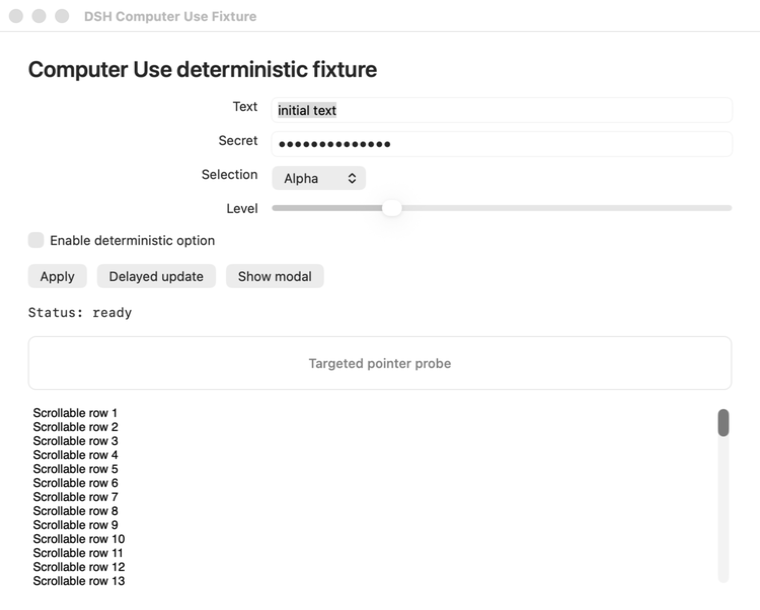
Fixture 会记录每次 `applicationDidBecomeActive` 回调。独立 native monitor 还会在 click、scroll 与 drag 整个动作期间每毫秒采样系统光标和前台 pid。默认发布路径不得增加 `activationCount`,并要求光标坐标不变、前台 pid 不变、click/scroll 精确计数,并且 drag 只有一组完整 down/up gesture。
需求、架构、关键决策、验证证据和兼容性边界见[前台安全输入策略](docs/interaction-policy.md)。
## 范围
`dsh-computer-use` 是原生**动作层**,不会取代更窄的接口:
- 浏览器任务应继续使用 browser automation 和 DOM/CDP 状态;
- 有 API、CLI 或专用应用插件时仍应优先使用;
- OCR、视觉 grounding 与像素理解应交给独立安装的 `dsh-vision-toolkit`:加载 `vision-tools` Skill,把准确的截图 Artifact 路径传给 `vision_glance`、`vision_ground`、`vision_detect`、`vision_crop` 或 `vision_long_screenshot_ocr`;不要用 shell 驱动的 `tesseract`、`screencapture` 或临时 Swift/Python OCR 取代这些工具;
- `dsh-design` 等领域 Bundle 可以在工作流跨入原生应用时组合 Computer Use。
## 快速开始
### 前置条件
- macOS 14 或更新版本。
- 已安装 Web 或 Headless Profile、并挂载 Skill Tool 的 DeepSeek Harness。
- 用于观察和原生动作的 macOS Accessibility 权限。
- 只有请求截图时才需要 macOS Screen Recording 权限。
- 构建本仓库时需要 Node.js `^22.19.0` 或 `>=24.0.0`。
直接从 npm 一键安装 Web 与 Headless Bundle:
> [!IMPORTANT]
> 已发布的包名为 `@anionex/dsh-computer-use`。旧名
> `@dsh-external/dsh-computer-use` 从未发布到 npm,不可安装;
> 安装前请先更新旧的 profile 或 manifest 引用。
```sh
dsh plugin --profile web add @anionex/dsh-computer-use
dsh plugin --profile headless add @anionex/dsh-computer-use
dsh --profile web --dump-config | grep computer-use
dsh --profile headless --dump-config | grep computer-use
```
本地开发时,把包名替换为 checkout 的绝对路径即可。
修改已安装插件后,需要重启正在运行的 `dsh web` host,再创建一个新 Session,让 host 重新载入 Bundle 与 Skill catalog。
在新 Session 中加载 Skill:
```text
/dsh-computer-use
```
旧的 `/computer-use` Skill 仍供现有会话使用。如果已安装其他同名 Skill,
请加载 `/dsh-computer-use` 来激活本插件。
然后可以尝试:
> 使用 Computer Use 检查正在运行的 DSH Computer Use Fixture,启用 deterministic option,并根据动作后返回的新状态报告结果。优先使用 Accessibility 元素,不要复用旧 observation。
## 工作原理
```mermaid
flowchart LR
A["Select exact bundle id and pid"] --> B["Acquire scoped read access"]
B --> C["Observe AX tree and optional screenshot"]
C --> D["Choose target handle, index, or window-relative point"]
D --> E["Acquire control and optional one-use confirmation"]
E --> F["Re-observe and validate exact target"]
F --> G{"Input route"}
G -->|"Semantic"| H["Accessibility action or value"]
G -->|"Keyboard"| I["Post to target pid"]
G -->|"Pointer"| J["Post to target pid + window"]
H --> K["Wait for settlement"]
I --> K
J --> K
K --> L["Return fresh full or diff observation"]
```
每个已观察元素都有 observation-local 兼容 index 和 opaque `targetHandle`。仅传 index 的动作保留准确 locator 行为。低风险元素动作可以传入 `targetHandle` 与 `allowRebind: true`;输入前,provider-independent resolver 会获取新鲜 Accessibility 状态,并依次检查原 locator、唯一 provider-native identifier(例如 macOS `AXIdentifier`),以及基于 role、accessible name、已声明 action 和稳定 ancestor fingerprint 的唯一 semantic match。Resolver 始终保留准确 bundle id、pid 与选定窗口身份;遇到歧义或低置信度时返回 `COMPUTER_TARGET_AMBIGUOUS` 或 `COMPUTER_TARGET_LOW_CONFIDENCE`,不会猜测。坐标动作仍要求引用窗口的完整状态保持当前。
成功的元素动作会报告 `resolution.mode`、`confidence`、`candidateCount` 与 `targetChanged`。敏感目标一旦需要 rebind,旧的一次性 confirmation 会失效,并返回 `COMPUTER_TARGET_REBIND_REQUIRES_CONFIRMATION`;调用方必须观察当前 UI,并对新选择的 handle 再次确认。视觉坐标不是 target handle,不能授权敏感 rebind。本基础版本不包含 provider-native visual hit-test,该能力留待后续实现。
默认 interaction policy 为:
```yaml
interaction:
focusPolicy: preserve
keyboardPolicy: activate
pointerInputPolicy: targeted
cursorVisualization: visible
cursorSpeedPxPerSecond: 1600
cursorAccelerationPxPerSecondSquared: 6000
cursorClickDelayMs: 90
cursorAutoHideMs: 0
```
`cursorVisualization: visible` 会在选定应用位于前台时,为 click、scroll 与 drag 显示 Agent 自己的非交互光标;它不会替代或移动 macOS 系统光标。不需要视觉反馈时可设为 `hidden`。`pointerInputPolicy: deny` 会禁用坐标点击/fallback、滚动与拖拽。`keyboardPolicy: activate`(Bundle 默认)会先激活目标应用,让 `type-text` 键盘 fallback 与 `press-key` 可靠工作;`focusPolicy: activate` 是更宽的兼容模式,还会在指针光标移动和输入前激活目标应用,并重新观察、校验准确目标。
Agent 光标是 28x28 的透明整图光标(Cursor 箭头加 DeepSeek 鲸鱼,`assets/cursor.png`),热点位于图片左上角。它由独立进程运行,点击穿透、不激活应用,并绑定准确已观察的 pid、窗口、frame 与当前前台应用;任一条件不再匹配时就会隐藏。移动时间由距离、最大速度与加速度计算,默认采用带对称加减速的轻微弧线;把速度和加速度调高后仍保留少量可见动画帧。Native 到达目标并经过配置的停顿后,才会发出点击输入。拖拽则先按同一顺序到达起点,再让目标进程拖拽与 Agent 光标向终点移动同时开始。
Helper executable 是 DSH 内部传输实现,不是公共授权 API。它要求独立进程组和父进程持有的标准传输,因此普通 shell 重定向会在解析命令前 fail closed。这个检查只属于纵深防御,不会认证同一 macOS 用户下运行的任意代码:专门构造的 detached 父进程仍能复现这类传输拓扑。应通过已注册 Tool 使用该能力,以保留应用 lease、敏感动作 confirmation 与宿主策略检查;不能把 `danger-full-access` 当作阻止直接 native 调用的保护。
成功动作结果包括:
```ts
activation: 'not-requested' | 'already-frontmost' | 'activated'
pointerInput: boolean
pointerRouting: 'none' | 'target-process'
resolution?: {
mode: 'exact-locator' | 'native-identifier' | 'semantic-rebind'
confidence: number
candidateCount: number
targetChanged: boolean
}
agentCursor?: { visible: false; reason?: string }
effect: {
observedStateChanged: boolean
observedForMs: number
note?: string
}
```
`effect.observedStateChanged` 比较窗口 title、id、frame 与 Accessibility 元素树;它不证明变化由本次动作造成,也无法观察纯像素、瞬时、远端或其他外部效果。只有独立 Agent 光标本应显示却无法显示或验证时,结果才会出现 `agentCursor`。
模型不能通过 Tool 参数覆盖这些宿主策略。
## 模型 Tool
Bundle 初始只贡献 `computer_use_activate`。加载 Skill 后,才为当前 Agent 暴露聚焦的执行 vocabulary。
查看完整 Tool 列表
| Tool | 用途 |
|---|---|
| `computer_list_apps` | 列出有界用户应用及 bundle id、pid、前台状态和权限诊断 |
| `computer_observe` | 返回新鲜的 full/diff Accessibility observation 与可选截图 Artifact |
| `computer_click` | 优先使用 `AXPress`;接受准确 index 或 opaque target handle,并可在目标进程坐标 fallback 前执行安全 rebind |
| `computer_set_value` | 通过准确 index 或 opaque target handle 设置或清空可编辑 Accessibility value,不使用剪贴板 |
| `computer_type_text` | 通过 Accessibility 或目标进程键盘事件插入 Unicode;`method: keyboard` 跳过不可靠的 AX 写入,但不改变宿主焦点策略 |
| `computer_press_key` | 向选定进程发送有限词表中的按键,并支持可选 modifier |
| `computer_scroll` | 在已解析元素或窗口/屏幕坐标处向选定进程与窗口发送有界方向滚动 |
| `computer_drag` | 在引用 observation 的窗口/屏幕两点之间拖拽 |
| `computer_perform_action` | 执行准确或安全 rebind 后的选定元素所声明的 Accessibility action |
| `computer_wait` | 轮询一个有界 text/role/title 条件,不修改应用并返回新鲜状态 |
| `computer_confirm` | 获取绑定准确敏感动作的一次性 token |
任何 Tool 都不接受 AppleScript、JXA、shell、Swift、Objective-C、native selector、任意 Accessibility constant 或源码。
## Observation、权限与敏感动作
Observation 包含 opaque id 与过期时间、准确 app 身份、frontmost/window metadata、有界 tree text、带 opaque target handle 的当前元素、可选截图 metadata 和权限状态。Target handle 不暴露 provider object reference 或 native identifier。Secure text value 以 `[secure]` 输出,不会进入 target descriptor、tree text、Tool result、截图 metadata 或 native error。截图仍可能包含应用中其他可见数据,应按敏感数据处理。
对于 Electron 应用,helper 通过 AXManualAccessibility 请求暴露文档,并在有限时间内等待 web 控件出现。仅当应用支持该可写属性、目标位于 web 区域且调用明确传入 allowCoordinateFallback=true 时,才在 AX press 之前选择一次指向元素中心的目标进程鼠标点击。其他应用(包括 WebKit web 区域)、原生控件和未显式允许降级的调用仍优先走语义 AX 路径。AX press 成功后不会因为树未变化而自动重试:动作效果可能延迟或发生在界面之外。宿主的指针和激活策略仍然生效。
坐标动作支持三种空间:`window` 与 `screen` 以 point 为单位(与 Accessibility frame 一致),`screenshot` 以 observation 截图的像素为单位。截图按窗口的 backing scale 捕获且不含窗口阴影,因此图像是窗口 frame 的直接渲染,`screenshot.pixelScale` 表示每个 point 对应的像素数(Retina 上通常为 `2`)。从截图图像上读出的坐标必须用 `coordinateSpace: 'screenshot'` 传入;若当作 `window` point 传入,点击会整体偏移一个像素倍率——在 2x 屏上,想点窗口中间的点击会落到两倍偏移处,可能完全错过控件。Service 会在发送任何输入之前把截图像素换算为窗口 point,并对「超出窗口 frame 但落在截图范围内」的 window 坐标报错并说明倍率。
技术访问模型包含两类准确 bundle-id lease:
- `read`:读取 Accessibility 状态和请求的截图;
- `control`:向选定应用发送 UI 输入。
没有配置 grant 时,DSH 会请求 approval。Read approval 在 Session 内有效,control approval 只在当前 turn 有效。用户拒绝后,该 app/scope 在当前 Session 内保持最终结果。
Bundle 把 Session 级 read grant 和被拒绝的 app/scope 决定保存在自己拥有的 `computer_use_state` storage-domain sidecar 中,并用 Session header 的 `createdAt` 与 `cwd` 绑定准确生命周期;它不会向官方 Session 日志新增 Computer Use event,也不会修改 DSH Core。Web Profile 已经组合 `@deepseek-ai/dsh-storage-domain`;自定义 Profile 如果需要交互式 read grant 或持久拒绝状态,必须在本 Bundle 之前组合它。Settings 中配置的准确 grant 在没有 storage-domain 时仍可使用;获准的 control 决定只保存在当前进程的当前 turn。需要持久化的交互决定如果无法保存,操作会明确失败,不会静默缩短或削弱授权生命周期。
DSH `danger-full-access` preset 使用 `approval/policy: never`,因此未授权应用会在弹窗前被策略阻断。插件返回可操作的 `COMPUTER_PERMISSION_REQUIRED` 错误,并且不会把它记录成用户拒绝。请在 Computer Use Settings 中添加准确 bundle id,或改用 approval policy 为 `ask` 的 preset。
高影响外部通信、敏感数据传输、不可逆删除、账户/安全/隐私变更、未经请求的安装、法律条款接受,以及超出明确授权的财务完成动作,都需要在执行前立即调用 `computer_confirm`。Token 有短 TTL、只能使用一次,并绑定准确 app、process、observation、target handle 与 action;grant 不能绕过它。只要 resolution 不再使用原 locator,该 token 就会失效,必须重新观察并再次确认。
## macOS 权限与 native 完整性
Web Settings 分区展示 helper 完整性、Accessibility 与 Screen Recording 状态、当前 generation、interaction policy、限制和准确应用 grant。只有用户点击后,按钮才会打开相关 macOS 隐私页面;插件不能自行授予 TCC 权限。
Accessibility 与 Screen Recording 是 UI 权限,不是文件系统权限。正常使用保持在 DSH `workspace-write` 下:截图留在 Session workspace,临时文件使用 Session 私有临时目录,Bundle 不要求 `danger-full-access`。
仓库提交的 helper 是最低支持 macOS 14、ad-hoc 签名的 `arm64` + `x86_64` universal binary。[`native/macos/manifest.json`](native/macos/manifest.json) 固定其 SHA-256、源码 digest、架构与 deployment target。`pnpm run check:native` 还会检查只有目标进程指针路由,并拒绝系统光标 warp 或全局指针 post symbol。
## 配置
查看 Bundle 配置字段
| 字段 | 用途 |
|---|---|
| `observationTtlMs` | observation 允许复用的生命周期;默认 `0` 关闭过期,也可设为最大 `86400000` ms(24 小时)内的任意值 |
| `confirmationTtlMs` | 一次性敏感动作 confirmation 的生命周期 |
| `actionTimeoutMs` | `1000` 到 `120000` ms 的 native action 硬超时 |
| `settleMs` | `0` 到 `10000` ms 的动作后状态检查间隔 |
| `maxSettleMs` | `100` 到 `60000` ms 的动作后 settle 最大预算 |
| `maxNodes` / `maxDepth` / `maxTextBytes` | Accessibility 遍历与模型可见文本上限 |
| `maxScreenshotBytes` | PNG Artifact 最大字节数 |
| `artifactRoot` | workspace 内的相对截图目录 |
| `helper.path` | 可选的显式外部 helper executable;省略、空字符串或仅含空白字符时使用随包提供的托管 helper |
| `helper.allowSourceBuild` | 提交 helper 缺失时允许显式托管源码重建;默认 `false` |
| `interaction.focusPolicy` | `preserve`(默认)避免激活目标应用;`activate` 显式允许激活,并要求重新观察/校验 |
| `interaction.keyboardPolicy` | `preserve` 不激活地把键盘事件定向投递;`activate`(Bundle 默认)在键盘 fallback 前激活目标应用 |
| `interaction.pointerInputPolicy` | `targeted`(默认)允许 pid/window 定向指针输入;`deny` 禁用 click fallback、scroll 和 drag |
| `interaction.cursorVisualization` | `visible`(默认)显示独立 Agent 光标;`hidden` 只关闭 overlay,不影响输入 |
| `interaction.cursorSpeedPxPerSecond` | Agent 光标期望最大速度;默认 `1600`,范围为每秒 `100` 至 `50000` 像素;极端距离/参数组合下优先遵守 48 至 2000 毫秒的移动安全边界 |
| `interaction.cursorAccelerationPxPerSecondSquared` | Agent 光标加速度与减速度;默认 `6000`,范围为每秒平方 `100` 至 `500000` 像素 |
| `interaction.cursorClickDelayMs` | 到达后、点击/拖拽按下反馈与原生输入前的停顿;默认 `90`,范围 `0` 至 `1000` 毫秒 |
| `interaction.cursorAutoHideMs` | Agent 光标空闲后隐藏时间;默认 `0` 表示在目标保持前台且绑定有效时持续显示,也可设为最大 `30000` ms 内的有限值 |
| `allowAllApps` | 向所有运行中的应用授予 `read` 与 `control`;默认 `false`。开启后忽略精确 `grants` |
| `grants` | 准确、无通配符的 bundle-id read/control policy;`control: true` 隐含 read |
已弃用的 0.2.x `interaction.cursorMotionMs` 仍会被接受,确保旧 Settings 文档能够加载,但运行时会忽略它;下次通过 Web Settings 保存时会移除该字段。
Settings 更新只有在校验与健康检查通过后才替换当前 provider generation;替换会使已有 observation 与待用 confirmation 失效。
## 状态与限制
- 状态:早期 `0.3.0`;稳定版本发布前,模型可见和 provider 行为仍可能变化。
- 当前 provider 只支持 macOS;Windows UI Automation 和 Linux provider 尚未实现。
- 在非 macOS 主机上插件会优雅降级:DSH profile 正常启动,不会注册 Computer Use 工具与 Skill,Web Settings 会显示 `COMPUTER_UNSUPPORTED_PLATFORM`,而不是让启动失败。
- 目标进程指针投递使用动态解析的 SkyLight SPI。该路由不可用时,pointer fallback 会 fail closed,不会切换到全局输入。
- 点击点必须落在选定应用的某个屏幕内窗口中;helper 会解析该点下最上层的匹配窗口,frame/title 匹配有歧义不再阻塞坐标动作。最小化、隐藏或无窗口目标会 fail closed。
- 自定义 canvas、游戏、强化输入 surface 与未来 macOS 版本可能拒绝目标进程指针或键盘事件。应尽量优先使用语义化 Accessibility。
- `focusPolicy: activate` 与 `keyboardPolicy: activate` 会有意打断前台工作,只作为操作方显式选择的兼容模式。
- 目标应用可能因接受动作而自行改变 activation 或 focus。
- 软件包按请求捕获离散 observation,不提供实时桌面流。
- 浏览器工作应继续使用 browser automation,因为 DOM/CDP 状态更窄、更精确。
- 公共 npm 包以 `@anionex/dsh-computer-use` 安装,可同时挂载到 Web 与 Headless Profile。
## 开发与发布验收
请把仓库放在 DeepSeek Harness checkout 旁边,让 TypeScript 与 Vitest 解析准确的 DSH peer declaration 和 runtime module:
```text
workspace/
├── packages/
├── vendor/
└── dsh-computer-use/
```
随后运行:
```sh
pnpm install --frozen-lockfile
pnpm run build
DSH_COMPUTER_USE_REQUIRE_TCC=1 pnpm test
pnpm run check:native
pnpm pack --dry-run
pnpm run validate
```
`pnpm run validate` 会运行 keyless local lane 和干净 Web/Headless Profile lane。真实模型发布 lane 需要 `DEEPSEEK_API_KEY`,并支持可选的 `DEEPSEEK_BASE_URL`:
```sh
pnpm run validate:model
# or keyless validation followed by the real-model lane
pnpm run validate:release
```
## 移除
```sh
dsh plugin --profile web remove @anionex/dsh-computer-use
dsh plugin --profile headless remove @anionex/dsh-computer-use
```
移除或禁用 Bundle 会注销 Skill 与 Tool、取消 helper 工作、释放进程内 Agent observation、turn control grant 与 confirmation、关闭 storage-domain handle,并移除 Web contribution。已经生成的截图文件和插件自有的 `computer_use_state` sidecar 会保留,供用户显式清理。
## 安全、社区与支持
- 潜在漏洞按 [SECURITY.md](SECURITY.md) 私下报告。
- 修改代码或文档前请阅读 [CONTRIBUTING.md](CONTRIBUTING.md)。
- 安装、权限、配置和工作流问题见 [SUPPORT.md](SUPPORT.md)。
- 在项目空间中遵守 [Code of Conduct](CODE_OF_CONDUCT.md)。
- 版本记录见 [CHANGELOG.md](CHANGELOG.md)。
- 维护支持方式见 [FUNDING.md](FUNDING.md),赞助不购买 roadmap 控制权或私有支持。
## 关于
DSH Computer Use 由 [anionex](https://anionex.me/) 维护。如果你想了解我后续的更多工作,欢迎在 [X](https://x.com/anion_ex) 或 [GitHub](https://github.com/Anionex) 关注我。
## 许可证
[MIT](LICENSE) © 2026 anionex。