# Hide Navigation Bar for Ionic 5+
With this module you can:
- implement an expansible header that stretches when pulling the page down
- auto-hide the page header when scrolling down
[![NPM version][npm-image]][npm-url]
### 🔥 ..Also works with Supertabs 🔥
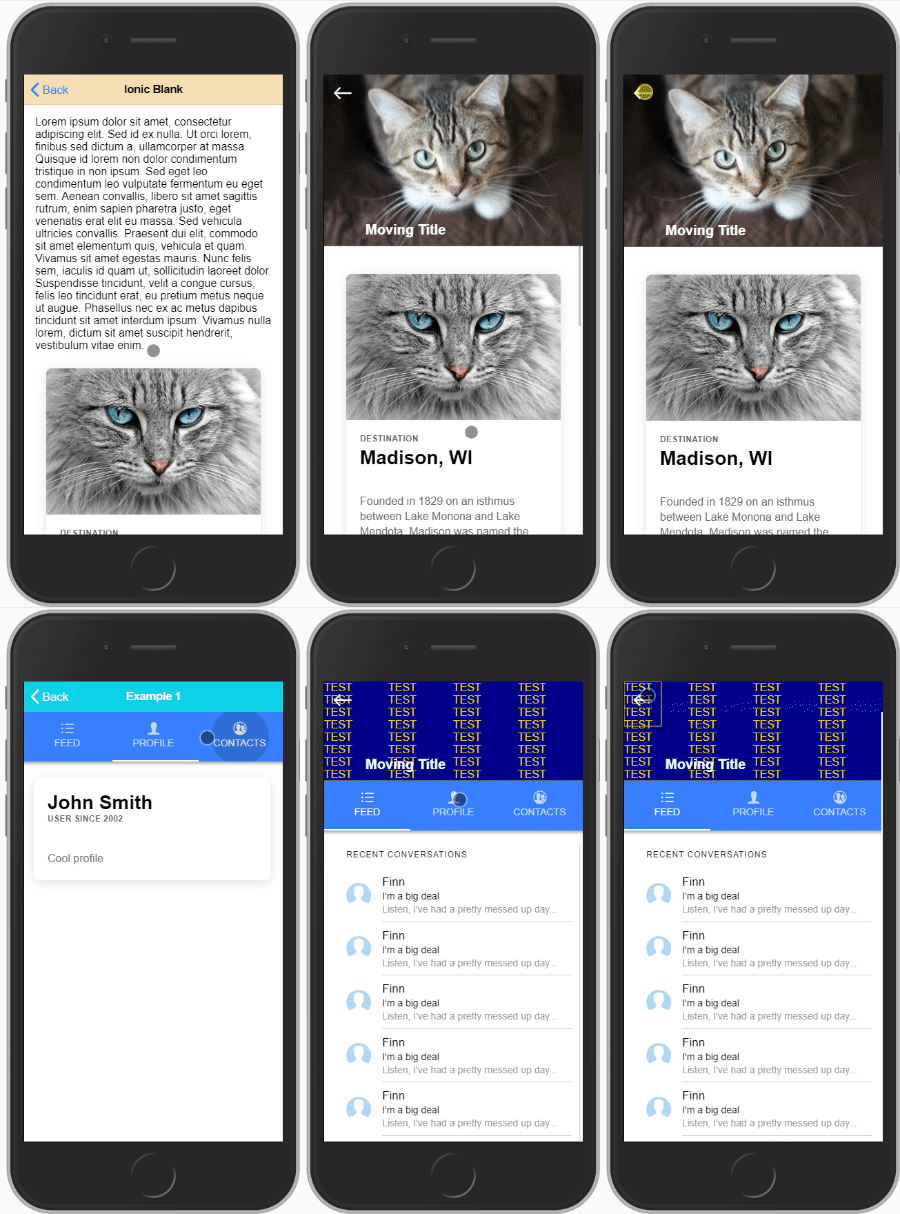
Check out the [example](https://github.com/heidji/ionic4-hidenav-example)
#### Note:
_Both should not be used together on the same page, either you want to make room for reading content or you want to add an expansible header, not both together :)_
_This plugin is also made as generic as possible, making it maybe a bit harder to setup but giving the user much more freedom to design what he wants._
## Installation
```
npm i @almothafar/ionic-hidenav
```
## Implementation
Create (or modify if you already have) a **shared.module.ts** in your project root folder:
```typescript
import { NgModule } from '@angular/core';
import { HidenavModule } from '@almothafar/ionic-hidenav';
@NgModule({
imports: [HidenavModule],
exports: [HidenavModule]
})
export class SharedModule { }
```
and import the SharedModule on every page you intend to use this plugin:
```typescript
import { NgModule } from '@angular/core';
import { CommonModule } from '@angular/common';
import { FormsModule } from '@angular/forms';
import { Routes, RouterModule } from '@angular/router';
import { IonicModule } from '@ionic/angular';
import { HomePage } from './home.page';
import { SharedModule } from '../shared.module';
const routes: Routes = [
{
path: '',
component: HomePage
}
];
@NgModule({
imports: [
CommonModule,
FormsModule,
IonicModule,
RouterModule.forChild(routes),
SharedModule
],
declarations: [HomePage]
})
export class HomePageModule {
}
```
---
## Part 1: Expansible header
This is a custom component defined using this HTML tag:
```html
```
This component must be defined outside of `` and comes with required and optional child DOM elements:
## Creating the expansible header element
**home.page.html**
`#shrinkexpand`: This is the element that will shrink and expand with scrolling the page
`#static`: Element(s) with this tag will be left alone. You can use these to create buttons on your header for example.
```html
```
Inputs for ``:
| input | type | Description |
| ----------------- | ---------------------------- | ------------------------------------------------------------------------------ |
| `header-height` | **required** | height to which the header shrinks to |
| `opacity-factor` | optional / default = 0 | `1 - 10` opacity of shrunk header overlay |
| `opacity-color` | optional / default = black | accepts any css color description (name, rgb, # ..) |
| `blur-factor` | optional / default = 0 | the maximum blur when the header is collapsed (accepts integer) |
| `init-expanded` | optional / default = false | set to `true` if you want the header to initiate expanded |
| `no-border` | optional / default = false | set to `true` if you want to remove the bottom styling of the header |
| Tabspage params only: |
| `preserve-header` | optional / default = false | set to `true` if you want to keep the header state separate on each tab |
### Adding your Header to a simple page:
add the `hidenav-sh-content` directive to your ``
````html
...
....
````
### Adding your Header to a Supertabs Page:
You need to give the the `` that holds the `` element the directive `hidenav-sh-tabscontent` then you need to add to each `` on every tab two directives: `hidenav-sh-content` and `hidenav-tabspage`
````html
...
...
...
...
...
````
### Events:
you can subscribe to the `(scroll)` event for example like:
```html
...
```
The **$event** variable returns the current header height.
### Functions:
- `expand(duration)`: scrolls content to top and expands the header.
- `shrink(duration)`: scrolls just about enought to shrink the header if it is expanded.
- `toggle(duration)`: toggles between `expand()` and `shrink()`.
Note that `duration` is optional and defaults to 200.
---
## Part 2: Hide Header on scroll
This function is fairly simple to implement than the previous one, all you will have to do is define directives `hidenav-header` and `hidenav-content` in the page you want to use.
### Adding the hidenav component to a simple page
In the following example, both header and content carry the previously mentioned directives.
```html
...
...
```
### Adding the hidenav component to a Supertabs page
Give the `` the `hidenav-header` directive and the `` that holds the `` component the directive `hidenav-tabscontent`.
As for the `` elements in each of the tabs give them the `hidenav-content` and `hidenav-tabspage` directive.
````html
...
...
...
...
...
````
**PS**.: as mentioned in the beginning, you should not use both methods (Part1 and Part2) together on one page. It was never tested and is not intended to be used.
[npm-url]: https://npmjs.org/package/@almothafar/ionic-hidenav
[npm-image]: https://img.shields.io/npm/v/@almothafar/ionic-hidenav/latest