# xdialogport
This is one of the components of the xcomponents library.
## Important note
This component is very similar to [the win7dialogs API](https://github.com/allnulled/win7dialogs). In fact, it is a pretended imitation of that API. But the advantage of this component versus that API is that this component **can use** Vue.js markup. This means, all the components you define in your Vue.js are automatically available. This easies a lot the reutilization of code, and the exploitation of Vue.js algorythms.
## When to use it
This component is designed to hold the window dialogs that are opened programmatically from the app.
## How to use it
The first you need to do to use `xdialogport` is to use it in your Vue.js v2 markup:
```html
```
### The object API
Once you do this, and the component is `mounted`, you will have available the `this.$dialogs` (or also `this.$xdialogport`) inside all your components. With it, you can from anywhere in your app:
```js
const html = "" +
"" +
" Name:" +
" " +
" " +
" Surname:" +
" " +
" " +
" " +
"";
const data = await Vue.prototype.$dialogs.form({
title: "Fast form",
html: html,
footer: "Calmed, doing forms."
});
console.log(data.name);
console.log(data.surname);
```
You also have the methods `confirm` and `inform`. Here are some demos.
```js
const html = "" +
"" +
" Are you sure you want it?" +
"";
const confirmation = await Vue.prototype.$dialogs.confirm({
title: "Confirmation",
html: html,
button_accept: "Yes",
button_reject: "No",
footer: "Calmed, doing more forms."
});
if(confirmation) {
console.log("Yes? OK, let's do it.");
} else {
console.log("No? OK, another day maybe, then.");
}
```
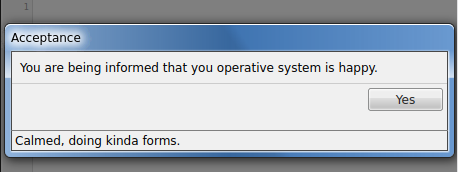
The `inform` method is the simplest, and only allows you to accept.
```js
const html = "" +
"" +
" You are being informed that you operative system is happy." +
"";
const accept = await Vue.prototype.$dialogs.inform({
title: "Acceptance",
html: html,
button_accept: "Yes",
footer: "Calmed, doing kinda forms."
});
```
### The arguments API
The arguments API works the same way. The only thing that changes is that it accepts this order of parameters, instead of an object containing them labeled:
- html: `String` *required*. This field accepts Vue.js markup. All of them are Vue.js markup, in fact.
- title: `String` or `"Message"`. Title of the window.
- footer: `String` or `false`. Footer of the window.
- button_accept: `String` or `"Aceptar"`. Accept button text.
- button_reject: `String` or `"Cancelar"`. Reject button text.
## Images
The `Vue.prototype.$dialogs.inform` method looks like this:
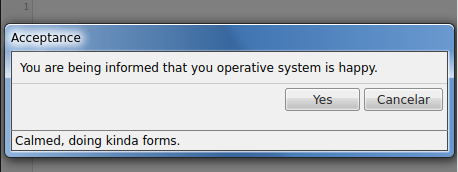
The `Vue.prototype.$dialogs.confirm` method looks like this:
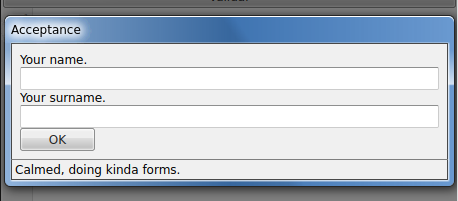
The `Vue.prototype.$dialogs.form` method looks like this: