# Chinese Dictionary JavaScript Module
Status: early prototype, interface will change
An ECMAScript 2015 (ES6) browser module for showing Chinese-English dictionary
terms in web pages. The JavaScript code will load one or more dictionaries from
JSON files. Basical lookup is provided as well as parsing Chinese text and
highlighting the words contained in the dictionary. When a user mouses over the
dictionary terms then a tooltip with the English equivalent will be displayed.
When a user clicks on a term then the other details of the dictionary term will
be shown.
The JavaScript module does not require a web framework, like Material or React,
but it should be compatible with those. It is designed and built using plain
JavaScript and to be used with modern browsers.
Indexing by traditional and simplified Chinese text is supported but no lookup
by Pinyin or English is possible.
This module is used on the web sites
[Chinese Notes](https://chinesenotes.com/),
[NTI Reader](https://ntireader.org/), and the
[Humanistic Buddhism Reader](https://hbreader.org/).
## Prerequisites
Install Node.js, version 11.
## Quickstart
The file index.html is ready to be served as a demo web page. The easiest way to
run this yourself is to clone it from GitHub:
```shell
git clone https://github.com/alexamies/chinesedict-js.git
cd chinesedict-js
```
It needs to be served on a web server (not just opened in a browser from the
local file system). For example, using Express:
```shell
npm install
npm run start
```
Open the index.html file in a web browser at `http://localhost:8080/index.html`
Click on one of the highlighted words. If everything is ok you should see a
dialog like this (on Chrome):
 Depending on the contents of the contents of the dictionary, multi-character
terms may show the details for individual characters. For example, in the
screenshot below.
Depending on the contents of the contents of the dictionary, multi-character
terms may show the details for individual characters. For example, in the
screenshot below.
 ## Using the module in your own projects
Follow the instructions here to use the chinesedict-js in your own module. Refer
to the demo examples if you get stuck.
### Setup
Suppose that your own project is in directory public_html:
```shell
mkdir public_html
cd public_html
npm init -y
```
### Installation
Get the chinesedict-js JavaScript module with the command:
```shell
npm install @alexamies/chinesedict-js
```
The files from the GitHub project will be located in the directory
```shell
node_modules/@alexamies/chinesedict-js
```
### Basic use
With the basic use of the chinesedict-js module, a DictionaryView is created
that takes care of TML DOM manipulation required to display the dictionary
elements. You can import the module into your web pages with a JavaScript
[import](https://developer.mozilla.org/en-US/docs/Web/JavaScript/Reference/Statements/import)
statement:
```javascript
import { DictionarySource,
PlainJSBuilder } from '@alexamies/chinesedict-js';
```
Make sure that you reference your own JavaScript code in your HTML page using a
[script](https://developer.mozilla.org/en-US/docs/Web/HTML/Element/script)
element with type="module"
```html
```
In demo_app.js, add JavaScript code to import the ES6 module:
```javascript
const source = new DictionarySource('assets/words.json',
'Demo Dictionary',
'Just for a demo');
const builder = new PlainJSBuilder([source],
'.textbody',
'dict-dialog',
'all');
const dictView = builder.buildDictionary();
```
Matching terms will be highlighted. The dictionary will be loaded
asynchronously.
After the dictionary is loaded it can respond to user clicks on a word with a
dialog. Words can also looked up directly:
```javascript
const term = dictView.lookup('力'); // Example term
const entry = term.getEntries()[0]; // Get the entry
console.log(`English: ${ entry.getEnglish() }`);
console.log(`Pinyin: ${ entry.getPinyin() }`);
```
The PlainJSBuilder is a DictionaryBuilder implementation that creates and
initializes the dictionary view for browser apps that do not depend on a web
application framework. The parameters to the constructor of PlainJSBuilder are
1. source - An array of sources with the filenames of the dictionary JSON files
2. selector - A DOM selector for the Chinese text to be segmented
3. dialog_id - A DOM id used to find the dialog
4. highlight - Highlight either all the terms ('all' by default) or only proper
nouns ('proper')
where 'div_id' is select for the HTML elements containing the Chinese text.
Also, in your SCSS or CSS file import the stylesheet:
```css
@import '@alexamies/chinesedict-js/chinesedict';
```
The [dialog-polyfill](https://github.com/GoogleChrome/dialog-polyfill) can be used
for cross-browser compatibility. The dialog-polyfill files needs to be copied
manually at the moment. On the command line:
```shell
npm install dialog-polyfill
cp node_modules/dialog-polyfill/dialog-polyfill.js dist/.
cp node_modules/dialog-polyfill/dialog-polyfill.css dist/.
```
The dialog-polyfill is not used as a module. Load it into your HTML page:
```html
```
Also, import the stylesheet into your CSS file with a
[CSS import](https://developer.mozilla.org/en-US/docs/Web/CSS/@import)
statement:
```css
@import '/assets/dialog-polyfill.css';
```
## Customize the Dictionary
A very small demo dict is provided with some examples.
You can customize the module with your own dictionaries, HTML content and
styles. The dictionary should be structured the same as the example words.json
files provided. If you have not got your own dictionary then you can use the
[NTI Buddhist Text Reader Project](https://github.com/alexamies/buddhist-dictionary),
or
[Chinese Notes](https://github.com/alexamies/chinesenotes.com)
Chinese-English dictionary, which may be reused under the
[Creative Commons Attribution-Share Alike 3.0 License-CCASE 3.0](https://creativecommons.org/licenses/by-sa/3.0/).
You can use either the build/word2json.py or build/gen_dictionary.js file
Nodejs command line utility to generate the dictionary file. Both utilities
assumes the tab separated variable format of the words.txt file in the
[Chinese Notes](https://github.com/alexamies/chinesenotes.com)
project.
Basic usage for the Python command line utility is
```shell
python3 words2json.py "file1.tsv,file2.tsv" words.json
```
The words2json.py script can accept a number of source files as the first
argument. They should be enclosed in double quotes and separated by commas.
Basic usage for the Node.js command line utility is
```shell
node build/gen_dictionary.js
```
To build with the Chinese Notes dictionary:
```shell
CHINESE_DICT_JS=$PWD
cd ..
git clone https://github.com/alexamies/chinesenotes.com.git
CNREADER_HOME=$PWD/chinesenotes.com
cd $CHINESE_DICT_JS
```
To generate the
dictionary use the command
```shell
npm install
npm run generate_dict $CNREADER_HOME/data/words.txt
```
To restrict the entries to a specific topic use the --topic argument. For
example,
```shell
node build/gen_dictionary.js --topic "Literary Chinese" build/words.tsv
```
The dictionary file is stored in JSON format.
For the
[CC-CEDICT](https://www.mdbg.net/chinese/dictionary?page=cc-cedict) dictionary
```shell
curl -O https://www.mdbg.net/chinese/export/cedict/cedict_1_0_ts_utf-8_mdbg.zip
unzip cedict_1_0_ts_utf-8_mdbg.zip
rm cedict_1_0_ts_utf-8_mdbg.zip
npm run cc-cedict
```
It is possible to add multiple dictionaries, as shown in the screenshot below.
## Using the module in your own projects
Follow the instructions here to use the chinesedict-js in your own module. Refer
to the demo examples if you get stuck.
### Setup
Suppose that your own project is in directory public_html:
```shell
mkdir public_html
cd public_html
npm init -y
```
### Installation
Get the chinesedict-js JavaScript module with the command:
```shell
npm install @alexamies/chinesedict-js
```
The files from the GitHub project will be located in the directory
```shell
node_modules/@alexamies/chinesedict-js
```
### Basic use
With the basic use of the chinesedict-js module, a DictionaryView is created
that takes care of TML DOM manipulation required to display the dictionary
elements. You can import the module into your web pages with a JavaScript
[import](https://developer.mozilla.org/en-US/docs/Web/JavaScript/Reference/Statements/import)
statement:
```javascript
import { DictionarySource,
PlainJSBuilder } from '@alexamies/chinesedict-js';
```
Make sure that you reference your own JavaScript code in your HTML page using a
[script](https://developer.mozilla.org/en-US/docs/Web/HTML/Element/script)
element with type="module"
```html
```
In demo_app.js, add JavaScript code to import the ES6 module:
```javascript
const source = new DictionarySource('assets/words.json',
'Demo Dictionary',
'Just for a demo');
const builder = new PlainJSBuilder([source],
'.textbody',
'dict-dialog',
'all');
const dictView = builder.buildDictionary();
```
Matching terms will be highlighted. The dictionary will be loaded
asynchronously.
After the dictionary is loaded it can respond to user clicks on a word with a
dialog. Words can also looked up directly:
```javascript
const term = dictView.lookup('力'); // Example term
const entry = term.getEntries()[0]; // Get the entry
console.log(`English: ${ entry.getEnglish() }`);
console.log(`Pinyin: ${ entry.getPinyin() }`);
```
The PlainJSBuilder is a DictionaryBuilder implementation that creates and
initializes the dictionary view for browser apps that do not depend on a web
application framework. The parameters to the constructor of PlainJSBuilder are
1. source - An array of sources with the filenames of the dictionary JSON files
2. selector - A DOM selector for the Chinese text to be segmented
3. dialog_id - A DOM id used to find the dialog
4. highlight - Highlight either all the terms ('all' by default) or only proper
nouns ('proper')
where 'div_id' is select for the HTML elements containing the Chinese text.
Also, in your SCSS or CSS file import the stylesheet:
```css
@import '@alexamies/chinesedict-js/chinesedict';
```
The [dialog-polyfill](https://github.com/GoogleChrome/dialog-polyfill) can be used
for cross-browser compatibility. The dialog-polyfill files needs to be copied
manually at the moment. On the command line:
```shell
npm install dialog-polyfill
cp node_modules/dialog-polyfill/dialog-polyfill.js dist/.
cp node_modules/dialog-polyfill/dialog-polyfill.css dist/.
```
The dialog-polyfill is not used as a module. Load it into your HTML page:
```html
```
Also, import the stylesheet into your CSS file with a
[CSS import](https://developer.mozilla.org/en-US/docs/Web/CSS/@import)
statement:
```css
@import '/assets/dialog-polyfill.css';
```
## Customize the Dictionary
A very small demo dict is provided with some examples.
You can customize the module with your own dictionaries, HTML content and
styles. The dictionary should be structured the same as the example words.json
files provided. If you have not got your own dictionary then you can use the
[NTI Buddhist Text Reader Project](https://github.com/alexamies/buddhist-dictionary),
or
[Chinese Notes](https://github.com/alexamies/chinesenotes.com)
Chinese-English dictionary, which may be reused under the
[Creative Commons Attribution-Share Alike 3.0 License-CCASE 3.0](https://creativecommons.org/licenses/by-sa/3.0/).
You can use either the build/word2json.py or build/gen_dictionary.js file
Nodejs command line utility to generate the dictionary file. Both utilities
assumes the tab separated variable format of the words.txt file in the
[Chinese Notes](https://github.com/alexamies/chinesenotes.com)
project.
Basic usage for the Python command line utility is
```shell
python3 words2json.py "file1.tsv,file2.tsv" words.json
```
The words2json.py script can accept a number of source files as the first
argument. They should be enclosed in double quotes and separated by commas.
Basic usage for the Node.js command line utility is
```shell
node build/gen_dictionary.js
```
To build with the Chinese Notes dictionary:
```shell
CHINESE_DICT_JS=$PWD
cd ..
git clone https://github.com/alexamies/chinesenotes.com.git
CNREADER_HOME=$PWD/chinesenotes.com
cd $CHINESE_DICT_JS
```
To generate the
dictionary use the command
```shell
npm install
npm run generate_dict $CNREADER_HOME/data/words.txt
```
To restrict the entries to a specific topic use the --topic argument. For
example,
```shell
node build/gen_dictionary.js --topic "Literary Chinese" build/words.tsv
```
The dictionary file is stored in JSON format.
For the
[CC-CEDICT](https://www.mdbg.net/chinese/dictionary?page=cc-cedict) dictionary
```shell
curl -O https://www.mdbg.net/chinese/export/cedict/cedict_1_0_ts_utf-8_mdbg.zip
unzip cedict_1_0_ts_utf-8_mdbg.zip
rm cedict_1_0_ts_utf-8_mdbg.zip
npm run cc-cedict
```
It is possible to add multiple dictionaries, as shown in the screenshot below.
 Example code for mulitple dictionaries is give in
[demo2/test3.html](demo2/test3.html) with JavaScript file
[demo2/demo_app.js](demo2/demo_app.js).
## Integration
The module JavaScript is generated from TypeScript, which can help provide
direct integration for TypeScript apps.
### Building with TypeScript
The JavaScript module is based on a [TypeScript
module](https://www.typescriptlang.org/docs/handbook/modules.html). Both
use the same ECMAScript 2015 (ES6) module concepts.
Compile the TypeScript module and demo app
```shell
npm run compile
```
Build the JavaScript into an optimized bundle with module dependencies
```shell
npm run build
```
Run the demo app
```shell
npm run start
```
This will generate the demo_app.js file used in the basic example.
You may need to copy the type declaration file index.d.ts from the GitHub
project. For example,
```shell
mkdir your_project
cd your_project
npm install @alexamies/chinesedict-js
cd ..
git clone https://github.com/alexamies/chinesedict-js.git
cp chinesedict-js/index.d.ts node_modules/@alexamies/chinesedict-js/.
```
### Using with dictionary with your own HTML presentation
The Material Design Web example shows how to use the module without DOM
dependencies. The load the dictionary data only first import `DictionaryLoader`
and `DictionarySource`.
```JavaScript
import { DictionaryLoader,
DictionarySource,
TextParser } from '@alexamies/chinesedict-js';
````
Load the dictionary with code like
```JavaScript
const source = new DictionarySource(
'ntireader.json',
'NTI Reader Dictionary',
'Nan Tien Institute Reader dictionary');
const dictionaries = new DictionaryCollection();
const loader = new DictionaryLoader([source], dictionaries);
const observable = loader.loadDictionaries();
observable.subscribe(
() => {
thisApp.dictionaries = loader.getDictionaryCollection();
const loadingStatus = thisApp.querySelectorNonNull("#loadingStatus")
loadingStatus.innerHTML = "Dictionary loading status: loaded";
},
(err) => { console.error(`load error: + ${ err }`); },
);
```
The loadDictionaries() function returns an RxJS Observable. When that completes
the dictionary will be loaded and you can get the headwords with type
`Map`.
You can parse a text string into individual terms with `TextParser`:
```JavaScript
const parser = new TextParser(dictionaries);
const terms = parser.segmentText(text);
````
To run the demo, first copy the material demo app to an external directory
```shell
cd
cp -r chinesedict-js/material .
```
Copy a demo dictionary
```shell
cp chinesedict-js/assets/ntireader.json .
```
Change to the material directory
```shell
cd material
```
Install the dependencies with the comm
```shell
npm install
```
Compile the TypeScript
```shell
npm run compile
```
Build the CSS and JavaScript bundles with the command
```shell
npm run build
```
Start the webpack dev server with the command
```shell
npm start
```
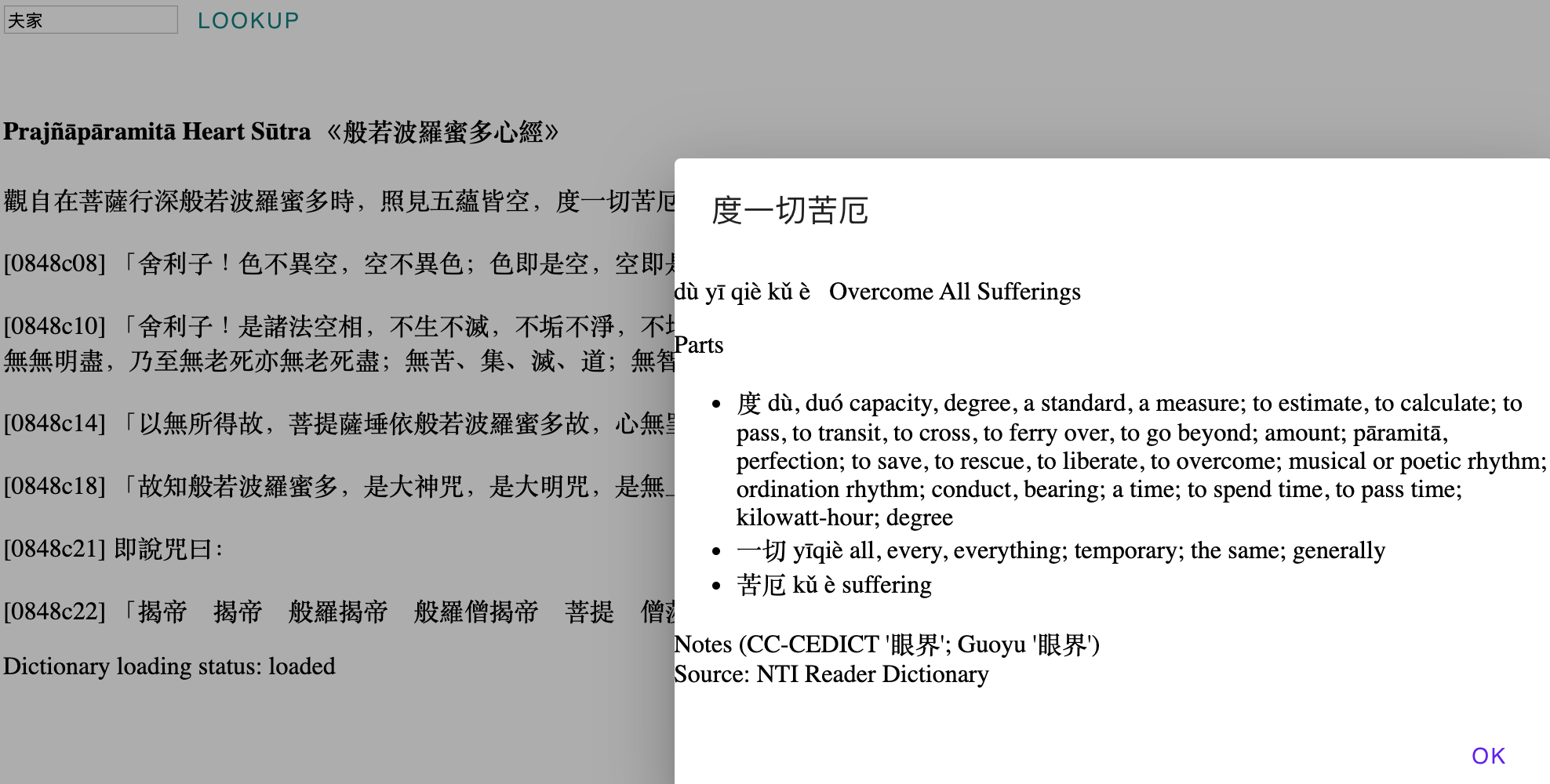
You should see something like the screenshot below.
Example code for mulitple dictionaries is give in
[demo2/test3.html](demo2/test3.html) with JavaScript file
[demo2/demo_app.js](demo2/demo_app.js).
## Integration
The module JavaScript is generated from TypeScript, which can help provide
direct integration for TypeScript apps.
### Building with TypeScript
The JavaScript module is based on a [TypeScript
module](https://www.typescriptlang.org/docs/handbook/modules.html). Both
use the same ECMAScript 2015 (ES6) module concepts.
Compile the TypeScript module and demo app
```shell
npm run compile
```
Build the JavaScript into an optimized bundle with module dependencies
```shell
npm run build
```
Run the demo app
```shell
npm run start
```
This will generate the demo_app.js file used in the basic example.
You may need to copy the type declaration file index.d.ts from the GitHub
project. For example,
```shell
mkdir your_project
cd your_project
npm install @alexamies/chinesedict-js
cd ..
git clone https://github.com/alexamies/chinesedict-js.git
cp chinesedict-js/index.d.ts node_modules/@alexamies/chinesedict-js/.
```
### Using with dictionary with your own HTML presentation
The Material Design Web example shows how to use the module without DOM
dependencies. The load the dictionary data only first import `DictionaryLoader`
and `DictionarySource`.
```JavaScript
import { DictionaryLoader,
DictionarySource,
TextParser } from '@alexamies/chinesedict-js';
````
Load the dictionary with code like
```JavaScript
const source = new DictionarySource(
'ntireader.json',
'NTI Reader Dictionary',
'Nan Tien Institute Reader dictionary');
const dictionaries = new DictionaryCollection();
const loader = new DictionaryLoader([source], dictionaries);
const observable = loader.loadDictionaries();
observable.subscribe(
() => {
thisApp.dictionaries = loader.getDictionaryCollection();
const loadingStatus = thisApp.querySelectorNonNull("#loadingStatus")
loadingStatus.innerHTML = "Dictionary loading status: loaded";
},
(err) => { console.error(`load error: + ${ err }`); },
);
```
The loadDictionaries() function returns an RxJS Observable. When that completes
the dictionary will be loaded and you can get the headwords with type
`Map`.
You can parse a text string into individual terms with `TextParser`:
```JavaScript
const parser = new TextParser(dictionaries);
const terms = parser.segmentText(text);
````
To run the demo, first copy the material demo app to an external directory
```shell
cd
cp -r chinesedict-js/material .
```
Copy a demo dictionary
```shell
cp chinesedict-js/assets/ntireader.json .
```
Change to the material directory
```shell
cd material
```
Install the dependencies with the comm
```shell
npm install
```
Compile the TypeScript
```shell
npm run compile
```
Build the CSS and JavaScript bundles with the command
```shell
npm run build
```
Start the webpack dev server with the command
```shell
npm start
```
You should see something like the screenshot below.
 If you get stuck read the instructions at
[Using MDC Web with Sass and ES2015](https://material.io/develop/web/docs/getting-started/).
### Cross browser support
Cross browser support is provided for the HTML
[dialog](https://developer.mozilla.org/en-US/docs/Web/HTML/Element/dialog)
using [dialog-polyfill](https://github.com/GoogleChrome/dialog-polyfill) since
the dialog element is not yet supported natively by Edge or Safari.
Modern browsers ES6 style JavaScript including modules. If you want to support
older browsers you will need to do that with a different compilation target for
the tsc TypeScript compiler above. However, this will result in less readable
and slower code.
### Mobile Device Support
The module can be used on web pages designed for mobile devices although it has
not yet been designed for an optimal experience.
### Performance
Bundling and minification with WebPack or Babel may help but their current ES6
module support lags behind browsers. Use of common JS modules does not perform
adequately, except for very small dictionaries and text sizes.
## App Engine
An example of deploying to App Engine is given in [demo](demo/README.md).
See this at
[chinesedictdemo.appspot.com](https://chinesedictdemo.appspot.com).
### Other Frameworks
Develop an implementation of the TypeScript DictionaryBuilder interface or work
with the JavaScript directly to create an initialize the dictionary for your
framework.
If you get stuck read the instructions at
[Using MDC Web with Sass and ES2015](https://material.io/develop/web/docs/getting-started/).
### Cross browser support
Cross browser support is provided for the HTML
[dialog](https://developer.mozilla.org/en-US/docs/Web/HTML/Element/dialog)
using [dialog-polyfill](https://github.com/GoogleChrome/dialog-polyfill) since
the dialog element is not yet supported natively by Edge or Safari.
Modern browsers ES6 style JavaScript including modules. If you want to support
older browsers you will need to do that with a different compilation target for
the tsc TypeScript compiler above. However, this will result in less readable
and slower code.
### Mobile Device Support
The module can be used on web pages designed for mobile devices although it has
not yet been designed for an optimal experience.
### Performance
Bundling and minification with WebPack or Babel may help but their current ES6
module support lags behind browsers. Use of common JS modules does not perform
adequately, except for very small dictionaries and text sizes.
## App Engine
An example of deploying to App Engine is given in [demo](demo/README.md).
See this at
[chinesedictdemo.appspot.com](https://chinesedictdemo.appspot.com).
### Other Frameworks
Develop an implementation of the TypeScript DictionaryBuilder interface or work
with the JavaScript directly to create an initialize the dictionary for your
framework.