# pi-linear
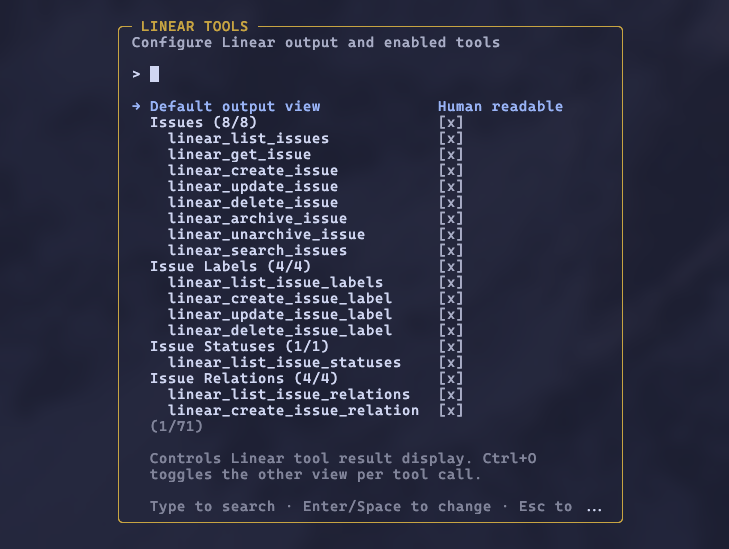
Configure Linear tools and output defaults from the settings overlay.
---
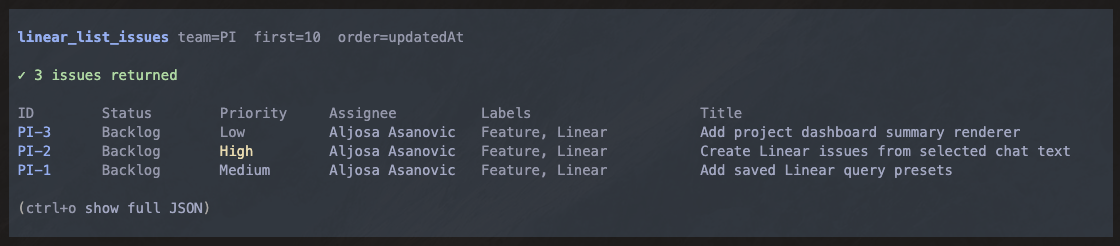
Human-readable issue results keep screenshots clean while full JSON remains available with Ctrl+O.
Linear integration for [pi](https://pi.dev) with 55+ tools covering issues, projects, documents, initiatives, comments, relations, and more. Includes multi-workspace auth and a per-tool settings overlay.
## Prerequisites
You need a Linear API key. To create one:
1. Go to **Linear Settings > Account > Security & Access > API**
2. Click **Create key** and give it a name (e.g. "pi")
3. Under **Permissions**, select **Only select permissions** with **Read** and **Write** enabled. Leave **Admin** unchecked.
4. Under **Team access**, choose **All teams you have access to** or scope to specific teams if you prefer
5. Click **Create** and copy the key
## Install
```bash
pi install npm:@alasano/pi-linear
```
## Authentication
The extension can use either stored workspaces or the `LINEAR_API_KEY` environment variable. Stored workspaces are preferred by default so multi-account switching keeps working even if `LINEAR_API_KEY` is set globally.
Use the `/linear-auth` command to manage workspaces and choose the auth preference:
| Command | Description |
| ------------------------------------ | -------------------------------------------------------------------- |
| `/linear-auth add ` | Add a workspace with an API key (prompts for key) |
| `/linear-auth remove ` | Remove a workspace (shows selector if name omitted) |
| `/linear-auth switch ` | Switch active workspace and prefer stored workspaces |
| `/linear-auth prefer workspace\|env` | Choose whether stored workspaces or `LINEAR_API_KEY` are tried first |
| `/linear-auth status` | Show auth preference, active source, and configured workspaces |
| `/linear-auth` | Same as status |
When you add your first workspace, it becomes active automatically. Adding a second workspace prompts you to switch. After a `/reload` with two or more workspaces configured, the agent gets a `linear_switch_workspace` tool and can switch between them when asked.
Default auth resolution order (`/linear-auth prefer workspace`):
1. Active stored workspace (if any workspaces are configured)
2. `LINEAR_API_KEY` environment variable (fallback when no workspace is active)
3. Interactive prompt (asks you to set up a key)
Environment auth resolution order (`/linear-auth prefer env`):
1. `LINEAR_API_KEY` environment variable
2. Active stored workspace (fallback when `LINEAR_API_KEY` is not set)
3. Interactive prompt (asks you to set up a key)
Credentials and auth preference are stored at `~/.pi/agent/extensions/linear/credentials.json`.
## Tool settings
Run `/linear-settings` to open an overlay where you can choose the default output view and enable or disable tools by category or individually. Linear results default to a human-readable view, with full JSON available via `Ctrl+O`; you can flip the default to full JSON if you prefer. Disabled tools are removed from the LLM's context entirely. Preferences persist across sessions.
## Tools (55)
### Issues
| Tool | Description |
| ------------------------ | ------------------------------------------------------------------ |
| `linear_list_issues` | List issues with filters, pagination, and sort |
| `linear_get_issue` | Get full issue details by identifier (ENG-123) or id |
| `linear_create_issue` | Create an issue with full IssueCreateInput support |
| `linear_update_issue` | Update an issue with full IssueUpdateInput support |
| `linear_delete_issue` | Delete an issue (admins can permanently delete) |
| `linear_archive_issue` | Archive or trash an issue |
| `linear_unarchive_issue` | Restore an archived issue |
| `linear_search_issues` | Search issues by text, with optional comment search and team boost |
### Issue Labels
| Tool | Description |
| --------------------------- | ---------------------------------- |
| `linear_list_issue_labels` | List issue labels with team filter |
| `linear_create_issue_label` | Create an issue label |
| `linear_update_issue_label` | Update an issue label |
| `linear_delete_issue_label` | Delete an issue label |
### Issue Statuses
| Tool | Description |
| ---------------------------- | ------------------------------------- |
| `linear_list_issue_statuses` | List workflow states (issue statuses) |
### Issue Relations
| Tool | Description |
| ------------------------------ | ------------------------------------------------------- |
| `linear_list_issue_relations` | List issue relations |
| `linear_create_issue_relation` | Create a relation (blocks, duplicate, related, similar) |
| `linear_update_issue_relation` | Update a relation |
| `linear_delete_issue_relation` | Delete a relation |
### Projects
| Tool | Description |
| -------------------------- | ------------------------------------------------ |
| `linear_list_projects` | List projects with filters, pagination, and sort |
| `linear_get_project` | Get full project details by id |
| `linear_save_project` | Create or update a project |
| `linear_delete_project` | Delete a project |
| `linear_archive_project` | Archive or trash a project |
| `linear_unarchive_project` | Restore an archived project |
List and search results include `pageInfo` in the JSON output for cursor pagination. Project list results use a bounded summary selection, and `linear_get_project` plus project save results include the project's markdown `content` body.
### Project Labels
| Tool | Description |
| ----------------------------- | ---------------------- |
| `linear_list_project_labels` | List project labels |
| `linear_create_project_label` | Create a project label |
| `linear_update_project_label` | Update a project label |
| `linear_delete_project_label` | Delete a project label |
### Project Relations
| Tool | Description |
| -------------------------------- | ------------------------- |
| `linear_list_project_relations` | List project relations |
| `linear_create_project_relation` | Create a project relation |
| `linear_update_project_relation` | Update a project relation |
| `linear_delete_project_relation` | Delete a project relation |
### Documents
| Tool | Description |
| --------------------------- | ------------------------------------------ |
| `linear_list_documents` | List documents with filters and pagination |
| `linear_get_document` | Get full document details by id |
| `linear_create_document` | Create a document |
| `linear_update_document` | Update a document |
| `linear_delete_document` | Delete a document |
| `linear_unarchive_document` | Restore an archived document |
### Comments
| Tool | Description |
| ----------------------- | -------------------------------------------------- |
| `linear_list_comments` | List comments with filters and pagination |
| `linear_create_comment` | Create a comment on an issue, project update, etc. |
| `linear_update_comment` | Update a comment |
| `linear_delete_comment` | Delete a comment |
### Initiatives
| Tool | Description |
| ----------------------------- | --------------------------------------------------- |
| `linear_list_initiatives` | List initiatives with filters, pagination, and sort |
| `linear_get_initiative` | Get full initiative details by id |
| `linear_save_initiative` | Create or update an initiative |
| `linear_delete_initiative` | Delete an initiative |
| `linear_archive_initiative` | Archive an initiative |
| `linear_unarchive_initiative` | Restore an archived initiative |
### Milestones
| Tool | Description |
| ------------------------- | ---------------------------- |
| `linear_list_milestones` | List project milestones |
| `linear_get_milestone` | Get milestone details by id |
| `linear_save_milestone` | Create or update a milestone |
| `linear_delete_milestone` | Delete a milestone |
### Teams
| Tool | Description |
| ------------------- | ------------------------------- |
| `linear_list_teams` | List teams with workflow states |
| `linear_get_team` | Get team details by id |
### Users
| Tool | Description |
| ------------------- | ---------------------- |
| `linear_list_users` | List users |
| `linear_get_user` | Get user details by id |
### Workspaces
| Tool | Description |
| ------------------------- | ----------------------------------------------------------- |
| `linear_switch_workspace` | Switch active workspace (only available with 2+ workspaces) |
## Requirements
- Pi interactive mode (settings overlay uses the widget API)