# pi-forcefeed

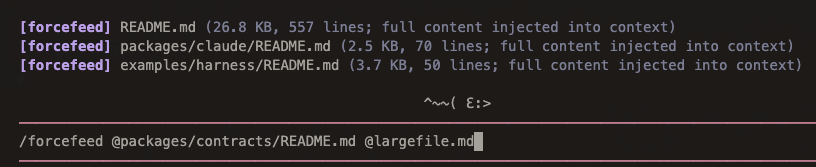
Force-feed complete files into [pi](https://pi.dev) conversation context without using the built-in `read` tool's truncation.
Use this when you intentionally want to put one or more whole files into the model context and are willing to own the provider/model context-window risk.
## Install
```bash
pi install npm:@alasano/pi-forcefeed
```
## Commands
| Command | Description |
| ----------------------- | ---------------------------------------------------- |
| `/forcefeed ` | Inject one or more complete files into context |
| `/forcefeed @` | Same command, with Pi's built-in `@` path completion |
Examples:
```text
/forcefeed README.md
/forcefeed @README.md @examples/harness/README.md
/forcefeed ./docs/notes.md /absolute/path/to/file.ts
```
## Behavior
- Accepts relative paths from the current Pi working directory.
- Accepts absolute paths.
- Accepts an optional leading `@` per path.
- Accepts quoted paths with spaces.
- Reads files as UTF-8 text.
- Sends one custom message containing all successfully read files.
- Renders one compact `[forcefeed]` line per file in the UI.
- Does not impose a file-size limit; provider/model context limits still apply.
The model receives start/end markers around every file:
```text
<<>>
...
<<>>
```
If one file fails, `pi-forcefeed` still injects the files it could read and shows an error notification for the failed paths.
## Autocomplete
- `@` paths use Pi's built-in file autocomplete.
- Bare command arguments also provide simple path completion for `/forcefeed `.
- Multi-path bare completion preserves earlier paths while completing the current path token.
## Requirements
- Pi with extension support.
- Node.js 22 or newer.
## Limitations
`pi-forcefeed` bypasses Pi's `read` truncation, not model/provider context limits. Very large files or many files can still make a request too large, slow, or expensive.