
# Easy email

<p align="center">

  <br/>
  <a aria-label="Vercel logo" href="https://vercel.com">
    <img src="https://badgen.net/badge/icon/Made%20by%20Vercel?icon=zeit&label&color=black&labelColor=black">
  </a>
  <br/>

  <img src="https://img.shields.io/badge/PRs-welcome-brightgreen.svg">
  <a aria-label="NPM version" href="https://www.npmjs.com/package/easy-email-editor">
    <img alt="" src="https://badgen.net/npm/v/easy-email-editor">
  </a>
  <a aria-label="React version" href="https://react.js">
    <img alt="" src="https://img.shields.io/badge/React-17.0-yellow.svg">
  </a>
  <a aria-label="MJML" href="https://mjml.io/">
    <img src="https://img.shields.io/badge/MJML-awesome-rgb(120 33 117).svg">
  </a>
  <a aria-label="Package size" href="https://www.typescriptlang.org/">
    <img alt="Using TypeScript" src="https://img.shields.io/badge/%3C/%3E-TypeScript-brightgreenred.svg">
  </a>
  <img alt="" src="https://badgen.net/npm/license/easy-email-editor">
</p>

## Introduction

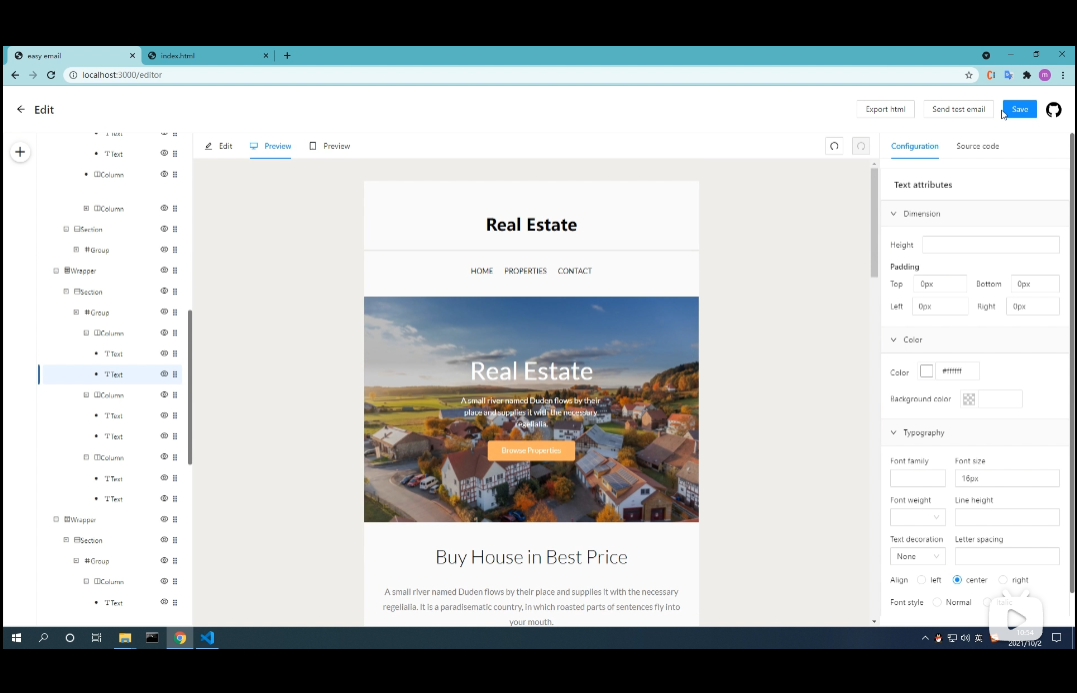
Easy email is developed based on the [MJML](https://mjml.io/) and has very good compatibility. At the same time, it can generate code through drag-and-drop editing.

## Features:

- Drag and drop editor
- Can be converted into `MJML`, or generated through `MJML`
- Collect blocks and reuse them at other times
- Defined custom block
- Dynamic rendering


|                                                                                  Video Overview                                                                                  |
| :------------------------------------------------------------------------------------------------------------------------------------------------------------------------------: |
| <a href="https://www.bilibili.com/video/BV1YQ4y167bb" target="_blank"><img src="https://assets.maocanhua.cn/e2ba1d5c-c944-4351-9668-c519baf67361-image.png" alt="Overview" ></a> |
|                                                         Watch video overview:https://www.bilibili.com/video/BV1YQ4y167bb                                                         |

## Live Demo

Check out the live demo here: <a href="http://easy-email-m-ryan.vercel.app" target="_blank" alt="http://easy-email-m-ryan.vercel.app">http://easy-email-m-ryan.vercel.app</a>

## Getting started

```sh
$ npm install --save easy-email-editor antd mjml-browser react-final-form
```

or

```sh
$ yarn add easy-email-editor antd mjml-browser react-final-form
```

```js
import React from "react";
import { BlocksMap, EmailEditor, EmailEditorProvider } from "easy-email-editor";
import "easy-email-editor/lib/style.css";
import "antd/dist/antd.css";

const initialValues = {
  subject: "Welcome to Easy-email",
  subTitle: "Nice to meet you!",
  content: BlocksMap.getBlock("Page").create({}),
};

export function App() {
  return (
    <EmailEditorProvider data={initialValues}>
      {({ values }) => {
        return <EmailEditor height={"calc(100vh - 72px)"} />;
      }}
    </EmailEditorProvider>
  );
}
```

## Docs

Check out [documentation](https://docs-easy-email.vercel.app/) for guides and a full API reference.

## Examples

> Please see <a href="https://github.com/m-Ryan/easy-email-demo" target="_blank" alt="https://github.com/m-Ryan/easy-email-demo">https://github.com/m-Ryan/easy-email-demo</a>

## Development

```sh
$ git clone git@github.com:m-Ryan/easy-email.git
$ cd easy-email
$ yarn install

```

## Start the dev server

```sh
$ yarn dev

```

## License

The MIT License
