# Coaching Overlay
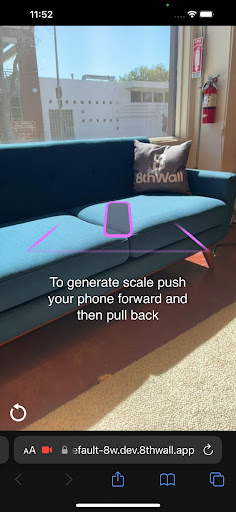
Helpful user prompts for Absolute Scale and Sky Effects projects
## Usage
See https://8thwall.org/docs/engine/guides/coaching-overlays for a complete guide to customizing the coaching overlay.
### Option 1: Script tag
```html
```
### Option 2: npm
```bash
npm install @8thwall/coaching-overlay
```
You will need to copy the included artifacts into your dist folder, for example in webpack:
```js
new CopyWebpackPlugin({
patterns: [
{
from: 'node_modules/@8thwall/coaching-overlay/dist',
to: 'external/coaching-overlay',
}
]
})
```
You can then load the library by adding the following to index.html:
```html
```
When you import the package, a simple helper for accessing window.CoachingOverlay/window.SkyCoachingOverlay is provided. The expectation is still that the script tag is added to the HTML. Note that configuring the overlays in this way is not required for A-Frame projects as the configuration is passed through the component schema.
```js
import * as CoachingOverlay from '@8thwall/coaching-overlay'
CoachingOverlay.AbsoluteScale.configure({
promptColor: '#00ff00',
})
CoachingOverlay.Sky.configure({
promptText: 'Look at the sky!',
})
```
## Development
- Start a local server with `npm run watch`
- Try out the test at `https://localhost:9003/test/`.
- In order to use your local version in a project, replace the existing script tag with ``