# custom-titlebar
Poorly coded titlebar for [Electron](https://www.electronjs.org/), [NW.js](https://nwjs.io/) and [PWAs](https://developer.mozilla.org/en-US/docs/Web/Progressive_web_apps).
    [](https://www.jsdelivr.com/package/npm/@6c65726f79/custom-titlebar)

> Light/Dark skin

> Control button styles
Show me more

> Condensed menu
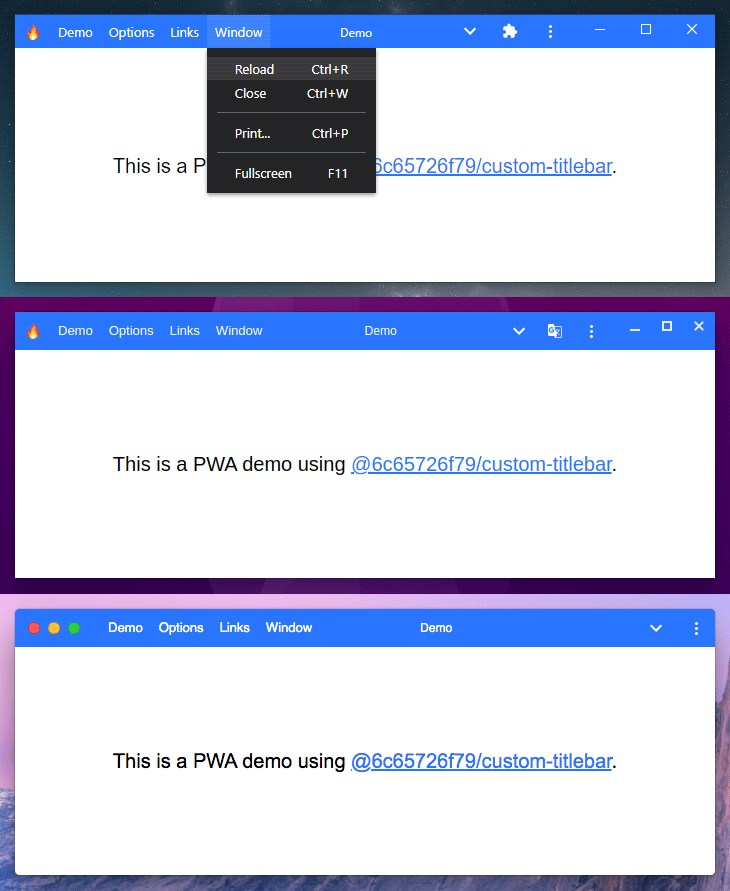
> Progressive web app
# About
**It's a library for Electron, NW.js and PWAs, it can be used on a basic website but it's useless ¯\\_(ツ)_/¯**
## Main features
* Compatible with any version of Electron 🎉
* Works with Electron, NW.js and probably others 🤷♂️
* Fully compatible with Progressive Web Apps and Window Controls Overlay 🔥
* Works without any dependencies, so it won't break in the next major release of Electron 👀
* Very small footprint (< 30 kB) 👣
* Options and methods very similar to [custom-electron-titlebar](https://www.npmjs.com/package/custom-electron-titlebar) 📖
## Demo
You can see a demo of this library in a PWA here: https://6c65726f79.github.io/custom-titlebar/
Notes:
* Check the list of [compatible browsers](https://developer.mozilla.org/en-US/docs/Web/Manifest/display_override#browser_compatibility).
* If the install button doesn't appear, try reloading and reopening the tab several times.
* You may need to manually enable Window Controls Overlay until Chrome 98 is released: `chrome://flags/#enable-desktop-pwas-window-controls-overlay`
## Inpiration
This package is highly inspired by [custom-electron-titlebar](https://www.npmjs.com/package/custom-electron-titlebar).
## Motivations
I needed a custom titlebar for Electron 14 to replace the unmaintained [custom-electron-titlebar](https://www.npmjs.com/package/custom-electron-titlebar), but I couldn't find any interesting ones, so I made it myself.
## Not yet implemented
* ~~MenuItem role, icon, radio~~ Done!
* ~~Icons theme~~ Done!
* Submenu scrollbar
* Keyboard controls
# Q&A
## Can I use this package without `@electron/remote`?
Absolutely! Check out the [advanced examples](https://github.com/6c65726f79/custom-titlebar/wiki/Advanced-examples#use-without-electronremote) to see how it's done.
## How to fix Content Security Policy errors?
Simply add `style-src 'unsafe-inline'` in the `Content-Security-Policy` meta tag.
## How long before this package becomes unmaintained too?
This package doesn't rely on the Electron or NW.js API so it doesn't need as much maintenance as other packages. Even if I stop maintaining it and the API change dramatically, you could modify your code to match the new API. So theoretically this package can't become obsolete.
# Install
```
npm i @6c65726f79/custom-titlebar
```
# Usage
## Node.js
### JavaScript
```javascript
const Titlebar = require('@6c65726f79/custom-titlebar');
new Titlebar({
backgroundColor: '#000'
});
```
### TypeScript
```typescript
import Titlebar from '@6c65726f79/custom-titlebar';
new Titlebar({
backgroundColor: '#000'
});
```
## Browser
```html
```
# Examples
See the Wiki for more [advanced examples](https://github.com/6c65726f79/custom-titlebar/wiki/Advanced-examples).
## Electron
### main.js
```javascript
const { initialize, enable } = require('@electron/remote/main');
const { app, BrowserWindow } = require('electron');
const path = require('path');
initialize();
function createWindow () {
const win = new BrowserWindow({
width: 800,
height: 600,
frame: false,
webPreferences: {
contextIsolation: true,
preload: path.join(__dirname, 'preload.js')
}
})
enable(win.webContents);
win.loadFile('index.html');
}
app.whenReady().then(() => {
createWindow();
})
```
### preload.js
```javascript
const { Menu, getCurrentWindow } = require('@electron/remote');
const Titlebar = require('@6c65726f79/custom-titlebar');
const { platform } = require('process');
const currentWindow = getCurrentWindow();
let titlebar;
currentWindow.webContents.once('dom-ready', () => {
titlebar = new Titlebar({
menu: Menu.getApplicationMenu(),
backgroundColor: '#37474f',
platform: platform,
browserWindow: currentWindow, /* Only needed if you use MenuItem roles */
onMinimize: () => currentWindow.minimize(),
onMaximize: () => currentWindow.isMaximized() ? currentWindow.unmaximize() : currentWindow.maximize(),
onClose: () => currentWindow.close(),
isMaximized: () => currentWindow.isMaximized()
});
});
```
## NW.js
### package.json
```json
{
"name": "helloworld",
"main": "index.html",
"window": {
"frame": false,
"toolbar": false
},
"dependencies": {
"@6c65726f79/custom-titlebar": "latest"
}
}
```
### index.html
```html
Hello World!
Hello World!
```
## Progressive Web App
### manifest.webmanifest
```json
{
"background_color": "#2975ff",
"description": "Progressive Web Application with a custom titlebar",
"display": "standalone",
"display_override": ["window-controls-overlay"],
"icons": [],
"name": "Progressive Web Application",
"short_name": "custom-titlebar",
"start_url": "./",
"theme_color": "#2975ff"
}
```
### index.html
```html
Titlebar
This is a web page
```
# Options
All parameters are optional.
| Parameter | Type | Description | Default |
| ------------------------ | ---------- | ---------------------------------------------------------------------------------- | ---------------- |
| backgroundColor | `string` | The background color of the titlebar. The value must be a valid CSS color. | `"#FFFFFF"` |
| backgroundUnfocusEffect | `boolean` | Enables or disables the unfocus effect on the background of the titlebar. | `true` |
| browserWindow | `object` | The current `BrowserWindow`. **(Electron only)** | undefined |
| condensed | `boolean` | Force the menu bar to be condensed. | `false` |
| closeable | `boolean` | Enables or disables the close button. | `true` |
| drag | `boolean` | Define whether or not you can drag the window. | `true` |
| hideControlsOnDarwin | `boolean` | Set this option to true if you're using `titleBarStyle: 'hidden'` on macOS. **(Electron only)** | `false` |
| hideMenuOnDarwin | `boolean` | Hide the menu bar when the `platform` is `darwin`. | `true` |
| height | `number` | The height of the titlebar. | `30` |
| icon | `string` | The icon of the titlebar. | undefined |
| isMaximized | `function` | A function that return `true` or `false` if the window is maximized or not. | undefined |
| maximizable | `boolean` | Enables or disables the maximize button. | `true` |
| menu | `object` | List of MenuItem to show in the menu bar. ([Electron](https://www.electronjs.org/docs/api/menu-item) or [NW.js](https://docs.nwjs.io/en/latest/References/MenuItem/)) | undefined |
| menuItemClickHandler | `function` | A function that takes a `commandId` as parameter to handle menu item clicks. | undefined |
| minimizable | `boolean` | Enables or disables the minimize button. | `true` |
| onClose | `function` | The function to call when the close button is clicked. | undefined |
| onMaximize | `function` | The function to call when the maximize/restore button is clicked. | undefined |
| onMinimize | `function` | The function to call when the minimize button is clicked. | undefined |
| overflow | `string` | The overflow of the container. (`auto`, `visible`, `hidden`) | `"auto"` |
| platform | `string` | Style of the control buttons. (`win`, `darwin`) | `"win"` |
| title | `string` | Window title. | `document.title` |
| titleHorizontalAlignment | `string` | Set horizontal alignment of the window title. (`left`, `center`, `right`) | `"center"` |
| unfocusEffect | `boolean` | Enables or disables the unfocus effect on the text and background of the titlebar. | `true` |
| windowControlsOverlay | `boolean` | Set this option to true if you're using [Window Controls Overlay](https://github.com/WICG/window-controls-overlay/blob/main/explainer.md). | `false` |
# Methods
## getMenuItemById
Returns the MenuItem with the specified `id`.
```javascript
const titlebar = new Titlebar({
menu: [{label: 'Item 1', id: 'item1'}]
});
const menuItem = titlebar.getMenuItemById('item1');
console.log(menuItem.label); // Item 1
```
## updateOptions
This method updates all parameters that are specified.
```javascript
titlebar.updateOptions({
menu: Menu.getApplicationMenu(),
condensed: 'true',
titleHorizontalAlignment: 'left'
});
```
## updateTitle
This method update the title of the titlebar. If you change the content of the title tag, you should call this method to update the title.
```javascript
document.title = 'My new title';
titlebar.updateTitle();
// Or you can do as follows and avoid writing document.title
titlebar.updateTitle('New Title');
```
## updateMenu
> Deprecated: This method will be removed in v1.0.0, use `updateOptions` instead.
This method updates or creates the menu. You can use an array of MenuItem from [Electron](https://www.electronjs.org/docs/api/menu-item)/[NW.js](https://docs.nwjs.io/en/latest/References/MenuItem/), or directly `Menu.getApplicationMenu()` in Electron.
```javascript
// With a menu template
const menu = [
{
label: 'Item 1',
submenu: [
{
label: 'Subitem 1',
click: () => console.log('Clicked on subitem 1')
},
{
type: 'separator'
},
{
label: 'Subitem 2',
click: () => console.log('Clicked on subitem 2')
},
]
},
{
label: 'Item 2',
submenu: [
{
label: 'Subitem checkbox',
type: 'checkbox',
checked: true
},
{
type: 'separator'
},
{
label: 'Subitem with submenu',
submenu: [
{
label: 'Submenu item 1',
accelerator: 'Ctrl+T'
}
]
}
]
}
];
titlebar.updateMenu(menu);
// Or with getApplicationMenu in Electron
titlebar.updateMenu(Menu.getApplicationMenu());
// Disable menu
titlebar.updateMenu();
```
## dispose
This method removes the titlebar completely and all recorded events.
```javascript
titlebar.dispose();
```
# CSS Classes
The following CSS classes exist and can be used to customize the titlebar.
| Class name | Description |
| ------------------------------ | ---------------------------------------------- |
| `custom-titlebar` | Style of the titlebar. |
| `custom-titlebar-appicon` | Style of the icon. |
| `custom-titlebar-container` | Style of the container under the titlebar. |
| `custom-titlebar-controls` | Style of the window controls. |
| `custom-titlebar-menu-item` | Style of the main menu items. |
| `custom-titlebar-separator` | Style of the separators. |
| `custom-titlebar-submenu` | Style of the submenus. |
| `custom-titlebar-submenu-item` | Style of the submenu items. |
----
Made with love and fun from France ❤