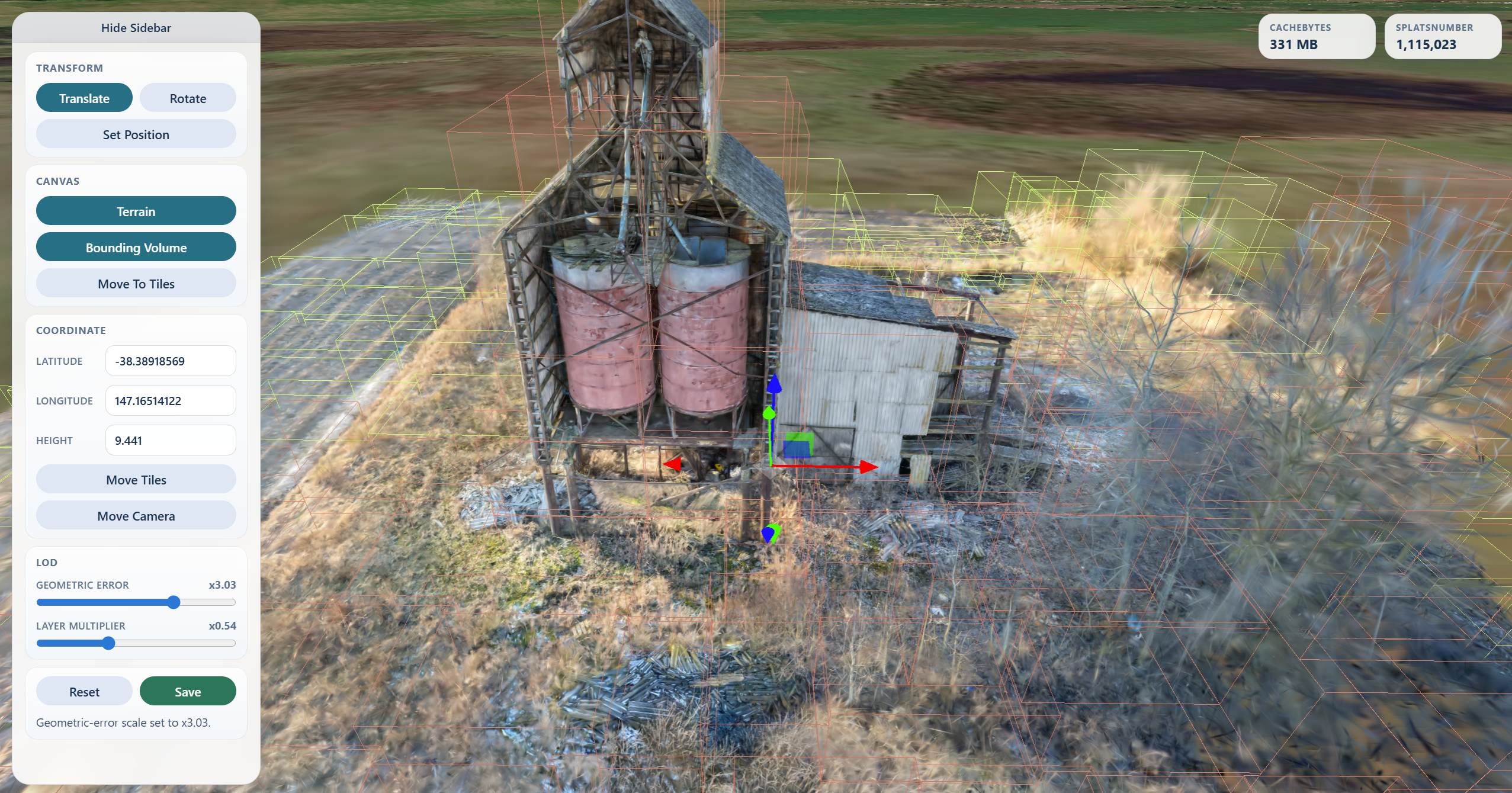
 - `Translate`, `Rotate`, infinite `Scale` track/value input, and `Reset` for root transform edits
- `Move Camera` to a WGS84 latitude / longitude / height
- `Move Tiles` to relocate the tileset root with an ENU-aligned transform
- `Set Position` to click the globe, terrain, or loaded tiles and place the tileset there
- `Terrain`, off by default, to toggle Cesium World Terrain after entering a Cesium ion token, while keeping satellite imagery
- `Render on demand`, enabled by default, to pause canvas rendering while the scene is idle
- `Geometric Error` scaling from `1/16x` to `16x`
- `Layer Multiplier` scaling from `1/8x` to `8x` for each tile's geometric-error difference from the tileset's global leaf baseline
- `Crop Regions` for drawing screen-space exclude regions or a crop sphere on 3D Gaussian Splat tilesets
- `Save` to persist root transform edits, geometric-error scaling, and confirmed crop selections back to disk
### Crop Regions
`Crop Regions` appears when the loaded tileset contains 3D Gaussian Splat content. It lets you draw one or more screen-space exclude rectangles or define a single crop sphere, preview them in the viewer, then apply the crop when you click `Save`.
For screen regions:
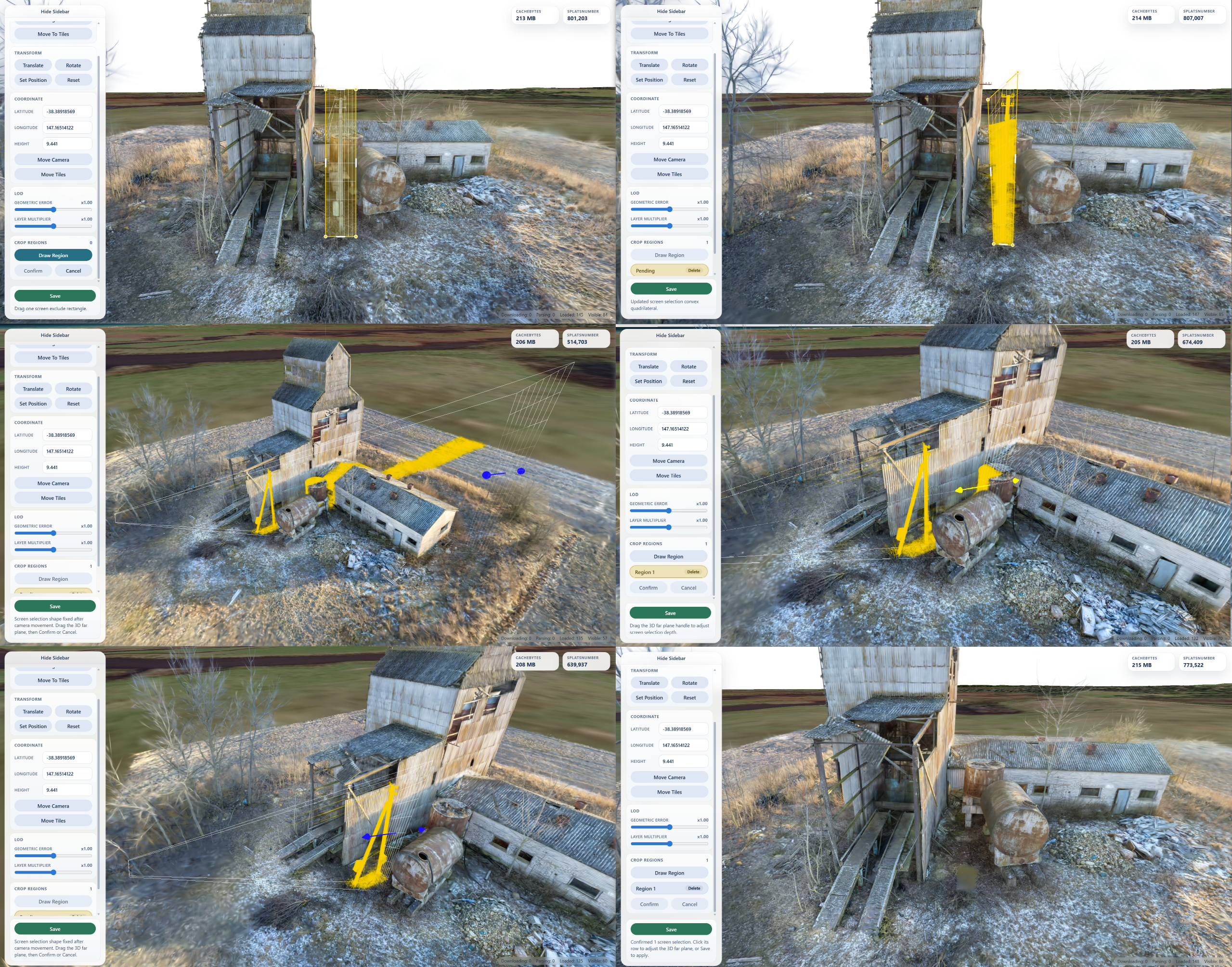
1. Click `Draw Region` and drag a rectangle over the splats to remove.
2. Before moving the camera, drag pending corner points or side handles if the screen region needs adjustment; the pending shape must stay a convex four-sided screen quadrilateral.
3. Rotate, pan, or zoom the camera to fix the pending screen shape in 3D, then drag the far-plane handle to set how deep the crop region extends into the scene.
4. Click `Confirm` to add the region to the save list, or `Cancel` to discard the pending rectangle.
5. Select a confirmed region row if you need to adjust its 3D far plane with the transform handle.
6. Click `Save` to persist the root transform and delete splats inside the confirmed crop regions.
For the crop sphere:
1. Click `Create Sphere` to place one sphere at the current tileset center.
2. Adjust its radius with the radius track, or select its row and move it with the sphere-center local-coordinate transform handle.
3. Click `Confirm` to hide splats outside the sphere, or `Cancel` to discard it.
4. Click `Save` to remove splats outside the confirmed sphere.
- `Translate`, `Rotate`, infinite `Scale` track/value input, and `Reset` for root transform edits
- `Move Camera` to a WGS84 latitude / longitude / height
- `Move Tiles` to relocate the tileset root with an ENU-aligned transform
- `Set Position` to click the globe, terrain, or loaded tiles and place the tileset there
- `Terrain`, off by default, to toggle Cesium World Terrain after entering a Cesium ion token, while keeping satellite imagery
- `Render on demand`, enabled by default, to pause canvas rendering while the scene is idle
- `Geometric Error` scaling from `1/16x` to `16x`
- `Layer Multiplier` scaling from `1/8x` to `8x` for each tile's geometric-error difference from the tileset's global leaf baseline
- `Crop Regions` for drawing screen-space exclude regions or a crop sphere on 3D Gaussian Splat tilesets
- `Save` to persist root transform edits, geometric-error scaling, and confirmed crop selections back to disk
### Crop Regions
`Crop Regions` appears when the loaded tileset contains 3D Gaussian Splat content. It lets you draw one or more screen-space exclude rectangles or define a single crop sphere, preview them in the viewer, then apply the crop when you click `Save`.
For screen regions:
1. Click `Draw Region` and drag a rectangle over the splats to remove.
2. Before moving the camera, drag pending corner points or side handles if the screen region needs adjustment; the pending shape must stay a convex four-sided screen quadrilateral.
3. Rotate, pan, or zoom the camera to fix the pending screen shape in 3D, then drag the far-plane handle to set how deep the crop region extends into the scene.
4. Click `Confirm` to add the region to the save list, or `Cancel` to discard the pending rectangle.
5. Select a confirmed region row if you need to adjust its 3D far plane with the transform handle.
6. Click `Save` to persist the root transform and delete splats inside the confirmed crop regions.
For the crop sphere:
1. Click `Create Sphere` to place one sphere at the current tileset center.
2. Adjust its radius with the radius track, or select its row and move it with the sphere-center local-coordinate transform handle.
3. Click `Confirm` to hide splats outside the sphere, or `Cancel` to discard it.
4. Click `Save` to remove splats outside the confirmed sphere.
 Crop saving rewrites supported local `.gltf` / `.glb` Gaussian Splat resources that use `KHR_gaussian_splatting_compression_spz_2`. Fully deleted splat primitives are removed from their glTF, and empty tile content can be pruned from the tileset JSON. Remote content and unsupported Gaussian Splat encodings are rejected instead of being modified.
If `build_summary.json` exists next to the root tileset, `Save` also updates:
- `root_transform`
- `root_transform_source`
- `root_coordinate`
- `viewer_geometric_error_scale`
- `viewer_geometric_error_layer_scale`
## Development
```bash
npm install
npm test
npm run pack:check
```
## Error Handling
Runtime and validation failures throw `InspectorError` from the Node API and print a concise error message in the CLI.
Crop saving rewrites supported local `.gltf` / `.glb` Gaussian Splat resources that use `KHR_gaussian_splatting_compression_spz_2`. Fully deleted splat primitives are removed from their glTF, and empty tile content can be pruned from the tileset JSON. Remote content and unsupported Gaussian Splat encodings are rejected instead of being modified.
If `build_summary.json` exists next to the root tileset, `Save` also updates:
- `root_transform`
- `root_transform_source`
- `root_coordinate`
- `viewer_geometric_error_scale`
- `viewer_geometric_error_layer_scale`
## Development
```bash
npm install
npm test
npm run pack:check
```
## Error Handling
Runtime and validation failures throw `InspectorError` from the Node API and print a concise error message in the CLI.