# multi-agent-shogun
**Command your AI army like a feudal warlord.**
Run 10 AI coding agents in parallel — **Claude Code, OpenAI Codex, GitHub Copilot, Kimi Code, OpenCode, Cursor, Antigravity** — orchestrated through a samurai-inspired hierarchy with zero coordination overhead.
**Talk Coding, not Vibe Coding. Speak to your phone, AI executes.**
[](https://github.com/yohey-w/multi-agent-shogun)
[](https://opensource.org/licenses/MIT)
[](https://github.com/yohey-w/multi-agent-shogun/releases/tag/v5.1.0)
[]()
[English](README.md) | [日本語](README_ja.md)


One Karo (manager) coordinating 7 Ashigaru (workers) + 1 Gunshi (strategist) — real session, no mock data.
---
## Quick Start
**Requirements:** tmux, bash 4+, at least one of: [Claude Code](https://claude.ai/code) / Codex / Copilot / Kimi / OpenCode / Antigravity
```bash
git clone https://github.com/yohey-w/multi-agent-shogun
cd multi-agent-shogun
bash first_setup.sh # one-time setup: config, dependencies, MCP
source ~/.bashrc # reload PATH
claude --dangerously-skip-permissions # first run only: OAuth + accept Bypass Permissions → /exit
bash shutsujin_departure.sh # launch all agents
```
> For full install steps (incl. Windows) and the first-30-minutes walkthrough, see [🚀 Quick Start](#-quick-start) and the basic usage section below.
Type a command in the Shogun pane:
> "Build a REST API for user authentication"
Shogun delegates → Karo breaks it down → 7 Ashigaru execute in parallel.
You watch the dashboard. That's it.
> **Want to go deeper?** The rest of this README covers architecture, configuration, memory design, and multi-CLI setup.
---
## What is this?
**multi-agent-shogun** is a system that runs multiple AI coding CLI instances simultaneously, orchestrating them like a feudal Japanese army. Supports **Claude Code**, **OpenAI Codex**, **GitHub Copilot**, **Kimi Code**, **OpenCode**, **Cursor**, and **Antigravity**.
**Why use it?**
- One command spawns 7 AI workers + 1 strategist executing in parallel
- Zero wait time — give your next order while tasks run in the background
- AI remembers your preferences across sessions (Memory MCP)
- Real-time progress on a dashboard
```
You (上様 / The Lord)
│
▼ Give orders
┌─────────────┐
│ SHOGUN │ ← Receives your command, delegates instantly
└──────┬──────┘
│ YAML + tmux
┌──────▼──────┐
│ KARO │ ← Distributes tasks to workers
└──────┬──────┘
│
┌─┬─┬─┬─┴─┬─┬─┬─┬────────┐
│1│2│3│4│5│6│7│ GUNSHI │ ← 7 workers + 1 strategist
└─┴─┴─┴─┴─┴─┴─┴────────┘
ASHIGARU 軍師
```
---
## Why Shogun?
Most multi-agent frameworks burn API tokens on coordination. Shogun doesn't.
| | Claude Code `Task` tool | Claude Code Agent Teams | LangGraph | CrewAI | **multi-agent-shogun** |
|---|---|---|---|---|---|
| **Architecture** | Subagents inside one process | Team lead + teammates (JSON mailbox) | Graph-based state machine | Role-based agents | Feudal hierarchy via tmux |
| **Parallelism** | Sequential (one at a time) | Multiple independent sessions | Parallel nodes (v0.2+) | Limited | **8 independent agents** |
| **Coordination cost** | API calls per Task | Token-heavy (each teammate = separate context) | API + infra (Postgres/Redis) | API + CrewAI platform | **Zero** (YAML + tmux) |
| **Multi-CLI** | Claude Code only | Claude Code only | Any LLM API | Any LLM API | **7 CLIs** (Claude/Codex/Copilot/Kimi/OpenCode/Cursor/Antigravity) |
| **Observability** | Claude logs only | tmux split-panes or in-process | LangSmith integration | OpenTelemetry | **Live tmux panes** + dashboard |
| **Skill discovery** | None | None | None | None | **Bottom-up auto-proposal** |
| **Setup** | Built into Claude Code | Built-in (experimental) | Heavy (infra required) | pip install | Shell scripts |
### What makes this different
**Zero coordination overhead** — Agents talk through YAML files on disk. The only API calls are for actual work, not orchestration. Run 8 agents and pay only for 8 agents' work.
**Full transparency** — Every agent runs in a visible tmux pane. Every instruction, report, and decision is a plain YAML file you can read, diff, and version-control. No black boxes.
**Battle-tested hierarchy** — The Shogun → Karo → Ashigaru chain of command prevents conflicts by design: clear ownership, dedicated files per agent, event-driven communication, no polling.
---
## Why CLI (Not API)?
Most AI coding tools charge per token. Running 8 Opus-grade agents through the API costs **$100+/hour**. CLI subscriptions flip this:
| | API (Per-Token) | CLI (Flat-Rate) |
|---|---|---|
| **8 agents × Opus** | ~$100+/hour | ~$200/month |
| **Cost predictability** | Unpredictable spikes | Fixed monthly bill |
| **Usage anxiety** | Every token counts | Unlimited |
| **Experimentation budget** | Constrained | Deploy freely |
**"Use AI recklessly"** — With flat-rate CLI subscriptions, deploy 8 agents without hesitation. The cost is the same whether they work 1 hour or 24 hours. No more choosing between "good enough" and "thorough" — just run more agents.
### Multi-CLI Support
Shogun isn't locked to one vendor. The system supports 7 CLI tools, each with unique strengths:
| CLI | Key Strength | Default Model |
|-----|-------------|---------------|
| **Claude Code** | Battle-tested tmux integration, Memory MCP, dedicated file tools (Read/Write/Edit/Glob/Grep) | Claude Sonnet 4.6 |
| **OpenAI Codex** | Sandbox execution, JSONL structured output, `codex exec` headless mode, **per-model `--model` flag** | gpt-5.3-codex / **gpt-5.3-codex-spark** |
| **GitHub Copilot** | Built-in GitHub MCP, 4 specialized agents (Explore/Task/Plan/Code-review), `/delegate` to coding agent | Claude Sonnet 4.6 |
| **Kimi Code** | Free tier available, strong multilingual support | Kimi k2 |
| **OpenCode** | Shared `AGENTS.md` instructions, agent-specific definitions via `--agent`, `/new` context reset, restart-only model changes, deterministic interactive TUI launch, provider-qualified `--model` routing | provider/model |
| **Cursor** | Auto-loads `CLAUDE.md`/`AGENTS.md`/`.cursor/rules/`, built-in web search, `inbox-write` skill via `.cursor/skills/`, `/model` live switching, `--yolo` auto-run | Varies |
| **Antigravity CLI** | Google Antigravity CLI integration via `agy`, host-managed auth, YOLO-style launch, `gemini`/`agy` legacy aliases | host default / last-used |
OpenCode sessions load the agent-specific `.opencode/agents/.md` definition via `--agent` and keep automation resets on `/new`; model changes require a relaunch. Automation uses the repository-provided `config/opencode-tui.json` via `OPENCODE_TUI_CONFIG`, which disables `app_exit` and pins `session_interrupt`/`input_clear` to known bindings. Role boundaries are embedded in the generated agent frontmatter: Shogun can read `queue/reports/*` for oversight but cannot write them, Karo is limited to coordination files plus report aggregation, Ashigaru only touch their own task/report pair, and Gunshi reads ashigaru reports but only writes `gunshi_report.yaml`.
Antigravity sessions launch with `agy --dangerously-skip-permissions`. Shogun treats `type: antigravity`, `type: agy`, and legacy `type: gemini` as Antigravity. Authentication and default model selection stay in the host user's Antigravity CLI setup; `settings.yaml` may optionally pass a concrete `model`, but `auto` uses the host default or last-used model.
A unified instruction build system generates CLI-specific instruction files from shared templates:
```
instructions/
├── common/ # Shared rules (all CLIs)
├── cli_specific/ # CLI-specific tool descriptions
│ ├── claude_tools.md # Claude Code tools & features
│ ├── copilot_tools.md # GitHub Copilot CLI tools & features
│ ├── opencode_tools.md # OpenCode tools, agent frontmatter, and permission model
│ └── cursor_tools.md # Cursor Agent tools, skills, and session rules
└── roles/ # Role definitions (shogun, karo, ashigaru)
↓ build
CLAUDE.md / AGENTS.md / .github/copilot-instructions.md / .opencode/agents/*.md / .cursor/rules/*.md
← Generated per CLI
```
One source of truth, zero sync drift. Change a rule once, all CLIs get it.
---
## Bottom-Up Skill Discovery
This is the feature no other framework has.
As Ashigaru execute tasks, they **automatically identify reusable patterns** and propose them as skill candidates. The Karo aggregates these proposals in `dashboard.md`, and you — the Lord — decide what gets promoted to a permanent skill.
```
Ashigaru finishes a task
↓
Notices: "I've done this pattern 3 times across different projects"
↓
Reports in YAML: skill_candidate:
found: true
name: "api-endpoint-scaffold"
reason: "Same REST scaffold pattern used in 3 projects"
↓
Appears in dashboard.md → You approve → Skill created in .claude/commands/
↓
Any agent can now invoke /api-endpoint-scaffold
```
Skills grow organically from real work — not from a predefined template library. Your skill set becomes a reflection of **your** workflow.
---
## Quick Start
### Windows (WSL2)
|
**Step 1**
|
📥 **Download the repository**
[Download ZIP](https://github.com/yohey-w/multi-agent-shogun/archive/refs/heads/main.zip) and extract to `C:\tools\multi-agent-shogun`
*Or use git:* `git clone https://github.com/yohey-w/multi-agent-shogun.git C:\tools\multi-agent-shogun`
|
|
**Step 2**
|
🖱️ **Run `install.bat`**
Right-click → "Run as Administrator" (if WSL2 is not installed). Sets up WSL2 + Ubuntu automatically.
|
|
**Step 3**
|
🐧 **Open Ubuntu and run** (first time only)
```bash
cd /mnt/c/tools/multi-agent-shogun
./first_setup.sh
```
|
|
**Step 4**
|
✅ **Deploy!**
```bash
./shutsujin_departure.sh
```
|
#### First-time only: Authentication
After `first_setup.sh`, run these commands once to authenticate:
```bash
# 1. Apply PATH changes
source ~/.bashrc
# 2. OAuth login + Bypass Permissions approval (one command)
claude --dangerously-skip-permissions
# → Browser opens → Log in with Anthropic account → Return to CLI
# → "Bypass Permissions" prompt appears → Select "Yes, I accept" (↓ to option 2, Enter)
# → Type /exit to quit
```
This saves credentials to `~/.claude/` — you won't need to do it again.
#### Daily startup
Open an **Ubuntu terminal** (WSL) and run:
```bash
cd /mnt/c/tools/multi-agent-shogun
./shutsujin_departure.sh
```
### 📱 Mobile Access — Dedicated Android App (Recommended)

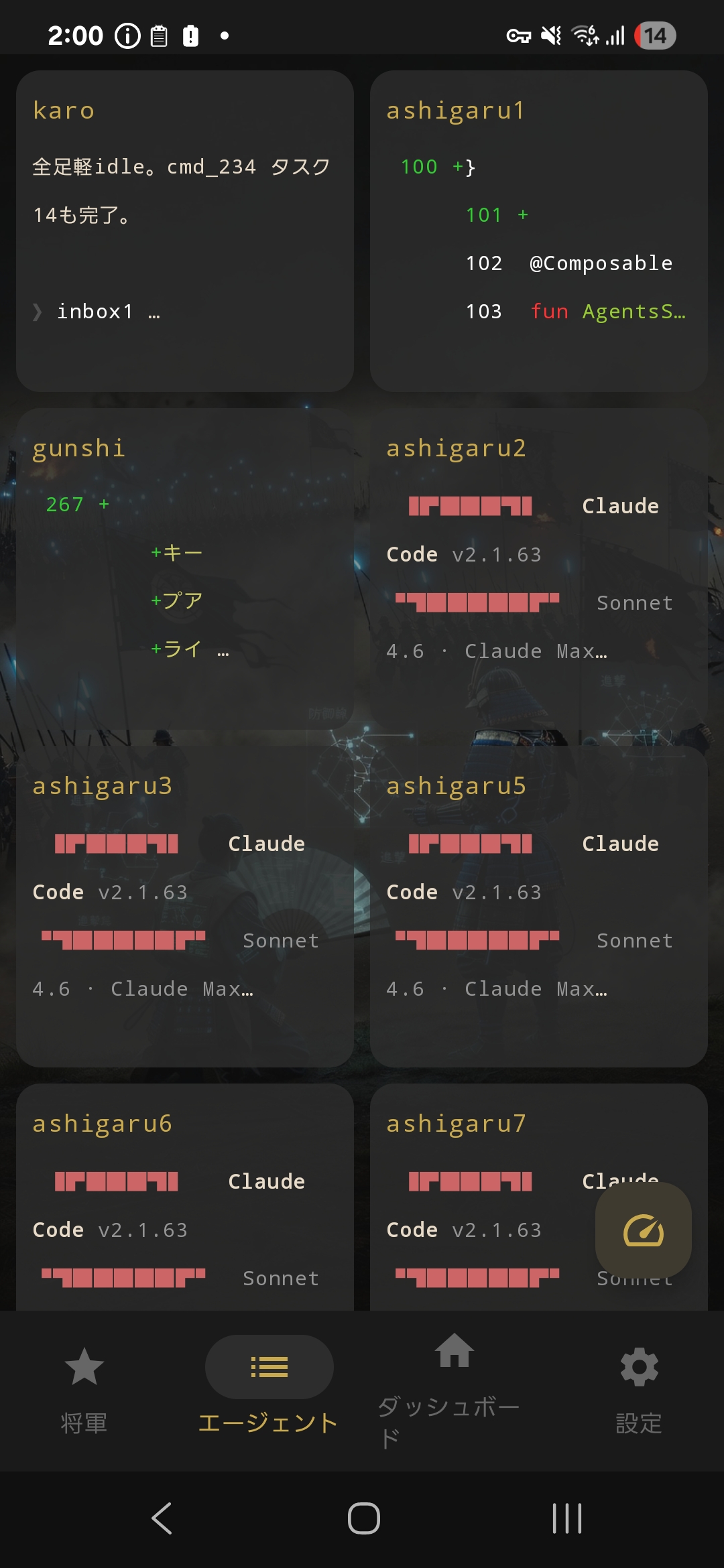
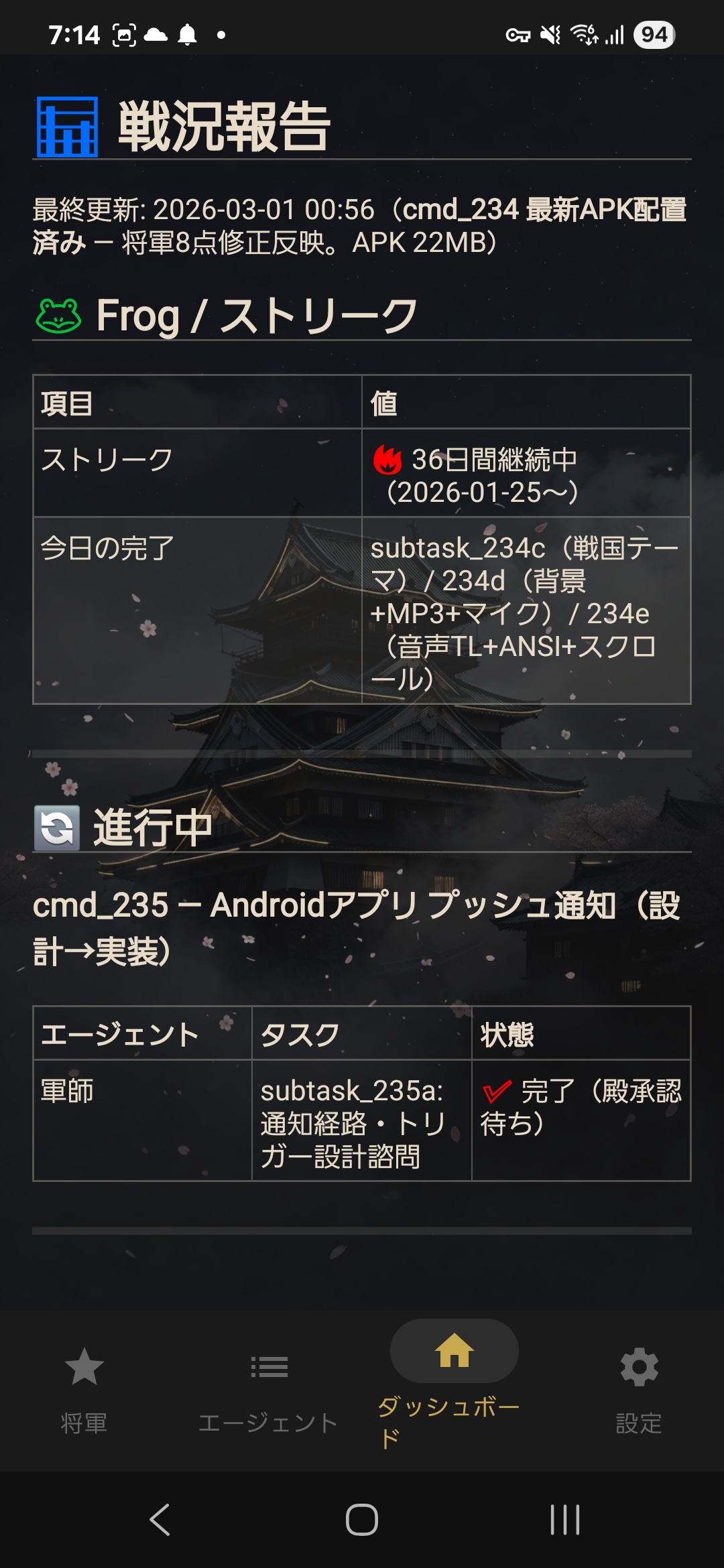
Monitor and command 10 AI agents from your phone with the dedicated Android companion app.
| Feature | Description |
|---------|-------------|
| **Shogun Terminal** | SSH terminal + voice input + special key bar (C-c, C-b, Tab, etc.) |
| **Agents Grid** | 9-pane simultaneous monitoring. Tap to expand fullscreen + send commands |
| **Dashboard** | Renders dashboard.md with full table text selection/copy |
| **Rate Limit** | Tap the FAB on the Agents tab to check Claude Max 5h/7d usage with progress bars |
| **Voice Input** | Japanese continuous recognition via Google Speech API — higher accuracy than phone keyboard voice |
| **Screenshot Share** | Share images via Android share menu → SFTP transfer to server |
> **Note:** Android only for now. No iOS version — the developer doesn't own an iPhone. If there's demand, please open an [Issue](https://github.com/yohey-w/multi-agent-shogun/issues). PRs welcome!
#### Setup
**Prerequisites:**
- Shogun system running on WSL2 (or Linux server)
- SSH server started (`sudo service ssh start`)
- Phone and server on same network (LAN or [Tailscale](https://tailscale.com/))
**Steps:**
1. **Install APK**
1. Download [`android/release/multi-agent-shogun.apk`](android/release/multi-agent-shogun.apk) on your phone (open the file on GitHub → "Download raw file")
2. Tap the download notification → "Install"
3. If "Unknown sources" warning appears → "Settings" → enable "Allow from this source" for your browser → go back → "Install"
4. Done → "Open"
2. **Configure SSH** (Settings tab)
| Field | Example | Description |
|-------|---------|-------------|
| SSH Host | `100.xxx.xxx.xxx` | Server IP (e.g., Tailscale IP) |
| SSH Port | `22` | Usually 22 |
| SSH User | `your_username` | SSH login username |
| SSH Key Path | `/data/data/.../id_ed25519` | Private key path on phone (*1) |
| SSH Password | `****` | Use if no key available |
| Project Path | `/mnt/c/tools/multi-agent-shogun` | Server-side project directory |
| Shogun Session | `shogun` | tmux session name for Shogun |
| Agent Session | `multiagent` | tmux session name for agents |
*1 Transfer your private key to the phone, or use password authentication
3. **Save → Switch to Shogun tab** → auto-connects
**Using Tailscale (connect from anywhere):**
```bash
# Server-side (WSL2)
curl -fsSL https://tailscale.com/install.sh | sh
sudo tailscaled &
sudo tailscale up --authkey tskey-auth-XXXXXXXXXXXX
sudo service ssh start
```
Install the Tailscale app on your phone, log in with the same account, and use the displayed Tailscale IP as the SSH Host in the app.
**With ntfy notifications:**
See [ntfy setup section](#-8-phone-notifications-ntfy) for push notifications from Karo on task completion.
📟 Termux Method (without the Android app) (click to expand)
SSH via Termux also works. More limited than the dedicated app, but requires no APK sideloading.
**Requirements (all free):**
| Name | In a nutshell | Role |
|------|--------------|------|
| [Tailscale](https://tailscale.com/) | A road to your home from anywhere | Connect to your home PC from anywhere |
| SSH | The feet that walk that road | Log into your home PC through Tailscale |
| [Termux](https://termux.dev/) | A black screen on your phone | Required to use SSH — just install it |
**Setup:**
1. Install Tailscale on both WSL and your phone
2. In WSL (auth key method — browser not needed):
```bash
curl -fsSL https://tailscale.com/install.sh | sh
sudo tailscaled &
sudo tailscale up --authkey tskey-auth-XXXXXXXXXXXX
sudo service ssh start
```
3. In Termux on your phone:
```sh
pkg update && pkg install openssh
ssh youruser@your-tailscale-ip
css # Connect to Shogun
```
4. Open a new Termux window (+ button) for workers:
```sh
ssh youruser@your-tailscale-ip
csm # See all 9 panes
```
**Disconnect:** Just swipe the Termux window closed. tmux sessions survive — agents keep working.
---
🐧 Linux / macOS (click to expand)
### First-time setup
```bash
# 1. Clone
git clone https://github.com/yohey-w/multi-agent-shogun.git ~/multi-agent-shogun
cd ~/multi-agent-shogun
# 2. Make scripts executable
chmod +x *.sh
# 3. Run first-time setup
./first_setup.sh
```
### Daily startup
```bash
cd ~/multi-agent-shogun
./shutsujin_departure.sh
```
---
❓ What is WSL2? Why is it needed? (click to expand)
### About WSL2
**WSL2 (Windows Subsystem for Linux)** lets you run Linux inside Windows. This system uses `tmux` (a Linux tool) to manage multiple AI agents, so WSL2 is required on Windows.
### If you don't have WSL2 yet
No problem! Running `install.bat` will:
1. Check if WSL2 is installed (auto-install if not)
2. Check if Ubuntu is installed (auto-install if not)
3. Guide you through next steps (running `first_setup.sh`)
**Quick install command** (run PowerShell as Administrator):
```powershell
wsl --install
```
Then restart your computer and run `install.bat` again.
---
📋 Script Reference (click to expand)
| Script | Purpose | When to run |
|--------|---------|-------------|
| `install.bat` | Windows: WSL2 + Ubuntu setup | First time only |
| `first_setup.sh` | Install tmux, Node.js, Claude Code CLI + Memory MCP config | First time only |
| `shutsujin_departure.sh` | Create tmux sessions + launch the configured CLI for each agent + load instructions + start ntfy listener | Daily |
| `scripts/switch_cli.sh` | Live switch agent CLI/model (settings.yaml → /exit → relaunch) | As needed |
### What `install.bat` does automatically:
- ✅ Checks if WSL2 is installed (guides you if not)
- ✅ Checks if Ubuntu is installed (guides you if not)
- ✅ Shows next steps (how to run `first_setup.sh`)
### What `shutsujin_departure.sh` does:
- ✅ Creates tmux sessions (shogun + multiagent)
- ✅ Launches each agent with the CLI configured in `config/settings.yaml` (Claude/Codex/Copilot/Kimi/OpenCode)
- ✅ Auto-loads instruction files or generated agent definitions for each CLI
- ✅ Resets queue files for a fresh state
- ✅ Starts ntfy listener for phone notifications (if configured)
**After running, all agents are ready to receive commands!**
---
🔧 Manual Requirements (click to expand)
If you prefer to install dependencies manually:
| Requirement | Installation | Notes |
|-------------|-------------|-------|
| WSL2 + Ubuntu | `wsl --install` in PowerShell | Windows only |
| Set Ubuntu as default | `wsl --set-default Ubuntu` | Required for scripts to work |
| tmux | `sudo apt install tmux` | Terminal multiplexer |
| Node.js v20+ | `nvm install 20` | Required for MCP servers |
| Claude Code CLI | `curl -fsSL https://claude.ai/install.sh \| bash` | Official Anthropic CLI (native version recommended; npm version deprecated) |
| OpenAI Codex CLI | Install from the official OpenAI Codex distribution | Required only for agents with `type: codex` |
| GitHub Copilot CLI | Install and authenticate GitHub Copilot CLI | Required only for agents with `type: copilot` |
| Kimi Code CLI | Install and authenticate Kimi Code | Required only for agents with `type: kimi` |
| OpenCode CLI | `npm install -g opencode-ai` | Required only for agents with `type: opencode`; provider API keys must be available in the agent shell |
| Cursor CLI | See [Cursor CLI docs](https://cursor.com/docs/cli/overview) — use `cursor-agent` or `agent` command | Required only for agents with `type: cursor` |
| Antigravity CLI | Install and authenticate Google Antigravity CLI (`agy`) | Required only for agents with `type: antigravity`, `type: agy`, or legacy `type: gemini` |
---
### After Setup
Whichever option you chose, **10 AI agents** are automatically launched:
| Agent | Role | Count |
|-------|------|-------|
| 🏯 Shogun | Supreme commander — receives your orders | 1 |
| 📋 Karo | Manager — distributes tasks, quality checks | 1 |
| ⚔️ Ashigaru | Workers — execute implementation tasks in parallel | 7 |
| 🧠 Gunshi | Strategist — handles analysis, evaluation, and design | 1 |
Two tmux sessions are created:
- `shogun` — connect here to give commands
- `multiagent` — Karo, Ashigaru, and Gunshi running in the background
---
## How It Works
### Step 1: Connect to the Shogun
After running `shutsujin_departure.sh`, all agents automatically load their instructions and are ready.
Open a new terminal and connect:
```bash
tmux attach-session -t shogun
```
### Step 2: Give your first order
The Shogun is already initialized — just give a command:
```
Research the top 5 JavaScript frameworks and create a comparison table
```
The Shogun will:
1. Write the task to a YAML file
2. Notify the Karo (manager)
3. Return control to you immediately — no waiting!
Meanwhile, the Karo distributes tasks to Ashigaru workers for parallel execution.
### Step 3: Check progress
Open `dashboard.md` in your editor for a real-time status view:
```markdown
## In Progress
| Worker | Task | Status |
|--------|------|--------|
| Ashigaru 1 | Research React | Running |
| Ashigaru 2 | Research Vue | Running |
| Ashigaru 3 | Research Angular | Completed |
```
### Project-Unit Operation (Equivalent to Visual Studio "Solution")
Once set up, the Shogun system can handle **multiple projects under the same Shogun**, switching between them as needed. The unit equivalent to a Visual Studio "solution" is `projects/{name}.yaml` + `context/{name}.md`.
#### 1. Running your first project
```bash
# (1) Connect to the Shogun (after shutsujin_departure.sh completes)
tmux attach-session -t shogun
# (2) Just give the Shogun your command — the project starts automatically
# → Shogun writes cmd to queue/shogun_to_karo.yaml and notifies Karo
# → Karo distributes to Ashigaru for parallel execution
# → Results aggregate in dashboard.md
```
No explicit "create a project" command is needed. The Shogun attaches a `project:` field to the cmd when relevant, and related files are automatically separated.
#### 2. Explicitly registering a project (optional, for long-term work)
For ongoing projects, you can place metadata in `projects/{name}.yaml`:
```yaml
# projects/example.yaml
id: example
name: "Sample Project"
working_directory: /path/to/repo
north_star: "The ultimate goal for this project"
notes: |
Project-specific notes, stakeholders, special rules
```
The Shogun and Karo reference this file and inject project context when issuing cmds.
Detailed project knowledge (requirements, design, past feedback) lives in `context/{name}.md`. When the Shogun issues a cmd related to the project, it automatically references this file.
#### 3. Customizing the agent formation
The agent formation (which CLI each agent uses) lives in `config/settings.yaml`:
```yaml
cli:
agents:
ashigaru1:
type: codex # codex / claude / copilot / kimi / opencode / antigravity
model: gpt-5.5
ashigaru2:
type: claude
model: claude-sonnet-4-6
# Same for ashigaru3-7, gunshi, karo
```
OpenCode uses provider-qualified model IDs:
```yaml
cli:
agents:
ashigaru3:
type: opencode
model: openrouter/openai/gpt-4o-mini
variant: high # optional provider-specific reasoning variant
```
OpenRouter setup has two separate pieces:
1. **Model routing** goes in `config/settings.yaml` as shown above (`type: opencode`, `model: openrouter/...`).
2. **Provider authentication** is configured in OpenCode, not in `settings.yaml`. Run OpenCode once as the same OS user that will launch Shogun, then use `/connect` → `OpenRouter` and paste the API key. OpenCode stores provider credentials in its own user data under that OS user (for example under `~/.local/share/opencode/`; the exact file/database is OpenCode-internal). For headless deployments that use environment-based provider credentials, make sure the shell that runs `shutsujin_departure.sh` has `OPENROUTER_API_KEY` loaded.
Do not put API keys in `config/settings.yaml`, `config/opencode-tui.json`, or `.opencode/agents/*.md`. Those files only describe routing, tmux-safe keybindings, and generated agent definitions.
When OpenCode is selected, `lib/cli_adapter.sh` launches it with `--agent ` and the repository-pinned `OPENCODE_TUI_CONFIG=config/opencode-tui.json`. The TUI command does not accept `--variant`; if `variant:` is configured, `scripts/build_instructions.sh` and `scripts/switch_cli.sh` synchronize `model:` / `variant:` into a git-ignored `.opencode/agents/-runtime.md`, which OpenCode loads via `--agent -runtime`.
To switch on the fly, use `scripts/switch_cli.sh`:
```bash
bash scripts/switch_cli.sh ashigaru3 --type claude --model claude-sonnet-4-6
bash scripts/switch_cli.sh ashigaru3 --type opencode --model openrouter/openai/gpt-4o-mini
bash scripts/switch_cli.sh ashigaru3 --type opencode --model openrouter/minimax/minimax-m2.5 --variant xhigh
```
#### 4. Switching or closing a project
There is no explicit "close project" command. **Issuing the next project's cmd automatically switches context.**
- Pause temporarily: do nothing. Old cmds remain in `queue/` as history, and the Shogun restores state when resumed
- Fully retire: delete `projects/{name}.yaml`, or add an `archived: true` flag
- Run in parallel: use the `project:` field in cmds to keep concurrent projects distinct
#### 5. Carrying experience and settings between projects
What carries forward to future projects:
| What carries forward | Stored in | Referenced when |
|----------------------|-----------|-----------------|
| Lord's preferences and lessons | Memory MCP (persistent) | All agents at Session Start |
| Project-specific knowledge | `context/{name}.md` | When running the project's cmds |
| Past cmd history | `queue/shogun_to_karo.yaml` | When the Shogun needs it |
| Custom skills | `~/.claude/skills/`, `skills/` | When matching triggers fire |
| Agent formation | `config/settings.yaml` | At shutsujin startup |
**Memory MCP** is the heart of "experience." When you tell the Shogun "don't do X next time" or "remember Y," the Shogun records it in Memory MCP, and all future projects see it.
### Detailed flow
```
You: "Research the top 5 MCP servers and create a comparison table"
```
The Shogun writes the task to `queue/shogun_to_karo.yaml` and wakes the Karo. Control returns to you immediately.
The Karo breaks the task into subtasks:
| Worker | Assignment |
|--------|-----------|
| Ashigaru 1 | Research Notion MCP |
| Ashigaru 2 | Research GitHub MCP |
| Ashigaru 3 | Research Playwright MCP |
| Ashigaru 4 | Research Memory MCP |
| Ashigaru 5 | Research Sequential Thinking MCP |
All 5 Ashigaru research simultaneously. You can watch them work in real time:
Results appear in `dashboard.md` as they complete.
---
## Key Features
### ⚡ 1. Parallel Execution
One command spawns up to 8 parallel tasks:
```
You: "Research 5 MCP servers"
→ 5 Ashigaru start researching simultaneously
→ Results in minutes, not hours
```
### 🔄 2. Non-Blocking Workflow
The Shogun delegates instantly and returns control to you:
```
You: Command → Shogun: Delegates → You: Give next command immediately
↓
Workers: Execute in background
↓
Dashboard: Shows results
```
No waiting for long tasks to finish.
### 🧠 3. Cross-Session Memory (Memory MCP)
Your AI remembers your preferences:
```
Session 1: Tell it "I prefer simple approaches"
→ Saved to Memory MCP
Session 2: AI loads memory on startup
→ Stops suggesting complex solutions
```
### 📡 4. Event-Driven Communication (Zero Polling)
Agents talk to each other by writing YAML files — like passing notes. **No polling loops, no wasted API calls.**
```
Karo wants to wake Ashigaru 3:
Step 1: Write the message Step 2: Wake the agent up
┌──────────────────────┐ ┌──────────────────────────┐
│ inbox_write.sh │ │ inbox_watcher.sh │
│ │ │ │
│ Writes full message │ file │ Detects file change │
│ to ashigaru3.yaml │──change──▶│ (inotifywait, not poll) │
│ with flock (no race) │ │ │
└──────────────────────┘ │ Wakes agent via: │
│ 1. Self-watch (skip) │
│ 2. tmux send-keys │
│ (short nudge only) │
└──────────────────────────┘
Step 3: Agent reads its own inbox
┌──────────────────────────────────┐
│ Ashigaru 3 reads ashigaru3.yaml │
│ → Finds unread messages │
│ → Processes them │
│ → Marks as read │
└──────────────────────────────────┘
```
**How the wake-up works:**
| Priority | Method | What happens | When used |
|----------|--------|-------------|-----------|
| 1st | **Self-Watch** | Agent watches its own inbox file — wakes itself, no nudge needed | Agent has its own `inotifywait` running |
| 2nd | **Stop Hook** | Claude Code agents check inbox at turn end via `.claude/settings.json` Stop hook | Claude Code agents only |
| 3rd | **tmux send-keys** | Sends short nudge via `tmux send-keys` (text and Enter sent separately for Codex CLI compatibility) | Fallback — disabled in ASW Phase 2+ |
**Agent Self-Watch (ASW) Phases** — Controls how aggressively the system uses `tmux send-keys` nudges:
| ASW Phase | Nudge behavior | Delivery method | When to use |
|-----------|---------------|-----------------|-------------|
| **Phase 1** | Normal nudges enabled | self-watch + send-keys | Initial setup, mixed CLI environments |
| **Phase 2** | **Busy → suppressed, Idle → nudge** | busy: stop hook delivers at turn end. idle: nudge (unavoidable) | Claude Code agents with stop hook (recommended) |
| **Phase 3** | `FINAL_ESCALATION_ONLY` | send-keys only as last-resort recovery | Fully stable environments |
Phase 2 uses the idle flag file (`/tmp/shogun_idle_{agent}`) to distinguish busy vs idle agents. The Stop hook creates/removes this flag at turn boundaries. This eliminates nudge interruptions during active work while still waking idle agents.
> **Why can't nudges be fully eliminated?** Claude Code's Stop hook only fires at turn end. An idle agent (sitting at the prompt) has no turn ending, so there's no hook to trigger inbox checks. A future `Notification` hook with `idle_prompt` blocking support or a periodic timer hook could solve this.
Configure in `config/settings.yaml`:
```yaml
asw_phase: 2 # Recommended for Claude Code setups
```
Or set the default directly in `scripts/inbox_watcher.sh` (`ASW_PHASE` variable). Restart inbox_watcher processes after changing.
**3-Phase Escalation (v3.2)** — If agent doesn't respond:
| Phase | Timing | Action |
|-------|--------|--------|
| Phase 1 | 0-2 min | Standard nudge (`inbox3` text + Enter) — *skipped for busy agents in ASW Phase 2+* |
| Phase 2 | 2-4 min | Copilot/Kimi: Escape×2 + single Ctrl-C + nudge. Claude/Codex/OpenCode: plain nudge fallback |
| Phase 3 | 4+ min | Send CLI-specific context reset: Claude/Copilot/Kimi use `/clear`, Codex/OpenCode use `/new` (max once per 5 min) |
**Key design choices:**
- **Message content is never sent through tmux** — only a short "you have mail" nudge. The agent reads its own file. This eliminates character corruption and transmission hangs.
- **Zero CPU while idle** — `inotifywait` blocks on a kernel event (not a poll loop). CPU usage is 0% between messages.
- **Guaranteed delivery** — If the file write succeeded, the message is there. No lost messages, no retries needed.
### 📊 5. Agent Status Check
See which agents are busy or idle — instantly, from one command:
```bash
# Project mode: full status with task/inbox info
bash scripts/agent_status.sh
# Standalone mode: works with any tmux session
bash scripts/agent_status.sh --session mysession --lang en
```
**Project mode output:**
```
Agent CLI Pane Task ID Status Inbox
---------- ------- --------- ------------------------------------------ ---------- -----
karo claude 待機中 --- --- 0
ashigaru1 codex 稼働中 subtask_042a_research assigned 0
ashigaru2 codex 待機中 subtask_042b_review done 0
gunshi claude 稼働中 subtask_042c_analysis assigned 0
```
**Standalone mode output** (no project config needed):
```
Pane State Agent ID
------------------------------ ---------- ----------
multiagent:agents.0 IDLE karo
multiagent:agents.1 BUSY ashigaru1
multiagent:agents.8 BUSY gunshi
```
Detection works for **Claude Code**, **Codex CLI**, and **OpenCode** by checking CLI-specific prompt/spinner patterns near the bottom of each tmux pane. The detection logic lives in `lib/agent_status.sh` — source it in your own scripts:
```bash
source lib/agent_status.sh
agent_is_busy_check "multiagent:agents.3" && echo "busy" || echo "idle"
```
### 📸 6. Screenshot Integration
VSCode's Claude Code extension lets you paste screenshots to explain issues. This CLI system provides the same capability:
```yaml
# Set your screenshot folder in config/settings.yaml
screenshot:
path: "/mnt/c/Users/YourName/Pictures/Screenshots"
```
```
# Just tell the Shogun:
You: "Check the latest screenshot"
You: "Look at the last 2 screenshots"
→ AI instantly reads and analyzes your screen captures
```
**Windows tip:** Press `Win + Shift + S` to take screenshots. Set the save path in `settings.yaml` for seamless integration.
Use cases:
- Explain UI bugs visually
- Show error messages
- Compare before/after states
### 📁 7. Context Management (4-Layer Architecture)
Efficient knowledge sharing through a four-layer context system:
| Layer | Location | Purpose |
|-------|----------|---------|
| Layer 1: Memory MCP | `memory/shogun_memory.jsonl` | Cross-project, cross-session long-term memory |
| Layer 2: Project | `config/projects.yaml`, `projects/.yaml`, `context/{project}.md` | Project-specific information and technical knowledge |
| Layer 3: YAML Queue | `queue/shogun_to_karo.yaml`, `queue/tasks/`, `queue/reports/` | Task management — source of truth for instructions and reports |
| Layer 4: Session | CLAUDE.md, instructions/*.md | Working context (wiped by `/clear`) |
#### Persistent Agent Memory (`memory/MEMORY.md`)
Shogun reads `memory/MEMORY.md` at every session start. It contains Lord's preferences, lessons learned, and cross-session knowledge — written by Shogun, read by Shogun.
```
┌─────────────────────────────────────────────────────────────┐
│ Git Repositories │
│ │
│ ┌─────────────────────┐ ┌──────────────────────────┐ │
│ │ multi-agent-shogun │ │ shogun-private │ │
│ │ (public OSS) │ │ (your private repo) │ │
│ │ │ │ │ │
│ │ scripts/ │ │ projects/client.yaml ←──┐ │ │
│ │ instructions/ │ │ context/my-notes.md ←──┤ │ │
│ │ lib/ │ │ queue/shogun_to_karo.yaml │ │ │
│ │ memory/ │ │ memory/MEMORY.md ←──┘ │ │
│ │ ├─ MEMORY.md.sample│ │ config/settings.yaml │ │
│ │ └─ MEMORY.md ─────┼───┼── same file, tracked here │ │
│ │ (gitignored) │ │ │ │
│ └─────────────────────┘ └──────────────────────────┘ │
│ ↑ anyone can fork ↑ your data, your repo │
└─────────────────────────────────────────────────────────────┘
```
**How it works:** `memory/MEMORY.md` lives in the same working directory as the OSS repo, but is excluded from the OSS `.gitignore` (whitelist-based). You track it in a separate private repo using a bare git repo technique:
```bash
# One-time setup (already done by first_setup.sh)
git init --bare ~/.shogun-private.git
alias privategit='git --git-dir=$HOME/.shogun-private.git --work-tree=/path/to/multi-agent-shogun'
privategit remote add origin https://github.com/YOU/shogun-private.git
# Daily use
privategit add -f memory/MEMORY.md projects/my-client.yaml
privategit commit -m "update memory"
privategit push
```
The OSS `.gitignore` uses a **whitelist approach** (default: exclude everything, then explicitly allow OSS files). So private files like `memory/MEMORY.md` are automatically excluded without needing explicit `gitignore` entries — just don't add them to the whitelist.
This design enables:
- Any Ashigaru can work on any project
- Context persists across agent switches
- Clear separation of concerns
- Knowledge survives across sessions
#### /clear Protocol (Cost Optimization)
As agents work, their session context (Layer 4) grows, increasing API costs. `/clear` wipes session memory and resets costs. Layers 1–3 persist as files, so nothing is lost.
Recovery cost after `/clear`: **~6,800 tokens** (42% improved from v1 — CLAUDE.md YAML conversion + English-only instructions reduced token cost by 70%)
1. CLAUDE.md (auto-loaded) → recognizes itself as part of the Shogun System
2. `tmux display-message -t "$TMUX_PANE" -p '#{@agent_id}'` → identifies its own number
3. Memory MCP read → restores the Lord's preferences (~700 tokens)
4. Task YAML read → picks up the next assignment (~800 tokens)
The key insight: designing **what not to load** is what drives cost savings.
#### Universal Context Template
All projects use the same 7-section template:
| Section | Purpose |
|---------|---------|
| What | Project overview |
| Why | Goals and success criteria |
| Who | Stakeholders and responsibilities |
| Constraints | Deadlines, budgets, limitations |
| Current State | Progress, next actions, blockers |
| Decisions | Decisions made and their rationale |
| Notes | Free-form observations and ideas |
This unified format enables:
- Quick onboarding for any agent
- Consistent information management across all projects
- Easy handoff between Ashigaru workers
### 📱 8. Phone Notifications (ntfy)
Two-way communication between your phone and the Shogun — no SSH, no Tailscale, no server needed.
| Direction | How it works |
|-----------|-------------|
| **Phone → Shogun** | Send a message from the ntfy app → `ntfy_listener.sh` receives it via streaming → auto-ACK reply (`📱受信: {your message}`) sent back to your phone → Shogun processes automatically |
| **Karo → Phone (direct)** | When Karo updates `dashboard.md`, it sends push notifications directly via `scripts/ntfy.sh` — **Shogun is bypassed** (Shogun is for human interaction, not progress reporting) |
```
📱 You (from bed) 🏯 Shogun
│ │
│ "Research React 19" │
├─────────────────────────►│
│ (ntfy message) │ → Delegates to Karo → Ashigaru work
│ │
│ "✅ cmd_042 complete" │
│◄─────────────────────────┤
│ (push notification) │
```
**Setup:**
1. Add `ntfy_topic: "shogun-yourname"` to `config/settings.yaml`
2. Install the [ntfy app](https://ntfy.sh) on your phone and subscribe to the same topic
3. `shutsujin_departure.sh` automatically starts the listener — no extra steps
**Notification examples:**
| Event | Notification |
|-------|-------------|
| Command completed | `✅ cmd_042 complete — 5/5 subtasks done` |
| Task failed | `❌ subtask_042c failed — API rate limit` |
| Action required | `🚨 Action needed: approve skill candidate` |
| Streak update | `🔥 3-day streak! 12/12 tasks today` |
Free, no account required, no server to maintain. Uses [ntfy.sh](https://ntfy.sh) — an open-source push notification service.
> **⚠️ Security:** Your topic name is your password. Anyone who knows it can read your notifications and send messages to your Shogun. Choose a hard-to-guess name and **never share it publicly** (e.g., in screenshots, blog posts, or GitHub commits).
**Verify it works:**
```bash
# Send a test notification to your phone
bash scripts/ntfy.sh "Test notification from Shogun 🏯"
```
If your phone receives the notification, you're all set. If not, check:
- `config/settings.yaml` has `ntfy_topic` set (not empty, no extra quotes)
- The ntfy app on your phone is subscribed to **the exact same topic name**
- Your phone has internet access and ntfy notifications are enabled
**Sending commands from your phone:**
1. Open the ntfy app on your phone
2. Tap your subscribed topic
3. Type a message (e.g., `Research React 19 best practices`) and send
4. `ntfy_listener.sh` receives it, writes to `queue/ntfy_inbox.yaml`, and wakes the Shogun
5. The Shogun reads the message and processes it through the normal Karo → Ashigaru pipeline
Any text you send becomes a command. Write it like you'd talk to the Shogun — no special syntax needed.
**Manual listener start** (if not using `shutsujin_departure.sh`):
```bash
# Start the listener in the background
nohup bash scripts/ntfy_listener.sh &>/dev/null &
# Check if it's running
pgrep -f ntfy_listener.sh
# View listener logs (stderr output)
bash scripts/ntfy_listener.sh # Run in foreground to see logs
```
The listener automatically reconnects if the connection drops. `shutsujin_departure.sh` starts it automatically on deployment — you only need manual start if you skipped the deployment script.
**Troubleshooting:**
| Problem | Fix |
|---------|-----|
| No notifications on phone | Check topic name matches exactly in `settings.yaml` and ntfy app |
| Listener not starting | Run `bash scripts/ntfy_listener.sh` in foreground to see errors |
| Phone → Shogun not working | Verify listener is running: `pgrep -f ntfy_listener.sh` |
| Messages not reaching Shogun | Check `queue/ntfy_inbox.yaml` — if message is there, Shogun may be busy |
| "ntfy_topic not configured" error | Add `ntfy_topic: "your-topic"` to `config/settings.yaml` |
| Duplicate notifications | Normal on reconnect — Shogun deduplicates by message ID |
| Changed topic name but no notifications | The listener must be restarted: `pkill -f ntfy_listener.sh && nohup bash scripts/ntfy_listener.sh &>/dev/null &` |
**Real-world notification screenshots:**


Left: Bidirectional phone ↔ Shogun communication · Right: Real-time progress report from Ashigaru


Left: Command completion notification · Right: All 8 Ashigaru completing in parallel
> *Note: Topic names shown in screenshots are examples. Use your own unique topic name.*
#### SayTask Notifications
Behavioral psychology-driven motivation through your notification feed:
- **Streak tracking**: Consecutive completion days counted in `saytask/streaks.yaml` — maintaining streaks leverages loss aversion to sustain momentum
- **Eat the Frog** 🐸: The hardest task of the day is marked as the "Frog." Completing it triggers a special celebration notification
- **Daily progress**: `12/12 tasks today` — visual completion feedback reinforces the Arbeitslust effect (joy of work-in-progress)
### 🖼️ 9. Pane Border Task Display
Each tmux pane shows the agent's current task directly on its border:
```
┌ ashigaru1 Sonnet+T VF requirements ──┬ ashigaru3 Opus+T API research ──────┐
│ │ │
│ Working on SayTask requirements │ Researching REST API patterns │
│ │ │
├ ashigaru2 Sonnet ───────────────────┼ ashigaru4 Spark DB schema design ───┤
│ │ │
│ (idle — waiting for assignment) │ Designing database schema │
│ │ │
└──────────────────────────────────────┴─────────────────────────────────────┘
```
- **Working**: `ashigaru1 Sonnet+T VF requirements` — agent name, model (with Thinking indicator), and task summary
- **Idle**: `ashigaru2 Sonnet` — model name only, no task
- **Display names**: Sonnet, Opus, Haiku, Codex, Spark — `+T` suffix = Extended Thinking enabled
- Updated automatically by the Karo when assigning or completing tasks
- Glance at all 9 panes to instantly know who's doing what
### 🔊 10. Shout Mode (Battle Cries)
When an Ashigaru completes a task, it shouts a personalized battle cry in the tmux pane — a visual reminder that your army is working hard.
```
┌ ashigaru1 (Sonnet) ──────────┬ ashigaru2 (Sonnet) ──────────┐
│ │ │
│ ⚔️ 足軽1号、先陣切った! │ 🔥 足軽2号、二番槍の意地! │
│ 八刃一志! │ 八刃一志! │
│ ❯ │ ❯ │
└───────────────────────────────┴───────────────────────────────┘
```
**How it works:**
The Karo writes an `echo_message` field in each task YAML. After completing all work (report + inbox notification), the Ashigaru runs `echo` as its **final action**. The message stays visible above the `❯` prompt.
```yaml
# In the task YAML (written by Karo)
task:
task_id: subtask_001
description: "Create comparison table"
echo_message: "🔥 足軽1号、先陣を切って参る!八刃一志!"
```
**Shout mode is the default.** To disable (saves API tokens on the echo call):
```bash
./shutsujin_departure.sh --silent # No battle cries
./shutsujin_departure.sh # Default: shout mode (battle cries enabled)
```
Silent mode sets `DISPLAY_MODE=silent` as a tmux environment variable. The Karo checks this when writing task YAMLs and omits the `echo_message` field.
---
## 🗣️ SayTask — Task Management for People Who Hate Task Management
### What is SayTask?
**Task management for people who hate task management. Just speak to your phone.**
**Talk Coding, not Vibe Coding.** Speak your tasks, AI organizes them. No typing, no opening apps, no friction.
- **Target audience**: People who installed Todoist but stopped opening it after 3 days
- Your enemy isn't other apps — it's doing nothing. The competition is inaction, not another productivity tool
- Zero UI. Zero typing. Zero app-opening. Just talk
> *"Your enemy isn't other apps — it's doing nothing."*
### How it Works
1. Install the [ntfy app](https://ntfy.sh) (free, no account needed)
2. Speak to your phone: *"dentist tomorrow"*, *"invoice due Friday"*
3. AI auto-organizes → morning notification: *"here's your day"*
```
🗣️ "Buy milk, dentist tomorrow, invoice due Friday"
│
▼
┌──────────────────┐
│ ntfy → Shogun │ AI auto-categorize, parse dates, set priorities
└────────┬─────────┘
│
▼
┌──────────────────┐
│ tasks.yaml │ Structured storage (local, never leaves your machine)
└────────┬─────────┘
│
▼
📱 Morning notification:
"Today: 🐸 Invoice due · 🦷 Dentist 3pm · 🛒 Buy milk"
```
### Before / After
| Before (v1) | After (v2) |
|:-----------:|:----------:|
|  |  |
| Raw task dump | Clean, organized daily summary |
> *Note: Topic names shown in screenshots are examples. Use your own unique topic name.*
### Use Cases
- 🛏️ **In bed**: *"Gotta submit the report tomorrow"* — captured before you forget, no fumbling for a notebook
- 🚗 **While driving**: *"Don't forget the estimate for client A"* — hands-free, eyes on the road
- 💻 **Mid-work**: *"Oh, need to buy milk"* — dump it instantly and stay in flow
- 🌅 **Wake up**: Today's tasks already waiting in your notifications — no app to open, no inbox to check
- 🐸 **Eat the Frog**: AI picks your hardest task each morning — ignore it or conquer it first
### FAQ
**Q: How is this different from other task apps?**
A: You never open an app. Just speak. Zero friction. Most task apps fail because people stop opening them. SayTask removes that step entirely.
**Q: Can I use SayTask without the full Shogun system?**
A: SayTask is a feature of Shogun. Shogun also works as a standalone multi-agent development platform — you get both capabilities in one system.
**Q: What's the Frog 🐸?**
A: Every morning, AI picks your hardest task — the one you'd rather avoid. Tackle it first (the "Eat the Frog" method) or ignore it. Your call.
**Q: Is it free?**
A: Everything is free and open-source. ntfy is free too. No account, no server, no subscription.
**Q: Where is my data stored?**
A: Local YAML files on your machine. Nothing is sent to the cloud. Your tasks never leave your device.
**Q: What if I say something vague like "that thing for work"?**
A: AI does its best to categorize and schedule it. You can always refine later — but the point is capturing the thought before it disappears.
### SayTask vs cmd Pipeline
Shogun has two complementary task systems:
| Capability | SayTask (Voice Layer) | cmd Pipeline (AI Execution) |
|---|:-:|:-:|
| Voice input → task creation | ✅ | — |
| Morning notification digest | ✅ | — |
| Eat the Frog 🐸 selection | ✅ | — |
| Streak tracking | ✅ | ✅ |
| AI-executed tasks (multi-step) | — | ✅ |
| 8-agent parallel execution | — | ✅ |
SayTask handles personal productivity (capture → schedule → remind). The cmd pipeline handles complex work (research, code, multi-step tasks). Both share streak tracking — completing either type of task counts toward your daily streak.
---
## Model Settings
| Agent | Default Model | Thinking | Role |
|-------|--------------|----------|------|
| Shogun | Opus | **Enabled (high)** | Strategic advisor to the Lord. Use `--shogun-no-thinking` for relay-only mode |
| Karo | Sonnet | Enabled | Task distribution, simple QC, dashboard management |
| Gunshi | Opus | Enabled | Deep analysis, design review, architecture evaluation |
| Ashigaru 1–7 | Sonnet 4.6 | Enabled | Implementation: code, research, file operations |
**Thinking control**: Set `thinking: true/false` per agent in `config/settings.yaml`. When `thinking: false`, the agent starts with `MAX_THINKING_TOKENS=0` to disable Extended Thinking. Pane borders show `+T` suffix when Thinking is enabled (e.g., `Sonnet+T`, `Opus+T`).
**Live model switching**: Use `/shogun-model-switch` to change any agent's CLI type, model, or Thinking setting without restarting the entire system. See the Skills section for details.
The system routes work by **cognitive complexity** at two levels: **Agent routing** (Ashigaru for L1–L3, Gunshi for L4–L6) and **Model routing within Ashigaru** via `capability_tiers` (see Dynamic Model Routing below).
### Bloom's Taxonomy → Agent Routing
Tasks are classified using Bloom's Taxonomy and routed to the appropriate **agent**, not model:
| Level | Category | Description | Routed To |
|-------|----------|-------------|-----------|
| L1 | Remember | Recall facts, copy, list | **Ashigaru** |
| L2 | Understand | Explain, summarize, paraphrase | **Ashigaru** |
| L3 | Apply | Execute procedures, implement known patterns | **Ashigaru** |
| L4 | Analyze | Compare, investigate, deconstruct | **Gunshi** |
| L5 | Evaluate | Judge, critique, recommend | **Gunshi** |
| L6 | Create | Design, build, synthesize new solutions | **Gunshi** |
The Karo assigns each subtask a Bloom level and routes it to the appropriate agent. L1–L3 tasks go to Ashigaru for parallel execution; L4–L6 tasks go to the Gunshi for deeper analysis. Simple L4 tasks (e.g., small code review) may still go to Ashigaru when the Karo judges it appropriate.
### Task Dependencies (blockedBy)
Tasks can declare dependencies on other tasks using `blockedBy`:
```yaml
# queue/tasks/ashigaru2.yaml
task:
task_id: subtask_010b
blockedBy: ["subtask_010a"] # Waits for ashigaru1's task to complete
description: "Integrate the API client built by subtask_010a"
```
When a blocking task completes, the Karo automatically unblocks dependent tasks and assigns them to available Ashigaru. This prevents idle waiting and enables efficient pipelining of dependent work.
### Dynamic Model Routing (capability_tiers)
Beyond agent-level routing, you can configure **model-level routing within the Ashigaru tier**. Define a `capability_tiers` table in `config/settings.yaml` mapping each model to its maximum Bloom level:
```yaml
capability_tiers:
gpt-5.3-codex-spark:
max_bloom: 3 # L1–L3 only: fast, high-volume tasks
cost_group: chatgpt_pro
gpt-5.3-codex:
max_bloom: 4 # L1–L4: + analysis and debugging
cost_group: chatgpt_pro
claude-sonnet-4-6:
max_bloom: 5 # L1–L5: + design evaluation
cost_group: claude_max
claude-opus-4-6:
max_bloom: 6 # L1–L6: + novel architecture, strategy
cost_group: claude_max
```
The `cost_group` field links each model to your subscription plan, enabling the system to avoid routing tasks to models your plan doesn't cover.
Two built-in skills help you configure this:
| Skill | Purpose |
|-------|---------|
| `/shogun-model-list` | Reference table: all models × subscriptions × Bloom max |
| `/shogun-bloom-config` | Interactive: answer 2 questions → get ready-to-paste YAML |
Run `/shogun-bloom-config` after setup to generate your optimal `capability_tiers` configuration.
---
## Philosophy
> "Don't execute tasks mindlessly. Always keep 'fastest × best output' in mind."
The Shogun System is built on five core principles:
| Principle | Description |
|-----------|-------------|
| **Autonomous Formation** | Design task formations based on complexity, not templates |
| **Parallelization** | Use subagents to prevent single-point bottlenecks |
| **Research First** | Search for evidence before making decisions |
| **Continuous Learning** | Don't rely solely on model knowledge cutoffs |
| **Triangulation** | Multi-perspective research with integrated authorization |
These principles are documented in detail: **[docs/philosophy.md](docs/philosophy.md)**
---
## Design Philosophy
### Why a hierarchy (Shogun → Karo → Ashigaru)?
1. **Instant response**: The Shogun delegates immediately, returning control to you
2. **Parallel execution**: The Karo distributes to multiple Ashigaru simultaneously
3. **Single responsibility**: Each role is clearly separated — no confusion
4. **Scalability**: Adding more Ashigaru doesn't break the structure
5. **Fault isolation**: One Ashigaru failing doesn't affect the others
6. **Unified reporting**: Only the Shogun communicates with you, keeping information organized
### Why Mailbox System?
Why use files instead of direct messaging between agents?
| Problem with direct messaging | How mailbox solves it |
|-------------------------------|----------------------|
| Agent crashes → message lost | YAML files survive restarts |
| Polling wastes API calls | `inotifywait` is event-driven (zero CPU while idle) |
| Agents interrupt each other | Each agent has its own inbox file — no cross-talk |
| Hard to debug | Open any `.yaml` file to see exact message history |
| Concurrent writes corrupt data | `flock` (exclusive lock) serializes writes automatically |
| Delivery failures (character corruption, hangs) | Message content stays in files — only a short "you have mail" nudge is sent through tmux |
### Agent Identification (@agent_id)
Each pane has a `@agent_id` tmux user option (e.g., `karo`, `ashigaru1`). While `pane_index` can shift when panes are rearranged, `@agent_id` is set at startup by `shutsujin_departure.sh` and never changes.
Agent self-identification:
```bash
tmux display-message -t "$TMUX_PANE" -p '#{@agent_id}'
```
The `-t "$TMUX_PANE"` is required. Omitting it returns the active pane's value (whichever pane you're focused on), causing misidentification.
Model names are stored as `@model_name` and current task summaries as `@current_task` — both displayed in the `pane-border-format`. Even if Claude Code overwrites the pane title, these user options persist.
### Why only the Karo updates dashboard.md
1. **Single writer**: Prevents conflicts by limiting updates to one agent
2. **Information aggregation**: The Karo receives all Ashigaru reports, so it has the full picture
3. **Consistency**: All updates pass through a single quality gate
4. **No interruptions**: If the Shogun updated it, it could interrupt the Lord's input
---
## Skills
No skills are included out of the box. Skills emerge organically during operation — you approve candidates from `dashboard.md` as they're discovered.
Invoke skills with `/skill-name`. Just tell the Shogun: "run /skill-name".
### Included Skills (committed to repo)
Skills ship with the repository in `skills/`. They are domain-agnostic utilities useful for any user:
| Skill | Description |
|-------|-------------|
| `/skill-creator` | Template and guide for creating new skills |
| `/shogun-agent-status` | Show busy/idle status of all agents with task and inbox info |
| `/shogun-model-list` | Reference table: all CLI tools × models × subscriptions × Bloom max level |
| `/shogun-bloom-config` | Interactive configurator: answer 2 questions about your subscriptions → get ready-to-paste `capability_tiers` YAML |
| `/shogun-model-switch` | Live CLI/model switching: settings.yaml update → `/exit` → relaunch with correct flags. Supports Thinking ON/OFF control |
| `/shogun-readme-sync` | Keep README.md and README_ja.md in sync |
These help you configure and operate the system. Personal workflow skills grow organically through the bottom-up discovery process.
### Skill Philosophy
**1. Personal skills are not committed to the repo**
Skills in `.claude/commands/` are excluded from version control by design:
- Every user's workflow is different
- Rather than imposing generic skills, each user grows their own skill set
**2. How skills are discovered**
```
Ashigaru notices a pattern during work
↓
Appears in dashboard.md under "Skill Candidates"
↓
You (the Lord) review the proposal
↓
If approved, instruct the Karo to create the skill
```
Skills are user-driven. Automatic creation would lead to unmanageable bloat — only keep what you find genuinely useful.
---
## MCP Setup Guide
MCP (Model Context Protocol) servers extend Claude's capabilities. Here's how to set them up:
### What is MCP?
MCP servers give Claude access to external tools:
- **Notion MCP** → Read and write Notion pages
- **GitHub MCP** → Create PRs, manage issues
- **Memory MCP** → Persist memory across sessions
### Installing MCP Servers
Add MCP servers with these commands:
```bash
# 1. Notion - Connect to your Notion workspace
claude mcp add notion -e NOTION_TOKEN=your_token_here -- npx -y @notionhq/notion-mcp-server
# 2. Playwright - Browser automation
claude mcp add playwright -- npx @playwright/mcp@latest
# Note: Run `npx playwright install chromium` first
# 3. GitHub - Repository operations
claude mcp add github -e GITHUB_PERSONAL_ACCESS_TOKEN=your_pat_here -- npx -y @modelcontextprotocol/server-github
# 4. Sequential Thinking - Step-by-step reasoning for complex problems
claude mcp add sequential-thinking -- npx -y @modelcontextprotocol/server-sequential-thinking
# 5. Memory - Cross-session long-term memory (recommended!)
# ✅ Auto-configured by first_setup.sh
# To reconfigure manually:
claude mcp add memory -e MEMORY_FILE_PATH="$PWD/memory/shogun_memory.jsonl" -- npx -y @modelcontextprotocol/server-memory
```
### Verify installation
```bash
claude mcp list
```
All servers should show "Connected" status.
---
## Real-World Use Cases
This system manages **all white-collar tasks**, not just code. Projects can live anywhere on your filesystem.
### Example 1: Research sprint
```
You: "Research the top 5 AI coding assistants and compare them"
What happens:
1. Shogun delegates to Karo
2. Karo assigns:
- Ashigaru 1: Research GitHub Copilot
- Ashigaru 2: Research Cursor
- Ashigaru 3: Research Claude Code
- Ashigaru 4: Research Codeium
- Ashigaru 5: Research Amazon CodeWhisperer
3. All 5 research simultaneously
4. Results compiled in dashboard.md
```
### Example 2: PoC preparation
```
You: "Prepare a PoC for the project on this Notion page: [URL]"
What happens:
1. Karo fetches Notion content via MCP
2. Ashigaru 2: Lists items to verify
3. Ashigaru 3: Investigates technical feasibility
4. Ashigaru 4: Drafts a PoC plan
5. All results compiled in dashboard.md — meeting prep done
```
---
## Configuration
### Language
```yaml
# config/settings.yaml
language: ja # Samurai Japanese only
language: en # Samurai Japanese + English translation
```
### Screenshot integration
```yaml
# config/settings.yaml
screenshot:
path: "/mnt/c/Users/YourName/Pictures/Screenshots"
```
Tell the Shogun "check the latest screenshot" and it reads your screen captures for visual context. (`Win+Shift+S` on Windows.)
### ntfy (Phone Notifications)
```yaml
# config/settings.yaml
ntfy_topic: "shogun-yourname"
```
Subscribe to the same topic in the [ntfy app](https://ntfy.sh) on your phone. The listener starts automatically with `shutsujin_departure.sh`.
#### ntfy Authentication (Self-Hosted Servers)
The public ntfy.sh instance requires **no authentication** — the setup above is all you need.
If you run a self-hosted ntfy server with access control enabled, configure authentication:
```bash
# 1. Copy the sample config
cp config/ntfy_auth.env.sample config/ntfy_auth.env
# 2. Edit with your credentials (choose one method)
```
| Method | Config | When to use |
|--------|--------|-------------|
| **Bearer Token** (recommended) | `NTFY_TOKEN=tk_your_token_here` | Self-hosted ntfy with token auth (`ntfy token add `) |
| **Basic Auth** | `NTFY_USER=username` + `NTFY_PASS=password` | Self-hosted ntfy with user/password |
| **None** (default) | Leave file empty or don't create it | Public ntfy.sh — no auth needed |
Priority: Token > Basic > None. If neither is set, no auth headers are sent (backward compatible).
`config/ntfy_auth.env` is excluded from git. See `config/ntfy_auth.env.sample` for details.
---
## Advanced
Script Architecture (click to expand)
```
┌─────────────────────────────────────────────────────────────────────┐
│ First-Time Setup (run once) │
├─────────────────────────────────────────────────────────────────────┤
│ │
│ install.bat (Windows) │
│ │ │
│ ├── Check/guide WSL2 installation │
│ └── Check/guide Ubuntu installation │
│ │
│ first_setup.sh (run manually in Ubuntu/WSL) │
│ │ │
│ ├── Check/install tmux │
│ ├── Check/install Node.js v20+ (via nvm) │
│ ├── Check/install Claude Code CLI (native version) │
│ │ ※ Proposes migration if npm version detected │
│ └── Configure Memory MCP server │
│ │
├─────────────────────────────────────────────────────────────────────┤
│ Daily Startup (run every day) │
├─────────────────────────────────────────────────────────────────────┤
│ │
│ shutsujin_departure.sh │
│ │ │
│ ├──▶ Create tmux sessions │
│ │ • "shogun" session (1 pane) │
│ │ • "multiagent" session (9 panes, 3x3 grid) │
│ │ │
│ ├──▶ Reset queue files and dashboard │
│ │ │
│ └──▶ Launch the configured CLI for each agent │
│ │
└─────────────────────────────────────────────────────────────────────┘
```
shutsujin_departure.sh Options (click to expand)
```bash
# Default: Full startup (tmux sessions + configured CLI launch)
./shutsujin_departure.sh
# Session setup only (no CLI launch)
./shutsujin_departure.sh -s
./shutsujin_departure.sh --setup-only
# Clean task queues (preserves command history)
./shutsujin_departure.sh -c
./shutsujin_departure.sh --clean
# Battle formation: All Ashigaru on Opus (max capability, higher cost)
./shutsujin_departure.sh -k
./shutsujin_departure.sh --kessen
# Silent mode: Disable battle cries (saves API tokens on echo calls)
./shutsujin_departure.sh -S
./shutsujin_departure.sh --silent
# Full startup + open Windows Terminal tabs
./shutsujin_departure.sh -t
./shutsujin_departure.sh --terminal
# Shogun relay-only mode: Disable Shogun's thinking (cost savings)
./shutsujin_departure.sh --shogun-no-thinking
# Show help
./shutsujin_departure.sh -h
./shutsujin_departure.sh --help
```
Common Workflows (click to expand)
**Normal daily use:**
```bash
./shutsujin_departure.sh # Launch everything
tmux attach-session -t shogun # Connect and give commands
```
**Debug mode (manual control):**
```bash
./shutsujin_departure.sh -s # Create sessions only
# Manually launch Claude Code on specific agents
tmux send-keys -t shogun:0 'claude --dangerously-skip-permissions' Enter
tmux send-keys -t multiagent:0.0 'claude --dangerously-skip-permissions' Enter
```
**Restart after crash:**
```bash
# Kill existing sessions
tmux kill-session -t shogun
tmux kill-session -t multiagent
# Fresh start
./shutsujin_departure.sh
```
Convenient Aliases (click to expand)
Running `first_setup.sh` automatically adds these aliases to `~/.bashrc`:
```bash
alias csst='cd /mnt/c/tools/multi-agent-shogun && ./shutsujin_departure.sh'
alias css='tmux attach-session -t shogun' # Connect to Shogun
alias csm='tmux attach-session -t multiagent' # Connect to Karo + Ashigaru
```
To apply aliases: run `source ~/.bashrc` or restart your terminal (PowerShell: `wsl --shutdown` then reopen).
---
## File Structure
Click to expand file structure
```
multi-agent-shogun/
│
│ ┌──────────────── Setup Scripts ────────────────────┐
├── install.bat # Windows: First-time setup
├── first_setup.sh # Ubuntu/Mac: First-time setup
├── shutsujin_departure.sh # Daily deployment (auto-loads instructions)
│ └──────────────────────────────────────────────────┘
│
├── instructions/ # Agent behavior definitions
│ ├── shogun.md # Shogun instructions
│ ├── karo.md # Karo instructions
│ ├── ashigaru.md # Ashigaru instructions
│ ├── gunshi.md # Gunshi (strategist) instructions
│ └── cli_specific/ # CLI-specific tool descriptions
│ ├── claude_tools.md # Claude Code tools & features
│ └── copilot_tools.md # GitHub Copilot CLI tools & features
│
├── lib/
│ ├── agent_status.sh # Shared busy/idle detection (Claude Code + Codex + OpenCode)
│ ├── cli_adapter.sh # Multi-CLI adapter (Claude/Codex/Copilot/Kimi/OpenCode)
│ └── ntfy_auth.sh # ntfy authentication helper
│
├── scripts/ # Utility scripts
│ ├── agent_status.sh # Show busy/idle status of all agents
│ ├── inbox_write.sh # Write messages to agent inbox
│ ├── inbox_watcher.sh # Watch inbox changes via inotifywait
│ ├── switch_cli.sh # Live CLI/model switching (/exit → relaunch)
│ ├── ntfy.sh # Send push notifications to phone
│ └── ntfy_listener.sh # Stream incoming messages from phone
│
├── config/
│ ├── settings.yaml # Language, ntfy, and other settings
│ ├── ntfy_auth.env.sample # ntfy authentication template (self-hosted)
│ └── projects.yaml # Project registry
│
├── projects/ # Project details (excluded from git, contains confidential info)
│ └── .yaml # Full info per project (clients, tasks, Notion links, etc.)
│
├── queue/ # Communication files
│ ├── shogun_to_karo.yaml # Shogun → Karo commands
│ ├── ntfy_inbox.yaml # Incoming messages from phone (ntfy)
│ ├── inbox/ # Per-agent inbox files
│ │ ├── shogun.yaml # Messages to Shogun
│ │ ├── karo.yaml # Messages to Karo
│ │ └── ashigaru{1-8}.yaml # Messages to each Ashigaru
│ ├── tasks/ # Per-worker task files
│ └── reports/ # Worker reports
│
├── saytask/ # Behavioral psychology-driven motivation
│ └── streaks.yaml # Streak tracking and daily progress
│
├── templates/ # Report and context templates
│ ├── integ_base.md # Integration: base template
│ ├── integ_fact.md # Integration: fact-finding
│ ├── integ_proposal.md # Integration: proposal
│ ├── integ_code.md # Integration: code review
│ ├── integ_analysis.md # Integration: analysis
│ └── context_template.md # Universal 7-section project context
│
├── skills/ # Reusable skills (committed to repo)
│ ├── skill-creator/ # Skill creation template
│ ├── shogun-agent-status/ # Agent status display
│ ├── shogun-model-list/ # Model capability reference
│ ├── shogun-bloom-config/ # Bloom tier configurator
│ ├── shogun-model-switch/ # Live CLI/model switching
│ └── shogun-readme-sync/ # README sync
│
├── memory/ # Memory MCP persistent storage
├── dashboard.md # Real-time status board
└── CLAUDE.md # System instructions (auto-loaded)
```
---
## Project Management
This system manages not just its own development, but **all white-collar tasks**. Project folders can be located outside this repository.
### How it works
```
config/projects.yaml # Project list (ID, name, path, status only)
projects/.yaml # Full details for each project
```
- **`config/projects.yaml`**: A summary list of what projects exist
- **`projects/.yaml`**: Complete details (client info, contracts, tasks, related files, Notion pages, etc.)
- **Project files** (source code, documents, etc.) live in the external folder specified by `path`
- **`projects/` is excluded from git** (contains confidential client information)
### Example
```yaml
# config/projects.yaml
projects:
- id: client_x
name: "Client X Consulting"
path: "/mnt/c/Consulting/client_x"
status: active
# projects/client_x.yaml
id: client_x
client:
name: "Client X"
company: "X Corporation"
contract:
fee: "monthly"
current_tasks:
- id: task_001
name: "System Architecture Review"
status: in_progress
```
This separation lets the Shogun System coordinate across multiple external projects while keeping project details out of version control.
---
## Troubleshooting
Using npm version of Claude Code CLI?
The npm version (`npm install -g @anthropic-ai/claude-code`) is officially deprecated. Re-run `first_setup.sh` to detect and migrate to the native version.
```bash
# Re-run first_setup.sh
./first_setup.sh
# If npm version is detected:
# ⚠️ npm version of Claude Code CLI detected (officially deprecated)
# Install native version? [Y/n]:
# After selecting Y, uninstall npm version:
npm uninstall -g @anthropic-ai/claude-code
```
MCP tools not loading?
MCP tools are lazy-loaded. Search first, then use:
```
ToolSearch("select:mcp__memory__read_graph")
mcp__memory__read_graph()
```
Agents asking for permissions?
Agents should start with each CLI's unattended permission settings. This is handled automatically by `shutsujin_departure.sh`.
Workers stuck?
```bash
tmux attach-session -t multiagent
# Ctrl+B then 0-8 to switch panes
```
Agent crashed?
**Do NOT use `css`/`csm` aliases to restart inside an existing tmux session.** These aliases create tmux sessions, so running them inside an existing tmux pane causes session nesting — your input breaks and the pane becomes unusable.
**Correct restart methods:**
```bash
# Method 1: Run claude directly in the pane
claude --model opus --dangerously-skip-permissions
# Method 2: Karo force-restarts via respawn-pane (also fixes nesting)
tmux respawn-pane -t shogun:0.0 -k 'claude --model opus --dangerously-skip-permissions'
```
**If you accidentally nested tmux:**
1. Press `Ctrl+B` then `d` to detach (exits the inner session)
2. Run `claude` directly (don't use `css`)
3. If detach doesn't work, use `tmux respawn-pane -k` from another pane to force-reset
---
## tmux Quick Reference
| Command | Description |
|---------|-------------|
| `tmux attach -t shogun` | Connect to the Shogun |
| `tmux attach -t multiagent` | Connect to workers |
| `Ctrl+B` then `0`–`8` | Switch panes |
| `Ctrl+B` then `d` | Detach (agents keep running) |
| `tmux kill-session -t shogun` | Stop the Shogun session |
| `tmux kill-session -t multiagent` | Stop the worker session |
### Mouse Support
`first_setup.sh` automatically configures `set -g mouse on` in `~/.tmux.conf`, enabling intuitive mouse control:
| Action | Description |
|--------|-------------|
| Mouse wheel | Scroll within a pane (view output history) |
| Click a pane | Switch focus between panes |
| Drag pane border | Resize panes |
Even if you're not comfortable with keyboard shortcuts, you can switch, scroll, and resize panes using just the mouse.
---
## What's New in v5.1.0 — Karo as Traffic Controller
> **Keep the manager out of the work queue.** Karo now has a sharper management boundary: it keeps the workflow moving, delegates execution to Ashigaru, routes review and RCA to Gunshi, and owns E2E only as plan reviewer and final judge.
- **Karo is traffic control** — Karo acknowledges cmds, decomposes work, tracks dependencies, updates dashboard/daily logs, and makes final acceptance decisions without becoming the execution bottleneck
- **Gunshi owns review work** — quality review, evidence review, RCA, adoption/drop decisions, architecture/design review, and deploy blocker classification are routed to Gunshi
- **Ashigaru execute** — implementation, shell execution, deploy steps, and test commands are delegated to Ashigaru by default
- **E2E responsibility clarified** — Karo reviews the E2E plan, checks prerequisites, and makes the final pass/fail judgment; direct execution is now an explicit exception that must be justified in reports
- **Generated instructions refreshed** — Claude, Codex, Copilot, Kimi, and OpenCode instruction outputs were rebuilt from the updated role definitions
- **Android local caches ignored** — `.android-user/`, `.gradle-user/`, and `.toolchain/` are now ignored under `android/`
## What's New in v5.0.0 — OpenCode First-Class Support
> **Run the Shogun formation on OpenCode.** OpenCode is now a first-class CLI alongside Claude Code, Codex, Copilot, and Kimi, with generated role agents, tmux-safe startup, provider-qualified model routing, and VPS-verified end-to-end operation.
- **OpenCode agent generation** — `scripts/build_instructions.sh` generates `.opencode/agents/*.md` for Shogun, Karo, Ashigaru 1-7, and Gunshi from the same shared instruction source used by other CLIs
- **Role boundary permissions** — `config/opencode-permissions.yaml` drives OpenCode frontmatter permissions so each role can read/write only the files it owns
- **tmux-safe OpenCode launch** — `lib/cli_adapter.sh` launches OpenCode with `--agent ` and repository-pinned `OPENCODE_TUI_CONFIG=config/opencode-tui.json` for deterministic keybindings
- **Provider-qualified models** — `settings.yaml` can route OpenCode agents to models such as `opencode/qwen3.6-plus-free` or `openrouter/openai/gpt-4o-mini`
- **Verified on CI and VPS** — Multi-CLI CI passes on Ubuntu/macOS, and a VPS smoke test confirmed Shogun → Karo → `dashboard.md` execution using OpenCode
What was in v3.5 — Dynamic Model Routing
- **Bloom Dynamic Model Routing** — `capability_tiers` in `config/settings.yaml` maps each model to its Bloom ceiling. L1-L3 → Spark, L4 → Sonnet 4.6, L5 → Sonnet 4.6 + extended thinking, L6 → Opus. Routing happens without agent restarts — the system finds the right idle agent by model capability
- **Sonnet 4.6 as the new standard** — SWE-bench 79.6%, only 1.2pp below Opus 4.6. Gunshi downgraded Opus → Sonnet 4.6. All Ashigaru default to Sonnet 4.6. One YAML line change, no restarts required
- **`/shogun-model-list` skill** — Complete reference table: all CLI tools × models × subscriptions × Bloom max level. Updated for Sonnet 4.6 and Spark positioning
- **`/shogun-bloom-config` skill** — Interactive configurator: answer 2 questions about your subscriptions → get ready-to-paste `capability_tiers` YAML
What was in v3.4 — Bloom→Agent Routing, E2E Tests, Stop Hook
- **Bloom → Agent routing** — Replaced dynamic model switching with agent-level routing. L1–L3 tasks go to Ashigaru, L4–L6 tasks go to Gunshi. No more mid-session `/model opus` promotions
- **Gunshi (軍師) as first-class agent** — Strategic advisor on pane 8. Handles deep analysis, design review, architecture evaluation, and complex QC
- **E2E test suite (19 tests, 7 scenarios)** — Mock CLI framework simulates agent behavior in isolated tmux sessions
- **Stop hook inbox delivery** — Claude Code agents automatically check inbox at turn end via `.claude/settings.json` Stop hook. Eliminates the `send-keys` interruption problem
- **Model defaults updated** — Karo: Opus → Sonnet. Gunshi: Opus (deep reasoning). Ashigaru: Sonnet (uniform tier)
- **Escape escalation disabled for Claude Code** — Phase 2 escalation was interrupting active Claude Code turns; Stop hook handles delivery instead
- **Codex/OpenCode startup integration** — Codex uses `get_startup_prompt()` / `get_startup_prompt_arg()` for Session Start recovery, while OpenCode loads agent definitions through generated `.opencode/agents/*.md` files
- **YAML slimming utility** — `scripts/slim_yaml.sh` archives read messages and terminal commands, supports current top-level and legacy task YAML, and keeps `--dry-run` filesystem-safe for queue cleanup audits
## What's New in v3.3.2 — GPT-5.3-Codex-Spark Support
> **New model, same YAML.** Add `model: gpt-5.3-codex-spark` to any Codex agent in `settings.yaml`.
- **Codex `--model` flag support** — `build_cli_command()` now passes `settings.yaml` model config to the Codex CLI via `--model`. Supports `gpt-5.3-codex-spark` and any future Codex models
- **Separate rate limit** — Spark runs on its own rate limit quota, independent of GPT-5.3-Codex. Run both models in parallel across different Ashigaru to **double your effective throughput**
- **Startup display** — `shutsujin_departure.sh` now shows the actual model name (e.g., `codex/gpt-5.3-codex-spark`) instead of the generic effort level
## What's New in v3.0 — Multi-CLI
> **Shogun is no longer Claude-only.** Mix and match 4 AI coding CLIs in a single army.
- **Multi-CLI as first-class architecture** — `lib/cli_adapter.sh` dynamically selects CLI per agent. Change one line in `settings.yaml` to swap any worker between Claude Code, Codex, Copilot, or Kimi
- **OpenAI Codex CLI integration** — GPT-5.3-codex with `--dangerously-bypass-approvals-and-sandbox` for true autonomous execution. `--no-alt-screen` makes agent activity visible in tmux
- **CLI bypass flag discovery** — `--full-auto` is NOT fully automatic (it's `-a on-request`). Documented the correct flags for all 4 CLIs
- **Hybrid architecture** — Command layer (Shogun + Karo) stays on Claude Code for Memory MCP and mailbox integration. Worker layer (Ashigaru) is CLI-agnostic
- **Community-contributed CLI adapters** — Thanks to [@yuto-ts](https://github.com/yuto-ts) (cli_adapter.sh), [@circlemouth](https://github.com/circlemouth) (Codex support), [@koba6316](https://github.com/koba6316) (task routing)
What was in v2.0
- **ntfy bidirectional communication** — Send commands from your phone, receive push notifications for task completion
- **SayTask notifications** — Streak tracking, Eat the Frog, behavioral psychology-driven motivation
- **Pane border task display** — See each agent's current task at a glance on the tmux pane border
- **Shout mode** (default) — Ashigaru shout personalized battle cries after completing tasks. Disable with `--silent`
- **Agent self-watch + escalation (v3.2)** — Each agent monitors its own inbox file with `inotifywait` (zero-polling, instant wake-up). Fallback: `tmux send-keys` short nudge (text/Enter sent separately for Codex CLI). 3-phase escalation: standard nudge (0-2min) → Escape×2+nudge (2-4min) → `/clear` force reset (4min+). Linux FS symlink resolves WSL2 9P inotify issues.
- **Agent self-identification** (`@agent_id`) — Stable identity via tmux user options, immune to pane reordering
- **Battle mode** (`-k` flag) — All-Opus formation for maximum capability
- **Task dependency system** (`blockedBy`) — Automatic unblocking of dependent tasks
---
## Sponsors
This project is funded by sponsors. Your support keeps it free and actively maintained.
 | Tier | Perks |
|------|-------|
| ☕ $5/mo | Name in sponsors section |
| 🏯 $25/mo | Early access to new releases |
| ⚔️ $100/mo | Priority issue/PR response (48h) |
| 🎖️ $500/mo | Monthly 1:1 consultation |
| 🏛️ $1,000/mo | Logo in README + quarterly strategy session |
## Contributing
Issues and pull requests are welcome.
- **Bug reports**: Open an issue with reproduction steps
- **Feature ideas**: Open a discussion first
- **Skills**: Skills are personal by design and not included in this repo
## Credits
Based on [Claude-Code-Communication](https://github.com/Akira-Papa/Claude-Code-Communication) by Akira-Papa.
## License
[MIT](LICENSE)
---
| Tier | Perks |
|------|-------|
| ☕ $5/mo | Name in sponsors section |
| 🏯 $25/mo | Early access to new releases |
| ⚔️ $100/mo | Priority issue/PR response (48h) |
| 🎖️ $500/mo | Monthly 1:1 consultation |
| 🏛️ $1,000/mo | Logo in README + quarterly strategy session |
## Contributing
Issues and pull requests are welcome.
- **Bug reports**: Open an issue with reproduction steps
- **Feature ideas**: Open a discussion first
- **Skills**: Skills are personal by design and not included in this repo
## Credits
Based on [Claude-Code-Communication](https://github.com/Akira-Papa/Claude-Code-Communication) by Akira-Papa.
## License
[MIT](LICENSE)
---
**One command. Eight agents. Zero coordination cost.**
⭐ Star this repo if you find it useful — it helps others discover it.
💖 [Sponsor this project](https://github.com/sponsors/yohey-w) to keep it free.