# xdialog: A simple and beautiful JavaScript dialog library
[](https://www.jsdelivr.com/package/gh/xxjapp/xdialog)
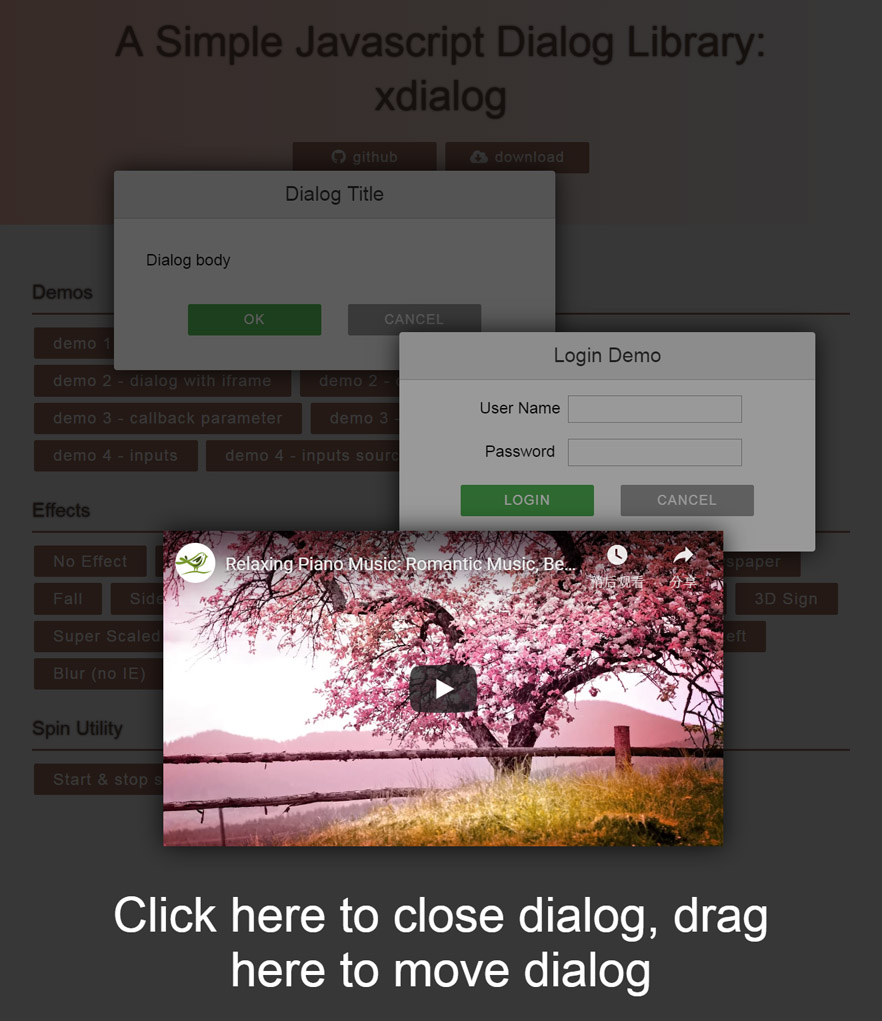
xdialog is a simple JavaScript library to create beautiful modern dialogs with lots of cool effects using CSS3 transitions and transforms.
Online demo is here [xdialog demo](https://xxjapp.github.io/xdialog/)
## Main features of xdialog
- Using vanilla JavaScript and CSS
- No dependency
- Modern and beautiful default UI
- Simple usage
- Lots of cool open/close effects
- Lots of options and callbacks can be used to customize easily
- Enter key to ok
- ESC key to cancel
- Click overlay to cancel
- Drag dialog/overlay to move dialog
- Supports iframe content such as YouTube videos
## Background
Inspired by codrops' [ModalWindowEffects](https://github.com/codrops/ModalWindowEffects), this dialog library enhanced some of the original CSS effects, and added many convenient functions.
## Installation
You can use CDN or local method to install.
1. CDN
Insert the following code into your html file.
```html
```
Or for non-min version, use this.
```html
```
Thanks to [jsdelivr](https://www.jsdelivr.com), jsdelivr CDN works like magic. For more details, please refer [https://www.jsdelivr.com/package/gh/xxjapp/xdialog](https://www.jsdelivr.com/package/gh/xxjapp/xdialog).
2. Local
- Download xdialog library file xdialog.x.y.z.min.zip or xdialog.x.y.z.zip from [release page](https://github.com/xxjapp/xdialog/releases/latest) and unzip it.
- Insert the Stylesheet **xdialog.min.css** and JavaScript **xdialog.min.js** into the html file.
```html
```
Or insert non-min version files if you like.
```html
```
## Usage
Just call xdialog API to open or create dialogs, like the following. See [Reference](#reference) for more details.
```js
let dialog1 = xdialog.open(); // open is a shortcut of create + show
dialog1.close(); // close is a shortcut of hide + destroy
let dialog2 = xdialog.create({title: 'Hello, xdialog', body: 'This is a message.'});
dialog2.show();
dialog2.hide();
dialog2.destroy();
```
## Reference
### xdialog API
#### xdialog methods
- xdialog.init(options)
```text
initialize xdialog
options.zIndex0 - initial z index to use, default value is 10000
```
- xdialog.create(options)
```text
create a dialog
```
SEE: [default options](#default-options)
- xdialog.open(options)
```text
create a dialog and show it
```
SEE: [default options](#default-options)
- xdialog.alert(text, options)
```text
display an alert dialog, please view the source for details
```
- xdialog.confirm(text, onyes, options)
```text
display a confirm dialog, please view the source for details
```
- xdialog.info(text, options)
```text
display an information dialog, please view the source for details
```
- xdialog.warn(text, options)
```text
display a warning dialog, please view the source for details
```
- xdialog.error(text, options)
```text
display an error dialog, please view the source for details
```
- xdialog.fatal(text, options)
```text
display a fatal error dialog, please view the source for details
```
- xdialog.dialogs()
```text
get all dialog instances
```
#### xdialog utility methods
- xdialog.startSpin()
```text
start spin animation
```
- xdialog.stopSpin()
```text
stop spin animation
```
### dialog API
#### dialog attributes
- dialog.id
```text
dialog html element id
```
- dialog.element
```text
dialog html element
```
#### dialog methods
- dialog.show()
```text
show dialog
```
- dialog.hide()
```text
hide dialog
```
- dialog.destroy()
```text
destroy dialog
```
- dialog.close()
```text
hide dialog and destroy it
```
- dialog.adjust()
```text
adjust dialog to make the whole dialog visible
```
- dialog.fixChromeBlur()
```text
fix chrome blur
```
### default options
Default options will be used if you **create** / **open** dialog without corresponding attributes. You can overwrite these with your own values.
```js
{
// dialog title
// use null value to remove title
title: 'Dialog Title',
// dialog body
//
// valid values:
// - null
// no body
//
// - string
// body html
//
// - object
// src: body source selector
// element: body source dom element
//
// please use element when selector not usable
//
// example:
// {
// src: '#demo6-content'
// element: document.getElementById('demo6-content')
// }
body: '
Dialog body
',
// dialog buttons
//
// valid values:
// - null
// no buttons
//
// - array
// predefined button name or user defined button html like
// example: ['ok', 'cancel', 'delete', '']
//
// - object
// button name to button text(predefined) or button html(user defined) or attribute object map like
// example: {
// ok: {
// text: 'okay',
// style: 'background:#4336f4;',
// clazz: 'xd-button xd-ok demo-copy-button'
// },
// delete: 'Delete',
// cancel: 'Cancel',
// other: ''
// }
buttons: ['ok', 'cancel'],
// dialog extra classes
// for example 'xd-fatal my-dialog-class'
extraClass: '',
// dialog extra style
// for example 'width: 640px;'
style: '',
// dialog show/hide effect, one of the following values
// - fade_in_and_scale
// - slide_in_right
// - slide_in_bottom
// - newspaper
// - fall
// - side_fall
// - sticky_up
// - 3d_flip_horizontal
// - 3d_flip_vertical
// - 3d_sign
// - super_scaled
// - just_me
// - 3d_slit
// - 3d_rotate_bottom
// - 3d_rotate_in_left
// - blur
// - let_me_in
// - make_way
// - slip_from_top
//
// use '' or null value to disable effect
effect: 'fade_in_and_scale',
// fix dialog blur for chrome browser with/without transform and/or with/without perspective
//
// true: to fix
// false: not to fix
//
fixChromeBlur: true,
// modal or not
modal: true,
// timeout in seconds to close dialog automatically
// use 0 value to disable closing dialog automatically
timeout: 0,
// listen enter key press or not
listenEnterKey: true,
// listen ESC key press or not
listenESCKey: true,
// callback when dialog element is about to be created
// return false to stop creating process
beforecreate: null,
// callback when dialog element has been created
aftercreate: null,
// callback before show
// return false to stop showing process
beforeshow: null,
// callback after show
aftershow: null,
// callback before hide
// return false to stop hidding process
beforehide: null,
// callback after hide
afterhide: null,
// callback when OK button pressed
// return false to avoid to be closed
onok: null,
// callback when Cancel button pressed
// return false to avoid to be closed
oncancel: null,
// callback when Delete button pressed
// return false to avoid to be closed
ondelete: null,
// callback when dialog is about to be destroyed
// return false to avoid to be destroyed
ondestroy: null,
// callback when drag will start
// return false to avoid being dragged by default process
// return true to allow being dragged
// otherwise to go default process
ondrag: null,
}
```
### callback function format
#### default
All callback functions use the same prototype, except the ones with special instruction.
```js
/**
* @param {Object} param - callback parameter
* @param {String} param.id - dialog html element id
* @param {Element} param.element - dialog html element
* @param {Object} param.dialog - dialog instance
* @param {Element} param.overlay - dialog overlay element
* @param {Event} param.event - event if any
*/
function callback(param)
```
#### callback for ondrag
```js
/**
* @param {Element} element - element clicked
* @param {Element} destElement - element to be moved
* @param {Element} srcElement - element to drag on
*/
function ondrag(element, destElement, srcElement)
```
Example: let jquery Sortable to handle some element's dragging.
SEE: [https://jqueryui.com/sortable/](https://jqueryui.com/sortable/)
```js
ondrag: function(element) {
if ($(element).closest('.ui-sortable').length > 0) {
return false;
}
// otherwise let go default process
}
```