# :label: Recognize Anything Model
This project aims to develop a series of open-source and strong fundamental image recognition models.
[](#open_book-training-datasets)
[](ram/data/ram_tag_list.txt)
[](https://huggingface.co/spaces/xinyu1205/Recognize_Anything-Tag2Text)
[](https://colab.research.google.com/github/mhd-medfa/recognize-anything/blob/main/recognize_anything_demo.ipynb)
[](https://bohrium.dp.tech/notebooks/63116114759)
- **Recognize Anything Plus Model (RAM++)** [[Paper](https://arxiv.org/abs/2310.15200)]
RAM++ is the next generation of RAM, which can **recognize any category with high accuracy**, including **both predefined common categories and diverse open-set categories**.
- **Recognize Anything Model (RAM)** [[Paper](https://arxiv.org/abs/2306.03514)][[Demo](https://huggingface.co/spaces/xinyu1205/recognize-anything)]
RAM is an image tagging model, which can **recognize any common category with high accuracy**.
RAM is accepted at **CVPR 2024 Multimodal Foundation Models Workshop**.
- **Tag2Text (ICLR 2024)** [[Paper](https://arxiv.org/abs/2303.05657)] [[Demo](https://huggingface.co/spaces/xinyu1205/recognize-anything)]
Tag2Text is a vision-language model guided by tagging, which can **support tagging and comprehensive captioning simultaneously**.
Tag2Text is accepted at **ICLR 2024!** See you in Vienna!
## :bulb: Highlight
### **Superior Image Recognition Capability**
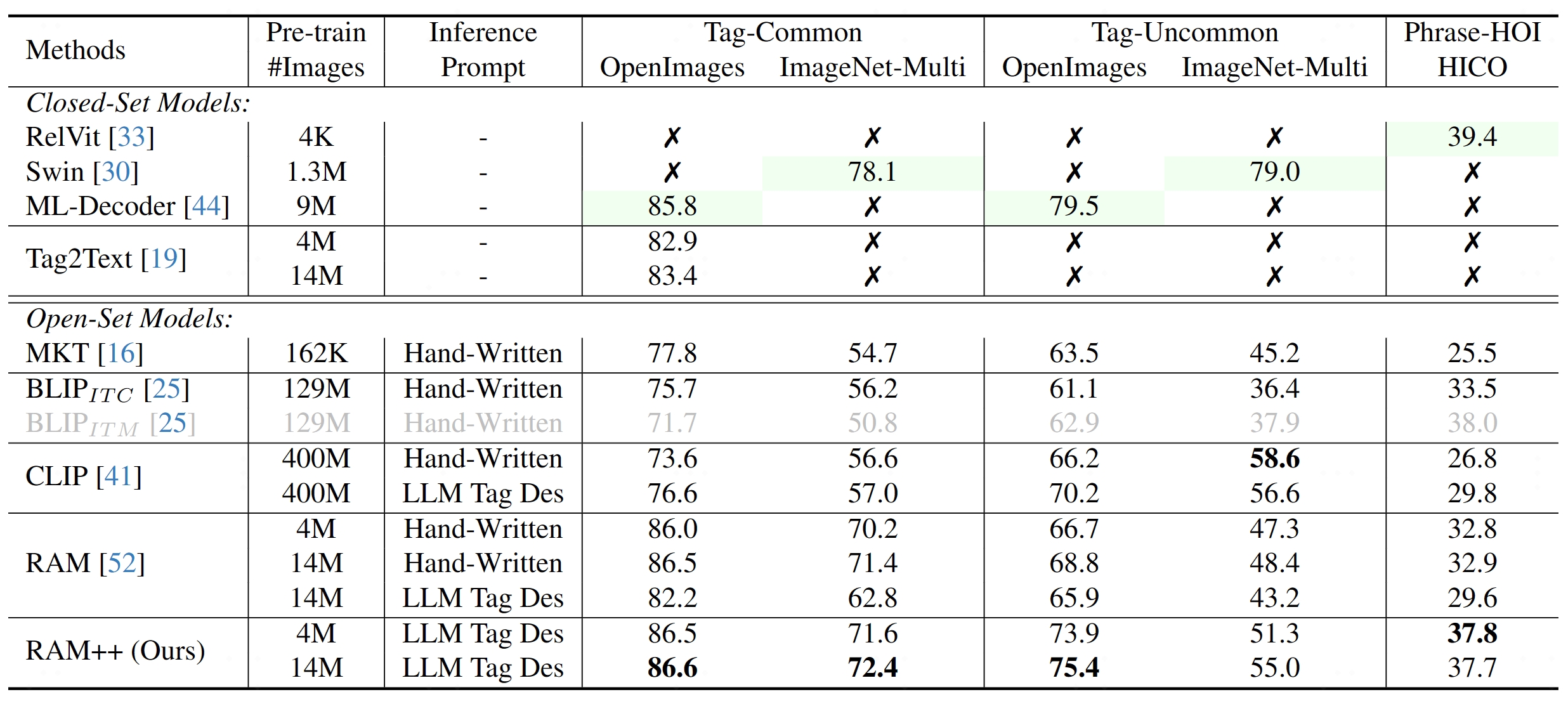
RAM++ outperforms existing SOTA image fundamental recognition models on common tag categories, uncommon tag categories, and human-object interaction phrases.
Comparison of zero-shot image recognition performance.
### **Strong Visual Semantic Analysis**
We have combined Tag2Text and RAM with localization models (Grounding-DINO and SAM) and developed a strong visual semantic analysis pipeline in the [Grounded-SAM](https://github.com/IDEA-Research/Grounded-Segment-Anything) project.

## :sunrise: Model Zoo
RAM++
RAM++ is the next generation of RAM, which can recognize any category with high accuracy, including both predefined common categories and diverse open-set categories.
- **For Common Predefined Categoies.** RAM++ exhibits exceptional image tagging capabilities with powerful zero-shot generalization, which maintains the same capabilities as RAM.
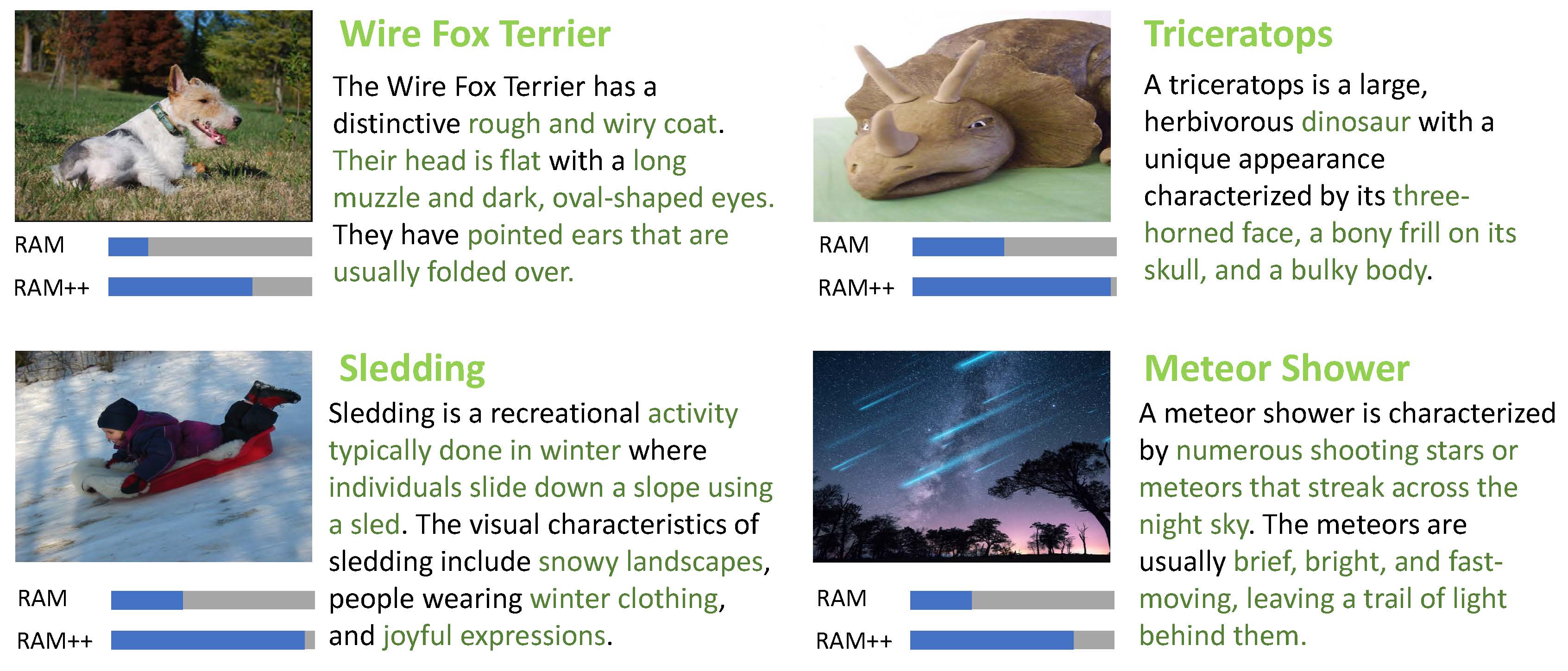
- **For Diverse Open-set Categoires.** RAM++ achieves notably enhancements beyond CLIP and RAM.
(Green color means fully supervised learning and others means zero-shot performance.)
RAM++ demonstrate a significant improvement in open-set category recognition.
RAM
RAM is a strong image tagging model, which can recognize any common category with high accuracy.
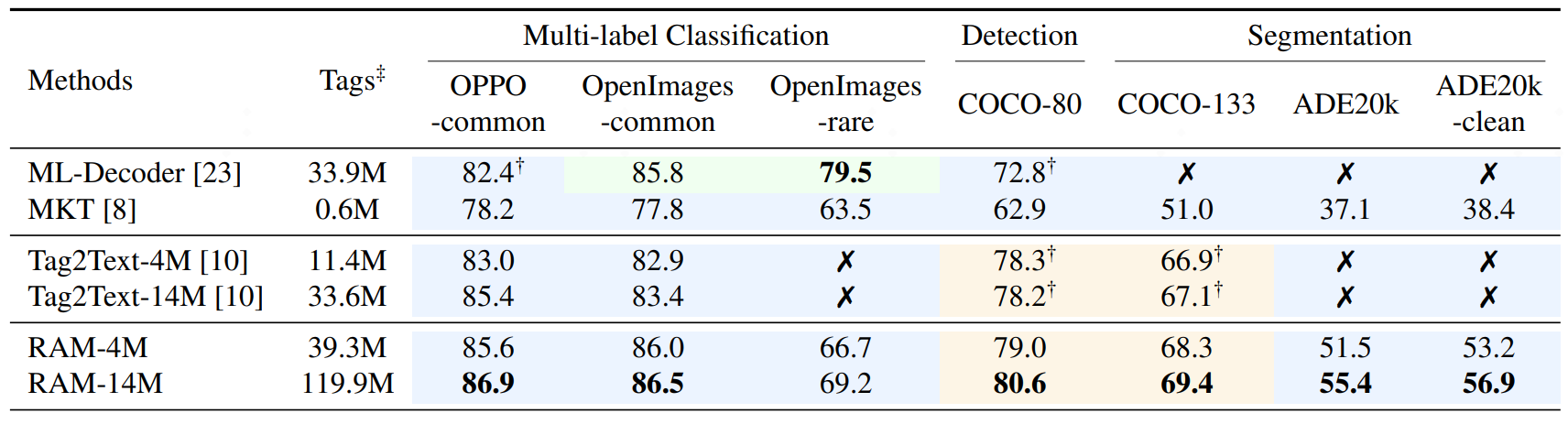
- **Strong and general.** RAM exhibits exceptional image tagging capabilities with powerful zero-shot generalization;
- RAM showcases impressive zero-shot performance, significantly outperforming CLIP and BLIP.
- RAM even surpasses the fully supervised manners (ML-Decoder).
- RAM exhibits competitive performance with the Google tagging API.
- **Reproducible and affordable.** RAM requires Low reproduction cost with open-source and annotation-free dataset;
- **Flexible and versatile.** RAM offers remarkable flexibility, catering to various application scenarios.
(Green color means fully supervised learning and Blue color means zero-shot performance.)
RAM significantly improves the tagging ability based on the Tag2text framework.
- **Accuracy.** RAM utilizes a **data engine** to **generate** additional annotations and **clean** incorrect ones, **higher accuracy** compared to Tag2Text.
- **Scope.** RAM upgrades the number of fixed tags from 3,400+ to **[6,400+](./ram/data/ram_tag_list.txt)** (synonymous reduction to 4,500+ different semantic tags), covering **more valuable categories**.
Moreover, RAM is equipped with **open-set capability**, feasible to recognize tags not seen during training
Tag2text
Tag2Text is an efficient and controllable vision-language model with tagging guidance.
- **Tagging.** Tag2Text recognizes **[3,400+](./ram/data/tag2text_ori_tag_list.txt)** commonly human-used categories without manual annotations.
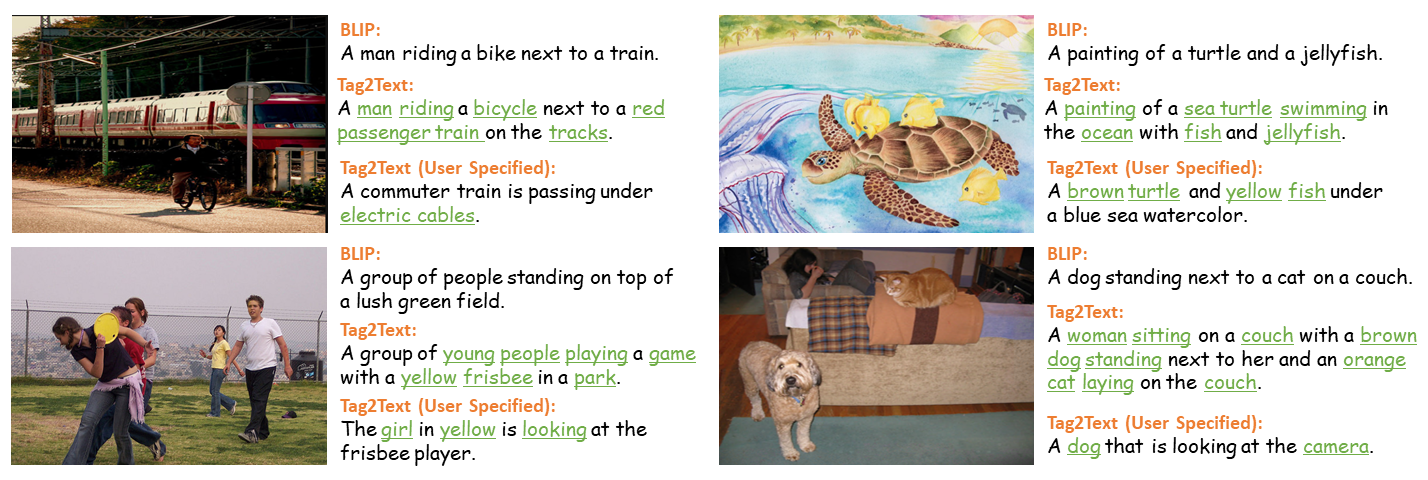
- **Captioning.** Tag2Text integrates **tags information** into text generation as the **guiding elements**, resulting in **more controllable and comprehensive descriptions**.
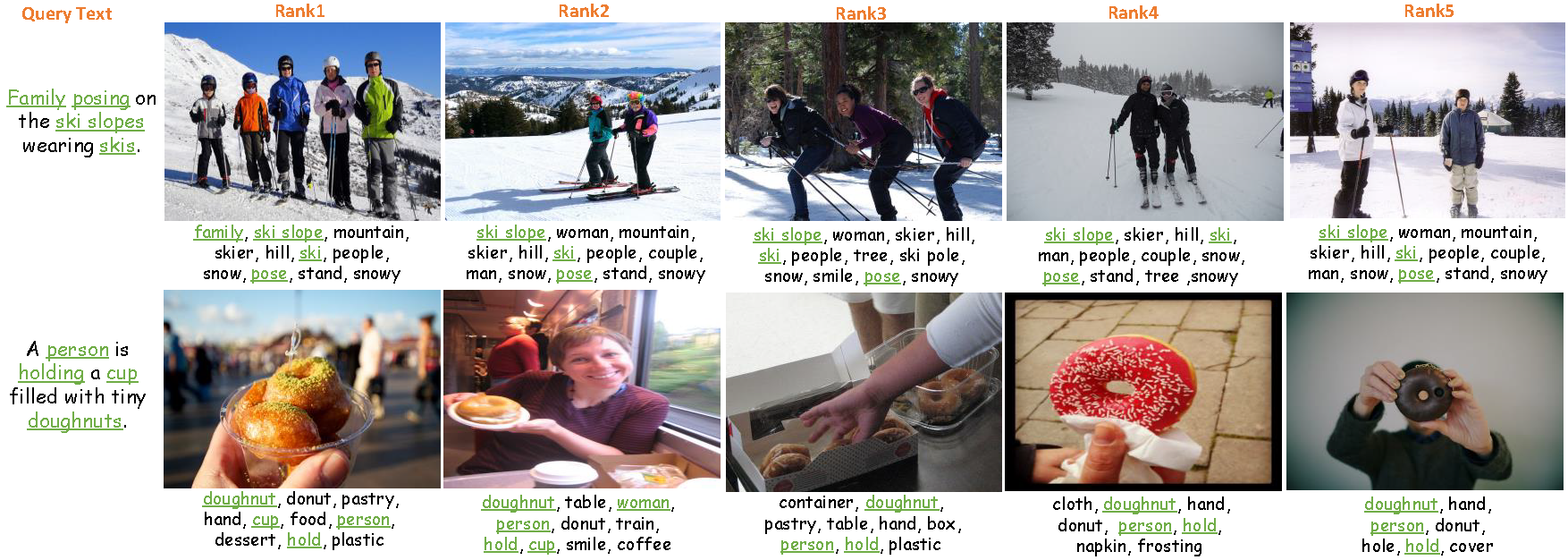
- **Retrieval.** Tag2Text provides **tags** as **additional visible alignment indicators** for image-text retrieval.
Tag2Text generate more comprehensive captions with tagging guidance.
Tag2Text provides tags as additional visible alignment indicators.
## :open_book: Training Datasets
### **Image Texts and Tags**
These annotation files come from the [Tag2Text](https://arxiv.org/abs/2303.05657) and [RAM](https://recognize-anything.github.io/). Tag2Text automatically extracts image tags from image-text pairs. RAM further augments both tags and texts via an automatic data engine.
| DataSet | Size | Images | Texts | Tags |
|----------|---------|--------|-------|-------|
| [COCO](https://huggingface.co/datasets/xinyu1205/recognize-anything-dataset/blob/main/coco_train_rmcocodev_ram.json) | 168 MB | 113K | 680K | 3.2M |
| [VG](https://huggingface.co/datasets/xinyu1205/recognize-anything-dataset/blob/main/vg_ram.json) | 55 MB | 100K | 923K | 2.7M |
| [SBU](https://huggingface.co/datasets/xinyu1205/recognize-anything-dataset/blob/main/sbu_ram.json) | 234 MB | 849K | 1.7M | 7.6M |
| [CC3M](https://huggingface.co/datasets/xinyu1205/recognize-anything-dataset/blob/main/cc3m_train_ram.json) | 766 MB | 2.8M | 5.6M | 28.2M |
| [CC3M-val](https://huggingface.co/datasets/xinyu1205/recognize-anything-dataset/blob/main/cc3m_val_ram.json) | 3.5 MB | 12K | 26K | 132K |
CC12M to be released in the next update.
### **LLM Tag Descriptions**
These tag descriptions files come from the [RAM++](https://arxiv.org/abs/2310.15200) by calling GPT api. You can also customize any tag categories by [generate_tag_des_llm.py](generate_tag_des_llm.py).
| Tag Descriptions | Tag List |
|---------------------|----------|
| [RAM Tag List](https://huggingface.co/datasets/xinyu1205/recognize-anything-plus-model-tag-descriptions/blob/main/ram_tag_list_4585_llm_tag_descriptions.json) | [4,585](ram/data/ram_tag_list.txt) |
| [OpenImages Uncommon](./datasets/openimages_rare_200/openimages_rare_200_llm_tag_descriptions.json) | [200](datasets/openimages_rare_200/openimages_rare_200_ram_taglist.txt) |
## :toolbox: Checkpoints
Note : you need to create 'pretrained' folder and download these checkpoints into this folder.
|
Name |
Backbone |
Data |
Illustration |
Checkpoint |
| 1 |
RAM++ (14M) |
Swin-Large |
COCO, VG, SBU, CC3M, CC3M-val, CC12M |
Provide strong image tagging ability for any category. |
Download link |
| 2 |
RAM (14M) |
Swin-Large |
COCO, VG, SBU, CC3M, CC3M-val, CC12M |
Provide strong image tagging ability for common category. |
Download link |
| 3 |
Tag2Text (14M) |
Swin-Base |
COCO, VG, SBU, CC3M, CC3M-val, CC12M |
Support comprehensive captioning and tagging. |
Download link |
## :running: Model Inference
### **Setting Up** ###
1. Create and activate a Conda environment:
```bash
conda create -n recognize-anything python=3.8 -y
conda activate recognize-anything
```
2. Install `recognize-anything` as a package:
```bash
pip install git+https://github.com/xinyu1205/recognize-anything.git
```
3. Or, for development, you may build from source:
```bash
git clone https://github.com/xinyu1205/recognize-anything.git
cd recognize-anything
pip install -e .
```
Then the RAM++, RAM, and Tag2Text models can be imported in other projects:
```python
from ram.models import ram_plus, ram, tag2text
```
### **RAM++ Inference** ###
Get the English and Chinese outputs of the images:
```bash
python inference_ram_plus.py --image images/demo/demo1.jpg --pretrained pretrained/ram_plus_swin_large_14m.pth
```
The output will look like the following:
```
Image Tags: armchair | blanket | lamp | carpet | couch | dog | gray | green | hassock | home | lay | living room | picture frame | pillow | plant | room | wall lamp | sit | wood floor
图像标签: 扶手椅 | 毯子/覆盖层 | 灯 | 地毯 | 沙发 | 狗 | 灰色 | 绿色 | 坐垫/搁脚凳/草丛 | 家/住宅 | 躺 | 客厅 | 相框 | 枕头 | 植物 | 房间 | 壁灯 | 坐/放置/坐落 | 木地板
```
### **RAM++ Inference on Unseen Categories (Open-Set)** ##
1. Get the [OpenImages-Uncommon categories](./datasets/openimages_rare_200/openimages_rare_200_ram_taglist.txt) of the image:
We have released the LLM tag descriptions of OpenImages-Uncommon categories in [openimages_rare_200_llm_tag_descriptions](./datasets/openimages_rare_200/).
python inference_ram_plus_openset.py --image images/openset_example.jpg \
--pretrained pretrained/ram_plus_swin_large_14m.pth \
--llm_tag_des datasets/openimages_rare_200/openimages_rare_200_llm_tag_descriptions.json
The output will look like the following:
```
Image Tags: Close-up | Compact car | Go-kart | Horse racing | Sport utility vehicle | Touring car
```
2. You can also customize any tag categories for recognition through tag descriptions:
Modify [categories](./generate_tag_des_llm.py#L56), and call GPT api to generate corresponding tag descriptions:
python generate_tag_des_llm.py \
--openai_api_key 'your openai api key' \
--output_file_path datasets/openimages_rare_200/openimages_rare_200_llm_tag_descriptions.json
RAM Inference
Get the English and Chinese outputs of the images:
python inference_ram.py --image images/demo/demo1.jpg \
--pretrained pretrained/ram_swin_large_14m.pth
The output will look like the following:
```
Image Tags: armchair | blanket | lamp | carpet | couch | dog | floor | furniture | gray | green | living room | picture frame | pillow | plant | room | sit | stool | wood floor
图像标签: 扶手椅 | 毯子/覆盖层 | 灯 | 地毯 | 沙发 | 狗 | 地板/地面 | 家具 | 灰色 | 绿色 | 客厅 | 相框 | 枕头 | 植物 | 房间 | 坐/放置/坐落 | 凳子 | 木地板
```
RAM Inference on Unseen Categories (Open-Set)
Firstly, custom recognition categories in [build_openset_label_embedding](./ram/utils/openset_utils.py), then get the tags of the images:
python inference_ram_openset.py --image images/openset_example.jpg \
--pretrained pretrained/ram_swin_large_14m.pth
The output will look like the following:
```
Image Tags: Black-and-white | Go-kart
```
Tag2Text Inference
Get the tagging and captioning results:
python inference_tag2text.py --image images/demo/demo1.jpg \
--pretrained pretrained/tag2text_swin_14m.pth
Or get the tagging and sepcifed captioning results (optional):
python inference_tag2text.py --image images/demo/demo1.jpg \
--pretrained pretrained/tag2text_swin_14m.pth \
--specified-tags "cloud,sky"
### **Batch Inference and Evaluation** ##
We release two datasets `OpenImages-common` (214 common tag classes) and `OpenImages-rare` (200 uncommon tag classes). Copy or sym-link test images of [OpenImages v6](https://storage.googleapis.com/openimages/web/download_v6.html) to `datasets/openimages_common_214/imgs/` and `datasets/openimages_rare_200/imgs`.
To evaluate RAM++ on `OpenImages-common`:
```bash
python batch_inference.py \
--model-type ram_plus \
--checkpoint pretrained/ram_plus_swin_large_14m.pth \
--dataset openimages_common_214 \
--output-dir outputs/ram_plus
```
To evaluate RAM++ open-set capability on `OpenImages-rare`:
```bash
python batch_inference.py \
--model-type ram_plus \
-- pretrained/ram_plus_swin_large_14m.pth \
--open-set \
--dataset openimages_rare_200 \
--output-dir outputs/ram_plus_openset
```
To evaluate RAM on `OpenImages-common`:
```bash
python batch_inference.py \
--model-type ram \
-- pretrained/ram_swin_large_14m.pth \
--dataset openimages_common_214 \
--output-dir outputs/ram
```
To evaluate RAM open-set capability on `OpenImages-rare`:
```bash
python batch_inference.py \
--model-type ram \
-- pretrained/ram_swin_large_14m.pth \
--open-set \
--dataset openimages_rare_200 \
--output-dir outputs/ram_openset
```
To evaluate Tag2Text on `OpenImages-common`:
```bash
python batch_inference.py \
--model-type tag2text \
-- pretrained/tag2text_swin_14m.pth \
--dataset openimages_common_214 \
--output-dir outputs/tag2text
```
Please refer to `batch_inference.py` for more options. To get P/R in table 3 of RAM paper, pass `--threshold=0.86` for RAM and `--threshold=0.68` for Tag2Text.
To batch inference custom images, you can set up you own datasets following the given two datasets.
## :golfing: Model Training/Finetuning
### **RAM++** ##
1. Download [RAM training datasets](#open_book-training-datasets) where each json file contains a list. Each item in the list is a dictonary with three key-value pairs: {'image_path': path_of_image, 'caption': text_of_image, 'union_label_id': image tags for tagging which including parsed tags and pseudo tags }.
2. In ram/configs/pretrain.yaml, set 'train_file' as the paths for the json files.
3. Prepare [pretained Swin-Transformer](https://github.com/microsoft/Swin-Transformer), and set 'ckpt' in ram/configs/swin.
4. Download RAM++ frozen tag embedding file "[ram_plus_tag_embedding_class_4585_des_51.pth](https://huggingface.co/xinyu1205/recognize-anything-plus-model/blob/main/ram_plus_tag_embedding_class_4585_des_51.pth)", and set file in "ram/data/frozen_tag_embedding/ram_plus_tag_embedding_class_4585_des_51.pth"
5. Pre-train the model using 8 A100 GPUs:
```bash
python -m torch.distributed.run --nproc_per_node=8 pretrain.py \
--model-type ram_plus \
--config ram/configs/pretrain.yaml \
--output-dir outputs/ram_plus
```
6. Fine-tune the pre-trained checkpoint using 8 A100 GPUs:
```bash
python -m torch.distributed.run --nproc_per_node=8 finetune.py \
--model-type ram_plus \
--config ram/configs/finetune.yaml \
--checkpoint outputs/ram_plus/checkpoint_04.pth \
--output-dir outputs/ram_plus_ft
```
RAM
1. Download [RAM training datasets](#open_book-training-datasets) where each json file contains a list. Each item in the list is a dictonary with four key-value pairs: {'image_path': path_of_image, 'caption': text_of_image, 'union_label_id': image tags for tagging which including parsed tags and pseudo tags, 'parse_label_id': image tags parsed from caption }.
2. In ram/configs/pretrain.yaml, set 'train_file' as the paths for the json files.
3. Prepare [pretained Swin-Transformer](https://github.com/microsoft/Swin-Transformer), and set 'ckpt' in ram/configs/swin.
4. Download RAM frozen tag embedding file "[ram_tag_embedding_class_4585.pth](https://huggingface.co/xinyu1205/recognize_anything_model/blob/main/ram_tag_embedding_class_4585.pth)", and set file in "ram/data/frozen_tag_embedding/ram_tag_embedding_class_4585.pth"
5. Pre-train the model using 8 A100 GPUs:
```bash
python -m torch.distributed.run --nproc_per_node=8 pretrain.py \
--model-type ram \
--config ram/configs/pretrain.yaml \
--output-dir outputs/ram
```
6. Fine-tune the pre-trained checkpoint using 8 A100 GPUs:
```bash
python -m torch.distributed.run --nproc_per_node=8 finetune.py \
--model-type ram \
--config ram/configs/finetune.yaml \
--checkpoint outputs/ram/checkpoint_04.pth \
--output-dir outputs/ram_ft
```
Tag2Text
1. Download [RAM training datasets](#open_book-training-datasets) where each json file contains a list. Each item in the list is a dictonary with three key-value pairs: {'image_path': path_of_image, 'caption': text_of_image, 'parse_label_id': image tags parsed from caption }.
2. In ram/configs/pretrain_tag2text.yaml, set 'train_file' as the paths for the json files.
3. Prepare [pretained Swin-Transformer](https://github.com/microsoft/Swin-Transformer), and set 'ckpt' in ram/configs/swin.
4. Pre-train the model using 8 A100 GPUs:
```bash
python -m torch.distributed.run --nproc_per_node=8 pretrain.py \
--model-type tag2text \
--config ram/configs/pretrain_tag2text.yaml \
--output-dir outputs/tag2text
```
5. Fine-tune the pre-trained checkpoint using 8 A100 GPUs:
```bash
python -m torch.distributed.run --nproc_per_node=8 finetune.py \
--model-type tag2text \
--config ram/configs/finetune_tag2text.yaml \
--checkpoint outputs/tag2text/checkpoint_04.pth \
--output-dir outputs/tag2text_ft
```
## :black_nib: Citation
If you find our work to be useful for your research, please consider citing.
```
@article{huang2023open,
title={Open-Set Image Tagging with Multi-Grained Text Supervision},
author={Huang, Xinyu and Huang, Yi-Jie and Zhang, Youcai and Tian, Weiwei and Feng, Rui and Zhang, Yuejie and Xie, Yanchun and Li, Yaqian and Zhang, Lei},
journal={arXiv e-prints},
pages={arXiv--2310},
year={2023}
}
@article{zhang2023recognize,
title={Recognize Anything: A Strong Image Tagging Model},
author={Zhang, Youcai and Huang, Xinyu and Ma, Jinyu and Li, Zhaoyang and Luo, Zhaochuan and Xie, Yanchun and Qin, Yuzhuo and Luo, Tong and Li, Yaqian and Liu, Shilong and others},
journal={arXiv preprint arXiv:2306.03514},
year={2023}
}
@article{huang2023tag2text,
title={Tag2Text: Guiding Vision-Language Model via Image Tagging},
author={Huang, Xinyu and Zhang, Youcai and Ma, Jinyu and Tian, Weiwei and Feng, Rui and Zhang, Yuejie and Li, Yaqian and Guo, Yandong and Zhang, Lei},
journal={arXiv preprint arXiv:2303.05657},
year={2023}
}
```
## :hearts: Acknowledgements
This work is done with the help of the amazing code base of [BLIP](https://github.com/salesforce/BLIP), thanks very much!
We want to thank @Cheng Rui @Shilong Liu @Ren Tianhe for their help in [marrying RAM/Tag2Text with Grounded-SAM](https://github.com/IDEA-Research/Grounded-Segment-Anything).
We also want to thank [Ask-Anything](https://github.com/OpenGVLab/Ask-Anything), [Prompt-can-anything](https://github.com/positive666/Prompt-Can-Anything) for combining RAM/Tag2Text, which greatly expands the application boundaries of RAM/Tag2Text.