语析 Yuxi
多租户 Harness + 企业知识库
让企业知识可被智能体检索、推理与交付
[](https://github.com/xerrors/Yuxi/blob/main/docker-compose.yml)
[](https://github.com/xerrors/Yuxi/issues)
[](https://github.com/xerrors/Yuxi/blob/main/LICENSE)
[](https://deepwiki.com/xerrors/Yuxi)
[](https://www.bilibili.com/video/BV1erE26iEgv/?share_source=copy_web&vd_source=37b0bdbf95b72ea38b2dc959cfadc4d8)

[[项目文档]](https://xerrors.github.io/Yuxi) · [[版本特性]](http://xhslink.com/o/5Y6QWnmjF2d) · [[English]](README.en.md)
## 简介
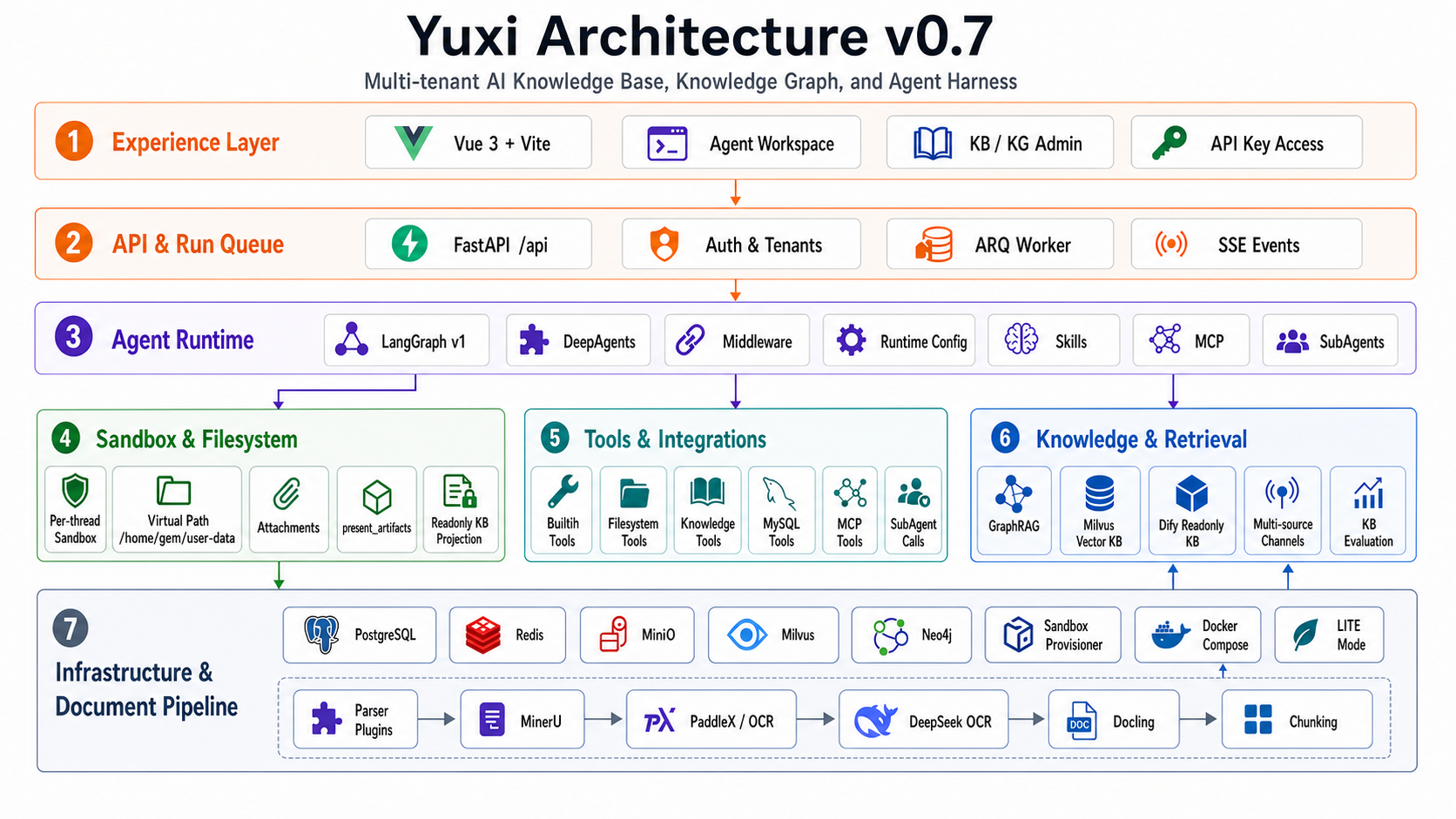
语析(Yuxi)是一个基于大模型的智能知识库与知识图谱智能体开发平台。它把 **RAG 检索**、**Milvus 知识库内知识图谱** 与 **LangGraph 多智能体编排** 整合进统一的多租户工作台:管理员配置知识库、模型与权限,用户在类 ChatGPT 的界面中与可挂载 Skills、MCP、子智能体和沙盒工具的智能体对话,并获得带引用来源、知识图谱推理与可交付产物的回答。
导航:[项目介绍](https://xerrors.github.io/Yuxi/) | [快速开始](https://xerrors.github.io/Yuxi/intro/quick-start) | [开发路线图](https://xerrors.github.io/Yuxi/develop-guides/roadmap) | [0.7 版本特性](http://xhslink.com/o/5Y6QWnmjF2d);最新开发动态,详见 [changelog](https://xerrors.github.io/Yuxi/develop-guides/changelog)。

## 技术栈
| 层 | 技术 |
| --- | --- |
| 前端 | Vue 3 · Vite · Pinia |
| 后端 | FastAPI · LangGraph · ARQ (异步 worker) |
| 存储 | PostgreSQL · Redis · MinIO · Milvus · Neo4j |
| 文档解析 | MinerU · PaddleX · RapidOCR |
| 部署 | Docker Compose |
## 快速开始
**前置要求**:已安装 [Docker](https://docs.docker.com/get-docker/) 与 Docker Compose,并准备至少一个兼容 OpenAI 接口的大模型 API。
**1. 克隆代码并初始化**
```bash
git clone --branch v0.7.0 --depth 1 https://github.com/xerrors/Yuxi.git
cd Yuxi
# Linux/macOS
./scripts/init.sh
# Windows PowerShell
.\scripts\init.ps1
```
**2. 使用 Docker 启动**
```bash
docker compose up --build
```
**3. 访问平台**
等待启动完成后,浏览器打开 `http://localhost:5173`,使用初始化时生成的管理员账户登录即可。
> 💡 不需要知识库 / 知识图谱等重依赖时,可使用 `make up-lite` 以 LITE 轻量模式启动,加快冷启动速度。更多部署说明见 [项目文档](https://xerrors.github.io/Yuxi)。
## 致谢
本项目参考并引用了以下优秀开源项目,在此致以诚挚的感谢:
- [LightRAG](https://github.com/HKUDS/LightRAG) - 早期版本曾参考其图谱构建与检索思路;当前 Yuxi 已实现自研 Milvus 知识库/图谱链路以替换历史集成,降低兼容性问题
- [DeepAgents](https://github.com/langchain-ai/deepagents) - 直接引入作为深度智能体框架
- [DeerFlow](https://github.com/bytedance/deer-flow) - 参考了其 Sandbox 智能体架构的实现思路
- [RAGflow](https://github.com/infiniflow/ragflow) - 参考了其文档 Text Chunking 的分块策略
- [LangGraph](https://github.com/langchain-ai/langgraph) - 多智能体编排框架,本项目的核心架构基础
- [QwenPaw](https://github.com/agentscope-ai/QwenPaw) - 参考模型配置与个人文件区域设计
## 参与贡献
感谢所有贡献者的支持!